

Every vendor sells you "tickets". The object underneath is not the same thing twice. Zendesk has six statuses and will not let an agent close anything by hand, Freshdesk splits Resolved (agent says done) from Closed (customer says done), HubSpot has no status field at all (they are pipeline stages), and Jira Service Management splits the whole thing into Status plus Resolution. Which is the thing that decides what your reports can even measure. Nobody compares it.
On money, seats are not the interesting number anymore. Zendesk Suite Team is $55/agent/month, Freshdesk Pro is also $55, so that part is basically a wash. The AI layer sitting on top is where it moves, and it is metered in six different units. Freshdesk bills $0.49 per session and counts the attempt. Gorgias, $0.85 to $1.00 per automated interaction. Help Scout $0.75 per resolution, Jira from $0.30 per assisted conversation, escalations included. And Zendesk publishes no per-resolution rate at all.
I build AI agents at eesel, so I have watched this go wrong up close. One of eesel's own customers had a bot invent solar-panel subscription details and send it to real people, because the knowledge base had no match for the question. Which is why every rollout I work on now gets simulated against historical tickets first, before it touches a live queue. And if what you want is the AI layer without the migration, eesel runs on top of the ticketing system you already have, from $299/month for 500 credits (1 credit per ticket handled).
What a customer service ticketing system actually is
A ticketing system takes every inbound message, from email, live chat, WhatsApp, a contact form, a phone call, and turns it into one record with an owner, a state, a clock and a history. That record is the whole product, really. Everything else, the macros, the SLA timers, the routing rules, the dashboards, exists because there is a structured object to hang them on.
Which is why the "we just use a shared inbox" thing holds until roughly the third agent. An inbox cannot tell you how long the oldest unanswered message has been sitting, or who is on it, and it also cannot tell you whether you are about to miss a promise you made in your own terms. A ticketing system can.
The four layers, in the order they usually break:
- Intake. Every channel lands in one queue. This is the omnichannel part, and it is the part vendors demo.
- The ticket record. Status, priority, type, tags, custom fields. The layer this post is mostly about, because it is where systems quietly differ.
- Movement. Assignment, routing, escalation, SLA clocks, automations that close stale tickets.
- Measurement. Reports, CSAT, exports. Almost always gated behind a plan upgrade.
The part nobody compares: what a "ticket" means in each system
Here is the part that surprised me most, from reading four vendors' field documentation back to back. The word "ticket" is shared. The object underneath is not.
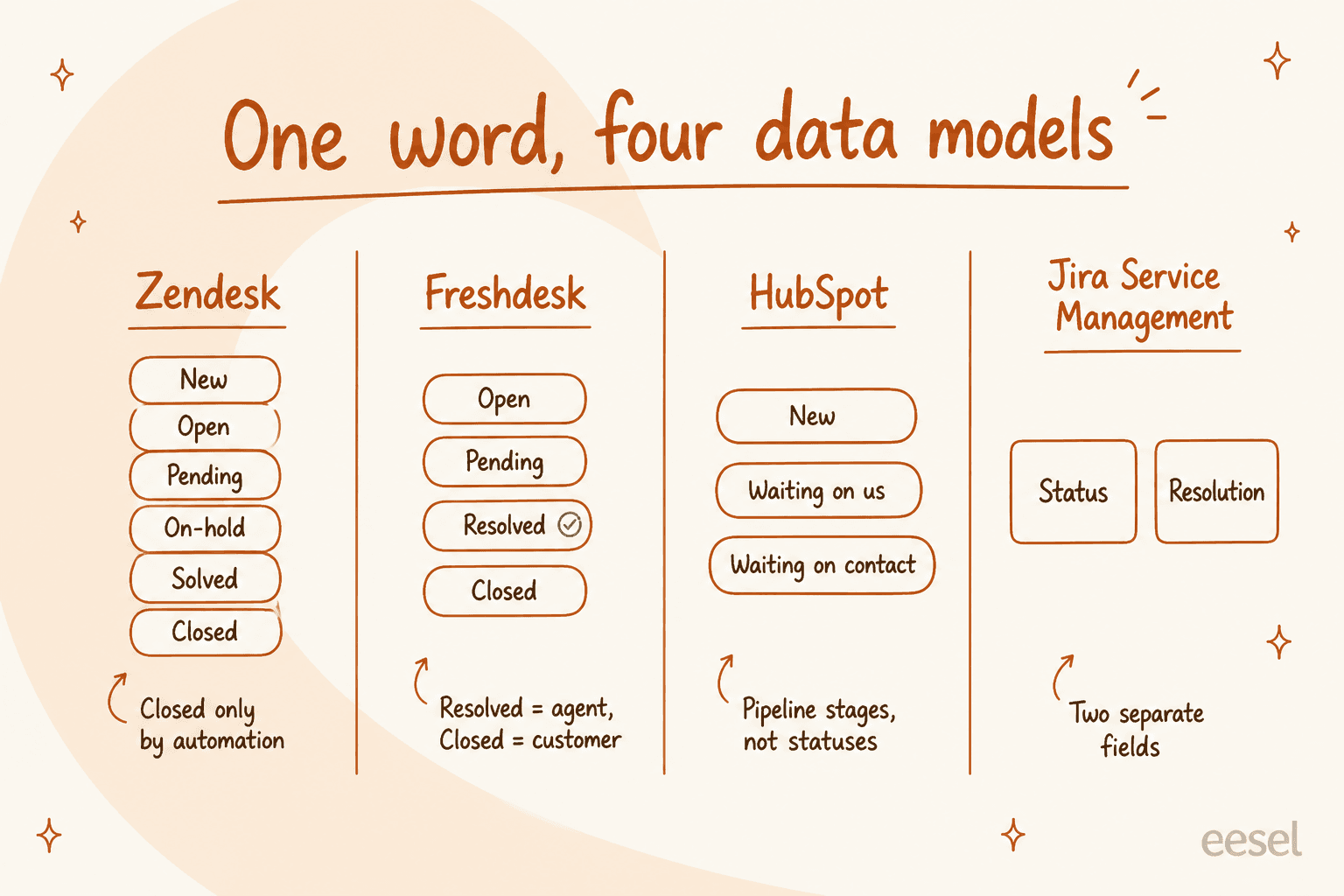
Zendesk ships six statuses: New, Open, Pending, On-hold, Solved, Closed. Two of them behaves in ways that catch people out. New is a one-way door, since Zendesk's ticket field docs say "After changing the status from New to another status, you can't change the status back to New". And nobody on your team can close a ticket: "Tickets can't manually be set to Closed" per the ticket lifecycle docs, closure is an automation, four days after Solved by default, and if you deactivate that automation the 28-day rule takes over and "can't be changed". On-hold is invisible to the customer, who still sees Open. For the full walk there is a longer piece on the Zendesk ticket status lifecycle.

Freshdesk has four statuses which you cannot delete, and the line between two of them is drawn on who decides. Resolved means "the ticket is completed according to the agent". Closed means "the ticket is completed according to the customer", and Freshdesk's field docs note the standard practice of auto-closing after 72 hours when the customer never says so. Priority is hard-coded at four values and "cannot be edited and is hard-coded into our systems because it is directly tied to the SLA Policies functionality". Custom statuses need the Growth plan or higher.
HubSpot Service Hub has no ticket status field, not in the sense the others mean it. A ticket is a CRM record on a pipeline, and HubSpot's docs put it plainly: "for tickets, pipeline stages are called statuses by default, but they are the same as other object stages". The default Support Pipeline is New, Waiting on contact, Waiting on us, Closed. Category is set by AI, off by default, and Enterprise-only.
Jira Service Management splits the axis entirely: status for where the work is, resolution for how it ended, with Known error and Hardware failure added to the base Done / Won't do / Duplicate set. It stacks three objects on top of each other too, request type on work type on workflow, and it warns that skipping the request type means "your requests won't have access to all Jira Service Management features".
Practical consequence: "resolution time" is not a comparable number across two of these systems. If you are migrating and your board tracks that number, expect it to move on the day you switch, for reasons which have nothing to do with your team at all.
And statuses are where queue hygiene goes to die:
"I was going through our queue today and found 90 tickets where we responded, asked for more information from the customer but then never heard back from them. They just sit there inflating our numbers and that honestly doesn't look good for management. We have been called before for unresolved open tickets so this is a big deal."

Ninety of two hundred "open" tickets were just waiting on a customer who went silent. So the open count was never the backlog. One admin in r/ITManagers cut a group's backlog by 54% just by auto-closing anything older than five days, which is the cheapest reporting fix in this entire post.
What the market actually costs in 2026
I re-checked every one of these on the vendors' own pricing pages on 31 July 2026. Annual billing, per agent per month, unless the row is saying otherwise.
| System | Entry plan | Mid plan | Top plan | Billing unit | Free tier | AI meter |
|---|---|---|---|---|---|---|
| Zendesk | Support Team $19 | Suite Team $55 | Suite Professional $115; Enterprise quote-only | Per agent | No | Verified resolution, rate unpublished |
| Freshdesk | Growth $19 | Pro $55 | Enterprise $89 | Per agent | Not on the page today | $0.49/session after 500 |
| Zoho Desk | Express $7 | Standard $14 / Professional $23 | Enterprise $40 | Per user | Yes, 3 users | 30M free tokens/mo on Express+ |
| Help Scout | Standard $25 | Plus $45 | Pro $75 (10 seat min) | Per user | Yes, 5 users | $0.75/resolution |
| HubSpot Service Hub | Starter $7 | Professional $90 | Enterprise $150 | Per seat | Yes, 2 users | ~$0.45/resolution in credits |
| Gorgias | Starter $40/mo | Basic $77/mo, Pro $471/mo | Advanced $1,227/mo | Per ticket, not per seat | No | $0.85-$1.00/automated interaction |
| Jira Service Management | Free (1-3 agents) | Standard $25 | Premium $57.30 | Per agent, volume bands | Yes, 3 agents | $1/resolution, $0.30/assisted conversation |
| eesel | From $299/mo (500 credits) | $499/mo (1,000 credits) | $1,899/mo (5,000 credits) | Monthly credits, 1 per ticket handled | Yes, 100 free credits | Included in the credit |
Three notes here that matter more than the numbers themselves. Zendesk's public page no longer shows a Suite Growth card, so the Suite ladder is Team, Professional, Enterprise. Freshdesk's free plan is not on its pricing page today, only a 14-day trial. And HubSpot charges a required one-time onboarding fee on top of seats: $1,500 on Professional and $3,500 on Enterprise.
The AI meter is the real pricing decision
This is where I would spend the negotiation. Six vendors, six units, and those units are not interchangeable.
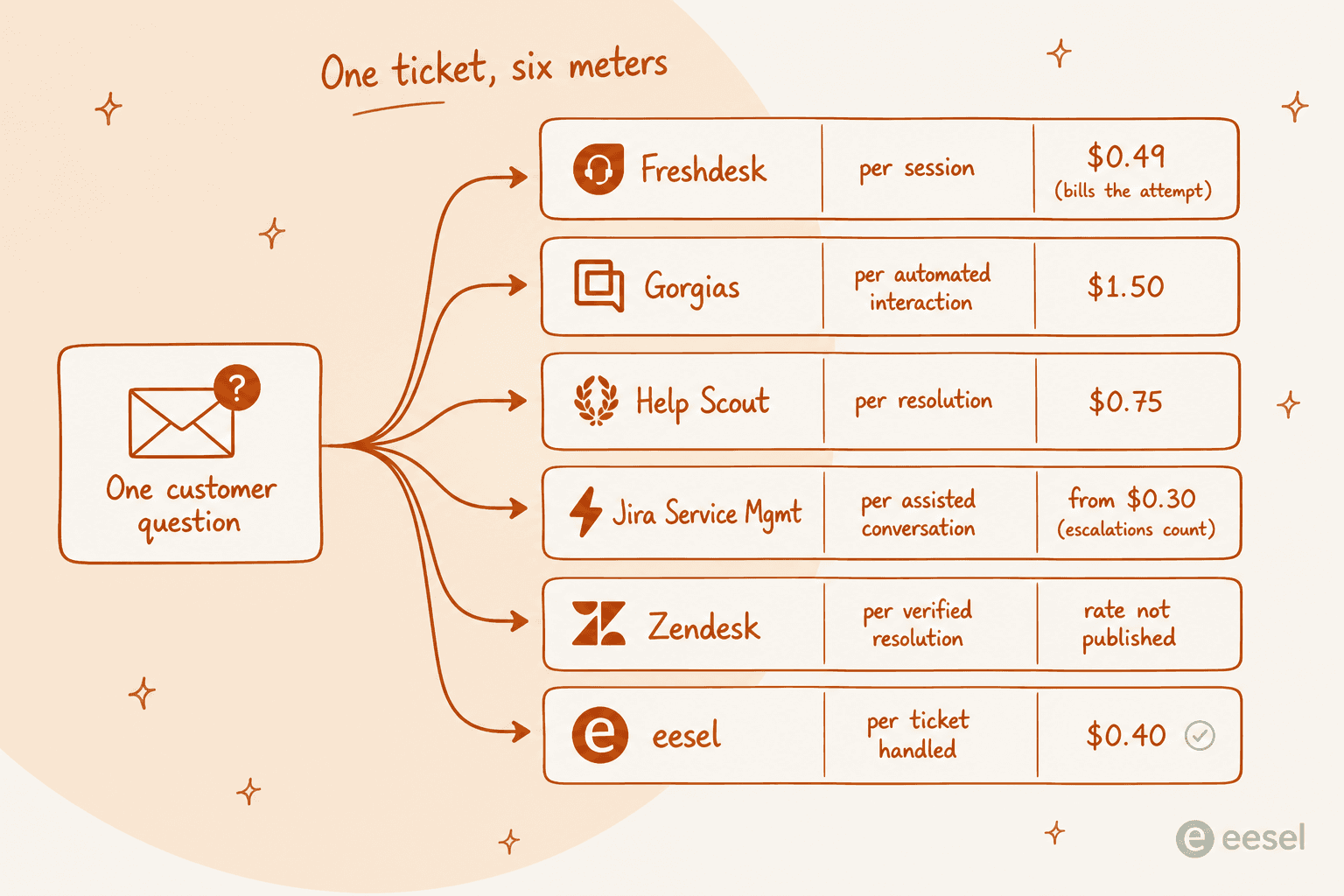
- Freshdesk bills the session, and a Freshworks session is every interaction inside a 24-hour window. It bills the attempt, not the outcome. First 500 free on every plan, then $49 per 100.
- Gorgias bills the automated interaction at $0.85 to $1.00 depending on the plan, plus a separate ticket meter at $0.36 to $0.40 per ticket.
- Help Scout bills the resolution at $0.75, and is unusually honest about what does not count: not if the customer escalates, searches the knowledge base, asks more questions or clicks "I still need help". It also ships a monthly spend cap.
- Jira Service Management bills the assisted conversation from $0.30, and that counts "any conversation that was matched to an intent, regardless of whether the virtual service agent resolves the issue or escalates it". Escalations bill.
- HubSpot bills in credits: 50 credits per conversation resolved, at $9.00 per 1,000 credits annually, so about $0.45 a resolution. Professional's 3,000 included credits work out to 60 AI resolutions a month.
- Zendesk bills the verified resolution only. Since 18 May 2026 there are three tiers: assisted escalation (not billed), contained resolution (AI finished but failed a 72-hour verification, not billed), verified resolution (billed). The tiering is fairer than what it replaced. The rate is still not published anywhere.
That last change came out of real anger, and the anger was about the definition, not the price:
"Complete trash lol, stuff I used to get free now counts as an AR. Most of the ARs are abandoned chats. There's no dispute resolution process. Complete scam. I used to like Zendesk but since trying the new bot and now this I have little good will left"
So before signing anything, ask the vendor one question. What exactly makes this billable? Then run your own volume through it.
Work out your own AI bill
Pick your monthly volume of AI-handled conversations. These are the published rates applied at face value, AI only, seats excluded.
Two things jump out here. Freshdesk is free until you cross 500, then it climbs fast, because what it charges for is attempts. And the spread between the cheapest and the dearest meter at the same volume is about 2.6x, which is far wider than the spread between the seat prices.
The five checks I would run before signing
1. Who gets to set priority
Do not let requesters set it. This was the most upvoted answer in a long r/sysadmin thread on the subject, and it is funny for the wrong reason:
"Dealt with this decades ago. It was scrapped quickly because as you might imagine it was abused to death. It really didn't bother me though. I still got the same number of tickets and just slogged through them. When people got mad because we were missing SLAs we just replied there was nothing we could do now that all tickets were priority."
Priority is better derived, from the customer tier or the intent, from the SLA policy, or from an AI classifier reading the message. Freshdesk's four priority values are welded to its SLA engine, and in Zendesk, deactivating Priority silently switches SLA targets off entirely.
2. Whether you can get your own numbers out
Test this during the trial, not after it. Reporting is where the plan gates bite hardest of all: custom reports start at Suite Professional ($115/agent/month) in Zendesk, at Pro ($55) in Freshdesk, at Professional in HubSpot, and at Enterprise ($105/seat/month) in Front. Help Scout does not have a report builder at any price, and says so directly: "there isn't a way to customize how calculations are performed nor is there an option to build custom reports based on custom data sets".
Even paying for the top tier does not guarantee usable:
"I have never found anything as complex as Zendesk explore.
I've worked with ThoughtSpot building dashboards, reports and exports but omg Zendesk, you are taking so much of my time!!!!!!!!
I have recently moved jobs where I worked with the platform Dixa and at my new job, I launched Zendesk - I have the most basic set up on Zendesk ever but the Explore setup is BREAKING ME."
And when the reporting layer loses, the workaround is always the same one:
"The reports and automations can be somewhat difficult to navigate. We ended up just exporting all of our tickets every month and creating our own reports through Power query in Excel."

A director who rebuilds reports in Excel every month is a real cost. Worth to price it in.
3. Whether the knowledge base will survive contact with your team
Every ticketing system ships with a knowledge base. Most of them rot, because writing the articles is nobody's actual job:
"I run a small team, and we have an internal wiki for processes, FAQs, and troubleshooting. The problem? No one updates it. People keep asking the same questions in Slack instead of checking the wiki."
This matters more than it used to, because the AI layer is reading from it. A thin internal knowledge base gives you a thin AI agent. The fix that works is sourcing answers from resolved tickets and existing docs rather than from articles someone has to remember to write, which is the approach behind training AI on a knowledge base.
4. Where the data lives, and what the uptime promise really is
Almost nobody contracts uptime at the plans which you are actually looking at. Zendesk's 99.9% attaches only to Premier Support customers and covers exactly five products. Freshworks, Help Scout, Front and Gorgias publish no uptime percentage or service-credit schedule at all. Zoho commits to 99.9% company-wide, about 43.8 minutes of allowable downtime a month.
Residency has a similar teeth to it. Zendesk's Data Center Location add-on is free on Suite Professional and above but is "included but not automatically activated", and without it Zendesk "may move the account data of customers who do not have or have not activated the Data Center Location add-on between regions without notice". Freshdesk and Zoho both fix your region at signup. Help Scout is US-only.
5. What the migration actually carries
The export is never the whole story:
"I have exported my historical tickets to XML but not going to work. First my tickets are a mess. They are not properly organized, tagged, or anything. Lot of the info chatGPT would need to understand is in custom fields which are not labeled in any export."
Run the export during the trial. If the custom field labels come out unmapped, your historical data is much less useful on the other side, and so is any AI which you were planning to train on it.
What an AI layer changes, honestly
I work on this at eesel, so treat me as an interested party rather than a neutral one. But eesel publishes the unflattering half of its own trial data, and that is the part worth reading.
One customer, a German online jewelry retailer running about 1,000 tickets a month on Zendesk plus Shopify, ran a real-traffic trial on eesel in March 2026: 93% triage accuracy and 100% spam detection with zero false positives on the 22% of their inbox that was spam, across 284 chats plus a 100-ticket cross-validation. The same trial also showed only 12% of drafts went out as written and a 7% factual error rate on drafts. Both of those numbers are real. The second one is the reason the agents there use AI for triage and research work, not as an autopilot.
The upside case looks like Gridwise, a gig-economy driver-analytics app on Zendesk:
"In the first month, eesel is resolving 73% of our tier 1 requests. eesel offers easy Zendesk implementation and setup. Our team implemented and achieved results quickly during our 7-day trial. Responses are simple to fix and adjust. The platform even includes automations for ticket tagging, assignment, and status updates!"
Kim Simpson, Gridwise
And then the scar. Early on, paying eesel customers, a Danish solar-energy provider among them, had bots fabricate answers whenever the knowledge base returned no match. One invented subscription details about solar cells and sent them to real customers. Another answered a support question with "Oxygen (periodic table)". That is where the hard confidence threshold and decline-to-answer fallback came from, and why every rollout I set up now starts with a simulation against historical tickets. If you are evaluating anyone's AI, hallucination handling is the first thing to interrogate, not the resolution rate on the slide.
A CX lead at a supplements brand running about 7,000 tickets a month put the buying criterion better than eesel's own marketing does:
"The AI will never be able to answer 100% of the questions, but if it tries and just answers 'sorry I don't know this,' I cannot go and check all my 7,000 tickets to see if the AI actually made a good answer, then the point is a little bit gone. I need an AI who is only handling the tickets that it's confident to handle and all the other ones, leave them alone."
eesel did not win that deal. The requirement was right: confidence-scoped handoff beats coverage, every time.
What a ticket costs before any of this
Worth to hold in your head while you compare the seat prices. MetricNet's channel data for North America puts the average cost per ticket at $17.19 for voice, $16.13 for email, $15.72 for chat, $15.07 for web submit, and $2.37 for self-help.
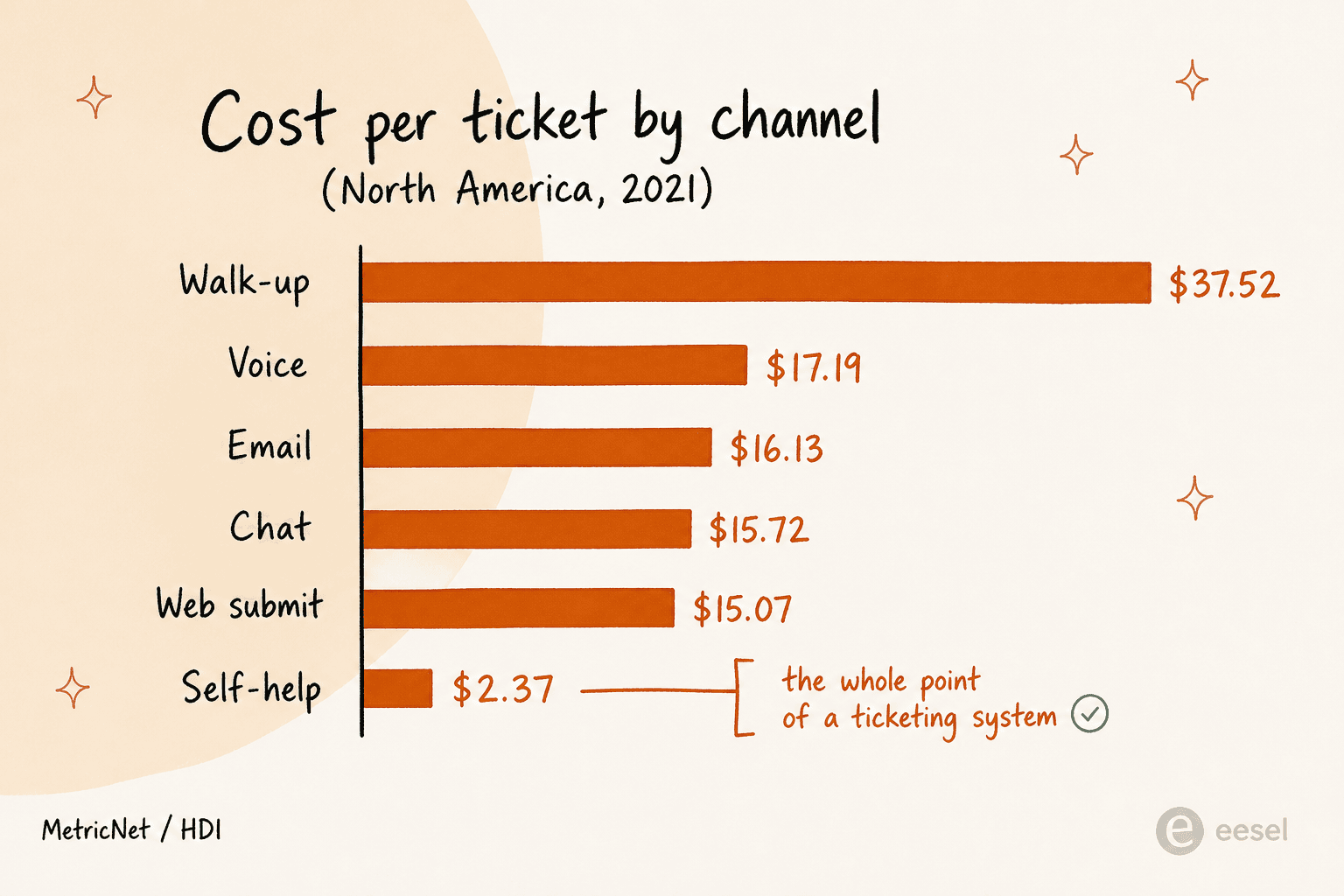
That spread, described by HDI as varying "by more than two orders of magnitude (100X) from the lowest cost self-help ticket to the highest cost walk-up ticket", is the actual business case for a ticketing system. Not the software licence, the channel shift.
Two guard rails here, so you do not overpromise. The average self-service completion rate across service desks worldwide is 10.4% in MetricNet's benchmarking database, not the 30% to 80% that vendor decks imply. And deflection makes the leftovers harder: as the easy tickets leave, "the average complexity and the average handle time of the incidents that continue to be handled by live agents will increase". Plan your staffing for that, and see my ticket deflection guide before you set a target.
How I would actually choose
- Under 5 people, email-first: Zoho Desk free or Express at $7, or Help Scout's free plan. Do not buy a suite.
- A growing support team on multiple channels: Freshdesk Growth at $19 or Zendesk Suite Team at $55. Pick Zendesk if you need the app ecosystem, Freshdesk if you want more included at the low end.
- Ecommerce, order-heavy: Gorgias, because per-ticket pricing suits seasonal spikes and the Shopify integration is real. Watch the $0.85 to $1.00 automated interaction rate.
- You already live in a CRM: HubSpot Service Hub if the sales team is on HubSpot, Agentforce if it is Salesforce. Budget the onboarding fee.
- Internal IT or a mixed employee and customer desk: Jira Service Management, with the caveat that it now sells only as the Service Collection bundle.
- Your ticketing system is fine, the AI on top is not: do not migrate. Add the layer. That is the case eesel was built for.
eesel for the ticketing system you already run
If the queue itself works fine and what you actually want is the tier-1 volume gone, then switching systems is an expensive way of solving the wrong problem. eesel plugs into Zendesk, Freshdesk, Gorgias, Help Scout, Front and the rest, trains on your resolved tickets and help centre, and drafts or resolves inside the tool your team already has open. No migration, no re-training on a new UI.
Two things make it different to the meters above. It simulates against your historical tickets before it answers a live customer, so you see the resolution rate and the wrong answers on your own data first. And it is a fixed monthly plan from $299 for 500 credits, with 1 credit per ticket handled and no seat fees, so a partial rollout fits the smallest plan: route 200 of your 1,000 monthly tickets to it and you use 200 credits. The free plan includes 100 credits with no card, and the simulation runs before you commit to anything.

The short version
Compare the ticket object, not the feature list. Ask what makes an AI interaction billable, before you ask what it costs. Test the export and the reporting inside the trial window, not after. And be suspicious of any deflection number that starts with a 5 or higher, because the benchmark across every service desk MetricNet measures is 10.4%. Everything else is negotiable.