What "customer service" actually looks like in a law firm
When people say "customer service," they picture an e-commerce chat bubble asking where a package is. Legal client service is quieter and higher-stakes, but a surprising amount of it is still routine.
Think about the questions that hit a firm's main inbox in a given week: "What's the status of my case?", "Can you resend the engagement letter?", "How do I pay my invoice?", "When is my deposition?", "What documents do you still need from me?". None of these require a law degree to answer. They require someone to look something up, find the right document, and reply, which is exactly the kind of work that piles up and pushes response times out to days.
That's the slice AI is good at. It's the same pattern I see across every vertical that adopts AI for customer service: a small number of question types account for most of the volume, and they repeat. The difference in legal is that the answers have to be exactly right and they have to stay confidential, which is why you can't just point a generic customer service chatbot at it.
If you've never separated your client communication into "routine logistics" versus "needs a lawyer," that's the first exercise. It's also roughly how you should think about what to automate.
Why legal is the hardest place to put a bot
Most industries can tolerate a chatbot that's wrong occasionally. Legal can't, for three reasons that stack on top of each other.
Confidentiality and privilege. Client communications are protected. Any tool that touches them has to keep that data inside your control, not feed it into a shared model or leak it across matters. A bot that "learns" from one client's messages and accidentally surfaces them to another isn't a bug, it's a breach.
The unauthorized practice of law. There's a hard line between giving a client information ("your hearing is on the 14th") and giving legal advice ("you should accept the settlement"). Cross it and you've got a regulatory problem, even if the AI was trying to be helpful. A co-founder of a legal-tech company I worked with put it about as plainly as it gets: in legal tech you can't afford to get anything wrong, because there's a fine line between being helpful and overstepping into legal advice. The fix they leaned on was setting exact guardrails on sourcing and making the AI provide transparent citations on every answer.
The accuracy bar. A wrong shipping estimate annoys someone. A wrong filing deadline can blow a case. So the tolerance for hallucination is basically zero, which rules out any tool that answers from general training data instead of your firm's own, verified knowledge.
These aren't reasons to avoid AI in legal. They're the spec. Get them right and AI client support works beautifully here; ignore them and you've built a liability.
What AI should and shouldn't touch in a legal practice
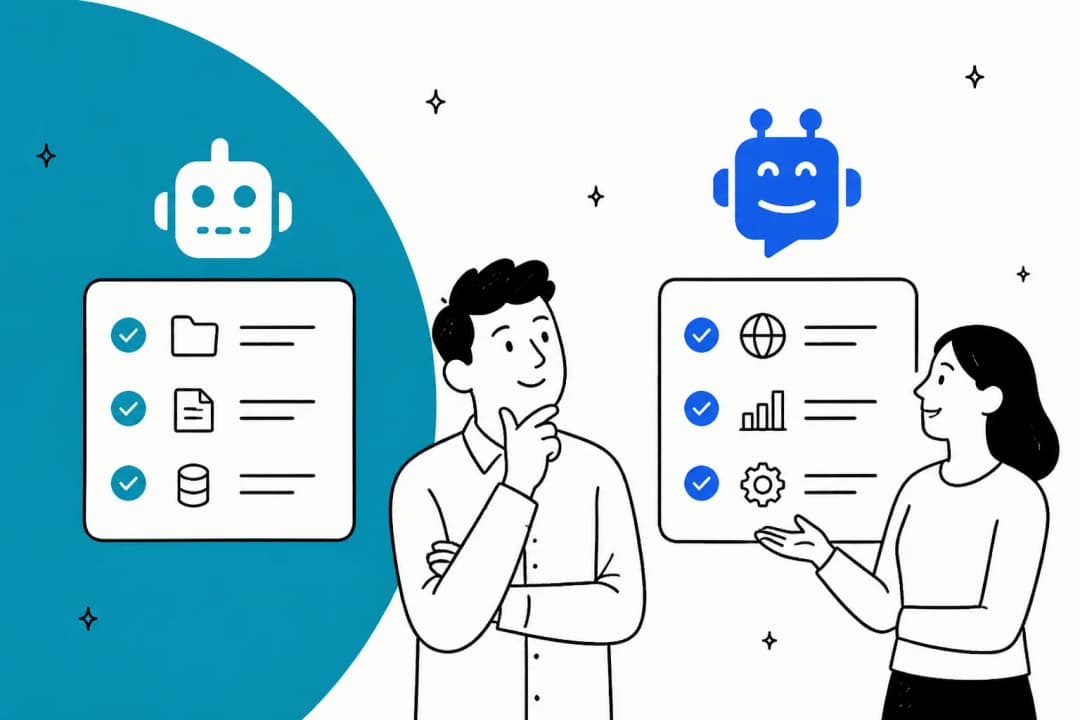
Here's the split I'd start from. The left side is safe to automate today. The right side stays with a person, full stop.
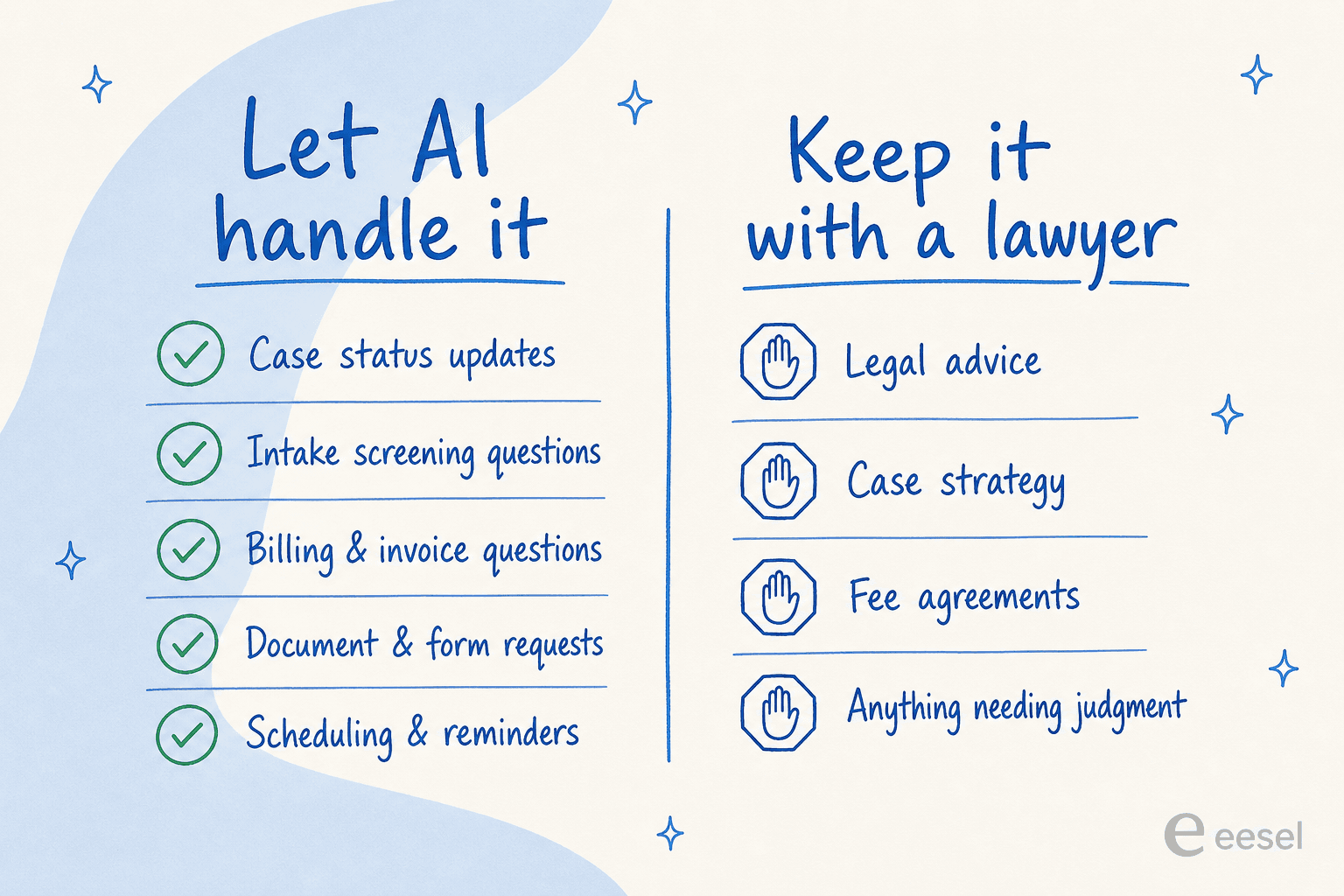
The point of drawing this line explicitly is that it becomes a configuration rule, not a hope. A good AI agent lets you say, in plain language, "answer status and billing questions, but if anyone asks for advice or mentions a new legal issue, hand it straight to the team." You're not trusting the model's judgment about where the line is; you're telling it, and watching it hold.
This is also where AI beats the old rule-based chatbots that law firms tried years ago. A rule-based bot can only match keywords; it falls apart the moment a client phrases something unexpectedly. A modern AI agent understands the intent behind "I still haven't heard back about my thing from last month" and can map it to the right matter, then either answer or escalate.
The math: what a firm your size could actually save
Before the how, the "is it even worth it." The honest answer depends on your volume of routine client messages and how long each one takes a person to handle. Rather than hand-wave it, plug in your own numbers:
Even a conservative setup, where the AI handles a little over half of routine messages, usually gives a small practice back a meaningful chunk of a full-time person's week, the kind of agent productivity gain that's hard to argue with. And because good tools charge for what the AI actually handles rather than per seat, the cost scales with the work, not with your headcount. More on that below.
How to deploy it without crossing a line
This is the part that matters most for legal, so I'll be specific about the mechanism. A safe AI client-support setup runs every question through the same path:
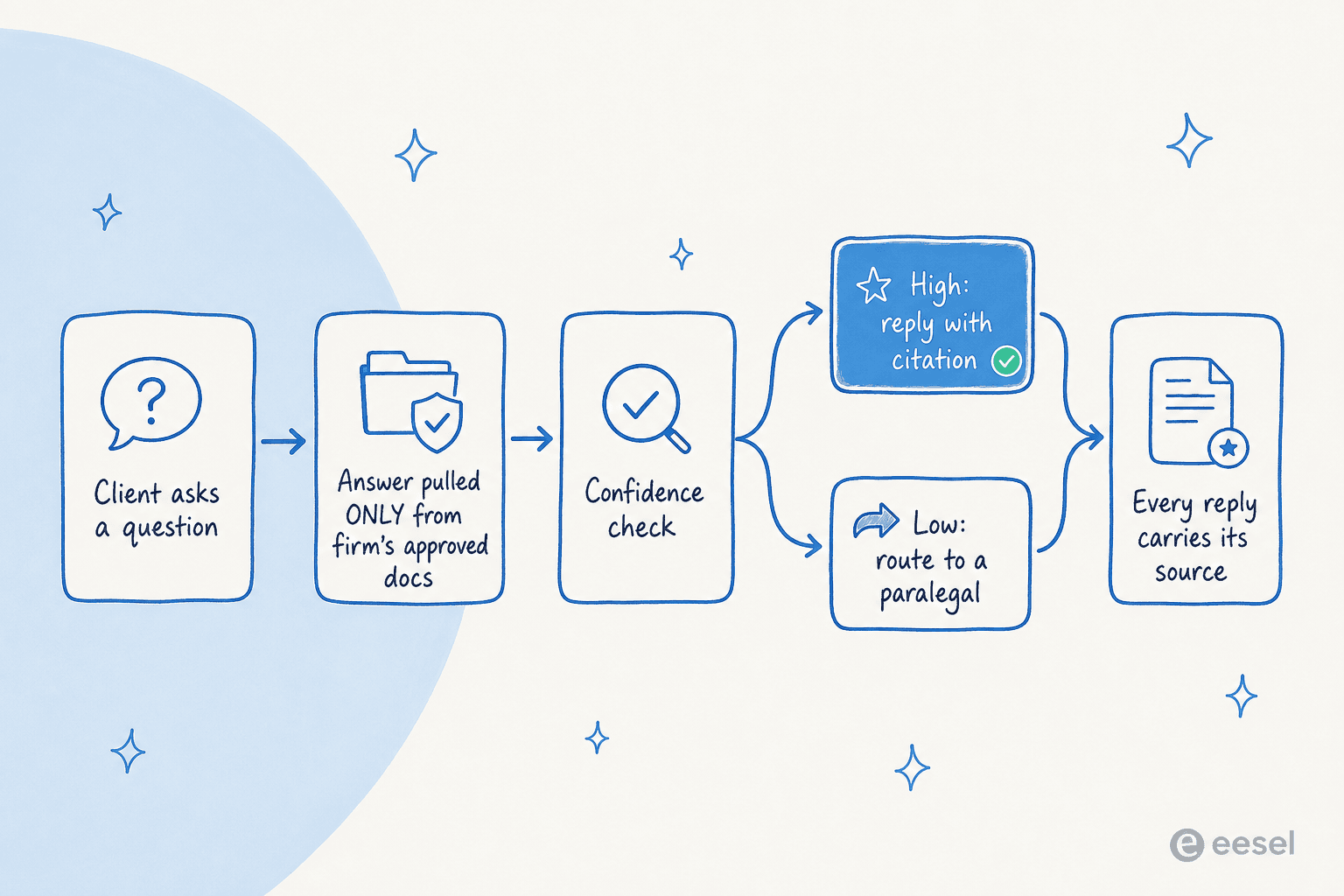
Answer only from approved knowledge. The AI should be locked to your firm's own material, your knowledge base, FAQs, past client conversations, intake forms, and nothing else. It does not pull from the open internet or general training data. This single setting is what keeps it from inventing a "deadline" or paraphrasing legal advice it read somewhere. When I demo this, the most common objection from technical buyers is some version of "does it secretly fall back to ChatGPT if it doesn't know, and can that be turned off?" The answer has to be yes, it can be turned off, and for legal it should be.
Cite every answer. Each reply should point back to the source it came from. Citations do double duty: they let your team audit what the AI said, and they keep the AI honest, because an answer with no source to cite is an answer it shouldn't be giving.
Route on confidence. The AI scores its own confidence and only replies directly when it's high. Everything else becomes a drafted reply waiting for a human, or a clean handoff. One support lead I worked with framed the whole philosophy in a line I think about a lot: the AI will never answer 100% of questions, so what you actually want is an AI that only handles the tickets it's confident about and leaves the rest alone. That's doubly true in legal.
You configure most of this in plain language rather than code. With eesel, you tell the agent when to jump in, what tone to use, and when to stay out, then watch it behave.

The other thing I'd insist on for a law firm is a dry run. Before the AI replies to a single client, you should be able to simulate it against your real past conversations and see what it would have said, where its coverage is strong, and where it would have stayed silent. eesel's simulation mode does exactly that, so going live is a decision you make with evidence, not a leap of faith. It's also how a team like Gridwise got comfortable fast:
"In the first month, eesel is resolving 73% of our tier 1 requests. We saw results quickly during our 7-day trial."
Kim Simpson, Gridwise (eesel AI helpdesk agent)
That 73% wasn't a legal firm, but the mechanism is identical: train on the real ticket history, simulate, then let it handle only the slice it's reliably good at. A modern AI agent assist setup can also keep a human in the loop on every reply if you'd rather start there, drafting answers for a paralegal to approve before anything sends. There's a whole category of agent-assist tools built around exactly that review step.
Confidentiality: the questions every firm has to ask
If you take one section seriously, make it this one. For a law firm, the security review is the buying decision, and I've watched deals live or die on it. Here's what happens to client data in a properly built setup:
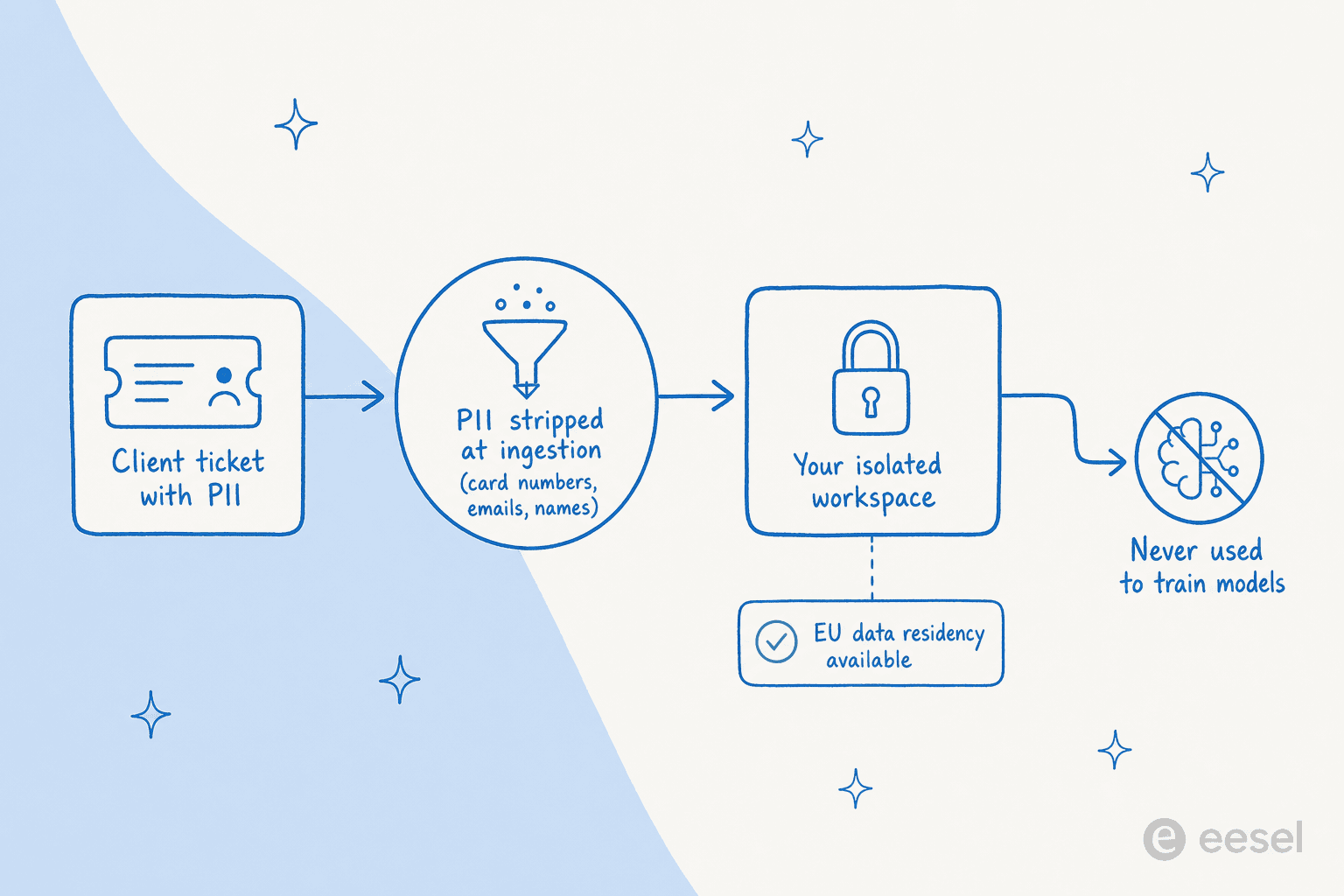
Run any vendor through this checklist before they touch a client message:
| Question to ask | What "good" looks like | Where eesel lands |
|---|---|---|
| Is our data used to train your models? | A flat no, in writing | Never used for training, stated bluntly on the security page |
| Is our data isolated from other customers? | Per-workspace isolation, no cross-contamination | Each workspace fully isolated |
| Can sensitive data be redacted? | PII stripped before processing | Optional PII redaction at ingestion (cards, emails, names, SSNs) |
| Where is data stored? | Known region, EU option | US East default, EU residency on request |
| Encryption? | At rest and in transit | AES-256 at rest, TLS 1.2+ in transit |
| Compliance posture? | SOC 2, GDPR, and BAAs for regulated work | GDPR and CCPA compliant, SOC 2 Type II underway, HIPAA and BAAs on enterprise |
The data-handling questions are the ones legal buyers raise first, and rightly. I've sat in reviews where the entire concern was "tickets contain sensitive client information, does all of that stay inside our environment?" The reassuring answer is that with redaction on, PII is stripped at the point of ingestion, so the raw sensitive data never even reaches the search index. For the most regulated practices, the enterprise plan adds HIPAA support, signed business associate agreements, SSO, and cloud service agreements. If a vendor can't speak to this list clearly, that's your answer.
What it actually costs
Pricing in this category splits into two camps, and the difference matters more for a small firm than people expect.
Per-seat tools charge you for every login whether or not the AI does anything, which punishes you for having a team. Usage-based tools charge for the work. eesel's pricing is the second kind: $0.40 per ticket, no platform fee, no per-seat cost, no minimum.
| Client messages per month | Monthly cost |
|---|---|
| 100 | $40 |
| 200 | $80 |
| 500 | $200 |
| 1,000 | $400 |
Because billing is per resolved conversation, a partial rollout actually costs less: route only 200 of your 1,000 monthly messages through the AI and you pay for 200, not 1,000. You're never charged for the conversations your team handles. For a firm dipping a toe in, that means you can start the AI on just billing and scheduling questions, prove it out, and expand from there without your bill jumping on day one. It's a far cry from the per-agent cost math of hiring to cover the same volume. It's the same usage-based logic that makes AI work in other regulated, high-stakes verticals like healthcare support.
Try eesel for legal client support
If you run client communications for a firm and want the routine half off your plate without risking the confidential half, eesel is built for exactly this shape of problem. It plugs into the helpdesk you already use, whether that's Zendesk, Front, or Salesforce, learns from your firm's own past conversations and documents, answers only from what you approve with a citation on every reply, and routes anything advisory or low-confidence straight to your team.

The differentiator that matters most for legal is the simulation mode: you see precisely how the AI would have handled your real past client messages before it touches a live one, so the security team and the partners can sign off on evidence rather than promises. It's free to try, no credit card, and you can keep it on a human-approval leash for as long as you want. Start with the questions that were never going to need a lawyer, and give your people back the afternoon.
Frequently Asked Questions
What is AI customer service for legal teams?
Is AI customer service safe to use in a law firm?
Can AI give legal advice to clients?
How much does AI customer service for legal cost?
Will client data fed to the AI stay confidential?


Article by
Alicia Kirana Utomo
Kira is a writer at eesel AI with a Computer Science background and over a year of hands-on experience evaluating AI-powered customer service tools. She focuses on breaking down how helpdesk platforms and AI agents actually work so that support teams can make better buying decisions.