

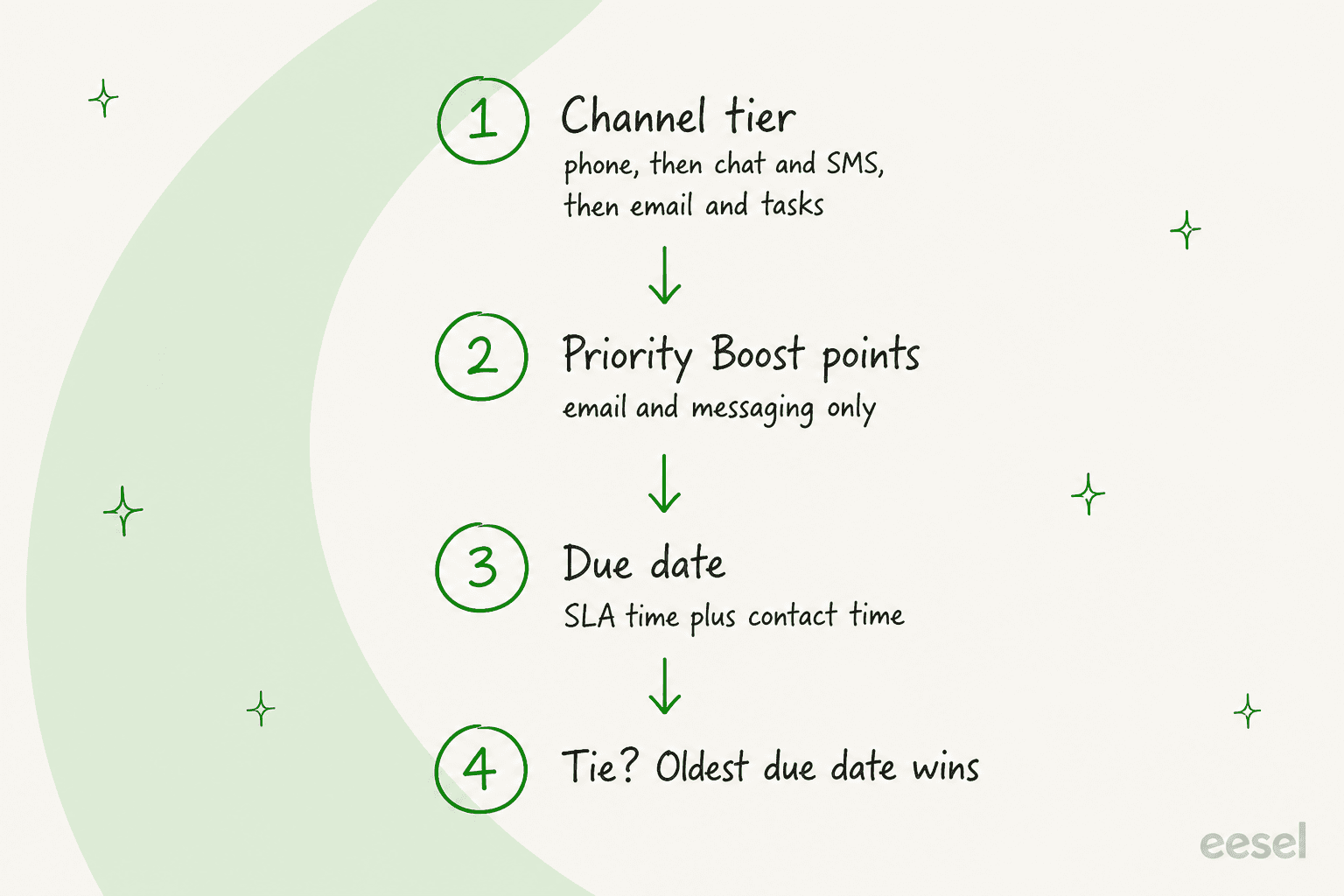
Gladly has no priority field. Who gets helped next comes from four layers: channel tier, People Match boost points, due date, and the oldest due date as the tiebreaker. None of them is set by Gladly AI as far as its help center says. The AI answers first, and the SLA clock only starts at handoff, so your handoff reasons shape the queue more than any rule. eesel has no Gladly connector, but its AI helpdesk teammate hands urgent tickets to people in Freshdesk, Zendesk and Gorgias.
With the eesel CLI, an AI coding agent can upload approved escalation rules as knowledge and ask test questions before anything goes live. Connecting a helpdesk still needs an admin to approve it.
Does Gladly have a priority field?
No, and that is the first thing to unlearn if you come from a ticket tool. In Zendesk or Freshdesk you set Low, High or Urgent on a ticket and sort a view by it. Gladly's routing overview describes something different: work is ordered by a channel tier, then by scores you build, then by a due date the SLA creates.
I build and run AI agents at eesel, so when I read a vendor's docs I look for two things: which field decides the order, and who fills it in. For Gladly the answer is "nobody fills in a priority; you assemble it from settings." That is a design choice, not an omission, and it suits a customer-first model. It does mean you have to know which setting wins when two disagree.
For the routing side (Inboxes, Entry Points, skills), my Gladly AI conversation routing post goes deeper. This one stays on one question: what makes a conversation jump the line.
How does the channel tier set the baseline?
It is the strongest layer and you cannot tune it. Gladly's routing priority by channel page gives a fixed order: phone customers first, then messaging (chat, SMS, Facebook Messenger), then email, Tasks and voicemail. Gladly's stated reason is that people on real-time channels expect to wait minutes, not hours.
If an agent is available for several channels, they are offered phone and messaging work for as long as it is waiting, ahead of email. A Rule cannot reorder channels: Gladly's Rules limitations page says you cannot, for example, always route an SMS before a chat message.
That has a practical effect on staffing. A steady stream of chat can leave email waiting in the same Inbox unless someone is available for email only. A dedicated email-only Inbox is the fix I would reach for. My notes on Zendesk priority by channel show the same trade-off in a ticket tool, where you can at least set it per channel.
How does the due date decide the order?
Inside a channel tier, the default is oldest due date first. A due date is the time of contact plus the SLA, so a contact at 10 AM with a five minute SLA is due at 10:05. Gladly's How SLA Impacts Routing page lays out the rules, and three are worth remembering:
- Entry Point SLA beats Inbox SLA. If both exist, the Entry Point wins, so a 15 minute phone SLA can sit inside an Inbox with a 24 hour one.
- The earlier date always wins. A new contact in an open conversation compares its potential due date with the existing one and keeps the earlier.
- A move can shorten the clock. When a Rule or an agent moves a conversation to another Inbox, the shorter of the two SLAs applies.
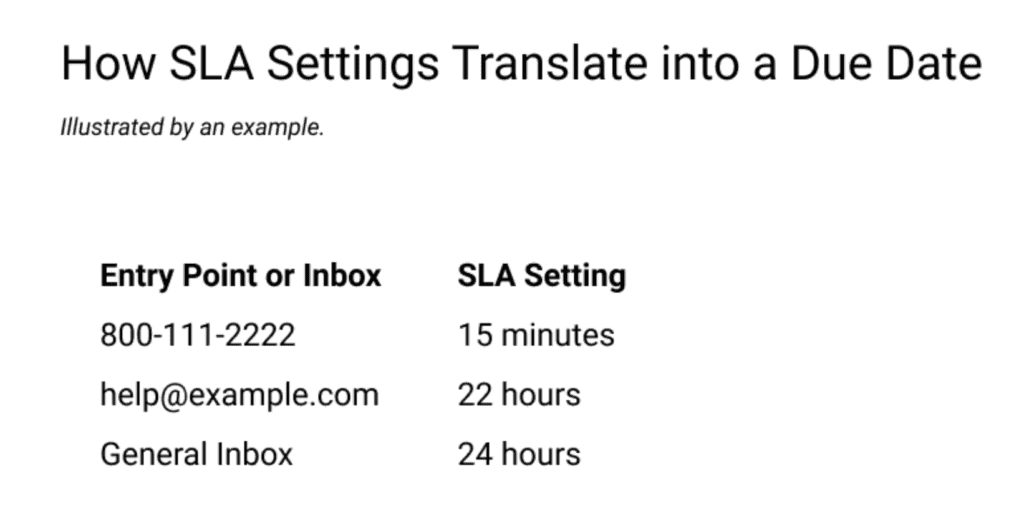
Gladly's example makes this concrete. A customer emails the General Inbox (24 hour SLA) on Monday at 10 AM, so the due date is Tuesday at 10 AM. A Rule sees something pressing and moves it to an Escalations Inbox with a one hour SLA. The new potential due date is Monday at 11 AM, and because that is earlier, it wins.
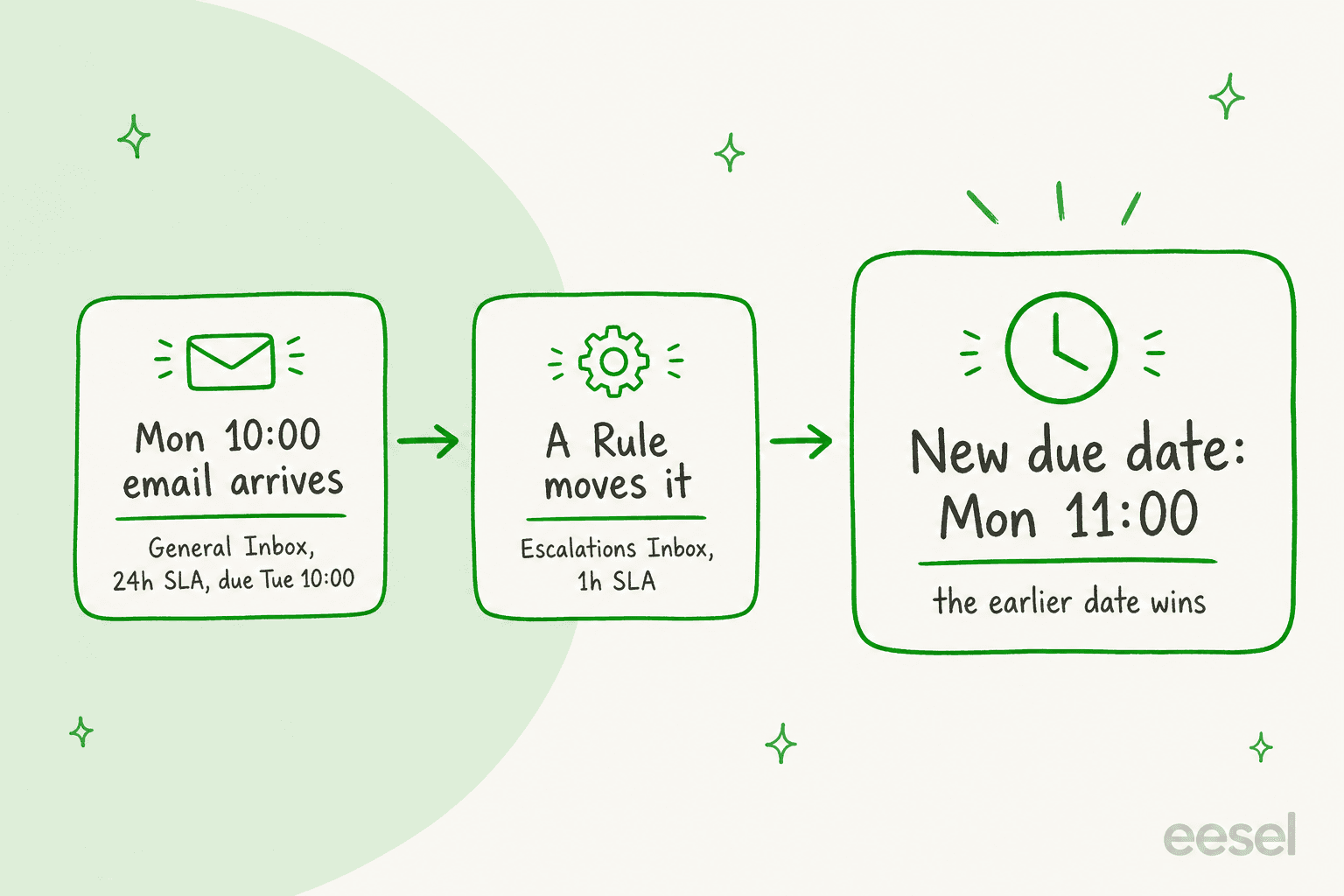
That pattern, an escalation Inbox with a short SLA, is the nearest thing Gladly has to "make this urgent." It works for ticket escalation because it needs no new field. It also means the signal that triggers it, such as a keyword in the message body, has to come from a Rule you wrote.
What stops the clock?
Gladly's No Reply Needed action stops the SLA countdown on a contact. A customer who writes "Sure, will do!" after you asked for a photo should not leave a green dot and a running clock behind. If the last message means the conversation can close, close it. If you still owe the customer work, mark the contact No Reply Needed and leave the conversation open.
Two limits are worth knowing. A Rule built on "conversation due date is overdue" does not apply to conversations in Waiting status, and Gladly says that those need a person to act manually. And time-based triggers are not retroactive, so a new overdue Rule will not touch conversations already past the threshold.
How do Priority Boosts make a customer jump the line?
People Match is where Gladly gets closest to a priority score. You write scenarios in a Rules-like screen called Priority Boost, give each a size, and a customer's matched scenarios add up. When an agent frees up, the waiting customer with the highest total goes first. Sizes are Small (1 point), Medium (3), Large (5) and Very Large (10).
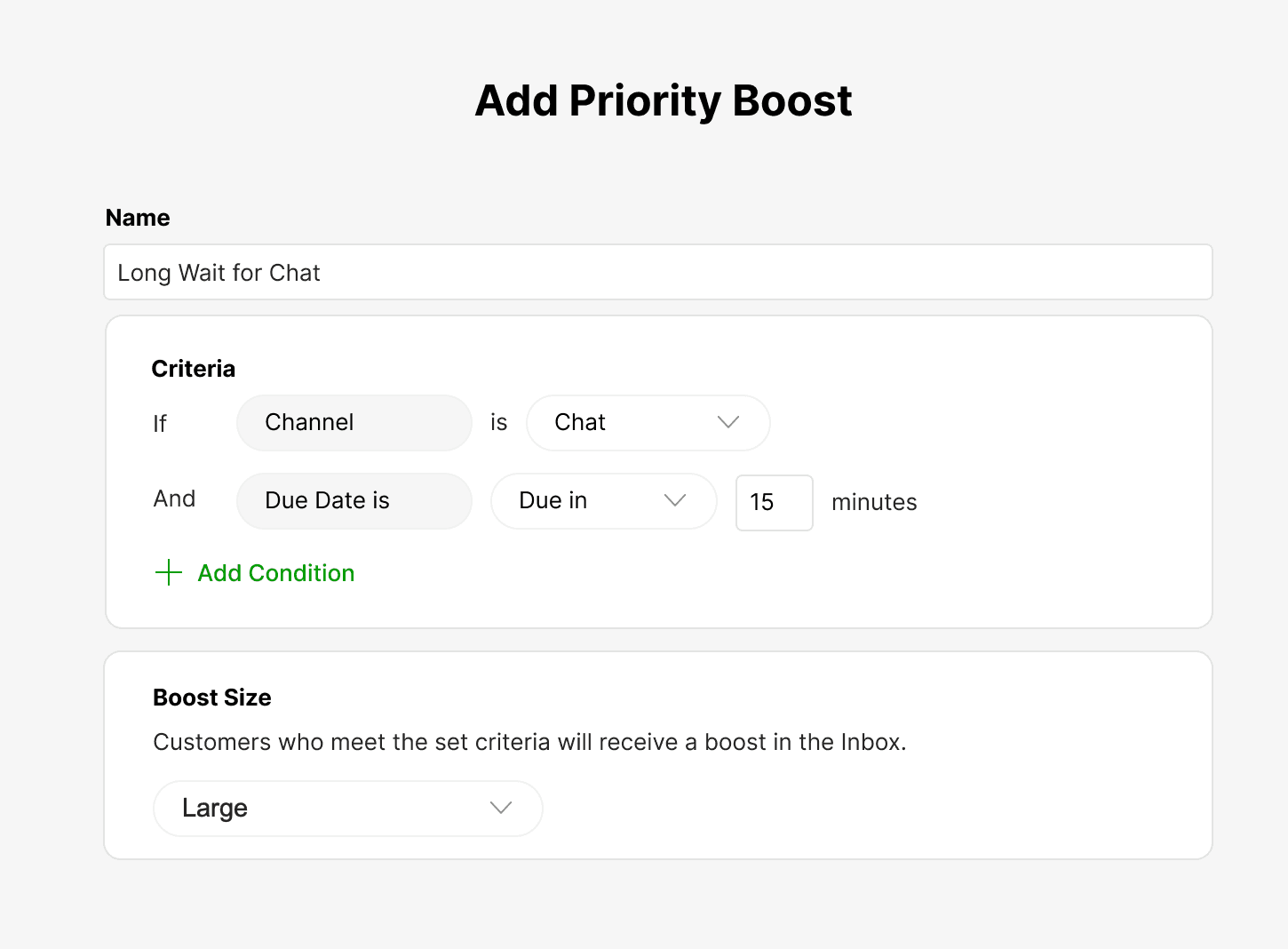
The conditions you can score on, from Gladly's conditions page:
| Condition | What it checks | Worth knowing |
|---|---|---|
| Skills | Agent skills matching the customer | Additive, not a guarantee |
| Channel | Chat, email, SMS, Messenger, WhatsApp, Instagram, voicemail | Voice and Tasks are not supported |
| Inbox | The Inbox the conversation is in | An Inbox-only boost matches everything in it |
| Transfer status | First match or rematching | Rematching protects a customer who was already helped once |
| Due date | Due in, overdue, overdue by | Ignores business hours |
| Wait time | Longer or shorter than a threshold | Ignores business hours |
| Topics | Any or all of a set | Topics can be added by people, Rules or AI |
| Custom attributes | Values from your lookup, such as VIP tier or spend | May not apply if an agent is free instantly |
Two points here matter more than the rest. First, Gladly's own docs say boosted emails always route ahead of Tasks, regardless of the Task's due date, so a broad boost can quietly bury Tasks. Its boost design guide names the usual culprits: an Inbox-only boost, and a flat boost that gives everything the same size. Second, People Match changes SLAs: Gladly says to expect that you may not always hit those targets, and suggests judging success on CSAT, lifetime value, order value and first contact resolution instead.
How do time-based boosts keep non-boosted customers from waiting forever?
By scoring waiting itself. Gladly's time-based boosts page shows three examples: a chat boost when a customer is 10 minutes past a five minute SLA, a small boost on messaging after two hours, and a medium boost on email after two days against a 12 hour SLA. You can also boost everything overdue with one scenario across channels.
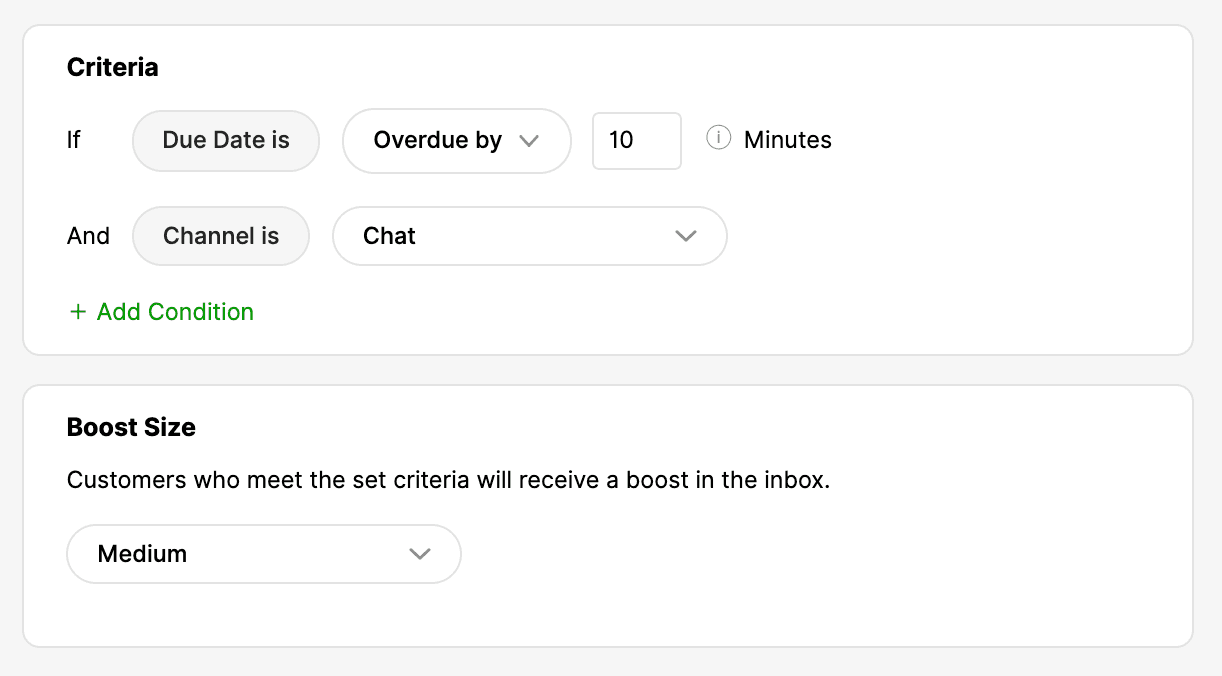
Even with no boost configured, due dates break ties between customers with the same score or none. That default is what saves a quiet customer from waiting behind a stream of boosted ones. It matters because G2 reviewers describe a steep learning curve, so a first boost setup is rarely perfect. One more catch: Due Date and Wait Time conditions do not check business hours, so Gladly suggests temporarily turning time-based boosts off if you want a Monday morning to start with fresh customers.
"Now, because Gladly unifies every interaction under a single customer profile, we're able to serve customers more efficiently and consistently meet our SLAs."

Does Gladly AI set conversation priority?
Not in anything I found in Gladly's help center, and I read the AI, Rules, People Match and SLA pages for this. The sequence matters more than the feature list. Gladly AI engages first, and Gladly's SLA page says that in that case the messages "are not considered as routed and queued," so the SLA clock starts only after handoff. Rules do not fire on messages while the AI is handling them either, a limit I covered in Gladly AI conversation routing.
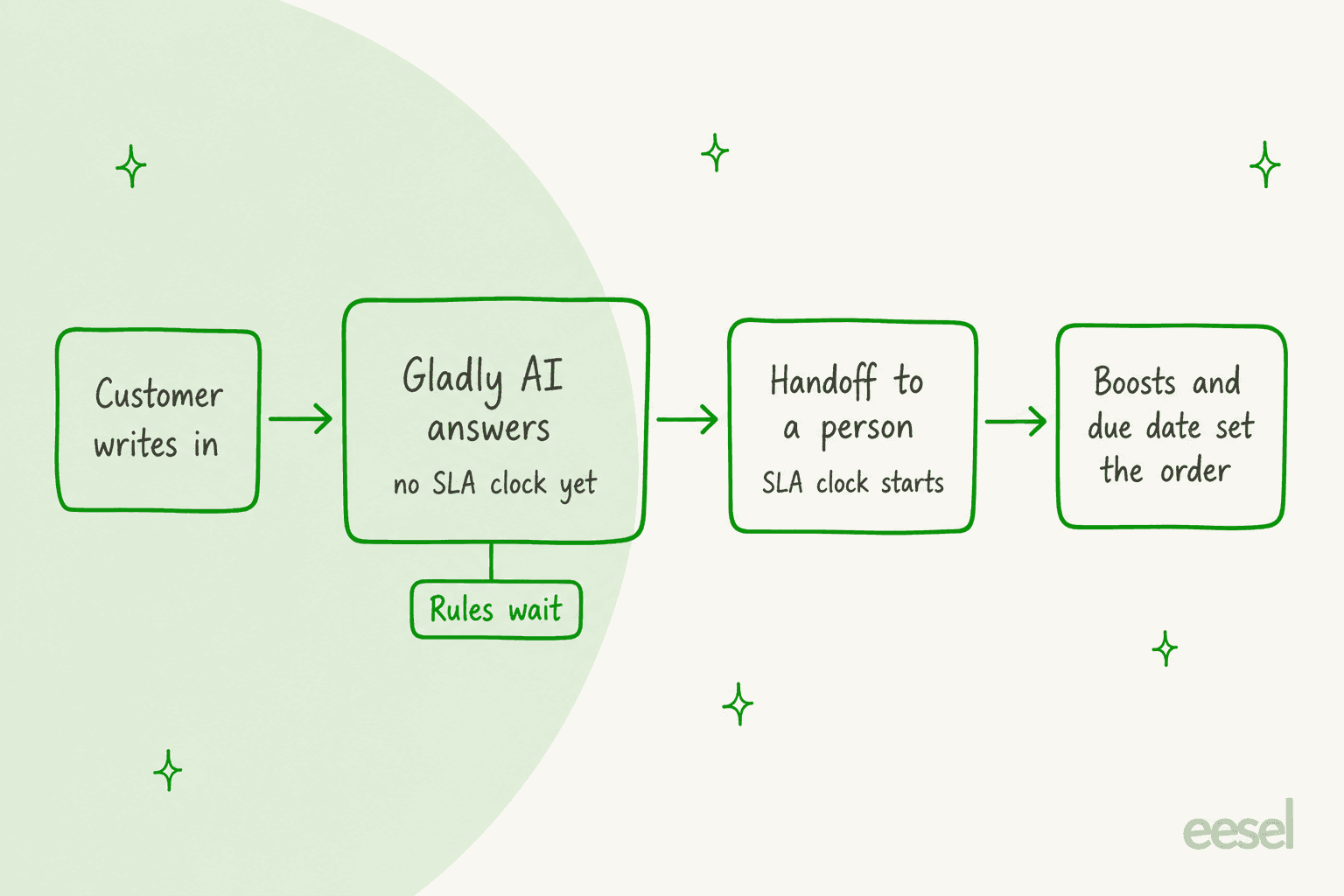
Three AI features sit near priority without setting it:
- Enhanced Automatic Topics (beta). Gladly AI adds up to 1 to 5 Topics once, right before a handoff or at resolution, and the docs say they "flow into your Rules, routing, and reporting." A Topic can then be a People Match condition. This is the link between AI and priority, but a person has to build the boost that uses it.
- Signals. It evaluates AI-handled sessions against criteria you define. The docs say it is not a real-time alert, so it can tell you what happened last week, not reorder today's queue.
- Session Intent (Gladly). A managed Signal sorting AI sessions into Sales, Service, Mixed or None. Gladly describes it as a view of what shoppers come to the AI for.
I also found SupporTrends, which Gladly's docs describe as using AI and NLP to analyze customer sentiment once conversations close. It is an analysis tool, not a queue control. If you want the sentiment angle, my Gladly AI sentiment analysis post covers it.
My read: what Gladly calls AI covers answering, summarizing and tagging. Priority stays something you configure, which is fair. It keeps the order of work explainable to a lead who has to defend it, and a model that guessed urgency would be hard to audit. I would not use that as a reason to skip the handoff design: the AI agent handoff best practices I wrote apply directly, because "the AI hands this off" is the moment urgency becomes visible to your queue.
How would I set up Gladly prioritization, in order?
- Set SLAs per Entry Point before anything else. A 15 minute chat SLA and a 12 hour email SLA do more than any boost.
- Define handoff reasons next. Legal threats, a request for a person and anything high value go to a human early, per Gladly's handoff setup.
- Add an escalation Inbox with a short SLA and one Rule that moves overdue or sensitive conversations into it.
- Add one or two boosts, not ten. Pair a customer attribute (VIP tier) with a narrowing condition so it does not match everything.
- Add one overdue boost across channels so unboosted customers do not wait indefinitely.
- Review weekly. Check Tasks overdue while emails keep routing, which is Gladly's own symptom of boosts that are too broad.
For the thinking behind steps 2 and 6, see my guides on ticket triage automation and reviewing AI conversations.
Where does Gladly prioritization fall short?
| Gap | What Gladly's docs say | Why it matters |
|---|---|---|
| No priority field | Order comes from channel, boosts and due date | Nothing to sort a view by or report on directly |
| Fixed channel order | Rules cannot put one channel ahead of another | Chat can starve email in a shared Inbox |
| Voice and Tasks | People Match does not apply; boosted email beats Tasks | Phone is highest priority and least tunable |
| Business hours | Due Date and Wait Time boosts ignore them | A late-night text can look overdue by morning |
| AI and urgency | AI adds Topics at the end of a session | Urgency reaches the queue only after handoff |
| Waiting status | Overdue Rules do not apply | Stalled conversations need a person |
These are trade-offs of a conversation-first model, not defects. The same design that gives agents one thread per customer is why Gladly asks you to build urgency out of parts. If you need a ticket-style priority field and a plain-language rule set, Gladly alternatives and Kustomer vs Gladly are the comparisons I would start with.
How do other helpdesks handle AI ticket prioritization?
Gladly is not alone in leaving the field to people. I checked three others with the same question:
- Kustomer. Priority comes from skills-based routing, with no separate AI priority setting: see Kustomer AI ticket prioritization.
- Help Scout. It has no native priority field, so teams use a custom field on higher plans: see Help Scout AI ticket prioritization.
- HubSpot. It reads priority for SLA goals and the waitlist but I found no AI setting that sets it: see HubSpot help desk ticket prioritization.
For the general method, AI ticket prioritization lays out the signals an agent can read, and Freshdesk VIP priority scenarios shows a field-based version.
Where does eesel fit if you run Gladly?
Honestly, not inside it. eesel has no Gladly connector: its helpdesk integrations name Zendesk, Freshdesk, Gorgias, HubSpot, Help Scout, Front and more, and Gladly is not on the list. Gladly's own AI is the layer to use there, and the priority controls above are the part you configure.
Where eesel does apply, it works as an AI helpdesk teammate in the queue you already have, and the useful part for this topic is the handoff. SE Ranking runs eesel on Zendesk for three products, with one agent per product. In the month 8 August to 8 September 2026 it handled about 4,650 conversations, 2,100 of them live chats answered first by eesel, and it handed about 1,260 chats to the team. Refunds, trial extensions and requests for a person go to people with the customer's name and email, and data quality, white label, audit and API questions become Tier 2 tickets with the evidence attached.
That is the same discipline as a Gladly escalation Inbox: the agent decides when to stop, and the queue decides who is next. The team also asked for an ai_handled tag on every ticket eesel touches, so containment is counted in Zendesk instead of guessed, which is the habit I would copy into any Gladly Topics setup. Related reading: AI escalation management, chatbot escalation and AI support agent permissions.
Try eesel next to your helpdesk
If your queue lives in Zendesk, Freshdesk, Gorgias, Front or HubSpot rather than Gladly, eesel joins it as an AI helpdesk teammate: it tags tickets, drafts or replies where you allow it, and hands urgent or sensitive ones to a person with context.
Start in draft mode, test on past tickets, then widen scope. See pricing or Try eesel.