


To review AI support conversations, read every escalation, low-CSAT, reopened and refund or policy conversation, plus a random 20 to 30 of the ones marked resolved, because "resolved" often just means the customer went quiet. Check each for a correct, sourced answer, policy, actions, handoff timing and tone. Then label the root cause (missing knowledge, instruction gap, wrong action, late handoff), fix it at that source and replay the same past tickets before the change goes live. Review daily in week one, then weekly. eesel shows the sources and reasoning behind every reply and replays resolved tickets with nothing sent.
Why doesn't "resolved" mean the AI got it right?
I work eesel's support queue, and the thing I've learned to distrust most is a green "resolved" badge. An AI agent can close a conversation with a fluent, polite, wrong answer, and nothing in the dashboard flinches. The customer either gives up or comes back angry two days later on a different channel.
The vendors say this themselves. HubSpot sets resolution status on a customer agent conversation 72 hours after the last visitor response, and later negative feedback "will not change the resolution status." The same page is blunt: "Deflections do not always indicate resolution." Zendesk's new quality evaluation dashboard, released on November 10, 2026, scores comprehension and empathy, then warns that "Comprehension does not mean the issue was resolved." The deflection vs resolution gap has its own write-up.
Here's what that looks like from the operator side, from a team running a self-hosted support bot:
"just ast week a customer sent a screenshot where the bot told him accidental damage was covered under warranty and we'd repair it for free. It isn't and we don't. The doc it pulled was about the extended plan, which he doesn't have, and the bot blended the two we had to honor it ... haunting part is nothing in our logs looked obviously wrong. The answer was fluent and on topic, it was just built on the wrong chunk"

eesel has seen the same pattern on its own rollouts. On one trial, a B2B technical support team watched the agent tell customers a product was supported when it wasn't, because a help article said, word for word, "we support all models." The agent wasn't making things up. It read a sentence that was too broad and repeated it with confidence. That kind of failure only shows up when a person reads the conversation next to the source.
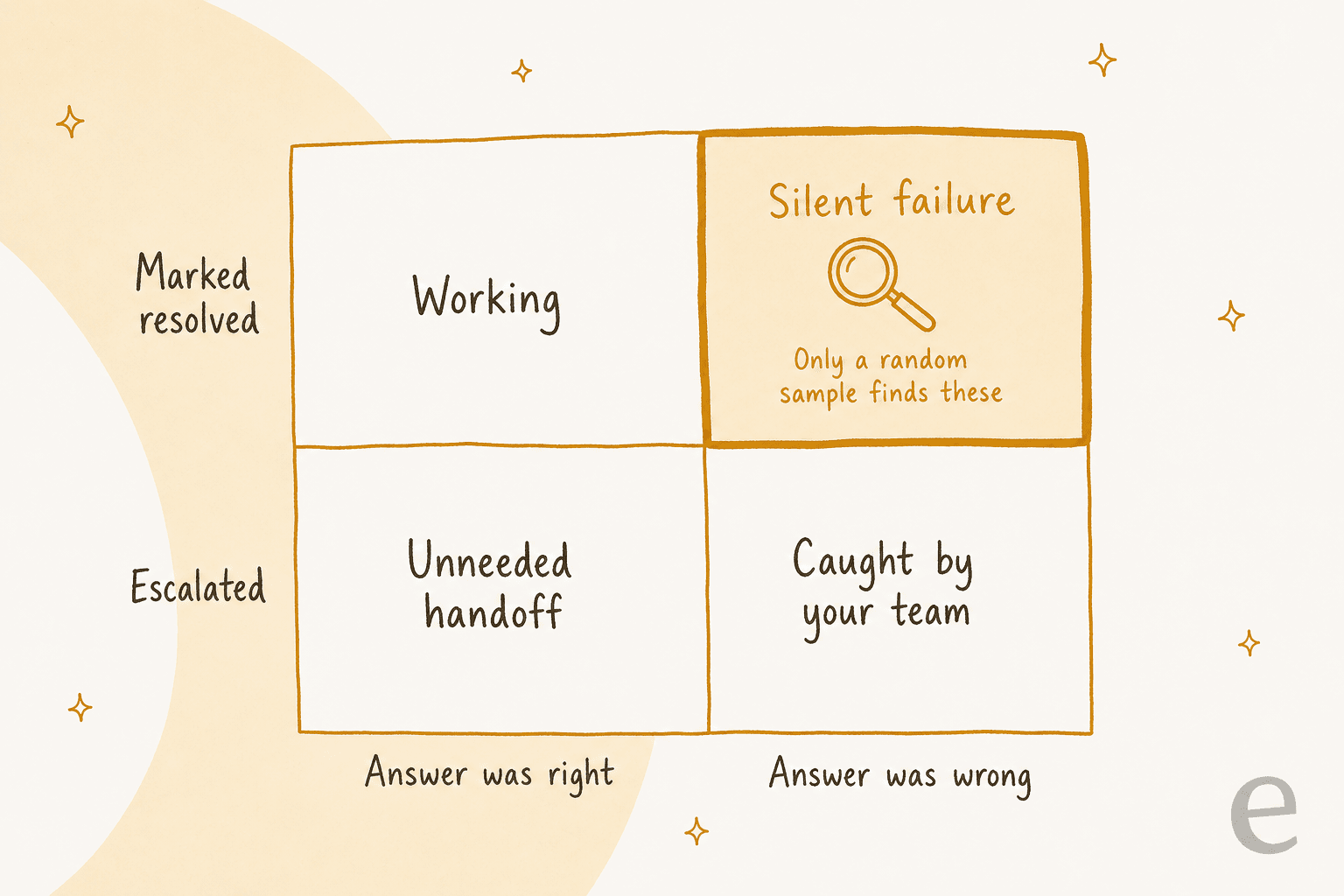
Escalations land in front of your team anyway. The silent failures in the top-right square don't, which is why the routine below spends part of its time on conversations that look fine. It is a different job from support QA for human agents: you're not coaching a person, you're finding which input to the agent was wrong.
If your team uses coding agents, the eesel CLI lets one take part in this loop. After you fix a rule, the agent can send the correction with eesel chat, read the saved rule back with eesel instructions, then ask the questions from the failed tickets again and check the answers before anything changes for customers. Connecting the helpdesk in the first place still needs someone with admin access to approve it.
Which AI support conversations should you pull?
You can't read everything, and you shouldn't try. A CX lead at a supplements brand doing around 7,000 tickets a month put it plainly on a call with eesel's sales team:
"The AI will never be able to answer 100% of the questions, but if it tries and just answers 'sorry I don't know this,' I cannot go and check all my 7,000 tickets to see if the AI actually made a good answer"
He's right about the math. The answer is a sampling plan with two parts: read every conversation in the risky buckets, and take a small random scoop from the big "resolved" bucket.
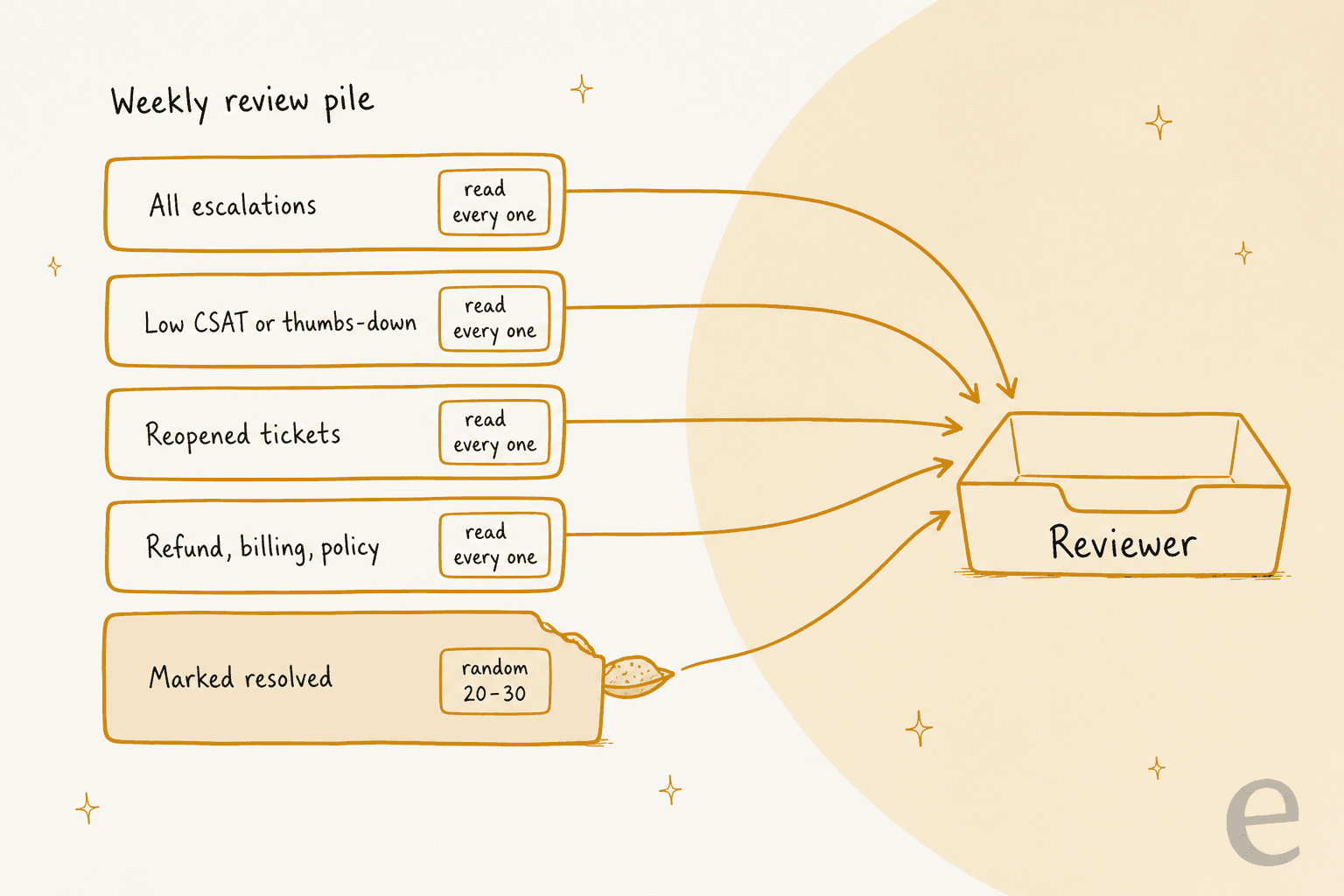
| Bucket | How many to read | Why it's in the pile |
|---|---|---|
| All escalations and handoffs | Every one | Shows what the agent couldn't do, and whether it gave up too early or too late |
| Low CSAT or thumbs-down | Every one | Customers telling you something went wrong, even when the ticket closed |
| Reopened tickets | Every one | The answer didn't hold. Often a wrong or partial answer marked resolved |
| Refund, billing and policy topics | Every one at first | A wrong answer here costs money or a promise you have to honor |
| Random slice of "resolved" | 20 to 30 a week | The only way to find silent failures |
A note on CSAT: an AI-generated satisfaction score is not the same as asking the customer. eesel's own docs say "AI CSAT is not customer feedback" in its Reports page, and treat it as an internal signal only. Use real CSAT for AI replies where you have them.
Where you pull these from depends on your helpdesk, and every major one now has a place for it:
- Zendesk. Conversation logs sit under Optimize > Monitoring > Conversation logs and show the past 7 days by default. The filters map well onto the buckets above: messages not understood, drop-offs, escalation failed, BSAT, and whether a knowledge answer was used. The Zendesk conversation logs guide walks through them.
- Freshdesk. In AI Agent Studio, Analyze > Ticket logs filters by status, including agent hand-off, and separates real conversations from preview tests. Freshdesk's own advice is that "reading two or three actual conversations is the fastest way" to confirm a topic is failing (Freshdesk docs). More on its analytics here.
- Gorgias. The AI Agent ticket view has a To review section that collects every ticket where AI Agent sent a response, and an
ai_failed_actiontag for failed actions (Gorgias docs). A ticket tagged bothai_answeredandai_handoveris worth reading first: it replied, then escalated anyway. - HubSpot. The customer agent groups failures under Analyze > Coaching opportunities, with the exact message it couldn't answer highlighted in red.
One practical detail: the last 72 hours are still moving. Gorgias only bills an interaction as automated once 72 hours have passed without a human handover, and HubSpot waits the same 72 hours. Pull last week's conversations, not yesterday's, for anything you plan to count.
What should you check in each conversation?
Six checks per conversation. Most take seconds once you're used to them. The slow one is grounding, and it's the one that catches the warranty-style failures.
| Check | What to look at | Red flag |
|---|---|---|
| Correct answer | Would your best agent have said the same thing? | Right topic, wrong detail (plan, region, date, amount) |
| Grounded in a source | Which article, macro or past ticket did it use? | No source, the wrong source, or two sources blended |
| Policy followed | Refund windows, eligibility, what needs approval | Promised something your policy doesn't allow |
| Actions taken correctly | Refunds, cancellations, tags, order lookups | An action fired on the wrong order, or failed silently |
| Handoff timing | When it escalated, and what the handoff note said | Looped after the customer asked for a person, or the note doesn't match the transcript |
| Tone | Does it sound like your team? | Over-apologizing, robotic, or chirpy with an upset customer |
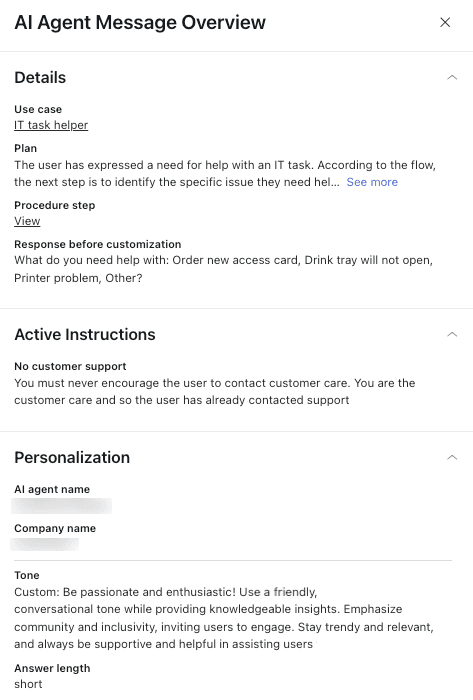
Grounding needs the agent's working, not just its reply. Zendesk's per-message View details shows the agent's Plan, the response before customization and the Active instructions it followed, which is how you tell a knowledge problem from an instruction problem.
For the policy check, pay special attention to money. If your agent can issue refunds, read every refund conversation for the first month, whether or not it was flagged. The post on refund guardrails covers which limits belong in settings rather than in the prompt.
Treat the handoff note as its own check. It's easy to read the AI's reply, see it escalated, and move on. But the note your human agent receives can be wrong too:
"My place added an AI bot that handles the chat first and gives the summary of what the client said to the agent, but the thing is, its summaries are often just lies that it hallucinated lol. It just makes up stuff that the customer never said, and you still have to check the whole history."
Compare the summary with the transcript. If they disagree, that's a failure even if the escalation itself was right. The handoff best practices post covers what a good note contains.
Tone is the last check and the easiest to over-weight. A slightly stiff reply that's correct beats a warm one that's wrong. Fix tone in bulk once you have several examples, using a brand voice rule rather than one-off edits.
How do you label what went wrong?
Once a conversation fails a check, give it one root-cause label. The label decides where the fix goes, and the usual mistake is fixing everything in the prompt. I use four labels:
- Missing or outdated knowledge. The fact wasn't in any source, or the source was wrong.
- Instruction gap. The facts were right, but the agent did the wrong thing with them.
- Wrong action or permission. It took, skipped or botched an action, or was allowed to do something it shouldn't.
- Should have handed off. It kept going when a person should have taken over, or handed off something it could have answered.
Your helpdesk may already have a version of this. HubSpot's coaching opportunities sort failures by Reason: Knowledge, Handoff, Experience, Action and Other (HubSpot docs). Zendesk lets you add labels to conversations and warns against a unique label per conversation, since labels are "meant to group conversations for analysis." Keep your labels to a short, fixed list so the counts mean something.
One trap to know about: in some tools, rating a conversation doesn't change the agent at all. Gorgias says its Bad, Okay and Good ratings "don't immediately change the way AI Agent behaves in conversations with your customers"; to change behavior you rate or add sources instead (Gorgias docs). Zendesk's built-in feedback options for generative replies (Incomplete answer, Made-up facts, Missing article and so on) go to Zendesk's AI researchers. Both are useful, but neither is a fix on your side.
Pick a failure type below to see what it looks like in a transcript, where the fix goes in each helpdesk, and how to retest it.
Pick a failure type to see where its fix goes in Zendesk, Freshdesk, Gorgias, HubSpot and eesel.
The best proof of this approach I know is Qontro, which makes ERP software and runs eesel on Freshdesk as a co-pilot. The team compares each eesel draft with the reply a person actually sent. Where the draft was wrong, that usually points to a missing or incomplete help article, or a rule that needs tightening, and they fix that rather than the single ticket. About one in ten drafts now goes out with little or no editing, and the share is rising slowly. That's the four labels working in practice, on about 190 Freshdesk tickets drafted a month.
When one label keeps coming up, step back from single tickets. Lots of "missing or outdated knowledge" means it's time for a knowledge base audit, and AI can help with detecting outdated content before the agent repeats it.
How do you fix it and retest before it goes live?
Fix it at the source the label points to, then replay the same past tickets that failed. Not new questions you invent, the actual tickets. A fix that passes your own test question can still fail on the customer's wording, and the failed tickets are the wording you already know breaks things.
One commenter described the habit that makes this compound:
"Keep the transcript reads too, but let them compound instead of evaporate: every escalation like this becomes a case in a small regression set, re-run on every prompt, chunking, or model change, so the failure classes you've already paid for stay fixed."
Each helpdesk retests a little differently, and the difference matters:
| Tool | Where you retest | What the test questions are |
|---|---|---|
| Zendesk | Test widget and the conversation simulator | Scenarios from a library or ones you write |
| Freshdesk | Test tab, up to 100 queries per run | Pasted queries, or 50 generated from your knowledge |
| Gorgias | Playground, including draft skills and articles | Messages you type, as a new or existing customer |
| HubSpot | Batch testing, up to 8 test sets | Generated from live conversations (5+ similar per theme) or written by you |
| eesel | Helpdesk simulation | Your resolved past tickets, scored against what your team sent |
Gorgias adds a warning worth copying into your own runbook: if you turn actions on in a test, they "can affect real customer and order data" (Gorgias docs). Use a fake customer profile.
The reason eesel works from past tickets is that it's the closest thing to a dry run on your real queue. Its simulation replays resolved tickets, drafts a reply to each, puts it next to what your team sent, and groups the results by theme. "It sends nothing to customers," per eesel's docs. The example run in the helpdesk docs sampled 20 resolved tickets, matched 17 of them, and returned five ranked fixes. That 3-in-20 miss list is exactly the review pile you want before customers see anything.
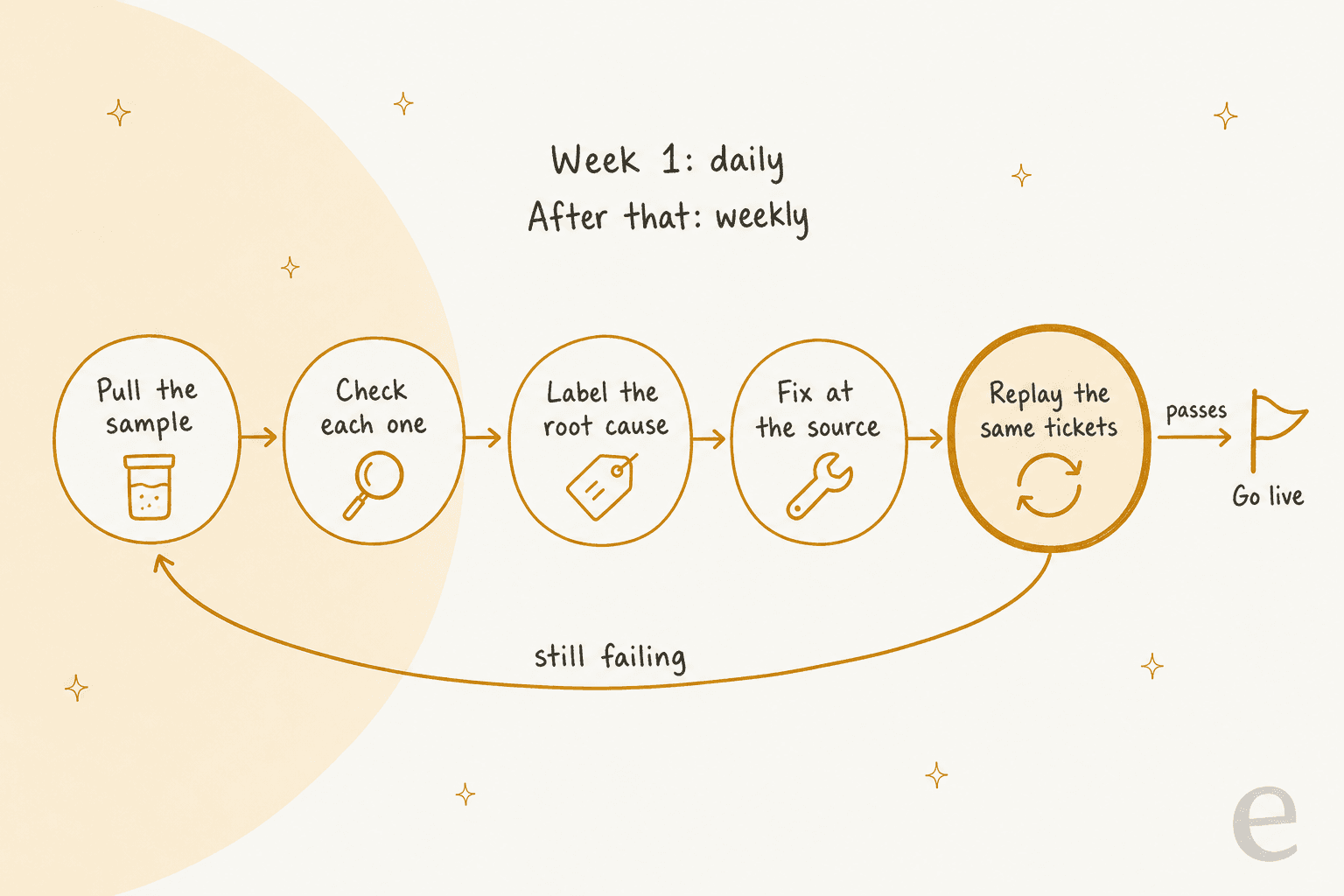
Only go live when the replay passes. If it still fails, the label was probably wrong, which happens. A "missing knowledge" failure that persists after you add the article can be an instruction that tells the agent to prefer a different source. For more on test design, see the guide to AI support agent testing.
How often should you review AI support conversations?
Daily in the first week, then weekly. That's the cadence I'd start with for any new agent, or any agent you've just given a new channel or action.
Week one, daily. Read every flagged conversation and about 10 random resolved ones each day. Failures cluster early because the first real customers find the gaps your test questions missed.
After that, weekly. Every flagged conversation plus 20 to 30 random resolved ones, and a look at the label counts. If one label's count drops after a fix, it worked. If the random slice stops turning up failures for three or four weeks, shrink it, never to zero.
Go back to daily after any big change. A new channel, a new action, a model change, or a large knowledge import resets the clock.
How much you review also depends on how much the agent does unsupervised. In eesel, every action is set to On, Ask first or Off, and the actions docs suggest starting supervised and moving routine actions to On "once the drafts are consistently right." One exception: live chat replies are always On, because nobody can pause a live chat for approval. That makes chat the channel where the random sample matters most.
The eesel Reports page has an Approvals area that shows the same thing from the other side. Its docs say an action "approved every time without edits is ready to run on its own," while one that "keeps getting rejected needs an instructions fix."
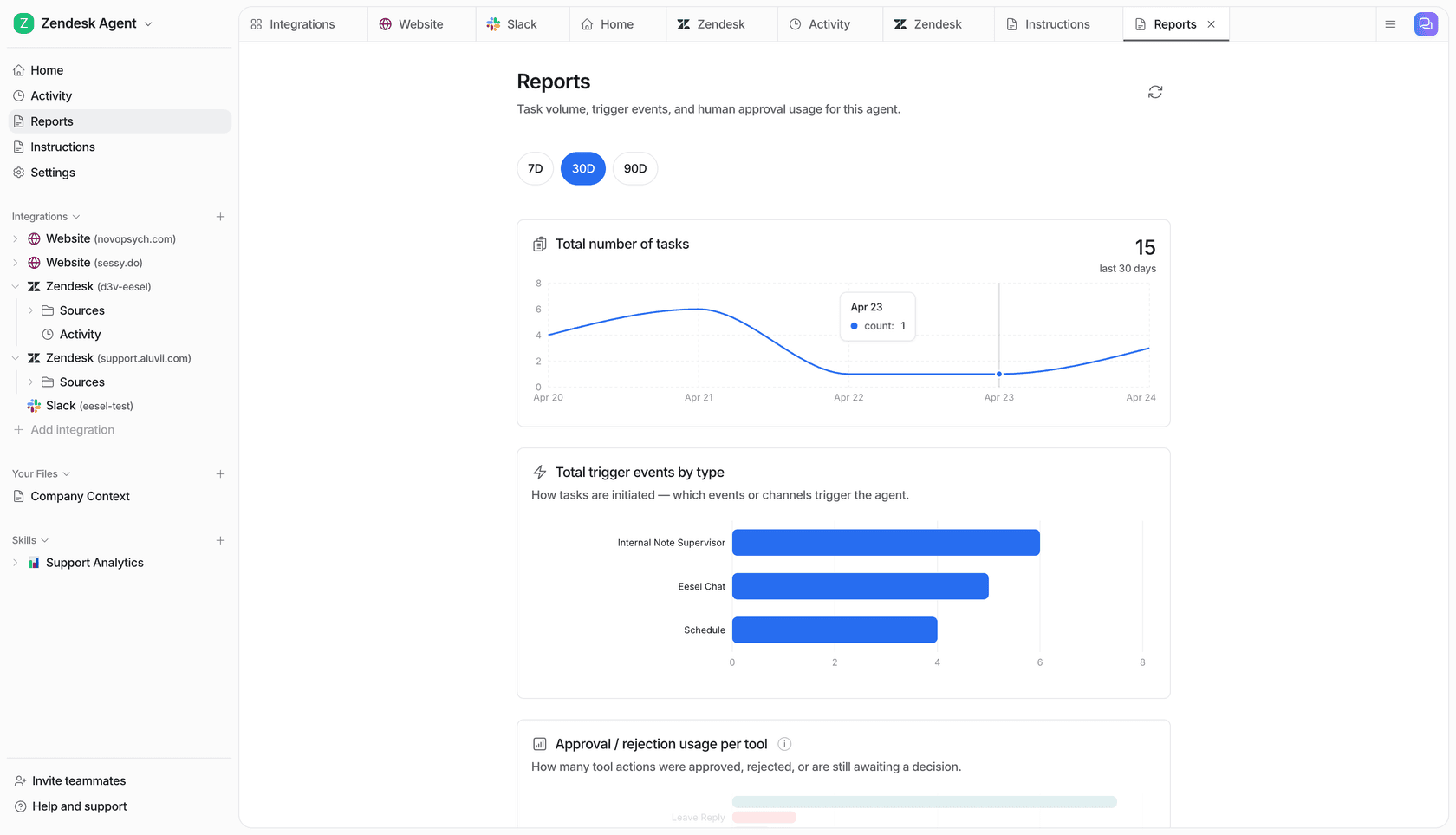
To keep the weekly pass from slipping, put it on a schedule. eesel has a Weekly digest skill that summarizes conversations handled by topic and channel, approvals waiting, and what it skipped and why, and the card sets it up to send every Monday (eesel docs). Whatever tool you use, the digest should end with a short list of conversations for a person to read, not just numbers.
What mistakes make a review routine fall apart?
The common ones:
- Only reading escalations. You'll learn what the agent can't do, and miss what it does wrong with confidence. Keep the random resolved slice.
- Fixing everything in the prompt. A missing fact written into the instructions works for one ticket and goes stale the day the policy changes. Facts go in your knowledge base or macros.
- Trusting the resolution rate as a score. Use it to decide where to look, not as proof the answers were right.
- Retesting with new questions only. Replay the tickets that failed. Otherwise you never prove the fix worked on the wording that broke it.
- No owner. Reviews done "when someone has time" quietly stop. Name one person per week, and use QA calibration if several people share it so the labels stay consistent.
- Using a human QA scorecard as is. Scorecards built for people, like the ones in Zendesk QA, score empathy and process. Add the grounding and actions checks, or you'll score a polite wrong answer as a pass.
The cost of skipping the labels shows up fast. When a team can't tell which AI decisions are wrong, it ends up checking all of them, as this Hacker News comment describes:
"The AI would confidently misroute 15-20% of tickets, requiring human review of ALL AI decisions"

Review your AI support agent's work with eesel
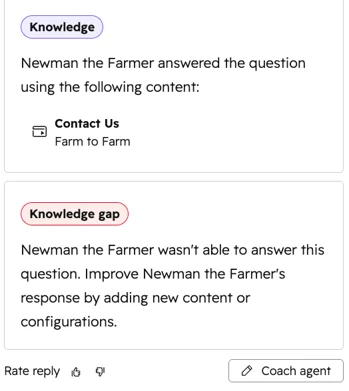
eesel is an AI helpdesk teammate that joins your existing queue in Zendesk, Freshdesk, Gorgias or HubSpot. It was built to be reviewed. Every run lands in Activity with a link to the ticket, what triggered it, which sources it searched, every action it took, its reasoning step by step, and whether it hit a knowledge gap. If an answer is wrong, you open the run and tell it what to change in the chat beside it, and the fix goes into its instructions or a memory.
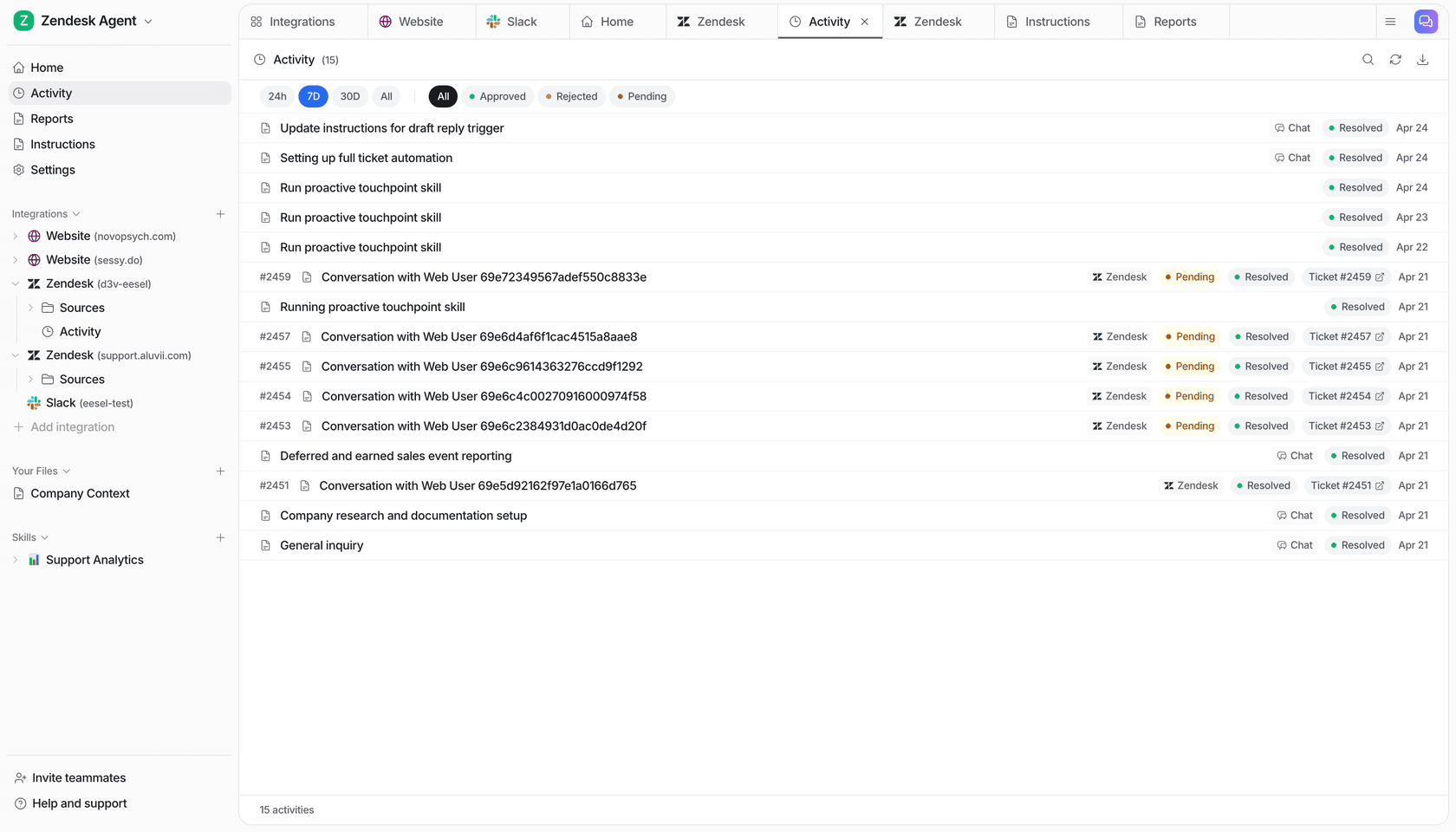
You can also choose how much it does alone while you build trust. STIL Classics runs eesel on Gorgias as drafts: in one month it left about 430 internal notes, most of them draft replies for the team to check and send, and when a fact is missing the draft leaves a gap in brackets rather than guessing. That makes review fast, because the gaps point straight at the missing knowledge.
SamCart runs separate agents on Freshdesk tickets and its website chat, and when a seller asks for a person or the question goes beyond the help center, the ticket is tagged for handoff and the agent stops replying. That tag gives the weekly review a clean bucket to read.
Before anything goes live, the simulation replays your resolved tickets and shows where the agent and your team disagree, with nothing sent. Plans start at $299 a month for 500 credits after a 7-day free trial, per eesel pricing.
Try eesel on your own past tickets and see what your review pile looks like before your customers do.