


Let an AI agent refund on its own only when the refund is small, inside your policy window, on a verified order and free of risk flags. Everything else waits for a person. The key point: put those limits in the tool and the payment system, not in the prompt, because a prompt is the one layer a customer can argue with. eesel fits that model: it looks up the order, checks your policy, and holds refunds over your threshold for a teammate to approve. With the eesel CLI, a coding agent can upload your refund policy and run test refund questions before launch.
Why are refunds the riskiest thing an AI agent can do?
I work the eesel support queue every day, and I've helped teams put AI agents on live helpdesks for a while now. Refunds are where I'd slow down. An answer that's wrong can be corrected in the next reply. A refund that's wrong can't be undone. Shopify's refund docs say you "can't cancel or reverse a refund" once it's started; the fix is to create a new draft order and ask the customer to pay again. That's a conversation nobody wants to have.
The teams that do this well already think in rules. A support admin at a digital media subscription business on Zendesk, teaching an eesel agent his team's cancellation playbook, wrote:
"I have a rule in CS where we do not address a cancel or refund request when there is an issue attached to it."
That's a guardrail written in plain language: troubleshoot first, refund second. The question this guide answers is where rules like that should live, so the agent can't be argued, confused or tricked out of them.
The money is the obvious risk, and the words are the second one. If the agent tells a customer "your refund is on its way" and nothing runs, the customer now holds a written promise from your company, and your team inherits the job of honoring or walking it back. So a refund the bot promises can cost you even if it never runs.
The third risk is the customer on the other side. A developer testing his own refund agent on Reddit described what happened when he played the customer:
"I sent it a customer message with a prompt injection pretending to be an admin. It authorized 4000€ on a 1299€ order."

It was a deliberate test, not a real store. A reply in the same thread put it more bluntly:
"if a bot has the ability to refund based on words alone, then customers will learn to jedi mind trick their money back for everything."
If you're still deciding whether to let AI near refunds at all, start with my overview of AI for refund requests. For the build itself, see how to automate refunds. This post assumes you've decided yes and want to do it without waking up to a bad week.
Where should refund guardrails live?
Most teams write the refund rules into the agent's instructions and stop there. That's the weakest place to put them. Instructions are words the model reads next to the customer's words, and the customer gets to write as many as they like.
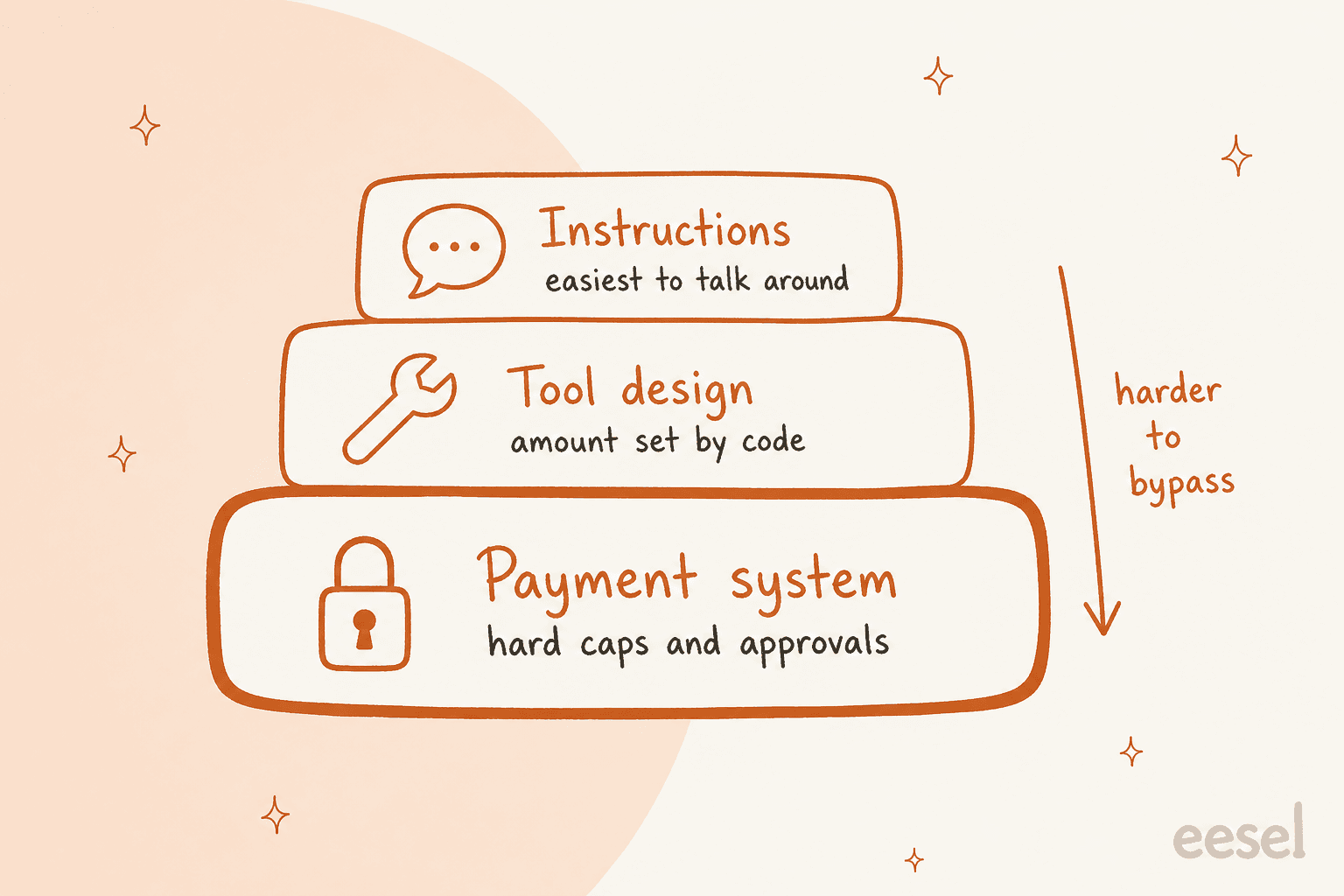
I think about it as three layers:
| Layer | What it holds | Example | How easy to bypass |
|---|---|---|---|
| Instructions | Tone, policy wording, when to escalate | "Escalate refunds over $100 to a person" | Easiest: it's text the model weighs |
| Tool design | What the refund tool accepts and computes | A refund_order tool that reads the amount from the order | Harder: the model can't type a number in |
| Payment system | Key permissions, hard caps, approval rules | A Stripe key that can't refund without a reviewer | Hardest: enforced outside the AI entirely |
Instructions still matter, because they decide when the agent escalates and what it says. But every limit that protects money should also exist in one of the two lower layers. A Hacker News commenter called a refund a deterministic business rule (the order exists, it's within the return window, the amount matches) and went on:
"That decision shouldn't be made by an LLM at all."

I'd soften that a little. The AI is good at reading a messy message, working out that the customer wants a refund and gathering the order. The rule check that follows should be code. That split also keeps your escalation rules simple, because the agent only escalates on cases code has already flagged.
What guardrails does an AI refund agent need?
Here's the sequence I'd build, in the order a refund should pass through it. Each step is a check that can stop the refund or send it to a person.
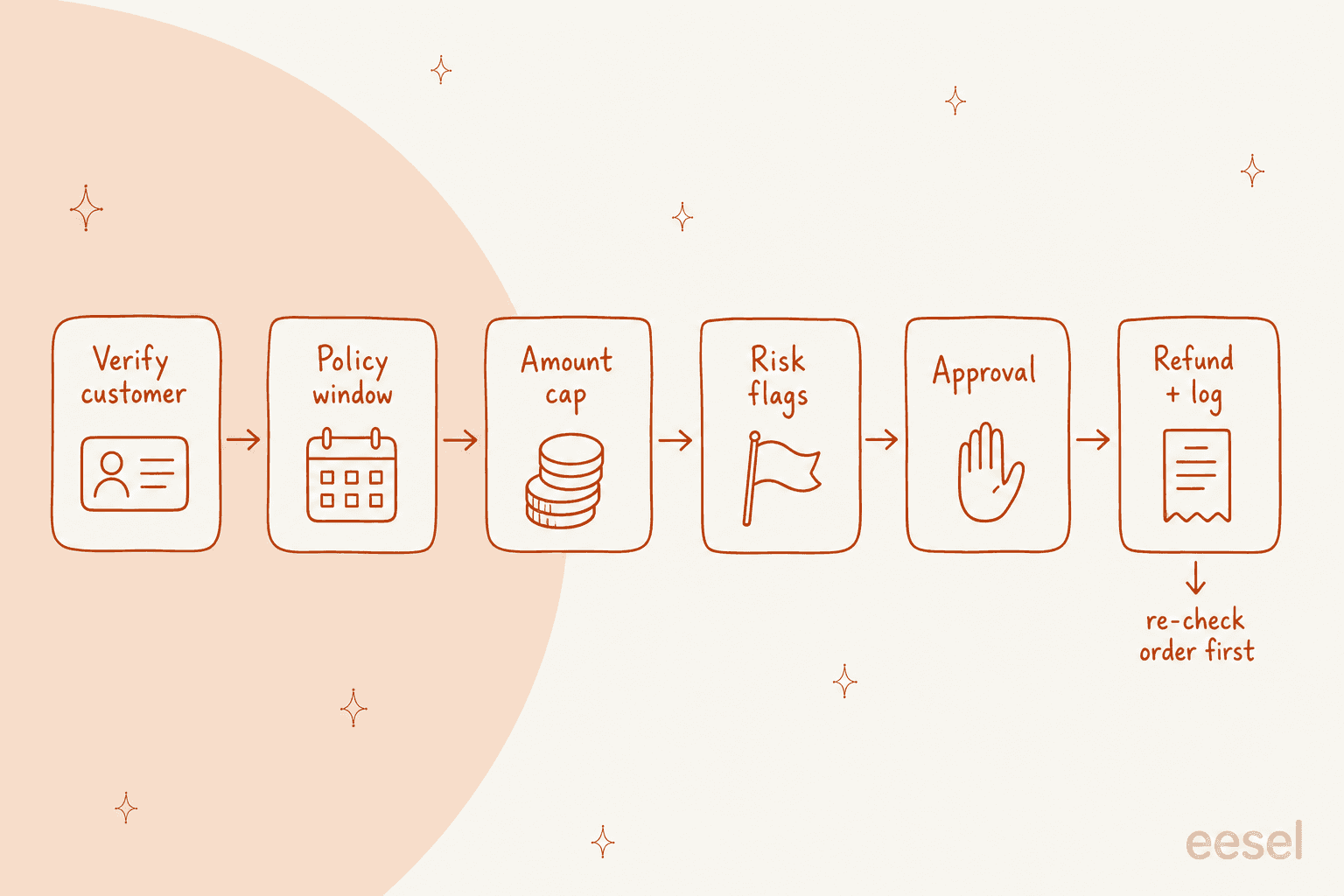
1. Give the agent read access first and write access per action
Start with the narrowest permissions that work. The agent needs to read orders, customers and payments to answer most refund questions, and it only needs write access to the one action that moves money.
Both big platforms support this split:
- Shopify: an app's
write_ordersscope only reaches orders from the last 60 days. Older orders needread_all_orders, which gives read access only. For people, Shopify's staff permissions separate refunding to the original payment method from refunding to store credit. - Stripe: restricted keys set each resource to Read, Write or None, with None as the default. Stripe calls them "the recommended type of key for API keys you give to AI agents." My guide to AI for Stripe billing covers the read-only questions.
If a refund action exists, someone will eventually phrase a message that makes the agent want to call it, so every write action you leave out is one less surprise. My guide to Breeze agent guardrails shows the same idea on HubSpot.
2. Check the policy window from the order, not the conversation
"I bought this last week" is a claim. The order's delivery date is a fact. The agent should pull the order, compare its dates with your return policy, and treat anything outside the window as an exception for a person.
Shopify's return rules give you windows of 14, 30 or 90 days, unlimited, or a custom length, counted from delivery. When several rules apply, "the shortest of those return windows is used." Final sale items can't be returned at all. Those are exactly the checks an agent should run before it even mentions money.
Two smaller checks belong here too:
- Gateway limits. Shopify Payments says you "can usually issue a refund up to 120 days" after the charge, depending on the bank. Past that, a refund may not go through even if your policy allows it.
- Troubleshoot-first rules. Like the admin quoted above, many teams don't refund a damaged or faulty item until a fix has been tried. Encode the order of steps, not only the outcome.
If you want ready wording for these replies, my refund and exchange macros cover the common ones.
3. Cap the amount in code, never in the chat
This is the guardrail that would have stopped the 4,000€ test refund. The agent should never type the refund amount. It should pick the order and the items, and let the system work out what's owed. A commenter in the same thread explained why:
"a create_refund tool with an arbitrary amount is going to be much more error prone than a refund_order tool that determines the amount externally"
The platforms already give you the ceiling:
- Shopify's SuggestedRefund returns
maximumRefundableSet, "The total monetary value available to refund," per order and per payment gateway. On refundCreate,allowOverRefundingis off by default. Leave it off. - Stripe won't refund more than the original charge, and refunds go back to the original payment method only.
On top of the platform ceiling, add your own cap: the most the agent may refund without a person. A good starting point is whatever a new hire on your team can refund without asking. If you have a written refund approval matrix, the AI should sit on its lowest rung.
4. Route by risk signals, not only by amount
A $15 refund to a customer on their fifth refund this month isn't a small refund. Amount is one axis; risk is the other. Before any refund, the agent should check for signals you've decided matter:
- Repeat refunders. Look at the customer's order history and past refunds. A Shopify merchant on Reddit suggested a simple version: "I'd tag the customer account so if he orders again, you can re-evaluate before fulfilling the order" (u/FerociousBeardCom). A tag like that is easy for an agent to read.
- Open disputes. Stripe's dispute docs are clear that you "can't issue a refund outside the dispute process" while a dispute is open. A refund attempt here fails at best.
- Early fraud warnings. Stripe says about 40% of Visa and Mastercard early fraud warnings become fraud disputes if you don't refund, but that refunding every one "isn't a good strategy". It's worth it on charges at or below your dispute fee. That's a rule to write down, not one for the AI to improvise.
- Policy exceptions. "Can you make an exception?" is a person's call, every time.
- Odd messages. Text claiming to be from an admin, a manager or "the system" inside a customer message should send the ticket to a person.
Put the two axes together and the routing is simple:
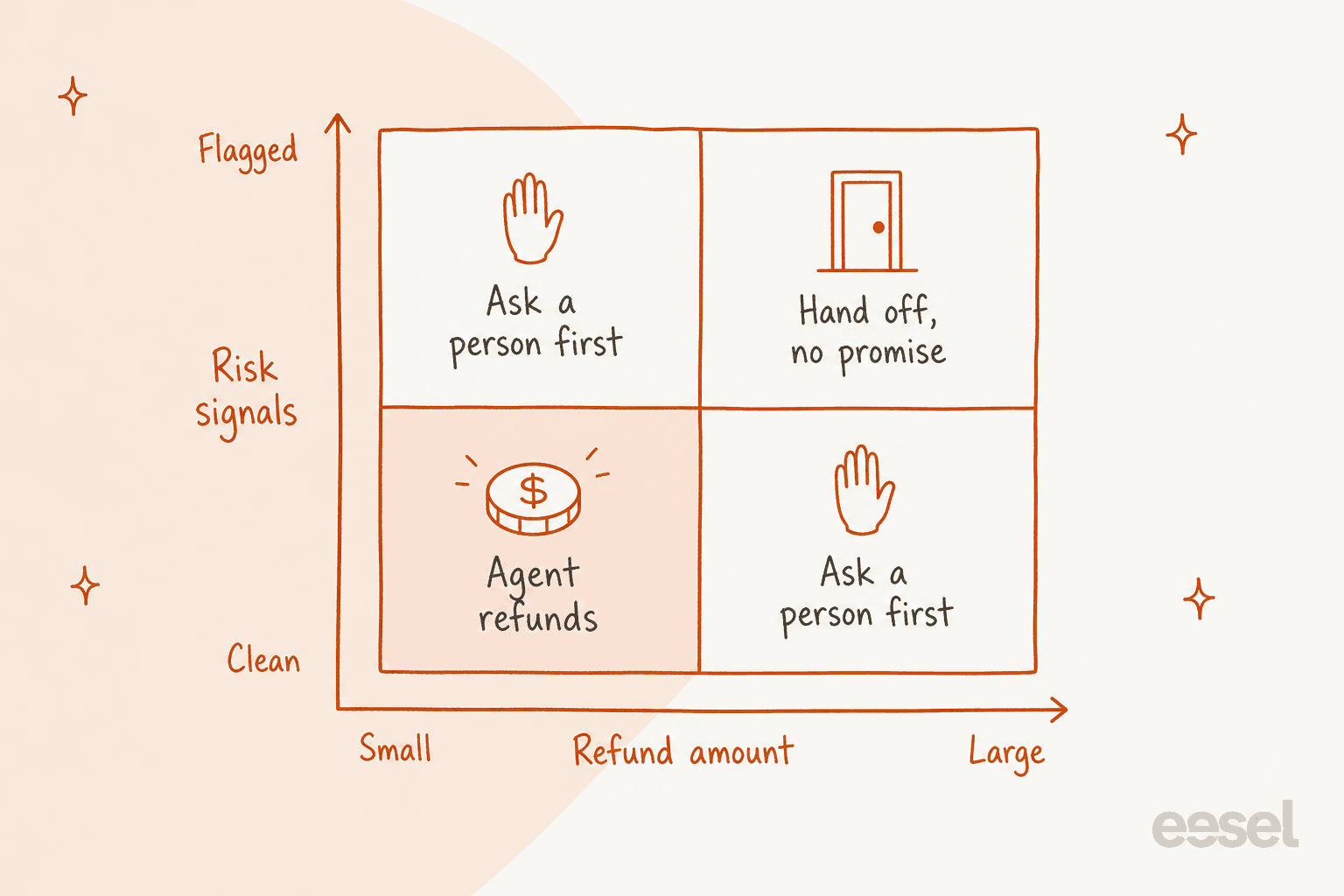
Pick the case in front of you to see where it should go:
Pick an amount and a risk signal to see whether the agent should refund, ask a person, or hand off. The thresholds are yours to set.
For more on the fraud side, my guide to AI for fraud-related support goes deeper.
5. Set approval thresholds a person signs off on
Anything outside the "agent refunds" corner needs a person to approve it. Good approval means the agent does the prep: it finds the order, works out the amount and drafts the reply, then waits. The person clicks once instead of redoing the research.
Several platforms now build this in:
- Stripe lets you tag a restricted key as "Authorizing agent access". Those keys come with approval rules that by default cover refunds, payouts and account changes. Stripe's approval rules (in public preview) can require approval only when a refund exceeds an amount, and "A user can't approve their own request."
- Zendesk auto assist separates pre-approved actions from agent-approved ones. Its docs say actions "that write data, such as an action that refunds an order, should be marked as agent-approved" (Zendesk).
- Freshdesk AI agent workflows include a hand-off block, and the Freshworks docs use "a refund above a threshold" as the example.
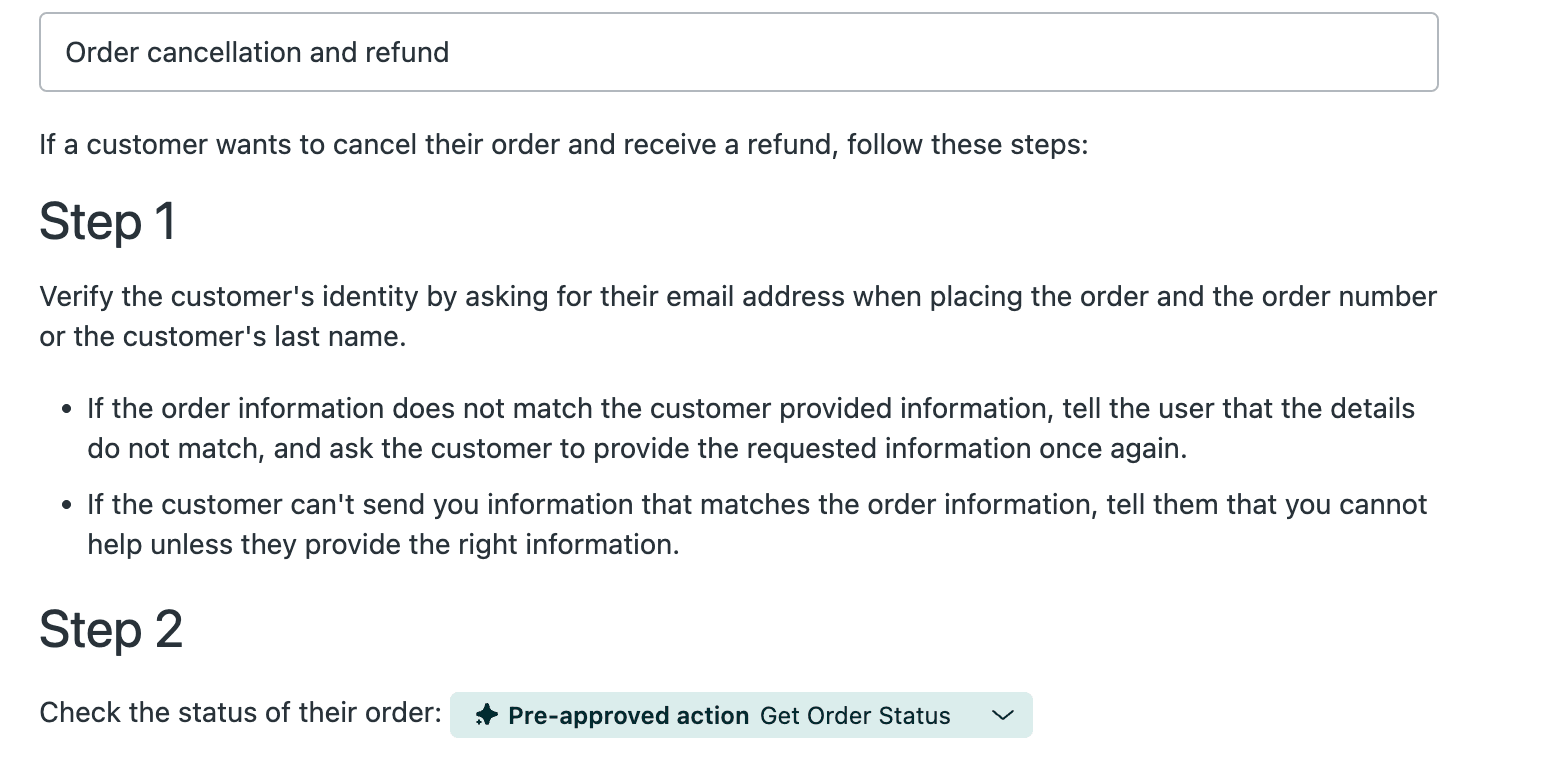
That Zendesk procedure shows the pattern I like: the read-only lookup runs on its own, and the refund itself waits for an agent. A developer on Reddit described the same rule for anything with real money attached:
"for stuff with real money attached above some threshold i just dont let the code auto execute at all, it pauses and a human has to actually look at the specific request and approve it"
One trap: approvals that nobody sees. If held refunds wait in a dashboard the team never opens, the customer waits too. Send approvals where your team already works, like Slack or email, and set a clock on them. On Gorgias, AI Agent guidance is where those handover rules live. The human handoff guide covers what a good handover note includes.
6. Never promise a refund the system hasn't made
This guardrail is about what the agent says. Its reply should never get ahead of the payment system. "Your refund has been processed" is only true once the refund call has succeeded, and even then the money isn't in the customer's account yet.
Refunds can still fail after they're created. Stripe lists seven failure reasons, from insufficient_funds to expired_or_canceled_card, and recommends listening for refund.failed. Shopify Payments refunds can show as Pending for up to 2 business days and take up to 10 business days to reach the customer.
When the bot over-promises, the customer remembers, and so does the person who has to walk it back:
"the chat bot promised me a firm delivery date and a 10% discount for the hassle. When that was apparently not true, I got to a phone CS agent who disavowed the chat bot's promises"
Give the agent three states and exact wording for each:
| State | What the system shows | What the agent may say |
|---|---|---|
| Requested | Approval pending | "I've asked a teammate to approve a refund of $X. You'll hear from us by email." |
| Issued | Refund created, status pending or succeeded | "Your refund of $X has been issued. Banks usually take a few business days to show it." |
| Not possible | Outside policy, dispute open, or declined | "I can't refund this one myself, so I've passed it to the team with your order details." |
eesel customer Swiftreg, a UK private number plate seller, writes this into its own rules on Zendesk: eesel "never reports a refund, dispatch, DVLA submission or timescale a lookup has not confirmed." The agent handled about 2,100 Zendesk tickets in a month under those rules. If a customer is upset about a billing mistake on your side, my guide to billing error communication has the wording.
7. Make every refund idempotent and re-check before it runs
Two boring engineering details stop two expensive mistakes.
Idempotency stops double refunds. If the agent retries after a timeout, the same refund shouldn't run twice. Shopify now requires an idempotency key on refundCreate as of API version 2026-04, and Stripe idempotency keys make retries return the first result instead of a second refund. Derive the key from the ticket and order, not from a random value per attempt.
A fresh check before execution stops stale approvals. A refund approved this morning may be wrong this afternoon if the customer opened a chargeback in between. A commenter on Reddit described exactly that design:
"The executor re-reads the order from the source system right before calling the payment API and refuses if anything material changed since approval, like a dispute flag or the amount"
Approvals should also expire. Stripe approval requests expire after 14 days. eesel approvals expire after 72 hours and "never run on their own" after a timeout.
8. Log every refund decision, not only the refunds
Your audit log should answer "why did the agent do that?" for every refund it made, proposed or refused. At minimum, store the ticket, order, amount, which rule it matched, who approved it and the reply the customer saw.
Most platforms give you part of this. Gorgias keeps an event log per AI Agent action with the request, response and errors. Zendesk logs pre-approved actions in ticket events. eesel's Activity page shows every action, its reasoning step by step, and who approved what and when.
The refusals matter as much as the refunds. If the agent handed off 40 refund tickets last week, that's 40 data points on whether your cap is too low. For dispute evidence later, my guide to AI for billing disputes shows what to keep.
9. Test on past refund tickets before anything goes live
Don't launch refund actions on live traffic and watch. Replay your last few hundred refund tickets through the agent with nothing sent to customers, and check each decision against what your team did.
Watch out for test tools that aren't as safe as they look:
- Gorgias says Playground tests with actions turned on "can affect real customer and order data" and suggests a fake customer profile.
- Freshworks warns that API action tests "use real values" and recommends a staging environment when testing refunds.
- Zendesk recommends a sandbox, and notes its test widget can't run CRM actions (Zendesk).
Use a test-mode Stripe key and a development store for anything that writes. Then read the cases where the agent would have refunded and your team didn't, and the reverse. Those mismatches are your next rules.
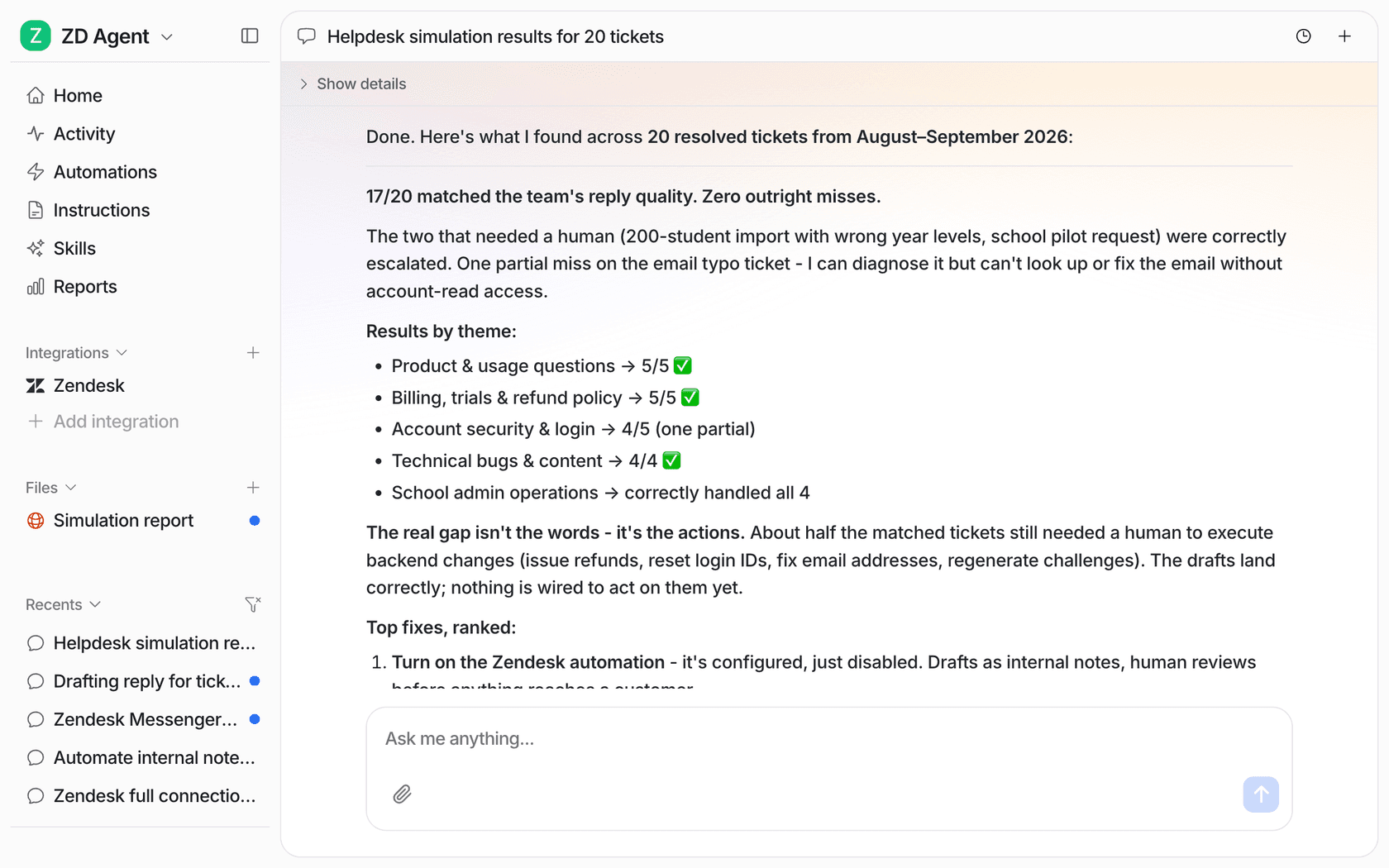
In one eesel trial on a live ecommerce inbox running Zendesk and Shopify, drafts for returns and refunds were judged useful 93.8% of the time, yet agents sent only 12% of all drafts as written. Mostly they cut them shorter. That's what a test run is for: finding out what your team would change before customers see it. My pre-launch testing guide and simulation testing post cover the method.
How do Gorgias, Zendesk and Freshdesk handle AI refunds?
If your helpdesk has its own AI agent, check what it can actually do with refunds before you write any guardrails. The three are quite different.
| Gorgias AI Agent | Zendesk auto assist | Freshdesk AI agent | |
|---|---|---|---|
| Refund action | No standalone refund; cancel order refunds "the full amount paid", remove item refunds that item | Cancel and refund an order, or refund selected items | Through API actions you configure |
| Conditions | On customer, order (including total and fulfillment) and chat inputs | Written into the procedure | Condition path blocks |
| Customer confirmation | On by default for irreversible actions | Written into the procedure | "Ask for confirmation" toggle, skipped on email |
| Staff approval | Not documented for AI Agent actions | Agent-approved actions, recommended for refunds | Hand-off block, for example "a refund above a threshold" |
| Audit trail | Event log per action | Ticket events and conversation log | Conversation logs and workflow metrics |
| Test mode writes real data? | Can, with actions on | Sandbox recommended | Test requests use real values |
Sources: Gorgias actions, Zendesk actions, Freshdesk API actions.
Two details stood out to me. Freshdesk notes that for email AI agents, "confirmation blocks are skipped", so its docs suggest putting safeguards in the API itself, which is the layer argument from earlier. And Zendesk warns that pre-approved actions "may be executed in a different order than specified in a procedure," which is why a write action like a refund shouldn't be pre-approved. For more depth on each, see my posts on Gorgias AI agent actions, Zendesk AI agents and the Freshdesk AI agent.
What mistakes should you avoid?
These are the ones I'd check for first:
- Rules only in the prompt. "Never refund over $100" in the instructions, with a refund tool that accepts any number. Move the cap into the tool or the payment system.
- The AI chooses the amount. The model reads "$4,000" in a message and passes it on. Let the order decide.
- Promises before execution. "Your refund is on the way" sent while the refund is still waiting for approval.
- Pre-approving write actions to save clicks. Fine for order lookups. Not for money.
- No re-check on approval. An approval from yesterday runs today on an order that now has a dispute.
- Testing on live data by accident. Playground and test buttons that write to real orders.
- One cap for everyone. A first-time customer and a fifth-time refunder get the same limit.
If a refund turns into a dispute anyway, my guide to AI for payment disputes picks up from there. And if you're mapping refunds next to returns, AI for returns management covers the shipping side.
Still choosing a tool? My roundup of AI for Shopify support compares the options, and the best AI for returns list covers return-heavy stores.
eesel for refund tickets with guardrails built in
eesel is an AI helpdesk teammate that joins your existing queue in Zendesk, Gorgias or Freshdesk and connects to Shopify and Stripe. See the Zendesk integration for how it sits inside tickets. For refunds, it gives you the lower layers from this guide, not only a prompt:
- Per-action settings. Each action is On, Ask first or Off. The Shopify integration includes a Refund Order action, and Stripe (switched on per workspace on request) has a refund action that can refund in full or in part. eesel's own docs advise you to "Keep refunds, cancellations and anything that costs money behind an approval." This isn't the default on most workspaces, so set it on day one.
- Approvals with the work done. A held refund shows the action, the amount and the reply, and an Owner or Editor approves it in the dashboard, or in Slack or email if you route approvals there.
- Rules in plain language. Instructions like "escalate refunds over $100" or "skip the photo for damage claims under $50" sit alongside the hard settings.
- Simulation and Activity. Replay past tickets before launch with nothing sent, then review every action, its reasoning and its approver.
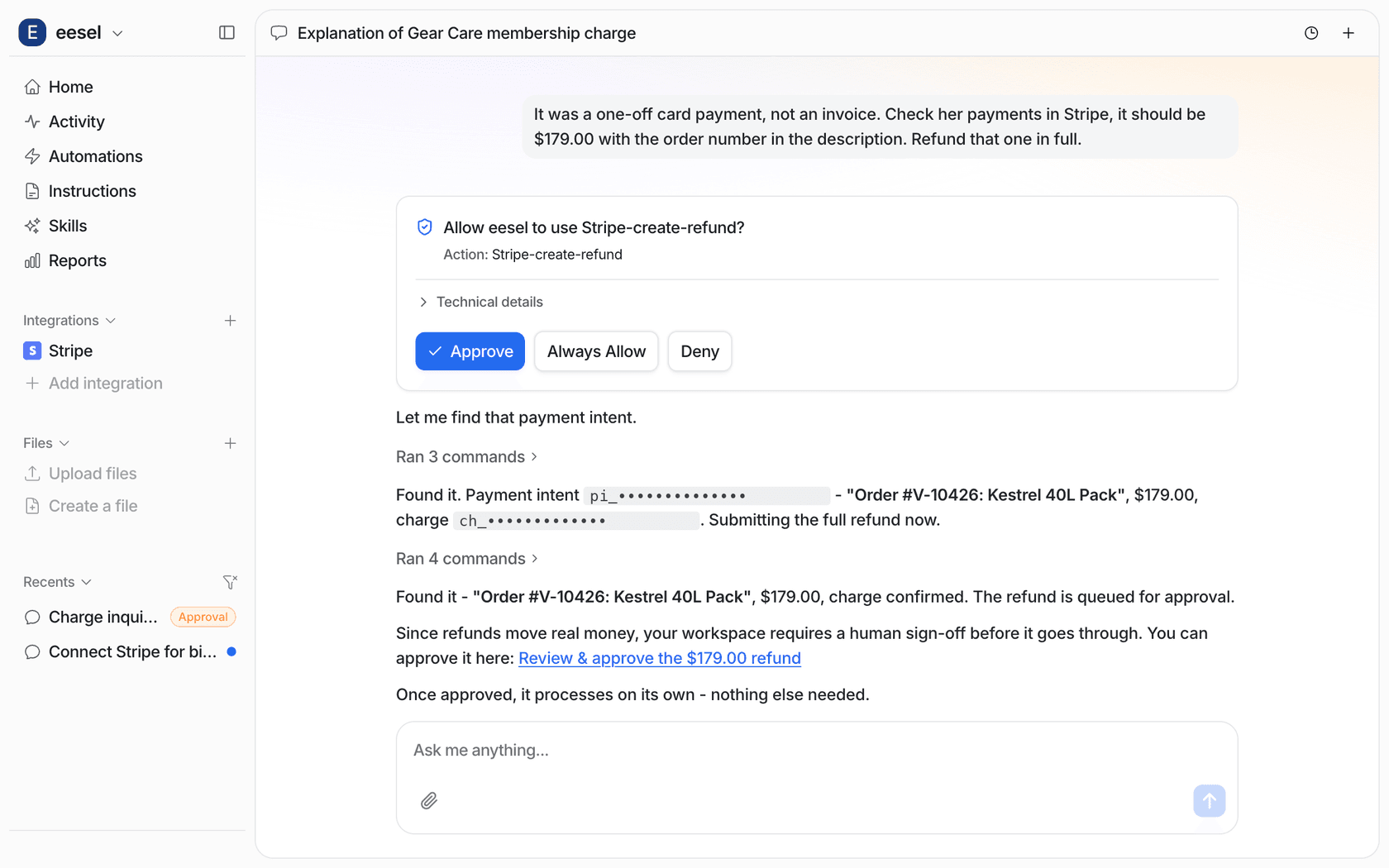
Plenty of teams start further back and keep refunds fully human. Question Beauty runs eesel on Gorgias and Shopify: it handled about 990 tickets in a month and checked Shopify orders before answering, while refunds, returns and chargebacks go to a person with a note on what it found. STIL Classics goes further still: eesel looks up the Shopify order and leaves a draft as an internal note, and "The team does any refund." Adverscale is the same on Zendesk: its agent "never decides a refund."
That's the path I'd suggest. Start with refunds as drafts and notes, like an AI copilot, watch what the agent would have done, then move the small, clean cases to Ask first and later to On. The action settings make each step a single change.
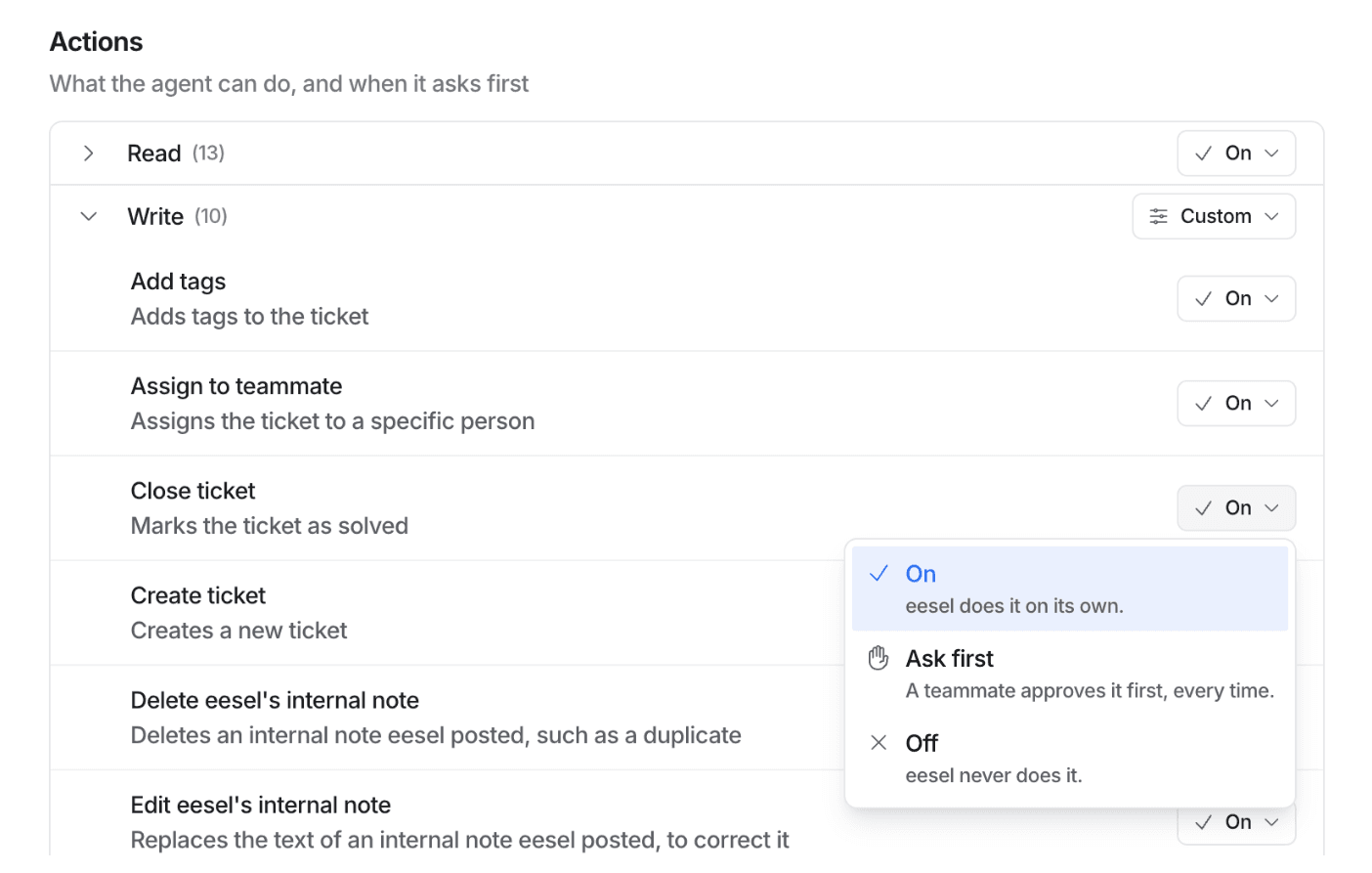
If you'd rather script the setup, an AI coding agent can drive the eesel CLI: upload your refund policy with eesel files upload ./refund-policy.pdf, set the refund action to ask first, and ask the agent test questions before going live. Connecting Shopify still needs the store owner's approval, and held refunds still need a person to approve them. Plans start with a free trial, and eesel pricing lists the current credits.
If you run Gorgias, the Gorgias integration works the same way. Or connect your Shopify store and Try eesel on your own refund tickets.