


Instagram DM order tracking works when each "where is my order?" DM becomes a helpdesk ticket. Match the person to the order before sharing anything, read the tracking from Shopify, and reply inside Meta's 24-hour window, because after that only a person may answer, for up to 7 days.
AI can safely handle "not shipped yet" and "here's your tracking link." Lost parcels, delivered-but-missing claims and refunds go to your team. eesel does this inside Gorgias, Zendesk or whichever helpdesk your DMs land in, so the order check, reply and handoff stay in one queue.
Why are order questions in Instagram DMs harder than email?
Because the DM carries almost nothing you need. An email from jamie@gmail.com matches a Shopify customer. A DM from @jamieclimbs matches no one. The message is short ("where's my stuff??"), it often has no order number, and it arrives on a channel with a hard reply clock.
I build AI agents at eesel, and the stores I see running support on social all describe the same mix. Question Beauty, a direct-to-consumer cosmetics brand on Gorgias and Shopify, put it this way in their story: most of their volume "is short messages from social media and chat: how much is this, do you ship to my country, where is my order, is this in stock." Rúngne, a Norwegian climbing apparel brand, gets Instagram and Facebook comments in the same Gorgias queue as email and chat, which came to 2,100 tickets in a month.
The second problem is who owns the inbox. When DMs live in the Instagram app on one person's phone, order questions wait for that one person. A Zendesk reviewer on G2 described exactly that before moving DMs into the helpdesk:
"A lot of our customers reach out through Instagram DMs first, and before this whoever managed our social account was fielding those separately from actual support tickets, so if that person was out, messages just sat unanswered."

So the fix has three parts: get DMs into the helpdesk, give whoever answers (person or AI) the order data, and put a rule between "someone asked" and "we shared their address." If you want an AI coding agent to do the setup, the eesel CLI lets it upload your shipping policy and saved replies, then ask test "where is my order?" questions and check the answers before anything reaches a customer. Connecting Gorgias or Shopify still needs an admin to approve it in the browser.
If you're after the wider picture of AI on Instagram (sizing questions, story replies, creator DMs), my AI for Instagram DMs guide covers that. This post stays on orders.
What are Meta's reply rules for order questions in DMs?
You get 24 hours. Meta's Instagram messaging docs say a business can only message someone after they've messaged first, and the standard window "lasts 24 hours" for most actions. If the customer messaged after clicking a Click-to-Direct ad, it "may last up to 7 days from that message." Every new message from the customer restarts the clock.
After 24 hours there's one way to keep talking: the human agent tag. Meta's Page messages reference lists five message tags and then says "Only HUMAN_AGENT is available for Instagram Messaging." That tag lets a person reply up to 7 days after the customer's last message. It's for a person typing, not for automation.
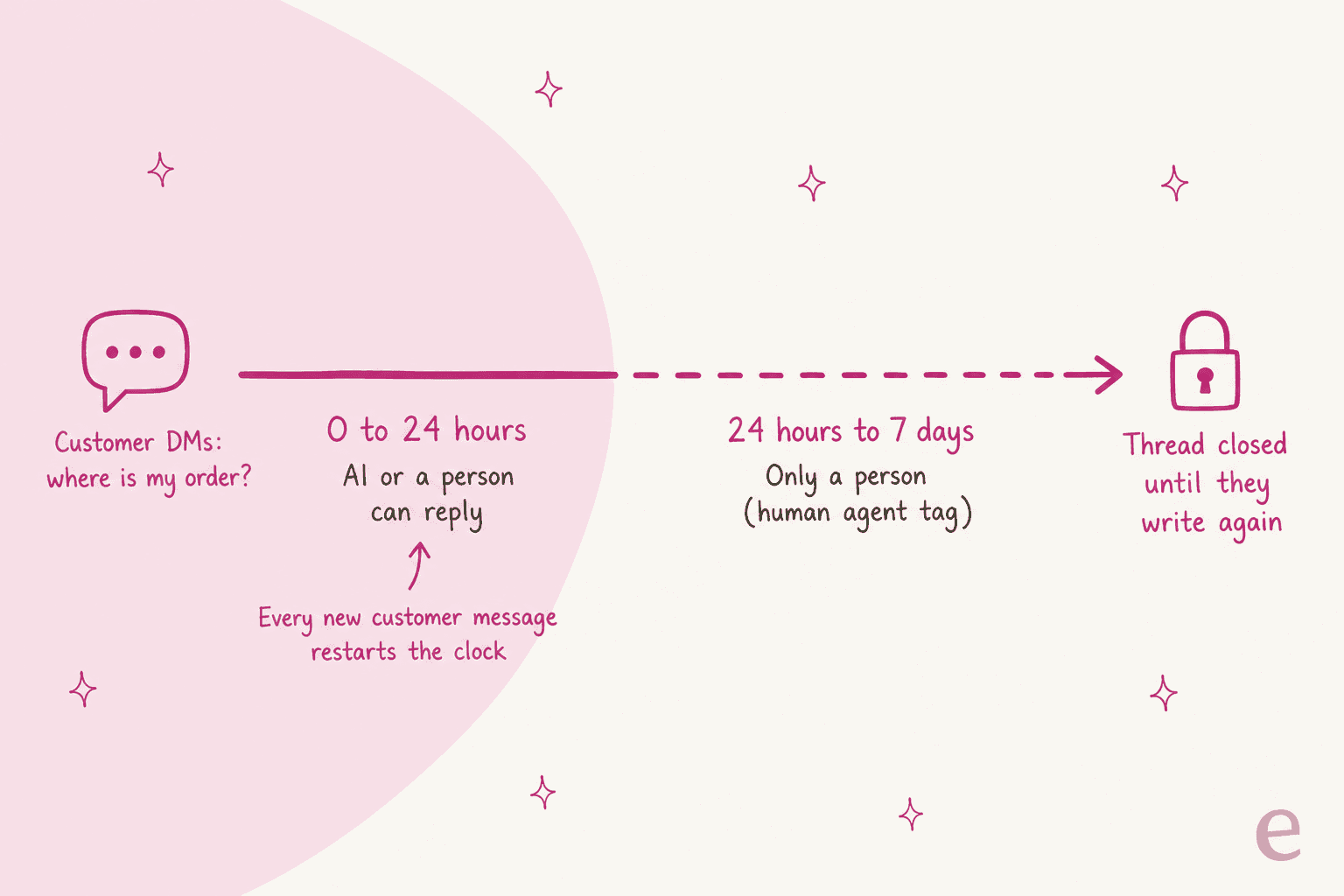
Three things follow for order tracking specifically:
- You can't push a shipping update later. On Messenger, a business can use the
POST_PURCHASE_UPDATEtag to send an order update outside the window. On Instagram that tag isn't available. If a parcel ships three days after the customer asked, you can't DM them the tracking link unless they write again or a person replies under the human agent tag. Your shipping emails (see this Shopify tracking workflow) are still the channel that carries proactive updates. - An AI reply has to land fast. Gorgias's AI Agent docs say it "can respond to shoppers within Meta's 24-hour standard messaging window." A weekend backlog that a human clears on Monday is still fine under the 7-day tag. An AI that queues for 30 hours isn't.
- Reply from the helpdesk, not the phone. Zendesk's Instagram Direct setup page notes that replies made in Instagram don't sync to the ticket. Gorgias goes further: its AI Agent "doesn't stop replying when you respond from the Instagram or Messenger app." Someone answering from their phone can end up talking over the bot.
How do you check who's asking before sharing order details?
Ask for something only the buyer would know, and match it to the order before you reply with anything personal. An Instagram username is not proof of who placed an order. Anyone can DM "where's my order, it's under Sarah Lee," and a delivery address or a partial card number in reply is a privacy incident, not a support win.
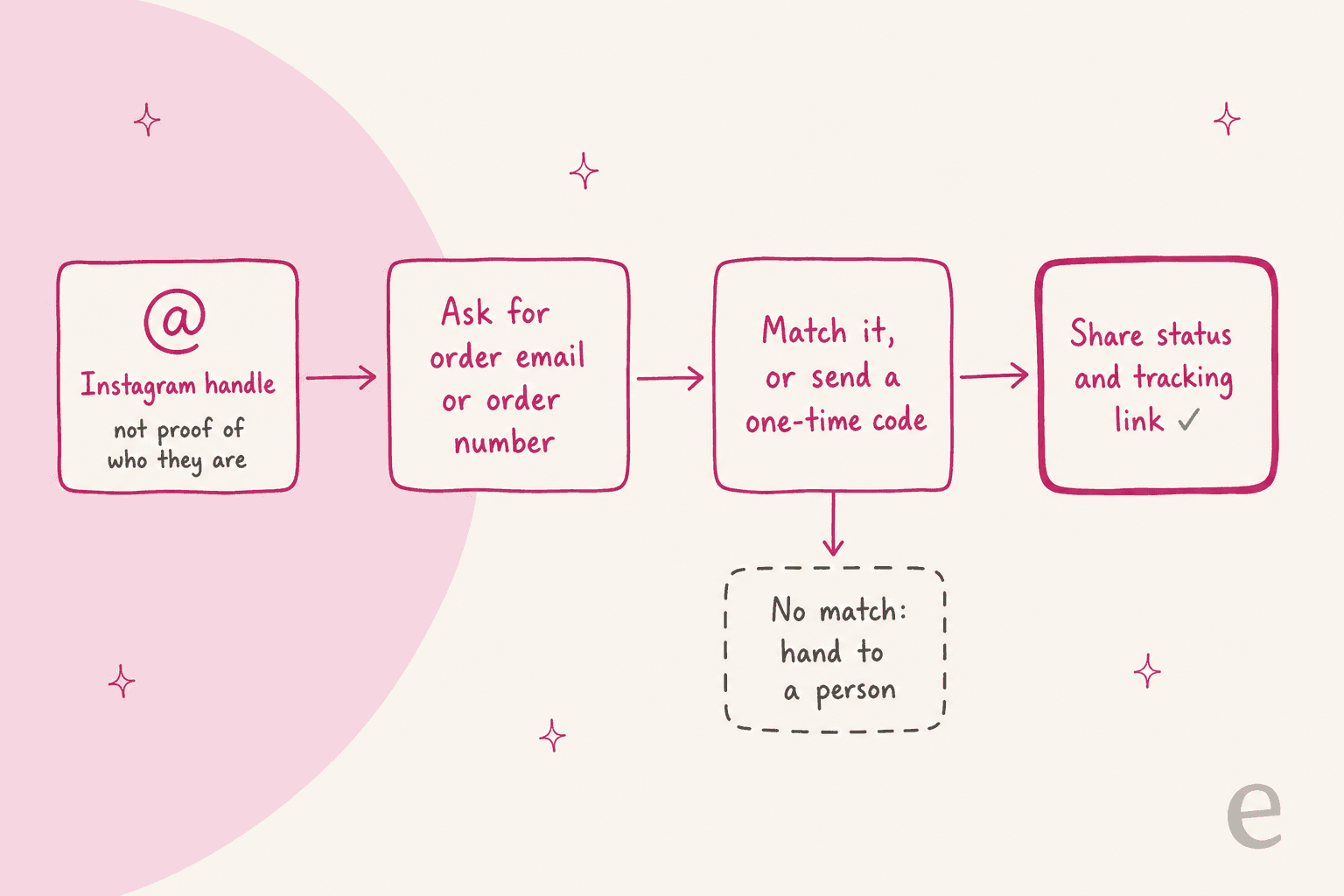
Gorgias has the most worked-out version of this I've seen on Instagram. Its AI Agent identity check runs before any order question or change:
- If the Instagram account is already linked to a customer profile, it recognises them and moves on.
- If not, it asks for "the email address or phone number on their order."
- It sends "a 6-digit code to that email address or phone number. The code expires after 10 minutes."
- A wrong or expired code, or no matching profile, hands the conversation to your team.
After one successful check, Gorgias links the Instagram account to the customer profile so the next DM skips the code.
If your stack doesn't send codes, a lighter rule still works: ask for the order number and the email used at checkout, and only answer when both match the same order. Beautek, a German equipment supplier on Zendesk, runs its eesel agent this way on website chat: it asks for the customer's email, runs a short identity check, then reads status and tracking from Beautek's own order system.
Two rules I'd hold everywhere:
- Share status, not personal data. "Your order shipped Tuesday with DHL, here's the tracking link" is fine once matched. Reading back the full address isn't needed to answer the question.
- Never ask for passwords or card numbers in a DM. If a customer volunteers them, have a person reply and tell them not to. The same owner-only logic shows up in AI for account recovery, and fraud tickets follow it too, as covered in AI for fraud-related support.
What can AI safely say about an order, and when should a person take over?
The answer depends on the order's state in Shopify, not on how the customer phrased the question. "Where is my order?" means five different jobs depending on what the order record shows.
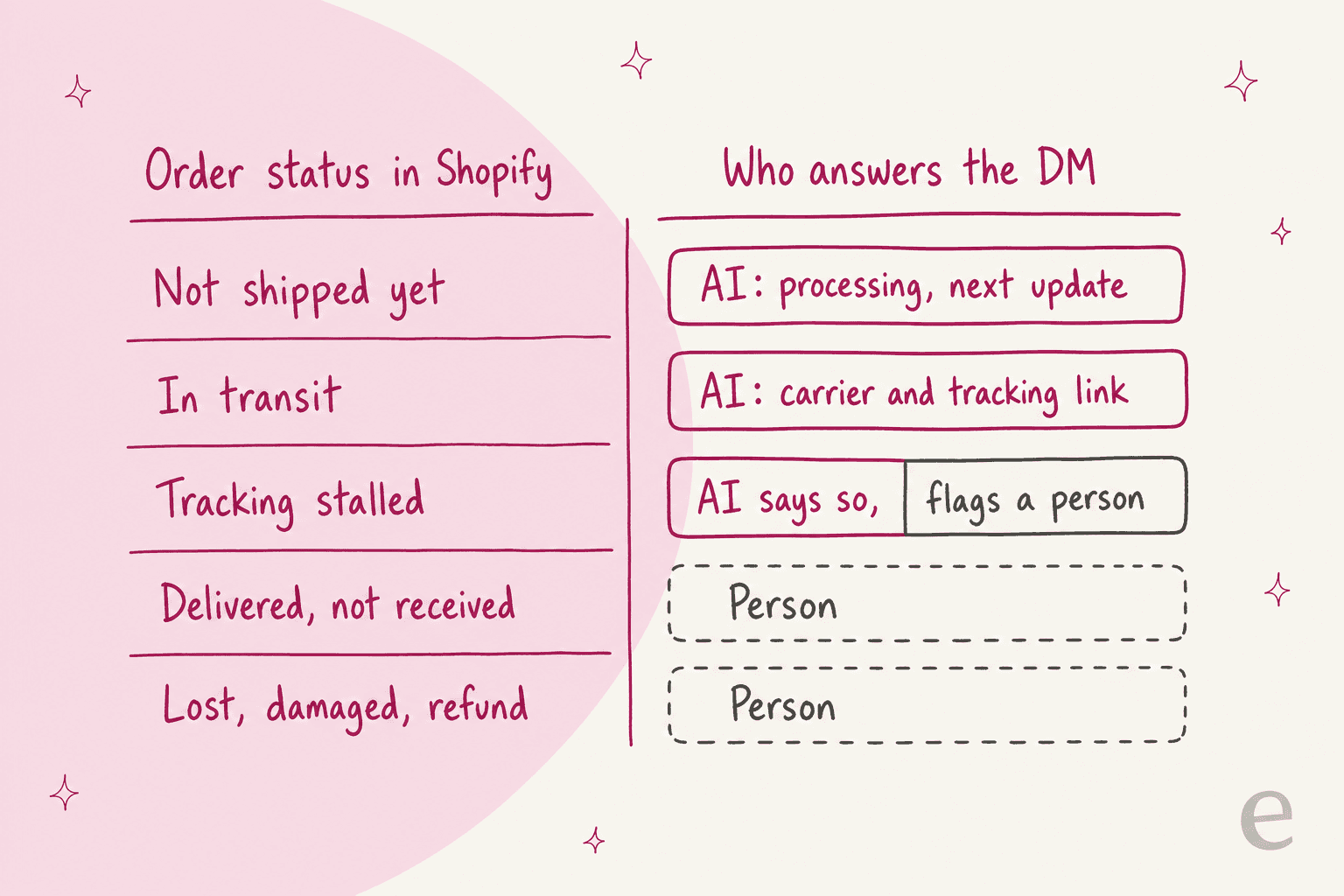
| Order state | What the reply should do | Who sends it |
|---|---|---|
| Paid, not shipped | Say it's being prepared and point to the shipping time in your policy | AI |
| Shipped, in transit | Give the carrier, the tracking number and the tracking link | AI |
| Tracking hasn't moved in days | Say what the last scan shows, then flag for a person to chase the carrier | AI drafts, person follows up |
| Marked delivered, customer says no | Acknowledge, collect details, hand over | Person |
| Lost, damaged, wrong item, refund | Hand over with the order attached | Person |
A Reddit commenter in r/shopify put the bar for the routine cases well:
"the 'where is my order email' a better response in terms of good customer service should actually contain tracking details, so that the client can find what he is looking for straight away"

That's the whole job for the top two rows: look it up, answer with the link, done. Question Beauty's agent checks "the customer, the recent order, its fulfilment status and tracking" in Shopify for every delivery question, and if the order is still processing or tracking already answers it, "eesel says so and closes the ticket." It looked up 290 Shopify orders and closed 280 tickets without a person in a month.
The bottom rows are where an AI that tries too hard costs you money. Rúngne's draft agent "never states a restock date, a return fee figure or an unconfirmed delivery date," and cancellations, damaged items, lost parcels and customs disputes go to the team. That's the right instinct: an AI that promises "it'll arrive tomorrow" from a stale scan creates the next ticket.
It's also what support leads ask for when they evaluate AI. A CX lead at a supplements brand doing about 7,000 Gorgias tickets a month told eesel on a sales call:
"I need an AI who is only handling the tickets that it's confident to handle and all the other ones, leave them alone."
For the handoff itself, the person picking it up shouldn't have to re-ask anything. The note should carry the matched order, the last tracking event and what the customer asked. Human handoff best practices goes deeper on the note itself, and the guide to shipping delay notifications covers late parcels.
How do Gorgias, Zendesk and Freshdesk route Instagram DMs?
All three turn Instagram DMs into tickets and can put an AI agent on them. They differ on order lookup inside the DM and on how they bill the AI.
| Gorgias | Zendesk | Freshdesk Omni | |
|---|---|---|---|
| Instagram DMs become tickets | Yes | Yes (Instagram Direct) | Yes |
| Story replies | Ticket created, AI won't reply | Yes, as tickets | Toggleable |
| AI on Instagram DMs | AI Agent on Socials | AI agents on social messaging (needs Zendesk messaging) | Freddy AI Agent ("Start with AI Agent") |
| Identity check before order data | 6-digit code, 10 minutes | Not documented for Instagram | Not documented for Instagram |
| Order lookup in the DM | Yes, Shopify | Not documented for Instagram | Shopify API actions exist, not Instagram-specific |
| AI billing unit | $1.50 per automated interaction, plus ticket fee | $1.50 committed / $2.00 pay-as-you-go per automated resolution | $49 per 100 AI Agent sessions |
| Entry plan with Instagram | Starter $10/mo (50 tickets) | Suite Team $55/agent/mo annual | Growth $29/agent/mo annual |
Prices are from each vendor's own pricing page as of November 2026: Gorgias bills per ticket, Zendesk per agent (pricing page), and Freshdesk Omni per agent with AI sessions on top (pricing page).
Gorgias is the Shopify-first option and the only one with a documented identity check on Instagram. Its AI Agent replies to DMs only, not comments, and Instagram and Messenger switch on together. Order Management and Flows "are built for Gorgias Chat, so they aren't available on social channels," per the same doc. Billing is a ticket fee plus an automation fee when AI Agent resolves without handing over.
Zendesk brings DMs and story replies in through the Instagram Direct channel, but "tickets are not created for comments or replies on posts, reels." AI agents run on social channels only if you're on Zendesk messaging, and handover sends the ticket to a Support group you pick (Zendesk's handoff setting explains the options). Zendesk only bills resolutions with no escalation, so handed-over order tickets cost nothing extra.
Freshdesk Omni lets you toggle DMs, story replies and story mentions separately, and Freddy AI Agent runs on DMs but not comments. The billing unit is the session, with every chat interaction inside 24 hours counted as one, rather than a resolution.
Outside the helpdesks, Manychat is strong on comment-to-DM flows but has no native order lookup documented, so it's better at collecting an order number than answering with tracking. Meta's own Business AI was launched with partners including Zendesk and Gorgias "to hand off complex support questions," which tells you where Meta expects order support to live.
How do I set up Instagram DM order tracking step by step?
This is the order I'd do it in. Steps 1 and 2 usually take an afternoon; the rest is tuning.
- Connect Instagram to your helpdesk. You need an Instagram professional account and, for Gorgias, Zendesk and Freshdesk, a linked Facebook Page. In the Instagram app, turn on Settings > Messages and story replies > Message controls > Connected tools > Allow access to messages, per Meta's setup guide.
- Connect Shopify to the same helpdesk so every DM ticket can show orders. If you're on another platform, connecting order data to an AI chatbot walks through the options.
- Write the identity rule down. Order number plus checkout email, or a one-time code. Put it in your saved replies and your AI's instructions in the same words.
- Pick the topics AI may answer. Start with "not shipped" and "in transit" only. Rúngne's team says moving a topic across later "is a list edit, not a project."
- Route the noise. Story reactions and mentions create tickets that aren't questions. Gorgias suggests a rule to close or route them; Gorgias Instagram comments covers the comment side.
- Test on real past DMs before going live. Gorgias's Playground lets you pick "Instagram DM" as the test channel. I'd also run the agent over a few hundred historical order tickets; AI support simulation testing explains how many you need per topic.
- Go live as drafts first, then let it send. Have the AI leave internal notes for a week, check them, then switch the "in transit" topic to send directly.
Where does eesel fit in Instagram order tracking?
eesel works as an AI teammate inside the helpdesk your DMs already land in. On Gorgias, Instagram DMs arrive as ordinary tickets. On Zendesk, the eesel Zendesk docs let you scope an automation by the channel a ticket came in on, "such as email, web form, Instagram DM or WhatsApp."
With Shopify connected, it reads the order live. The order fulfillment lookup returns "tracking numbers, carrier and shipment status for an order."
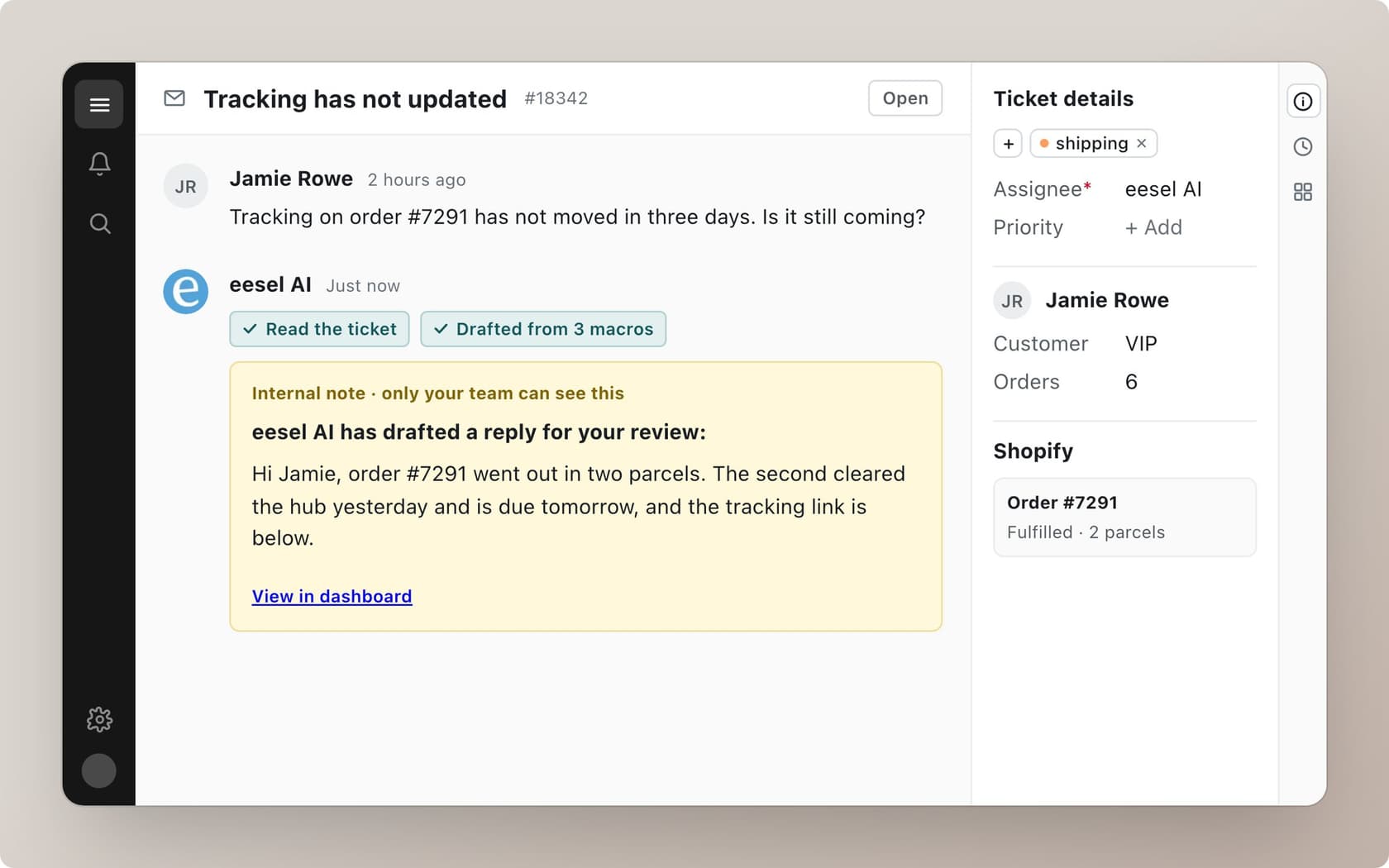
The way it handles the hard rows is the part I care about as someone who builds it. Every action is set to run on its own, ask first, or stay off, and the Actions and Approvals docs say plainly: "Keep refunds, cancellations and anything that costs money behind an approval." So the agent can send tracking links on its own while a refund for a lost parcel waits for a person. Rúngne runs three agents this way in Gorgias: one tags and acknowledges, one drafts with the Shopify order attached (580 drafts left for the team in a month), and one answers only the topics they chose, including "where is my order."
Two honest limits. First, eesel's docs list no native Instagram channel; the Instagram integration page describes connecting a Business account directly, but the route I can point you to step by step is through your helpdesk. Second, eesel's docs don't describe a one-time-code step like Gorgias's, so you write the match rule (order number plus email) into its instructions. Pricing is one credit per ticket, from $299 a month for 500, and an order lookup inside the ticket doesn't cost extra.
If you'd rather not run support at all, Managed Support covers Instagram and Facebook DMs, email, SMS and more inside your own tools for a flat $5k a month.
What mistakes break Instagram order tracking?
The four I see most:
- Answering from the handle. Looking up "the customer named Sarah" from the profile name and sending her order. Match an email or order number first.
- Promising a date. "It'll be there Thursday" from a carrier estimate that slipped. Share the last scan and the link, and let the carrier own the estimate.
- Replying from two places. One teammate in the Instagram app, the AI in the helpdesk, both answering. Everyone replies from the helpdesk.
- Letting the clock run out. A DM tagged for the AI but stuck behind a busy queue for 26 hours can't get an automated reply anymore. Watch first-response time on the Instagram view separately; social media response examples has templates for when a person picks it up.
For more on the order side in general, AI for order tracking support covers email and chat, returns get their own guide in AI for returns management, and my social support roundup compares tools across channels.
Try eesel for Instagram order DMs
If your Instagram DMs already land in Gorgias or Zendesk, eesel can join that queue as the teammate who checks the Shopify order before replying, sends tracking for "shipped" and "processing" orders inside the 24-hour window, and leaves lost-parcel and refund tickets for your team with the order attached. Question Beauty started with its social channels and now has 960 replies a month sent directly. Try eesel free with 100 credits and see its drafts on your own tickets before anything goes to a customer.