

AI support simulation testing means replaying tickets your team already solved through the AI agent, with sending switched off, and grading each answer before any customer sees one. The score is only as good as three things: how many tickets you replayed per topic, what you graded against, and whether the test could touch real systems. An 85% match on 20 tickets could really be anywhere from 64% to 95%, so read it per topic and treat small runs as a first look, not a verdict.
Of the helpdesks I checked, only Freshdesk's email agent and eesel replay your own solved tickets. Zendesk's simulator runs fictional scenarios, HubSpot generates questions from past conversation themes, Salesforce generates or uploads test cases, and Gorgias tests one conversation at a time.
The most useful run I've seen, a 100-ticket cross-check on a real ecommerce inbox, came back 88% right in direction, yet only 12% of drafts would have gone out unedited and 7% had a factual error. Same run, three honest scores. That's why I start every rollout with a simulation and then a stretch of drafts on live tickets. eesel does both, and Norden-Frisia signed up within days after a trial week run on its own past tickets.
What is AI support simulation testing?
AI support simulation testing is a dry run of an AI agent against realistic customer messages, where every reply is recorded and scored instead of sent. It answers one question before launch: if this agent had been working your queue last month, how many of its answers would you have been happy to send?
There are three ways to feed a simulation, and they catch different things.
| Kind of simulation | Where the test messages come from | What it catches | What it misses |
|---|---|---|---|
| Replay of past tickets | Solved tickets from your own helpdesk, in your customers' words | Real phrasing, real topic mix, gaps in your knowledge base | New issues you haven't seen yet, multi-turn pushback |
| Generated scenarios | An AI writes customer messages from your docs, topics or a prompt | Coverage of topics with little history, edge cases you describe | How customers actually word things, the real share of each topic |
| Scripted test sets | Questions you or your team write by hand | Known risks: refunds, legal, prompt injection | Anything nobody thought to write down |
I'd always start with the replay, because it's the only one built from what customers really send. Generated and scripted tests fill the holes the replay leaves, especially for the risky topics that don't come up often enough to show in a sample. My earlier AI support agent testing guide puts all three in a four-stage launch plan, and the pre-launch checklist covers handoffs, actions and the off switch. This post goes deeper on the simulation itself: how to run one, and how to read the score it gives you.
Why can a good simulation score still mislead you?
I build the integrations that pull ticket history into eesel, so I spend a lot of time looking at what a replay actually reads. The lesson I keep relearning is that "85% passed" means nothing until you know what "passed" meant.
That 100-ticket cross-check from the TL;DR is the clearest example I have. It was a trial on a real ecommerce inbox doing about 1,000 tickets a month. Triage was 93% accurate and spam detection was 100%. Drafts pointed the right way 88% of the time. But only 12% would have been sent exactly as written, and 7% contained a factual error. Of the rewrites, about 65% were length and tone, fixable by learning from the team's own sent replies, and only about 5% were the agent being wrong on facts. If you had stopped at "88%", you'd have launched with a 7% error rate you never saw, the kind of quiet AI hallucination customers find before you do.
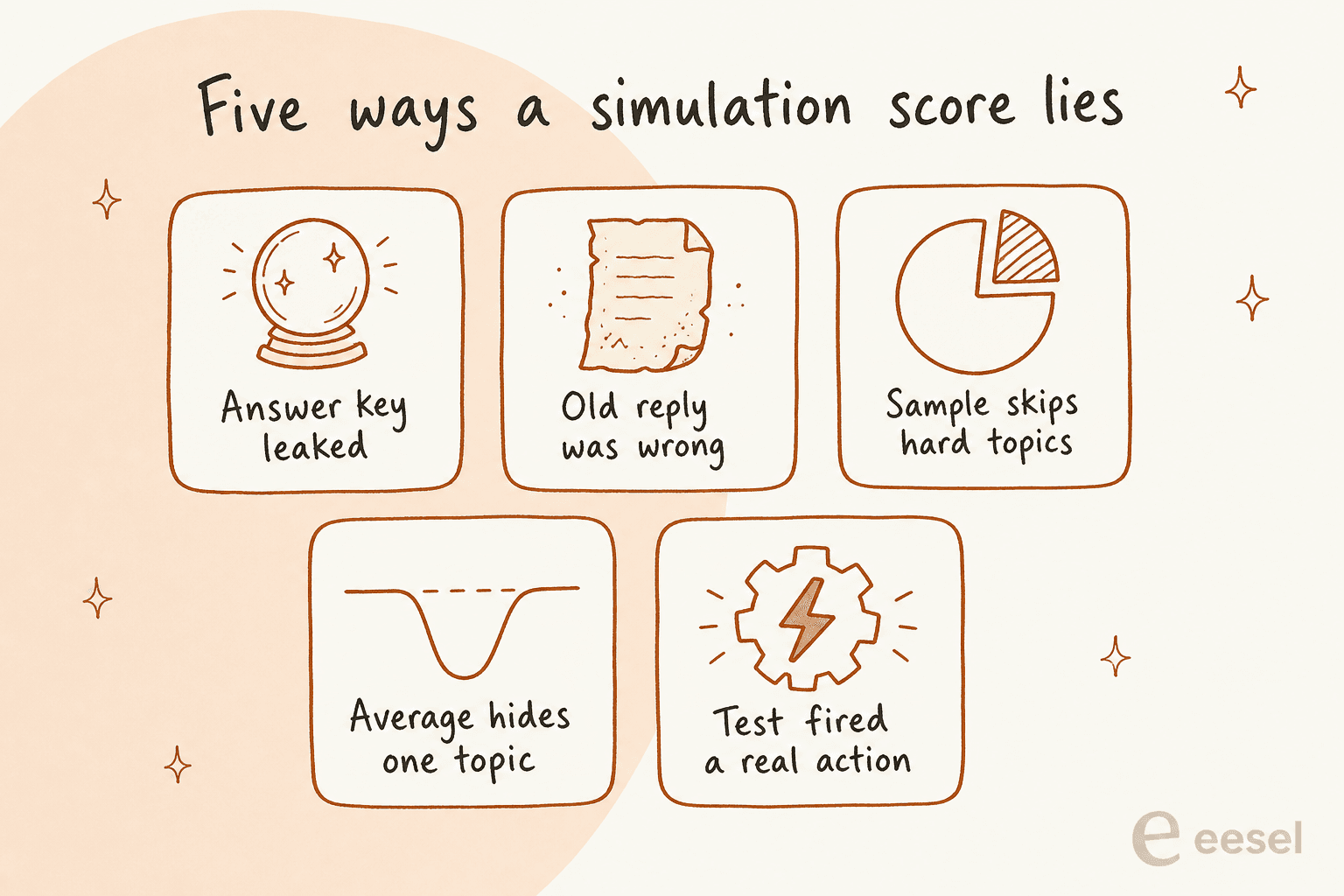
These are the five ways I've seen a simulation score drift away from what launch day looks like:
- The answer key leaked. If the agent can read the very ticket it's being tested on, or a macro written after that ticket was solved, it's grading itself with the answers in hand. Pick tickets the agent hasn't learned from, or switch that ticket source off for the test.
- The old reply was wrong. Matching what your team sent is a good default, but some of those replies used a policy you've since changed, and some were just mistakes. Grade against today's policy, and treat a "mismatch" on an outdated ticket as a pass.
- The sample skips the hard topics. Twenty recent tickets from a quiet fortnight might hold zero refund disputes. Fill the sample by topic, then add hand-written cases for the rare, risky ones.
- The average hides one topic. A 90% overall score can sit on top of a topic that fails every time. One Reddit commenter put it well: "A clean average can still hide one common path that fails every time" (u/Bitter_Big4525).
- The test fired a real action. A reply that's never sent is safe. A refund, a cancellation or a CRM update triggered during a test is not. More on this in step 3 below.
"the biggest failure i've seen was an agent that kept pulling data from the wrong user's account because the session token wasn't being passed correctly to the api call, the text responses looked perfect so nobody caught it until a customer complained about seeing someone else's balance"

That last one is the reason a simulation has to look at what the agent did, not only what it said.
How many tickets does an AI support simulation need?
For a first look, 20 tickets is fine. For a go-live decision on a topic, you want closer to 100 tickets on that topic, because small runs give you a score with a very wide margin of error.
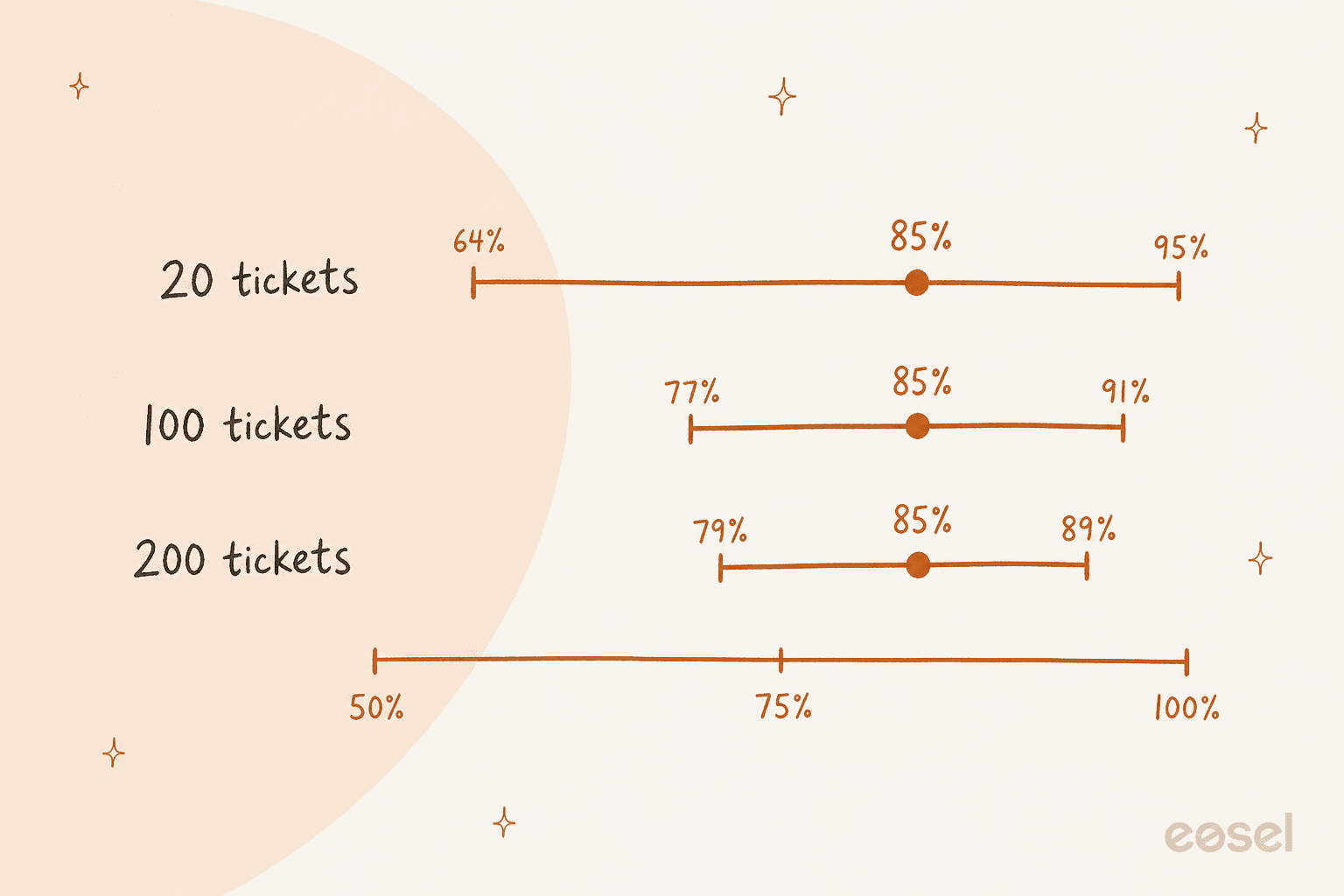
Here's the same 85% score at three sample sizes, using a standard 95% confidence range (the Wilson interval, if you want to check my maths):
| Tickets replayed | Passed | Score | Real rate is probably between |
|---|---|---|---|
| 20 | 17 | 85% | 64% and 95% |
| 50 | 42 | 84% | 72% and 92% |
| 100 | 85 | 85% | 77% and 91% |
| 200 | 170 | 85% | 79% and 89% |
| 20 | 20 | 100% | 84% and 100% |
Two things jump out. A 17-of-20 run can't tell you whether you've got a 65% agent or a 95% one. And a perfect 20-of-20 still only tells you the real failure rate is probably under about 16%. That's a great sign for a first run, and not enough to switch a topic to full autopilot.
The fix is cheap: run the simulation per topic, and keep adding tickets to the topics you want to automate until the low end of the range clears your bar. Plug your own numbers in here:
If a topic only gets a handful of tickets a month, you won't have enough history to prove it either way. That's a topic for drafts or a human handoff, not autopilot, however good the small run looks.
How do you run an AI support simulation you can trust?
Six steps, in this order. They work the same whether you use your helpdesk's built-in tester, a spreadsheet, or a dedicated AI helpdesk agent. The whole loop takes an afternoon for the first run, and minutes for every rerun after that.
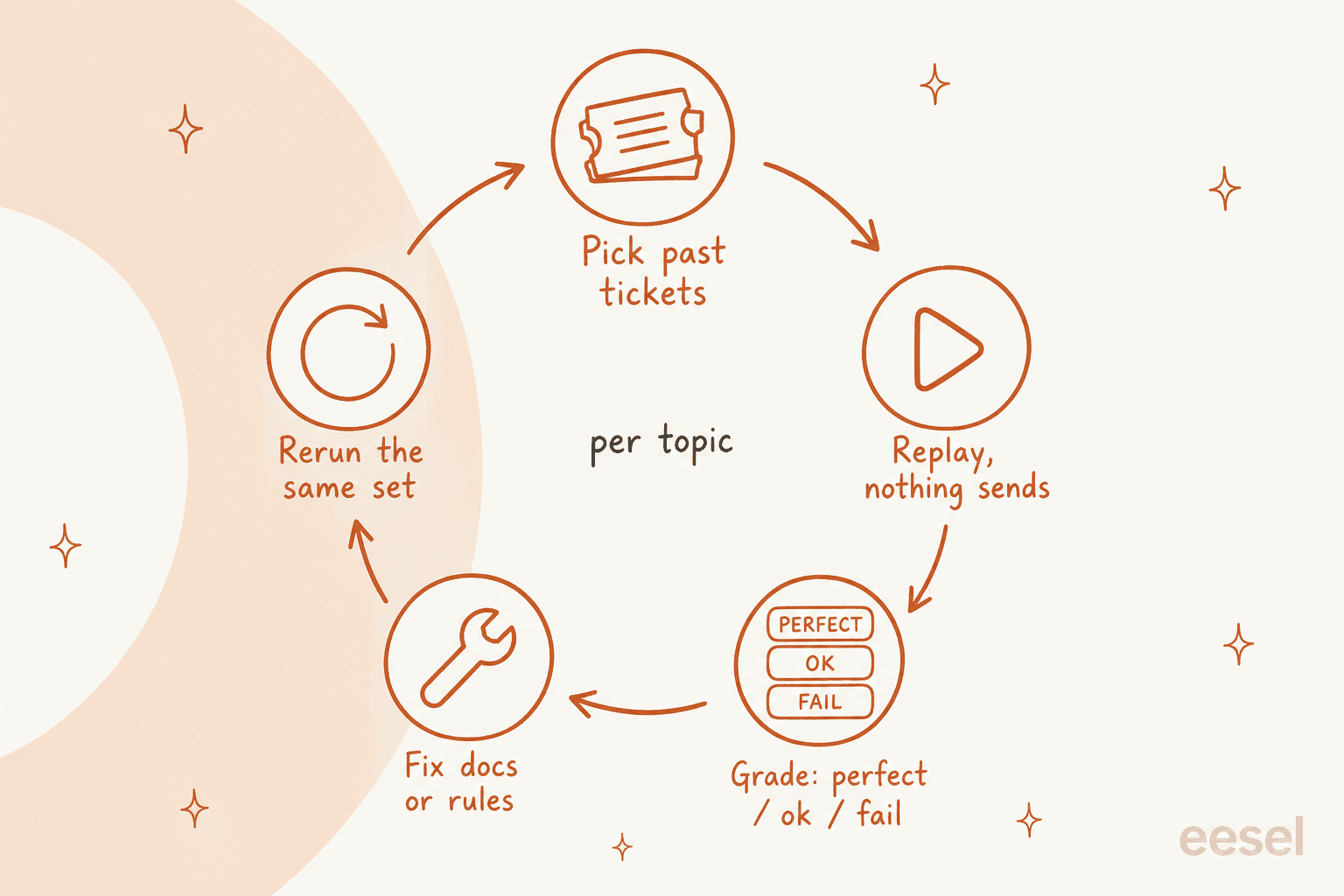
Step 1: pick the tickets by topic
Pull solved tickets from the last two or three months, so they reflect your current products and policies. Group them by topic (your helpdesk tags or ticket fields are usually enough) and take a share from each topic close to how often it arrives. Then add a small hand-written set for the rare, high-stakes cases: a refund outside the window, a customer who asks for a manager, a message trying to override the agent's rules, a question your docs don't answer at all.
That last kind matters more than it looks. Some of the worst early failures I've seen in eesel's customer history were bots making up answers when the knowledge base had nothing relevant. A test set without unanswerable questions can't catch that, and it's the core of preventing hallucinations in support.
"The one that worried me most was refund amounts. I ran AI models through support emails with a written refund policy, and 7 of them promised the wrong amount on the same email. The reply reads polite and confident, so nobody catches it until the customer quotes it back. On the easy emails they all looked great. It only showed up on hard emails I wrote and held back."
Step 2: freeze what the agent knows, and check for leaks
Point the agent at the same help center, macros and instructions it'll use on day one, and nothing else. Every answer should be grounded in a source you can point to, so the grader can check where it came from. Then check that the ticket you're replaying, and anything written to answer it, isn't sitting in the agent's knowledge. If the agent learns from past tickets, either pick tickets it hasn't learned from or exclude that source for the test run.
Step 3: switch off every action that writes
Turn sending off, then check the actions. The vendors are clear that this isn't automatic:
- Gorgias warns that when its agent uses an action in a test conversation, "it can affect real customer and order data (like cancelling an order)", and suggests a fake customer profile (Gorgias docs).
- Salesforce says "Testing agents can modify CRM data" and tells you to run Testing Center only in a sandbox.
- HubSpot's test panel now shows "any records that were created or updated" during a test (HubSpot docs).
My rule: in a simulation, the agent may read anything it'll read in production, and write nothing. If you want to test a refund action, test it separately against a fake order, and grade it with actions on approval when it does go live.
Step 4: grade on three levels, plus a "never" bucket
A pass/fail grade throws away the most useful information. I grade every answer as one of:
- Perfect: you'd send it as written.
- Acceptable: right answer, needs a light edit for length or tone.
- Fail: wrong, incomplete, or it should have handed off and didn't.
Then I keep a separate "never" bucket for the failures that block launch no matter the average: an invented policy, a promised refund the policy doesn't allow, another customer's data, a missed handoff on a legal or safety ticket. One Reddit commenter described their buckets as "annoying," "bad," and "burn it down", and the burn-it-down tier "has to be zero or we don't ship" (u/Evening_Event4634).
Letting an AI grader do the first pass is fine, and most tools now do. Salesforce uses an "LLM judge" that compares each reply to an expected response, and even it says its quality scores "are not absolute measures of success or failure" (Salesforce). I have a person read every fail, every "never" candidate, and a random slice of the passes, which keeps a human in the loop where the grader is weakest. OpenAI's evaluation best practices make the same point about checking a model grader against people. That's the same habit as a QA calibration session, just pointed at the agent.
Step 5: read the results per topic, and decide per topic
This is where the run turns into a rollout plan. For each topic, make one of three calls:
| What the topic's result looks like | What I'd do |
|---|---|
| Low end of the range clears your bar, zero "never" failures | Candidate to reply on its own, after a week of drafts on live tickets |
| Mostly perfect or acceptable, a few fails you understand | Drafts for a person to send, fix the cause, rerun |
| Many fails, or any "never" failure | Hand off to a person, fix the docs or rules first |
Launching per topic, not all at once, is how most of eesel's customers do it. Rúngne keeps a topic list that decides what gets a direct answer and what gets a draft, and moving a topic across is a list edit. smava marks about 1,100 of its 27,000 monthly tickets as eligible for an automatic reply, with drafts for the rest.
Step 6: fix, then rerun the same tickets
When a topic fails, the fix is usually a missing or vague help article, an instruction that's too loose, or a handoff rule that doesn't fire. Make the change, then rerun the exact same set and compare. Keep the tickets that already passed in the set, because a fix for one topic can quietly break another. Rerun again any time you change the model, the instructions, the confidence threshold or a big chunk of the knowledge base. Skipping the rerun after a "small change" is one of the implementation mistakes I see most.
"I think the key is testing the decision separately from the conversation. An agent can have a perfectly polite chat and still issue a refund it wasn't allowed to. If it has to state which policy and limit it applied before it takes any action, you can check that against the rule instead of reading through transcripts."
Which helpdesks let you simulate an AI agent on past tickets?
Most AI agents now ship some kind of test runner, but they mean very different things by "simulation". If you're picking a tool, this is worth adding to your vendor evaluation checklist. I checked each vendor's own help center on 30 October 2026:
| Tool | Replays your real past tickets? | Test input | Limit per run | How answers are scored | Can tests touch real data? | Saved reruns |
|---|---|---|---|---|---|---|
| Zendesk conversation simulator (early access) | No, fictional data only | Customer profiles and scenarios you write or AI generates | Not stated | Status per conversation, resolution estimate | Not stated; test widget skips CRM actions | Versioned scenarios, run history |
| Freshdesk email AI agent | Yes, solved tickets | Imported tickets, typed or generated emails | 50 | Answered, Unanswered or Error, plus your rating | Workflows trigger; not stated if live | Yes |
| Freshdesk chat AI agent | No | Typed or generated questions | 100 | Answered or unanswered, plus your rating | Not stated | Yes |
| HubSpot customer agent | No, generates questions from past conversation themes | Generated or typed questions | 8 test sets | You mark Looks good or Looks bad | Records can be created or updated | Yes |
| Gorgias AI Agent | One existing ticket at a time | Typed message or one past ticket | 1 conversation | No score; you read its reasoning | Yes, if actions are on | No |
| Salesforce Agentforce Testing Center | No | Generated from topics, actions or knowledge, or CSV upload | 100 generated, 1,000 per CSV | AI judge against an expected response, 0 to 5 quality scores | Yes, sandbox advised | Yes |
| Atlassian Customer Service Management | Not stated | A dataset of questions | Not stated | Resolved or not, reviewed by a person | Not stated | Yes |
| eesel | Yes, solved tickets | Past tickets, or generated cases with no helpdesk | Docs example run: 20 tickets | Compared with what your team sent, grouped by theme | No, "It sends nothing to customers" | Yes, can run on a schedule |
A few things worth knowing about each.
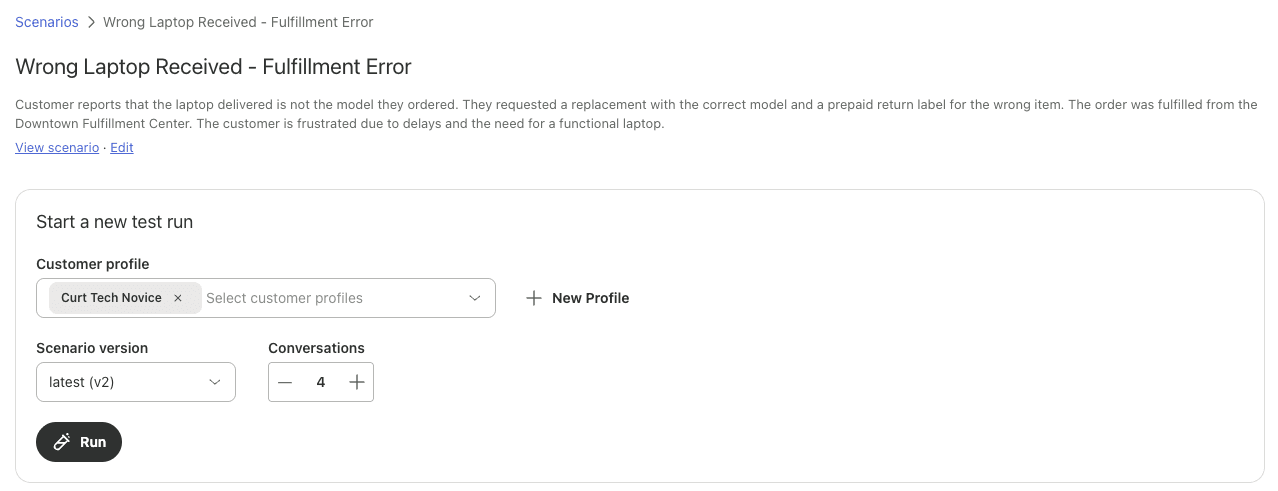
Zendesk. The conversation simulator is in an early access program and works only with a messaging AI agent. You write a scenario (background, initial problem, expected outcome, mock values) and pick a customer profile, and AI plays the customer. Zendesk says it's "designed for testing with fictional data", so it's strong for multi-turn chats and weak for "how would it have handled last month". Testing in it doesn't use up automated resolutions, which matters on Zendesk's per-resolution pricing. After launch, the conversation logs and Zendesk QA take over the grading.
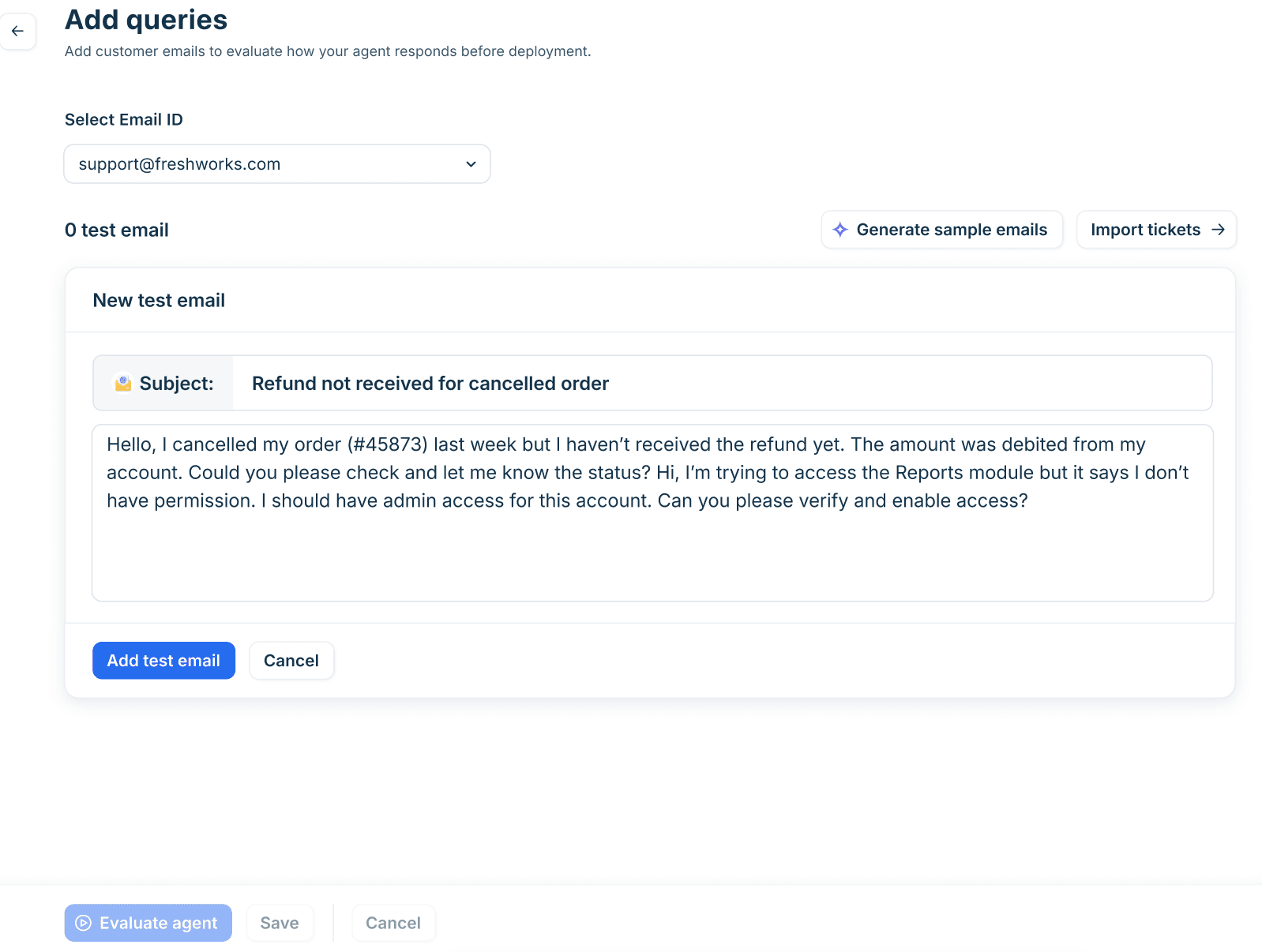
Freshdesk. The email agent's Evaluate step is the closest built-in thing to a real replay: you can "Import tickets to use solved historical tickets", up to "50 queries per evaluation run" (Freshdesk). Freshdesk's own bar is "at least 20 representative queries before deploying", which, going by the table above, I'd treat as a floor. The score is whether the agent answered, not whether the answer matched what your agent sent, so you still read each one. It's on Freshdesk Omni Growth, Pro and Enterprise, and there's a sandbox if you want a fully separate copy.
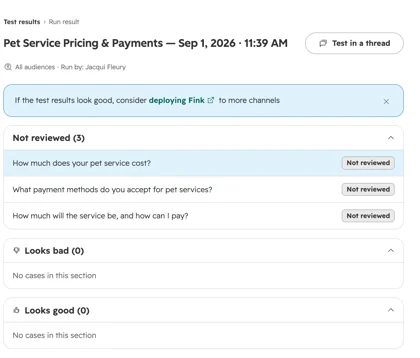
HubSpot. Batch testing can "generate them from existing customer conversations", which means it writes common questions per theme, and a theme needs "5 or more conversations on a similar topic" to show up. Grading is manual, one answer at a time, and test sets are saved for reruns. Testing doesn't use HubSpot Credits.
Gorgias. The Playground can re-run "an existing ticket", which Gorgias pitches for "re-simulating a conversation where AI Agent did not initially respond as expected" (Gorgias). It's great for checking a fix on one ticket, but there's no batch run, so you can't get a score across 100 tickets. Gorgias leans on live review instead: its go-live guide asks you to review "at least 10 tickets" in the first week.
Salesforce and Atlassian. Agentforce Testing Center has the most detailed scoring of the group: checks that the right topic and action were picked, plus an AI judge and optional quality scorers, on Enterprise, Performance, Unlimited and Developer editions with an agent add-on license (see Agentforce pricing). It doesn't replay past cases, though; you generate tests or upload a CSV. Atlassian's evaluations are simpler: a dataset of questions, each marked resolved or not, with a rerun after each fix.
If you're on Zendesk, Gorgias or HubSpot and want a replay of your actual solved tickets, that's a gap you'll fill outside the helpdesk, either with a spreadsheet and a lot of copy-paste, or with a tool that reads your ticket history directly.
What can't a simulation tell you?
A simulation tells you how the agent handles the first message of a ticket it has seen the shape of before. It can't fully tell you four things:
- How customers push back. A replay has one customer message and one answer. Real customers reply "that's wrong", ask again, or get angry. Scripted multi-turn tests help; live drafts help more.
- What's new this week. A product launch, an outage or a policy change creates tickets your history doesn't have.
- How customers feel about it. One Hacker News commenter who led an AI support rollout said they "did our own intensive testing" and still found "our customers just hated it" (victor106). Tone, speed and the option to reach a person matter as much as accuracy.
- Whether your docs stay true. A simulation is a snapshot. If a policy page changes next month, the score is stale. Schedule a rerun.
"Shipped a customer service agent for a mid-size e-commerce client last year, manual testing looked clean across every flow we ran. First week in production, users started interrupting mid-response to rephrase their question, agent would drop the original context entirely and answer the new phrasing with confident, wrong information. Support tickets spiked, client was fielding churn risk conversations by day ten. We caught exactly zero of that in manual testing because we were too polite during QA."
That's why I treat the simulation as the gate into drafts, not into autopilot. The next step is a week or two where the agent drafts on live tickets and a person sends. Innr is in exactly that stage on Freshdesk: every reply is a draft today, and the team is moving chosen topics to autonomous replies one at a time. SE Ranking is testing direct email replies on test tickets picked by subject line before widening it. Watch the resolution rate and reopen rate per topic during that stretch (not deflection, which counts tickets that never reached you), and use them to decide what goes autonomous. My implementation timeline post shows how long that stage usually takes.
How eesel runs a simulation on your past tickets
I'll be specific about how this works in eesel, since it's the part of the product I see the most questions about.
You ask for it in chat. With a helpdesk connected, eesel's Helpdesk simulation "replays your past tickets and scores its answers against what your team actually sent" (eesel docs). Without one, it writes realistic test cases instead. The run drafts a reply to each ticket, compares it with your team's reply, groups the results by theme, and lists fixes ranked by impact. In the docs example run, 17 of 20 resolved tickets matched the team's reply quality, with a per-theme breakdown underneath. Treat that as an example of the report, not a forecast for your queue.
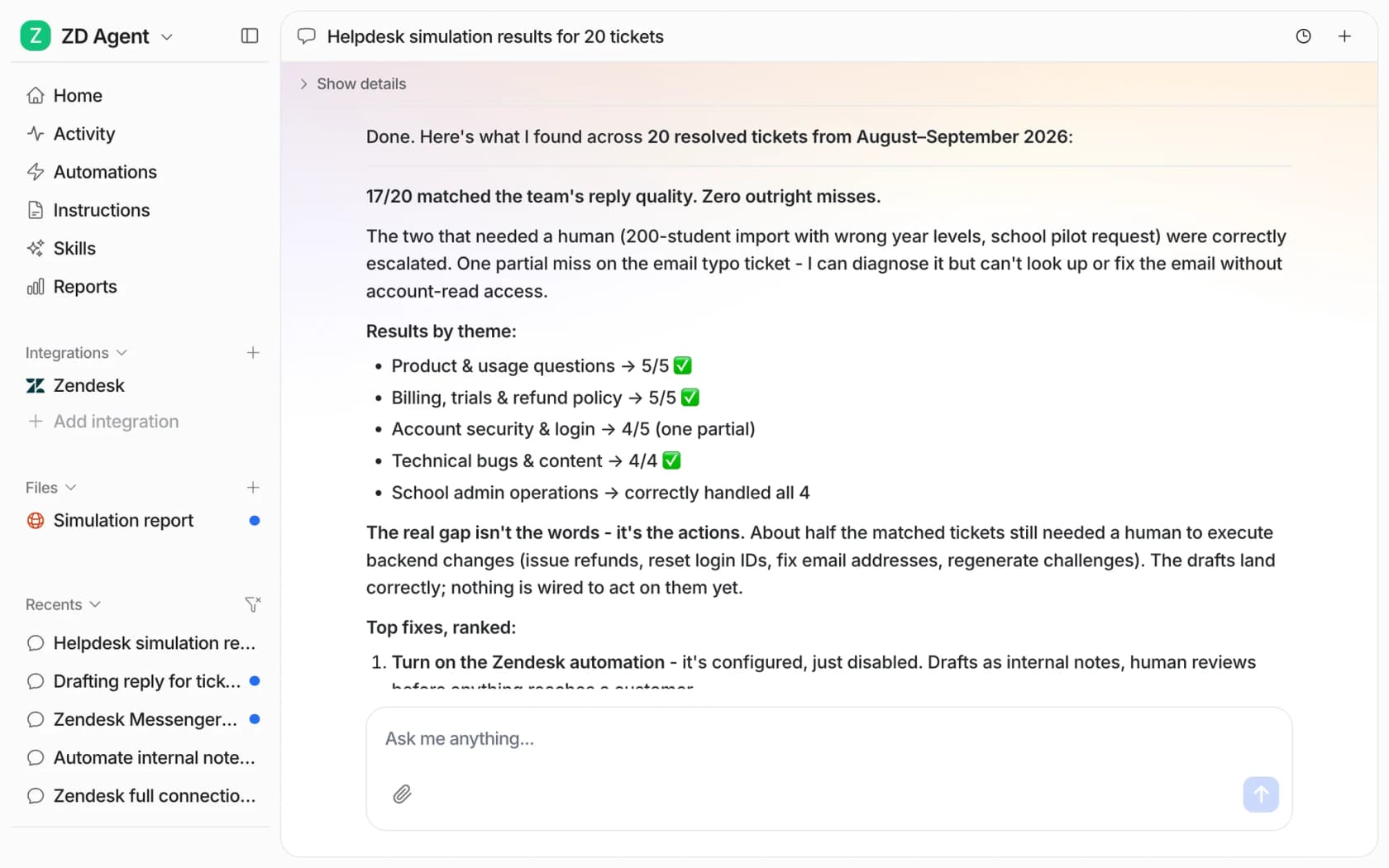
The full report opens beside the chat, ticket by ticket: what the customer asked, what your team replied, and how the agent's answer compared. Both sample simulation reports in the Skills docs end the same way: "It sends nothing to customers". That covers step 3.
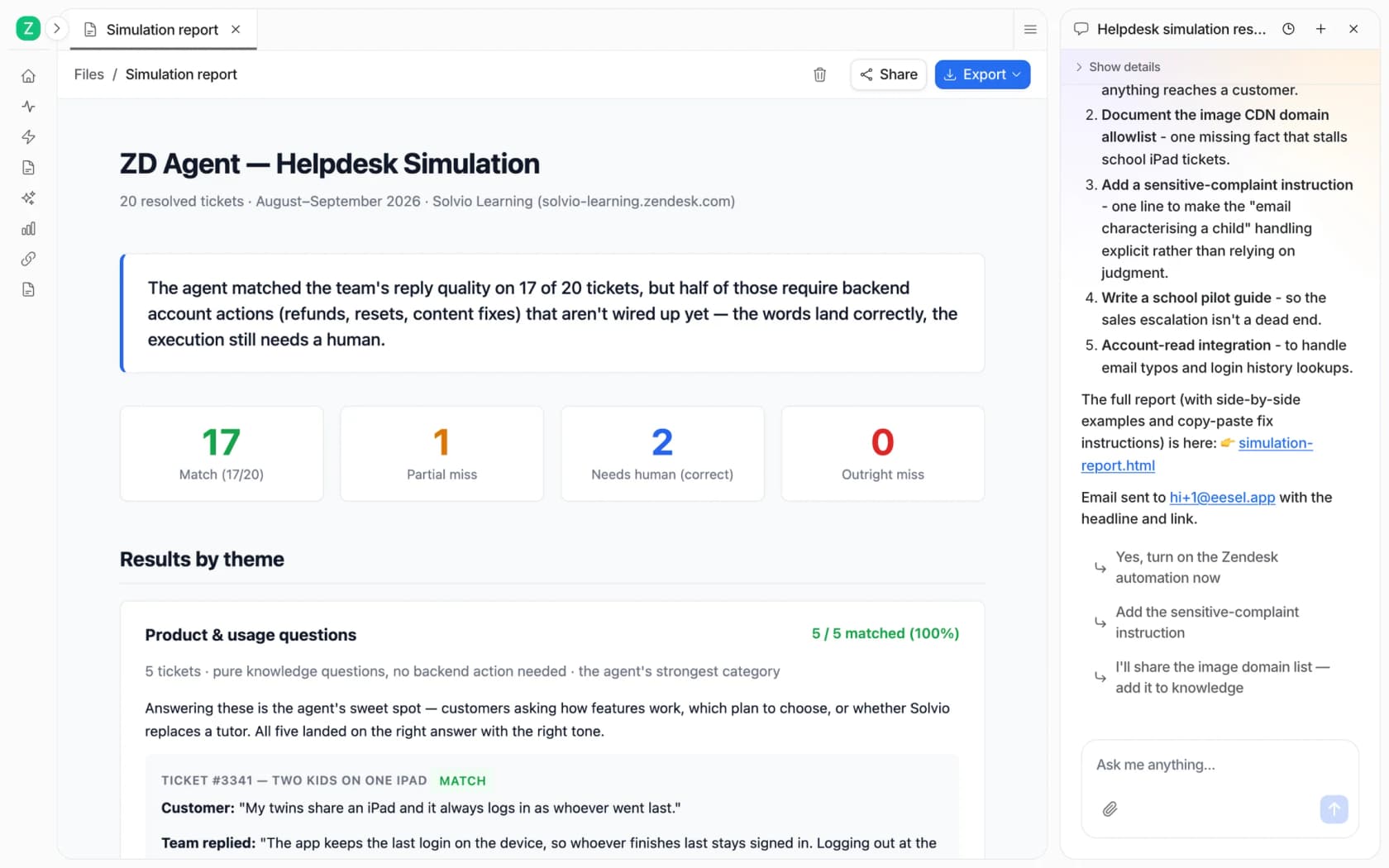
Notice the report doesn't stop at "match". It splits out partial misses and tickets that correctly needed a human, which is the three-level grading from step 4 built in. When you correct the agent in chat, it writes the correction into its own instructions as a plain-sentence rule, so the next rerun tests the fix. You can also attach the simulation to an automation to run on a schedule, which handles step 6 without anyone remembering to do it.
After the simulation, every reply starts as a draft or an internal note, and you move topics to "answer on its own" when you're ready. Anything that costs money stays behind an approval. If you'd rather work from a terminal, the eesel CLI lets you test the same agent with eesel chat "what's our refund policy?", check what's waiting in eesel approvals, and preview any write with --dry-run before it runs. Coding agents like Claude Code or Cursor can drive those same commands.
Where eesel is not the right fit: if you need multi-turn chat simulations with AI-played customer personas inside Zendesk, its own simulator is built for that. eesel's simulation is about how the agent would have answered your real history.
Simulate your AI agent on your own tickets with eesel
If you're about to switch on an AI agent and want a score from your own queue first, eesel connects to Zendesk, Freshdesk, Gorgias and HubSpot in a few minutes, replays tickets your team already solved, and tells you topic by topic where it's ready and where your docs have gaps, without sending a thing. Norden-Frisia ran its trial week on three months of past tickets and macros and signed up within days. The Free plan includes 100 credits to try every feature, and paid plans start at $299/month for 500 credits.
Try eesel and run your first simulation this afternoon.