

Why AI rollouts go wrong
I work eesel's support queue every day, so I see what happens after a team switches an AI agent on. The pattern that worries me most x. It's a model that's confident in a gap.
Here is a real one. A B2B technical support team on Zendesk asked their bot whether they supported a customer's car model. The bot said yes, for brands that were not in their database, because one help article said "we support all models." Nothing in the model was broken. The article was. Another set of paying customers saw their bot answer from general training data when the knowledge base returned nothing, and in one case it replied to a customer with "Oxygen", pulled from the periodic table.
Those are the reasons eesel now simulates every rollout against historical tickets before an AI sends a single reply. A replay of your own past tickets catches the gap in the knowledge base before a customer does.
The mistakes below come from that queue, from the sales calls where support leads tell us what went wrong with their last tool, and from vendor docs. If you want the setup steps from scratch, the AI implementation guide covers them. This post is the list of things to get right before launch day.
Mistake 1: counting deflection as resolution
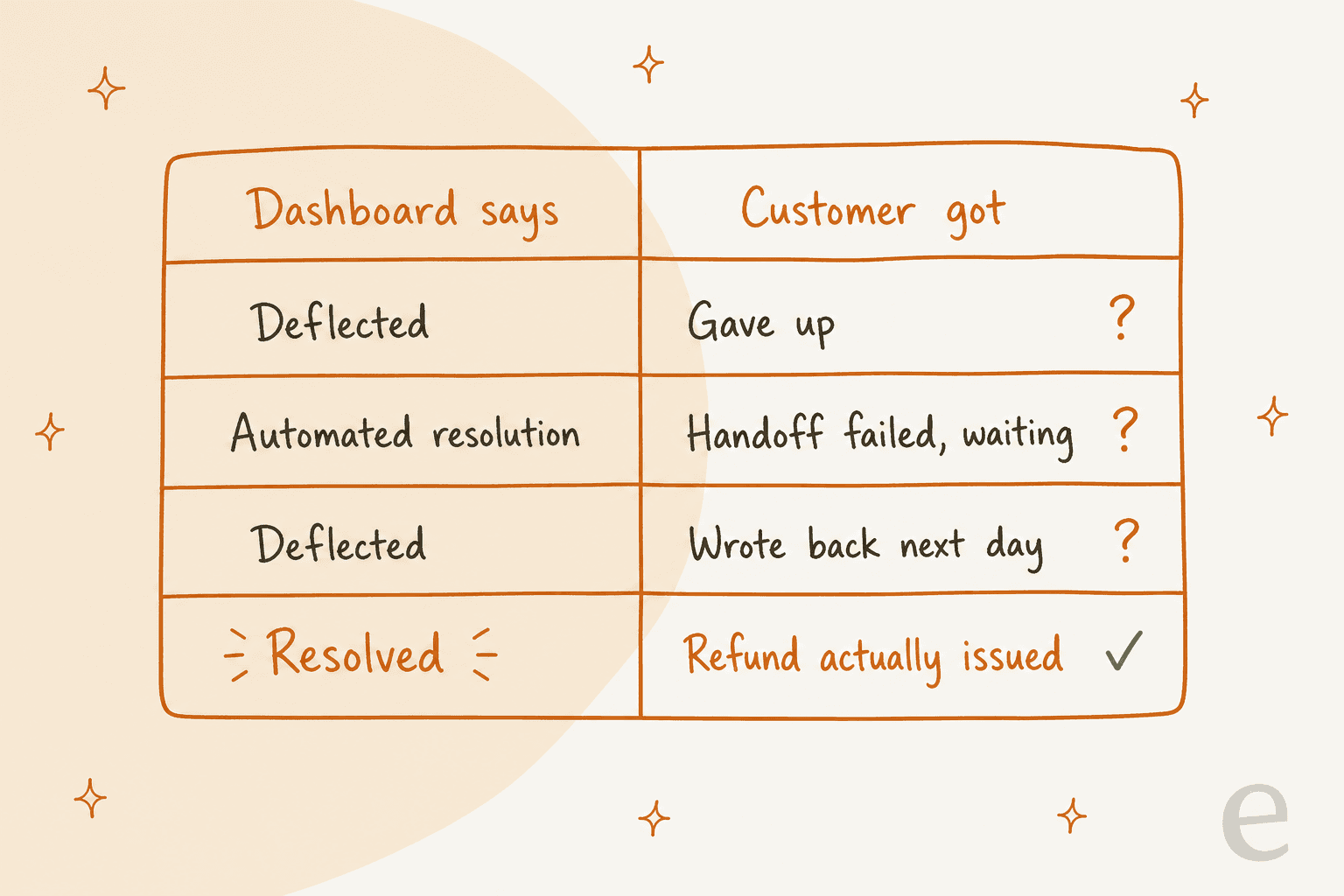
Deflection means the customer did not reach a person in that conversation. It says nothing on whether their problem got solved. A customer who gives up, a customer who writes back the next day, and a customer who got a real refund all look the same in a deflection chart.
Vendor reporting can blur this too, and it's worth knowing how before you build a dashboard on it. Zendesk documents a case where a messaging AI agent tried to escalate, found no agents available, created a ticket for follow-up and finished the conversation itself. The conversation status then reads Automated resolution while the custom field reads Escalated to agent, per Zendesk's own explanation. The customer is still waiting, and one of the labels says solved.
Zendesk's billing does draw this line carefully. Under the resolution tiers introduced on May 18, 2026, an "assisted escalation" and a "contained resolution" don't count against your allowance. Only a "verified resolution", where an LLM checks the transcript and confirms the request was resolved, does. That is a fair billing model. The point is that your own success metric needs the same rigour.
A practitioner in r/customerexperience put the distinction cleanly:
"Silence alone is a dangerous proxy for resolution. It's useful operationally, but it's not an experience signal. A bot answer + 72 hours of no follow-up mostly tells you the customer gave up or moved on, not that the problem was fixed."

The fix: decide what "resolved" means before launch. My working definition is an outcome you can point to (refund issued, address changed, answer confirmed) or no repeat contact on the same issue within 30 days. My colleagues go deeper on AI resolution rate and on deflection rate if you need the formulas.
Mistake 2: letting the AI fill gaps with guesses
When an AI agent can't find an answer, it has two options: say so and hand off, or produce something that sounds right. If you haven't told it which, assume the second.
The public examples are well known. On Hacker News, a Cursor developer's reply was quoted after the company's support bot told users about a login policy that did not exist:
"Hey! We have no such policy. You're of course free to use Cursor on multiple machines. Unfortunately, this is an incorrect response from a front-line AI support bot."

And when a Canadian tribunal made Air Canada honour a refund policy its chatbot invented, one commenter framed the cost the way a support lead should:
"In this case this could have just been a $650 'bug bounty' had Air Canada issued a quick refund. A reasonable QA expense to find out that your AI agent is misleading your customers."
The setups I trust write the rule down. Swiftreg, a UK number plate seller, runs eesel on Zendesk under rules the team wrote itself. A live lookup beats the knowledge base, past tickets and anything the customer says. eesel never reports a refund, dispatch or DVLA submission that a lookup hasn't confirmed, a validator checks each reply against the lookup results before it is sent, and every public reply ends with a footer saying the AI wrote it and may contain errors.
The fix: give the agent an explicit fallback for "no answer found" (hand off, or say a person will confirm), a rule that live data beats documents, and a short list of things it may never promise. The hallucination prevention guide lists the settings, and this explainer covers why gaps cause most of them.
Mistake 3: making the human hard to reach
Some teams hide the "talk to a person" option to protect a stretched queue. I understand the pressure. It still backfires, because the customer who can't get out of the bot loop doesn't go away. They come back angrier, on another channel.
The settings exist on every major helpdesk, which is why this is a choice rather than an accident. In Zendesk's AI agents, the messaging behaviour tab has an "Add option to talk to a human" checkbox at the start of the conversation, after helpful and unhelpful replies, and when the AI can't answer, per Zendesk's handoff settings article. Gorgias describes its AI Agent handing over when it can't confidently respond, meets a sensitive topic, or detects frustration, with handover rules you can add yourself in AI Agent settings.
A thread in r/CustomerSuccess asked whether a bot should transfer when someone types "talk to a human." The top answer drew the line I'd draw:
"Deflection is the bot solving the issue so well the person never needs a human. Obstruction is hiding the exit to protect the queue. The first reduces volume sustainably, the second just moves the pain (and usually amplifies it, like you described)."
The fix: hand off on any explicit request, log every request as a signal, and watch the time between "I want a person" and a person actually replying. As that same commenter notes, if 40% of chats end in a human request, the bot isn't your problem; the content or product friction behind it is. The transfer to human walkthrough shows the Zendesk side, and chatbot escalation covers the general patterns.
Mistake 4: feeding it a messy or outdated knowledge base
An AI agent is only as current as the last time someone fixed the help center. The car-model bot in the opening was a knowledge base problem: one sweeping sentence written for marketing, read literally by a machine.
The usual culprits are duplicate articles that disagree, policies that changed in Slack but not in the help center, and articles written for agents ("check the admin panel") that get quoted to customers. Gorgias's own go-live guide says AI Agent needs at least one knowledge source before you can enable it and suggests starting with written guidance if you're starting from scratch, which tells you how much the content does.
Past tickets help a lot here, because they show how your team actually answers, not how the help center says it should. When eesel connects to a helpdesk it reads historical tickets alongside articles; Original Bootcamp, a German outdoor fitness company on Freshdesk, has eesel answer from about 1,700 website pages and 1,100 Freshdesk tickets and articles.
The fix: before launch, run a short knowledge base audit on your top 20 ticket topics, delete or merge duplicates, and decide who updates the AI's sources when a policy changes. The policy change management guide covers that last part, and what data you need covers the sources.
Mistake 5: an AI that can talk but can't do anything
A lot of support tickets aren't questions. They are requests: cancel this order, change this address, resend this invoice. An AI that can only quote the help center will answer "here is how to request a refund" to someone who wanted the refund.
This is the gap a replay test exposes fastest. Here is an eesel Simulation run on 20 resolved Zendesk tickets: 17 of 20 matched the team's reply quality, and the headline finding was not about wording at all.
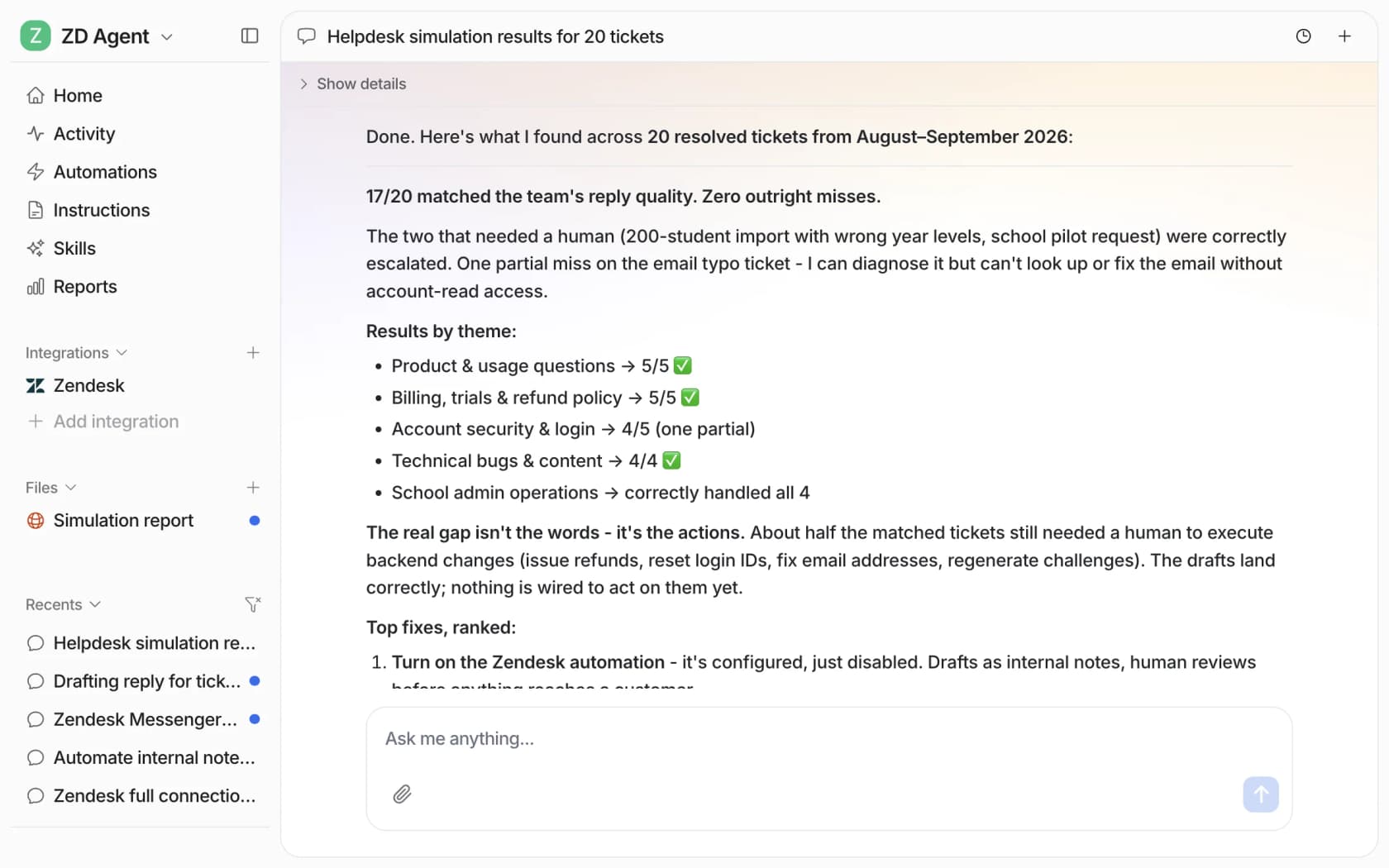
"The real gap isn't the words, it's the actions." About half the matched tickets still needed a person to issue a refund, reset a login or fix an email address. That's a useful thing to learn in week one, not month three.
The opposite mistake is just as real: giving the AI write access to money and accounts before you trust it. A solo SaaS founder on Reddit let an agent auto-reply to support tickets, saw two refunds go out on day one that they never approved, pulled the permission that night, and landed on a simple rule: "If money moves, a human clicks the button" (r/SaaS). Gorgias also warns in its test conversation docs that when AI Agent uses an action in a test, it can affect real customer and order data, so point tests at a fake customer profile.
Original Bootcamp shows the middle path. Anything that touches a booking, payment or the member's account goes to a person today, because eesel can't see that system yet, and the filter will open up once the company's new API is connected.
The fix: list the five most common requests in your queue, decide which ones the AI may read, which it may change, and which always go to a person. Start with read-only lookups. The Gorgias AI Agent actions post and AI agent API integration cover how actions get wired up.
Mistake 6: testing on made-up questions instead of your real tickets
Most teams test an AI agent by typing ten questions they already know the answer to. The AI passes, because those are the questions the help center was written for. Real customers write "hi my thing broke again??" with a screenshot and no order number.
Vendors give you useful test tools, and each one tests something different:
| Tool | What it tests against | Worth knowing |
|---|---|---|
| Zendesk conversation simulator | Multi-turn conversations generated from customer profiles and scenarios you write, or that AI writes from your prompt | Early access program, messaging AI agents only, designed for fictional data |
| Gorgias Playground | Any message you type, as a new customer, an existing customer, or an existing ticket | Free, doesn't touch reporting; the "existing ticket" target re-runs a real conversation after you change settings |
| eesel Simulation | A batch of your real past tickets or generated test cases | Scores each answer against what your team sent and suggests instruction changes |
The Gorgias "existing ticket" option is a good one and underused. The difference with a full replay is coverage: a scenario you write tests what you already expected, while a batch of last month's tickets tests what customers actually sent. Both are worth running. Only one tells you about the question nobody thought to write down.
A good replay result also shows you what to hand off, not only what the AI got right. In the run above, the two tickets that needed a human (a 200-student import with the wrong year levels, and a school pilot request) were correctly escalated. That's a pass.
The fix: replay at least a few weeks of resolved tickets, split the score by topic, and fix the weakest topic before launch. Adversarial testing covers the hostile edge cases, and teams on Freshdesk can also use a sandbox setup for configuration changes.
Mistake 7: a handoff that makes the customer start over
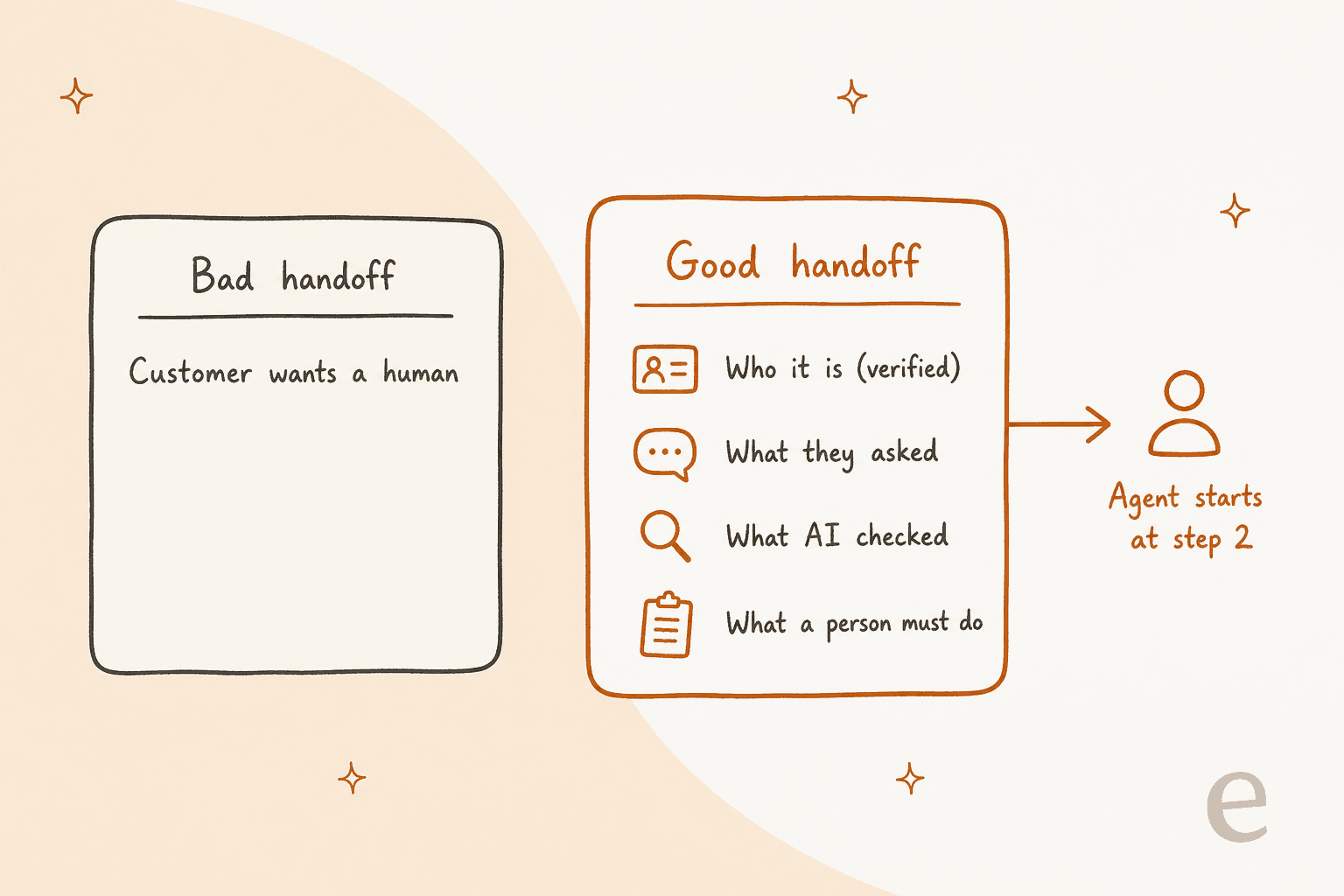
A handoff that only says "customer wants a human" is barely a handoff. The customer explains everything again, the agent re-checks what the AI already checked, and the whole conversation takes longer than if the AI had never been there.
Zendesk's escalation guide recommends the AI gathers information such as order number, name or email, adds tags and updates fields, and identifies suitable agents before escalating. That's the right list.
"If someone explicitly asks for a human, blocking the transfer usually hurts more than it helps. The real challenge isn't deflection, it's routing with context so the human doesn't start from zero."
Swiftreg's setup does this with internal notes. When one part of a ticket belongs to staff, eesel answers the rest and leaves an internal note on the part a person owns. In one month it sent 1,494 public replies and left 1,055 internal notes on about 2,100 Zendesk tickets. Original Bootcamp adds a rule I like: if a message mentions an injury or illness, it goes to a person even when the booking question could have been answered.
The fix: write a handoff template with four fields (who, what they asked, what the AI checked, what a person must do) and test it on your replay batch. The AI agent handoff guide has wording examples, and conversation design examples shows full flows.
Mistake 8: switching on full autonomy on day one
The biggest objection I hear on sales calls isn't price. It's control. Support leads have usually been burned once already, and they want the AI to take only the tickets it can handle. One CX lead at a DTC supplements brand on Gorgias, doing about 7,000 tickets a month, put it like this:
"The AI will never be able to answer 100% of the questions, but if it tries and just answers 'sorry I don't know this,' I cannot go and check all my 7,000 tickets to see if the AI actually made a good answer, then the point is a little bit gone. I need an AI who is only handling the tickets that it's confident to handle and all the other ones, leave them alone."
CX lead at a DTC supplements brand on Gorgias + Shopify, eesel sales call
That is the case for a staged rollout. Draft mode first, where the AI writes and a person sends, then auto-replies on one narrow topic, then the next.
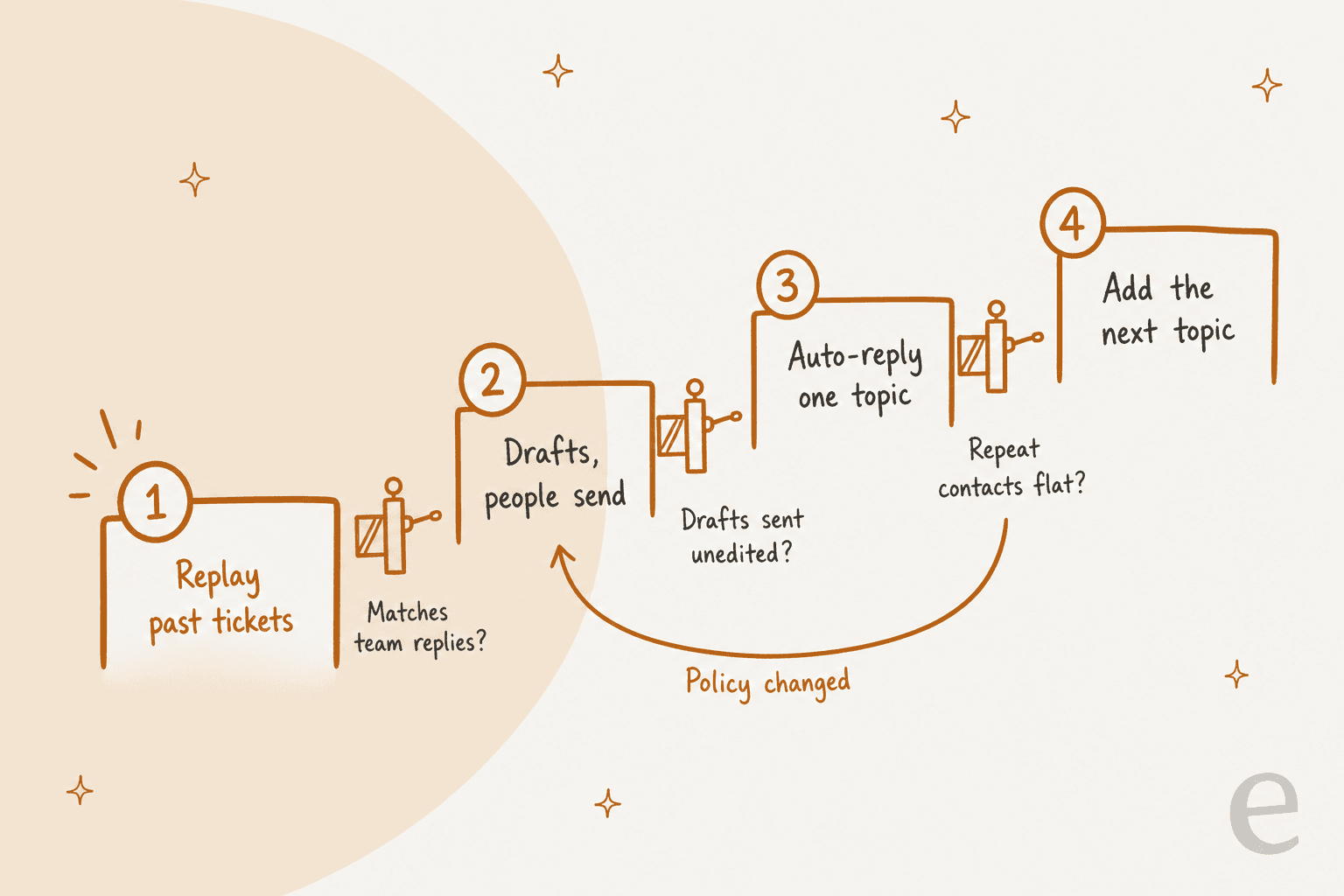
smava is the clearest example I can point to. It has run eesel on Zendesk since December 2024, across two brands and about 27,000 tickets a month. Between 8 August and 8 September 2026, the drafting agent, whose output waits for a person to approve, ran on about 12,200 tickets. The reply agents that prepare customer-ready answers only take tickets where the customer has no advisor assigned, about 1,100 of them. The rule for which tickets qualify is one field, so widening it is a text edit, not a project.
Gorgias's own go-live checklist points the same way at a smaller scale: in the first week, review at least 10 tickets AI Agent handled and give feedback on any that missed.
The fix: run drafts for two weeks and track how often agents send a draft without editing it. Turn on auto-replies only for the topic with the highest unedited rate. AI copilot for customer service explains draft mode, and Freshdesk AI draft replies shows it on Freshdesk.
Mistake 9: treating launch as the finish line
Your return policy will change. A new product ships. A carrier changes its tracking page. Every one of those makes some of the AI's answers wrong overnight, and nobody notices until the repeat contacts pile up.
Gorgias describes AI Agent improvement as a loop of train, test, deploy and analyze, one conversation type at a time, with an example of a returns skill running a 30% handover rate that becomes the goal for the next loop. Swiftreg takes it further: its eesel instructions are kept as numbered releases, and the next version is labelled a candidate build, rolled out through Swiftreg's own procedure rather than edited live.
Privacy belongs in this ongoing work too, not only in the security review before signing. Zendesk notes its conversation simulator is designed for fictional data and asks you to avoid real names and emails in test profiles. Your own checks should ask what the AI can read, what it writes back into tickets, and who can see the logs. The Zendesk AI agent data privacy post covers the Zendesk specifics.
The fix: put a monthly review on the calendar. Re-run the replay test on last month's tickets, read every ticket that came back on the same issue, and update the knowledge base before you touch the AI's instructions. Customer support error analysis gives a method for sorting what went wrong.
Is your AI agent ready to launch?
Tick the gates you can honestly say yes to. Each open one shows the fix to make before launch.
What to measure in the first 30 days
Once the AI is live, these are the numbers I'd put on one page. None of them is deflection on its own.
| Metric | What it catches | How to read it |
|---|---|---|
| Resolution backed by an outcome | Silent give-ups counted as wins | Refund issued, order changed, or customer confirmed |
| Repeat contact on the same issue (7 and 30 days) | Wrong or partial answers | Rising on one topic means a stale article or missing action |
| Handoff rate per topic | Topics the AI isn't ready for | High on one topic is the next thing to fix, not a failure |
| Human request to human reply time | A hidden or understaffed exit | Bad numbers here cost more trust than any bot answer |
| Unedited draft rate | Whether a topic is ready for auto-replies | Promote topics with a high rate, keep the rest in drafts |
| CSAT on AI-only versus human conversations | Tone and quality gaps | Compare the two, not the blended average |
One commenter in r/CustomerSuccess named the metric I'd add to every launch dashboard:
"The metric I'd watch is request-for-human to human-response time. If that number is bad, or people keep reopening on another channel after the bot, you're not deflecting demand, you're just hiding queue pain."
It also helps to know what your vendor bills for, because the billing unit is what your finance team will look at first:
| Vendor | Billing unit for the AI | Published price |
|---|---|---|
| Zendesk | Automated resolution (verified tier only, since May 18, 2026) | $1.50 committed, $2.00 pay-as-you-go, per Zendesk pricing |
| Gorgias | Automated interaction, when AI Agent resolves without a handover | $0.85 to $1.00 depending on plan, per Gorgias pricing |
| Freshdesk | Freddy AI Agent session (an email session is a 72-hour window) | First 500 sessions included once, then $49 per 100, per Freshdesk pricing |
| eesel | Credit: one ticket or one chat, however many replies or lookups | From $299/month for 500 credits, per eesel pricing |
The AI customer service metrics guide defines each metric in more detail, AI CSAT covers the survey side, and cost per resolution works through the money.
A 30-day rollout plan
Here is the order I'd follow on a typical email and chat queue. Connecting the helpdesk takes minutes; most of the month is earning trust one topic at a time.
- Days 1 to 5: connect and clean. Connect the helpdesk and knowledge sources, audit your top 20 topics, and write the fallback rule, the never-promise list and the handoff template.
- Days 6 to 8: replay. Run the AI against a few weeks of resolved tickets. Fix the weakest topic, then replay again.
- Days 9 to 22: drafts. The AI drafts on every eligible ticket, agents approve, edit or reject. Track the unedited rate per topic and what agents change.
- Days 23 to 30: one topic live. Turn on auto-replies for the topic with the best unedited rate. Keep the human option visible and watch repeat contacts daily.
- Day 30 onward: the loop. Add one topic at a time, re-run the replay monthly, and send any topic back to drafts when a policy changes.
The guide to automating support with AI goes deeper on each step, and if you're still picking a tool, choosing an AI agent and AI helpdesk buying criteria cover the buying side.
Roll out eesel without the mistakes
eesel is an AI helpdesk teammate that joins the queue you already run in Zendesk, Freshdesk or Gorgias, and its rollout is built around the order above. Before it sends anything, the Simulation skill replays your past tickets and scores each answer against what your team actually sent. Then it drafts, your agents approve, and auto-replies switch on only for the topics that earned it, under rules you write in plain language.

That is how smava runs about 27,000 Zendesk tickets a month with people approving most drafts, and how Swiftreg answers number plate orders from live lookups only. You get 100 free credits to connect your helpdesk and see real drafts on your own tickets before paying anything. Try eesel and run your first replay this week.