


What counts as a repeat support ticket?
I write about support for eesel, and before that I spent two years on SEO, so I read search queries for a living. The phrase "repeat support tickets" is interesting because the person typing it usually isn't asking for a definition, they're a support lead staring at a queue full of names they recognize and wondering why the same customers keeps writing in. That's the question this post is trying to answer.
At eesel we've spent the last few years running AI on live helpdesk queues, and in terms of what I see in sales calls, the pattern is pretty consistent: teams know repeats are expensive, but they measure them with a metric that misses half of them.
When people say "repeat ticket", they usually mean one of these four things:
| Term | What it is | Where it shows up |
|---|---|---|
| Reopen | Customer replies to a solved ticket, and the same ticket goes back to open | Your helpdesk's reopen metric |
| Follow-up ticket | Customer replies after the ticket is closed or archived, so the helpdesk creates a new linked ticket | A separate ticket, often missed |
| Duplicate ticket | Customer writes in twice about the same issue, often on two channels | Two open tickets, two agents |
| Repeat contact | Any of the above: same customer, same issue, within a time window | Only if you build it |
The last row is the one that really matters here. A repeat contact rate counts all three paths, while a reopen rate counts only the first.
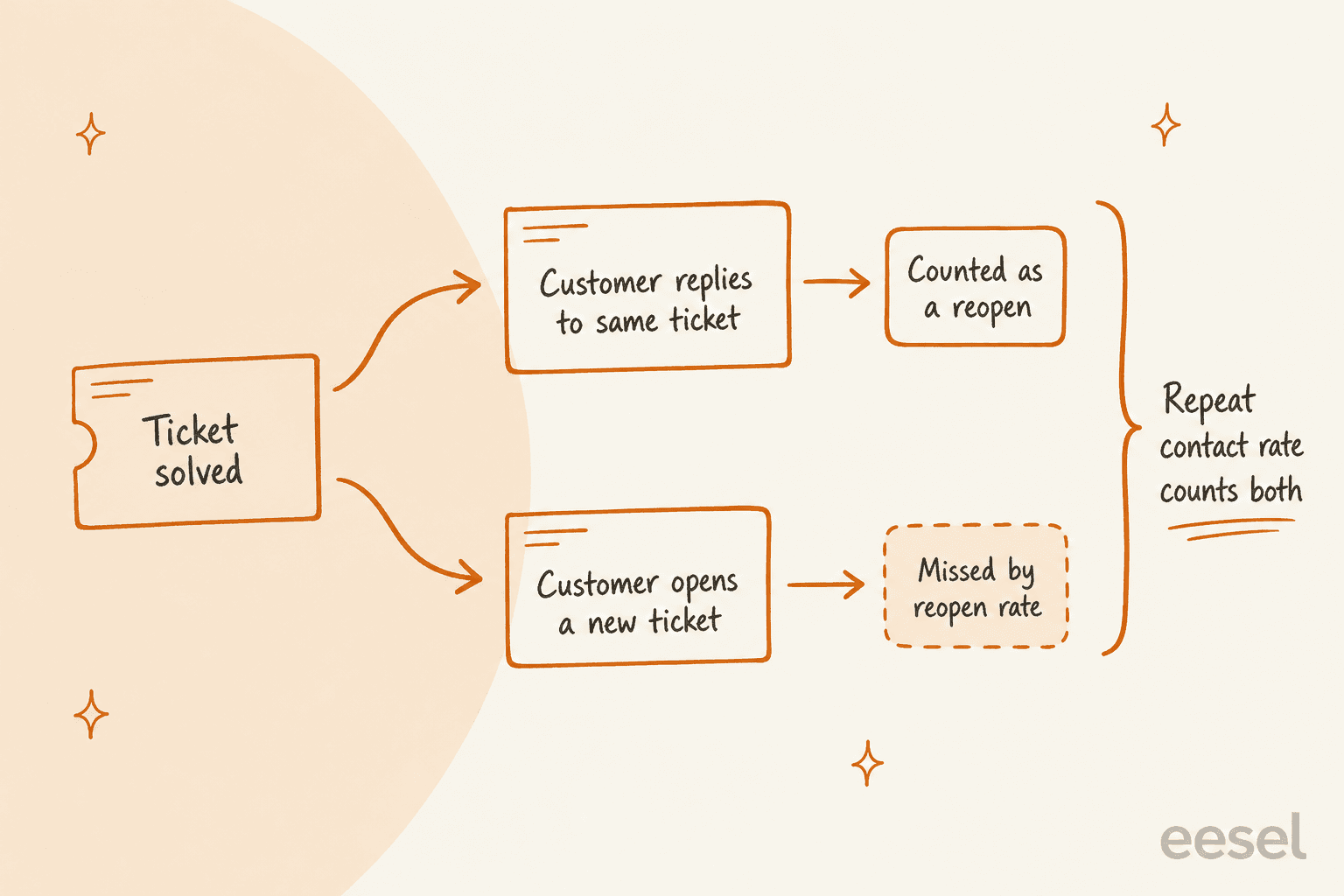
Why your reopen rate undercounts repeat contacts
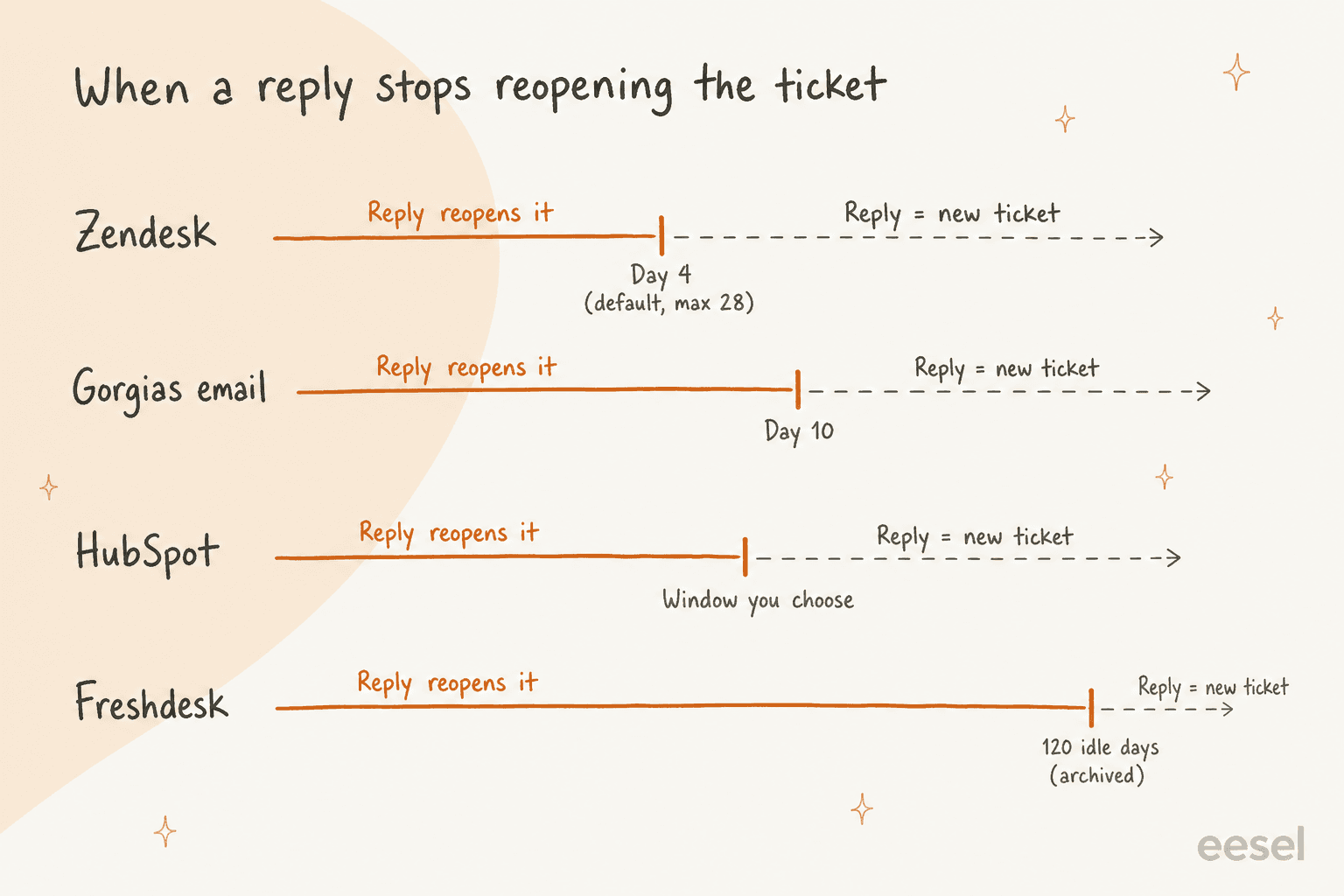
Every helpdesk has a cutoff point. Before it, a customer reply reopens the old ticket, after it the reply becomes a new ticket and your reopen metric just stops seeing it. The cutoff is different on every tool, and most teams never go and look it up.
Here is what each helpdesk does, taken from their own docs:
- Zendesk. A standard automation closes tickets 4 days after they're solved. You can stretch this to 28 days, you can't delete it though. After the close, "any response to a closed ticket from any channel automatically creates a follow-up ticket," per Zendesk's follow-up docs.
- Gorgias. A reply to a closed ticket reopens it, but on email a reply "more than 10 days after the last message" splits into a new ticket. On chat, SMS, voice and social DMs the split happens after 3 days, per Gorgias's billing docs.
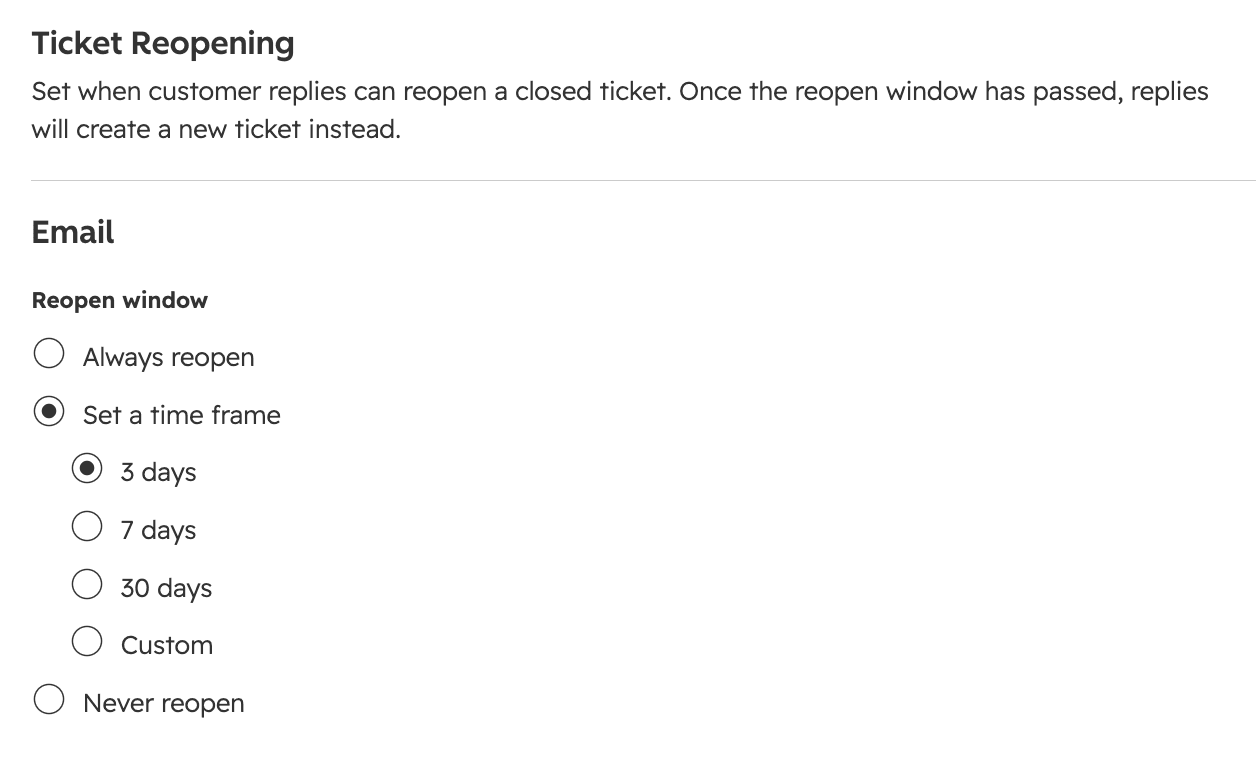
- HubSpot. Here the choice is yours. The ticket reopening setting offers Always reopen, Set a time frame, or Never reopen, on Service Hub Professional and Enterprise.
- Freshdesk. Its "Tickets reopened" metric counts resolved or closed tickets that go back to Open. Once a closed ticket sits idle for 120 days it's archived, and a reply then "creates a new ticket instead of reopening the archived one."
- Help Scout and Front. Help Scout reopens closed conversations unless you set a Conversation Lock. Front closes email conversations after 30 days by default and splits later replies into a new conversation.
HubSpot's version gives the clearest picture of the trade-off, since it hands the whole decision over to you:
So the upshot is, if your Zendesk instance still runs the 4-day default, a customer who comes back on day 5 is invisible to your reopen rate. One support lead on Reddit put the behavioral side of it well:
"Reopen rate helps too but people learn to just open a new ticket instead of reopening, so you really need the repeat contact window to catch it"

If you want the Zendesk side in a more detail, I wrote up the reopen ticket conditions you can set in automations.
Why first contact resolution can rise while repeats rise too
The other trap worth to mention is first contact resolution. Most helpdesks calculate it per ticket and not per issue, so a customer who opens a new ticket basically resets the clock, which then counts as a fresh win.
If you look at the native definitions you can see how narrow they are:
- Zendesk's closest metric is one-touch tickets: solved with one agent reply or none. A reopen that carries a new question does knock a ticket out of one-touch, a follow-up ticket however doesn't touch the original.
- Freshdesk's "Tickets resolved within FCR (%)" requires zero customer replies after the first contact, per its metrics glossary. And a new ticket is not a reply.
- Help Scout reports "Resolved on First Reply" in its email report, again per conversation.
That is how you end up with a story like this one:
"We hit 78% FCR last quarter. Leadership celebrated. Bought donuts and everything. Then I pulled the data on customers who contacted us 3+ times in 30 days. The number went up. Turns out we were "resolving" tickets by closing them, not by actually fixing the underlying issue."
I'm not saying drop FCR (I wrote a whole guide on AI for first contact resolution) or one-touch resolution, they're both useful. Just never report them without the repeat number sitting next to them, the same way you wouldn't report resolution rate without the CSAT.
How to measure repeat contact rate
The formula I would use looks like this:
Repeat contact rate = solved tickets where the same customer contacted you again about the same issue within 7 days ÷ all solved tickets in the period
There is a few choices to make up front:
- Pick a window and keep it. 7 days is a sensible default for email and chat, while call centers often use 14 or 30. One Reddit commenter suggested to check reopens within 72 hours, to catch agents who close tickets for the stats. Whatever you pick, don't change it in the middle of the quarter.
- Match on customer and issue, not customer alone. A customer who writes about a refund and then, two weeks later, about a login problem is not a repeat. Agents hate getting blamed for that one, and they're right to, too.
- Count across channels. The same customer emailing and then opening a chat is still one issue, which your helpdesk may not link together.
Then you pull the numbers from what the helpdesk already gives you:
| Helpdesk | Reopens | Repeats that become new tickets | First-contact style metric |
|---|---|---|---|
| Zendesk | "Reopened tickets" and "Reopens" in Explore | Follow-ups, filtered by the "Closed Ticket" update channel | One-touch tickets |
| Freshdesk | "Tickets reopened" | New tickets after archive, found via the contact's archived tickets | Tickets resolved within FCR (%) |
| Gorgias | Reopened bucket in the new Helpdesk performance report | Split tickets after 10 days (email) or 3 days (chat, SMS, voice) | No native FCR metric found |
| HubSpot | "Ticket reopen date" property | New tickets linked to the original | No native FCR report |
| Help Scout | Conversations set back to Active | New conversations, if Conversation Lock is on | Resolved on First Reply |
| Front | "Reopened conversations" in the Workload report | New linked conversations after close | No native FCR metric |
None of these gives you "same issue" out of the box, and the cheapest way to get there is a tag. When an agent picks up a ticket that is clearly a second contact, they add a repeat tag and also a reason tag. One Reddit reply framed it better than I could:
"You're right that three cheap contacts on one issue is not three wins. It is one unresolved problem with a growing cost and a customer who now expects the next reply to fail. Tag the second contact as a repeat of the first before anyone closes it again."
If tagging by hand sounds like something that won't stick, it usually doesn't, not past week three. AI ticket tagging can apply the repeat and the reason tags for you, then the numbers land in your helpdesk's own reports same as any other field.
From there on it's a normal report. In Zendesk I would add a repeat-rate widget into the same analytics dashboard your team already checks, and in Gorgias the tags shows up in the standard Gorgias analytics views.
What repeat tickets cost you
A repeat ticket costs more than the first contact did. The customer is more annoyed and the agent has to read through the history before replying, on top of that you've paid twice for one problem. Your cost per ticket doesn't show this, because on its own each ticket looks normal.
Plug your own numbers in below, the defaults are only there as an example.
Enter your monthly solved tickets, repeat rate, handling time and agent cost to see what repeat support tickets cost you, and what halving them is worth.
The dollar figure is only half of the story though. A customer who has to chase you three times is the one leaving the one-star review, and that cost never shows up in the cost per resolution math.
Why customers write back: the four root causes
When you pull 50 to 100 repeat tickets and actually read them, the reasons fall into four buckets almost every time, which also match with what I hear from support teams on eesel calls.
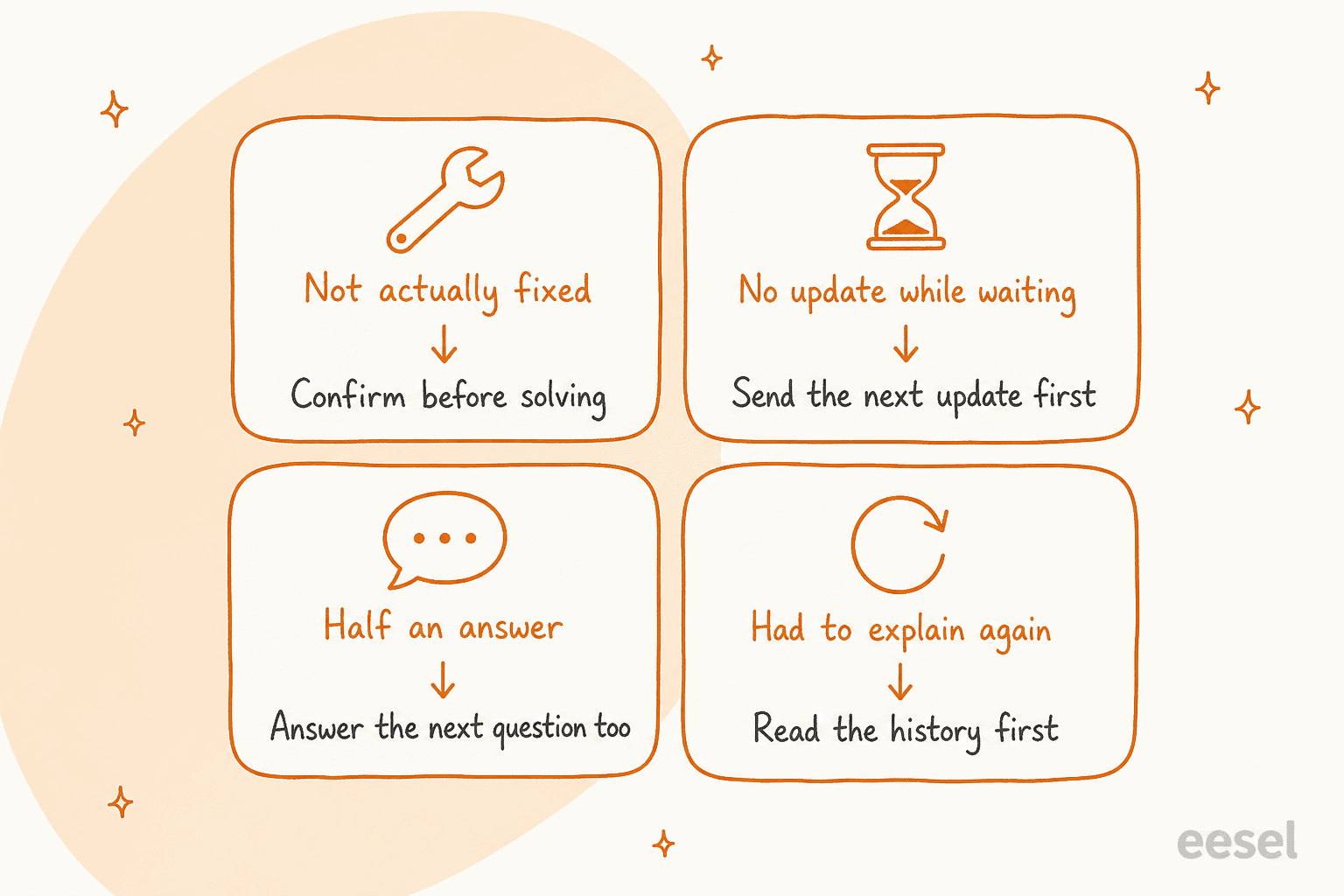
1. The ticket was closed, but the issue wasn't fixed
This is the big one, and it's usually a metrics problem before it is a people problem. If agents get scored on closed tickets then closing becomes the goal itself.
"Resolution looks good because the ticket gets closed, but customers sometimes come back a few days later with basically the same problem."
Fewer repeats also mean fewer tickets overall, and that is the cheapest form of reducing ticket volume.
The fix here is to make "all issues in the message resolved" part of your QA scorecard, rather than only whether the ticket got closed. Calibrate it across reviewers so everyone scores it the same way, I covered that in QA calibration.
2. No update while the customer was waiting
Refunds and shipping delays generate repeats, bug escalations too, because on the customer's side nothing happens for days. They write "any update?" since nobody told them when the next update would come.
This is the reason "where is my order" dominates ecommerce queues. On one eesel sales call, a multi-brand ecommerce operator handling 500+ tickets a day told us that refund requests, unsubscribes and order tracking are dominating their volume, and those are exactly the classic repeat categories.
The fix is proactive support: end every reply with when the next update will arrive, then set an automation to actually send it. Gorgias can follow up after no reply, Zendesk can do the same with time-based automations.
For order status specifically, a bot that reads the live tracking beats a macro, I compared the two in this guide to order status chatbots. My post on proactive vs reactive service has more about the trade-offs.
3. Half an answer, or the wrong one
A reply that answers the literal question but not the next obvious one is pretty much a guarantee for a second ticket. "Your refund is processing" invites "when will I get it?" Macros make this worse, when they're written for the common case and then pasted into the uncommon one.
"The responses are a push of a button by Customerservice representative and so patronizing because most the time they get it wrong."
There are two fixes here. Audit your macros against real tickets (I'd start with my guide to AI macros), and run a knowledge gap analysis to find the questions your help center doesn't cover, while a broader knowledge base audit catches articles that are simply out of date. Sometimes the docs are written for the wrong reader altogether, one support manager we spoke with had a knowledge base written for administrators while the tickets came from end users, which produced confusing replies.
4. The customer had to explain everything again
Handoffs between shifts or tiers lose context, and between teams too, with the bot-to-human handoff being the worst offender. The customer repeats themselves and gets a slightly different answer, then writes in a third time. Duplicates across channels is the same problem, just seen from the other side:
"Same customer would email twice about one issue, once from their phone, once from a laptop an hour later when they got worried nobody saw the first one, and we'd end up with two agents responding separately without realizing it was the same problem."

Start by turning on what your helpdesk already has. Zendesk's merging suggestions show tickets from the same requester two weeks either side, and Gorgias auto-merge combines open tickets from one customer. Both kinds of merge are permanent, so set them up carefully.
For the handoffs, my posts on shift handoffs and cross-team escalation cover the notes that stop the whole restart.
How to reduce repeat support tickets: a two-week plan
You don't need a new tool to get started, here is the plan I'd run.
Week one: find your top two causes
- Pull 50 to 100 tickets from the last month where the same customer came back within 7 days. Include follow-up and split tickets as well, not only reopens.
- Read each one and tag it with one of the four causes above. Add a fifth "other" bucket and keep it small.
- Note down who or what handled the first contact, so which agent group or which macro, or if it was the bot.
- Then count. In most teams it is two causes that account for most of the repeats.
Week two: fix those two and re-measure
- For "no update while waiting," add the next-update line to your top macros and an automation that sends it.
- For "not actually fixed," add a resolution check into QA and stop rewarding the raw close counts.
- For "half an answer," rewrite the three macros with the most repeats and fill the help center gaps, then check the wording against your tone guide.
- For "explain again," turn on merge suggestions or auto-merge and require a handoff note on escalation.
- Check your auto-close and reopen windows. If Zendesk is still on the 4-day default, decide on purpose if that's really what you want.
- Compare the repeat contact rate against your baseline, alongside CSAT and customer effort score, so you know repeats fell because issues got fixed and not because customers gave up.
A full support ticket analysis goes deeper into step one, in case you have more volume than you can read by hand.
Where AI helps, and where it makes repeats worse
AI can cut repeat tickets, it can also manufacture them at scale. The whole difference comes down to whether it's allowed to guess.
The failure mode looks something like this: a chatbot answers every question with something plausible and the chat closes, the dashboard counts a deflection, and then the customer comes back.
"How many customers finished a chat and come back 20 minutes later because the bot gave them a generic answer that didn't solve their issue? We're optimizing to close the ticket instead of solving the damn problem."
Sometimes it also shows up a week later rather than in the same session. One builder on Hacker News only found it by joining model choice against the reopens:
"our dashboard only tracked immediate task completion, and had no idea a cheaper model had quietly produced a worse answer that the customer reopened a week later."

So before trusting any AI on your queue, I'd ask for three things:
- It answers only when it's confident. A confidently wrong reply is worse than no reply at all, because it creates a repeat and also an angry customer, so look for a real confidence score or some equivalent rule. One CX lead handling 7,000 tickets a month told us on a call: "I need an AI who is only handling the tickets that it's confident to handle and all the other ones, leave them alone." That is the right bar, and it's the reason AI hallucination matters more for repeats than for anything else.
- It's tested on your past tickets before going live. Not on a demo script, but on real tickets you already solved, scored against what your team actually sent.
- You can split repeat rate by handler. If the AI's tickets come back more often than your agents' ones, you need to be able to see it, so tag every AI-handled ticket.
This is the part of eesel I would point to. Its Simulation skill replays your agent against real past tickets and scores each answer against your team's reply, then it suggests instruction changes. Here's a run on 20 resolved Zendesk tickets, where it matched the team on 17 and flagged the two that needed a human:
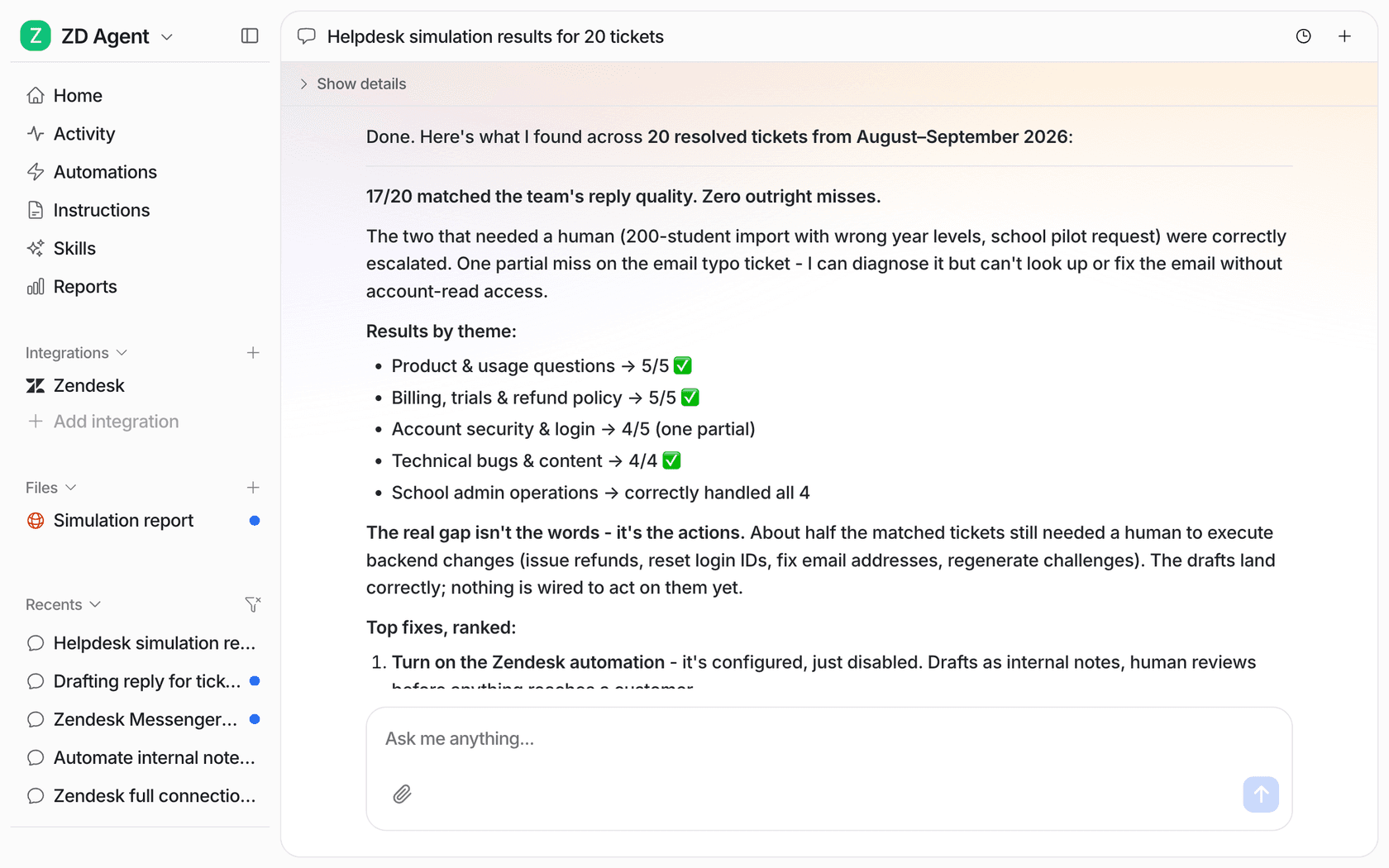
The same skills list includes "Analyze ticket trends" for recurring topics and "Update knowledge base," which finds questions your help center doesn't answer and drafts the missing articles. That covers root causes two and three more or less on autopilot. When it does get one wrong you correct it in chat, and the fix becomes a standing instruction, so the same mistake doesn't create the same repeat next week. My error analysis post walks through that loop.
There's one pricing detail that matters here too. On eesel's pricing page, a ticket is 1 credit "however many replies go back and forth." A customer who reopens a ticket doesn't cost you a second credit, a brand-new repeat ticket does, so cutting repeats lowers your eesel bill as well as the load on your agents.
What it isn't is a fix for a broken refund process, or for a shipping partner who loses parcels. If the root cause sits outside of support, AI just answers the repeat faster.
Cut repeat tickets with eesel
If your queue is full of customers writing back about the same issue, eesel's AI helpdesk teammate joins the Zendesk, Freshdesk, Gorgias or HubSpot setup you already run and learns from your past tickets and macros, plus your help center. It answers only what it can solve and hands the rest over to your team, and you can replay it on last month's tickets to see where it would have caused a repeat before any customer sees a reply. Gridwise's support lead put the result like this after one month:
"In the first month, eesel is resolving 73% of our tier 1 requests ... Responses are simple to fix and adjust."
Kim Simpson, Gridwise
It's free to start with 100 credits, paid plans then start at $299 a month for 500 credits.
