What is support agent ramp time?
Ramp time is the stretch between an agent's first day and the day they work the queue like everyone else. I'm on eesel's support team and work the queue every day, and the thing I've noticed is that teams usually mean three different things when they say a new hire is "ramped":
- First solo ticket. They've stopped shadowing and replied to a customer on their own.
- Team-median volume. They close about as many tickets per week as a typical agent.
- Team-median quality, no help. Their QA scores, reopen rate and CSAT match the team, and they've stopped pinging a senior on every third ticket.
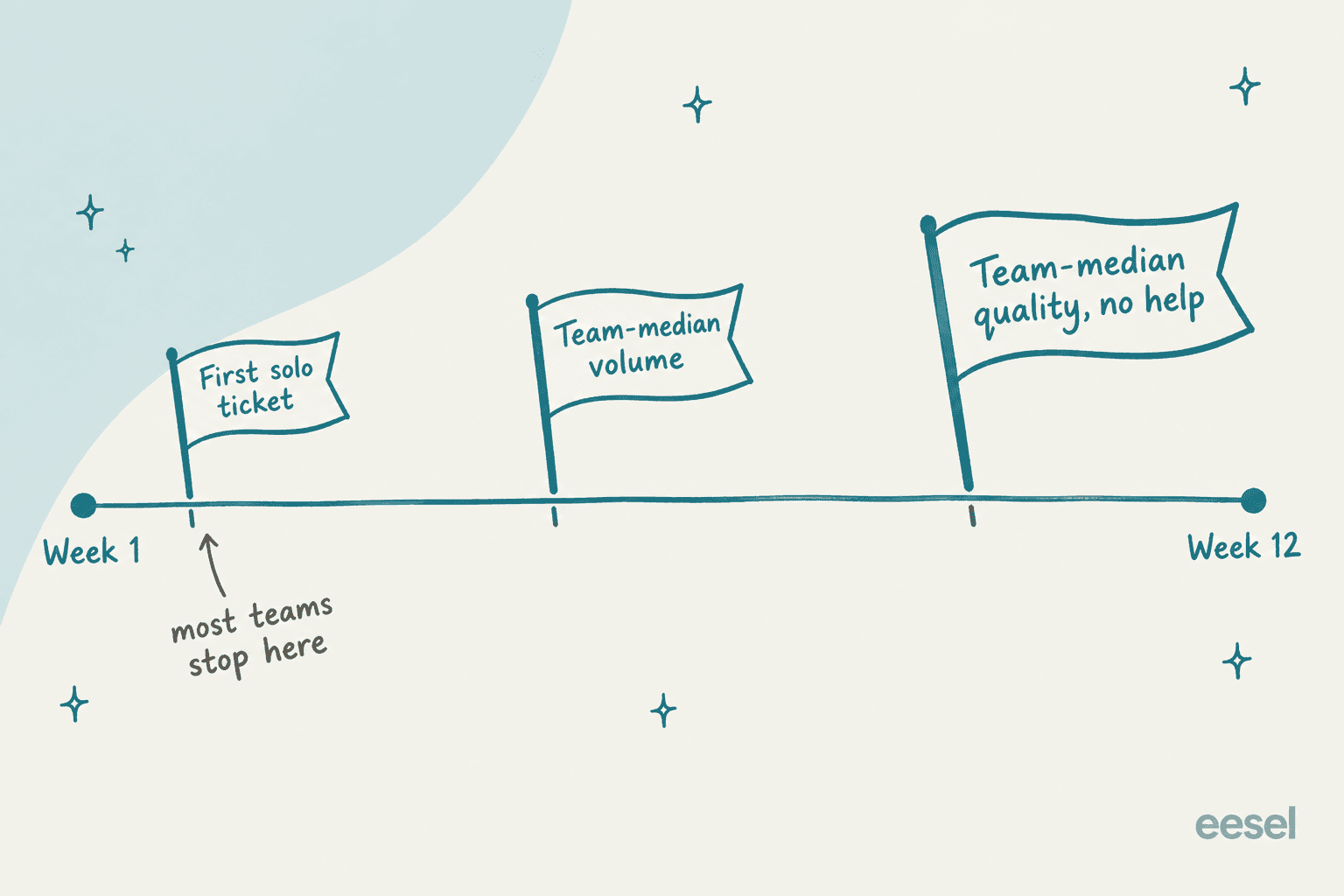
The first two are easy to hit and easy to fake. A new agent can close plenty of tickets by grabbing the simplest ones, or by asking a senior what to write and pasting the answer. That's why I only count the third flag as the end of ramp. It's also the one that matters to your customers and to the senior agents who've been quietly doing two jobs.
If you're building the onboarding plan itself, my colleague's guide to support agent training software covers the tools for each stage. This post is about the clock: how long it runs, how to read it, and how to make it shorter.
How long does ramp take for support agents?
There's no published industry benchmark I'd trust, and I looked. No helpdesk or QA vendor I checked publishes a formal definition of ramp time. The closest is MaestroQA's glossary (the company now trades as Rippit), which says support onboarding "typically run(s) from 2-8 weeks". In its ClassPass customer story, new agents got extra QA attention over "the first 60 days" of their tenure.
What real agents and team leads describe is longer, and it's a range, not a number:
| Setting | What people report | Source |
|---|---|---|
| Call center, high-volume | 6 weeks training, 6 weeks nesting, then metric targets at 33%, 66%, 100% over three months | r/callcentres |
| Call center | 4-6 weeks classroom, 1-2 weeks with a veteran on calls, review at 90 days | r/callcentres |
| Phone support | 1 week of training, 25 errors in month one, zero errors since month three | r/callcentres |
| MSP help desk | Induction, shadowing and low-priority tickets over 2 months, on-call at month 3 | r/msp |
| Technical support | All but the hardest cases after 3-6 months | Hacker News |
| Cloud support engineer | First 3 months training while taking cases | Hacker News |
Two patterns stand out. First, the gap between "allowed on the queue" and "good on the queue" is usually months, not days. One team lead in the r/callcentres thread put it bluntly after a whole training class was let go for missing an 80% scorecard:
"Some of our best agents are shaky for the first few months before their performance skyrockets. 10 days is nothing."

Second, product complexity sets the floor. A returns-and-shipping queue for an online store has a short tail of question types. A B2B SaaS or IT queue has a long one, and the new hire keeps meeting first-time questions for months. A help desk lead on r/sysadmin described a new hire with prior experience who still looked "about 50/50" at month four, after a one-month training ramp. Another reply in that thread:
"First month or 2 are there for ironing out the overwhelming feeling. The 6 month review is common for a reason."
So the useful benchmark is your own. If your last three hires took twelve weeks to reach the third flag, that's your baseline, and the goal is the next hire in nine.
How do you measure ramp time in your helpdesk?
Here's the catch: none of the five helpdesks I checked has an agent start date, tenure field or "new hire" group in its reporting docs. Every one of them does have the two things you need to build a ramp curve by hand, a per-agent filter and a custom date range. So the method is a weekly snapshot per new hire, compared against the team median.
I track four numbers, because each one catches a different way to look ramped without being ramped:
- QA score. The quality check. Whatever your quality assurance scorecard produces, weekly.
- Handle time. The speed check. Average handle time or the closest thing your helpdesk reports.
- Reopen rate. The "did it actually fix it" check. Fast closes that bounce back don't count.
- Asks for help. The independence check. Count internal notes or Slack threads where the new hire tagged a senior.
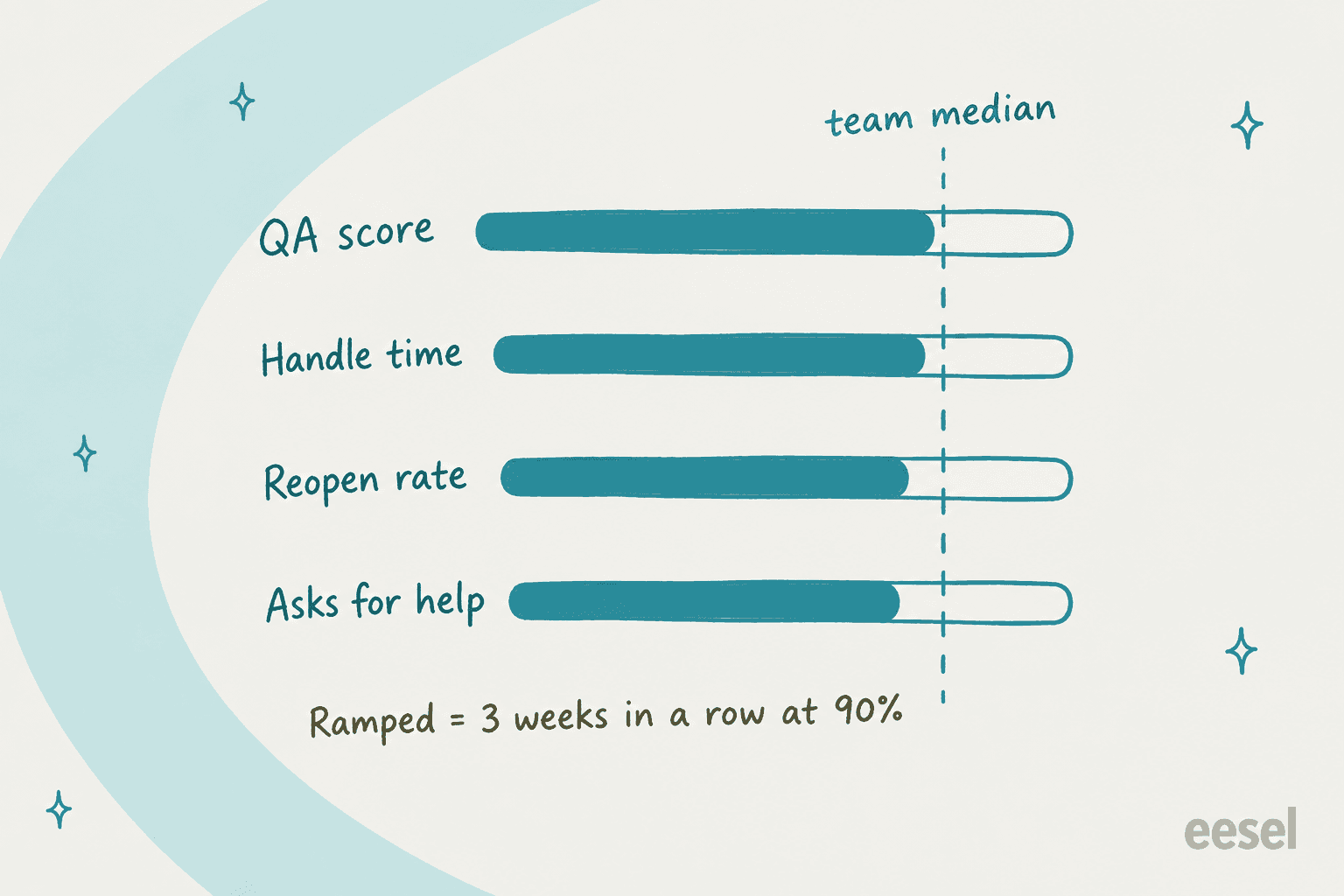
My rule of thumb: an agent is ramped once all four sit within about 90% of the team median for three weeks in a row. Three weeks stops a lucky week from counting. Ninety percent, not one hundred, because your team median includes your best people.
Where those numbers live in each helpdesk
| Helpdesk | Per-agent report | Agent filter and date range | Plan gate worth knowing | Per-agent quality score |
|---|---|---|---|---|
| Zendesk | Support dashboard: Assignee activity and Agent updates | Yes, both | Suite Professional, $115/agent/month annual (pricing) | Zendesk QA IQS and AQS, via the QA or WEM add-on (WEM bundle $50/agent/month) |
| Freshdesk | Agent Performance Report, every plan | Yes | Pro, $55/agent/month annual (plan table) | Not in the analytics docs |
| Gorgias | Agents performance report, all Helpdesk plans | Agent or team, presets plus custom range | Report is on every Helpdesk plan | Auto QA, needs an AI Agent subscription |
| Help Scout | Company and User report, Happiness | User drill-down, Teams on Plus and Pro | Standard keeps 2 years of data, Plus and Pro keep all of it | Happiness Score per user |
| Front | Team performance report | Teammates filter, custom range | Starter keeps 6 months of history, Professional 24 | Smart QA, $20/seat add-on or included in Enterprise |
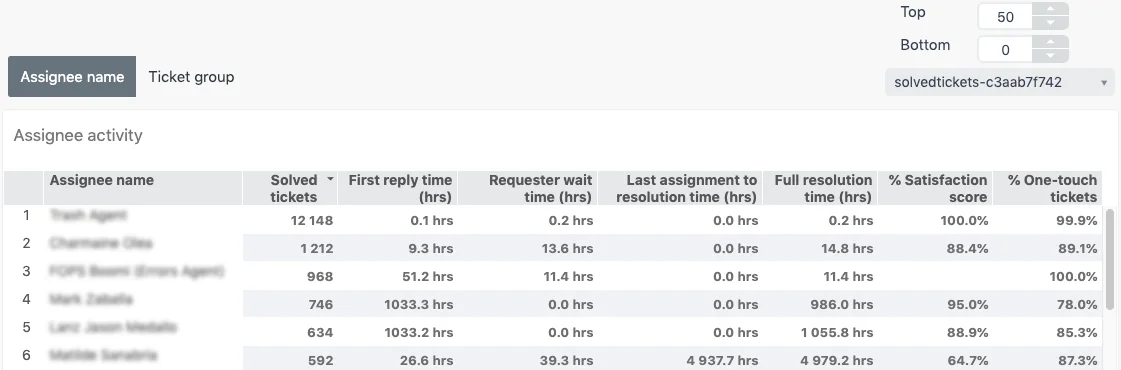
On Zendesk, the prebuilt Assignee activity tab already gives you most of the speed and quality columns per agent. Filter it to one new hire and one week, note the numbers, repeat. If you want a week-one-versus-week-four chart across several hires on one screen, that needs custom reports, which means Explore Professional or above.
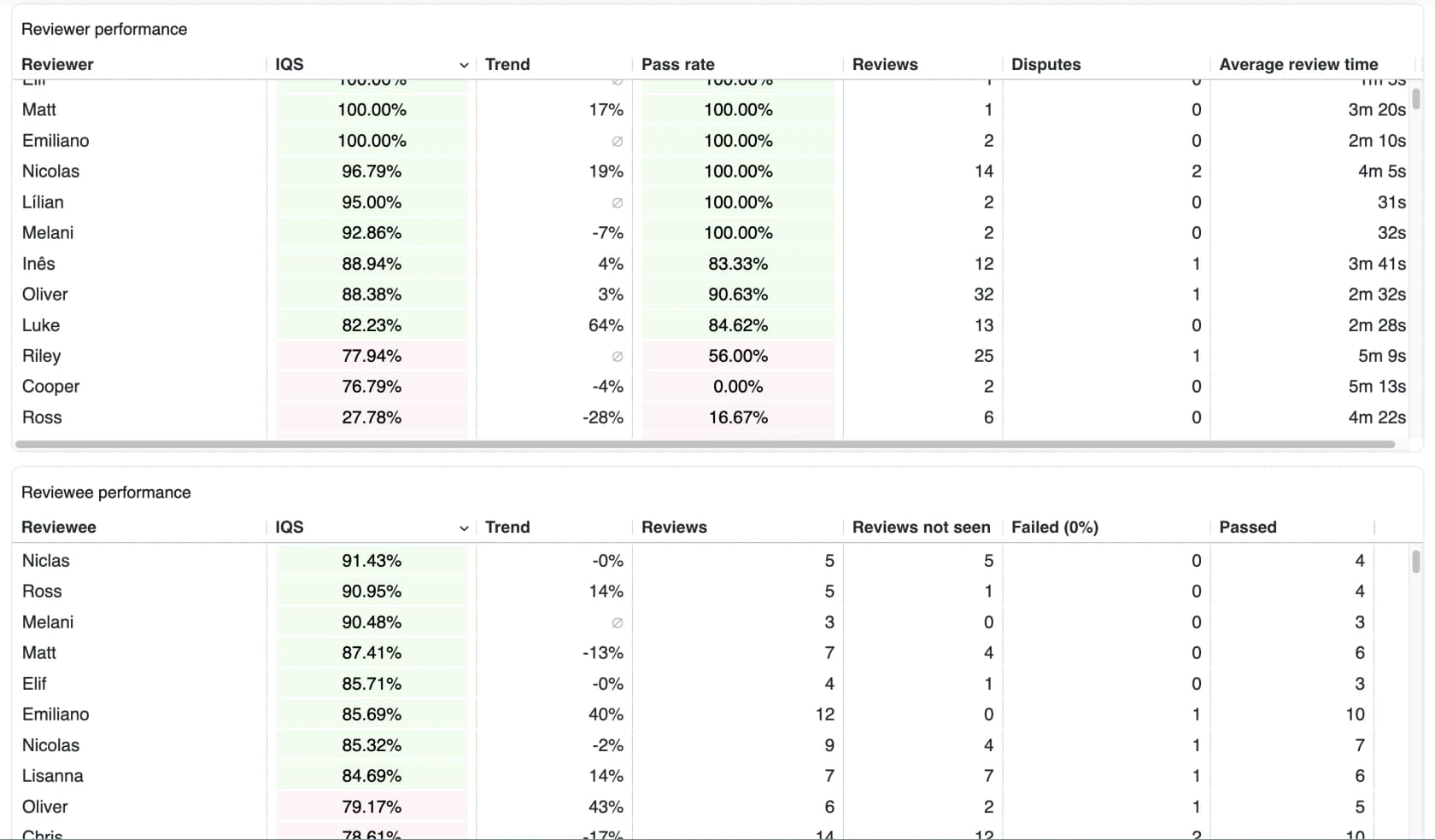
For the QA column, Zendesk QA's Reviews dashboard lists each reviewee's internal quality score (IQS) with a trend, and its quality-over-time card runs weekly. Zendesk's own docs say it can show "if any agents might require specific training", which is a polite way of describing a ramp curve. My Zendesk QA scorecard guide covers building the scorecard that feeds it.
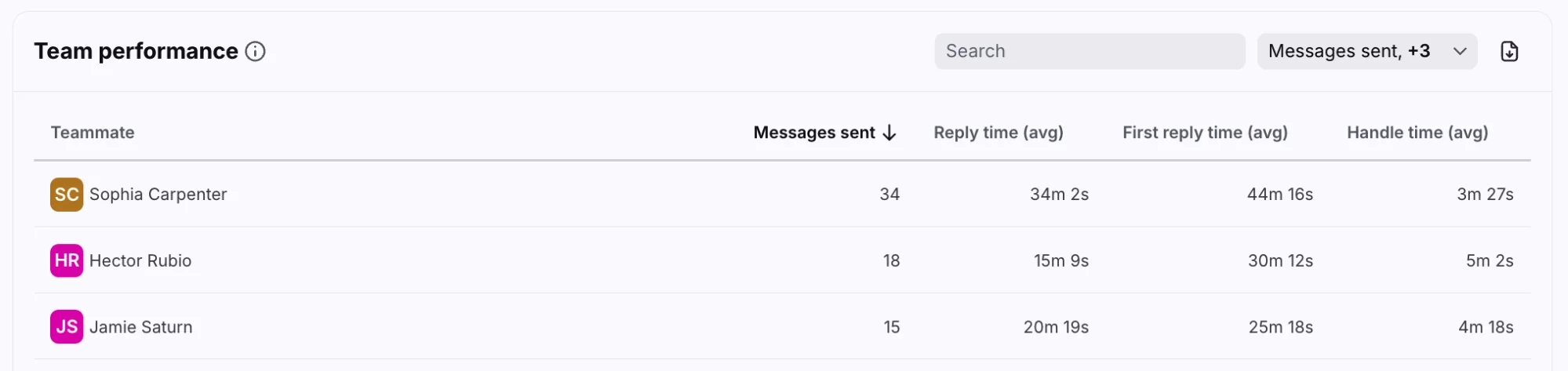
Front works the same way. Its Team performance table shows messages sent, reply time and handle time per teammate, and one thing to know is that Front credits whoever replies, not the assignee. That's handy for ramp tracking, because a senior who answers on a new hire's ticket shows up as the senior's work.
A spreadsheet with one tab per new hire and one row per week is honestly enough. The habit of filling it in every Friday matters more than the tool. For the metric definitions themselves, see my rundown of Zendesk Explore metrics. The reopen count is worth a closer look too, since it's the one new hires game without meaning to.
What does slow ramp actually cost?
Ramp has two costs that never show up on an invoice. The first is lost output: a new agent on half speed for ten weeks is five weeks of salary that produced no closed tickets. The second is senior time, the hours your best agents spend answering "how do I handle this one?" instead of working their own queue.
One reply in the r/callcentres thread put the stakes in one line:
"It costs a few thousand to onboard someone, giving them less than a month to get up to speed is crazy."
Plug your own numbers into this to see what a few weeks of ramp are worth to your team:
With the default numbers (six hires a year, ten weeks to ramp, half output, five senior hours a week), ramp costs about $8,000 per new agent and $48,000 a year. Cutting three weeks saves roughly $14,400 a year, before you count what happens to customers on the receiving end of a shaky week-two reply. If you're growing fast, ramp belongs in your headcount math: a hire who starts in March isn't a full agent until June. My notes on support coverage planning show how to plan for that, and the guide to building a customer service team covers the hiring side.
Where do the ramp weeks actually go?
This is the part I wish someone had told me before my first week. Ramp isn't one big lump of "learning". It's two very different kinds of work that need different fixes.
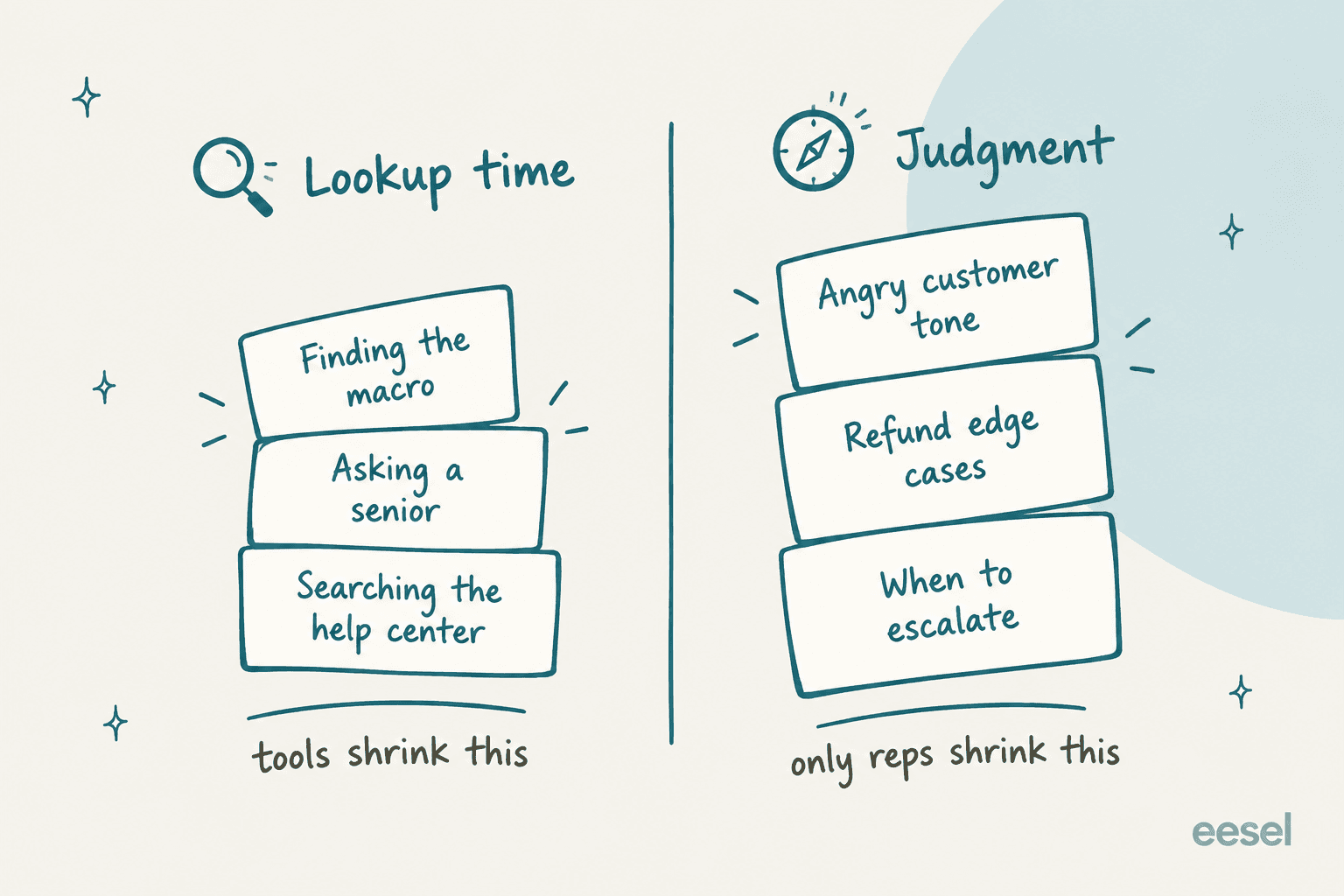
Lookup time is everything spent finding the answer: which macro applies, where the refund policy lives, how the team answered this exact question last month. A tier-1 tech on r/msp said this was the slowest part for them:
"If they're a T1, I believe what took most time for me was to learn/remember where everything was located rather than the specifics."
Judgment is everything else: reading an angry customer, knowing when a refund exception is fine, spotting the ticket that needs an escalation before it blows up. No document teaches this. It comes from handling real conversations and getting feedback on them.
The mistake I see most is treating lookup problems with judgment fixes, like more shadowing, longer classroom weeks, another role-play, when the new hire actually needs a faster way to find the answer. The opposite mistake is assuming a great internal knowledge base will teach tone. It won't.
One Hacker News commenter who built a support wiki for their team reported both effects at once:
"I was able to reduce training times by 75% because I created a curriculum that worked way better. I created a wiki for the support team and they were able to reduce call times by 40% because they had a place with the answers to the questions they were tired of answering."

That's a self-reported number from one person, but it matches what I see: lookup time is the cheap part to cut, and it's often the biggest part of the first month.
How to cut support agent ramp time: 6 things that work
None of these are exotic. The trick is doing them in the right order and matching each one to the pile it fixes.
1. Teach the most common tickets first
Most queues are dominated by a short list of question types. One phone agent on r/callcentres said "80% of calls are about the same thing". Pull your top ten ticket tags from last quarter and build week one around those, not around a tour of every feature. A help desk agent on r/ITCareerQuestions asked for exactly that:
"Most common cases in a week: give me the rundown of the most common Dispatch and Tier 1 tickets you get in a typical week. I can figure out anything more specific from there as I go along."
If you don't know your top ten, a knowledge gap analysis on last quarter's tickets will tell you, and it'll show which of them have no help article yet.
2. Practice on real past tickets, not generic role-plays
Generic scenarios teach phone manners. Your own resolved tickets teach your policies. A reply on r/CustomerService warned that with generic training "it will take them forever to figure out how your company wants something done" once they hit the floor.
The simple version: pick 30 resolved tickets across your top tags, hide the agent reply, have the new hire draft their answer, then compare it to what the team actually sent. A Zendesk sandbox helps for practicing macros and fields without touching customers, though it's included only on Enterprise plans (one on Support Enterprise, two on Suite Enterprise) and sold as an add-on from Support Professional and Suite Growth up. Freshdesk lists its sandbox on the Enterprise plan and frames it as a configuration-testing tool, which I cover in the Freshdesk sandbox guide.
3. Open the queue in stages
Don't flip a new hire from shadowing to the full queue in one day. The MSP plan I quoted above is a good model: one week induction, one week shadowing, two weeks on low-priority tickets, a month on standard incidents, and on-call "at the 3 month mark. If the staff member feels they are ready." (source)
In a helpdesk, staging is mostly routing. Put new hires in a group that only receives your simplest tags, then widen it as their numbers land. My guide to shared queue management covers the setup for each helpdesk. On Zendesk it's a group plus a trigger, explained in Zendesk routing. Freshdesk can do it with skill-based routing, assigning new hires a narrow skill.
4. Make them drive while a senior watches
Shadowing a senior feels productive and teaches surprisingly little. An MSP team lead described flipping it after two weeks:
"We start with screen share (trainer sharing to newbie) and after about 2 weeks we switch to newbie sharing with trainer, trainer comments/guides but forces newbie to "do" the things. Much higher knowledge retention when they do it with guidance over just having them watch one of us do things."
The ticket version is "draft, then approve". The new hire writes every reply as an internal note, a senior approves or edits it, and the edit is the lesson. It's slow for the senior at first, which is exactly why step 5 exists.
5. Give them a first draft on every ticket
This is where AI earns its keep on lookup time. An agent assist tool reads the ticket, finds the matching help article, macro or past reply, and drafts an answer the new agent checks, edits and sends. The new hire still decides what goes out. They just stop starting from a blank box and stop waiting on a senior to tell them where the refund policy lives.
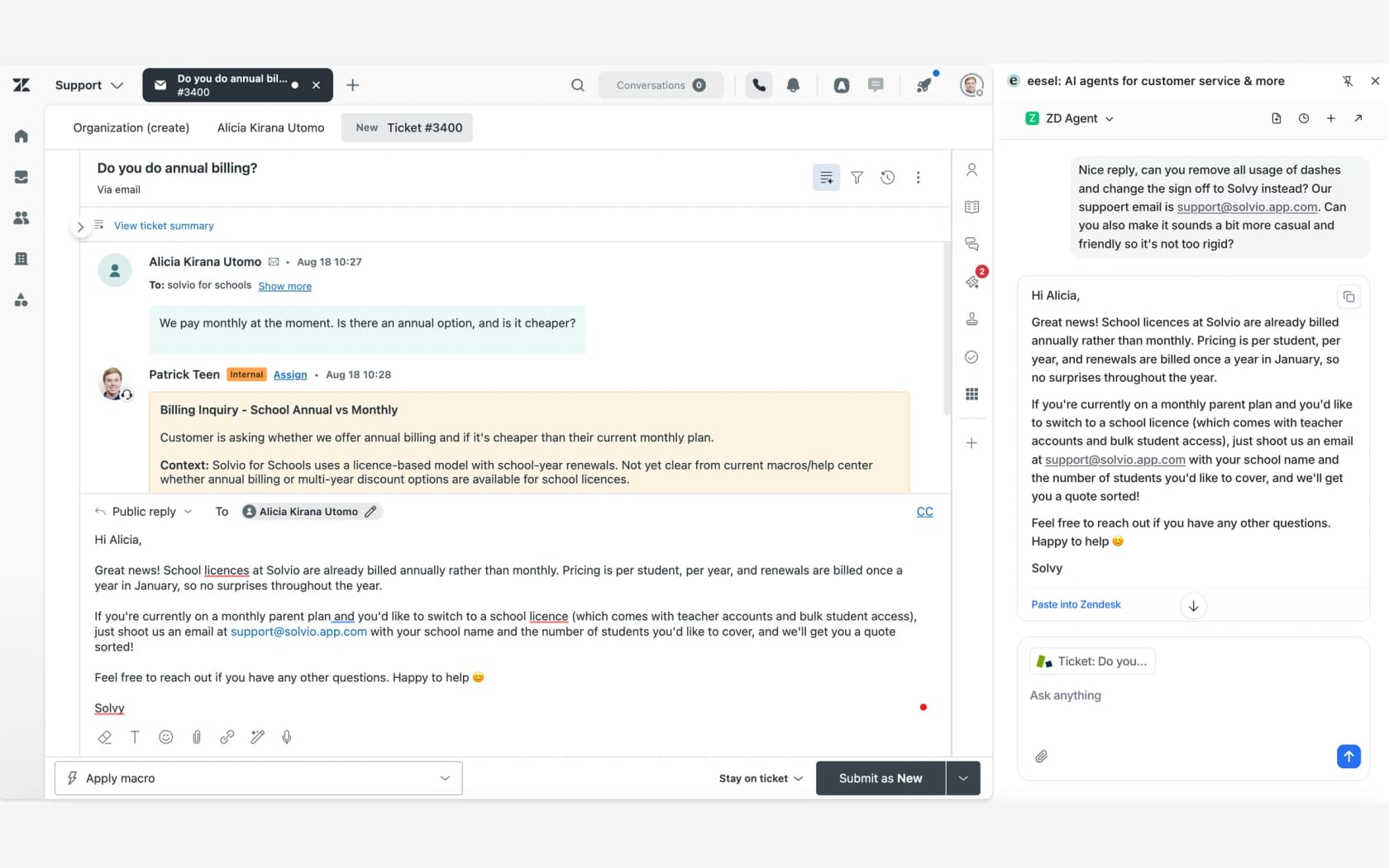
I've spent a lot of time looking at how agents actually use AI drafts, and in one trial I looked at, agents sent the draft as-is only 12% of the time. Most rewrites were about length and tone, the drafts ran long and the team's style is short. That's useful for a new hire. The draft gives them the right facts, and the edit they make teaches them the house style. When the AI is trained on the team's own sent replies, those rewrites shrink.
The proof I lean on comes from customers, not from me. Yellowdig's Director of Support & Operations shared this after rolling eesel out:
"Recently, a new customer success hire joked that our eesel AI bot was their best friend during onboarding and interviewing."
And vfm Group described the senior-time side of it: "Managers are now asked the important questions" after new hires started using the copilot to find answers from the source. That's the lookup pile shrinking. For a wider look at the category, see my roundup of AI agent assist tools. If you're new to the idea, start with what an AI copilot does for a support team.
6. Coach weekly on real conversations
Judgment shrinks with feedback, and the feedback has to be on their actual tickets. ClassPass, in MaestroQA's write-up, routed a larger share of new agents' tickets to graders each week through their first 60 days. That's the right instinct: QA a new hire heavily early, then taper.
A 30-minute weekly session on five of their tickets beats a monthly review of fifty. Zendesk QA's coaching dashboard shows how coaching sessions affect IQS, which closes the loop with the scorecard from earlier.
For the coaching itself, AI agent coaching for support walks through a weekly cadence. If you're choosing a scorecard tool, my roundup of support QA tools compares the options.
Mistakes that stretch ramp time
The same handful of mistakes show up across nearly every thread I read.
| Mistake | What it does to ramp | Fix |
|---|---|---|
| Cutting training to fill the queue | Errors pile up in month one and seniors spend the saved time cleaning up | Protect the first two weeks, stage the queue instead |
| Shadowing a different person every day | The new hire learns five slightly different ways to answer the same ticket | One named buddy for the first month |
| Measuring only the first solo ticket | Looks ramped at week two, isn't until month three | Track all four numbers to the third flag |
| Docs nobody can find | Lookup time stays high long after the policies are learned | Put answers where the agent works, like a Slack knowledge bot or in-helpdesk drafts |
| Generic role-plays | Agents learn manners, not your policies | Practice on 30 of your own resolved tickets |
The first one is the most common and the most expensive. One agent on r/callcentres described the result:
"My job is similar understaffed and threw us on the phones after 1 week of training. My 1st month on the phones I had 25 errors and I literally learned trial and error."
They got to zero errors by month three, so the ramp still happened. It just happened on customers instead of in training. The other quiet one is knowledge that only lives in senior heads. When those people leave, every future hire ramps slower, which is why knowledge transfer habits matter even for small teams. Writing down how the team handled a tricky ticket, the same way you would for a shift handoff, is the cheapest ramp investment there is.
eesel for support agent ramp time
eesel is an AI teammate you hire for a job, and its helpdesk teammate takes on the lookup half of ramp. Connect it to your helpdesk (Zendesk is the most common setup, and it also works with Freshdesk, Gorgias, Help Scout and Front) and it learns from your help center, macros and past tickets, then drafts replies as internal notes your new agents check, edit and send. When a senior corrects it, the correction goes into its instructions, so the next new hire gets the better answer from day one.
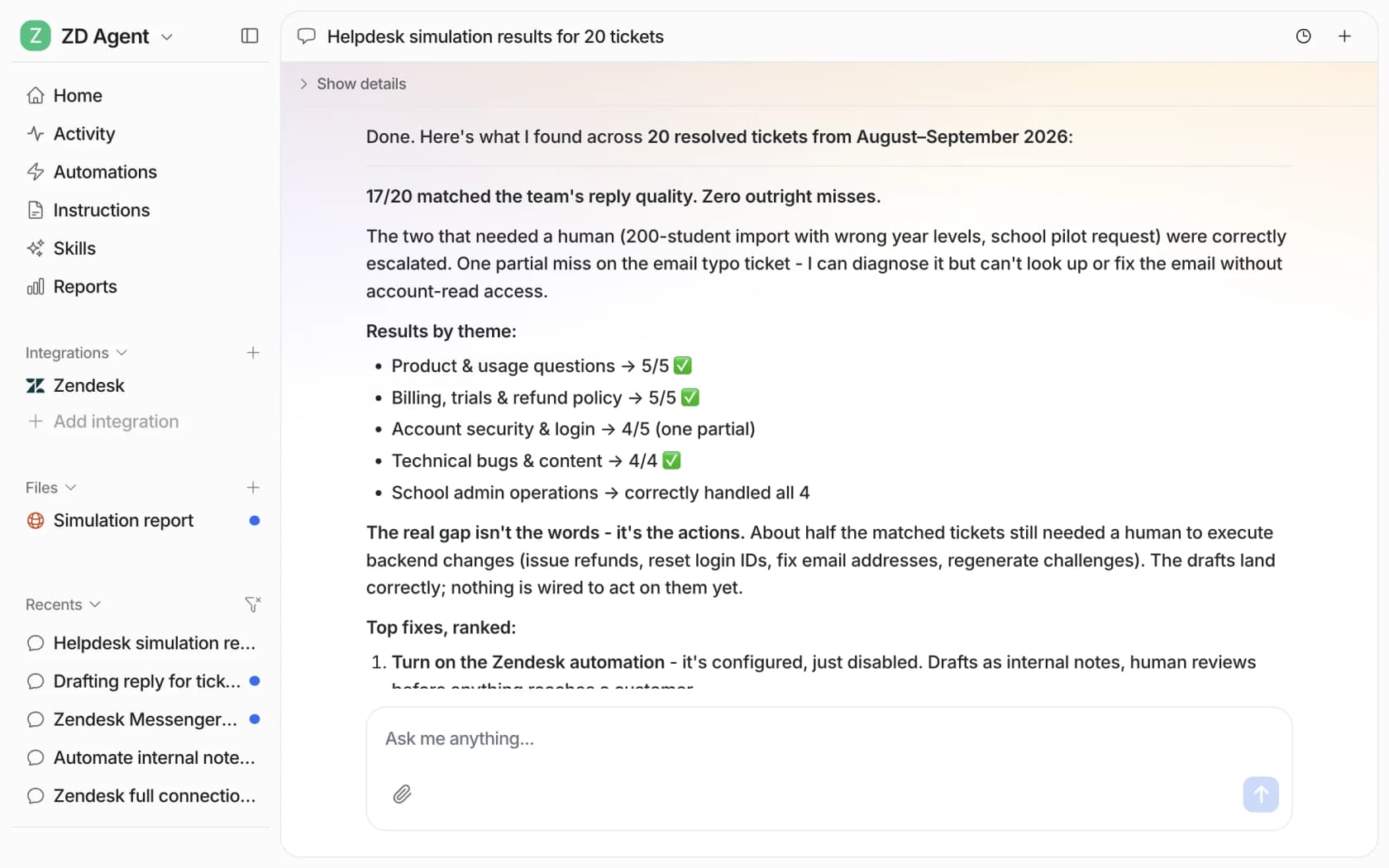
Before it answers anything on its own, you can run a simulation over your real past tickets and see how its replies compare to what your team sent. In eesel's own docs example, 17 of 20 past tickets matched the team's reply quality, with fixes ranked for the rest.
Seats are unlimited on every plan, so every trainee gets it without adding to the bill. There's a free plan with 100 credits and paid plans from $299 a month. If your next hire starts in a few weeks, it's worth having it drafting by their first day. Try eesel.
Frequently Asked Questions
What is support agent ramp time?
How long does it take a new support agent to ramp up?
How do you measure support agent ramp time?
What is a good ramp time for customer support agents?
How can I reduce support agent ramp time?
Does AI shorten ramp time for new support agents?
What does slow ramp time cost a support team?
Should new support agents use a sandbox to practice?


Article by
Riellvriany Indriawan
Riell is a designer and writer at eesel AI with about two years of experience researching CX platforms, AI chatbots, and helpdesk software. She combines her design background with a sharp eye for how these tools actually look and feel in practice — making her comparisons unusually visual and user-focused.