Why "just hire more agents" stops working
Every support leader has lived this: tickets grow with the customer base, so the plan is to grow the team at roughly the same rate. It works for a while. Then it doesn't, because ticket volume and revenue don't actually move in lockstep, and the gap shows up as burnout long before it shows up in a spreadsheet.
Eric Glyman, co-founder of Ramp, tells this story about his earlier startup Paribus: at a YC office hours session in 2015, his two-person team reported 20% week-over-week growth, and their "biggest problem" was too many support tickets. Their proposed fix was to hire a third person just to handle them. Jessica Livingston pushed back:
"If our solution was to hire someone to deal with customer issues, then next week when we grew more we'd have to hire another person, then another, and so on... You can't out-hire a bad product, or compensate for poor taste with a big support team."
That's the trap. Zendesk's own benchmark of over 20,000 help desks and 80 million tickets found the average support team handled 777 tickets a month at 294 tickets per active agent, with an average first response time of 24.2 hours. But the real story was in the breakdown by company size: 10-99 and 100-499 employee companies, the exact growth stage most scaling startups sit in, carried by far the heaviest tickets-per-agent load of any size band, and posted lower CSAT (81-82%) than both tiny teams (91%) and 5,000+ employee enterprises (82%, but with far less ticket volume per agent). Zendesk's own analysts put it plainly: "As you grow, don't neglect your support team."
This isn't just an old-company problem. One Yellowdig director of support and operations described it exactly: "As a fast-growing startup with a small team, our customers far outnumber our employees. It's crucial that we have robust self-service solutions as well as tools to supercharge the efficiency of our client-facing teams." I hear a version of this constantly, an ops lead at a DTC supplements brand doing roughly 7,000 Gorgias tickets a month told me their team couldn't keep up and needed to auto-resolve at least half of their email volume just to stay afloat.
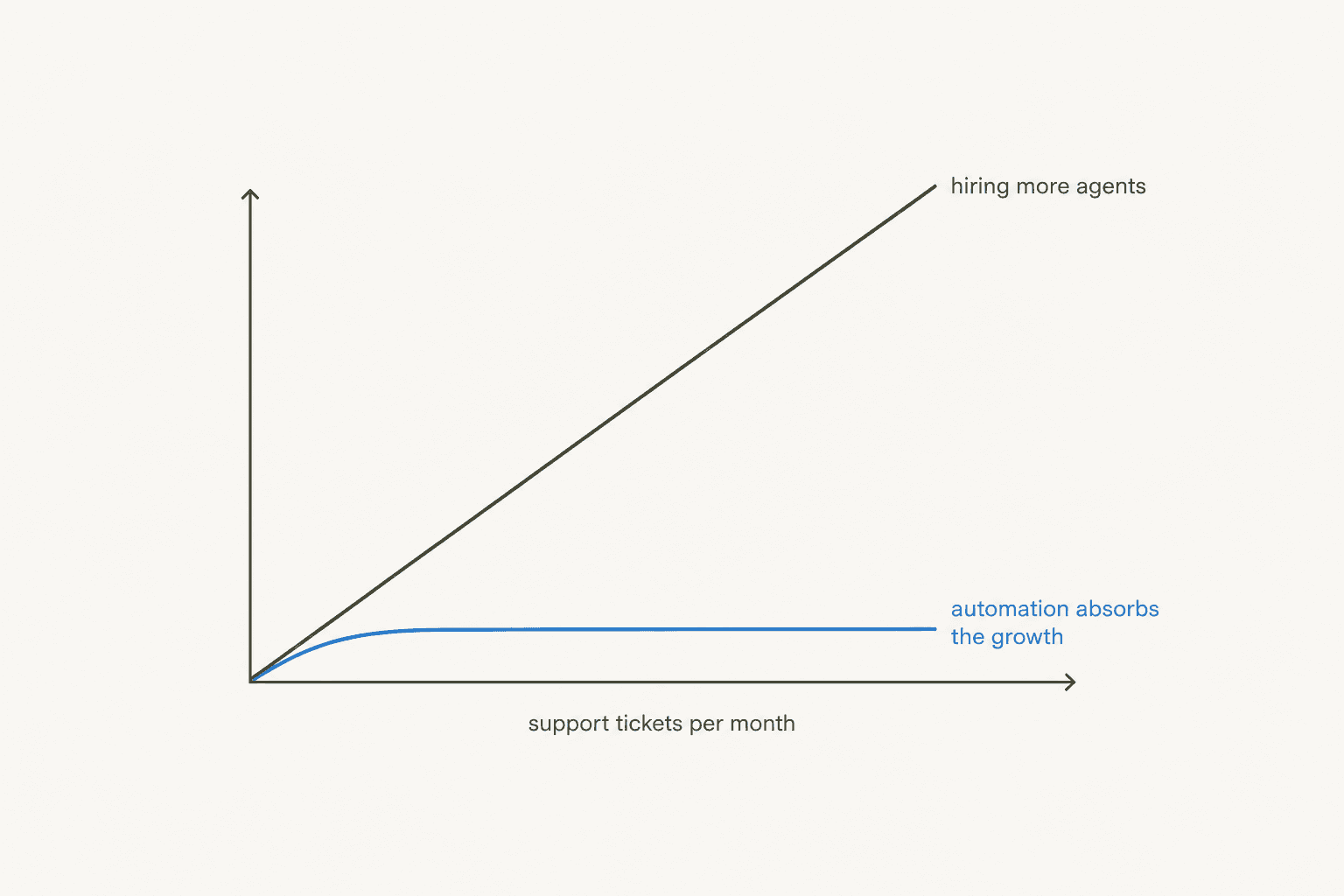
The chart above is the whole problem in one shape: hiring scales roughly linearly with volume (and slower than volume, because hiring and ramping a new agent takes months), while automation can absorb a volume spike the same week it happens.
What scaling by headcount actually costs
Before automating anything, it's worth pricing out what "just hire more agents" really costs, because the sticker price is never just the salary.
MetricNet's cost-per-ticket research for HDI puts the cost of replacing a single service agent in North America at roughly $12,000, once you count sourcing, background checks, training, and the ramp time to full productivity. And headcount overhead doesn't stop at the agent, only about 78% of a typical service desk's total headcount is direct, customer-facing agents; the other 22% is team leads, QA, schedulers, and management that has to scale alongside ticket volume too, not just the agents answering tickets.
Turnover makes this worse at exactly the moment you can least afford it. Salesforce's State of Service research found 12% of service employees left their company in the past year, and these are, in Salesforce's own words, "often hard to replace," because a departing agent takes tribal product knowledge with them. I've seen this directly: a salesperson at a French public-sector IT services firm on Freshdesk described two senior agents with deep product knowledge leaving that year, and wanted to capture that knowledge in an AI knowledge base before it walked out the door.
Meanwhile customer expectations keep rising even as your reps spend less time actually helping them. Salesforce found 82% of service reps say customer expectations are higher than they used to be, but reps spend under half their time, 46%, directly with customers, the rest eaten by internal admin. And the tolerance for getting it wrong is thin: Zendesk's CX Trends 2026 report found 85% of CX leaders say customers will drop a brand over a single unresolved issue, rising to 90% among startup leaders specifically, whether or not the ticket was technically within SLA.
| Cost driver | Figure | Source |
|---|---|---|
| Cost to replace one service agent (North America) | ~$12,000 | MetricNet / HDI |
| Share of headcount that's non-agent overhead | 22% | MetricNet / HDI |
| Service employees who left in the past year | 12% | Salesforce State of Service |
| Rep time actually spent with customers | 46% | Salesforce State of Service |
| CX leaders who'd lose a customer over one unresolved issue | 85% (90% at startups) | Zendesk CX Trends 2026 |
The other lever: self-service and deflection
Before an AI agent ever touches a ticket, the cheapest scaling lever is making sure customers never have to open one in the first place. Salesforce found 61% of customers say they'd prefer self-service for simple issues, and self-service adoption is one of the clearest splits between good and bad support orgs: 80% of high-performing service organizations offer a self-service option, against just 56% of low performers. HubSpot's own research backs this up, 78% of CRM leaders say customers actually prefer solving issues independently over talking to a human, and 64% of service leaders increased their self-service investment in 2024 alone.
In practice this means an up-to-date knowledge base, consistent macros for your most common replies, and clean knowledge management so agents (and any AI sitting on top) aren't hunting across five tools for the same answer.
One French Postme operator I spoke with put it bluntly: their support queries were dominated by the same handful of repetitive categories, refund requests, unsubscribes, order tracking, at 500+ tickets a day. That's exactly the kind of volume self-service and ticket deflection are built to absorb before a human ever sees it.
A G2 reviewer of an internal IT-helpdesk automation tool described the effect in concrete numbers that translate directly to customer support:
"[The tool] is taking 100 tickets in a day and solving for over 80% of the actual request which in turn means my ticket volume that my team and I have to work on has decreased by 80% which leaves us time to focus on bigger projects."

And on Reddit, the advice in a thread about a growing MSP drowning in ticket spikes was equally direct:
"If your problem is low level tickets, you need to either hire more level 1 staff, hire higher quality staff, or automate the common issues away."

That's the whole decision tree in one sentence. Hiring more or better staff both scale linearly with cost; automating the common issues away is the only one of the three that doesn't.
Where AI actually fits in the ticket lifecycle
This is where an AI agent, not a rigid rule-based chatbot, earns its place: not as a replacement for your team, but as the layer that catches everything repetitive before it reaches a human.
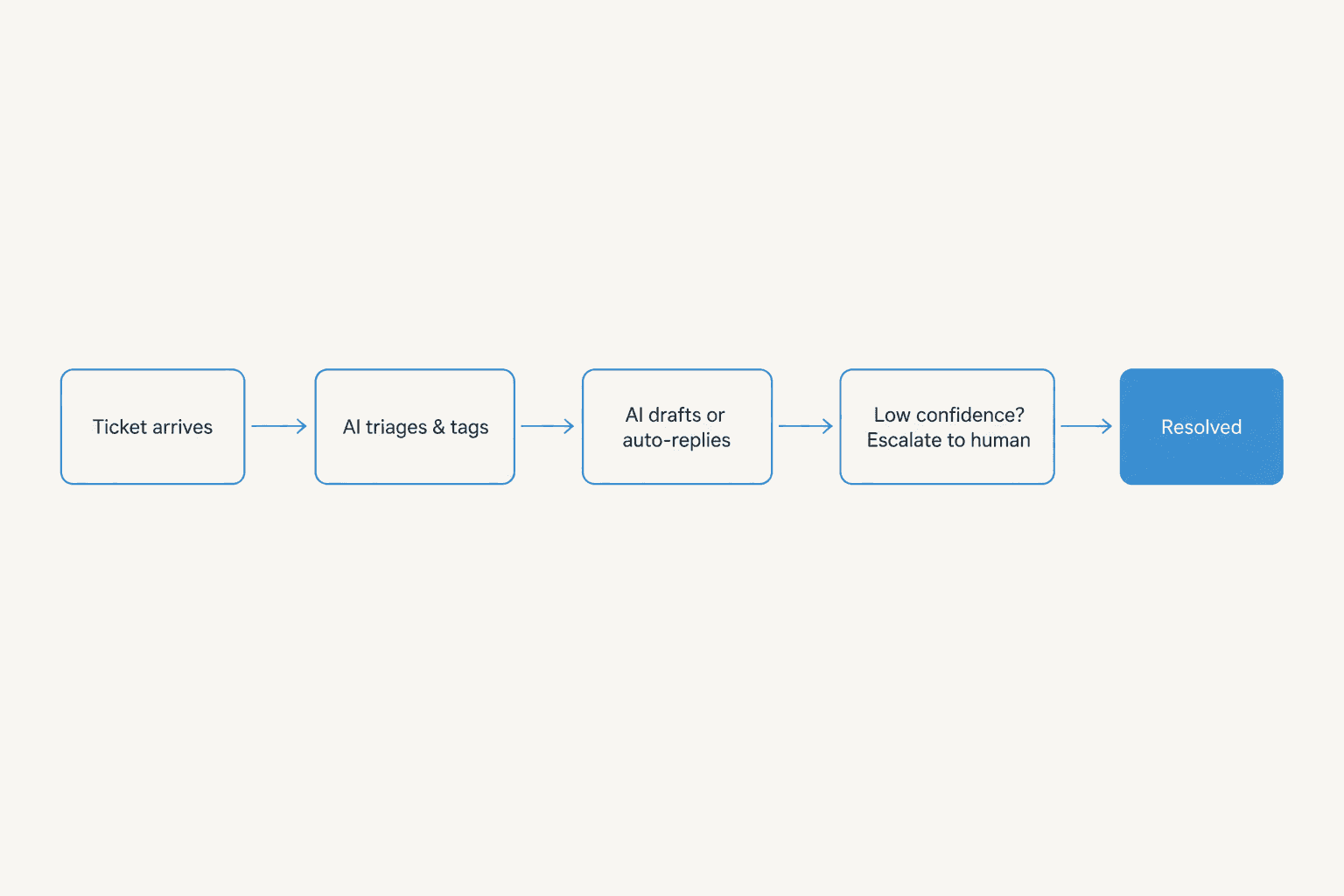
The pattern breaks into four stages:
- Triage and tag automatically. An AI for ticket triage reads and categorizes an incoming ticket the moment it lands, no more manual sorting before a human even sees what they're dealing with. The guide to automating ticket tagging walks through the setup.
- Draft or auto-reply on the repetitive volume. For the well-documented, high-frequency questions, refund status, order tracking, "how do I reset my password", the AI drafts a reply for review or, once you trust it, sends the reply itself. This is where ticket automation pays off fastest, because it's the highest-volume, lowest-judgment slice of your queue.
- Escalate on low confidence, not on a coin flip. This is the step teams skip, and it's the one that matters most. One DTC supplements CX lead I spoke with put the requirement bluntly: "The AI will never be able to answer 100% of the questions... I need an AI who is only handling the tickets that it's confident to handle and all the other ones, leave them alone." Escalation rules built on the AI's actual confidence, not a rigid keyword list, are what let you scale automation without scaling risk. See Zendesk AI agent escalations and chatbot escalation for how this is usually configured.
- Reserve human time for judgment and relationships. The tickets that need empathy, negotiation, or genuine problem-solving still go to a person, but now that person isn't also drowning in "where's my order" messages.
eesel customers running this pattern at real scale include a fully automated Zendesk deployment processing over 100,000 German-language tickets a month, and another customer handling 50,000+ tickets a month across a multi-agent Freshdesk setup with 1,000+ help articles feeding the knowledge base. Gridwise, meanwhile, saw its AI resolve 73% of tier-1 requests in its first month, with results visible during just a 7-day trial (see the helpdesk agent page for the full breakdown). None of that came from adding headcount.
Confidence-based escalation matters because the alternative failure mode is worse than doing nothing. I've watched a bot confidently tell a customer "yes, we support your car model" for a brand that wasn't actually in the company's database, simply because the knowledge base said "we support all models" without the nuance a human would catch. An AI that's confidently wrong erodes more trust than a slower human ever would, which is exactly why tracking resolution rate alongside CSAT, not resolution rate alone, is what keeps scaling automation honest.
What it actually costs to scale support with AI
The economics only work if the pricing model scales the way your ticket volume does, and this is where per-seat pricing and volume-based pricing diverge sharply.
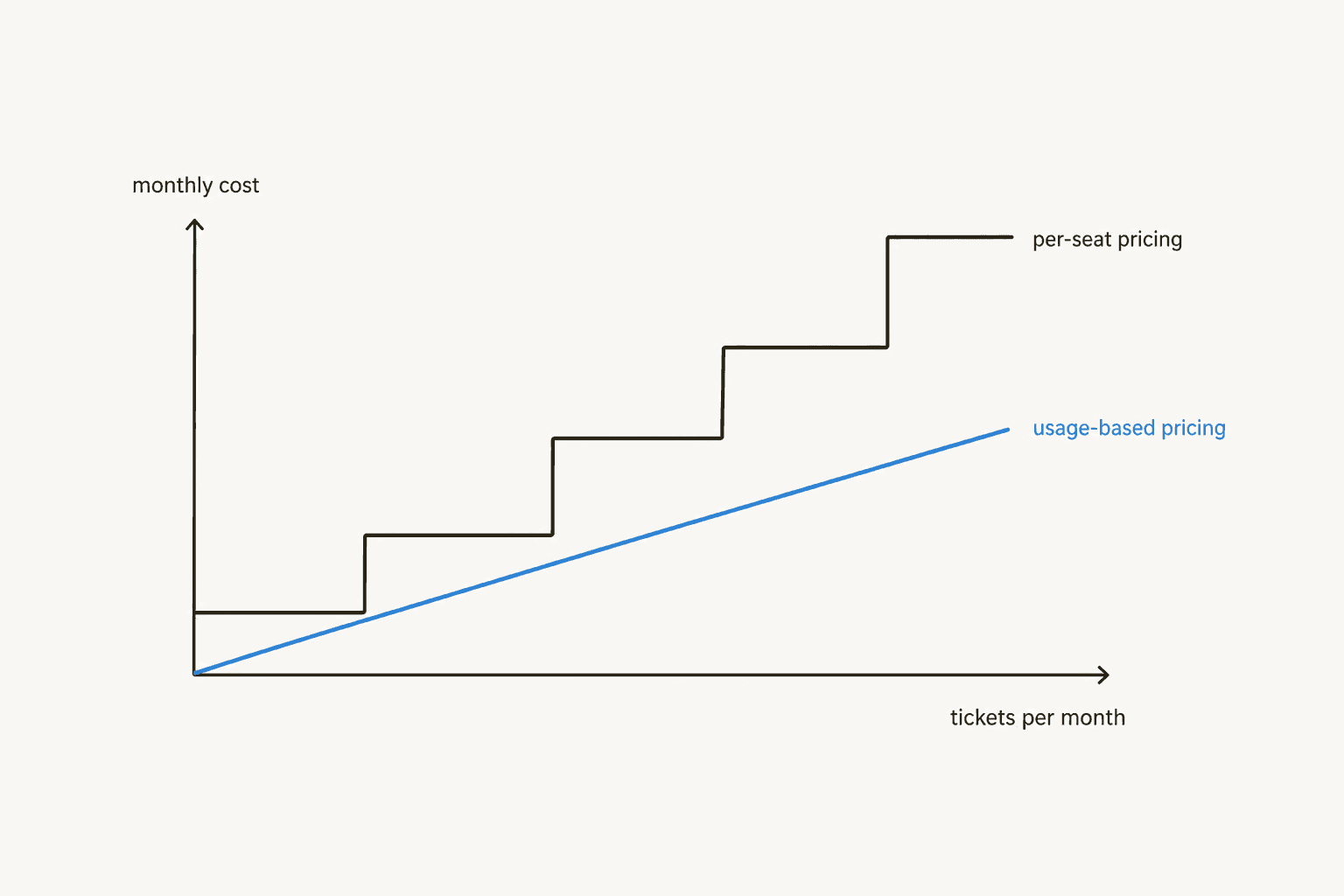
Per-seat software prices in step-functions: you're fine until you cross a threshold, then you're paying for an entire extra seat whether you needed 100% of it or 10%. Volume-based pricing, like eesel's, moves with ticket volume instead. eesel sells one fixed monthly price sized to volume, from $299/month for 500 credits, where 1 credit is one ticket or chat however long. There is no platform fee and no per-seat fee, and everything is included.
| Plan / item | Price | Terms |
|---|---|---|
| Free plan | $0 | 100 credits, every feature unlocked, no credit card |
| Credit | 1 per ticket or chat | However many replies or actions it takes |
| Blog post | $4 each | One full blog post draft per run |
| Pay a year upfront | Two months free | Annual billing |
| Add-ons | From $199/month | SSO and MFA from $199/mo, priority support from $299/mo, data residency $500/mo |
| Overage | $0.80 per extra credit | Optional, with a monthly cap you set |
At real volumes, the math is straightforward:
| Tickets per month | Plan | Monthly cost |
|---|---|---|
| Up to 100 | Free plan (100 credits) | $0 |
| Up to 500 | 500 credits | $299 |
| Up to 1,000 | 1,000 credits | $499 |
| Up to 2,500 | 2,500 credits | $999 |
| Up to 5,000 | 5,000 credits | $1,899 |
I've watched this play out with an e-commerce account on Gorgias handling roughly 700 tickets a week (over 4,000 tasks in six weeks, peaking at 708 in a single week) at close to $1 per ticket all-in, a fraction of what an additional hire to cover that same volume spike would have cost, without the multi-week hiring and ramp time. On the old flat-rate model many tools still use, I've seen the math work out to roughly $20 per AI-generated reply for a lower-volume account paying a flat monthly fee, versus about $0.50 to $0.60 per ticket on a volume-sized credit plan at 500 to 1,000 tickets, a big difference driven entirely by how the pricing model handles low and variable volume.
Common mistakes when scaling support with AI
A few patterns show up again and again in accounts that scale badly:
- Treating the AI's confidence as binary. An AI that answers everything with the same tone, whether it's 95% sure or 30% sure, will eventually give a customer a confident wrong answer. Set up confidence-based escalation from day one, not after the first bad reply.
- Automating before fixing self-service. If your knowledge base is stale or scattered, you're just automating the delivery of bad answers faster. Fix the source material first, the training on your knowledge base matters more than the automation layer sitting on top of it.
- Ignoring the non-agent overhead. Remember that 22% of headcount that isn't frontline agents. If you scale ticket-handling capacity with AI but don't also revisit how QA, scheduling, and reporting scale, you've just moved the bottleneck instead of removing it, see how support teams structure agent groups as they grow.
- Picking a pricing model that punishes growth. A per-seat or flat-fee tool that looked cheap at your current volume can become the most expensive line item in your stack the moment volume triples. Run the math on AI agent vs human agent cost at your projected volume, not just your current one.
Try eesel
I've spent enough time on support queues to know the hiring-to-keep-up cycle firsthand, and it's exactly why eesel is built the way it is. eesel's AI helpdesk agent plugs into the helpdesk you're already running, Zendesk, Freshdesk, Gorgias, or half a dozen others, and trains on your past tickets and help docs from day one, so it's useful before your next volume spike, not months into an implementation. Because pricing is per credit (one per ticket or chat) rather than per seat, scaling from 500 to 2,500 tickets a month doesn't mean a hiring decision, it just means moving up to a bigger, predictable monthly plan.
You can try eesel free with 100 credits before you need a card, plug it into your existing helpdesk, and see what it resolves before you decide whether your next hire is really a support agent or something else entirely.
Frequently Asked Questions
How do I scale customer support without hiring more agents?
What's a good tickets-per-agent ratio for a growing support team?
Can AI actually resolve support tickets on its own?
How much does it cost to scale customer support with AI?
What's the biggest mistake teams make when scaling support with AI?


Article by
Riellvriany Indriawan
Riell is a designer and writer at eesel AI with about two years of experience researching CX platforms, AI chatbots, and helpdesk software. She combines her design background with a sharp eye for how these tools actually look and feel in practice — making her comparisons unusually visual and user-focused.