What is shared support queue management?
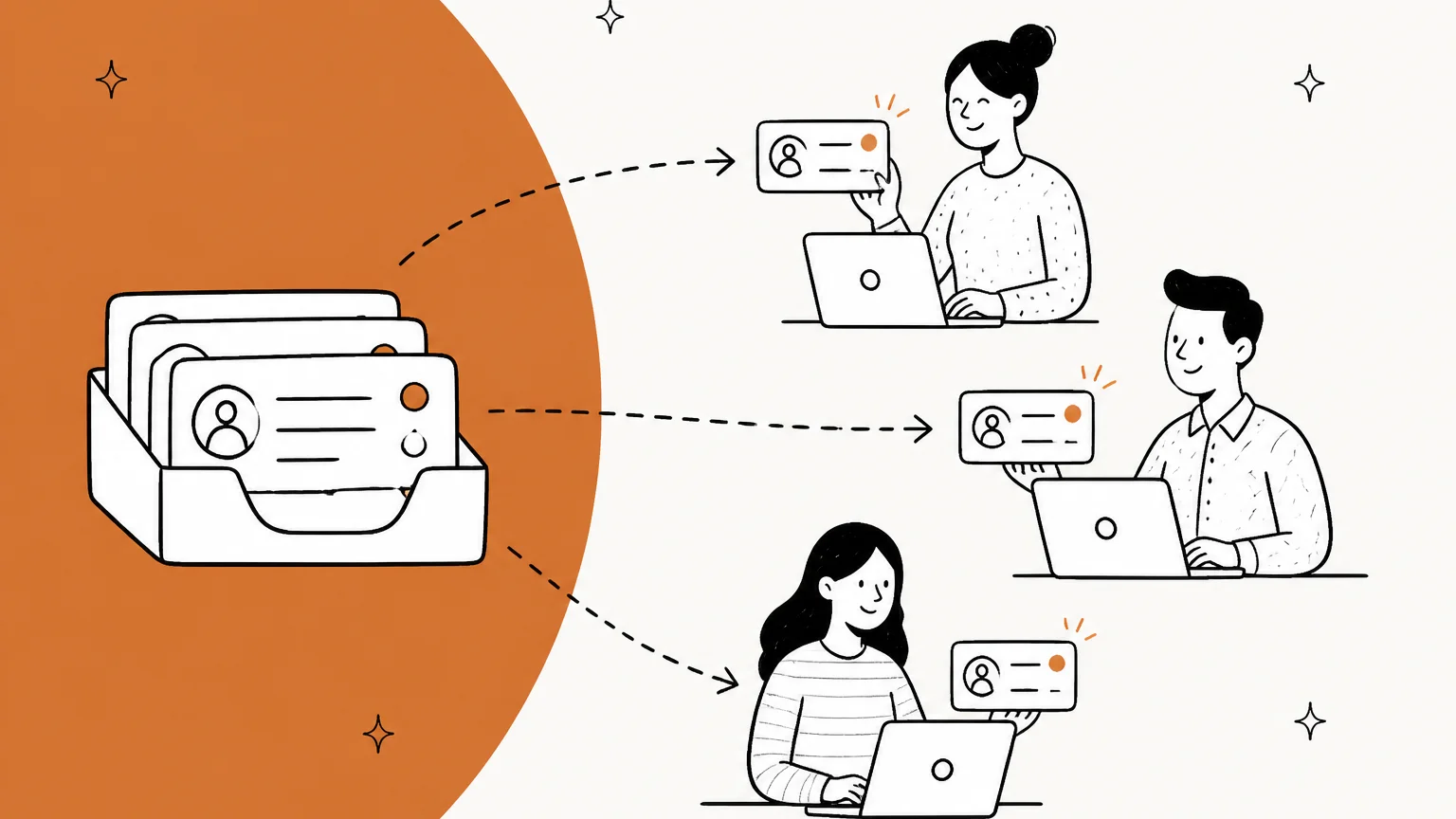
A shared support queue is one list of incoming tickets that a whole team works from, instead of each agent having their own inbox. Shared support queue management is the set of rules that decides who takes which ticket, how fast it gets an owner, what happens when someone is away, and how you notice when something slips.
I work the support queue at eesel every day, and I've learned that the hard part of a shared queue isn't the hard tickets. Hard tickets get attention because they're loud. The ones that slip are the ordinary tickets that four people opened, read, and closed again, each assuming someone else would take it.
Every helpdesk shows the shared queue a little differently:
- Zendesk uses views, including a standard unassigned view (Zendesk docs).
- Freshdesk uses ticket list views, with routing set per group (Freshdesk docs).
- Help Scout gives every inbox fixed folders: Unassigned, Mine, Assigned, Closed and Spam (Help Scout docs).
- Front works from a shared inbox with Unassigned, Assigned and Waiting tabs.
- Gorgias uses views, with a standard "Unassigned" view of open tickets nobody owns (Gorgias docs).
The tool names change. The failure modes don't.
Why shared queues break: the ownership gap
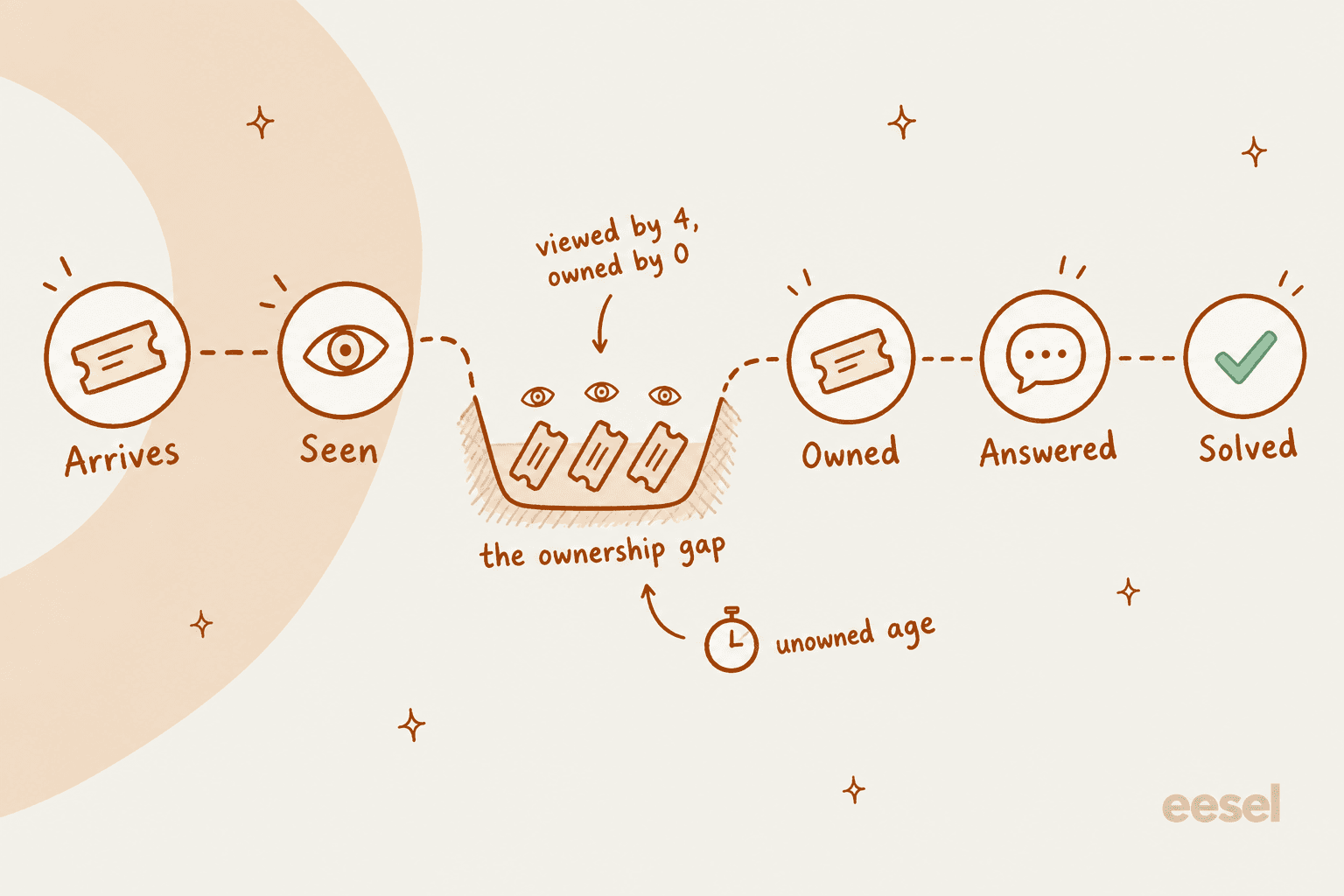
Here's the pattern I see most. A ticket arrives. Three agents see it in the queue. Each one has something else open, so each one moves on. Nobody's name is on it, so nobody feels it aging.
A K-12 IT lead described the pull-from-the-pile version of this years ago, and it still reads like every overloaded support queue I've seen:
"We currently have an unending bucket of tickets, the engineers and I pluck out calls with little oversight, however this results in some calls falling to the bottom of the pile and getting ignored. There's no ownership of unassigned calls."

It gets expensive when the ticket that slips is the urgent one. A Zendesk admin posted in February 2026 about an enterprise customer whose production system went down at 9am. The ticket sat until 2pm behind more than 30 overnight tickets, so the customer was down for 5+ hours before anyone noticed it was critical (r/Zendesk).
And in a thread about a ticket that sat unassigned for two days and earned a 1-star review, the story was the classic one: everyone assumed someone else had grabbed it. One reply put the cause plainly:
"That's not a system issue (crappy help desk software, bad ticketing system). It's a bad work ethic ("Meh, Bob can get that. Or Cindy. IDC, I'm busy on Reddit.")
Systems can help with setting SLAs and possibly even forcing ownership, but ultimately it's up to the team to take responsibility and do their jobs."
I half agree. Work ethic matters. But a queue design that depends on everyone remembering to grab the next ticket will fail on the busiest day, when everyone is already holding three. The fix is to make ownership automatic or make it someone's job, not to hope.
That's the shift this post is built on: measure unowned time, not just response time. Your first response time average can look fine while one ticket ages all afternoon, because averages hide the tail.
The three ways to assign work in a shared queue
Every shared queue runs on one of three models, whether the team chose it or not.
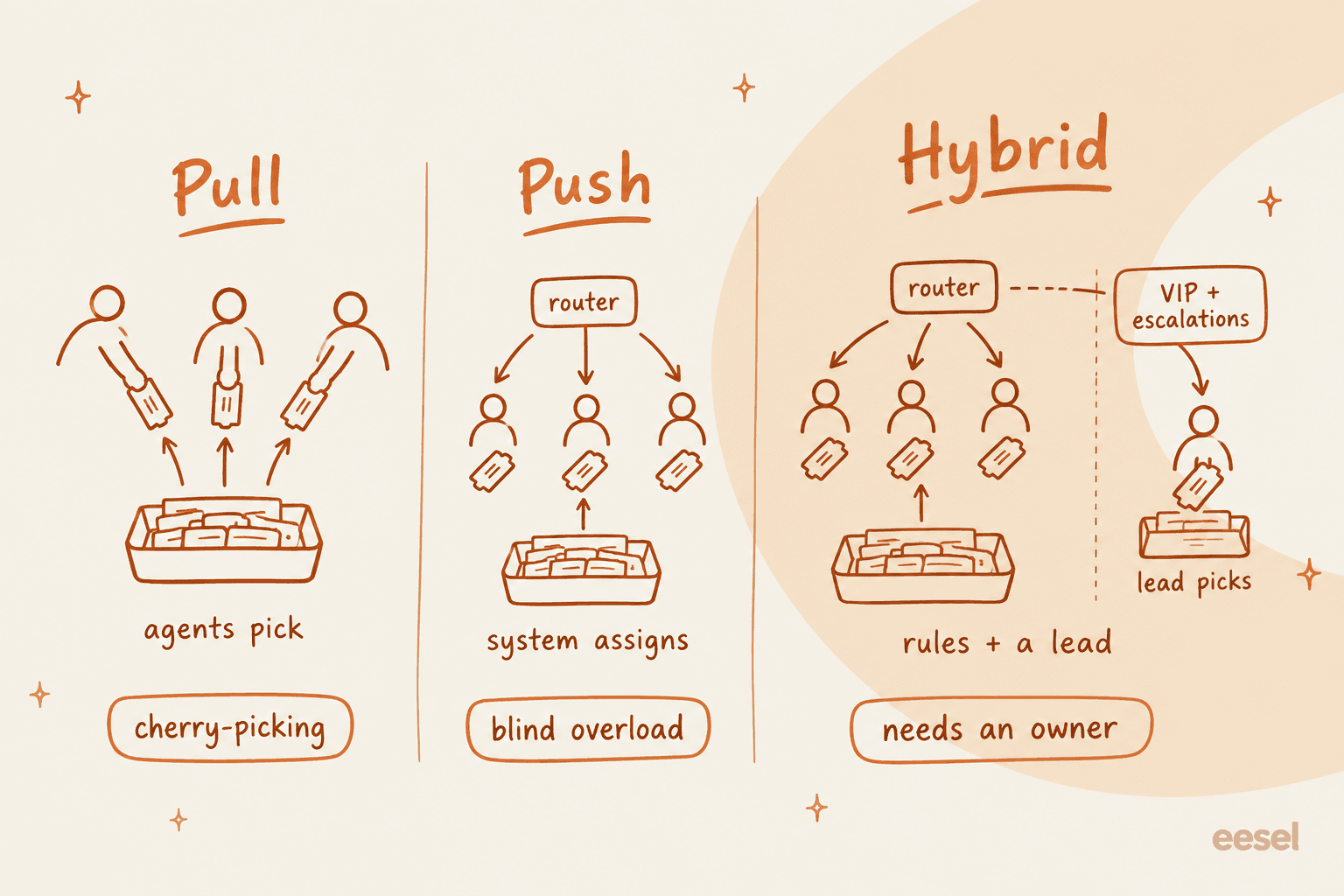
Pull means agents choose their own tickets from the shared view. It's the default in most helpdesks and it feels fair, because good agents can grab more. Its weakness is cherry-picking. One Zendesk team admitted to doing it on purpose when they were swamped:
"If we're underwater we do an easy out method where we cherry-pick the simple tickets (can be handled in less than 5 minutes) and have a portion of the team hit those while the rest does fifo."
That's a smart, deliberate version. The accidental version is everyone quietly skipping the same awkward ticket.
Push means the helpdesk assigns tickets for you, with ticket routing rules: round robin (next agent in line), load-based (fewest open tickets) or skills-based (matching language, product or tier). It fixes ownership, but it can overload people who happen to be online, and it doesn't know which tickets are hard. One Zendesk team found that out after switching:
"We recently moved from Round Robin to OCR and it's been a bit of a nightmare."
In the same post, they described 2-3 agents getting 15 email tickets while the rest got a couple or none, and some tickets never routing out of the unsolved view at all. That's usually a capacity and status setup problem, not a reason to go back to pulling, but it shows push needs tuning.
Hybrid means automatic assignment for the normal flow, plus a small lane that a lead works by hand: VIP accounts, escalations, anything the rules can't place. Most teams I'd advise end up here.
| Model | Who decides | Works best for | Main risk | What to add |
|---|---|---|---|---|
| Pull | Agents pick | Small teams, similar tickets | Cherry-picking, aging tickets | Oldest-first view, a daily triage owner |
| Push | Helpdesk rules | Busy queues, chat and messaging | Overloading whoever is online | Capacity limits, away status, reassignment |
| Hybrid | Rules plus a lead | Mixed tiers, VIPs, several languages | The manual lane has no owner | A named lane owner per shift |
If you stay on pull, add one rule that every Reddit thread on this topic lands on in some form: a person who owns the leftovers. An MSP lead described theirs:
"our helpdesk team functions as one big resource pool. Inbound phone calls and tickets are automatically queued, and the techs check it every so often to take tickets. Helpdesk manager gets an alert if a ticket's been sitting in the intake queue for 30 minutes, at which point he'll assign to a resource."
That 30-minute alert is the whole trick. Pull for speed, a backstop for ownership.
Which assignment model fits your queue?
Pick the line that sounds most like your team. Each one gives the model I'd start with and the setting that makes it work.
Which assignment model fits your queue?
Tap the description closest to your team.
Start with: pull, plus a triage owner
Keep agents picking from one shared view sorted oldest first. Rotate a daily triage owner who assigns anything unowned after your limit (30 to 60 minutes for email is a sane start).
Works on any plan. Turn on collision detection if your helpdesk has it.
Start with: push, load-based
Assign new tickets automatically to whoever has the fewest open tickets, with a per-agent capacity limit so nobody gets buried. Keep a manual lane for escalations.
Freshdesk Pro ($55), Help Scout Pro ($75) for Balanced, Front Professional ($65), Zendesk capacity-based routing on Team plans and up, Gorgias on every plan.
Start with: hybrid, skills or group routing
Route by language, product or tier first, then balance load inside each group. A lead owns the VIP and edge-case lane each shift.
Skills routing is Zendesk Suite Professional ($115) and Freshdesk Enterprise ($89). On Help Scout, Front and Gorgias, use separate teams or inboxes and route into them with rules.
Start with: push only
Customers in a live chat won't wait while agents browse. Push conversations to available agents, set a short accept or reassign timer, and cap concurrent chats per agent.
Zendesk can reassign a ticket an agent doesn't accept in time on Professional plans and up. Gorgias can unassign chats when the agent becomes unavailable.
How each helpdesk handles a shared queue
This is where plan gates bite. Here's what each tool can do on its own, from each vendor's docs and pricing page as of October 2026. Prices are per agent per month as listed on each pricing page, on annual billing where the page offers it.
| Helpdesk | Round robin | Load or capacity based | Skills based | Collision detection | SLA policies |
|---|---|---|---|---|---|
| Zendesk | Omnichannel routing, Team plans and up (Suite Team $55) | Capacity-based is the default, Team plans and up | Suite Professional $115, Support Enterprise | All plans except Team | Suite Growth and up |
| Freshdesk | Pro $55 | Pro $55 | Enterprise $89 | Growth $19 and up | One policy from Growth; multiple and escalations on Pro |
| Help Scout | Plus $45 | "Balanced," Pro $75 | Not in the docs | All plans | Standard 1, Plus 2, Pro unlimited |
| Front | Rule action, all plans | Load balancing, Professional $65 | Not in the docs | Yes, no plan gate stated | Time goals, Professional $65 |
| Gorgias | Fewest-tickets auto-assign, all helpdesk plans | One capacity limit, all plans | Not in the docs | "Also viewing" banner | All helpdesk plans |
Zendesk
Zendesk's omnichannel routing pushes email, calls and messaging to agents based on their status and spare capacity. Capacity-based assignment is the default: work goes to the eligible agent with the most room for that channel (Zendesk capacity rules). You can switch the assignment method to round robin, which picks the agent who has gone longest without a new ticket, as long as they still have capacity.
My Zendesk round robin guide walks through the setup.
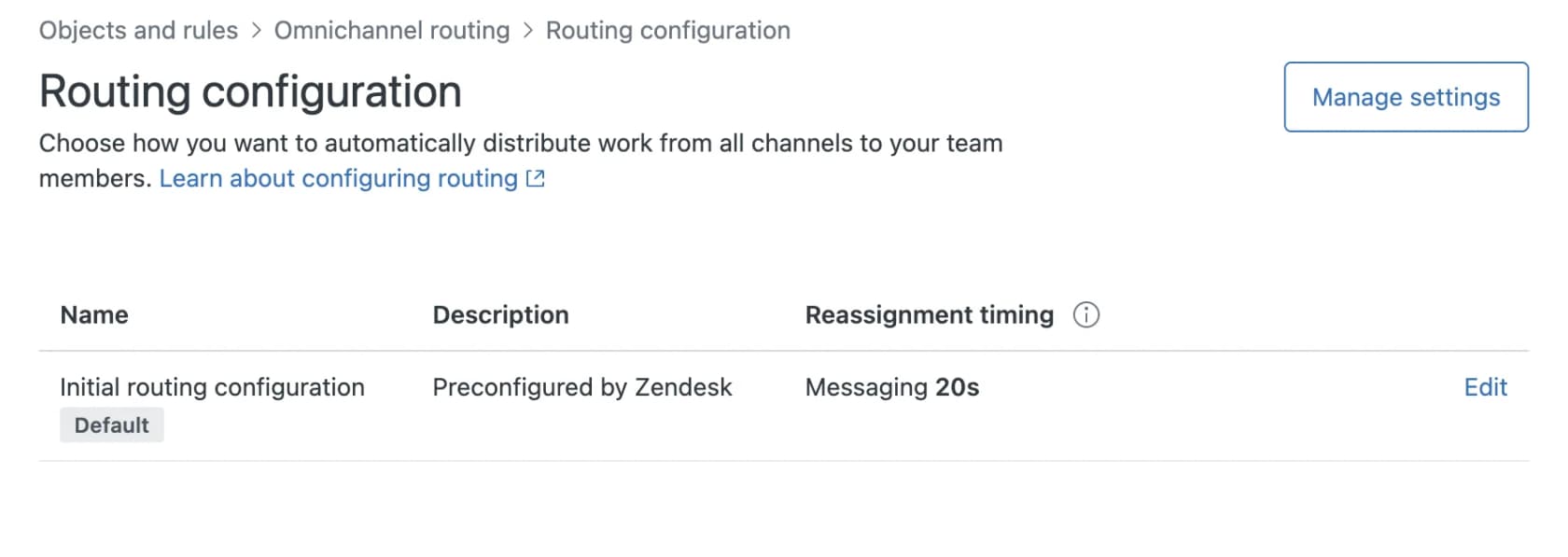
Three settings matter most for a shared queue:
- Skills. Skills-based routing is on Suite Professional and above. Required skills never time out; optional skills drop after a timeout you set (Zendesk skills docs).
- Reassignment. Zendesk can reassign up to the 50 most recently updated open email and messaging tickets when an agent's status changes to one you pick. Reassigning reopened tickets, and reassigning when an agent doesn't accept in time, are Professional and above (Zendesk routing configuration).
- Collision. An eye icon in views marks tickets someone else is viewing, but agent collision is not available on Team plans (Zendesk collision docs).
Zendesk's intelligent triage now classifies intent, sentiment and language on Professional plans and above at no extra cost, per Zendesk's announcement. Using those classifications in routing still needs the Copilot add-on, listed at $50 per agent per month on Zendesk's pricing page.
Freshdesk
Freshdesk sets routing per group. Under Admin, Groups, Group Properties, you pick manual or Advanced Automatic Routing (powered by Omniroute) with round-robin, load-based or skill-based assignment.
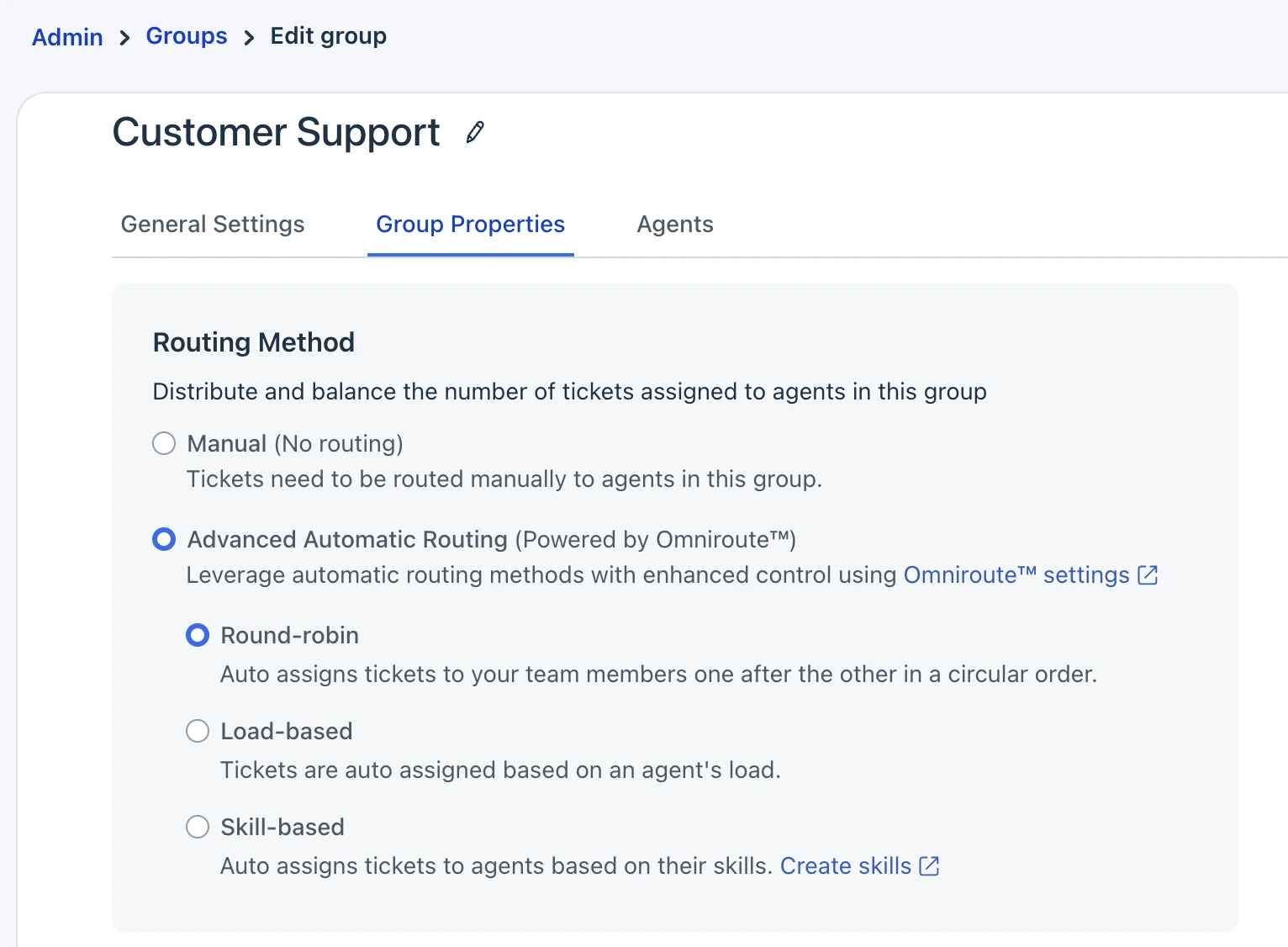
Round robin and load-based assignment are Pro and Enterprise, and round robin skips agents already at capacity (Freshdesk round-robin docs). Load-based gives each ticket to the least loaded available agent until each hits their limit. Skill-based routing is Enterprise only.
On Freshdesk's pricing page, that's Growth $19, Pro $55 and Enterprise $89 per agent.
Two details catch teams out. First, an offline agent can't receive new tickets, and if nobody is available the ticket stays unassigned. Second, a manual assignment can push an agent over their limit, and that excess then blocks their auto-assignment (Freshdesk Omniroute docs). I couldn't find a setting that moves an offline agent's open email tickets back to the pool, so plan a manual sweep at shift change. Collision detection is on Growth and above.
Help Scout
Help Scout keeps it simple. Routing offers two methods: Round Robin, which assigns "one by one in alphabetical order," on Plus, and Balanced, which assigns to the teammate with the fewest active conversations, on Pro (Help Scout routing docs).
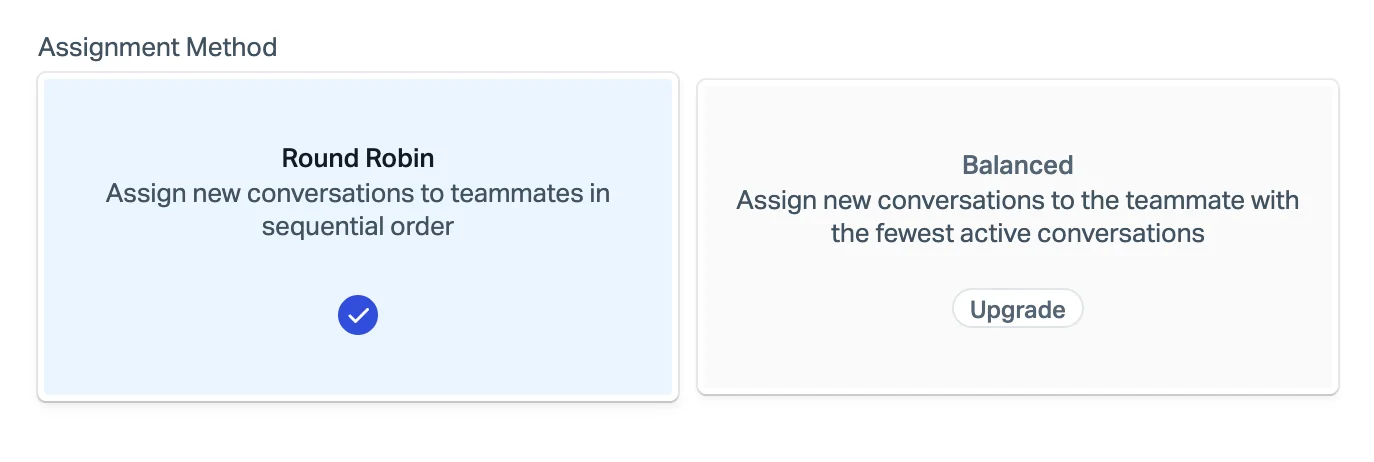
Routing skips teammates who are Away or at their limit (up to 100), works oldest-waiting first, and picks up anything already sitting in Unassigned. Manual and workflow assignments ignore those rules. Collision detection is on every plan, and Help Scout pauses your reply if a teammate replied or the customer wrote in since you opened the conversation (Help Scout collision docs). Help Scout's pricing lists Standard at $25, Plus at $45 and Pro at $75 per user per month. If you're pairing it with AI, my Help Scout triage guide covers what can be automated.
Front
Front routes with rules. A round robin rule assigns to online teammates in turn, but if everyone is offline nothing gets assigned and there's no queue, so a teammate who comes back later doesn't get the conversations they missed (Front's routing docs). A load balancing rule is smarter for a shared queue: it assigns to whoever has the fewest open conversations up to their limit (max 100), queues when everyone is full, and resumes from the oldest unreplied conversation. It's on Professional and above (Front load balancing docs).
Front's out-of-office handling is one of the better ones for a shared queue: replies to conversations assigned to an out-of-office teammate unassign and return to Unassigned automatically, on all plans (Front out of office docs). Front pricing lists Starter $25, Professional $65 and Enterprise $105 per seat. For the AI side, see my Front triage post.
Gorgias
Gorgias doesn't bill per agent. It bills by ticket volume, with helpdesk plans from Starter at $10 a month for 50 tickets up to Advanced at $750 for 5,000 on annual billing (Gorgias pricing). Auto-assignment is on every helpdesk plan: rules send a ticket to a team, then Gorgias orders tickets by priority and creation date and gives them to available agents with the fewest tickets (Gorgias auto-assign docs).
The capacity limit is one number for all agents, so you can't give a new hire a lighter load than a senior agent. Gorgias can unassign a reopened ticket when its agent is offline, and unassign chats when the agent becomes unavailable. My Gorgias assignment rules guide goes deeper, and the Gorgias views post covers the queue side.
Stop two people answering the same ticket
The opposite failure to a dropped ticket is a doubled one: two agents reply to the same customer with slightly different answers. It's rarer than dropped tickets, but customers notice it more. A CS lead in a thread about shared inboxes pointed at the fix:
"Zendesk or hubspot would be good for tracking, and assigned ownership so multiple people don't try to take ownership and end up causing issues."
There are two layers of protection. The first is assignment: a ticket with one owner the moment it arrives can't be grabbed twice. The second is collision detection, which shows who else is viewing or typing. Front's version is a good example of what to look for:
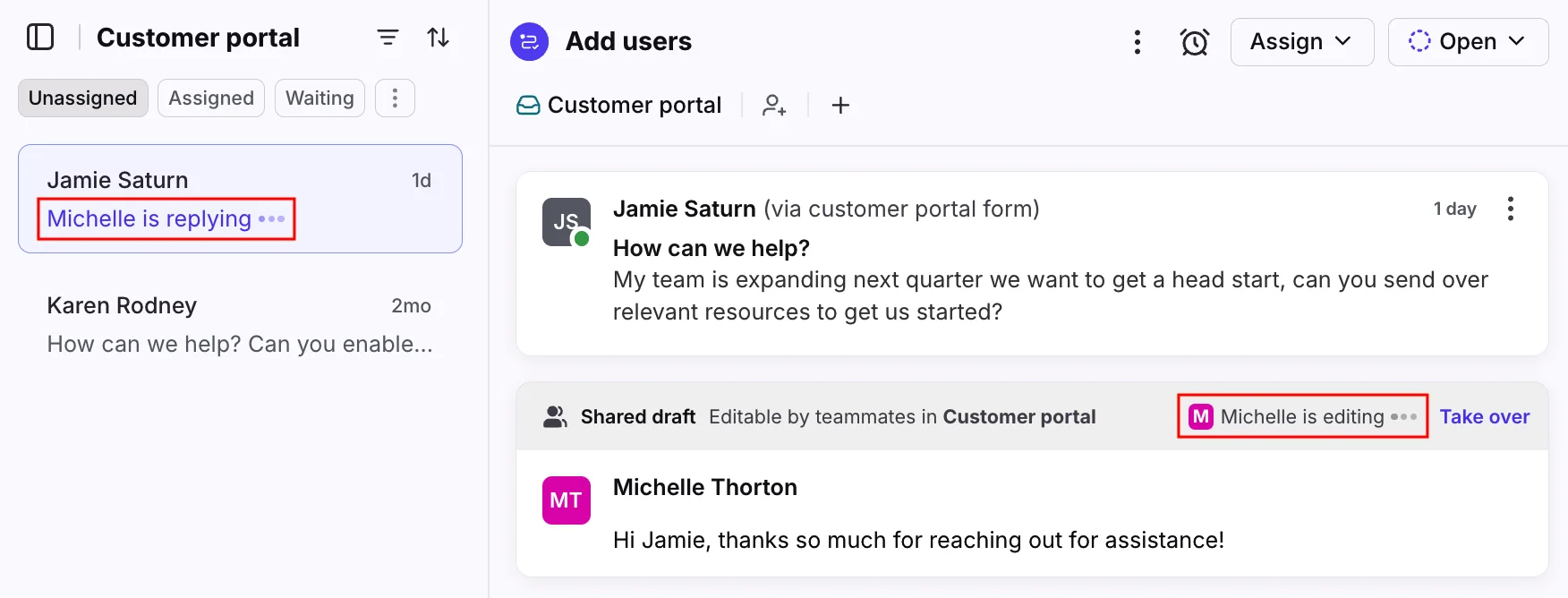
The "replying" marker shows in the list itself, before you even open the conversation, and the shared draft has a Take over button for handoffs (Front collision docs). If your current plan lacks collision detection (Zendesk Team, Freshdesk Free), push assignment matters even more, because it's your only guard.
The rules that keep a shared queue honest
Tools give you the settings. These six rules decide whether the settings work.
- Every new ticket gets an owner within a set time. Pick a number per channel, for example 30 minutes for email and a few seconds for chat. Track it as its own target, separate from your SLA for a first reply.
- One person owns the leftovers each shift. A commenter in the two-day-unassigned thread suggested the simplest version: "Make one person responsible each day/week for triage; reading all calls as they come in, fixing the 5 minute ones and assigning out the remainder" (r/CustomerService).
- Sort shared views oldest first. Newest-first views reward grabbing fresh, easy tickets. Oldest-first makes the aging ticket the first thing everyone sees.
- Set capacity limits, then respect them. Every helpdesk above lets agents assign themselves past their limit. If leads keep dumping tickets on the fastest agent, push routing stops balancing anything.
- Make away status mean something. Routing only skips agents who are marked away or offline. If agents forget to set status at lunch, tickets pile up on their names. Pair this with a shift handoff sweep of anything still assigned to someone who's gone.
- Escalate unowned tickets automatically. A trigger or automation that alerts a lead when a ticket has been unassigned past your limit is cheap insurance. My guide to escalating unassigned tickets has a Zendesk recipe, and SLA escalations cover the reply side.
There's also a fairness point leads miss. A sysadmin on Reddit described handling 3 times as many calls as the rest of the team and being reprimanded for having too many open tickets, while teammates who never touched the queue were praised for a "healthy" number (r/sysadmin). If you measure open tickets per agent in a pull model, you punish the people doing the pulling. Measure handled tickets and unowned age instead.
What to watch in a shared queue
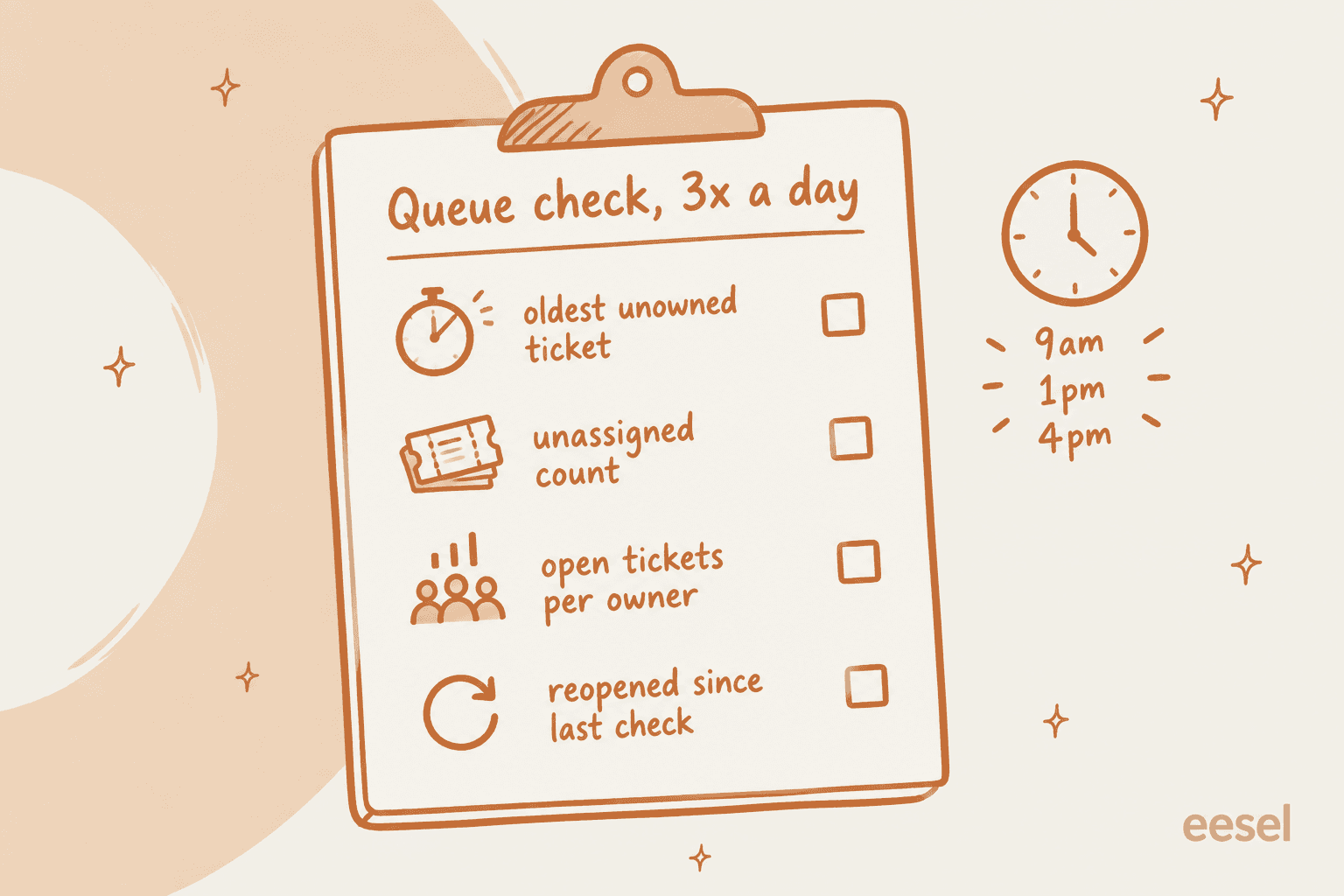
You don't need a dashboard with 20 tiles. You need four numbers, checked a few times a day.
| Number | What it tells you | Where it goes wrong |
|---|---|---|
| Oldest unowned ticket | The real worst-case wait | Averages hide it completely |
| Unassigned count | Whether routing or people are keeping up | A spike means status or capacity is misconfigured |
| Open tickets per owner | Whether load is balanced | One agent at 3x the rest means push isn't balancing or a lead is overriding it |
| Reopened since last check | Whether fast answers are actually solving things | High reopens mean speed is being bought with quality |
These sit alongside your usual customer service KPIs, not instead of them. If your ticket backlog is already large, start with my guide to clearing a support backlog before tuning routing.
Routing can't fix a queue that's simply understaffed. My support coverage planning post has the staffing math.
Where AI fits in a shared queue
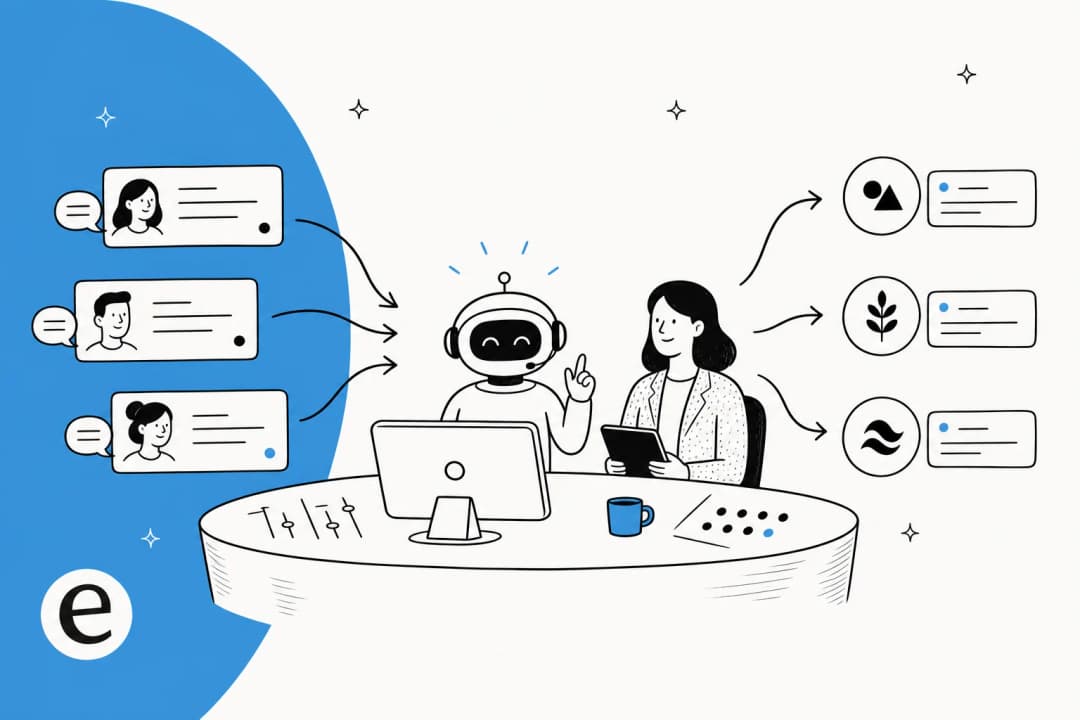
Most of the work in a shared queue isn't answering. It's reading a ticket, deciding what it is, tagging it, and deciding who should have it. That sorting step is where AI has gotten good, and it's where I'd start.
eesel has spent years putting AI on live support queues, and the numbers from real rollouts are more useful than any claim. In one trial on real Zendesk traffic at a German online jewelry retailer handling about 1,000 tickets a month, eesel's AI reached 93% triage accuracy and 100% spam detection, with no false positives on the 22% of the inbox that turned out to be spam. Its draft replies were 88% directionally right, and 12% went out as written. The agents mostly used it as a research and auto triage assistant, which is exactly the job a shared queue needs.
The most common buyer requirement I hear is about control, not speed. A CX lead at a supplements brand on Gorgias, running about 7,000 tickets a month, put it this way on a call:
"I need an AI who is only handling the tickets that it's confident to handle and all the other ones, leave them alone."
That's the right instinct for a shared queue. The AI should take the tickets it can handle completely, sort and route the rest, and leave anything uncertain for a person. With eesel's helpdesk teammate, routing follows your own instructions (for example, "assign anything from an angry customer to the senior team") using the helpdesk's assign actions. You can roll out in stages: drafts as internal notes first, then let it answer the easy tickets end to end. Before any of it goes live, Simulation replays your past tickets and scores the AI's answers against what your team actually sent, so you see the misses before customers do.
Gridwise, a driver-analytics app on Zendesk, wrote in a G2 review:
"In the first month, eesel is resolving 73% of our tier 1 requests... The platform even includes automations for ticket tagging, assignment, and status updates!"
Kim Simpson, Gridwise
For a shared queue, the effect is that the easy tickets never reach the pile at all, and the ones that do arrive already tagged and routed. If you're comparing options, my roundup of the best AI for ticket triage covers the field, and the AI copilot guide covers the drafting side.
Common shared queue mistakes
- Running one shared inbox with no assignment at all. Fine at 10 tickets a day, chaotic at 40. One CS operator described moving to a dedicated platform "once it became unwieldy to manage the responses and mistakes were being made" (r/CustomerSuccess). My shared inbox vs ticketing system post covers when to switch.
- Splitting the queue into personal inboxes. It feels tidy, but nobody can see a colleague's backlog and tickets die when someone is sick. Keep one queue and route inside it. My distributed support operations guide makes the same case for multi-site teams.
- Turning on push routing without capacity limits. You'll get the "15 tickets to three people, none to the rest" pattern from the Zendesk thread above.
- Treating escalations as part of the general pool. Escalated tickets need a named owner, not a slot in round robin. See my ticket escalation process guide and, for engineering handoffs, cross-team escalation.
- Ignoring time zones. A queue covered by people in different regions needs routing by schedule, or the overnight pile lands on whoever logs in first. Follow-the-sun support covers that setup.
eesel for shared support queues
If your shared queue is drowning in repetitive tickets, the cheapest fix is a teammate that takes them off the pile. eesel's AI helpdesk teammate plugs into Zendesk, Freshdesk, Gorgias, Front, Help Scout and other helpdesks in minutes, learns from your past tickets, macros and help center, then tags, routes and answers the easy tickets inside the queue you already run. Your agents keep their views, their routing and their workflow. They just see fewer tickets, and the ones they see are already sorted.

You can test it on your own past tickets with Simulation before it touches a live customer, and there's a free plan to start. Try eesel on your shared queue and see which tickets it would have cleared last week.
Frequently Asked Questions
How do I stop two agents replying to the same ticket?
Which helpdesk plan do I need for automatic ticket assignment?


Article by
Riellvriany Indriawan
Riell is a designer and writer at eesel AI with about two years of experience researching CX platforms, AI chatbots, and helpdesk software. She combines her design background with a sharp eye for how these tools actually look and feel in practice — making her comparisons unusually visual and user-focused.