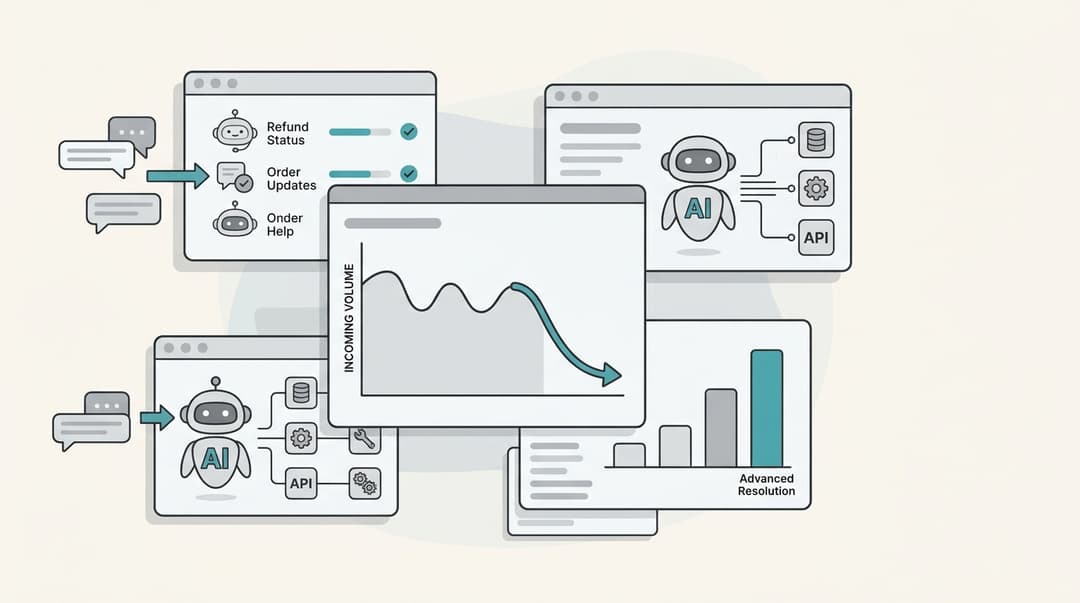
What counts as a support exception
An exception is any time an agent gives a customer something the written policy doesn't. Some are tiny and some cost real money, but they share one property: they depend on a judgment call, so two agents can make different calls on the same ticket.
Here are the ones I see most often in the queue, with the policy they bend:
| Exception type | Example | The policy it bends | Typical owner |
|---|---|---|---|
| Out-of-window refund or return | Refund on day 41 of a 30-day window | Return window | Team lead |
| Fee waiver | Skip the restocking or late fee once | Fee schedule | Agent, inside a budget |
| Goodwill credit | $10 credit after a late delivery | None, it's discretionary | Agent, inside a budget |
| Warranty exception | Replace an item just out of warranty | Warranty terms | Team lead or product owner |
| Final-sale override | Accept a return on a clearance item | Final-sale rule | Manager |
| Service or SLA credit | Credit for downtime on a B2B plan | Contract terms | Account manager or finance |
That last column matters more than it looks. Most teams have a refund approval matrix or at least a dollar limit for refunds. Very few have the same clarity for the rest of the table, so fee waivers and goodwill credits end up decided by mood.
Why unmanaged exceptions cost more than the exceptions themselves
The cost of an exception isn't just the $10 credit. It's what happens when exceptions are inconsistent, invisible, and impossible to review.
Customers learn to shop for a different agent. If the answer depends on who picks up, the smart move is to ask again. People say this openly:
"I've learned to play customer service roulette.
Don't get the answer I'm looking for?
Hang up and call back."

Exceptions get hidden inside other categories. When agents don't have a sanctioned way to grant something, they find an unsanctioned one. One commenter described how it works at banks and card companies:
"If you're not yelling at them, you can often get what you want via some other method (which only they know) - like them reclassifying the problem to something else they have leeway for."
That reclassified ticket now shows up in your reports as something it wasn't. Your ticket tagging is wrong, and the exception is invisible.
Promised exceptions vanish. The worst version is an exception that was agreed but never recorded. A customer on r/Comcast_Xfinity described working out a fix with support by phone: "they said they would note this on my account. I reached back out after a week to confirm the notes on the account an there is no record of the solution offered" (cali1302, Reddit). Now the next agent has to choose between honoring a promise they can't see or calling the customer a liar.
Small refusals turn into big precedents. The best-known example is the Air Canada chatbot case, where a refused bereavement refund ended up in front of a tribunal. One Hacker News commenter summed it up: it "should've been well within some second-tier customer service manager's discretionary refund budget. Instead they've got a precedent-setting ruling that makes the chatbot a huge liability" (ceejayoz, Hacker News).
The support exception management loop
Every exception should go through the same five steps. The one most teams skip is the last arrow, from the monthly review back to the written policy. Without it, you grant the same exception 40 times a month forever and never notice it should have been a rule.
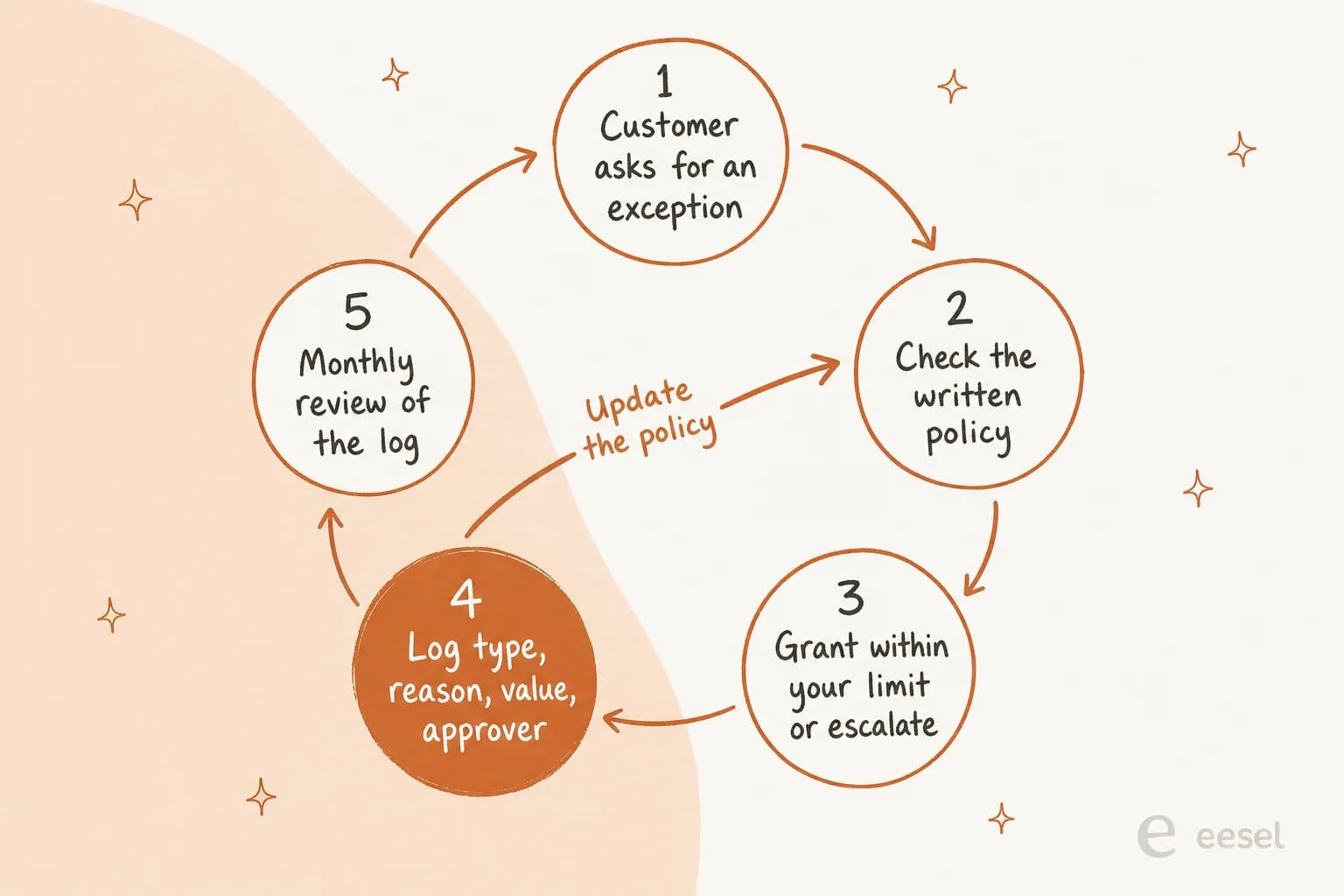
The rest of this guide walks through the loop in order: who decides, how to log it, which tools already handle one-off exceptions, how to review, and how to give your AI agent the same rules your people follow.
Step 1: Decide who can grant what
Start by sorting exceptions on two questions: whose fault is it, and how much does it cost? Those two answers tell you who should decide, far better than a single dollar limit does.
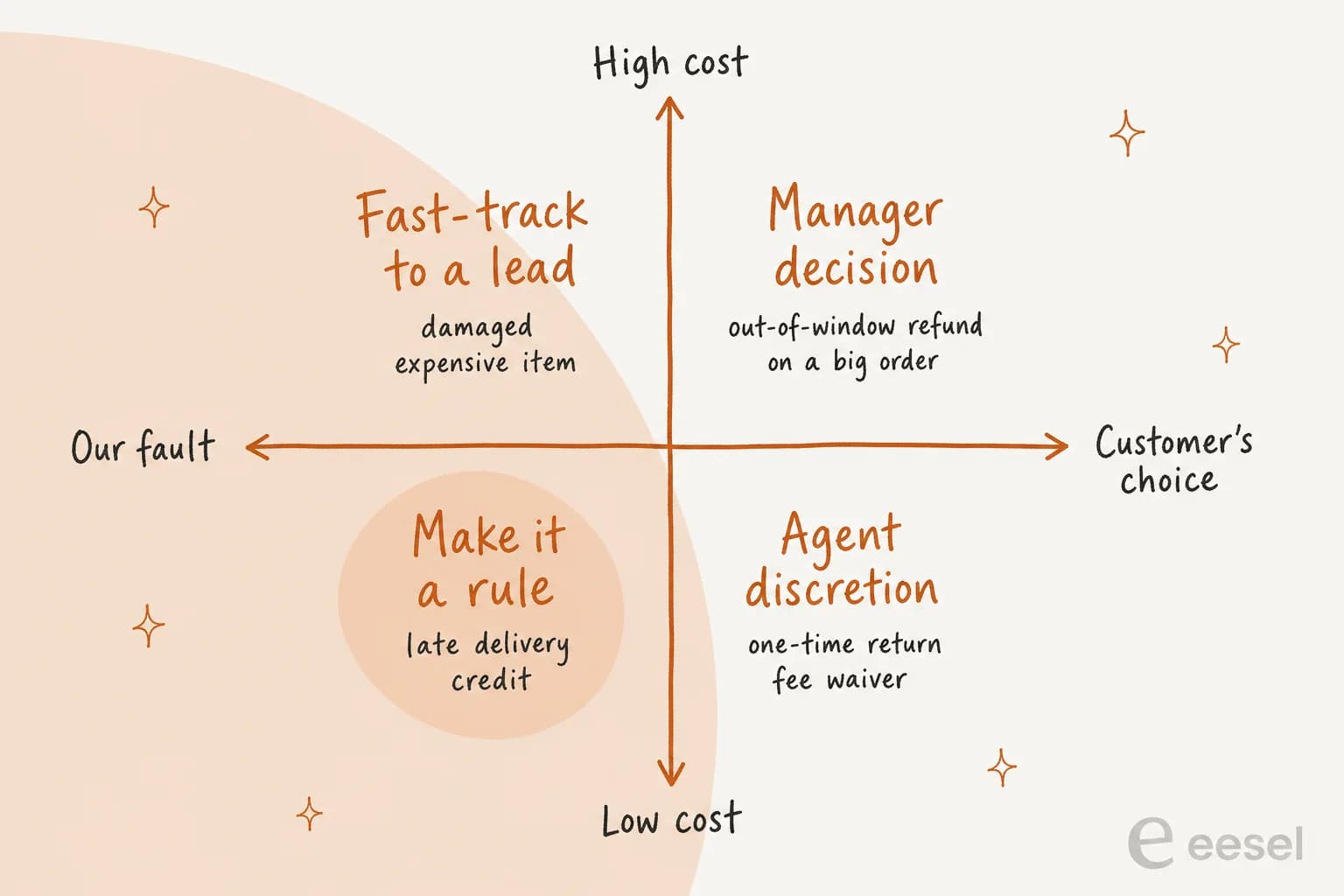
The bottom-left box is the one people get wrong. If a shipment was late because of you and the fix costs less than the time it takes to approve it, it shouldn't be an exception at all. A retail worker made the payroll argument well:
"Especially on clothes that have a ridiculously high margin, it's costs more money in payroll wasting that time than just giving them a BOGO."

For everything else, give each role a written discretion budget. Banks already work this way. As one commenter put it, "most banks/credit cards let the first-level hit the 'refund one fee' button, and the higher up you get, the more discretion they have" (bombcar, Hacker News). The budget should say three things:
- What the role can grant on its own. For example: one fee waiver per customer per year, goodwill credits up to $15, returns up to 7 days past the window.
- What it can't grant at all. Final-sale overrides, contract credits, anything involving an open chargeback.
- Who to ask for the rest. One named person and a backup, not "the leads channel". If you need a refresher on routing, my ticket escalation process guide covers it.
One more thing to write down: what the exception is for. Without that, discretion drifts toward whoever pushes hardest. An agent on r/talesfromcallcenters described supervisors who "pick to be nice to rude people and give hard stops to really nice people" (Asha990, Reddit). A line like "goodwill credits are for service failures on our side, not for persistence" settles a lot of arguments before they start.
Step 2: Log every exception in a field, not a note
Here's the part almost every exception guide skips. A note on the ticket ("gave a one-time courtesy refund") is better than nothing, but you can't count notes. To review exceptions, you need structured data, and in a helpdesk that means custom ticket fields.
The pattern I'd set up is four fields, with three of them only showing when the first is Yes:
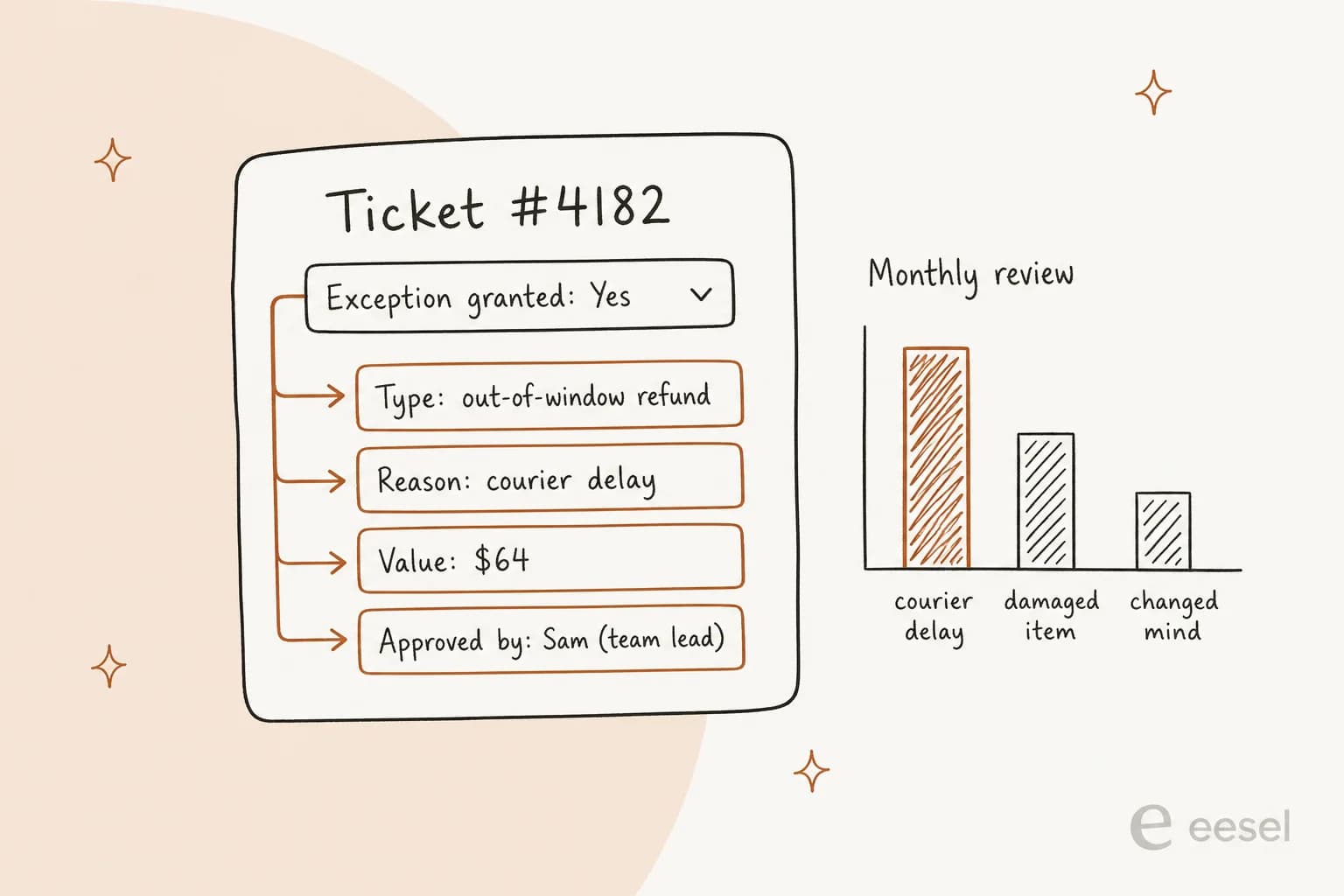
- Exception granted: a dropdown with No and Yes. Make it required when the ticket closes.
- Exception type: a dropdown with the types from the table above.
- Exception reason: a dropdown of reasons (courier delay, damaged item, our error, customer circumstance), plus an "other" option.
- Value and approver: a number field for cost, and a dropdown of approver names.
Dropdowns beat free text for a simple reason. Zendesk's own docs say text field values "might be inconsistent or contain spelling mistakes", which makes them "less useful for reporting purposes" (Zendesk). Freshdesk's advice is the same: "favor dropdowns over text fields where possible" (Freshdesk).
What each helpdesk supports
Every major helpdesk can do some version of this, but the plan gates and limits differ a lot. Here's what the docs say today:
| Helpdesk | Custom dropdown fields | Show fields only when "Yes" | Required on close | Report on the field |
|---|---|---|---|---|
| Zendesk | All plans, up to 2,000 values | Suite Growth and up | "Required to solve", all plans | Explore, Suite Professional and up |
| Freshdesk | Growth and up (not Free) | Dependent fields Growth+, dynamic sections Pro+ | "Required when closing", Growth+ | Custom reports, Pro and up |
| Gorgias | All plans, 25 active fields | All plans, up to 70 conditions | All plans | Ticket fields report, all plans, dropdowns only |
| HubSpot Service Hub | All plans, up to 5,000 options | Professional and up | Required stage properties on the pipeline | Custom reports, Professional and up |
| Help Scout | Plus and Pro, 10 fields per inbox | Not documented | Required on reply, not on close | Plus and Pro |
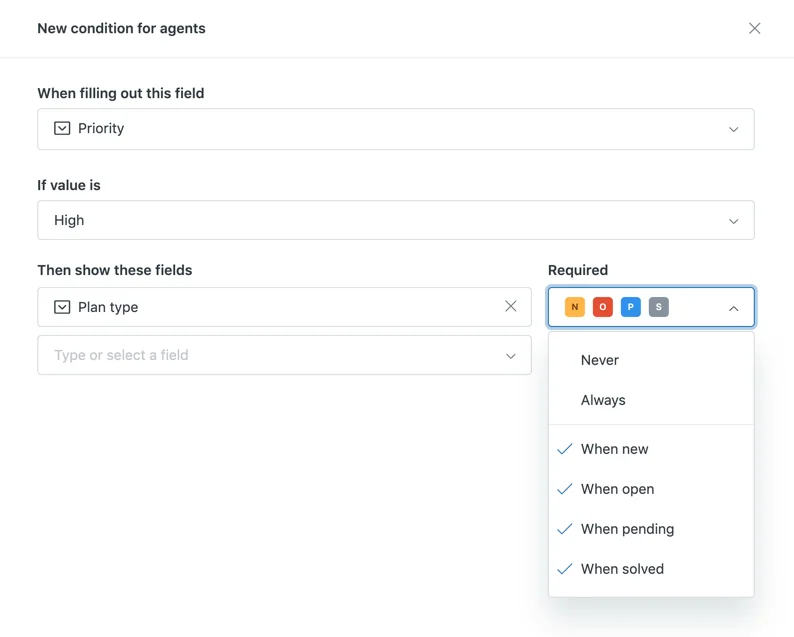
In Zendesk, the "show only when Yes" part is a conditional field. The condition editor also lets you make the dependent fields required per status, so Exception type only becomes mandatory when the ticket is solved:
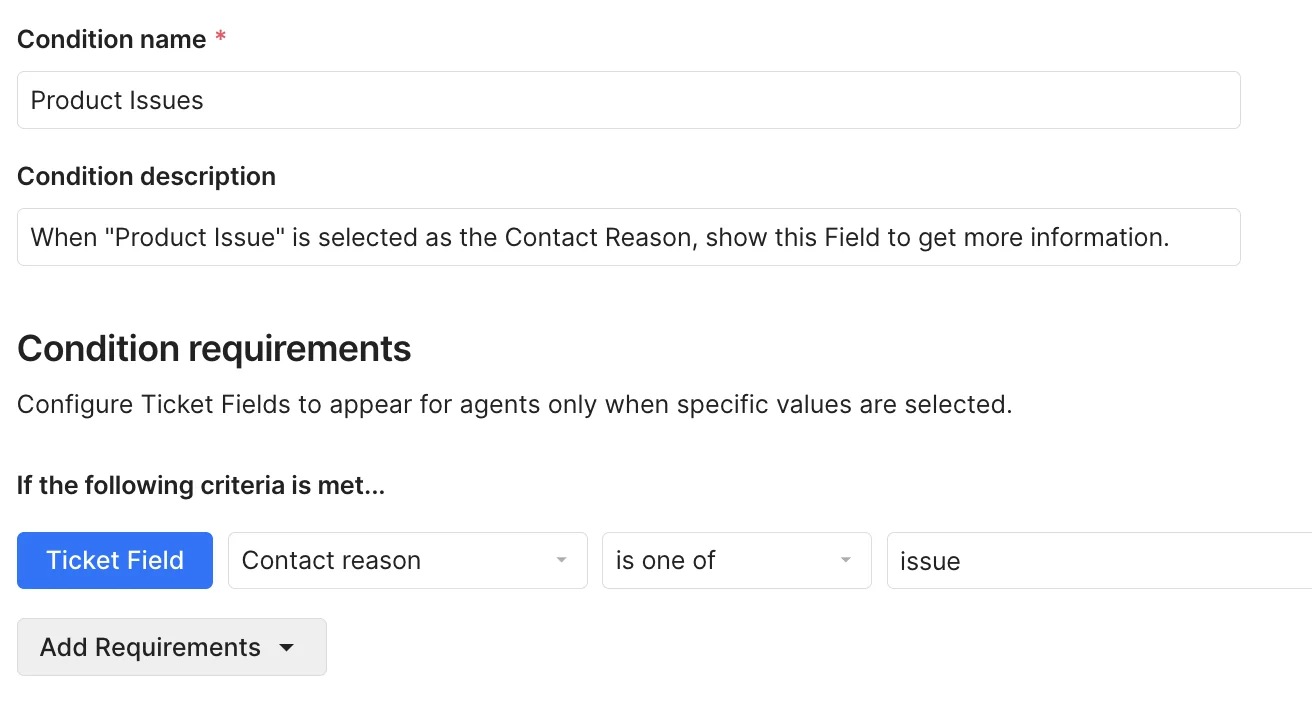
Gorgias does the same thing with field conditions, on every Helpdesk plan:
Four traps in the fine print
These are the details that quietly break an exception log six weeks after you set it up:
- Zendesk's required field has holes. The setting is right there on every field, but Zendesk's docs say required fields "can be bypassed by triggers and automations" and are "also bypassed when an agent merges a ticket" (Zendesk). Their suggested workaround is an
okay_to_closetag that your close automation waits for. - Gorgias only reports on dropdowns. Its Ticket fields report "only tracks dropdown-type custom ticket fields", so Number, Text and Yes/No fields won't show up (Gorgias). Make Exception granted a dropdown, not a Yes/No field. Gorgias also notes its AI Agent "is able to close a ticket without having filled in a required ticket field" (Gorgias).
- Help Scout checks on reply, not on close. Required custom fields have to be filled "when sending a reply", and field data doesn't carry over if the conversation moves to another inbox (Help Scout).
- Deleting a field deletes your history. Freshdesk says removing a field "hides it in Analytics", and Help Scout says deleting one erases its data "forever". Archive old exception types instead of deleting them.
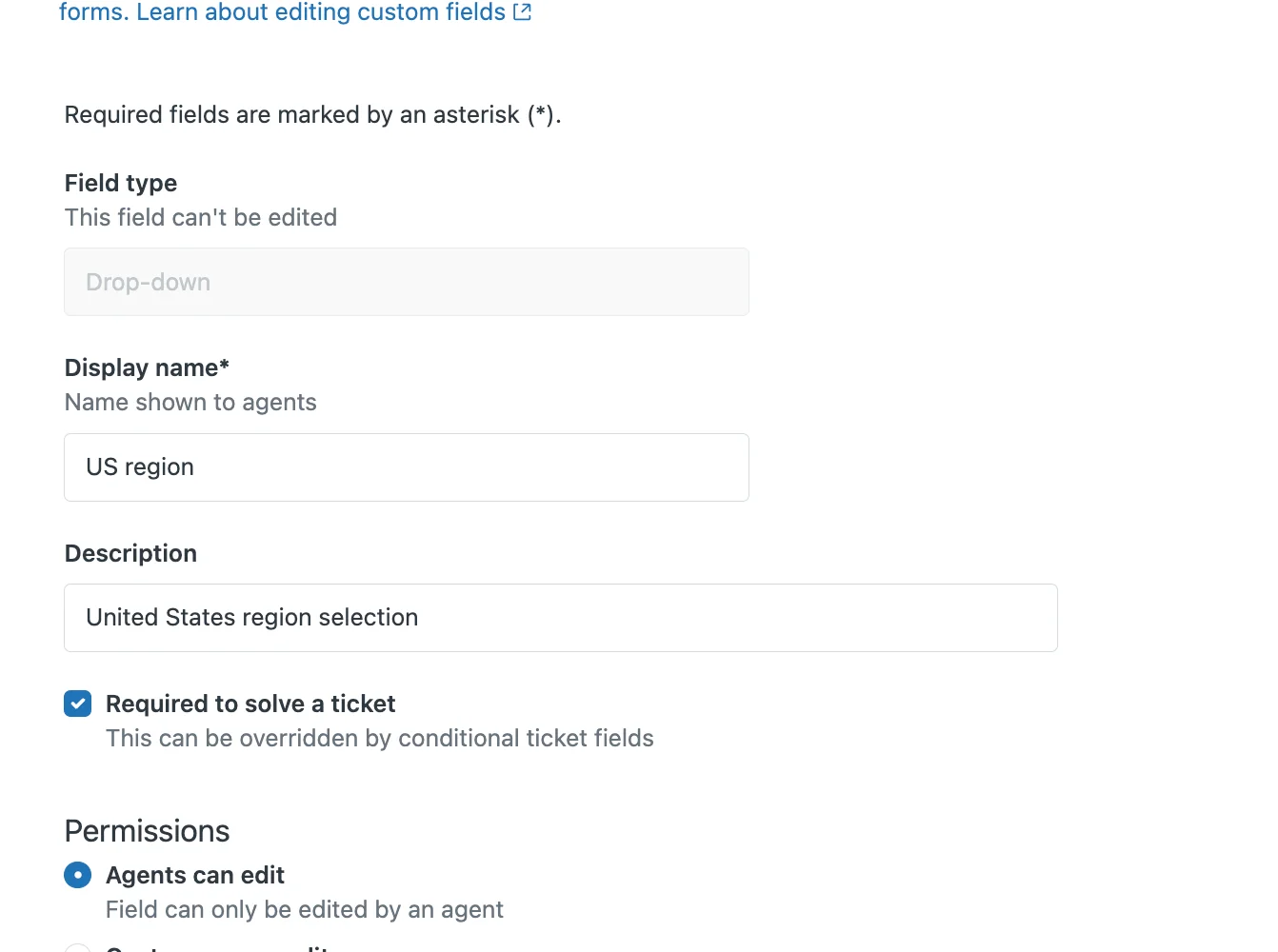
One bonus for Zendesk teams on Suite Professional and up: Explore's Updates history dataset can track changes to field values over time (Zendesk), which answers "who flipped this to Yes, and when". My Explore custom fields recipe walks through the report.
Step 3: Use the tools that already handle one-off exceptions
Your helpdesk records the exception. But the action itself often happens in another tool: the returns app, the store admin, the billing system. Several of these have a proper exception mechanism built in, and using it beats an agent working around the rules.
| Tool | One-off exception mechanism | What it records |
|---|---|---|
| Loop Returns | Allowlist an order or email to override the return window, final sale or blocklist | Listing entry, exportable as CSV |
| Redo | Reset a rejected return at the Policy Window or Final Sale Check step | The return's processing history |
| Shopify | Staff create the return in admin and edit fees per return | Decline reasons are internal-only |
| AfterShip Returns | Allowlist by order, product type, email or tag | Up to 20 preset reject reasons |
| Stripe Billing | Credit balance adjustment with an internal note | An "immutable list" of transactions |
Loop is the clearest model. Its Listings feature exists "to manage return exceptions and restrictions", and allowlisting an order "overrides any existing blocklist entry, products tagged as Final Sale, or the order's return window" (Loop). I like Loop's own best practice even more: allowlist the order, submit the return for the customer, then remove the allowlist entry right away. A temporary exception that cleans up after itself is exactly what you want. Loop also tells out-of-window shoppers to "contact your support team directly for any exceptions" (Loop), so these tickets will reach your queue whether you plan for them or not.
Loop Workflows turn repeat exceptions into rules. When the review in Step 4 says an exception should become policy, Workflows can apply it automatically, with actions like Bypass final sale, Set return window and Set handling fee to "override, add to, or waive existing fees" (Loop Workflows). I've covered more of this in my returns automation guide.
Shopify rules can carry the exceptions you already know about. Return window overrides let you give clearance items 14 days and furniture 90, and final sale items are described as "exceptions to your default return rules" (Shopify). What I couldn't find in Shopify's docs is a switch to make one order eligible when the rules say no. The documented route is a staff-created return in admin, where fees can be edited per return.
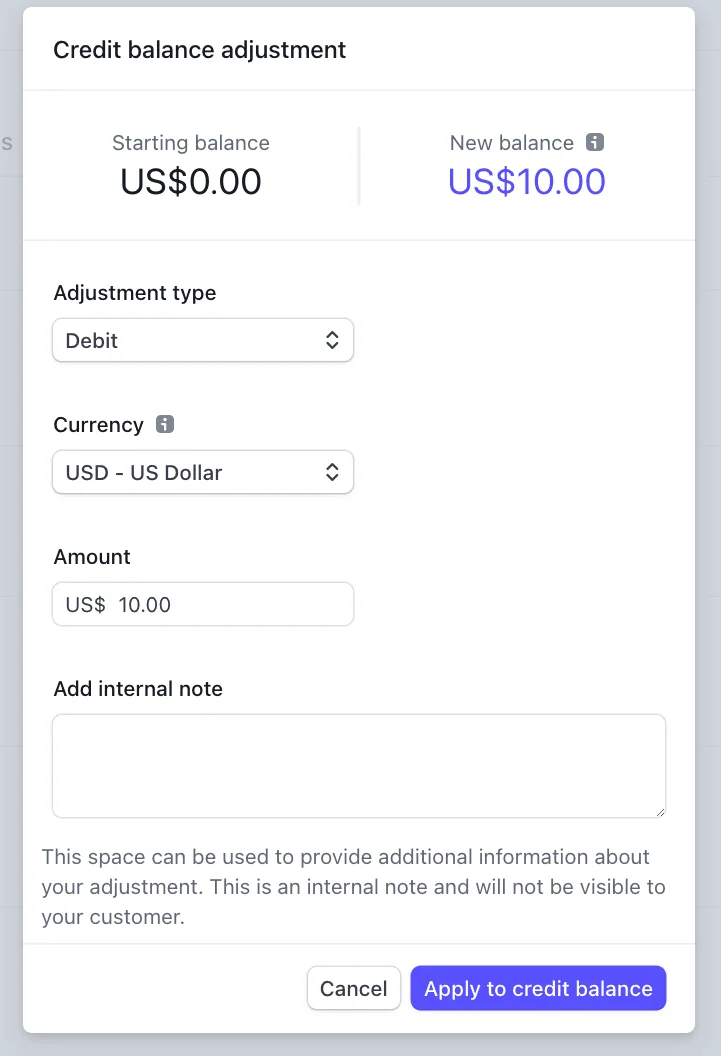
Stripe's credit balance is a goodwill credit with a built-in audit trail. Every customer balance is "computed from a ledger, an immutable list of debit and credit transactions" (Stripe). Each adjustment can carry an internal note the customer never sees, and entries can't be deleted, only reversed. If goodwill credits on your SaaS product live anywhere else, they're harder to audit than they need to be.
Step 4: Review the log and promote repeat exceptions
This is where exception management pays for itself. Once a month, pull every ticket with Exception granted set to Yes and group them by type and reason. For each group, you're asking one question: is this a real exception, or an unwritten rule?
From the customer's side, unreviewed exceptions look random. One commenter, after getting relief from a supervisor, wrote: "There's no particular rhyme or reason for why extraordinary relief is sometimes granted though, it seems completely random!" (gnicholas, Hacker News). From the team's side, it's worse: you're spending approver time on decisions you make the same way every time.
Pick one exception type from last month and plug its numbers into this:
The thresholds in the widget (10 requests a month, 80% granted) are my starting point, not an industry standard. Tune them to your volume. What matters is that the review ends in one of four decisions, and each decision changes something:
- Make it the policy. Update the written policy and the help center, update your macros, and tell agents and your AI agent the same day. My support policy change management guide covers the rollout.
- Keep it as agent discretion. Leave it in the budget, but keep logging it.
- Send it to a named approver. High cost, or a pattern you want a second pair of eyes on.
- Script the no. If you refuse a request 80% of the time, the 20% of yeses are teaching customers to keep asking. As one retail worker put it, "They are getting something out of it, so it continues" (Cheshire1871, Reddit).
The review also feeds two other loops. Agents whose exception rate is far from the team's average are a coaching conversation, which is where support QA calibration and agent feedback come in. And a spike in one reason, like courier delays, is an operations problem the support team is quietly paying for. Flag it with the rest of your support ticket analysis.
Step 5: Give your AI agent written exception rules
AI agents make exception management more urgent, not less. A person can read the room and quietly bend a rule. An AI agent will either follow whatever rules you wrote, or improvise, and both failure modes show up in public.
The first worry is that customers will talk the AI into exceptions:
"People will find out how to convince the LLM you do meet the requirements for a refund.
And if you check the requirements using something deterministic (last order was within last 2 weeks, customer has a high loyalty points score, they're subscribed to some premium service) then why do you need an agent at all?"
The opposite failure is just as bad: a bot that can't grant an exception and won't let the customer reach someone who can. One customer described an AI support chat that kept offering to cancel at the end of the billing period: "I ask for human. It repeats. I ask for human again. It repeats. I disconnect" (kldg, Hacker News).
The answer to both is the same as for people. Write the exceptions the AI may apply as plain rules, give it a hard boundary on anything that moves money, and make sure every other exception request reaches a human with context. That's AI guardrails applied to policy, and the AI escalation path is half of it.
The main helpdesk AI tools now support this shape:
| AI tool | How you write exception rules | What happens to the rest |
|---|---|---|
| Zendesk AI agents | Generative procedures with policy context, like "No refunds on clearance", and segments by customer type | An "Escalate to" step hands off to a person or team, and the AI stops |
| Gorgias AI Agent | Skills with boundaries, like "don't commit to a refund before a returned item arrives" | Handover topics you write in plain language, plus built-in triggers that "can't be turned off" |
| eesel | Plain-English instructions with an "exceptions and edge cases" template | Escalates with an internal note; money actions wait for approval |
Zendesk's procedure builder is a good picture of what "writing the exception down" looks like for an AI. You describe the policy in plain language, and it builds a branching map with a check before anything irreversible happens (Zendesk):
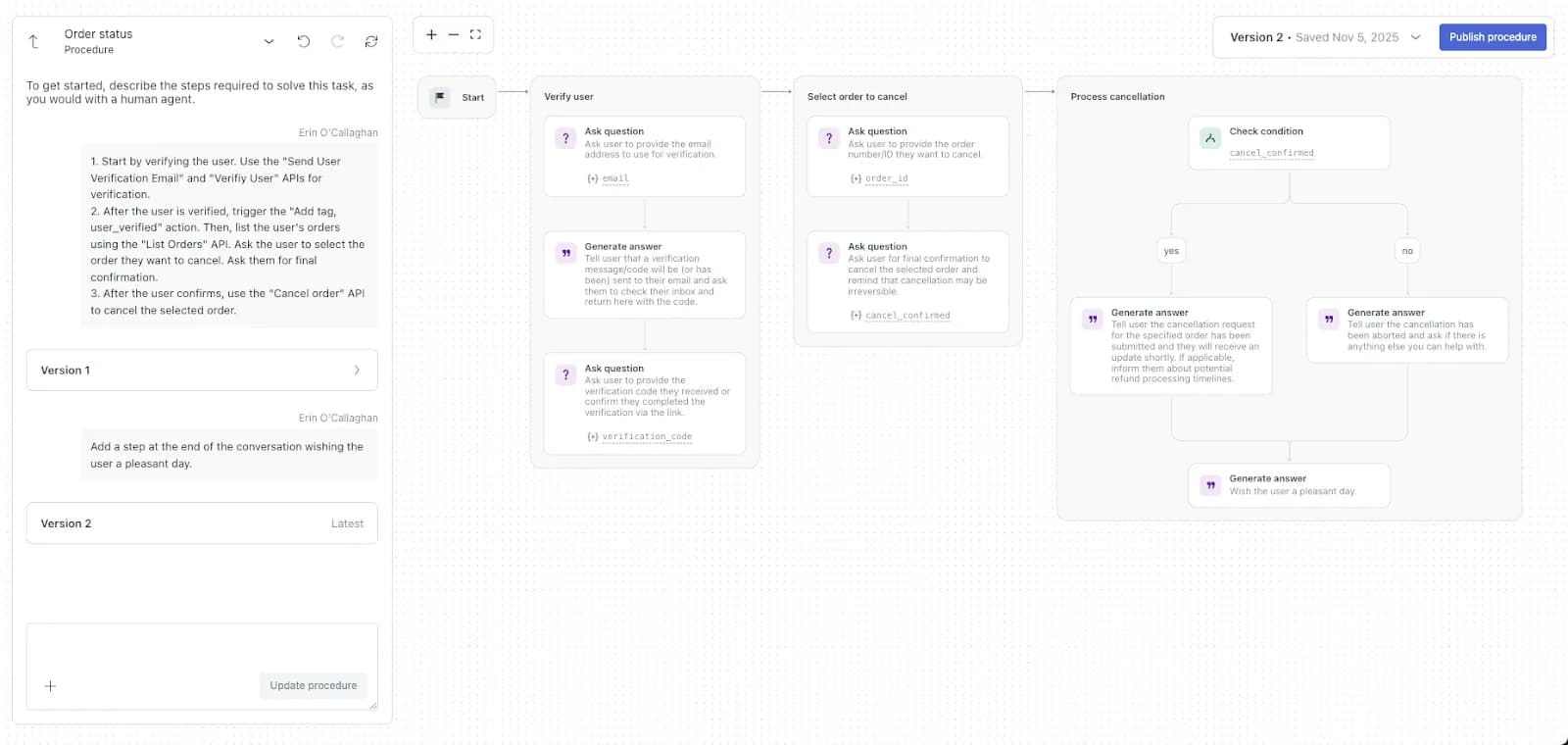
Zendesk's docs are also honest about the limit: context in a procedure can't "guarantee exact AI behavior", and anything that must branch should use a Check condition block (Zendesk). That's the right instinct. Wording guides the AI, but hard limits on money belong in action settings.
How I'd write exception rules with eesel
In eesel, exceptions go into the agent's instructions in plain English, the same way you'd brief a new hire. The docs ship a "Cover exceptions and edge cases" template with lines like "Damage claims under $50: skip the photo request, approve the refund" and "Orders placed within the last hour: cancellations don't need approval", plus a rule that VIP-tagged customers always escalate (eesel docs). The escalation template covers the other half: leave an internal note that says "what the customer wants, what you found, and what you'd have said", then assign it to a person.

You can also correct the agent the way you'd correct a person. A support admin I've worked with taught their agent a rule that's really an exception policy, that a cancel or refund request with an unresolved issue gets troubleshooting first:
"I have a rule in CS where we do not address a cancel or refund request when there is an issue attached to it."
A support admin encoding a "troubleshoot before you cancel" policy into the agent
For anything that costs money, the action settings do the enforcing. Every action has one of three settings per agent: Auto, Needs approval, or Disabled (eesel docs). You can leave an action on Auto and still tell the agent to ask first in specific situations, which is how a written exception policy becomes a real gate. When an approval is needed, the approver sees the exact action and amount, and approvals never run on their own after a timeout.
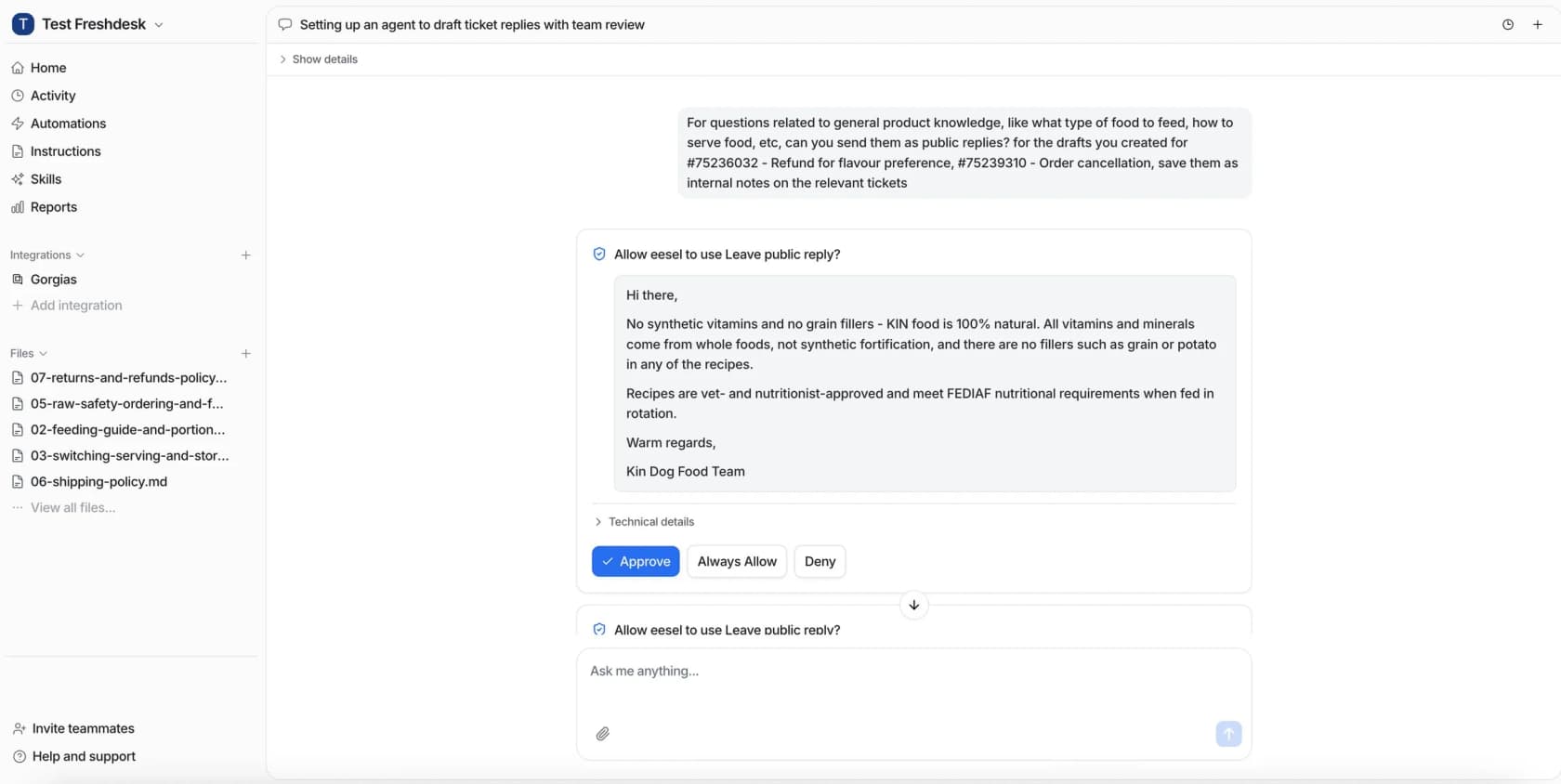
The Activity page records who approved what and when, which doubles as the exception log for everything the AI touched.
Common exception management mistakes
These are the ones I'd fix first, roughly in order of how much they cost:
- Logging exceptions in notes. You can't count notes. Use a required dropdown, and in Gorgias, make sure it's a dropdown and not a Yes/No field.
- No discretion budget. Without one, every agent invents their own, and customers learn to ask a second agent. Write down what each role can grant.
- Treating our-fault exceptions like favors. A late-delivery credit you grant every time should be a rule. Making customers ask for it just adds tickets and hurts CSAT.
- Never closing the loop. If the monthly review doesn't change the policy, the help center, or the macros, it's just a report. Every exception type should end the review with a decision.
- Letting AI improvise. An AI agent without written exception rules either says no to everything or yes to the wrong things. Give it rules, a money boundary, and a clean escalation path.
- Deleting old fields. Archive retired exception types so last year's data still shows up in reports.
Handle support exceptions with eesel
If your team runs on Zendesk, Gorgias or Freshdesk, eesel's AI helpdesk teammate is the most direct way to make your exception rules stick. It joins your existing queue, learns from your past tickets, help center and macros, and follows the exceptions you write in plain English. Anything that costs money waits for the right person's approval, in the dashboard or in Slack, and anything outside your rules goes to your team with a note explaining what the customer wants and what it found.

Before it handles a real exception, you can run a simulation on your past tickets and compare its answers with what your team actually sent. Pricing is per ticket with unlimited seats, so every approver can have access, and you can start with 100 free credits and no card. Try eesel.
Frequently Asked Questions
What is support exception management?
How do I track policy exceptions in my helpdesk?
Who should be allowed to approve a support exception?
When should an exception become part of the policy?
Can an AI agent handle support exceptions?
Why do customers get different answers from different support agents?
What is a goodwill credit in customer service?
How often should a support team review its exceptions?


Article by
Riellvriany Indriawan
Riell is a designer and writer at eesel AI with about two years of experience researching CX platforms, AI chatbots, and helpdesk software. She combines her design background with a sharp eye for how these tools actually look and feel in practice — making her comparisons unusually visual and user-focused.