How to automate returns with AI: a support team's guide (2026)

Riellvriany Indriawan

Katelin Teen
Last edited October 14, 2026
What "automating returns" actually means
I run the support queue at eesel, and I'll be honest: return tickets are the most thankless work a support team touches. I once sat with a multi-brand ecommerce operator handling 500+ tickets a day, and refund requests, order-tracking questions, and "can I exchange this?" made up the bulk of it. Not one of those needed a human's judgment. They needed the order pulled up, the policy checked, and a label or refund issued. That's the exact loop AI does well and a person does resentfully.
But before you automate anything, get clear on which half of the problem you're solving, because there are two, and they need different tools.
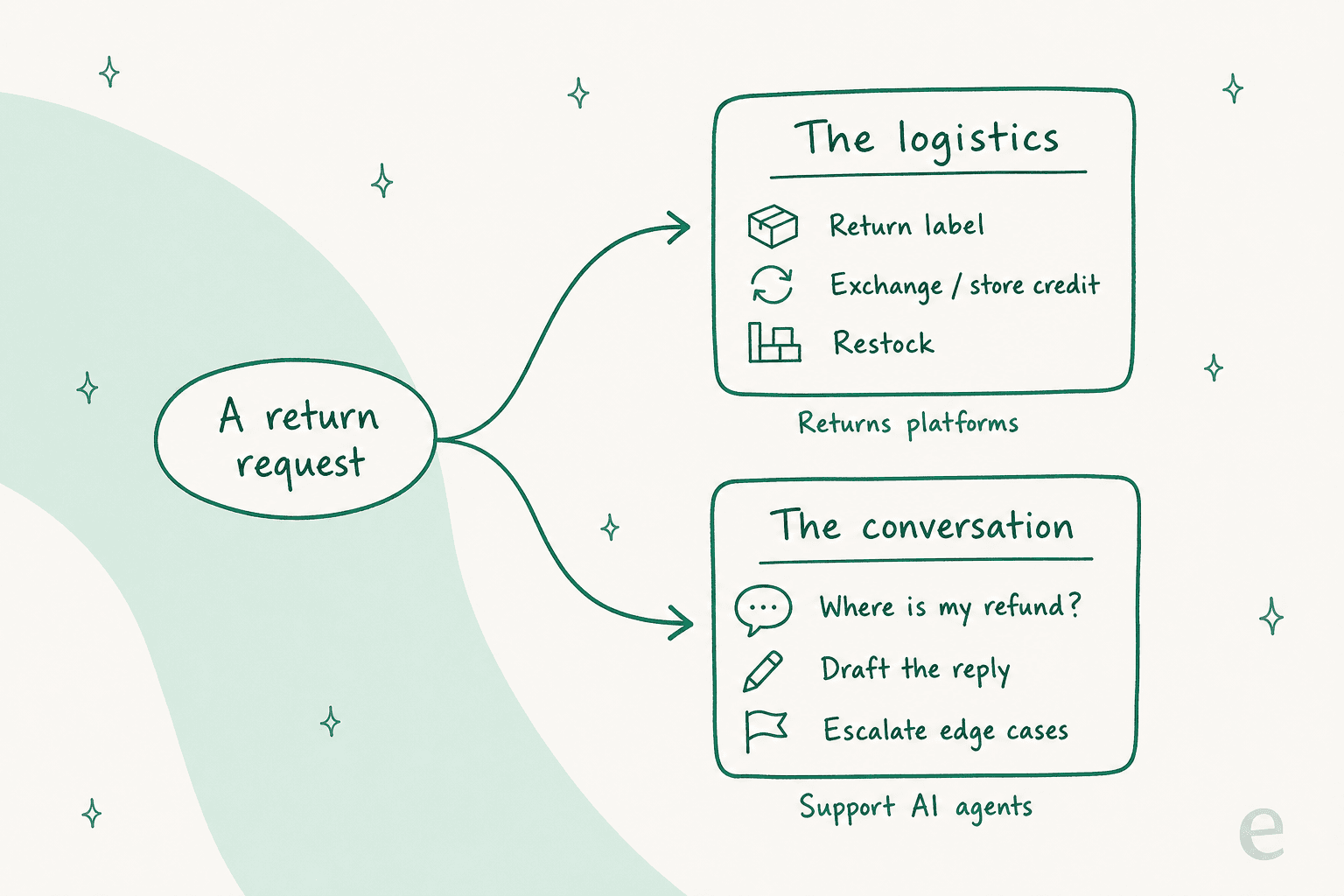
The logistics. A shopper wants to send something back. A returns platform gives them a self-service portal, generates the carrier label, nudges them toward an exchange or store credit, and routes the parcel through reverse logistics. This is warehouse-and-policy machinery. It knows nothing about answering a customer's message.
The conversation. A shopper emails "I want to return order #44433, it doesn't fit." A support AI agent reads the order, checks whether it's inside the return window, and either issues the label and refund or drafts a reply for a human. This is the tier-1 ticket work that eats your team's day, and it's what ticket-automation tools are built for.
This guide is about the second job: automating the return conversation. That's the part that floods your inbox, and it's the part an AI agent can take off your plate today. If your warehouse is the bottleneck instead, a chatbot won't fix it, and I'll point you to the right category at the end.
Before you start: the prerequisites
You don't need much, but you do need these four things in place or the automation will be shallow:
- A helpdesk with your return tickets in it. Zendesk, Gorgias, Freshdesk, Front, Help Scout, whatever you run. The AI joins it as an agent.
- Live order data the AI can read. Shopify, WooCommerce, Magento, BigCommerce, or Recharge. A returns answer without the order behind it is worthless, so this is non-negotiable.
- A written return policy. Return window, what's eligible, refund vs exchange vs store credit, who pays return shipping. If this only lives in someone's head, write it down first.
- A pile of past return tickets. You'll use these to test the AI before it goes live. The more history, the better the simulation.
If you've got those, the setup itself is faster than most people expect: an afternoon, not a quarter.
Step 1: Connect the helpdesk and the order data
Start by joining the AI agent to the helpdesk your team already lives in. The thing to look for here is an agent that layers on rather than one that forces a migration. A no-rip-and-replace setup means you keep your existing workflows, macros, and routing, and the AI just starts reading tickets alongside your team.

Then connect your store. This is the step people rush and regret. The AI needs to read the actual order (items, dates, fulfillment status) to answer a return question correctly, so hook up Shopify or WooCommerce so it can pull order #44433 and see it shipped 40 days ago and falls outside your 30-day window. Without that link, the AI is guessing from the customer's wording, and guessing is how you get a wrong refund.
Point it at your knowledge sources too: your help center, your return policy doc, past tickets where a human resolved a return well. The AI learns your actual policy and tone from these, not a generic template.
Step 2: Write down the rules the AI will follow
An AI agent is only as good as the policy you hand it. This is the step that turns "a chatbot that sounds helpful" into "an agent that makes the right call." Be specific:
- The return window. "30 days from delivery, not from order date." State it exactly, because "about a month" is not something an agent can enforce.
- What's eligible. Final-sale items, worn items, opened consumables. Spell out the exclusions.
- The default resolution. Do you push exchanges and store credit before cash refunds? Say so, and the AI will offer them in that order.
- Who pays return shipping. Free returns, customer-paid, or conditional on reason.
The trick that keeps this reliable is inserting verified policy text verbatim rather than letting the model paraphrase. When the AI quotes your real 30-day rule word for word, it can't drift into inventing a 45-day one. Good agents let you pin exact policy snippets the AI must use, which is your first line of defense against a made-up answer.
Step 3: Set the guardrails so it can't over-refund
Here's the part I'd never skip, having watched confident bots go wrong on returns. Three settings do almost all the safety work:
- A hard cap on refund value. Set a ceiling (say $150) above which the AI must hand off to a human. It can auto-resolve the $30 t-shirt all day; a $600 order gets a person's eyes. This one setting prevents the expensive mistakes.
- A confidence threshold. When the AI isn't sure (a weird edge case, a policy gap, an angry customer), it should draft a reply for a human instead of sending, or escalate cleanly. Confidence-based routing is what stops it bluffing.
- Draft mode first. Before it sends anything autonomously, run it in a mode where it writes the reply and a human approves it. You watch its judgment for a week, fix the gaps, then let it send on its own.
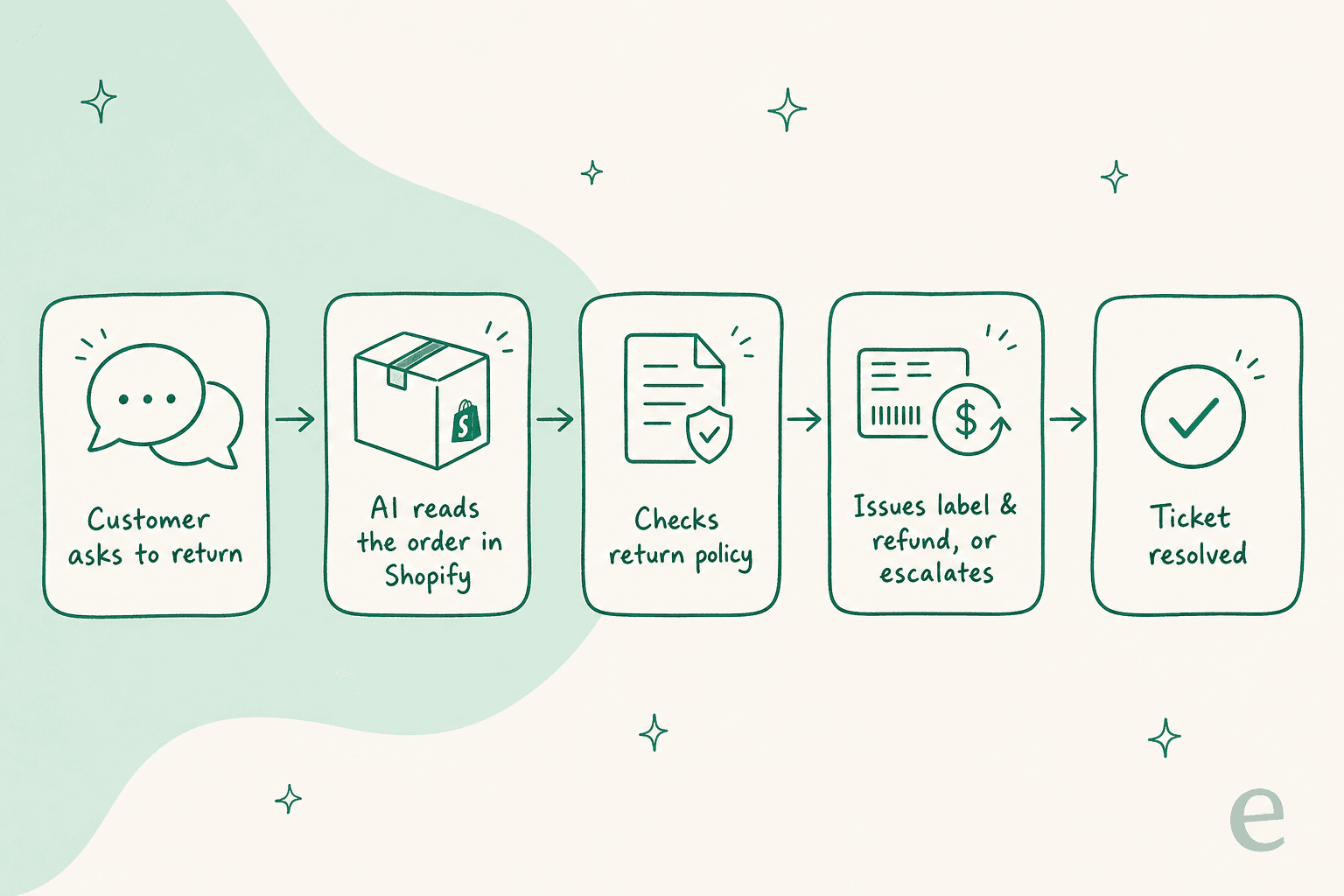
That loop is the one you're trying to close end-to-end. The tools that only make it three steps in (read, check, then always hand to a human) are still useful; they just save less. The guardrails above are what let you trust the last two steps.
Step 4: Simulate on your past return tickets
This is the step that separates a safe rollout from a scary one, and it's the single feature I'd refuse to launch returns automation without. Before the AI touches a live customer, replay it against thousands of your past return tickets and see exactly how it would have handled each one.

A good simulation tells you three things before go-live: what percentage of return tickets it would have resolved, where it would have made a mistake, and what policy gaps it hit. You read the transcripts, spot the ones where it was too generous or missed an exclusion, tighten the rules, and re-run. It's the difference between hoping and knowing.
I've seen this catch things no one expected: an agent auto-approving returns on a "final sale" collection because the policy doc never mentioned it, or refunding shipping it shouldn't have. Better to find that in a simulation than in your P&L. Once the numbers look right and the mistakes are gone, you're ready.
Step 5: Go live gradually
Don't flip everything to 100% on day one. Roll out in slices you can trust:
- Start with the safest ticket type. Order-status and "where's my return?" questions are low-risk. Let the AI take those first.
- Then add the clear-cut returns. In-window, eligible, under your refund cap. These are the bulk of your volume and the AI handles them cleanly.
- Keep humans on the edges. Out-of-window requests, high-value orders, damage claims, anything the AI flags low-confidence. These stay with your team, which is where you want your people anyway: on the judgment calls, not the label-cutting.
Ramp the autonomy up as your confidence grows. Most teams find that within a few weeks the AI is quietly clearing the majority of their return tickets, and the queue that used to eat mornings is mostly gone.
What it actually costs
The trap here is comparing sticker prices when tools aren't measuring the same thing. The billable unit is what decides your bill.
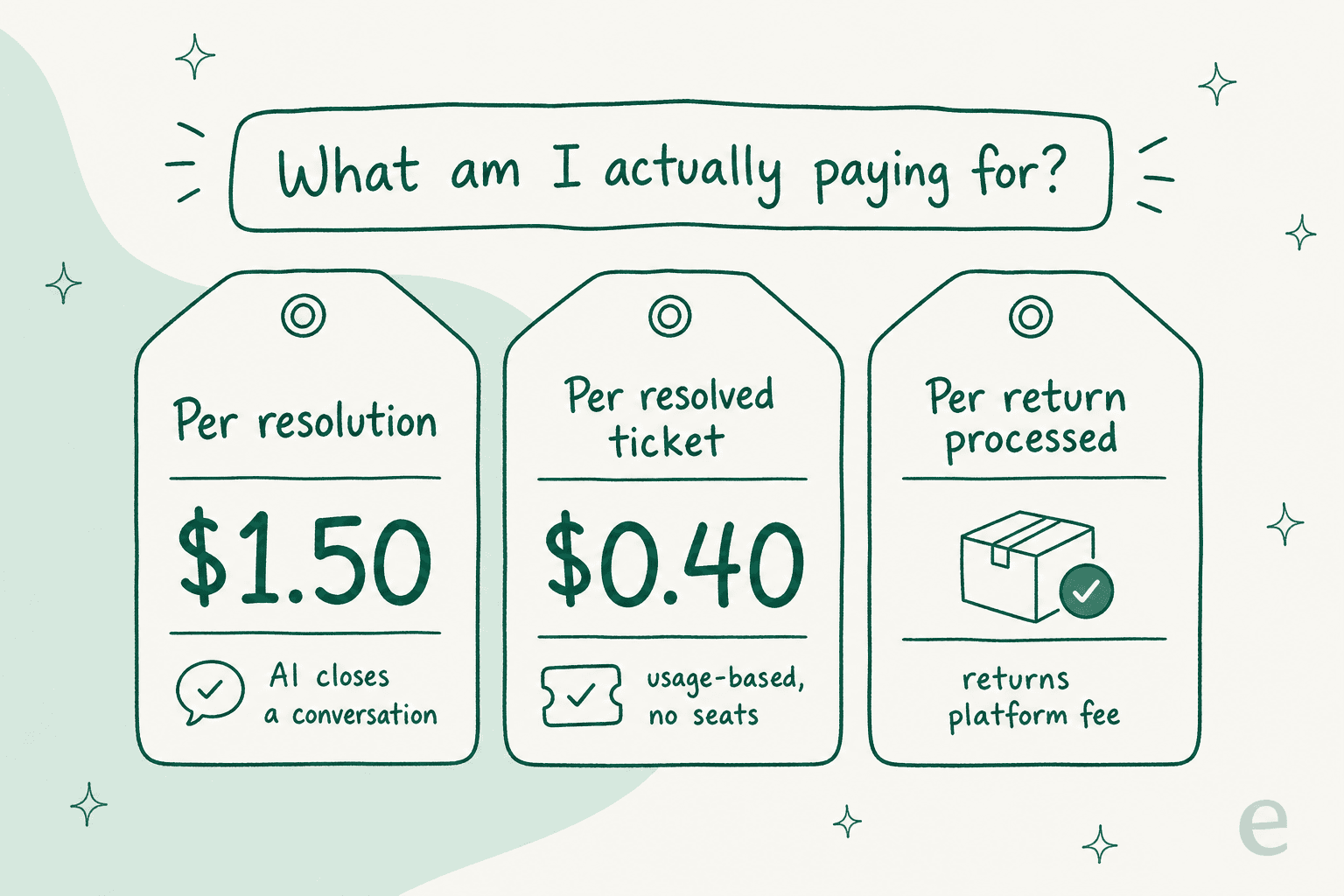
A worked example. Say you get 2,000 return-related tickets a month. On a per-interaction model at $0.90, automating all of them runs roughly $1,800/mo in AI resolution charges, on top of the helpdesk base. On eesel's 2,500-credit plan, the same 2,000 tickets (1 credit each) is $999/mo with no seat fees layered on. A returns platform isn't even billing the same event: it charges per return processed (the label and RMA), so it sits next to, not instead of, your support AI cost.
The takeaway isn't "cheapest wins." It's that a per-resolution tool and a credit plan can quote similar-looking numbers and land 3x apart once your volume is real. Run your actual monthly return volume through each model before you commit, and read my full guide to reducing ticket volume with AI for the levers that push that number down.
Common mistakes to avoid
A few pitfalls I see over and over:
- Skipping the order-data connection. An AI answering returns without reading the live order is just a fancier canned reply. Connect the store first, always.
- No refund cap. This is how a bot over-refunds a high-value order. Set the ceiling before you go live, not after the first bad one.
- Going straight to autonomous. Draft mode for a week is cheap insurance. Skipping it to "move fast" is how you erode your team's trust in the tool within days.
- Automating the wrong half. If your real bottleneck is the warehouse cutting labels, an AI agent won't help; you want a returns platform for the logistics. Match the tool to the actual pain.
- Treating it as set-and-forget. Policies change, new products launch, seasons shift. Re-run the simulation every quarter so the AI stays aligned with your current rules.
Try eesel for return tickets
If the half of the returns problem hurting you is the ticket flood (the "where's my refund?", "can I exchange the size?", "my order arrived damaged" messages), that's the exact job eesel AI is built for. It joins the helpdesk you already run, reads your Shopify, WooCommerce, or Magento order data, and resolves the return conversation end-to-end, drafting when it's unsure and escalating the edge cases cleanly.
The part I'd actually pitch you on, having watched confident bots go wrong on returns, is step 4 above: you simulate it on your own past return tickets first, see exactly how it would have handled each one, and only then flip it live on the tickets you trust. It's free to start with 100 credits and no card, with no per-seat fees and no rip-and-replace. Point it at Shopify, Gorgias, or Zendesk and let it take the return tickets your team dreads off their plate.