AI chatbot for WooCommerce: what actually works in 2026

Rama Adi

Katelin Teen
Last edited July 14, 2026
What "AI chatbot for WooCommerce" actually means
Here's the thing that trips people up. WooCommerce isn't a hosted platform with one official chatbot slot. It's the open-source ecommerce platform for WordPress, which means "adding a chatbot" can mean three very different things, and they're not close in quality.
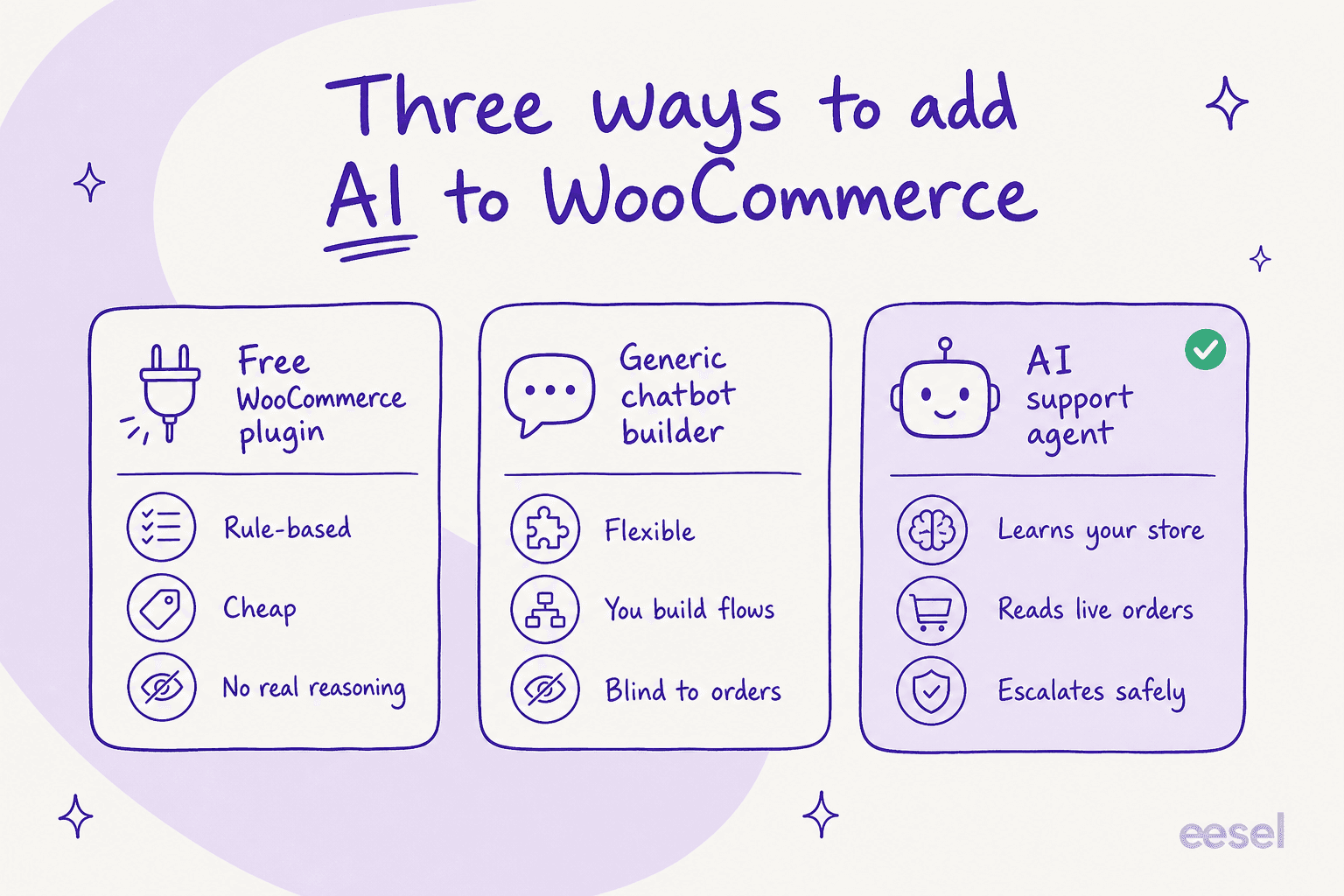
- A free WooCommerce plugin. There are dozens in the WordPress plugin directory. They're cheap (often $0), quick to install, and rule-based. You build decision trees by hand, and the bot follows them. No real reasoning, no memory of past tickets, no idea what's in a customer's cart. This is the rule-based chatbot end of the spectrum.
- A generic chatbot builder. Tools like the big conversational-AI platforms let you build flows and hook up an LLM. More flexible, but you're still doing the building, and out of the box they're blind to your WooCommerce orders unless you wire up the API yourself. You end up maintaining a second product alongside your store.
- An AI support agent. This is the category that learns your store: it ingests your catalog, your help docs, and crucially your solved tickets, then reads live order data at answer time. It's the difference between a bot that recites your FAQ and one that says "your order shipped this morning, here's the tracking."
Most of the "best AI chatbot for WooCommerce" roundups blur these three together. They're not interchangeable. If you only remember one thing from this section: a chatbot that can't see your orders can't do the job WooCommerce merchants actually need done.
What a good WooCommerce chatbot actually does
The bulk of ecommerce support is boring and repetitive, which is exactly why it's automatable. On a typical WooCommerce store, the top of the ticket pile is almost always the same three things.
"Where is my order?" (WISMO)
WISMO is the single biggest category in ecommerce support, and it's the clearest test of whether your chatbot is real. A rule-based plugin can only point the customer at a tracking page. A proper agent looks up the actual order in WooCommerce and answers with the real status.
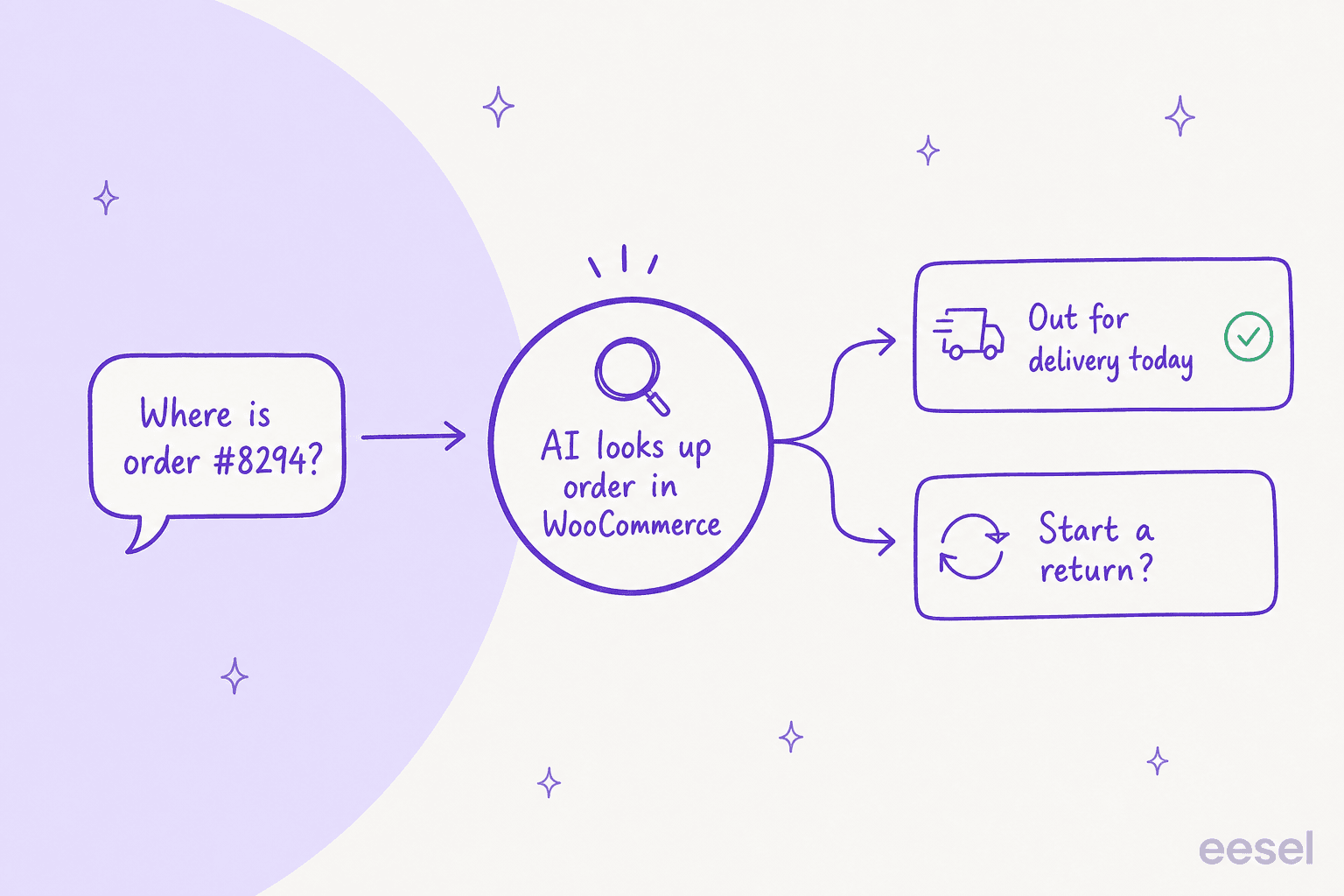
This is the pattern that matters: the customer asks in plain language, the AI pulls the live order, and it can then offer the next step, tracking or a return, without a human touching it. If you want to go deeper on just this slice, we wrote a whole guide on AI for order tracking and one on order-status, returns and shipping chatbots.
Product questions before the sale
The other half of the value is pre-sale. A good agent knows your catalog and can act like a shopping assistant: recommending a product based on what someone needs, comparing two items on the specs that matter, or checking whether a variant is in stock. On eesel's ecommerce agent, that looks like a customer asking "do you have the puffer in black, size M?" and getting a real in-stock confirmation plus an add-to-cart nudge, rather than a dead-end "please check the product page." This is the AI shopping assistant for ecommerce angle, and it's where a chatbot stops being a cost centre and starts recovering sales.
Returns and refunds
Returns are high-emotion and high-frequency, and they're a place where automation has to be careful. The right move is usually for the AI to gather the return reason, confirm eligibility against your policy, and either process it or hand a clean summary to a human. Getting refunds right is subtle enough that we have a dedicated guide on AI for refund requests and one on refund vs exchange intent.
A quick reality check from running this for years: the AI will never answer 100% of questions, and you shouldn't want it to. As one DTC supplements CX lead put it to us:
"The AI will never be able to answer 100% of the questions... I need an AI who is only handling the tickets that it's confident to handle and all the other ones, leave them alone."
That's the whole game. A WooCommerce chatbot that confidently handles 60-70% of tier-1 and stays out of the way on the rest beats one that tries everything and gets a third of it wrong.
How an AI chatbot for WooCommerce works under the hood
If you've only seen rule-based plugins, the modern version is worth understanding, because the mechanism is what makes it trustworthy.
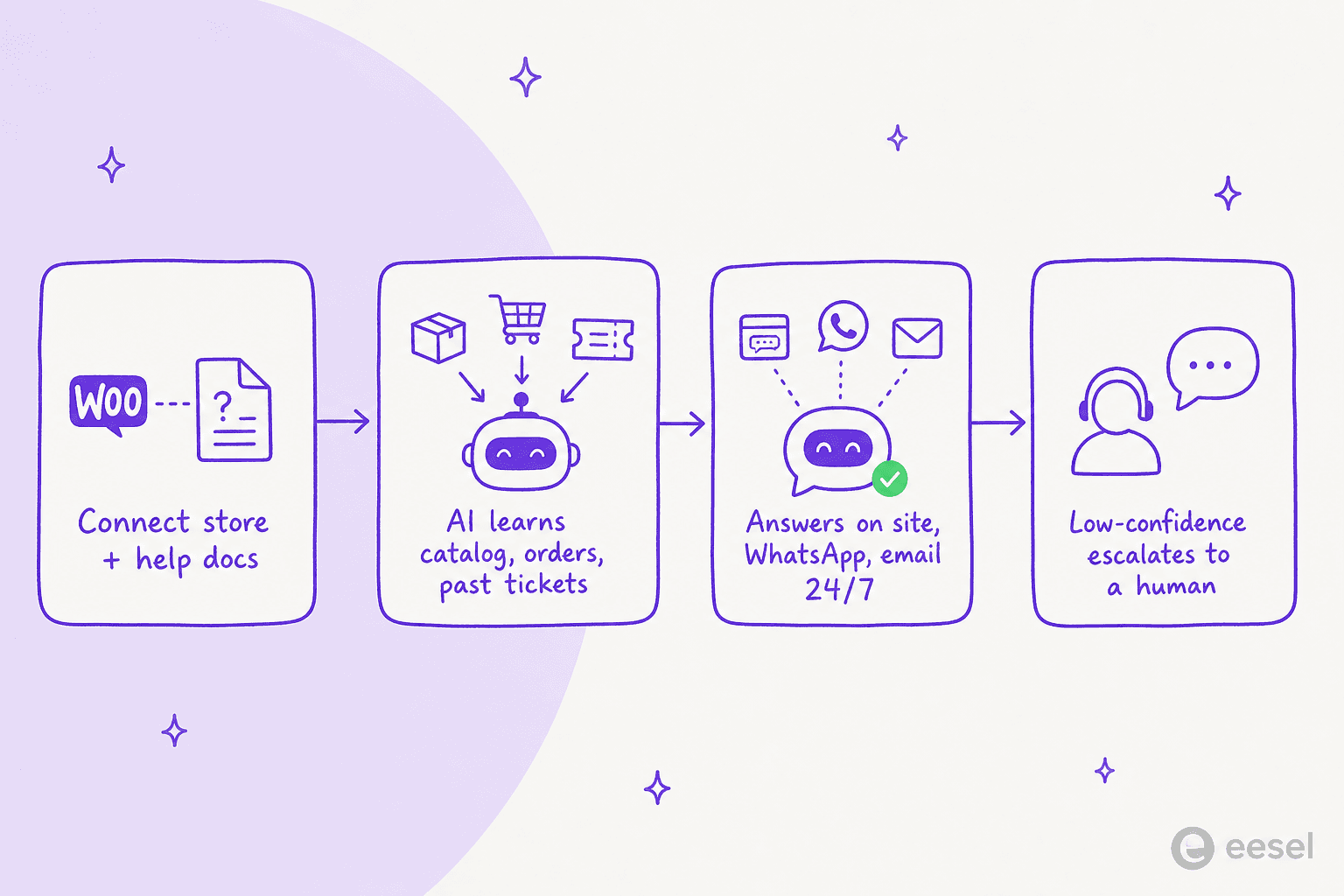
The flow is roughly: connect your store and knowledge sources, let the AI learn, answer across your channels, and escalate anything low-confidence to a person.
- It connects to your store and your knowledge. Your WooCommerce catalog and orders, plus your help center, Google Docs, Notion, or past Zendesk articles. The point is that "years of history becomes knowledge on day one" instead of you writing decision trees by hand.
- It grounds every answer in that data. Rather than free-associating like a raw chatbot, a good agent answers from your content and your live orders. This is what keeps it from making things up, and it's the core defence against AI hallucinations in support.
- It routes by confidence. When the AI is confident, it replies. When it isn't, it drafts for a human or escalates outright. That confidence gate is the single most important setting, and it's what separates a helpful AI customer service chatbot from a liability.
- It works across channels. The same agent can answer on your site chat widget, over WhatsApp, and by email, so a WooCommerce store isn't stuck bolting a different bot onto each channel.
That escalation-and-grounding design is why this generation of tools resolves real tickets. It's also why I'd steer any merchant away from a bot that answers everything with equal confidence, it's the fastest way to erode trust with your customers.
How to add an AI chatbot to your WooCommerce store
The good news: the modern setup is not a build project. Here's the path I'd actually recommend, using eesel's WooCommerce integration as the worked example (the same shape applies to most serious AI helpdesk agents).
1. Connect your store and knowledge sources. Link WooCommerce and point the agent at your help docs. If you also run a helpdesk like Gorgias or Zendesk, connect that too so the AI learns from real resolved tickets, not just marketing copy.

2. Tell it how to behave, in plain English. Instead of building flows, you configure by talking to it: set the tone, scope which topics it should handle, and write escalation rules like "always escalate to a human if someone mentions a chargeback." Changing behaviour later is a sentence, not a re-build.

3. Simulate on your real history before going live. This is the step most guides skip, and it's the one I'd never skip. Run the agent against your past tickets to see, by theme, what it would have answered and where it would have fallen short. You get a real coverage number instead of a leap of faith. Fill the gaps, re-run, and only then flip it on.

4. Go live gradually, starting supervised. Let the agent draft replies for your team to approve first, then hand it full autonomy on the easy, high-confidence stuff (WISMO, tracking, simple FAQs) while humans keep the tricky cases. Every correction your team makes teaches it. This is the same gradual-autonomy path that got Gridwise to 73% of tier-1 requests resolved in the first month, with results showing during a 7-day trial.
If you're on Shopify or another platform too, the store connection works the same way, here's eesel on Shopify in action:
What it costs (and the trap to avoid)
Pricing is where the three categories separate hard.
| Option | Typical cost | What you actually get |
|---|---|---|
| Free WooCommerce plugin | $0 | Rule-based flows, canned FAQ answers, blind to orders |
| Generic chatbot builder | ~$50-500/mo + build time | Flexible flows you build and maintain yourself |
| AI support agent (eesel) | From $299/month for 500 credits (1 credit per conversation), no per-seat fees | Learns your store, reads live orders, simulates before go-live, escalates safely |
The trap to watch for is the per-resolution overage model some AI vendors use, where every extra ticket the bot handles pushes your bill up unpredictably, so a good month for automation is a bad month for your invoice. eesel's model is one fixed monthly price sized to volume, with no seat fees and a free plan of 100 credits, so you can work out the real ROI before committing. For a broader view of what AI support costs versus a human agent, we broke that down in AI agent vs human agent cost.
One more note specific to WooCommerce: because the platform itself is free and open-source with 0% revenue share, merchants here are cost-conscious by nature. That's exactly why a predictable, resolution-based chatbot price fits the WooCommerce mindset better than a seat-based SaaS bill.
Getting it right: the things that actually matter
After all the feature lists, the decision comes down to a short list.
- Can it read live orders? If not, it can't do WISMO, and WISMO is most of your volume. This is non-negotiable.
- Does it learn from solved tickets, not just help-center articles? Learning from how your team actually answered is what makes replies sound like you.
- Can you simulate before going live? A coverage number on your real history beats a vendor's promise every time.
- Does it escalate on low confidence? The ability to stay quiet when unsure is what protects your brand.
- Is the pricing predictable? Avoid models that punish you for automating more.
Get those five right and the specific brand matters a lot less than the roundups suggest.
Try eesel on your WooCommerce store
If you want an AI chatbot for WooCommerce that does the real work, eesel is built for exactly this. It connects to your WooCommerce store and help docs, learns from your past tickets so it sounds like your team on day one, reads live order data to handle WISMO and returns, and, most importantly, lets you simulate it on your real ticket history before a single customer sees it. It answers on your site, over WhatsApp, and by email, in 80+ languages, and it escalates anything it isn't confident about.

There's a free plan with 100 credits and no card, so you can connect your store, run a simulation, and see your real coverage number before you decide. Try eesel and see what it resolves.