AI chatbot for BigCommerce: the practical setup guide

Rama Adi

Katelin Teen
Last edited July 14, 2026
Why BigCommerce stores reach for an AI chatbot
I'll be honest about where this comes from. Across three-plus years of putting AI agents on live support queues, the single most consistent pattern I see in ecommerce isn't exotic, it's volume. On a recent call, a multi-brand ecommerce operator handling 500+ tickets a day described their inbound as refund requests, unsubscribes, and order tracking, over and over. Another, an ops lead at a DTC brand doing roughly 7,000 tickets a month, came in wanting a copilot and left realizing they needed something that could auto-resolve at least half of their email, most of it WISMO ("where is my order"), subscription changes, and basic product questions.
That's the shape of BigCommerce support. Your store already handles storefront design, checkout, and multi-channel selling well, but none of that touches the inbox. And because BigCommerce plans are tied to your sales band, a good month means more orders, which means more tickets, on the exact same headcount. An AI chatbot is the lever that keeps ticket volume from scaling one-for-one with revenue.
What an AI chatbot actually does on a BigCommerce store
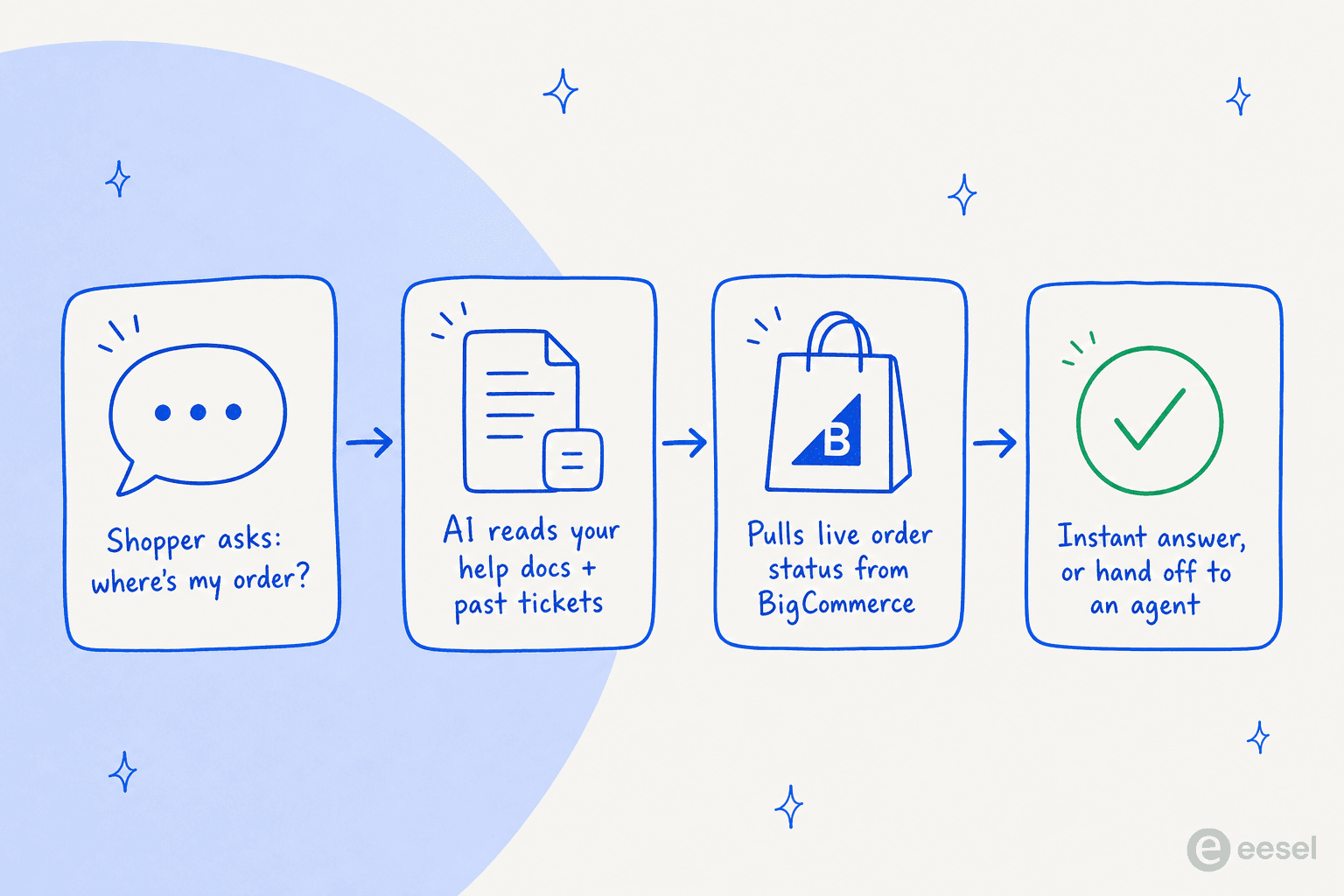
Forget the marketing demos for a second. A support-focused AI chatbot does one core job: a shopper asks a question, the bot reads your knowledge (help docs, past tickets, policies), checks live data where it needs to (like order status from BigCommerce), and either answers instantly or hands the conversation to a human. The magic is that middle step, pulling the live order, because that's what separates a real agent from a glorified FAQ page.
The reason store owners like this over Google's version of "add a chatbot" is durability. One eesel customer on Reddit put it better than any spec sheet could, describing why their team trusts the bot day to day:
"the way it works means the info u get from the bot is always updated in real-time as the docs are instead of having to ask someone etc."

That real-time link is the whole point. When you update a shipping-times doc, the bot's answer updates too, no retraining, no snapshot that quietly goes stale two months after launch.
What it resolves, and what it should escalate
The mistake I see most often is teams expecting an AI chatbot to handle everything, then losing trust the first time it fumbles a weird edge case. The better mental model is a clear split: let AI own the repetitive, well-documented stuff, and route the rest to a person.
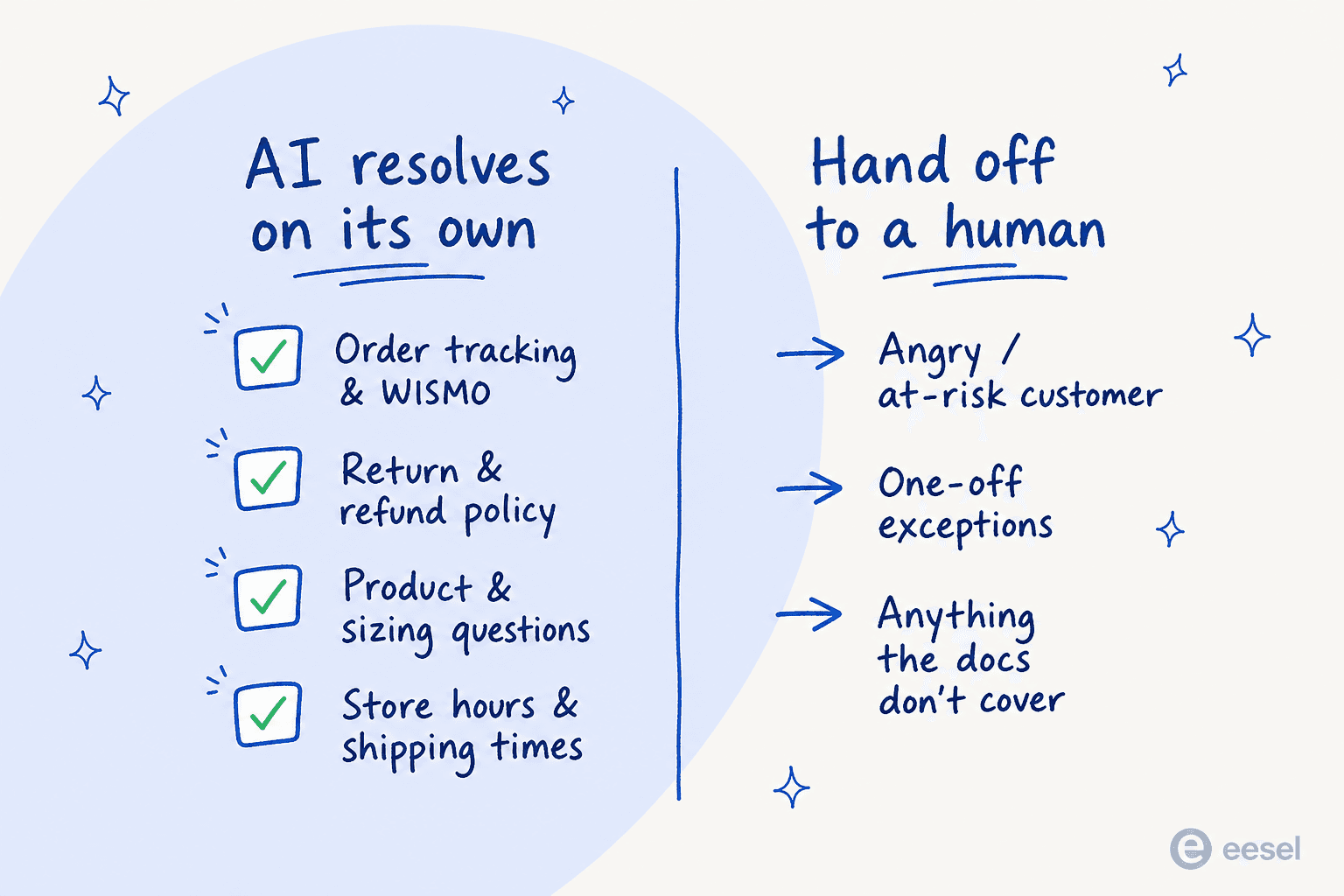
On the left, the stuff a bot should own outright: order tracking and WISMO, return and refund policy, product and sizing questions, shipping times, store hours. These are high-volume, low-nuance, and fully documented, which is exactly where AI shines. On the right, the cases that need a human: an angry or at-risk customer, a genuine one-off exception, and anything your docs simply don't cover. A good bot recognizes when it's out of its depth and escalates rather than inventing an answer.
The three ways to add an AI chatbot to BigCommerce
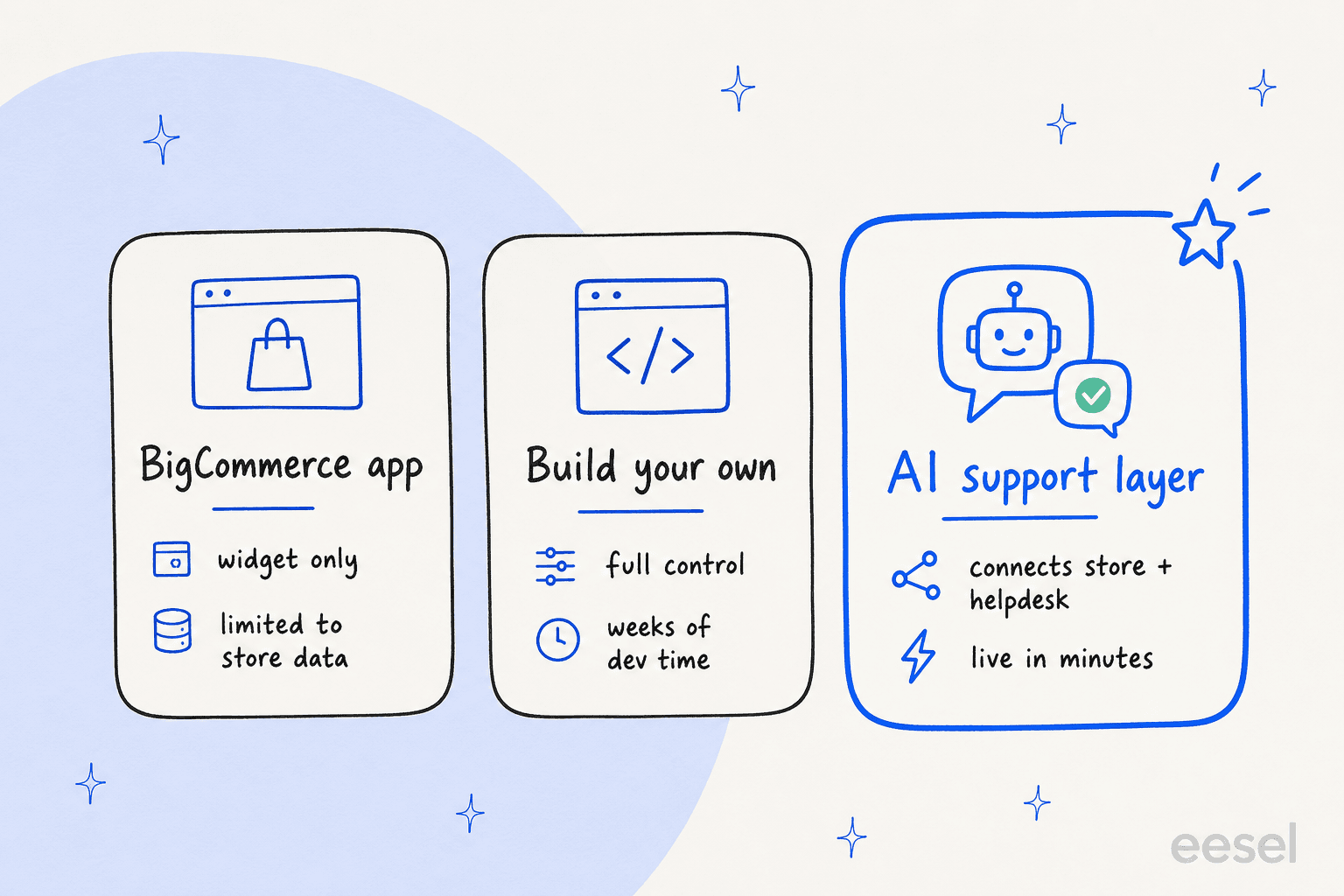
Here's where the real decision is. Not whether to add AI, but how you wire it in, because that choice decides whether your bot can reach order data, sit inside your helpdesk, and survive Black Friday.
1. A BigCommerce marketplace app
The path of least resistance. BigCommerce's 600+ integrations include chat widgets you can install in a few clicks. Great for a basic front-of-store widget, and if you just want a bubble that answers a handful of FAQs, this is enough.
The ceiling is that most of these are widget-only and scoped to store data. They live on your storefront but don't reach into your helpdesk, so a ticket that starts in the widget and moves to email falls off a cliff. My take: fine for a very small store, frustrating the moment support spans more than one channel.
2. Build your own on BigCommerce's open APIs
BigCommerce is genuinely open by design with full API access, so you can build exactly the bot you want, wired to your own model, your own logic, your own order lookups. For a team with engineers to spare, this gives total control.
The cost is the obvious one: weeks of development, then ongoing maintenance every time an API or a policy changes. Unless a custom conversational experience is a core differentiator for your brand, this is usually more than the problem needs. My take: the right call for a handful of stores, overkill for almost everyone else.
3. An AI support layer that connects both
This is the option most teams land on, and the one I'd reach for. Instead of a store-only widget or a from-scratch build, you use a tool that connects your BigCommerce store and your helpdesk, then answers from your combined knowledge. It reads your help docs, learns from past tickets, pulls live order status, and works inside Zendesk, Gorgias, Freshdesk, or Help Scout rather than bolting a second inbox onto your day.
The trade-off used to be setup time, but that's largely gone: tools like eesel go live in minutes, not weeks. My take: the best balance of reach and effort for a growing BigCommerce store, which is why the rest of this guide uses it as the worked example.
How I'd set one up (using eesel)
Whatever tool you pick, the setup arc is the same. Here's how it looks with eesel, which is built to layer onto your existing stack rather than replace it.
Step 1: connect your store and your knowledge
First, connect the sources the bot answers from. That means your BigCommerce store (for live order data), your help center or docs, and ideally your past tickets so the bot learns how your team actually phrases things. eesel connects to your helpdesk and ecommerce platform together, so BigCommerce order data and support history sit in one knowledge base.

Step 2: brief the agent in plain language
You don't code the bot's behavior, you describe it. Set the tone, the escalation rules, which questions to answer and which to hand off, all in plain English. This is where you encode your store's voice and your policies, and it's the difference between a bot that sounds like your brand and one that sounds like a generic assistant.

Step 3: simulate before you go live
This is the step teams skip and regret. Before the bot touches a real customer, run it against your historical tickets to see exactly how it would have answered. We built this because we've watched confident-sounding bots quietly give wrong answers, and simulating against real past tickets is the only way to catch that before your customers do. You get a concrete resolution-rate estimate instead of a leap of faith.
Step 4: start in draft mode, then let it run
Don't flip to fully autonomous on day one. Start with the bot drafting replies for a human to approve, watch the reporting for a week or two, then graduate the well-performing topics (WISMO, returns) to fully automatic while keeping the messier ones on human review. This trust ramp is how you get to autonomy without a scary big-bang launch.

Pitfalls to avoid
A few things I'd watch for, because they're where BigCommerce AI projects usually stall:
- Choosing a store-only widget when support spans channels. If your customers reach you on email, WhatsApp, and the storefront, a widget that only lives on-site leaves most of your volume untouched. Pick something that sits in your helpdesk too.
- Skipping the order-data connection. A bot that can't see live orders can't answer the single most common ecommerce question. If it can't pull order status, it's an FAQ page with a chat skin.
- Per-resolution pricing that punishes a good month. Some tools charge per resolution, so your bill spikes exactly when sales spike, the opposite of what you want. Watch the pricing model, not just the sticker price.
- Going live without a simulation. Trust, once lost, is hard to win back. Test against real tickets first.
Try eesel on your BigCommerce store
If you're running support on BigCommerce, eesel is built for exactly this: an AI agent that connects your store and your existing helpdesk, answers from your real help docs and past tickets, and pulls live order status so it can actually resolve "where's my order?" instead of deflecting it. It works natively with Zendesk, Gorgias, Freshdesk, and Help Scout, you brief it in plain language, and you can simulate it against your historical tickets before it ever replies to a customer.
Pricing is flat per ticket with no per-resolution surprises, which matters on a store where volume swings with the season. It's free to start, and you can have a working agent live in a few minutes rather than a few weeks.
