The modern call center in 2026: what actually changed

Kira

Katelin Teen
Last edited July 6, 2026
What "modern" actually means
I build AI agents for support queues for a living, and the word "modern" gets thrown around so loosely it's nearly meaningless. So let me pin it to something concrete. The shift from a traditional call center to a modern contact center is architectural and philosophical at the same time.
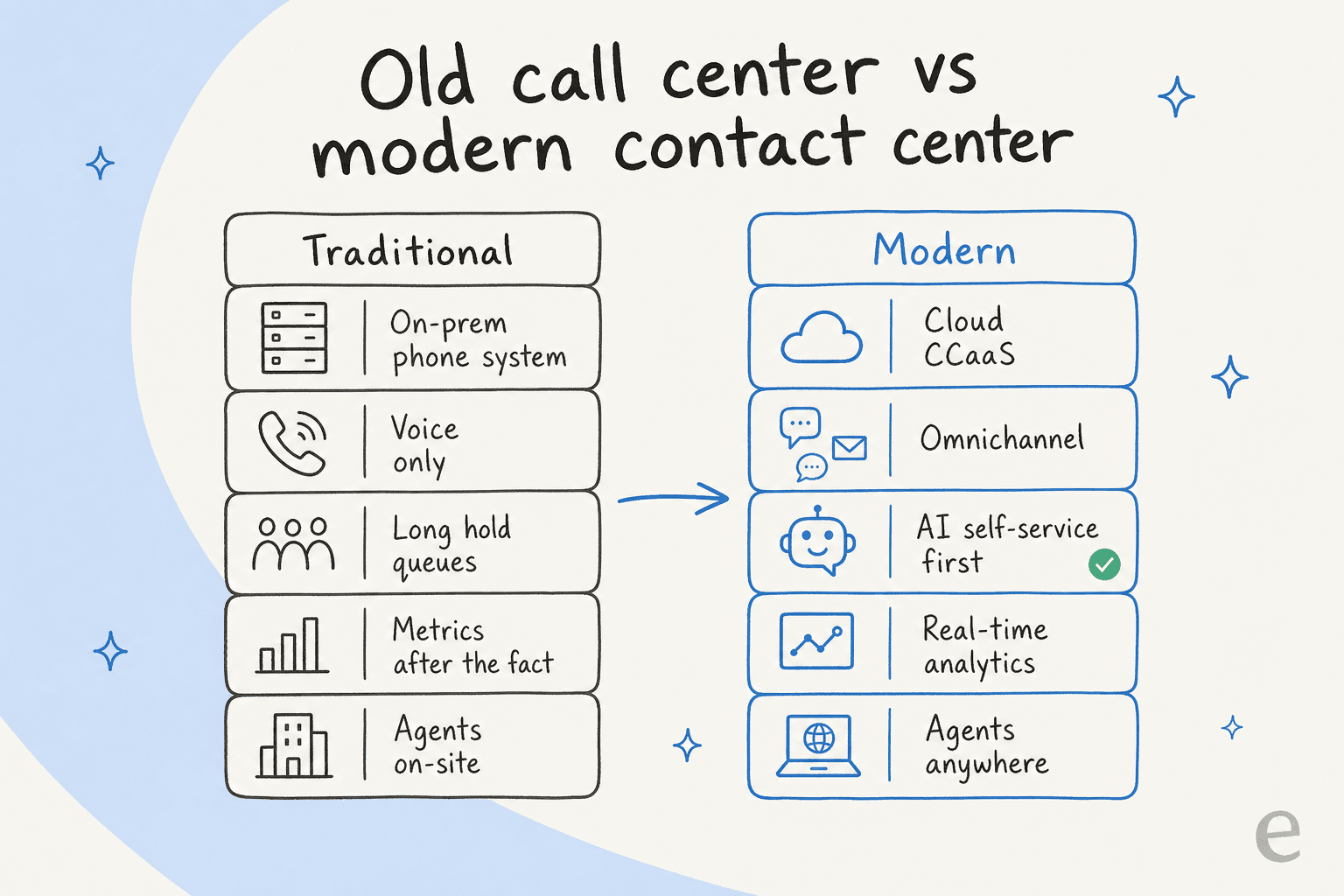
The traditional call center was on-premises hardware: PBX and ACD boxes racked in a building, voice-only (or voice plus some bolted-on email), with capacity fixed by the physical kit and agents sitting on-site. Genesys, one of the big platform vendors, describes legacy on-prem bluntly as "ageing systems that limit innovation" hemmed in by "hardware constraints" (Genesys).
The modern version flips every one of those. It's software delivered as a cloud service, omnichannel across voice, chat, email, social, and messaging in one interface, elastic in capacity, staffed by agents who could be anywhere, and with AI woven through the whole stack.
The elasticity difference isn't abstract. On Amazon Connect, Intuit scales its contact center from 6,000 to 11,000 agents during tax season with headroom for up to 20,000, and Rhode Island stood up an entire contact center in just 10 days, processing 75,000 unemployment claims on day one. You cannot do either of those things with hardware racked in a building. That flexibility is the whole reason "cloud" stopped being a nice-to-have.
The cloud layer: CCaaS
The delivery model underneath all of this has a name: CCaaS, contact-center-as-a-service. Instead of owning the routing, IVR, workforce management, quality monitoring, and analytics as hardware, you rent the whole stack as cloud software. It's the same move that turned owned servers into AWS.
It's a big market and growing fast. Estimates vary a lot by research firm and how they draw the boundaries, so the safe framing is this: CCaaS is a high-single-digit-billion-dollar market in 2026, growing at roughly 17% a year toward around $30 billion by the mid-2030s (Fortune Business Insights; IMARC Group). The direction is what matters: money is moving off on-prem, quickly.
If you're evaluating platforms, these are the names you'll actually run into:
| Platform | What it's known for |
|---|---|
| Genesys Cloud CX | Enterprise orchestration: predictive routing, journey management, composable architecture. |
| NICE CXone | The deepest bundled suite: AI, workforce management, quality management, and routing sharing data natively. |
| Five9 | Its "Genius AI" stack, intelligent virtual agents, and strong outbound/predictive dialing. |
| Talkdesk | Positions as AI-first, with automation and visual workflow builders for mid-market to enterprise. |
| Amazon Connect | Pay-as-you-go and AWS-native, with GenAI agent assist (Q in Connect) and conversation analytics (Contact Lens). |
| Zendesk | Ticketing-rooted, now an AI-first resolution platform with native voice, AI agents, and QA. |
| RingCentral | UCaaS and CCaaS convergence, with a voice-heavy heritage. |
Amazon Connect gives a sense of the scale these platforms run at: AWS says customers use it to support more than 10 million interactions every day, and TransUnion reported 40%-plus savings in annual costs after moving to it.
One thing to keep straight, though: moving to the cloud is not the same as being modern. Plenty of teams lift-and-shift onto a CCaaS platform and keep running it like the old phone room. The cloud is the enabler. The AI layer is where "modern" actually lives.
The AI layer: where modern lives
This is the part that defines 2026, so it's worth being precise about what AI is actually doing, because it's doing four different jobs and people mush them together.
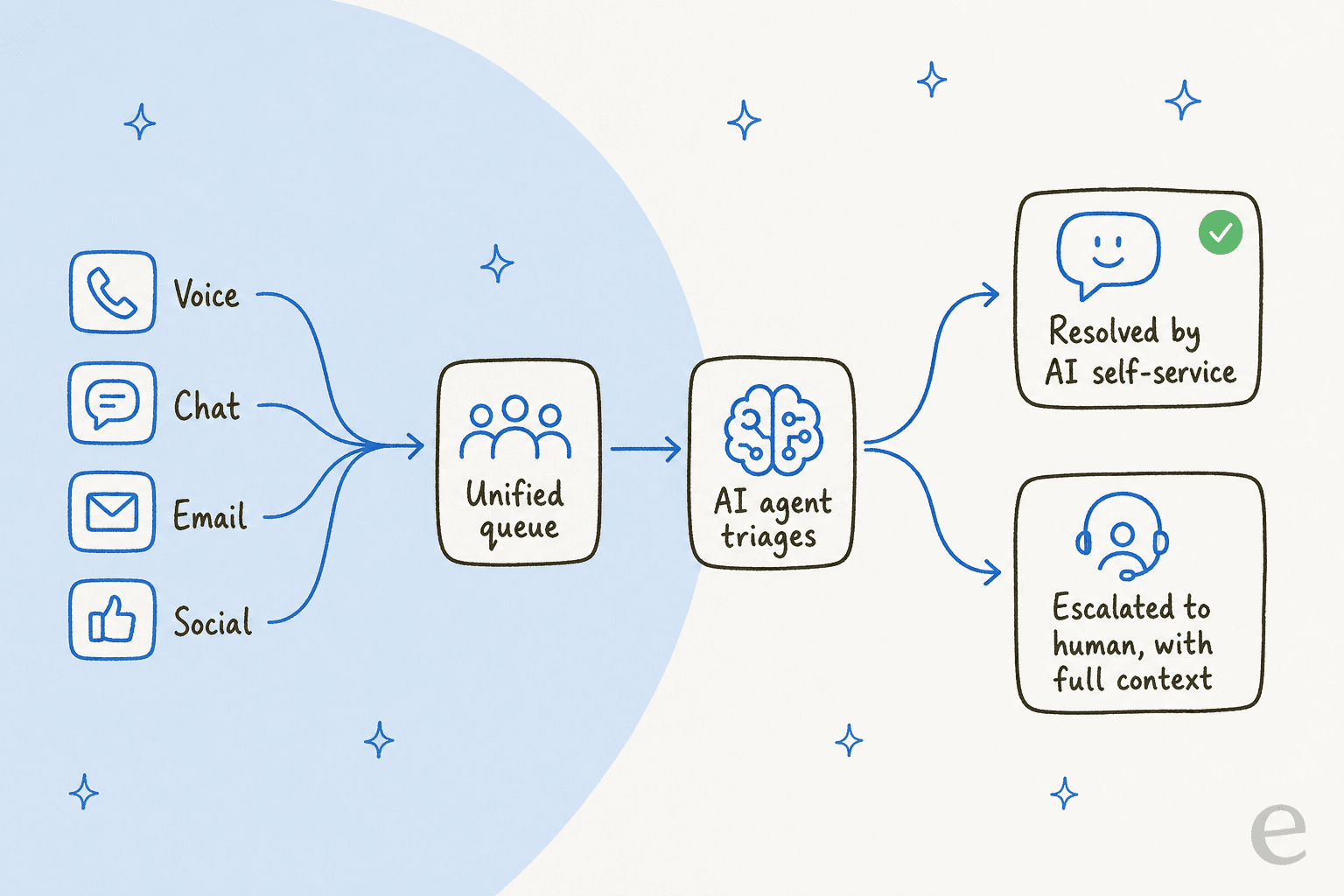
First, autonomous resolution. AI agents that fully handle a contact end to end, the successor to the old rule-based chatbot everyone hated. Amazon's newest generation on Connect includes agents that "resolve issues autonomously, processing returns, updating accounts, rebooking flights" (AWS). The bar has moved: 51% of consumers say they now prefer a bot when they want immediate service, and 48% say it's genuinely harder to tell AI and human reps apart. This is the difference between an AI agent and a rule-based chatbot, and it's a big one.
Second, agent assist. AI helping the human rather than replacing them: drafting replies, surfacing the right knowledge-base article, summarizing a long thread. Salesforce found reps using AI spend 20% less time on routine cases, freeing an estimated four hours a week for complex work. OpenTable's George Pokorny put it well in that same report: "Saving just two minutes on a 10-minute call lets our service reps focus on strengthening customer relationships." If you want to go deeper here, we've written about agent assist tools and AI for agent productivity separately.
Third, self-service and deflection. The AI resolves the customer's question before it ever becomes a ticket, usually against your help center. This is where the volume relief comes from, and it's the mechanism behind that 30%-to-50% shift. If your goal is to reduce ticket volume, this is the lever.
Fourth, the invisible back-office layer. Real-time transcription, sentiment analysis, and automated quality assurance. These used to be a manager listening to 2% of calls with a clipboard; now they're native features scoring 100% of interactions automatically. Zendesk's QA, Amazon's Contact Lens, and NICE's CXone all ship this out of the box.
Here's the nuance I'd push back on the hype with, though. Adoption and operationalization are not the same thing. Zendesk's data says only about a fifth of agents actually have generative AI tools at their desk, only 45% say they've had any AI training, and of those, just 21% are satisfied with it. Meanwhile 51% of service leaders say security concerns have delayed their AI plans. So the gap between "we bought AI" and "our agents use AI well" is the real story of 2026, and it's where most modernization projects quietly stall.
Omnichannel: the promise and the reality
The second pillar of modern is omnichannel, and it's the one with the widest gap between marketing and reality.
The distinction that matters, in Talkdesk's own words: multichannel means you handle several channels but "the individual customer touchpoints across channels are disconnected." Omnichannel means the channels are "fully integrated into one user interface" with context carried between them (Talkdesk). The difference is whether a customer who starts on chat and calls an hour later has to repeat everything.
Channels beyond voice aren't optional anymore. Talkdesk's research found 69% of consumers across all age ranges prefer text over calling, and 63% would switch to a company that offered text messaging over one that only did phone. Voice isn't dead, but it's no longer the default.
Here's the honest part, and it lines up with what I hear from teams constantly. Most "omnichannel" isn't. Real cross-channel handoff is rare, and buyers can smell it:
"Every vendor claims omnichannel support but actual meaning varies wildly. Some just mean email and phone which is barely omnichannel."
r/CustomerSuccess, "What does an omnichannel customer service platform even mean"

That skepticism is earned. And it's exactly why the useful question isn't "is this platform omnichannel?" but "does context actually follow the customer across channels?" A multichannel chatbot that can't see what happened on email is just a phone tree with extra steps.
The metrics that define a modern contact center
You can't manage what you don't measure, and modern contact centers measure differently. The 2026 wrinkle is that you now benchmark three ways: AI-only, human-only, and blended.
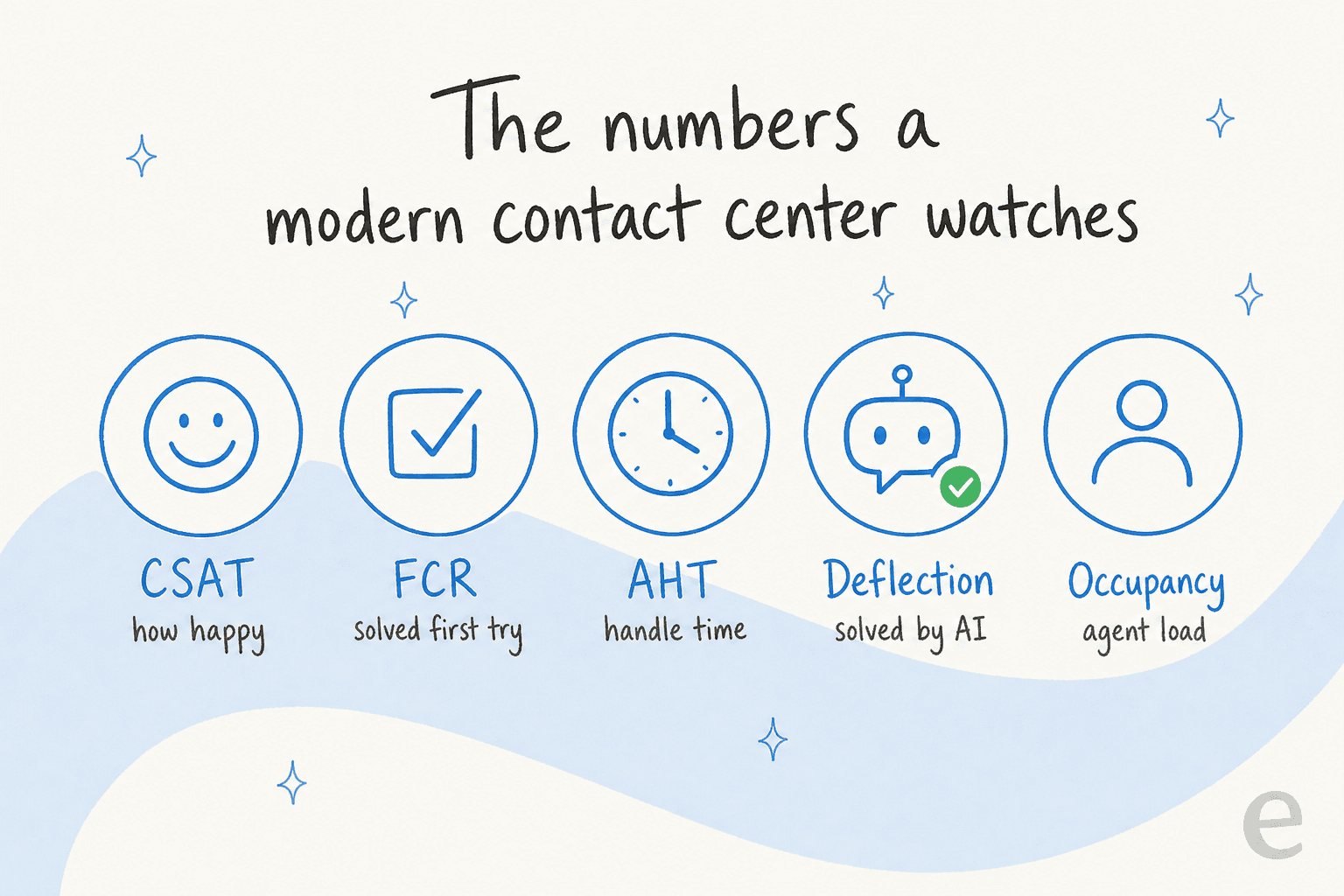
- CSAT (customer satisfaction): the percentage of customers who rate an interaction as satisfactory. Still the headline number.
- FCR (first contact resolution): resolved on the first contact, no follow-up needed. The metric most correlated with satisfaction, and where AI self-service moves the needle hard.
- AHT (average handle time): total time to handle one interaction. AI assist is what shaves it, that OpenTable "two minutes on a 10-minute call" figure is an AHT story.
- Deflection rate: the share of contacts resolved by self-service before a human touches them. This is the metric rising fastest, and it's the direct expression of the 30%-to-50% AI shift.
- Occupancy: how much of logged-in time agents spend actively handling contacts. Push it past ~85% and you're buying burnout.
The bigger shift is philosophical: Zendesk and others are moving the whole field toward cost-per-resolution as the north-star metric, rather than raw call volume. When AI can handle unlimited volume, "how many calls did we take" stops being the point. "What did it cost us to actually resolve this" becomes the point.
Agents work anywhere now
One more thing the cloud quietly unlocked: the distributed workforce. No on-prem PBX means an agent needs a browser and a headset, nothing more, which is why the remote support team went from exception to norm.
That created a new problem, which AI is now tackling: scheduling people you can't see across time zones. It's harder than it sounds, 69% of CX leaders say forecasting future labor requirements is a significant challenge. Modern workforce-management tools use AI to forecast demand and staff against it, and that's the gap they're built to close.
And on the perennial "is AI coming for these jobs" worry, the Salesforce data is more optimistic than the headlines: 71% of reps with AI say it's creating growth opportunities, 86% have developed new skills, and 81% say their role has become more specialized. The routine work goes to the machine; the interesting work stays with the person. That's the version of modern worth building toward.
Modernizing without the two-year migration
Here's what I've learned building AI for support queues: the teams that succeed at modernizing rarely start by ripping out their platform. The ones that try a full CCaaS migration first usually spend a year on the plumbing before the AI ever touches a real ticket.
The faster path is to add the intelligence layer on top of the helpdesk you already run. That's the approach we take with eesel. Instead of asking you to switch platforms, it plugs into Zendesk, Freshdesk, Gorgias, or whatever you're already on, learns from your past tickets and help center, and starts handling the repetitive volume, so "modern" becomes a setting you turn on rather than a project you dread.

The reason I trust that approach over a big-bang rollout is the adoption gap I mentioned earlier. A confident-sounding bot that gives wrong answers is worse than no bot, which is why every eesel rollout gets simulated against your historical tickets before it goes live, so you can see the resolution rate and the answers it would have given on real conversations, not a demo. Modernizing a call center is mostly about earning that trust one resolved ticket at a time. Start with a slice of your volume, prove the number, then widen it. That's a modern call center you can actually stand up this quarter.
Try eesel for your modern contact center
If the goal is a modern contact center without the migration headache, eesel is built for exactly that: an AI support agent that connects to your existing helpdesk in minutes, trains itself on your past tickets and knowledge base, and handles tier-1 volume across live chat, email, and your help center. The differentiator is the simulation, you run it against thousands of your real historical tickets first and see the resolution rate before a single customer talks to it. It's free to try, and it plugs into the stack you already have rather than replacing it.
Frequently Asked Questions
What is a modern call center?
What is the difference between a call center and a contact center?
How much does a modern cloud contact center cost?
Do modern call centers replace human agents with AI?
How do I make my call center more modern with AI?


Article by
Kira
Kira is a writer at eesel AI with a Computer Science background and over a year of hands-on experience evaluating AI-powered customer service tools. She focuses on breaking down how helpdesk platforms and AI agents actually work so that support teams can make better buying decisions.