What "call center technology" actually means in 2026
Start with the vocabulary, because it hides the whole story. A call center handles voice. A contact center handles voice plus chat, email, SMS, and social from one place. Salesforce puts the shift plainly: traditional workforce planning "focused almost entirely on voice traffic," but today it "must account for a sophisticated mix of digital and voice interactions," and simple queue-based routing gives way to routing that considers "agent skill, customer intent, and channel type" (Salesforce).
That is not a marketing rebrand. It changes what technology you need. Once a customer can start on chat, switch to email, and finish on the phone, every tool in the stack has to share one view of that person. Salesforce frames the difference as omnichannel versus multichannel: multichannel gives customers "several ways to contact your brand, but each channel exists in its own silo," while omnichannel connects them into "the same consistently exceptional service experience," and cites that 85% of customers expect consistent interactions across a business.
So when people say "call center technology" today, they usually mean an omnichannel contact center stack. Let's open it up.
The stack under the hood
Modern call center technology is a set of layers, each doing one job. You rarely buy them separately anymore (CCaaS bundles most of it), but knowing the pieces is how you tell a real platform from a rebadged phone line.
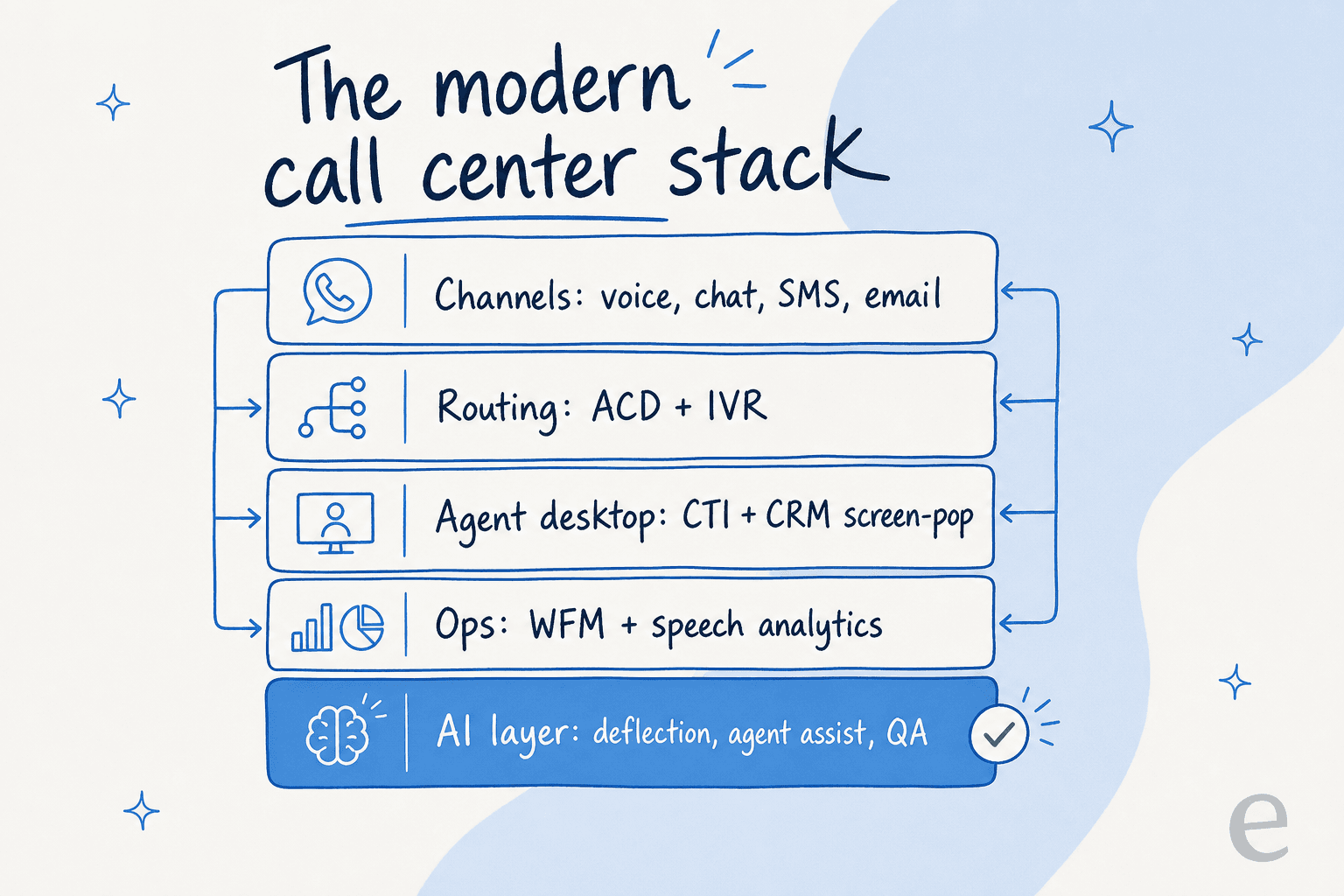
Here's what each layer actually does:
| Layer | What it is | What it does |
|---|---|---|
| ACD (Automatic Call Distribution) | The routing engine | Distributes incoming contacts to the right agent using "agent availability, skills, and caller preferences" (NICE). Twilio calls it "the traffic controller". |
| IVR (Interactive Voice Response) | The automated front door | The menu that lets callers "navigate menus by interacting via voice prompts or dial-pad input" and gathers intent before the ACD routes them. |
| CTI (Computer Telephony Integration) | The glue to your CRM | Connects the phone system to business software so an agent gets a "screen pop" of the caller's record (Five9). |
| WFM (Workforce Management) | Staffing and scheduling | Forecasting, scheduling, intraday changes, and performance tracking against SLAs (Salesforce). |
| Analytics | The insight layer | Speech and interaction analytics that, per NICE, can "analyze 100% of contacts 24/7" instead of a sampled few. |
| AI layer | The new automation tier | Deflection, real-time agent assist, and QA sitting in front of and alongside the humans. |
The two that trip people up are ACD and IVR, because they sound like the same thing. They're complementary. The IVR is the menu that collects what you need; the ACD is the engine that decides where you go. If you want to go deeper on the routing side specifically, our guide to ticket routing automation covers how this looks on a modern helpdesk rather than a phone switch.
The shift that reshaped everything: on-prem to cloud
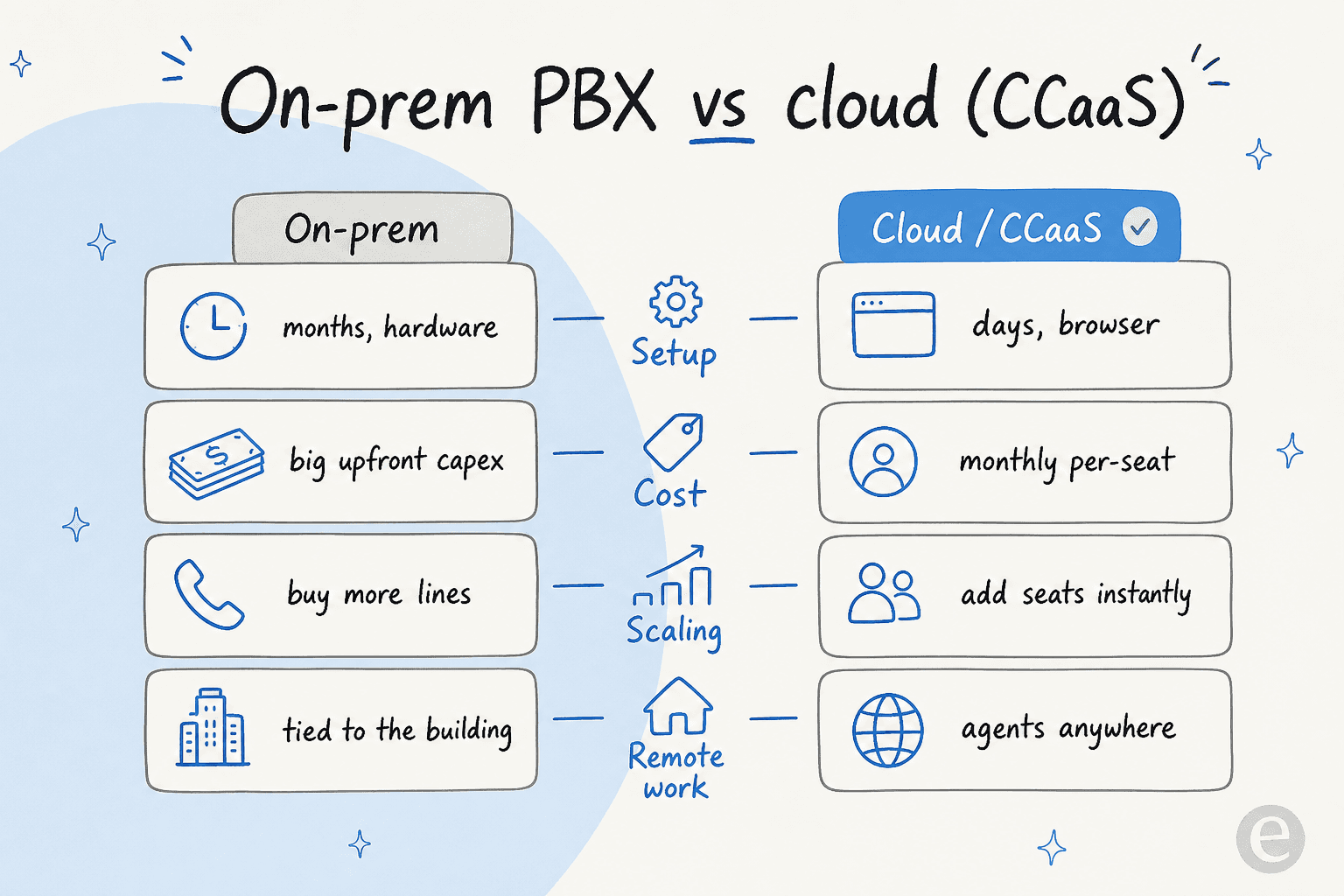
For decades this stack lived in a server room. You bought PBX hardware, you bought phone lines, and scaling meant a purchase order and an install date. CCaaS killed that model.
Genesys defines CCaaS as "a cloud-based delivery model" that "eliminates the need for on-premises systems," replacing "costly maintenance and hardware with a subscription-based model" so teams can "scale resources instantly without major capital investment." Five9 frames the same move as "faster, easier deployments, seamless upgrades, [and] flexible scalability" (Five9). In practice, setup went from months to days, and your agents stopped being tied to a building.
One caveat, because "cloud" gets sold as "cheap and simple" and it isn't always either. The subscription is only part of the bill. Buyers regularly hit paid professional-services fees for the work that actually delivers value, one contact-center admin put it bluntly on G2:
"It seems adding features that will continue to enhance performance always needs 'professional services' for integration... Other vendors seem to have pre-built packages... without the 'penny pinching'."
G2 reviewer, Five9 reviews

That gap, between the platform you were sold and the one you can actually configure without a consultant, is worth pressure-testing before you sign. It's also where the AI layer's pricing model matters, which we'll get to.
Where AI is actually landing (and where it's tripping)
Look across the vendor pages and AI shows up in three distinct slots, not one. It helps to see them as different jobs, because they succeed and fail for different reasons.
1. Front-of-queue self-service (deflection). Voice AI and chatbots that handle whole conversations before a human is involved, the successor to the IVR menu tree. Nextiva markets its virtual agent as resolving "70%+ of calls & chats" (a vendor claim, not an independently verified number). This is the slot with the highest ceiling and the most spectacular failures.
2. Agent assist / copilot (real-time). AI riding alongside the human: Genesys' Agent Copilot to "predict intent and guide agents in real time" (Genesys), Five9's "next-best-action recommendations." This is the quietest win.
3. Analytics and QA at 100% coverage. AI reading every interaction instead of the 2% a human QA lead can sample, exactly the NICE and Verint analytics claim. It's the same shift behind AI-driven customer service metrics.
Here's the thing the vendor pages won't tell you. Slot 1 done badly is a disaster, and the people who feel it first are your own agents. Read this Reddit thread from an agent whose company ripped out its IVR and put AI on every call:
"Everyone that calls in talks to an AI... The AI does a serviceable job most of the time, but it's not consistent. Callers get annoyed at how long it takes the AI to respond... sometimes the AI just goes off the rails and provides bad advice."
u/Parsleymagnet, r/callcentres (Jun 2026)

And the sting in the tail, the top comment on that same thread, is the CSAT problem nobody models in the sales deck:
"I hate working for a system that frustrates people for a long period of time before they can even speak to me, then I just solved their problem in a minute. They are not happy people. They almost get madder cuz I did it so easily."
u/sevensantana7 (32 upvotes), r/callcentres (Jun 2026)
Now compare that to slot 2, where AI is helping the human instead of replacing them. Same platform category, completely different reception:
"The AI auto-summarization is a game-changer. It accurately captures the intent and outcome of the call, allowing my agents to jump to the next customer almost immediately. It's improved our team's morale by removing the most tedious part of their job."
G2 reviewer, Five9 reviews
The lesson isn't "AI bad." It's that the technology succeeds when it knows its own limits. Which is the whole ballgame.
What actually makes AI work in the contact center
I've spent the last few years, along with the rest of the team at eesel, putting AI agents on live support queues, and the single most repeated request from customers is not "make it more powerful." It's "make it stop answering things it shouldn't." One CX lead we work with framed the whole problem in a sentence: they need an AI "who is only handling the tickets that it's confident to handle and all the other ones, leave them alone."
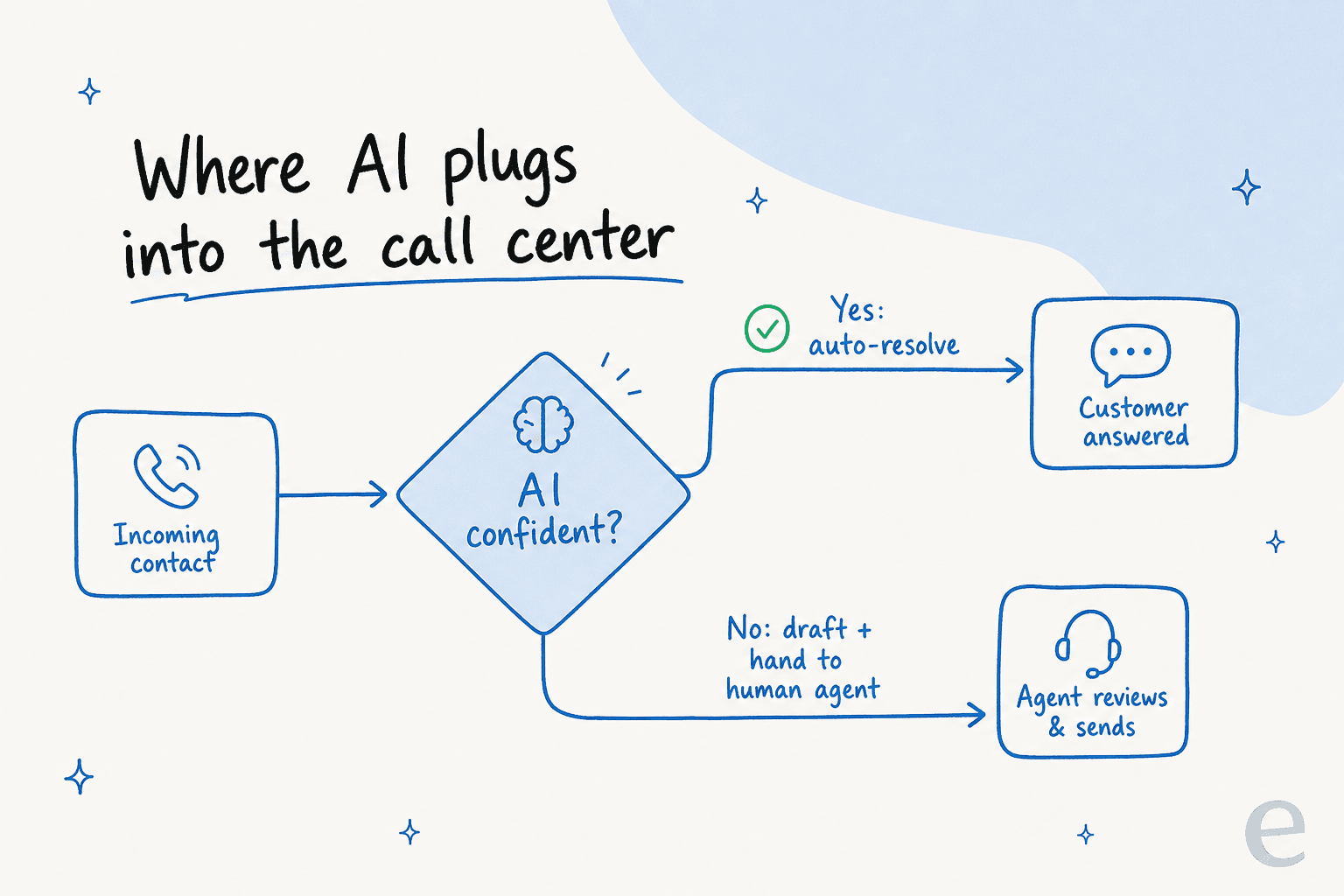
That's confidence-gating, and it's the difference between the two Reddit quotes above. The flow is simple: a contact comes in, the AI decides whether it's confident, and if it isn't, it drafts a reply and hands off to a human instead of guessing on the call. Get that gate right and the numbers follow, one internal IT team went from 15% deflection toward a 55% target on their Jira helpdesk, and a trial cohort saw 93% triage accuracy with zero false positives on spam.

The other thing that separates a safe rollout from a scary one is testing before go-live. We learned this the hard way: we've watched a confident-sounding bot quietly give wrong answers, which is why every rollout now gets simulated against historical tickets first, so you see exactly what it would have said, on real cases, before a customer ever does. That's a very different posture from "flip the IVR to AI and hope."
Do you need a new platform, or an AI layer on what you have?
Pick the line that sounds most like you.
Try eesel
If your "call center" is really a helpdesk (Zendesk, Freshdesk, Gorgias, a shared inbox) rather than a phone switch, you don't need to rip anything out to get the AI layer this article is about. eesel AI sits on top of the tools you already use: it trains on your past tickets and help center, drafts or auto-sends replies gated by confidence, and lets you simulate the whole thing on historical conversations before it ever touches a customer.
The pieces that make it fit the "does AI actually work here" test above: it's confidence-gated by design (it hands off what it's unsure about instead of guessing), it's self-serve so you're not waiting on a professional-services quote to configure it, and it's priced per task you can predict rather than per resolution that spikes when volume does. It's free to try, and because it runs a simulation first, the first thing you see is what it would do on your real tickets, not a demo script.

Frequently Asked Questions
What is call center technology?
What's the difference between a call center and a contact center?
What is CCaaS in call center technology?
How much does call center technology cost?
Can AI replace call center agents?


Article by
Kira
Kira is a writer at eesel AI with a Computer Science background and over a year of hands-on experience evaluating AI-powered customer service tools. She focuses on breaking down how helpdesk platforms and AI agents actually work so that support teams can make better buying decisions.