The sticker price is not the cost
Here's the thing that took me a while to internalise after a few years writing about this space and watching how eesel's own customers actually get billed: the number on the pricing page is almost never the number you pay.
Most AI customer service software vendors love to quote a clean per-unit rate, "$0.75 per resolution", "$1.00 per conversation", because it sounds small. But that rate sits on top of a stack of other costs: the per-seat licenses for your human agents, the AI add-on fee to switch the feature on, overage charges when you blow past your plan allowance, and the volume bills that land in your busiest month. The sticker price is the tip of the iceberg.
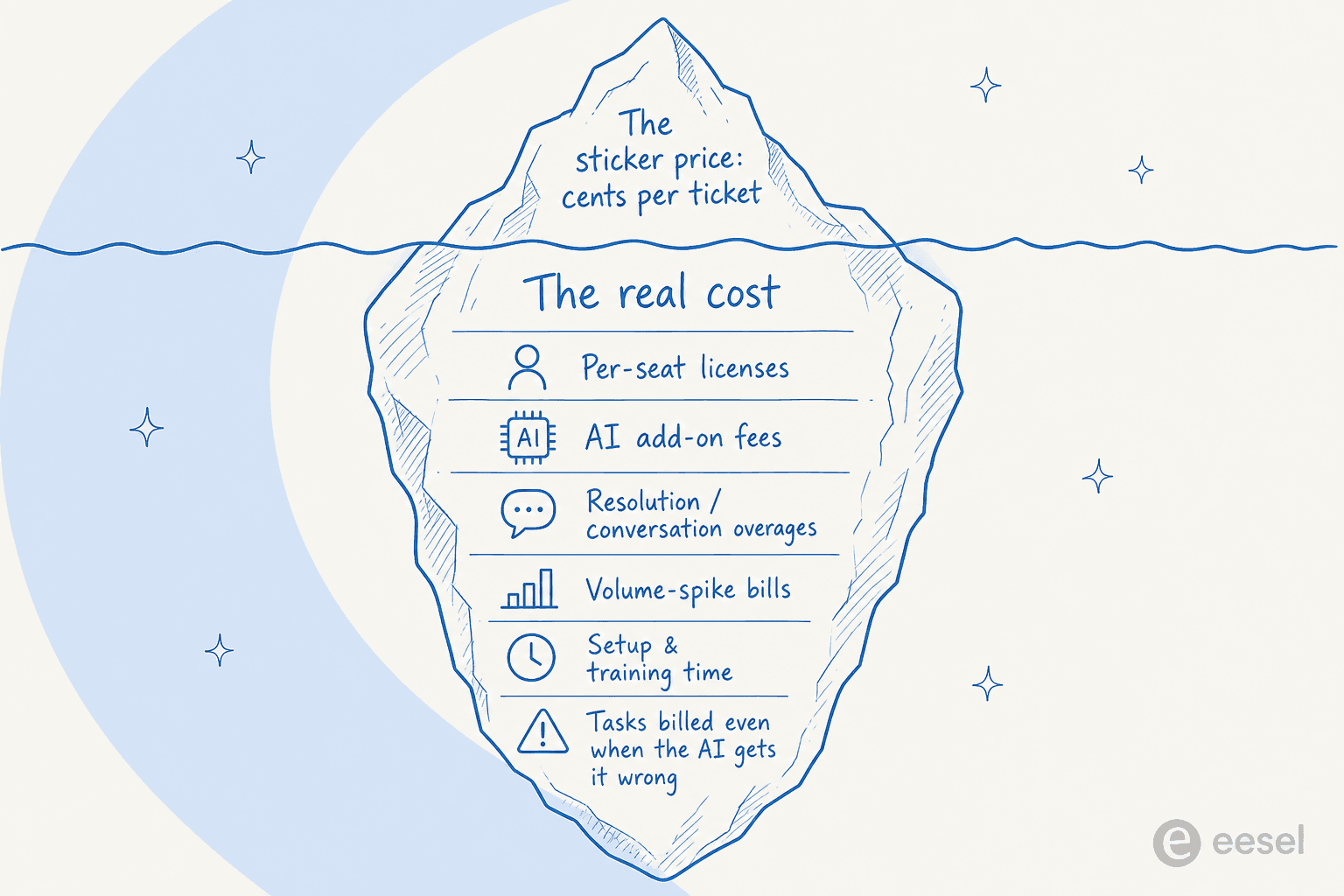
So the useful question isn't "how much per ticket". It's "which pricing model am I signing up for, and how does it behave when my volume doubles". That's where the real money is.
The four ways AI customer service gets priced
Almost every tool on the market, from the best AI helpdesk software down to the cheapest chatbot, uses one of four billing models. Knowing which one you're looking at tells you more about your future bill than any headline rate.
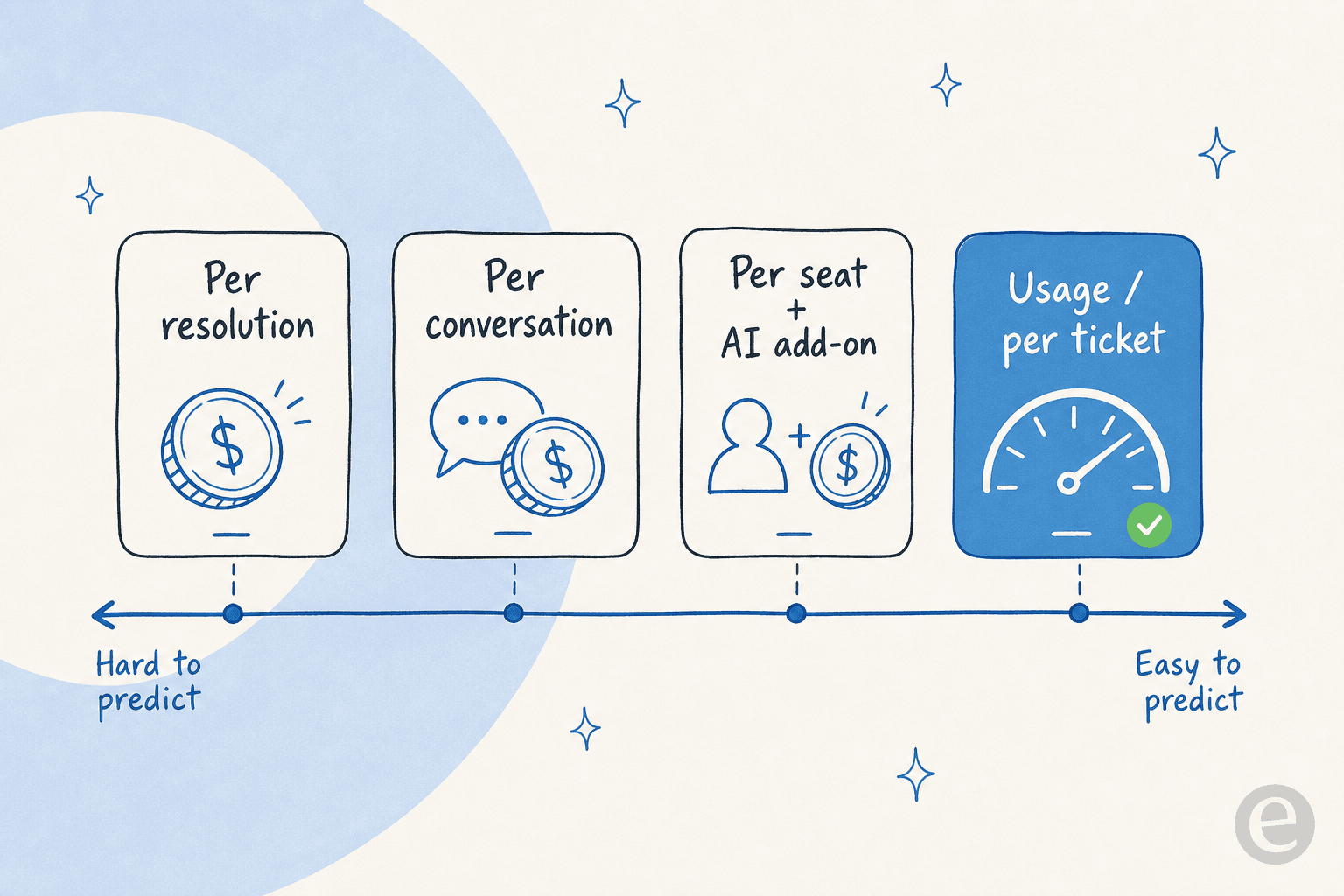
Per resolution. You pay each time the AI closes a ticket without a human. Zendesk bills its AI agents this way: its own pricing FAQ says AI agents are priced "based on the successful outcomes they deliver," with automated resolutions as the billing unit. The exact rate isn't even printed on the public page (it's gated behind plan allowances and sales), and practitioners on r/Zendesk report landing around $1.20 to $1.50 per resolution. Help Scout uses the same shape at a friendlier $0.75 per resolution.
Per conversation. You pay per conversation the AI takes on, resolved or not. Salesforce's Agentforce lists $2 per conversation, or a "Flex Credits" alternative at $500 per 100,000 credits where each AI action burns credits. It sits on top of Service Cloud seats that run $25 to $550 per user per month, with "transaction fees apply" in the fine print.
Per seat plus an AI add-on. The classic helpdesk model: you license every human agent, then pay extra to switch AI on. Zendesk's Copilot add-on is $50 per agent per month on top of Suite seats; Freshdesk sells its Freddy AI Agent in session packs at $49 per 100 on top of per-agent plans.
Flat usage per ticket. You pay a fixed rate per ticket the AI handles, with no seats and no platform fee. This is what eesel AI does at $0.40 per ticket. It's the only model on the list where your cost scales linearly and predictably with the work done, rather than with how good your AI got or how many people you employ.
The models on the left of that spectrum (per resolution, per conversation) are the ones that surprise people on the invoice. The ones on the right are the ones you can put in a spreadsheet and trust.
Per-resolution pricing has a quiet trap
Per-resolution pricing sounds the fairest of the lot, you only pay when the AI actually works. But it has a structural problem worth saying out loud: it charges you more precisely when things are going well.
Two things push a per-resolution bill up. The first is success: the better you train your AI and the higher your resolution rate climbs, the more resolutions you're billed for. You're penalised for the outcome you were trying to buy. The second is volume, and that one bites hardest at the worst possible time.
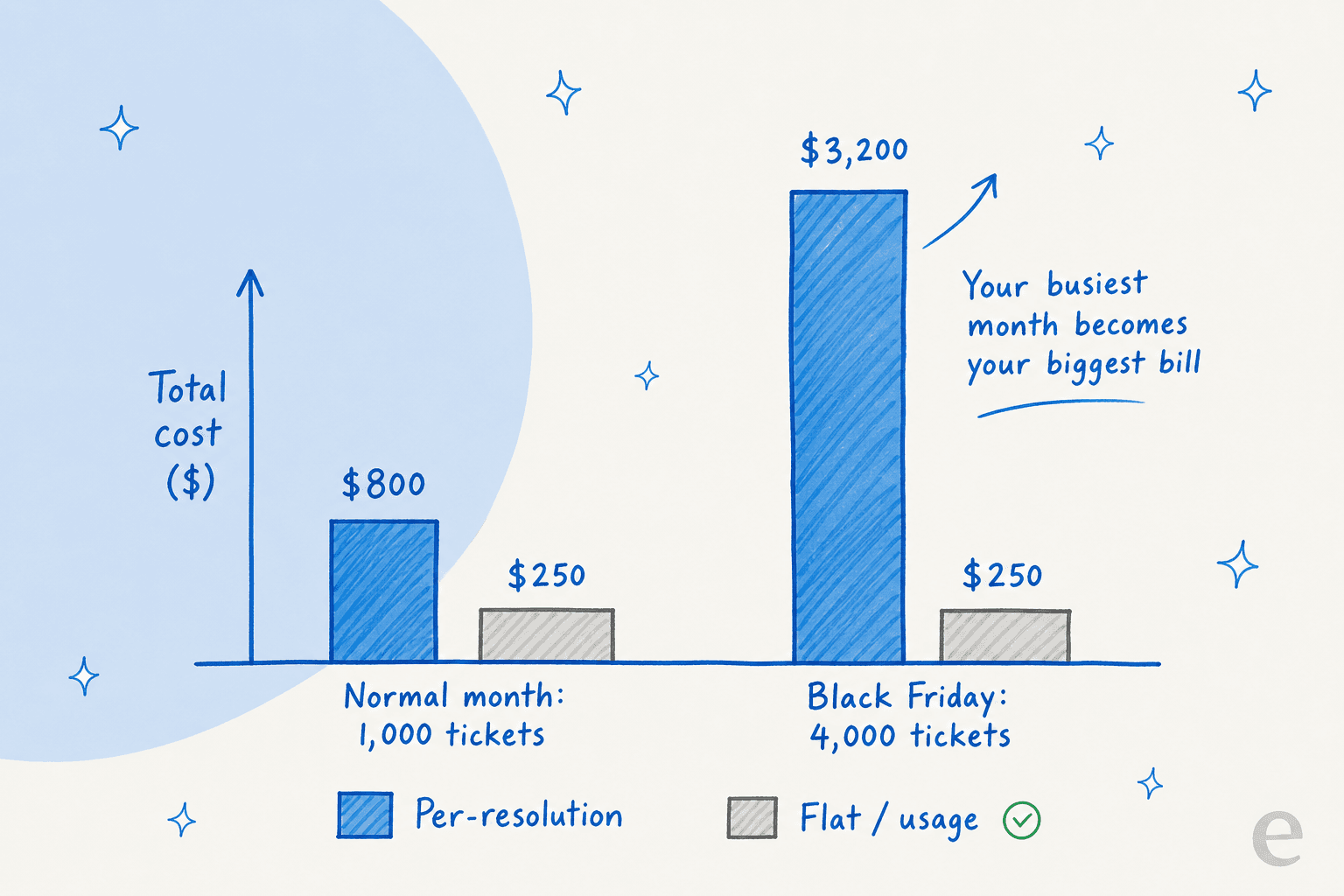
Run the math on a real example. A team doing 1,000 tickets a month at an 80% resolution rate pays around $790 a month on per-resolution pricing. Now Black Friday hits and volume quadruples to 4,000 tickets at the same resolution rate: the bill jumps to roughly $3,170. Same product, same configuration, four times the cost, in the exact month your margins are already under pressure. A flat usage rate doesn't move like that. Your busiest month is your busiest month, not your biggest bill.
What it actually costs: a worked example
Let me put numbers on a single realistic team so the models are comparable. Say you route 1,000 tickets a month to AI and it resolves 70% of them. Here's roughly what each model costs for the AI itself, before per-seat licenses (which several of these still charge on top).
| Model | Example tool | AI cost on 1,000 tickets (70% resolved) | Per-seat license on top? |
|---|---|---|---|
| Per resolution (high) | Zendesk-style ~$1.50 | ~$1,050/mo | Yes, $55-$115/agent |
| Per conversation | Salesforce Agentforce $2.00 | ~$1,400/mo | Yes, $25-$550/user |
| Per resolution (low) | Help Scout $0.75 | ~$525/mo | Yes, $25-$75/user |
| Per session | Freshdesk Freddy ~$0.49 | ~$245/mo (sessions, not tickets) | Yes, per-agent plan |
| Flat usage per ticket | eesel AI $0.40 | $400/mo | No seats, no platform fee |
A couple of honest caveats so this stays fair. Freshdesk's "session" is a 72-hour window, not a ticket, so its number isn't apples-to-apples, and its first 500 sessions are free on Pro and Enterprise. Help Scout's $0.75 is the lowest per-unit rate here, and it's one of the few that lets you cap your monthly spend. And eesel charges $0.40 for every ticket the AI handles whether or not it fully resolves, so it's not only counting wins. But notice the shape: the usage model is the only row with no per-seat license stacked underneath it, which is usually where the real gap opens up.
Try it with your own numbers
Per-unit rates are abstract until you plug in your volume. Here's a quick calculator, drop in your monthly tickets and expected automation rate and see how the models compare:
The numbers shift the moment you change your volume or resolution rate, which is exactly the point: the model you pick determines how your bill behaves, not just what it starts at.
The costs nobody quotes you
Beyond the per-unit rate, four costs reliably show up that the sales deck skips when it pitches you on customer service automation.
Per-seat licenses. On per-seat-plus-add-on models, you're paying for every human agent before the AI does anything. A 10-agent team on Zendesk Suite Professional is already at over $1,000 a month in seats before the Copilot add-on or per-resolution fees. Usage models like eesel skip this entirely, you pay for tickets handled, not chairs filled.
Volume-spike bills. Covered above, but worth repeating because it's the most common nasty surprise. If your business has seasonality (retail, travel, anything with a launch cycle), per-resolution and per-conversation pricing turns your peak into your most expensive month.
Setup and training time. This is a real cost even when it doesn't show on an invoice. A tool that takes weeks of configuration and a vendor-led onboarding is burning your team's time. The flip side is tools that go live fast: one logistics-tech team saw eesel resolve 73% of tier-1 requests in the first month, with usable results inside a 7-day trial, per Gridwise's Kim Simpson on G2.
Tasks billed even when the AI gets it wrong. Most usage-metered tools, eesel included, will bill a task even if the AI's answer was off, because the compute was spent either way. That's fair, but it's a reason to simulate against historical tickets before you go live, so you're not paying to discover gaps in production.
"Seat-based pricing used to be enough. Now I keep seeing SaaS products, especially those with agents and AI, layer on extra dimensions: seats for humans, plus usage for the AI."
That's a founder on r/SaaS describing exactly the stacking problem. The pile-up of pricing dimensions is the real story of AI customer service cost in 2026.
Where the models break for high-volume teams
The pricing model you choose matters more the bigger you get, and this is where I've seen the most expensive mistakes.
High-volume teams get punished hardest by per-interaction and per-resolution models. I've talked through pricing with an ops lead at a payouts and money-transfer fintech running on Zendesk, doing 7,000 to 8,000 escalated tickets a month. A per-interaction plan capped at 3,000 interactions was a non-starter; at their volume they'd blow through it in a day and a half. It's a recurring pattern, one team at 17,000 tickets a month, another needing 40,000-plus interactions, for whom per-interaction pricing simply doesn't pencil out.
And the sticker shock is real even for small teams. A US swimwear brand on Gorgias ran twelve test chats, was happy with how the AI performed, then opened two cancellation requests the moment they saw what the billing page would do to them at volume. The product worked. The pricing model didn't. (If you're shopping that category, my Gorgias alternatives roundup covers the pricing angle in more depth.)
This is the build-versus-buy moment too. Some teams look at per-resolution bills and think they'll just wire up the Claude or OpenAI API themselves. Occasionally that's right, but the maintenance cost is the thing people underestimate. As Karel at GENERAL BYTES put it after evaluating that path, "We could try to write our own LLM application but we didn't want to invest our time into that. We wanted something that we would not have to maintain." The cheapest-looking option on a spreadsheet is rarely the cheapest once you price in the engineering time to keep it running.
Try eesel
If predictable cost is what you're after, this is exactly the problem eesel AI was priced to solve. It runs on flat usage pricing: $0.40 per ticket, no per-seat fees, no platform fee, no minimum, and a free $50 of usage to start with no credit card. Your busiest month costs more only because you handled more tickets, not because the meter found a new way to charge you.

The part that actually controls cost, though, is what happens before you turn it on. eesel's simulation mode runs the AI against your past tickets so you see your real resolution rate and your real monthly cost before a single customer is touched. You can route only part of your volume, set a monthly spend cap (the default is $250, with alerts at 50, 75 and 100%), and the agents pause automatically at the limit. It plugs into Zendesk, Freshdesk, Gorgias, Front and 100-plus other tools, so you don't rip out your helpdesk to get there.
It's the closest thing to knowing your AI customer service cost before you commit to it. You can see the full pricing or start free and run the simulation on your own tickets.
Frequently Asked Questions
How much does AI customer service cost in 2026?
Is AI customer service cheaper than hiring more agents?
What is the cheapest AI customer service pricing model?
Why is per-resolution AI pricing so expensive at scale?
How do I control and predict AI customer service costs?


Article by
Kurnia Kharisma Agung Samiadjie
Kurnia is a software engineer and writer at eesel AI with two years of SEO experience, writing about AI tools, helpdesk software, and customer support. He pairs a developer's understanding of how these products are built with search-driven research into what actually ranks and resonates with the people searching for them.