Conversational AI for enterprise: how to pick and deploy it

Kira

Katelin Teen
Last edited July 6, 2026
What "conversational AI for enterprise" actually means
Let me define the term before the marketing does it for me.
Conversational AI is software that understands a natural-language request, reasons over some body of knowledge, and responds in a conversation, following up, asking for clarification, taking an action. That's distinct from a rule-based chatbot, which walks a fixed decision tree and breaks the moment a customer phrases things unexpectedly. If you've ever rage-clicked "talk to a human" on a support widget, you've met the rule-based kind.
The enterprise qualifier is where most of the actual work lives. The benefits of conversational AI are easy to list; delivering them at enterprise scale is not. A consumer chatbot answers FAQs on a marketing site. Enterprise conversational AI has to plug into a real helpdesk, read from systems of record, respect data-residency law, pass a security review, log every action for audit, and keep working when volume spikes on Black Friday. Same underlying model, wildly different bar.
Here's the reframe I'd push: the model is a commodity now. Claude, GPT, and Gemini are all excellent, and any vendor can call them. So the value has moved to the layer around the model, the retrieval, the routing, the controls, the integrations. When you evaluate conversational AI platforms, you're really evaluating that layer, not the model underneath it.
How enterprise conversational AI actually works
I build this kind of system, so let me pull back the curtain on what happens between "customer sends a message" and "customer gets an answer." It's less magic than the demos suggest, and the un-magical parts are exactly where enterprise readiness is won or lost.
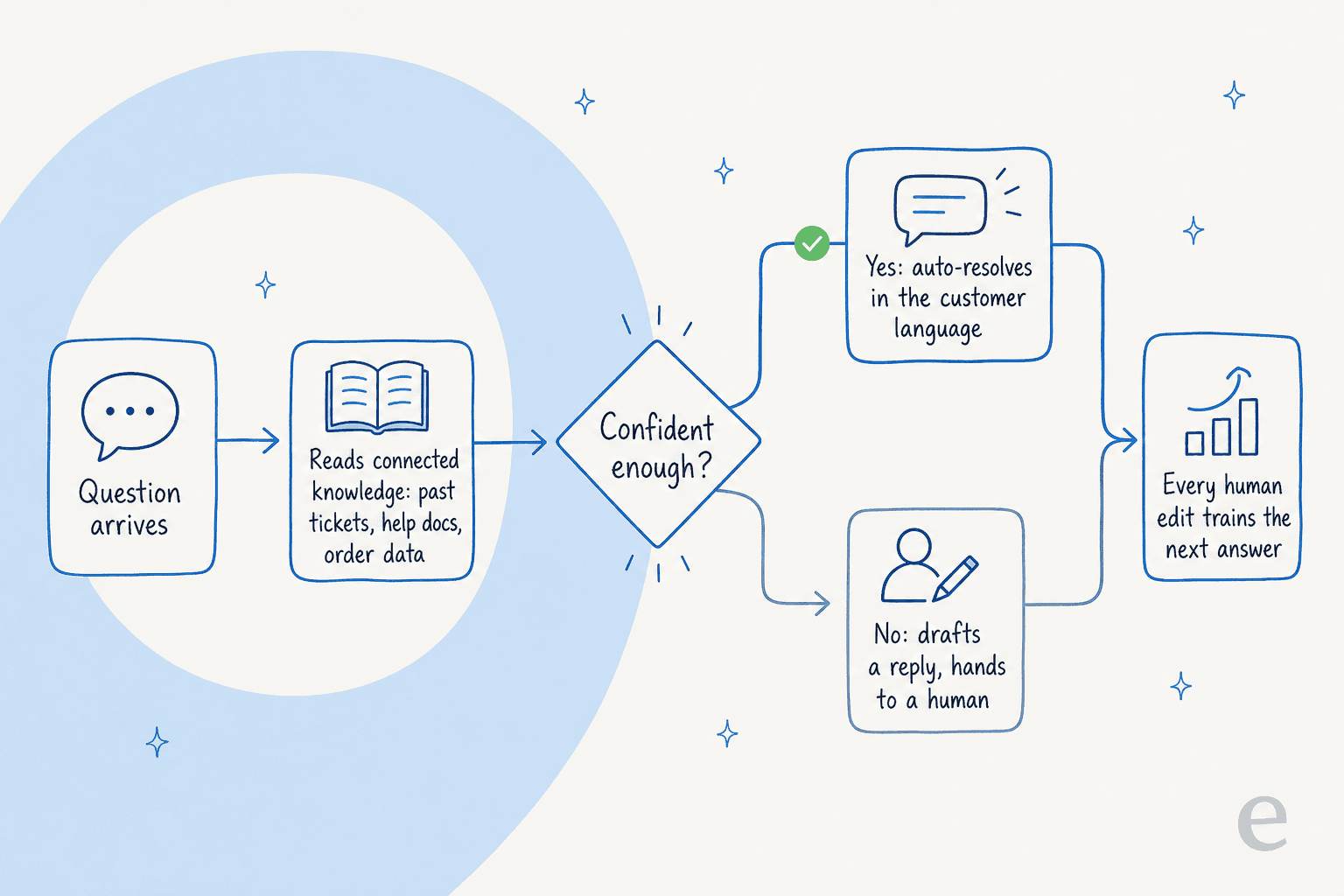
The flow, step by step:
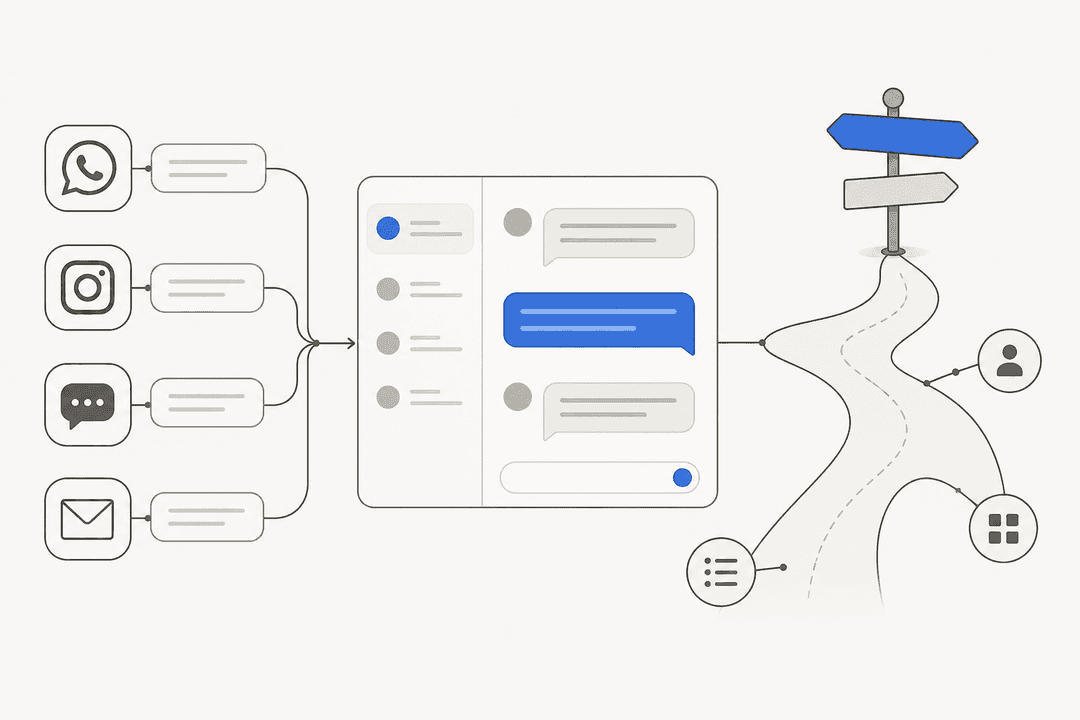
- A question arrives on any channel: a Zendesk ticket, a chat widget, an email, a Slack message.
- The AI retrieves relevant knowledge. This is the part that matters most. A good system reads your knowledge base, your macros, and crucially your past solved tickets, not just published help articles. The difference is enormous: help docs describe how things should work; solved tickets show how your team actually answers when reality is messier.
- It decides whether it's confident enough to answer. High confidence, it drafts or sends a reply in the customer's language. Low confidence, it steps back.
- It hands off cleanly when it's unsure, leaving the ticket, and often a suggested draft, for a human.
- It learns from every correction. When an agent edits its draft, that edit feeds the next answer.
Steps 3 and 5 are the ones cheap tools skip, and they're the ones enterprise buyers should interrogate hardest. Anyone can wire a model to a knowledge base. Knowing when to shut up, and getting measurably better from feedback, is the harder engineering.
What makes it "enterprise" (the bar most vendors miss)
If I were writing the evaluation checklist for a large support org, it would have four sections. None of them is "answer quality," because by the time you're comparing serious tools, whether from AI customer service companies or the best AI helpdesk software, they can all answer well in a demo.
Security and compliance: the hard gate
This is where deals actually die. In our own sales conversations, the blockers are almost never about whether the AI is smart enough, they're about compliance. A US healthcare platform on Zendesk hard-blocked on HIPAA and a signed BAA. A major podcasting platform couldn't proceed without SOC 2. A Brussels SaaS team was gated by an internal ISO review before they'd even start a trial.
So the questions your security team should ask, up front:
- Do you have SOC 2, and can we see the report?
- HIPAA and a signed BAA, if we handle health data?
- GDPR compliance with EU data residency?
- Can you redact PII (card numbers, passwords) before it hits the model?
- Is our data ever used to train your models? (The right answer is no.)
One anonymized quote I keep coming back to, from a technical evaluator at a semiconductor-hardware company, was essentially: does it fall back to ChatGPT if it doesn't know, and can that be turned off? The reassuring answer is that a well-built enterprise system answers only from your approved knowledge, and you can prove it. eesel, for its part, keeps data siloed per account, doesn't train on customer data, and offers EU residency plus PII controls on its enterprise plan.
Control: what the AI is allowed to touch
The biggest objection cluster I've seen, by far, isn't "will it work?" It's "will it do something I didn't sanction?" Enterprise teams want a dial, not a switch.
"There are certain tickets I don't want to go through AI."
That's a support lead talking, and it's a completely reasonable ask. A serious tool lets you exclude ticket types, gate the AI to only act when explicitly invoked, and choose per-workflow whether it drafts or sends. If a vendor's answer to "can I keep the AI away from refund disputes?" is a shrug, they're not enterprise-ready.

Scale and integrations
Enterprise volume is a different animal. It's not "handle a few chats," it's tens of thousands of tickets a month across a stack of systems. One eesel customer, the German loan-comparison firm smava, fully automates a Zendesk agent processing over 100,000 German-language tickets a month. Design.com runs 50,000+ monthly tickets on Freshdesk. That only works if the AI plugs natively into your tools, so integration breadth is a real buying criterion, not a footnote. This is the gap between a toy and real ticket automation.

Language
If you support customers globally, English-only is a non-starter. Look for real multilingual handling, answering in the customer's language, trained on your multilingual ticket history, rather than a bolt-on translation layer. eesel handles 80+ languages out of the box, which is why a Spanish insurance brokerage could run 560+ real Spanish-language conversations through it in 48 hours.
Here's how those four dimensions stack up against a typical scripted bot:
| Dimension | Scripted chatbot | Native helpdesk AI | Enterprise conversational AI |
|---|---|---|---|
| Understands intent | No, fixed flows | Partially | Yes, reasons over knowledge |
| Learns from solved tickets | No | Rarely | Yes |
| Confidence-based routing | No | Limited | Yes, per-workflow |
| SOC 2 / HIPAA / GDPR + EU residency | Varies | Varies | Table stakes |
| Ticket-type exclusion & control | No | Limited | Yes |
| Handles 100k+ tickets/month | No | Sometimes | Yes |
| Multilingual (80+ languages) | No | Some | Yes |
The trust problem nobody puts on the pricing page
This is the part I'd tattoo on every enterprise buyer's evaluation doc, because it's the thing that separates tools that survive rollout from tools that get switched off in week two.
A CX lead at a DTC supplements brand running roughly 7,000 tickets a month put the whole problem in one sentence:
"The AI will never be able to answer 100% of the questions, but if it tries and just answers 'sorry I don't know this,' I cannot go and check all my 7,000 tickets to see if the AI actually made a good answer, then the point is a little bit gone. I need an AI who is only handling the tickets that it's confident to handle and all the other ones, leave them alone."
That's the entire game. An AI that attempts everything creates more work, because now a human has to audit all of it. An AI that handles only what it's sure about, and cleanly hands off the rest, removes work. This is why confidence-based routing is the feature I'd weight highest, and why we lost at least one deal to a competitor purely on this axis before we made ours a first-class control.
The counterintuitive takeaway: a lower answer rate with high precision beats a high answer rate with mediocre precision, every time, in a support setting. Optimize for "never confidently wrong," not "always answers."
Build it yourself, or buy a platform?
Every technically capable enterprise asks this, and it's a fair question, the models are just an API call away. So why not build?
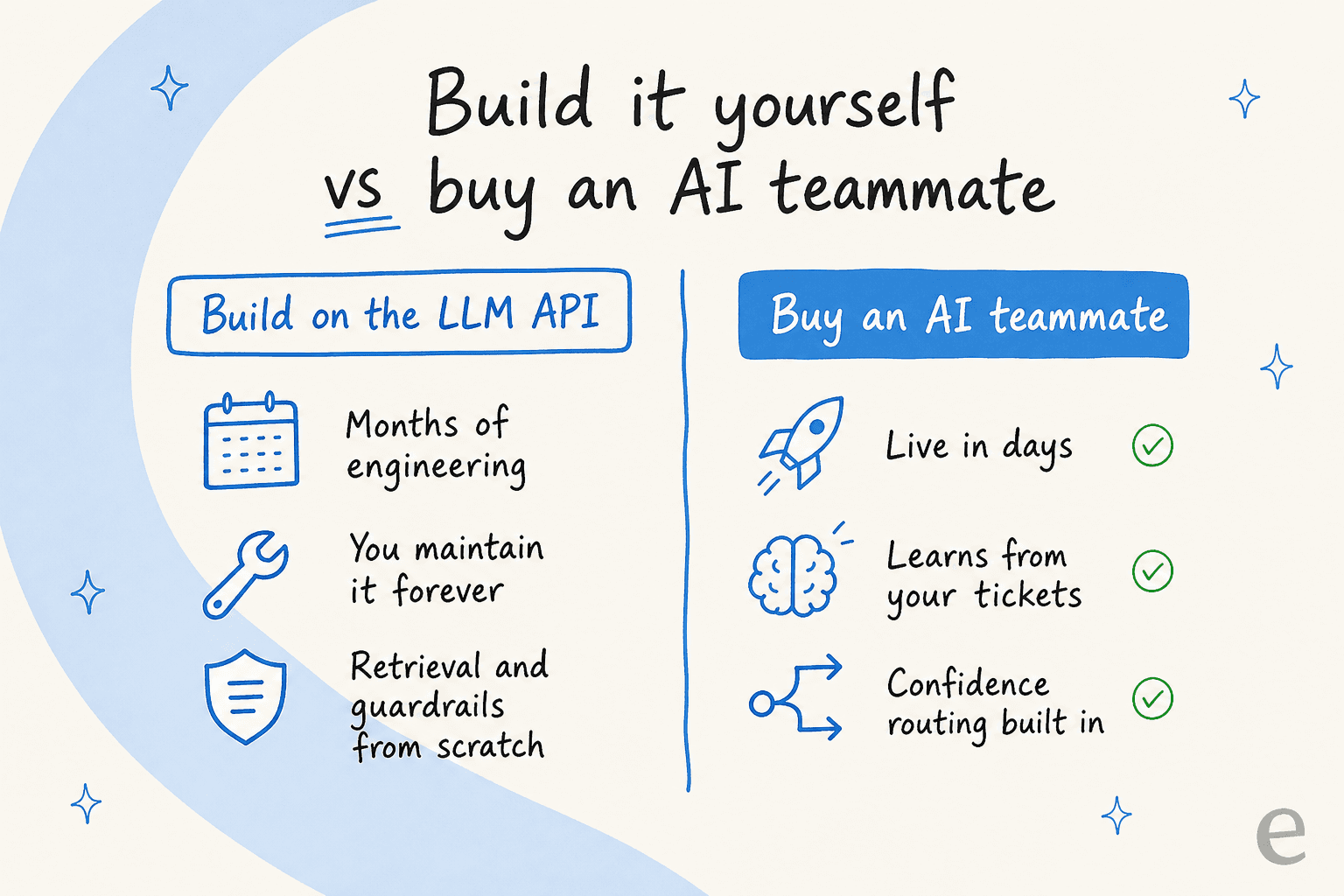
I've watched this play out both ways. Some teams do leave to build on the Claude or OpenAI API directly, and for a company whose core product is conversational AI, that can be right. But for a support org, the API is maybe 10% of the work. The other 90%, retrieval that actually finds the right answer, guardrails, confidence scoring, integrations with every helpdesk, audit logging, the learning loop, is a permanent engineering commitment.
An engineering lead at a crypto-hardware company, running a 300+ article knowledge base, put the buy case plainly:
"We could try to write our own LLM application but we didn't want to invest our time into that. We wanted something that we would not have to maintain."
That "not have to maintain" is the whole point. Building a demo is a weekend. Building something that clears a security review, handles 100k tickets, and keeps up with model releases is a team you have to staff forever. Unless conversational AI is your differentiator, that's usually the wrong place to spend engineers, a theme I dig into more in this look at AI agent versus human agent cost.
How to roll it out without betting the queue
Even with the right tool, the rollout is where trust is won or lost. The mistake is flipping the AI live on your whole queue and hoping. The fix is to make it earn autonomy in stages.
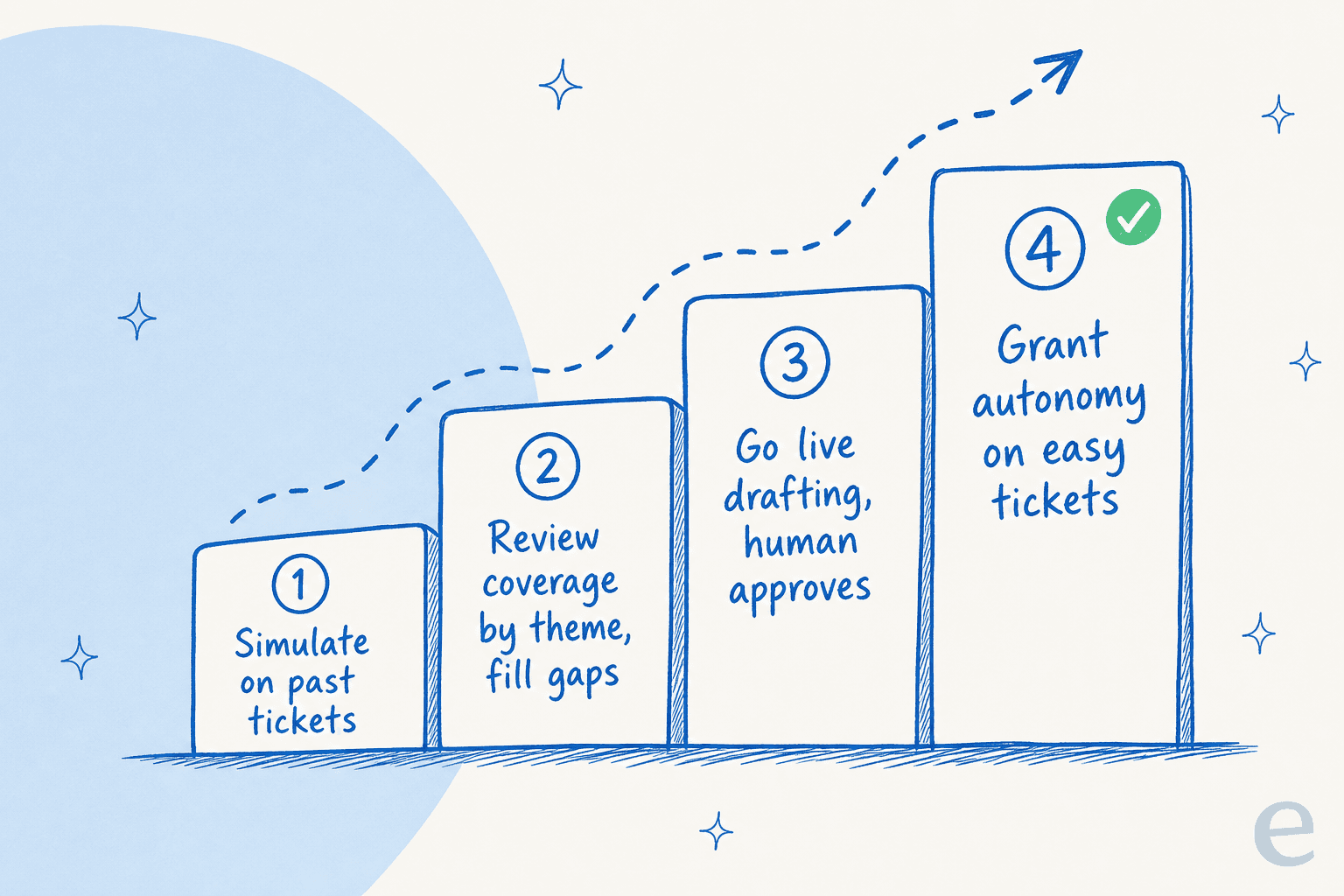
The approach I'd take, and the one eesel is built around:
- Simulate on your past tickets first. Before the AI touches a live customer, run it against thousands of historical tickets to see what it would have said. This is the single most de-risking step, and shockingly few tools offer it.
- Review coverage by theme and fill gaps. The simulation shows you where knowledge is thin. Fix those, re-run.
- Go live in draft mode. The AI suggests replies; humans approve or edit. Every edit trains it.
- Grant autonomy on the easy stuff. Once the numbers hold on, say, order-status and password-reset tickets, let it auto-resolve those and keep humans on the hard cases.

The whole point of simulation is that you see the numbers before you take the risk, not in a monthly report after something went wrong. It turns "trust us, it works" into "here's exactly how it would have performed on your last 5,000 tickets."
What real enterprise deployments look like
Enough theory. If you want the wider picture, there are plenty of AI agent examples in the wild, but here are numbers from actual production support deployments, the kind of proof I'd want before signing anything:
- 73% of tier-1 requests resolved in month one at Gridwise, a gig-economy analytics app on Zendesk, with results inside a 7-day trial.
- 27,886 fully-automated Zendesk interactions at smava via webhooks, no human in the loop for that volume.
- 96% chat quality across 581 chats in one helpdesk cohort's first week, and 93% triage accuracy with 100% spam detection in a real-traffic trial at a German jewelry retailer.
- ~183,000 interactions across 160 active accounts in one usage snapshot, which is the boring-but-important signal that this runs at scale, not just in slide decks.
That triage-accuracy point is worth sitting with. In that jewelry-retailer trial, the AI got 93% of tickets to the right place and caught 100% of spam with zero false positives, even while only 12% of its drafts went out untouched. In other words: it was a superb triage-and-research assistant well before it was trusted to send on its own. That's the healthy adoption curve, control first, autonomy earned.
Try eesel for enterprise conversational AI
If you're evaluating conversational AI for a large support operation, eesel is built for exactly the bar this post describes. It learns from your past tickets (not just help articles), plugs into Zendesk, Freshdesk, Salesforce, Slack, and 100+ other tools, answers in 80+ languages, and ships confidence-based routing so it only handles what it's sure about.
The differentiator I'd point your team to is simulation: you can run eesel against thousands of your historical tickets and see exactly how it would have performed, by theme, before it ever replies to a real customer. That's how the smava and Gridwise deployments got the confidence to go live. For regulated buyers, the enterprise plan adds SSO, HIPAA/BAA, EU data residency, and a dedicated engineer.

Start with a free trial or book a demo and point it at your own tickets, that's the fastest way to see whether it clears your bar.
Frequently Asked Questions
What is conversational AI for enterprise?
How is enterprise conversational AI different from a regular chatbot?
Is conversational AI secure enough for enterprise data?
How much of our ticket volume can conversational AI actually handle?
Should we build our own conversational AI or buy a platform?


Article by
Kira
Kira is a writer at eesel AI with a Computer Science background and over a year of hands-on experience evaluating AI-powered customer service tools. She focuses on breaking down how helpdesk platforms and AI agents actually work so that support teams can make better buying decisions.