AI chatbot for Salesforce Service Cloud: a 2026 setup guide

Rama Adi

Katelin Teen
Last edited July 14, 2026
What "AI chatbot" means in Service Cloud now
I build integrations for a living, so the first thing I do with any "add AI to X" question is figure out what the vendor actually means by AI this quarter. In Salesforce Service Cloud, the answer changed in 2026, and the two options aren't interchangeable.
Einstein Bots are the classic chatbot: a tree of dialogs you author, triggered either by a menu choice or by an intent that natural-language understanding detects in the customer's message. They're deterministic and predictable, which is a polite way of saying the bot can only answer what you explicitly scripted.
Agentforce Service Agent is the newer, generative agent. Salesforce describes it as something that "replaces traditional chatbots" with AI that handles a wide range of issues without preprogrammed scenarios. It reasons over your knowledge and CRM data through the Atlas Reasoning Engine, then takes actions or hands off to a human. If you want the plain-English version, we wrote a guide to Agentforce agents that unpacks it.
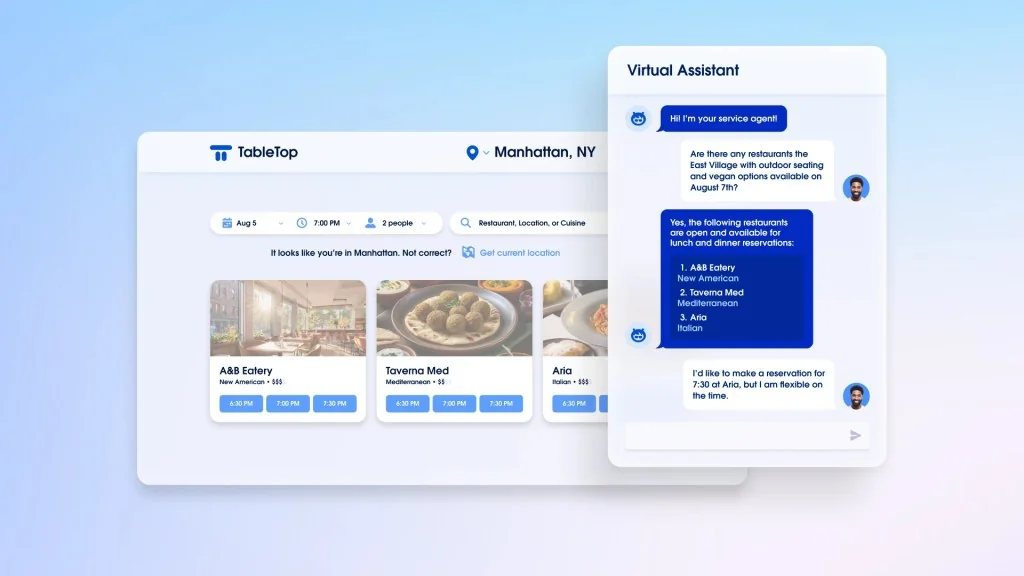
The path Salesforce now recommends is to start with an Einstein Bot on your Service Cloud channels, then optionally graduate it to an Agentforce Service Agent using a Create-Agent-from-Bot tool (still in Beta at the time of writing). So most teams end up touching both.
How a Salesforce chatbot works under the hood
Before the setup steps, it helps to hold the mental model, because it explains why the configuration is the way it is. A message comes in, NLU maps it to an intent, the matching dialog runs, and the conversation either resolves from knowledge or transfers to a human through Omni-Channel.
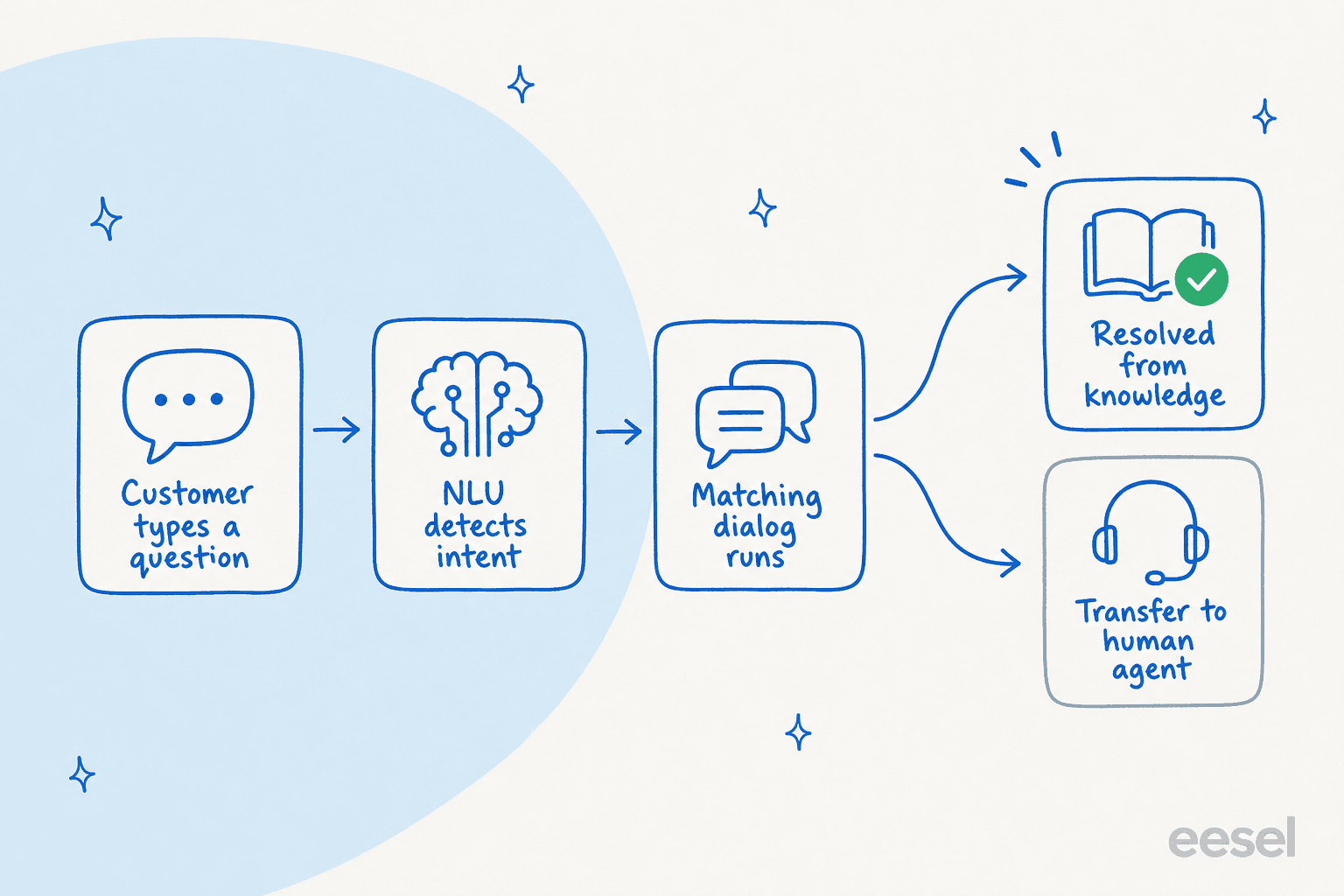
The important thing here: every branch on the left of that diagram is something you have to design. On an Einstein Bot, an unscripted question falls through to a fallback or a human. On Agentforce, the generative layer covers more ground, but it's only as good as the knowledge it's grounded on, which is the theme that comes back to bite later.
How to add an AI chatbot to Salesforce Service Cloud
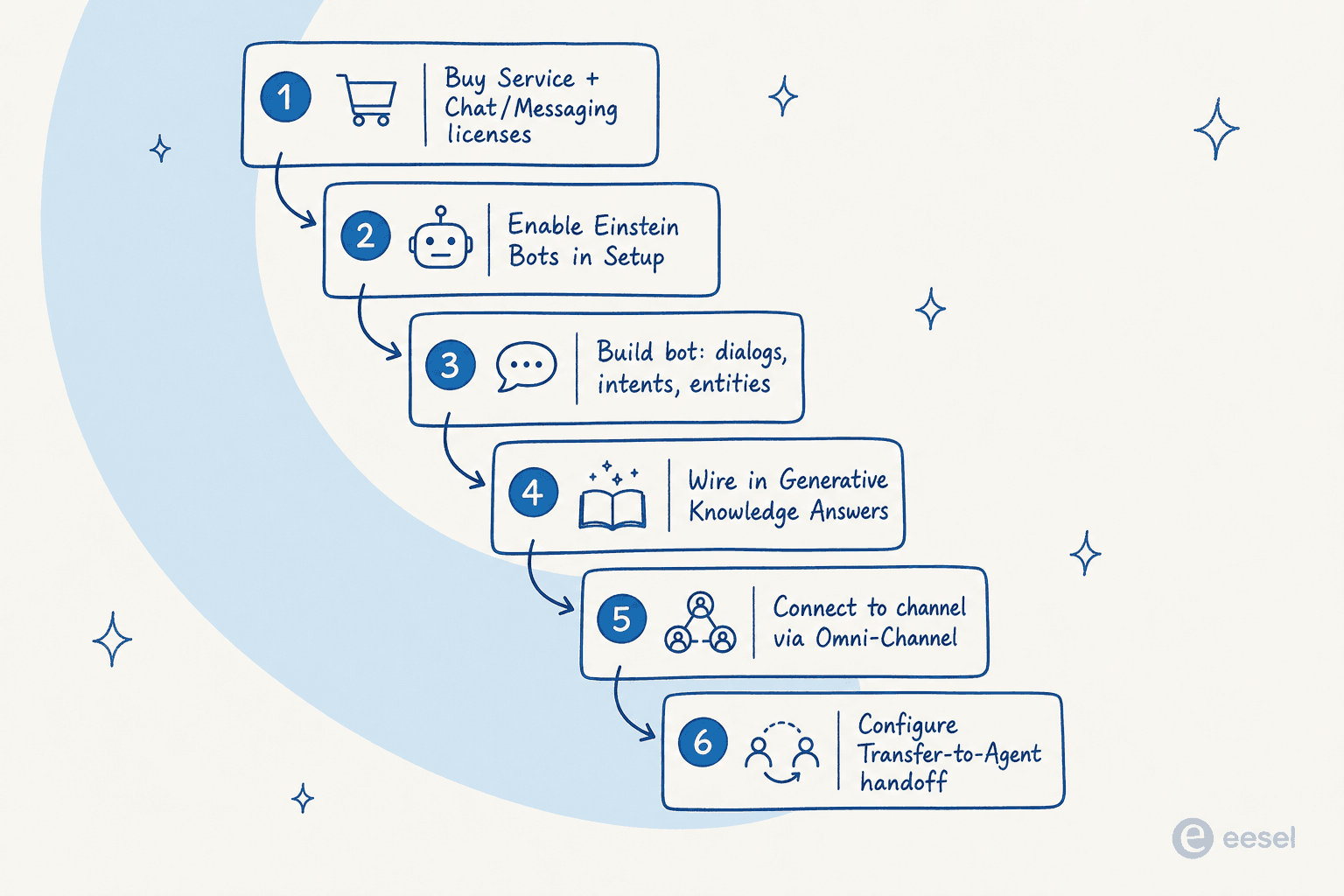
Here's the real sequence, pulled from Salesforce's own help docs rather than the marketing page. None of it is hard on its own; the length is the point.
Step 1: Sort the licenses and channels
A bot can't exist standalone. You need a Service license and a Chat or Messaging license, because the bot has to ride a live conversation channel. You'll also enable Lightning Experience, run the Chat guided setup, and provide an Embedded Service deployment (the widget the bot renders into) on an Experience Cloud site. Note the quota: each subscribed user gets 25 Einstein Bots conversations per month, and they don't roll over.
Step 2: Turn on Einstein Bots
From Setup, search Einstein Bots, flip the toggle on, and accept the terms. To build, your profile needs Customize Application, Modify Metadata, or Manage Bots permissions. One gotcha for newer orgs: anything created in Summer '23 or later has enhanced Omni-Channel routing enabled, which doesn't support standard bots, so you'll build Enhanced Bots instead.
Step 3: Build the bot
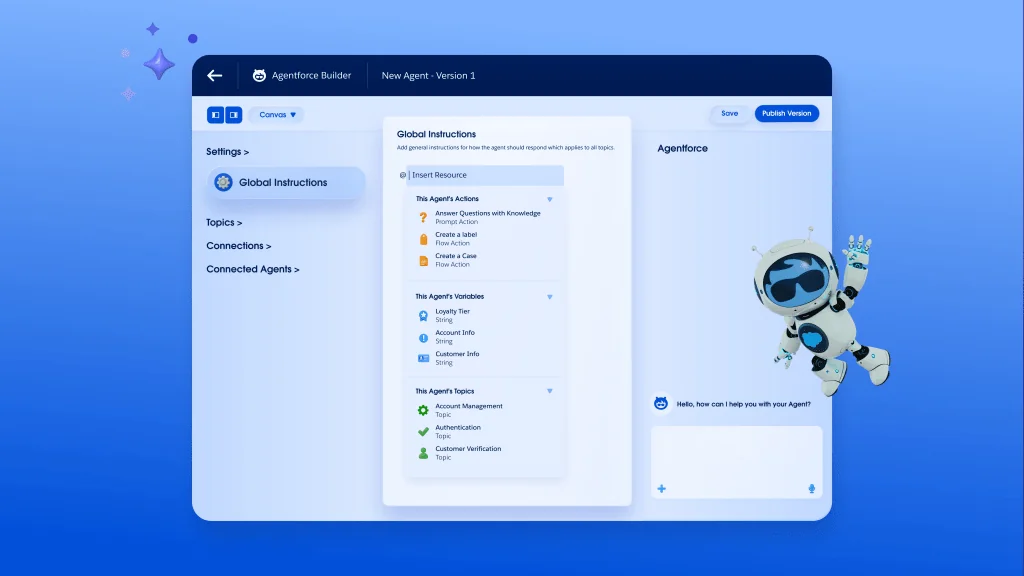
Launch the guided setup and pick your build path. A template (the Intro Template ships with welcome, order-status, and report-an-issue dialogs) is the fastest route to something working. From scratch, you get a welcome message, a Main Menu, system dialogs for closing or transferring, and entities to capture input. This is where you build the agent itself in the builder.
Step 4: Add generative answers
To make the bot answer from your help center rather than only from scripted dialogs, wire in one of two actions: Generative Knowledge Answers, which searches your knowledge base and writes a conversational reply, or Article Answers, a FAQ-style match against Lightning Knowledge. This is the step that turns a menu bot into something that feels like AI.
Step 5: Connect to a channel
Standard bots use the Connect-a-Standard-Bot-to-Channels flow. Enhanced bots route to and from the bot with Omni-Channel flows, and they add pre-chat forms and structured content. This is where the bot goes live on chat, messaging, or your website.
Step 6: Configure the human handoff
Handoff is a first-class dialog action, not an afterthought. The Transfer-to-Agent system dialog (standard bots) or the Set-Routing-Type step (enhanced bots) drops the live conversation into Omni-Channel, which routes it to an available rep in the Service Console. Get this wrong and customers get stuck talking to a bot that can't escalate, which is the fastest way to a bad review.
Optionally, Step 7 is graduating the bot to an autonomous Agentforce Service Agent. The original bot stays active so you can migrate at your own pace, and if it was on enhanced Messaging you can reuse its channels.
What it actually costs
This is where I'd slow down if I were the buyer. The seat price is the sticker, not the bill. Autonomous AI is a separate, metered layer.
| Edition | Price (USD/user/mo) | Billing | AI included |
|---|---|---|---|
| Starter Suite | $25 | Monthly or annual | Built-in assistive AI only |
| Pro Suite | $100 | Annual | Enhanced chat, no autonomous agents |
| Enterprise | $175 | Annual | "AI for Customer Service" (assistive) |
| Unlimited | $350 | Annual | Chat & bots included |
| Agentforce 1 Service | $550 | Annual | Full AI suite; 2.5M Flex Credits/org/yr |
On top of the seat, autonomous Agentforce usage is billed one of two ways:
- Conversation-based: a flat $2 per conversation, regardless of how many steps it takes.
- Flex Credits: $0.10 per action (20 credits), sold in packs of 100,000 credits for $500. Salesforce's own math puts a typical interaction at 3–6 actions, so $0.30–$0.60 each.
Only the top $550 edition bundles a meaningful AI allotment (2.5M Flex Credits, roughly 125,000 actions a year). Everything below either gives you assistive AI or asks you to buy conversations and credits separately. We broke the full picture down in the Agentforce setup cost and worth-the-cost posts, and it's the single most common reason people go looking at Agentforce alternatives.
Where the native path bites
I want to be fair here, because Service Cloud is a genuinely powerful platform and it's the #1-rated service software on G2. But there are three places teams consistently get stung, and none of them show up in a demo.
The credit meter is hard to budget. This is the loudest theme in the reviews.
"Pricing & 'Flex Credit' Unpredictability... It's harder to budget for than traditional seat licenses. If an AI agent gets stuck in a loop or handles an unexpected surge in holiday traffic, your 'digital wallet' of credits can drain faster than anticipated."

Setup usually needs a specialist. The dialogs, Omni-Channel flows, and data mapping add up.
"Most teams end up needing a dedicated admin or external consultant just to make it work smoothly, which adds to the overall cost. Setting it up properly takes time, and if your workflows or data aren't clearly defined, things can get messy quickly."
The AI is only as good as your data. This one I've watched happen. One gym-software team we worked with had a knowledge base that said "we support all models," so their bot cheerfully told customers "yes, we support your car model" for brands that weren't in the database at all. It's the same failure a G2 reviewer described: Agentforce "is only as smart as the data it can read... if your knowledge articles haven't been updated since 2021, the AI agent will confidently give customers outdated information." Confidently wrong is worse than "I don't know," and you usually find out about it in production. It's worth reading up on Einstein AI accuracy before you flip anything live.
It's a real pattern for us: after years of putting AI on live support queues, the lesson we keep relearning is that you have to test against real historical tickets before go-live, not after. Which is exactly what the native path makes hard.
The faster path: an AI layer on top of Service Cloud
Here's the reframe most coverage skips. You don't have to choose between "build the whole thing inside Salesforce" and "have no AI." You can run an AI layer that connects to Salesforce and does the answering, while your reps keep working in the Service Console.
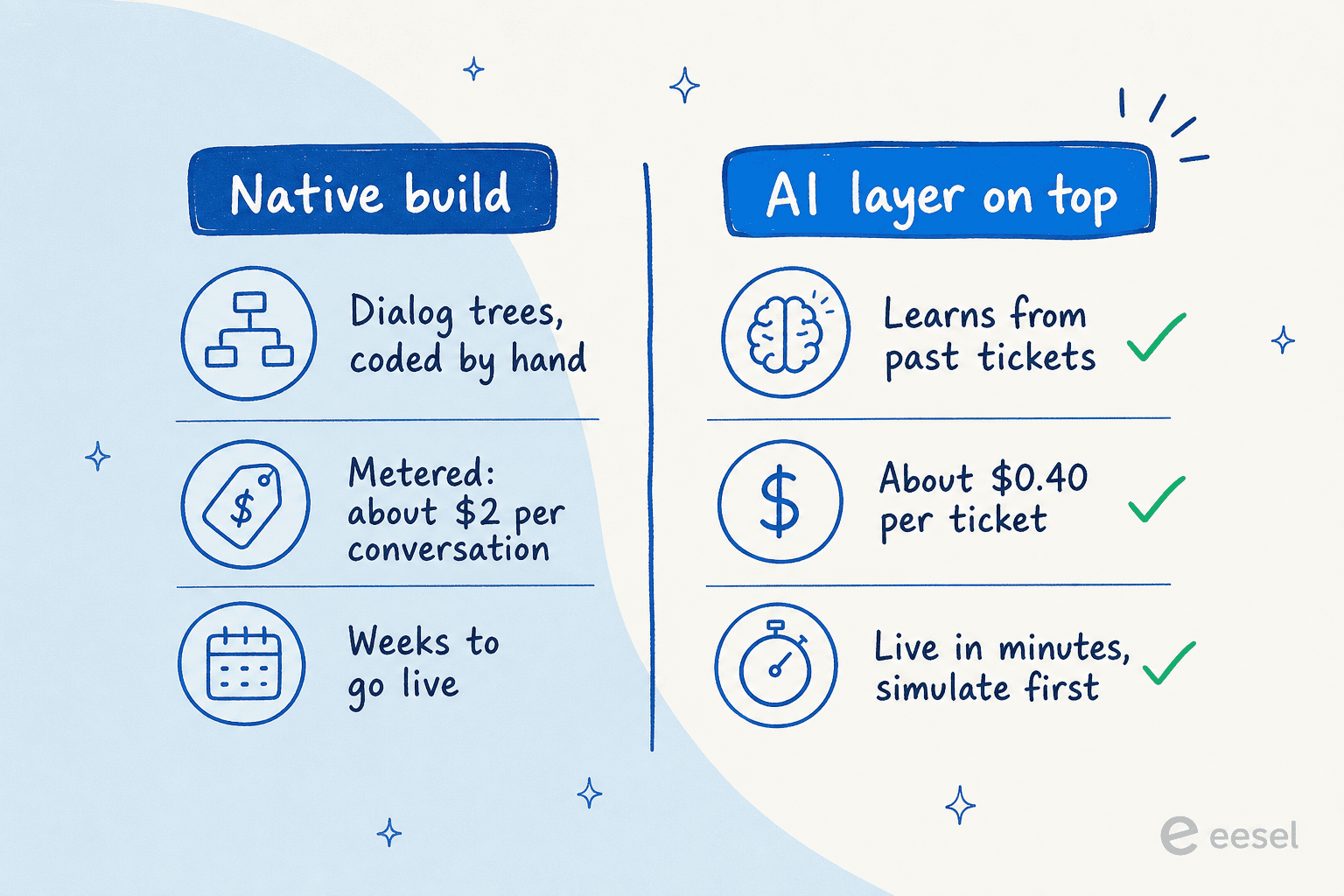
This is what we built eesel to do. Instead of scripting dialogs, it learns from your existing help docs and, crucially, your solved tickets, so it picks up the answers your team already gives. It connects to Salesforce alongside the rest of your stack, and it's one fixed monthly price, from $299/month for 500 credits (1 credit per ticket or chat, however long) with no per-seat fee, so the bill is predictable instead of a per-action credit wallet you have to babysit.

The part I'd actually sell you on is the safety net. eesel's simulation mode replays thousands of your past tickets against the AI before it ever touches a customer, so you see the coverage and the exact answers up front, fill the gaps, and only then flip it live on the easy tickets. That's the "test before production" discipline the native flow leaves to you. For proof it works, Gridwise saw eesel resolve 73% of tier-1 requests in the first month, and Smava runs a fully automated agent on 100,000+ tickets a month.
Try eesel for Salesforce
If your goal is "an AI chatbot answering tickets in Salesforce Service Cloud," eesel gets you there without the license stack, the dialog trees, or a per-action credit meter you have to guard with turn limits. It plugs into Salesforce, trains on your past tickets and help center in minutes, and you can simulate the whole thing on historical tickets before going live, so there's no leap of faith. It's free to try with 100 credits and no card, and you can point it at your own data today.
