To be fair, AI agents are everywhere right now. We've moved way past the simple chatbots of yesterday into a new era of autonomous teammates that can actually reason, plan, and take action. It's a pretty exciting shift, and Salesforce has thrown its hat into the ring with a major entry: Salesforce Agentforce. The promise is huge, aiming to automate tricky tasks across sales, service, and marketing.
But with all the slick demos and big promises comes a healthy dose of skepticism. You see the hype, but then you see real users on forums like Reddit users wondering if production-ready or just another "cool demo" moment. That's what this guide is for. We're going to cut through the noise and give you a clear look at what this tool is, how it actually works, its real-world complexities, and what you should think about before jumping in.
I've seen so many buzzwords and koolaid throughout the years in the SF ecosystem. This is just the sabor of the month. I remember seeing a demo of Google Glass for support agents at Dreamforce a few years ago. Chatter was supposed to be the next revolution. Einstein is already on its way out. That's all koolaid for investors.

What is Salesforce Agentforce?
So, what is Salesforce Agentforce when you strip away the marketing jargon? At its core, it is a platform for building and deploying your own autonomous AI agents. These aren't just chatbots that pop up to answer a quick question; they're designed to be proactive and perform multi-step tasks for both your employees and your customers.
Think of it less like a simple Q&A tool and more like a digital employee that can handle tricky workflows. For example, an agent could take a vague customer email, figure out they want to return an order, look up the order details, check it against your return policy, and then kick off the refund process, all without a human touching it.
To make this a bit more concrete, Salesforce has laid out a few out-of-the-box agent types you can build, like a Service Agent for resolving cases, a Sales Development Representative (SDR) for qualifying leads, a Sales Coach, and even a Merchandiser for e-commerce tasks. You can see the full lineup on the official Agentforce page. These standard Agentforce use cases are designed to give you a starting point for building agents that fit your business.
How Salesforce Agentforce works: A look under the hood
The technology behind this tool is pretty sophisticated. It isn't just one app, but a mix of different parts that talk to each other to get things done.
The Atlas reasoning engine
The heart of the system is the Atlas Reasoning Engine. This is the component that lets an agent truly think. When it gets a request, it doesn't just look for keywords. Instead, it figures out what the user wants, breaks the request down into a series of logical steps, and then executes a plan to get it done.
It does this using a process called a ReAct loop, which stands for Reason, Act, and Observe. This is a step up from simpler AI reasoning. The agent thinks about what to do, takes an action (like calling an API), checks the outcome of that action, and then adapts its next step based on the result. It keeps looping through this process until the goal is complete. This visual guide to the ReAct loop helps clarify how it works.
The first step in this loop is Topic Classification. The engine maps the user's request to a specific "topic" you've defined, like 'order management' or 'billing inquiry'. This helps it narrow down the relevant knowledge and actions it needs to use, making the whole process much more efficient.
The role of Data Cloud and RAG
A brain is only as good as the information it has access to, and that's where Salesforce Data Cloud comes in. While you don't technically need it, the system is built to work best with it. In fact, some experts say Agentforce requires Data Cloud to function as intended.
Data Cloud acts as the base, bringing all your company's data together (from Salesforce records to external systems) into one unified source of truth. This is vital for the agent.
The platform then uses a technique called Retrieval-Augmented Generation (RAG) to pull information from this data pool. In simple terms, RAG is how the agent searches all that unified data to find the most relevant facts to ground its answers. This way, the AI is much less likely to make stuff up. It's a great feature, but it highlights a major dependency. This highlights a major dependency, and as one user wisely pointed out, AI adoption is often a data problem first.
A lot of the problems people are trying to solve are really data quality and knowledge management issues. Agentforce won't magically fix that. No AI will in the short term, and you wouldn't want it to.
Building blocks: Topics, actions, and guardrails
So, how do you actually build one of these agents? You use the Agent Builder, which gives you three main components to work with:
-
Topics: These are the agent's areas of expertise. You define them based on what you want the agent to handle, like 'order management' or 'password resets'.
-
Actions: These are the specific tasks an agent can perform. An action can be anything from running a Salesforce Flow, calling an Apex class, or even connecting to an external system using a MuleSoft API.
-
Guardrails: These are the rules that keep your agent from going off the rails. You can define them using natural language instructions. There is also a built-in Einstein Trust Layer that handles things like data privacy and toxicity detection to keep your data secure.
To see these components in action, this official demo from Salesforce provides a helpful walkthrough of how an AI service agent built with Agentforce handles a customer interaction from start to finish.
How much does Salesforce Agentforce cost?
This is where things get a bit messy. There's no simple, flat monthly fee for this platform. Instead, the pricing is consumption-based, which can make it tricky to predict your costs.
According to the official pricing page, there are two main models:
-
Flex Credits: This is a pay-per-action model. You buy credits in bundles, like 100,000 credits for $500, and each task consumes a certain number of credits. For example, a single case management task might use up 60 credits, which works out to $0.30 per task.
-
Conversations: This is a flat-rate model designed for customer-facing agents. It costs a flat $2.00 per conversation.
On top of that, there are add-on licenses for your employees. If you want them to have unmetered access to internal agents, it's an extra $125 per user per month. That can add up fast. The total cost of ownership also has to include potential licenses for other Salesforce products you might need, like Data Cloud or MuleSoft. This variable pricing model makes it really hard to budget, especially if you plan to scale.
The practical challenges of implementation
While the demos look amazing, getting this running in a real business environment isn't always a walk in the park. There are a few hurdles you should know about before you sign any contracts, based on feedback from users who have actually put it into production.
It's a platform, not a plug-and-play tool
The first thing to understand is that this is a platform you build on top of, not a tool you simply turn on. As one user with implementation experience explained, the list of required roles is extensive:
Yes, we can build that agent...if you give me the following roles: Salesforce Admin, Slack Admin, Data Cloud Admin, a data architect that understands where you keep everything and what it means, somebody with fantastic process automation skills, a prompt engineer, a software developer with Apex experience, a UX designer (if you want to surface it anywhere but Slack), etc, etc, etc.
You'll need to spend significant time in the Agent Builder defining your topics, connecting actions to your existing logic, and writing detailed instructions for the agent to follow. It's a developer-centric platform that needs a technical team to manage the build and test cycle. This is a big difference compared to solutions designed for immediate use. For instance, unlike AI teammates you can invite to your help desk and have running in minutes, this is a full-blown development project.
The data estate dependency
We touched on this before, but it's worth repeating: the performance here is directly tied to the quality of your data. If your data is messy and spread across a dozen siloed systems, the agent will struggle to find the right context and give accurate responses.
This is a huge hurdle for many companies. One user noted that for many organizations, 2025 is a "readiness year" for AI because their progress is stalled by data quality. Some platforms get around this by learning directly from your existing knowledge sources like past support tickets, help centers, and Google Docs without needing a massive data project upfront. This makes it much easier to get started quickly.
Testing and tuning your setup
Another piece of feedback from the trenches is that it can be quite difficult to test because responses aren't always consistent. The AI can respond differently to the exact same prompt, which makes tuning a real challenge.
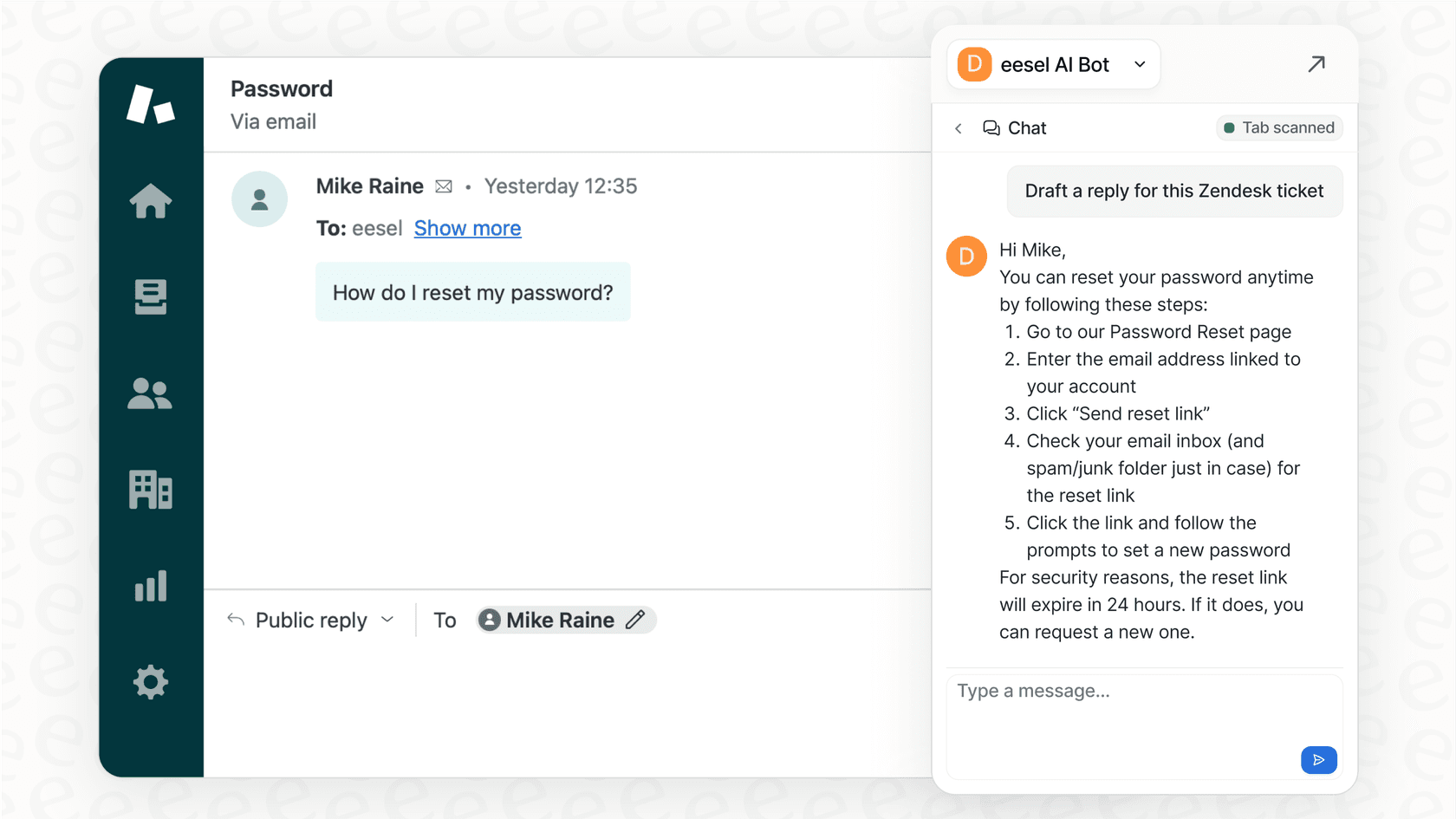
For example, a customer typing "reset password" versus "reset my password?" might trigger completely different behaviors. This means you have to spend a lot of time fine-tuning your prompts and instructions to cover all the little variations in how people ask for things. This is where a human-in-the-loop approach can be a lifesaver. An AI teammate like eesel AI can start by just drafting replies for your human agents to review and approve. This lets the AI learn safely on the job without the risk of sending a weird, autonomous reply to a customer.
When you need an AI teammate instead
The long and short of it is that this is a seriously robust, enterprise-grade platform. It’s perfect for companies that are deeply invested in the Salesforce ecosystem and have the time, budget, and technical talent to build custom AI agents from the ground up.
But for many teams, that level of complexity and cost is a non-starter. They just need an AI helper that can start contributing right now.
If that sounds more like you, an alternative like eesel AI might be a better fit. It’s designed to be an AI teammate you invite, not a platform you build. It directly deals with the biggest hurdles of a platform like Agentforce:

-
Go live in minutes: You just connect your help desk and knowledge sources with one click, and it starts working. There's no long configuration process needed.
-
Human-in-the-loop by default: You can start safely on day one with an AI Copilot that drafts replies for your team. The AI learns from their edits and feedback without any risk.
-
Learns from what you have: It reads your past tickets, help centers, and docs from over 120+ integrations. You don't need a perfect, unified data lake to get high-quality replies.
-
Transparent pricing: You get a simple, interaction-based model (starting at $239/month for 1,000 interactions) without the complex credit systems.
Here’s a quick comparison to make it crystal clear:
| Feature | Salesforce Agentforce | eesel AI |
|---|---|---|
| Setup Time | Weeks to months | Minutes |
| Onboarding | Needs technical configuration | Invite to help desk, learns automatically |
| Initial Use | Build, test, then deploy | Drafts replies for human review on day one |
| Data Requirement | Best with unified data in Data Cloud | Learns directly from existing tickets & docs |
| Ideal For | Enterprises with big Salesforce budgets | Teams wanting a plug-and-play AI teammate |
Choosing the right AI
This is a powerful and ambitious platform. For a large, Salesforce-centric enterprise with a dedicated development team, it offers a way to build deeply integrated, custom AI agents. There's no denying its potential.
But the best tool always depends on your team's specific needs, resources, and timeline. If you're looking for an enterprise development project, it is a strong contender. But if what you really need is an AI teammate that can join your team, clock in, and start helping out today without all the heavy lifting, a solution like eesel AI is built for exactly that.
Ready to see how an AI teammate can work for you? Start a free eesel AI trial.
Explore more Salesforce AI resources: Salesforce AI agent, Salesforce Agentforce pricing, Salesforce Einstein AI features, Salesforce pricing, Salesforce automation, Salesforce chatbot, Salesforce alternatives, and Salesforce review. For developers, see AI tools for Salesforce developers, Salesforce GPT setup, and HubSpot GPT tools.
Frequently asked questions
What exactly is Salesforce Agentforce?
It is a platform within Salesforce that allows businesses to build and deploy autonomous AI agents. These agents can handle tasks like customer service, sales lead qualification, and order management by reasoning through steps and taking actions across different systems.
How much do I have to pay for Salesforce Agentforce?
Pricing is based on usage rather than a flat monthly fee. You can pay roughly $2.00 per conversation for customer-facing agents or buy bundles of "Flex Credits" (e.g., $500 for 100,000 credits) where each action the agent takes consumes a certain amount of credits.
Is Salesforce Agentforce hard to set up?
It is generally considered a development project rather than a plug-and-play tool. You need to define topics, connect specific actions like Apex or Flows, and write detailed instructions, which usually requires a technical team and several weeks of work.
Does Salesforce Agentforce need my data to be perfect?
While it can work with various data sources, it performs best when your data is unified in Salesforce Data Cloud. If your data is messy or siloed, the agent may struggle to provide accurate or context-aware answers, making data cleanup a common first step.
Can I use Salesforce Agentforce for customer service?
Yes, one of its primary uses is as a Service Agent. It can be configured to resolve cases, handle billing inquiries, and manage order returns autonomously by connecting to your existing Salesforce workflows and external APIs.