How to add AI to Shopify support (2026 guide)

Rama Adi

Katelin Teen
Last edited July 14, 2026

What "adding AI to Shopify" actually means
Here's the thing most guides skip: Shopify's own AI (Sidekick) is built for you, the merchant. It helps you write product descriptions, edit your theme, and pull store insights from the admin. It is not a customer-facing support agent, and it does not answer your shoppers' tickets.
So when a store owner says they want to "add AI to Shopify," they almost always mean support: cutting down the flood of repetitive "where's my package" and "how do I return this" messages that eat a small team's day. I've spent the last few years building integrations that connect AI to exactly these stacks, and the pattern is consistent across every store I've seen: a huge share of the queue is a handful of question types, repeated forever.
There are three distinct places AI plugs into a Shopify support setup, and it helps to know which one you actually need before you start.
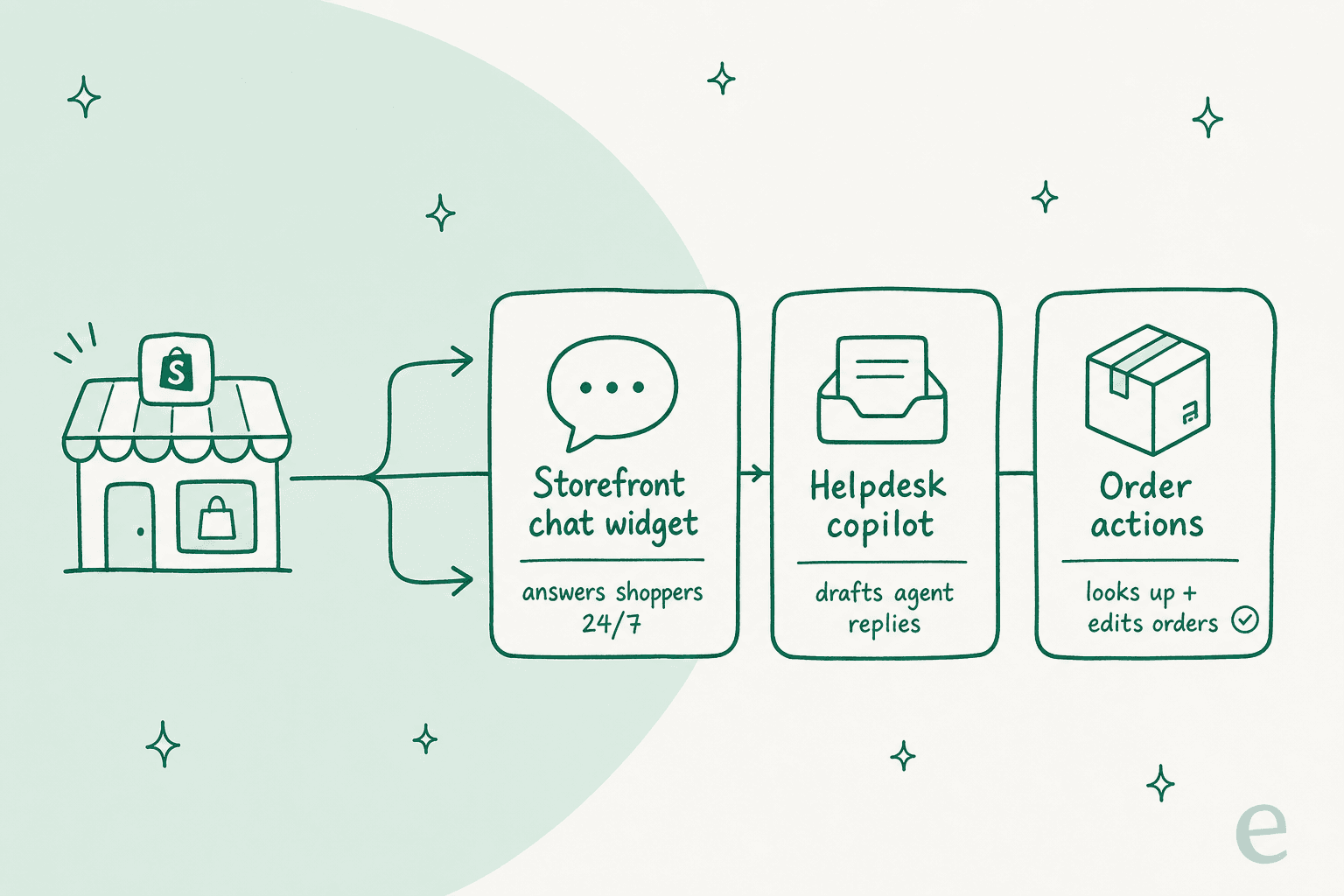
- A storefront chat widget. A chat bubble on your store that answers shoppers 24/7 before they ever open a ticket. This is where deflection happens.
- A helpdesk copilot. An AI copilot that lives inside Gorgias, Zendesk, Help Scout, or Front and drafts replies for your agents to approve. Lower risk, because a human still hits send.
- Order actions. The layer that makes support on Shopify different from support anywhere else: the AI reads live order data so it can tell a customer exactly where their package is, not just link them to a tracking page.
Most stores end up using all three, but you don't have to start there. If your team is drowning, start with the copilot (safest), then turn on the storefront widget once you trust it.
Before you start: what you'll need
You don't need engineers, but you do need a few things in place so the AI has something to work with:
- A knowledge source. Your Shopify help center, a docs site, Google Docs, a Notion wiki, or even a spreadsheet of FAQs. The AI is only as good as what it can read.
- Your Shopify store. So the AI can look up orders, tracking, and product details. This is what turns a generic chatbot into one that can actually resolve ecommerce tickets.
- Your helpdesk (optional but recommended). If you already run Gorgias, Zendesk, Freshdesk, Help Scout, or Front, the AI should sit on top of it rather than replace it.
- A batch of past tickets. This is the secret ingredient. Your history is the single best test set you have, and it's how you find out whether the AI is ready before a real customer ever sees it.
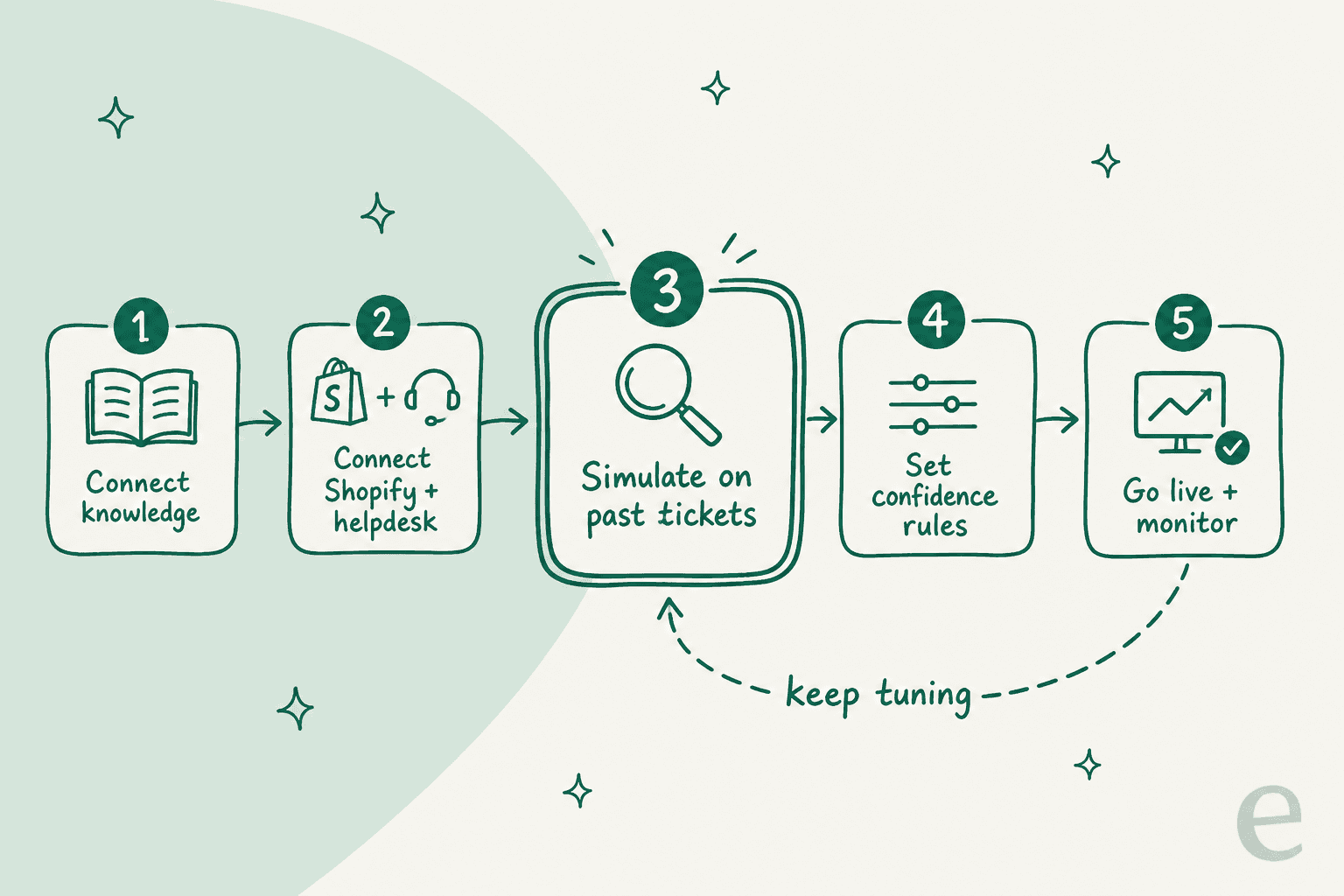
How to add AI to your Shopify support in 5 steps
The specifics vary by tool, but the shape of the setup is the same everywhere. Here's how it goes with eesel, which is the flow I know best.
Step 1: Connect your knowledge
First, point the AI at everything that holds an answer. Connect your help center, product docs, and any wikis. The best move here is to also let it learn from your past tickets, so it picks up not just the facts but your team's tone and the way you actually phrase a refund policy. One ecommerce operator put it plainly in a review:
"Finally, AI software that suits our needs. Easy to connect to Shopify, easy to prompt, and it learns from our articles."

Step 2: Connect Shopify and your helpdesk
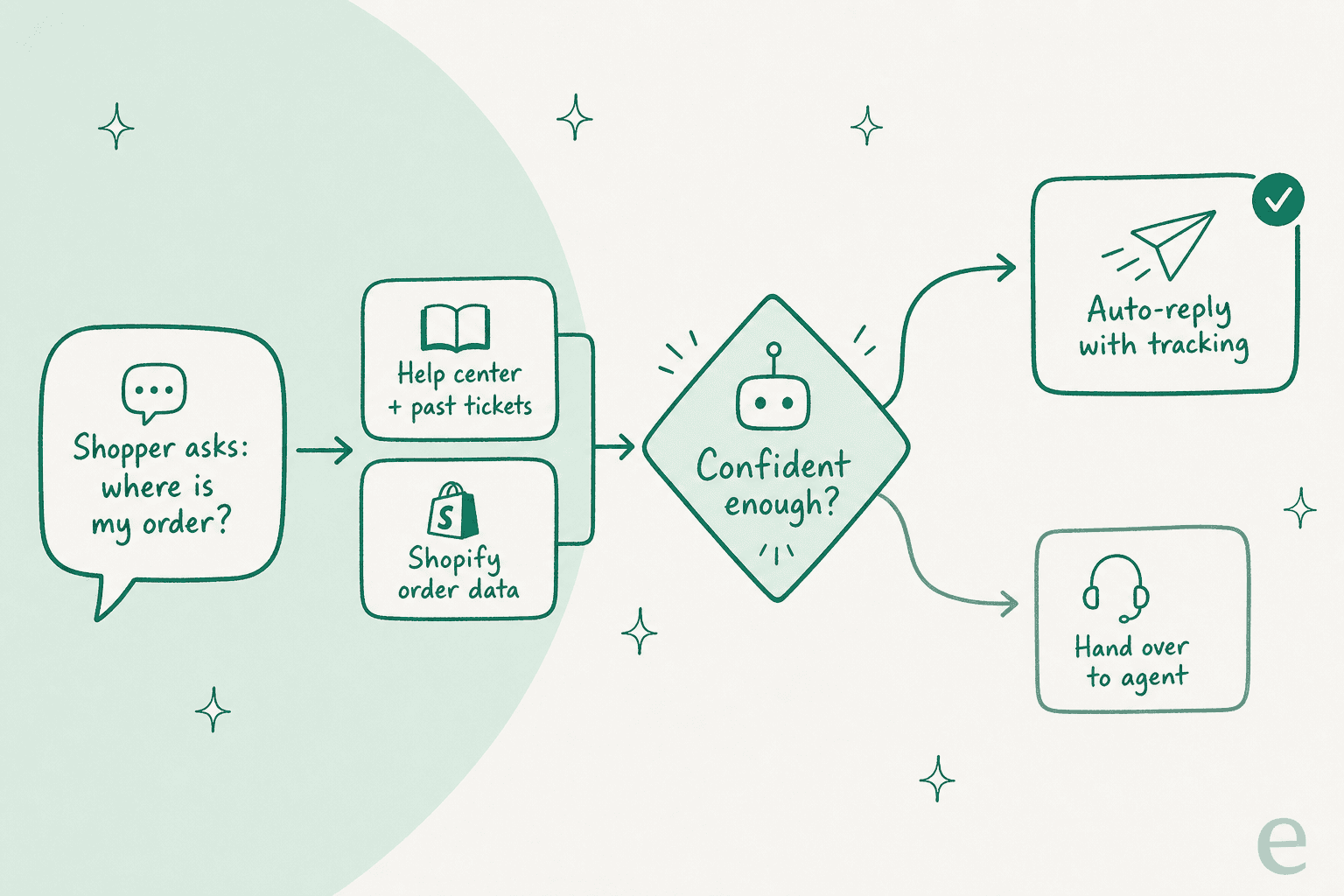
Next, link your Shopify store. This is the step that unlocks real resolutions instead of link-dumping. Once connected, the AI can pull a specific order's status, tracking number, and line items, so "where is my order #1043?" gets a real answer.
If you run a helpdesk, connect that too. eesel connects to the major ones from a single integrations screen, so the AI works the same inbox your agents already use.

Step 3: Choose the mode, copilot or autopilot
Now decide how much you want the AI to do:
- Copilot drafts a reply and leaves it as a suggestion for a human agent to review, edit, and send. Nothing reaches a customer without a person approving it.
- Autopilot (the storefront chat widget) answers shoppers directly and only escalates when it can't help.
If you're nervous, start with copilot. It gets you the speed win with none of the risk, and it's the mode most teams I work with switch on first. You can graduate to autopilot for your safest question types once the numbers look good.
Step 4: Simulate on your past tickets before going live
This is the step that separates a support agent you trust from a bot that embarrasses you. Before a single customer sees the AI, run it against a few thousand of your real historical tickets and see exactly what it would have answered.
A good simulation tells you two things up front: your likely resolution rate, and the exact tickets where the AI was unsure or wrong. That's your gap list. We run this on every rollout for a reason, because we've watched confident-sounding bots quietly give wrong answers, and simulating against history is how you catch that before your customers do.
Step 5: Set confidence rules and go live
Finally, set the guardrails. The goal is not "answer everything," it's "answer what you're sure about and hand off the rest." The most-repeated request I hear from support leads is some version of this:
"The AI will never be able to answer 100% of the questions. I need an AI who is only handling the tickets that it's confident to handle, and all the other ones, leave them alone."
a DTC supplements CX lead
So configure it that way: auto-reply on high-confidence order-status and FAQ tickets, draft-only on refunds over a threshold, and a clean handover to a human on anything it flags. Then flip it live, watch the reports, and tune. Rollout isn't one-and-done, it's a loop back to step 4 as your catalog and policies change.

What it costs
Pricing is where a lot of Shopify AI apps get slippery, so here's the honest version. Most AI support tools charge one of two ways: per resolution (you pay when the AI closes a ticket) or per seat plus usage. The trap to watch for is any model that charges you per message or per back-and-forth, because a chatty customer shouldn't cost you more than a terse one.
eesel keeps it to one dimension: a fixed monthly plan sized to volume, from $299/month for 500 credits (1 credit per ticket or chat), with no per-seat fees. Plug your own numbers in below to see what that looks like for your store.
For most stores, a handled ticket costs a fraction of what an agent's time costs for the same ticket, and the AI does it at 2am on a Sunday. The catch to remember: your resolution rate is what actually drives the value, and that comes back to how good your docs are and whether you tested properly.
Common mistakes to avoid
I've seen the same few trip-ups over and over:
- Going live without simulating. The single biggest one. An untested bot on your storefront will confidently misquote your return window to a customer. Always test on history first.
- Skipping the order connection. A support AI that can't see Shopify orders can only send a customer to a tracking link, which is exactly the self-service they already skipped. The order lookup is the whole point.
- Trying to automate 100%. The teams that succeed automate the confident majority and route the rest cleanly. Chasing full automation is how you get angry customers stuck in a loop.
- Treating setup as one-and-done. Your catalog, promos, and policies change. Revisit the simulation when they do.
- Ripping out your helpdesk. You don't need to. The AI should layer onto Gorgias, Zendesk, or Help Scout, not replace the tool your agents already know.
Try eesel for Shopify
If you want the fastest way from "no AI" to "AI resolving order-status tickets on its own," eesel is built for exactly this. It's self-serve, so you connect Shopify and your helpdesk yourself in a few minutes, no sales call and no engineering ticket. It reads your store's orders and your help docs out of the box, runs a simulation on your real past tickets so you know your resolution rate before you commit, and lets you dial confidence exactly where you want it.

It works whether you're customer-facing or agent-facing, and it doesn't ask you to leave the helpdesk you already run. One foodservice-equipment store summed up the after-sales fit:
"We're using eesel for customer support after sales, it integrates with our Freshdesk and Shopify, and the customer support from the eesel team has been very good."
You can start free and have the AI answering your most repetitive Shopify tickets the same afternoon.