What is support QA calibration?
Zendesk puts it plainly in its calibration setup guide: calibration is "the practice of having all your reviewers rate the same batch of conversations and compare their scores and comments." That's the whole idea. Same conversations, same QA scorecard, different people, then a conversation about why the numbers don't match. If you haven't built the scorecard yet, start with Zendesk QA scorecard creation and come back.
I work eesel's support queue every day, and the reason this matters is that QA scores don't stay inside the QA tool. They end up in 1:1s, in coaching plans, sometimes in bonuses. If one reviewer gives a reply 4 out of 5 for tone and another gives the same reply 2, the agent's score depends on whose queue they landed in. Agents notice that fast, and once they decide QA is a lottery, the feedback stops landing.
"You could have five QA agents listen to the same call and get five different results. Which isn't fair to the agent as that score could be used to determine if they'll be fired."

Calibration is the fix for that. It's not a training session for agents, and in most tools agents never see it. Zendesk's setup guide says "Agents do not see any conversation-related information in calibration", and calibration scores "don't affect the existing Internal Quality Score (IQS)." It's a check on the graders, run by the graders.
Why QA scores drift apart
Reviewers don't disagree at random. They disagree on the categories where the rubric leaves room for judgment: tone, empathy, "was the reply the right length", "did the agent go above and beyond." Process and accuracy usually line up, because a refund policy is either followed or it isn't. Tone is where two careful people read the same sentence and land two points apart.
The other source of drift is what a "pass" means in the first place. Here's a real example from eesel's own work. I looked at one real-traffic trial on an e-commerce Zendesk inbox, where 284 AI-drafted replies were graded three different ways.
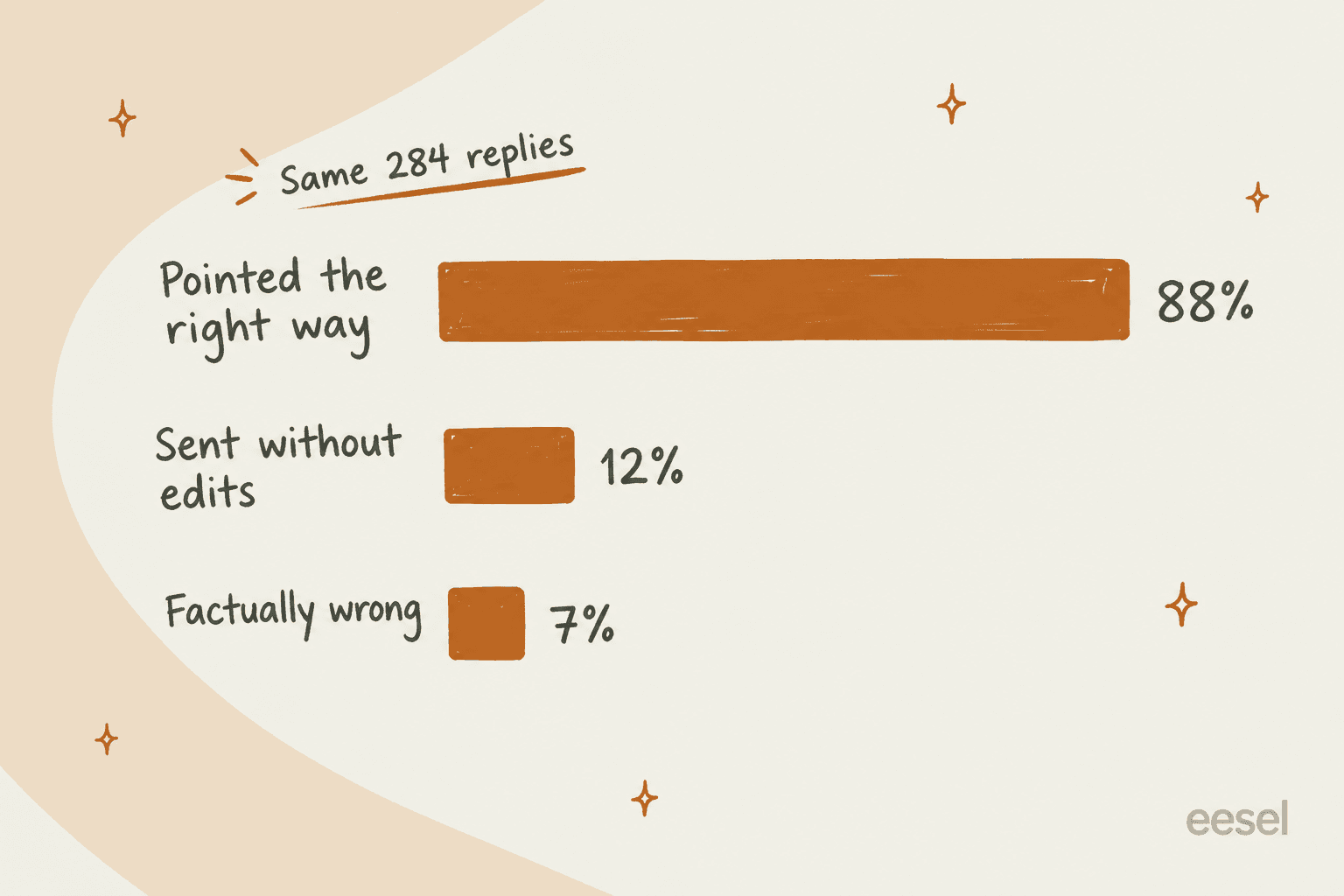
Same replies, three verdicts: 88% pointed the right way, only 12% were sent without edits, and 7% were factually wrong. None of those numbers is wrong. They just answer different questions. A reviewer who grades "would I send this as is?" and a reviewer who grades "is the answer correct?" will score the same queue miles apart, and both will think they're being fair. When I dug into why agents rewrote the drafts, about 65% of rewrites were for length and tone, about 20% needed order data the draft couldn't see, and about 5% were the draft being factually wrong. Length and tone are exactly the categories where human reviewers split too. (I broke down that kind of rewrite analysis in my error analysis guide.)
That's why calibration starts with the bar, not the score. If your scorecard doesn't say what a 3 versus a 4 looks like for tone, no amount of discussion will make reviewers agree for long.
How to run a QA calibration session
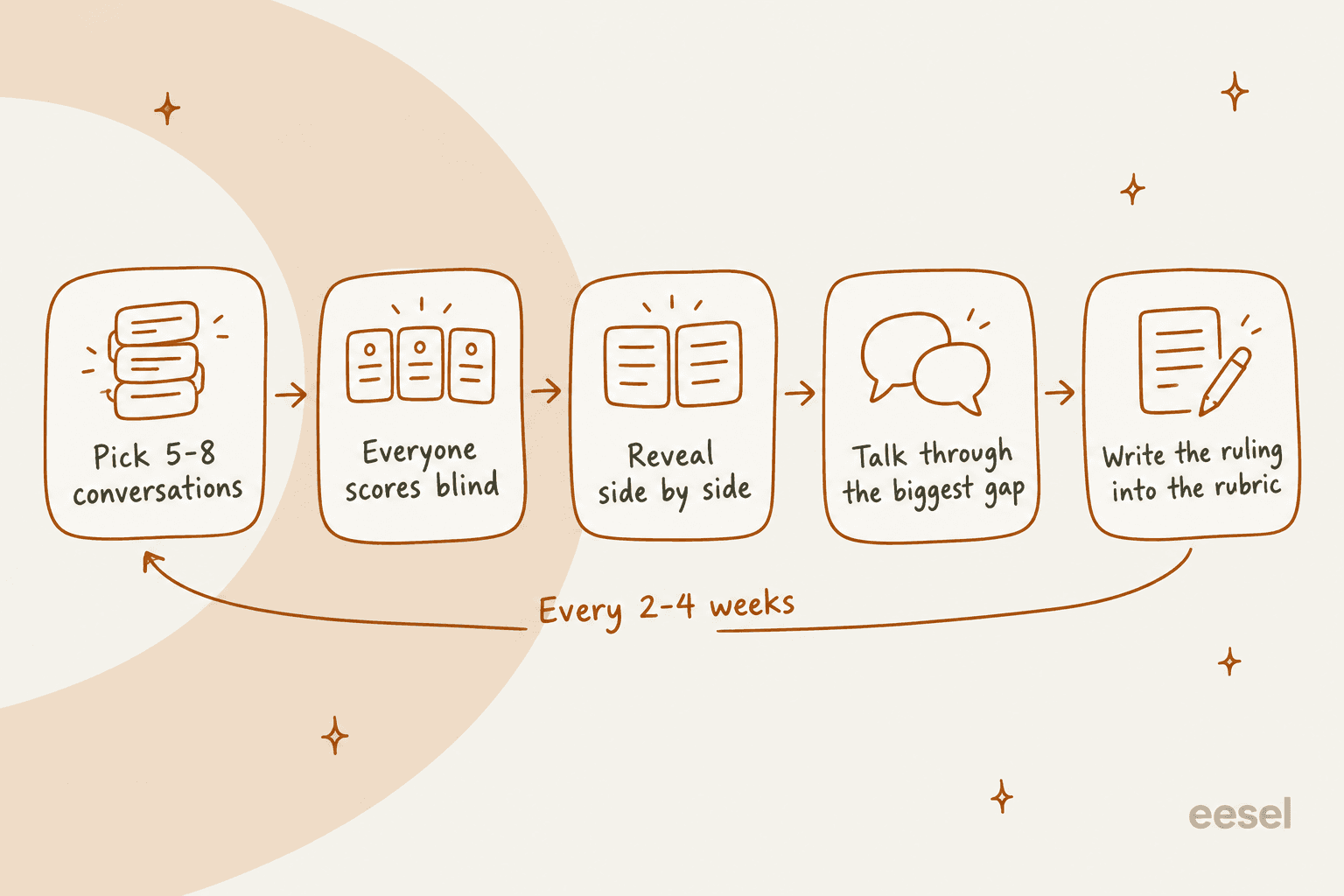
Here's the session I'd run, in five steps. It takes about an hour once a month, plus 10 to 15 minutes of scoring per reviewer beforehand.
1. Pick 5 to 8 conversations that will cause an argument
Zendesk's calibration guide suggests starting with about five conversations. I'd go up to eight once the team is used to it. More than that and the discussion gets rushed.
The selection matters more than the count. Easy tickets teach you nothing, because everyone scores them the same. MaestroQA's calibration advice is to pull tickets with low QA scores, tricky topics, or a recently changed process or product. evaluagent adds a fair point in its calibration explainer: keep the set balanced, not just bad interactions, or the session turns into a blame review.
My mix: one conversation that touches a policy that just changed, one where the customer was upset from the first message, one long multi-reply thread, one that went fine but felt "off," and one an agent disputed recently. If you support more than one language, add one non-English conversation too; my multilingual support QA guide covers how to calibrate across language teams.
2. Everyone scores blind
This is the step teams skip, and it's the one that makes the rest work. If reviewers can see each other's scores, or score together in the room, the first confident person sets the number and everyone drifts toward it. evaluagent's calibration webinar describes the paper version of this problem: people "can change their scores on their paper, and they can be swayed to another person's point of view before they get an opportunity to speak."
In Zendesk QA, blind or open is a workspace setting you choose per role. Reviewers can be set to see only their own reviews, or to see peers' reviews only after submitting their own. Leads and managers get the same "after submitting" option, or "always."
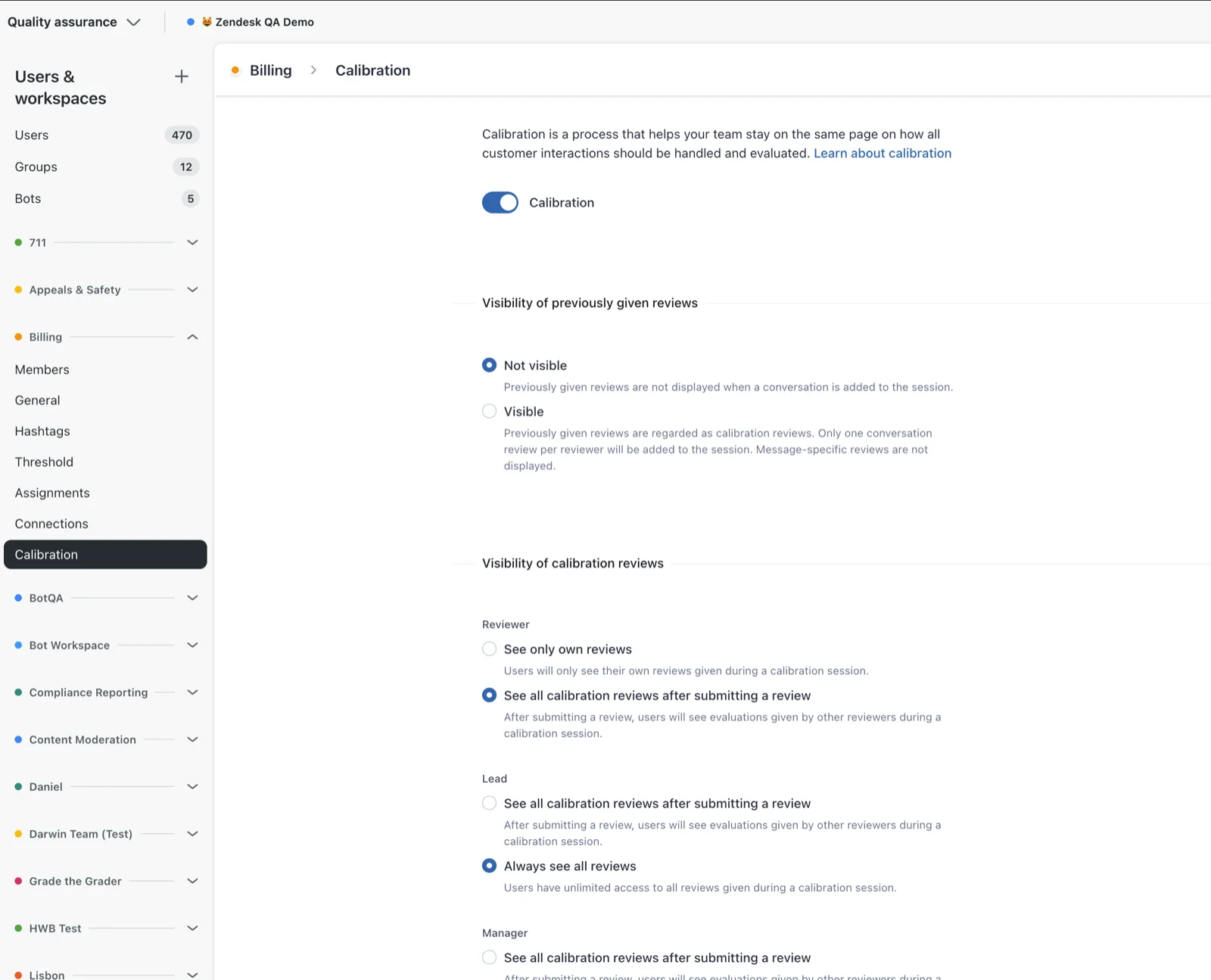
One practical gotcha: Zendesk QA sends no notifications for calibration. Per Zendesk's docs, "it's up to the workspace manager or lead to inform reviewers about the calibration session and its due date." Put the due date in your team channel, or half the reviewers will score it 10 minutes before the meeting.
3. Reveal the scores side by side, against a baseline
Once everyone has scored, put the scores in one grid: reviewers down the side, scorecard categories across the top. You're looking for two things, which I'll come back to in the next section: categories with a wide spread, and reviewers who are off on everything.
You also need a baseline, meaning one agreed "right" score to compare against. Zendesk QA lets a manager mark one review as the Baseline review, which, per Zendesk, "makes it easier to compare scores against it." The calibration dashboard then shows each reviewer's score next to the baseline score.
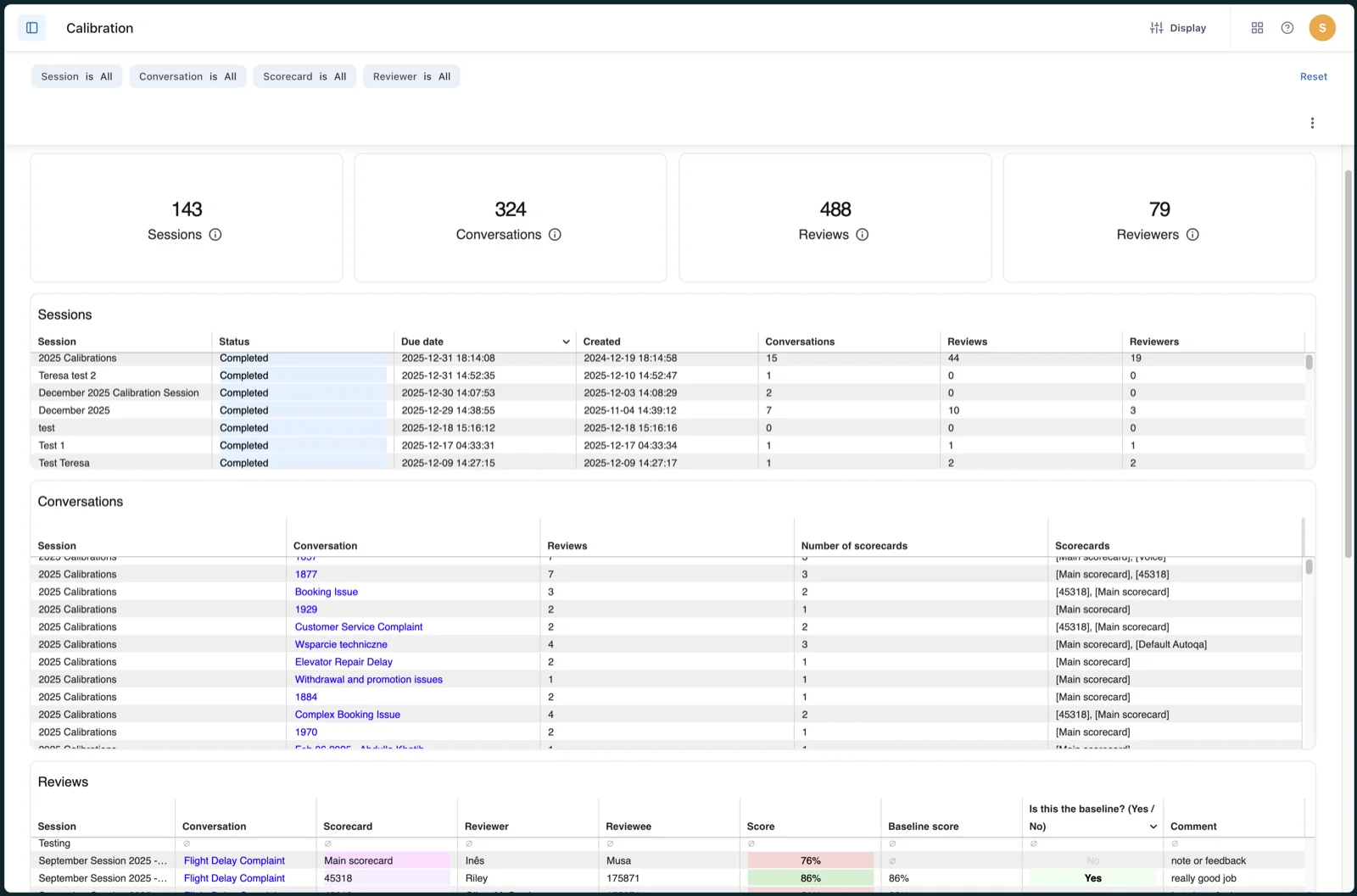
MaestroQA does the same thing with a designated final calibrator. Its team alignment guide calls that person "your source of truth to measure alignment against," and each grader gets an alignment score against them.
4. Talk through the biggest gap, not every gap
With 5 conversations and 6 categories you have 30 places to disagree. You won't get through them in an hour, and you shouldn't try. Sort by spread and spend the meeting on the two or three widest gaps.
The aim is a decision, not a consensus. One Stitch Fix leader quoted on MaestroQA's calibrations page put it well: "We've normalized the expectation that we're driving toward commitment, not consensus." evaluagent makes the same point from the other side: "It's not a democracy, if you like, where majority rules." If three reviewers say 4 and one says 2, the answer isn't automatically 4. The person who knows the policy best makes the call, and everyone commits to it.
5. Write the ruling into the rubric
This is where most calibration sessions quietly fail. The team agrees, everyone nods, and three weeks later the same disagreement shows up again because nothing was written down.
Every resolved gap should turn into one line in your scorecard guidance, with the conversation as the worked example. "Tone: a reply that apologizes twice for the same issue scores 3, not 4. Example: ticket #48213." That's the artifact that makes the next session shorter. It also feeds your support SOPs and the examples you use when onboarding new agents, since a new hire needs the same rulings your reviewers just agreed on. Good rulings read like good QA feedback examples: specific, tied to a line in the conversation, and short.
A QA lead on r/callcentres described the strict version of this:
"Calibrations by quality need to be strictly enforced and maintained. My last team I ran was quality and every month we'd pick a random call, all score separately, then get together and decide the correct score for each quality point. Whatever we all decided on, we had to be within 3% of that score (and certain elements had to be 100% on point)."
Rubric problem or reviewer problem?
This is the part of calibration that I think most guides skip, and it's the most useful. When scores don't line up, the pattern of the disagreement tells you what to fix.
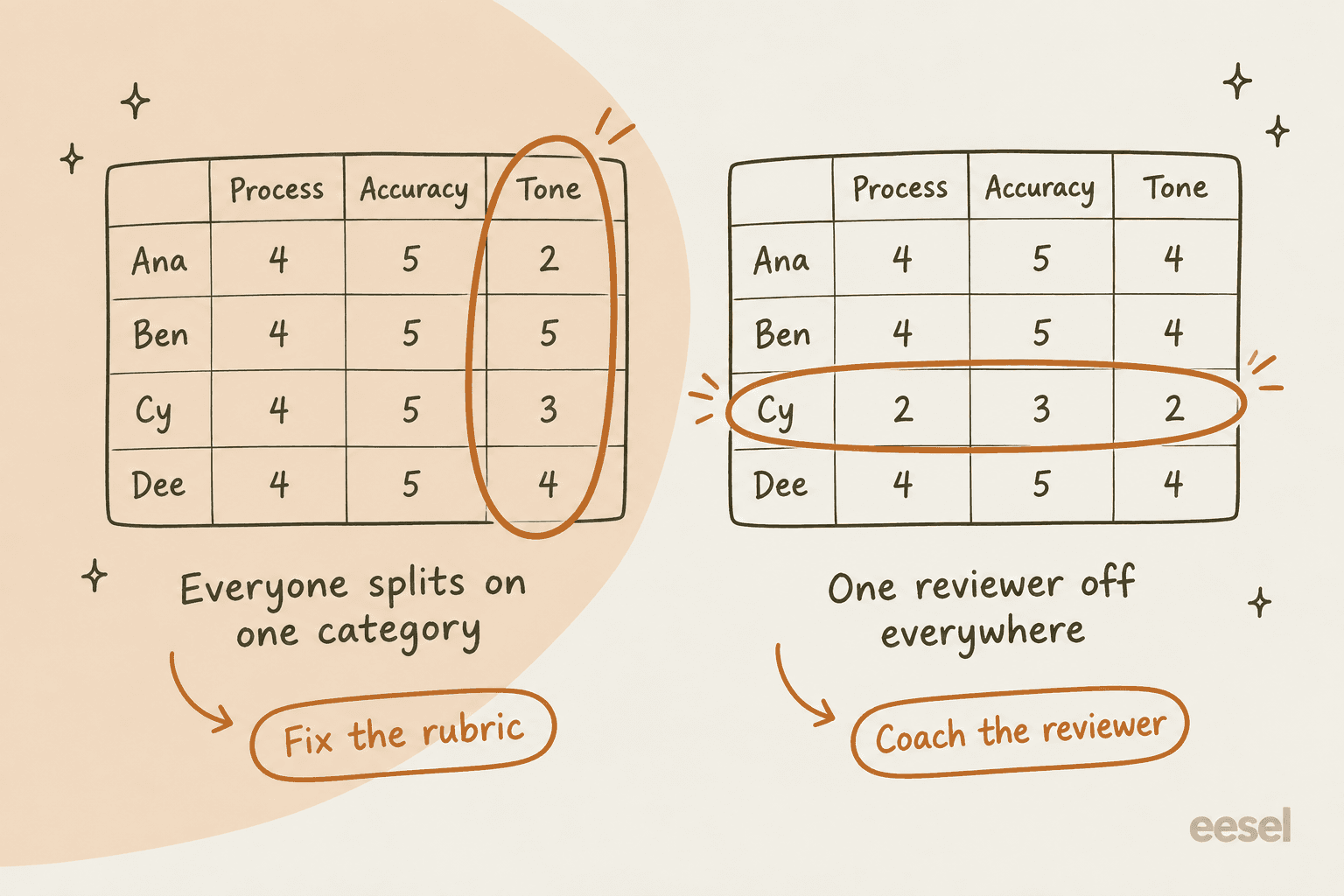
Everyone splits on one category. If process and accuracy line up but tone ranges from 2 to 5 across four reviewers, nobody is "wrong." The criterion is open to interpretation, so fix the rubric. Rewrite the tone guidance with concrete examples (my customer service tone guide has a template), and re-score the same conversation next session to check the gap closed.
One reviewer is off on everything. If one person scores two points lower than everyone else on every category, the rubric is fine. That reviewer is reading it differently, so coach the reviewer. Sit down with them, the same way you'd coach an agent, walk through one conversation category by category, and have them score one more on their own.
The whole team is off from the baseline in the same direction. Everyone gives 4s and the lead gave 2s. That usually means the lead knows something the team doesn't, like a policy change that never made it into the knowledge base. That's a communication fix, not a scoring one.
Try it with your own numbers. Type in each reviewer's scores for one conversation and the checker tells you which of these you're looking at.
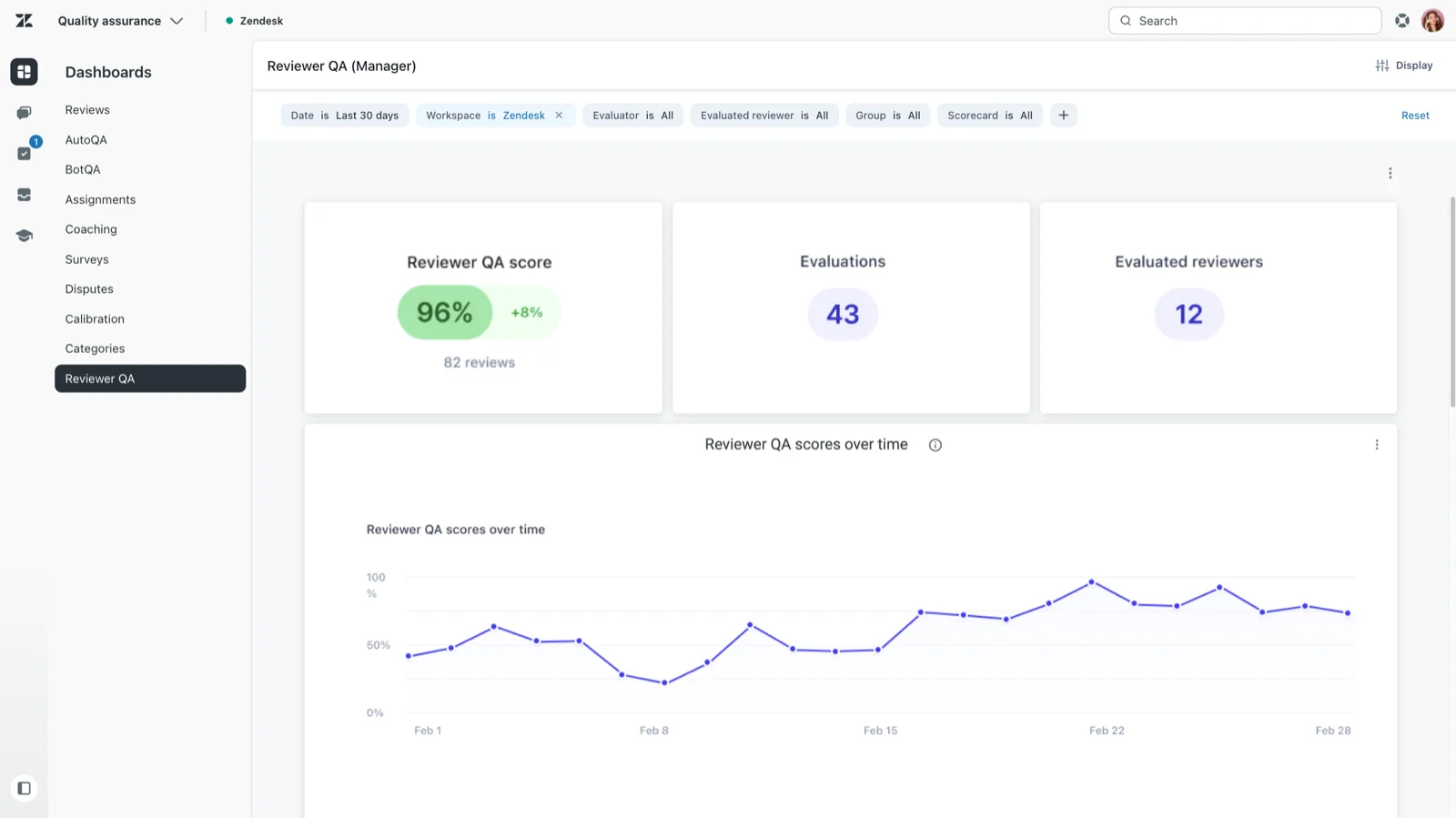
Zendesk QA also tracks the reviewer side over time with a separate Reviewer QA dashboard. It runs randomized assignments where someone evaluates the reviewers' own reviews, and Zendesk's dashboard docs say it's there to "track reviewer accuracy, evaluation history, and coaching trends." Evaluated reviewers see their own scores but can't see who evaluated them.
What counts as "calibrated"?
No QA vendor I checked publishes a hard pass mark. Here's what the people who do this for a living use instead.
| Source | Calibration target | What it's measured against |
|---|---|---|
| Zendesk's calibration guide | Gap "usually falls around 5 percent" | Baseline set during the session |
| u/mattemer on r/callcentres | Within 3%, some elements 100% | Score agreed by the group |
| MaestroQA | Alignment score per grader, no fixed threshold | Final calibrator's score |
| Scorebuddy | % of answers matching, plus Avg Variation | The original score being re-scored |
| Zendesk QA AutoQA | Above 75% accuracy is "high agreement" | Human reviewers' scores |
My take: aim for every reviewer within about 5 points of the baseline on the total score, and no category where reviewers are 2 or more points apart on a 5-point scale. Then add the rule from the r/callcentres quote above: some items have to be 100%. A missed identity check or a wrong refund amount isn't a matter of taste. Mark those as critical or auto-fail items on the scorecard (my scorecard criteria guide shows how in Zendesk QA) so they never get "calibrated" into a partial score.
Watch the total, too. Two reviewers can land on the same 80% overall while disagreeing on three categories underneath, one high where the other is low. Always compare per category, not just the headline score.
How often should you calibrate?
The honest answer is "more often than you're doing it now." Here's what vendors and practitioners suggest:
- New QA program or new scorecard: MaestroQA's guide says it sees teams calibrate "as frequently as once a week," then move to monthly once alignment is high, and step back up when a new rubric launches.
- Steady state: Zendesk's guide says monthly sessions suit most teams, and "the more reviewers you have, the more often you should calibrate."
- Large QA teams: a former QA manager on r/callcentres ran "a weekly calibration call so that everyone was on the same page" alongside 5 audits per rep per month.
A lone QA analyst on r/talesfromcallcenters described the flip side, where the reviewer is the one being graded:
"I was the lone QA agent for a call center of 55-70 people. We had a calibration session each week which involved the call center manager, the management staff, and myself. They chose ten calls that I had evaluated to listen to and score... I was held to a 95% accuracy rating which compared to the average of their call scores."
I'd add one trigger that isn't on any calendar: calibrate after anything that changes what "right" means. A pricing change, a new returns policy, a new escalation path. That's when reviewers drift fastest, because some of them know about the change and some don't. It's also worth a session whenever a new reviewer joins, the same way you'd shorten an agent's ramp time with worked examples, before their scores count toward anyone's support KPIs.
QA calibration features compared
Most dedicated QA tools have some kind of calibration feature. They differ in whether scoring is blind, what the "right answer" is measured against, and what you see afterward.
| Tool | Feature | Blind scoring | Measured against | Agents see it? |
|---|---|---|---|---|
| Zendesk QA | Calibration sessions, Reviewer QA | Configurable per role | Baseline review set by a manager | No |
| MaestroQA (now Rippit) | Team Calibration, Grade-the-Grader | Yes, graders see only their own score and the final | Final calibrator, alignment score | Not documented |
| Scorebuddy | Calibration lists | Not documented | Original score being re-scored | Optional toggle per list |
| evaluagent | Calibration sessions, Check-the-Checker | Yes, "blind evaluate" | Agreed "calibrated outcome" | Not documented |
| Playvox (NICE) | Calibration | Not documented | "Expert opinions" | Not documented |
| Level AI | Calibration | Not documented | Auditor benchmark | Not documented |
A few details worth knowing before you pick:
Zendesk QA needs the QA or Workforce Engagement Management add-on. Every Suite plan says Quality Assurance "Requires QA add-on," and the Workforce Engagement Bundle is listed at $50 per agent per month, billed yearly. Calibration isn't gated to a higher tier on top of that. One limit to know about: the calibration dashboard lists conversations and their reviews, and a customer comment on the setup article notes the data "can only be downloaded conversation by conversation." If you want a reviewer's trend across many sessions, plan to pull it into a spreadsheet, or lean on the Reviewer QA dashboard.
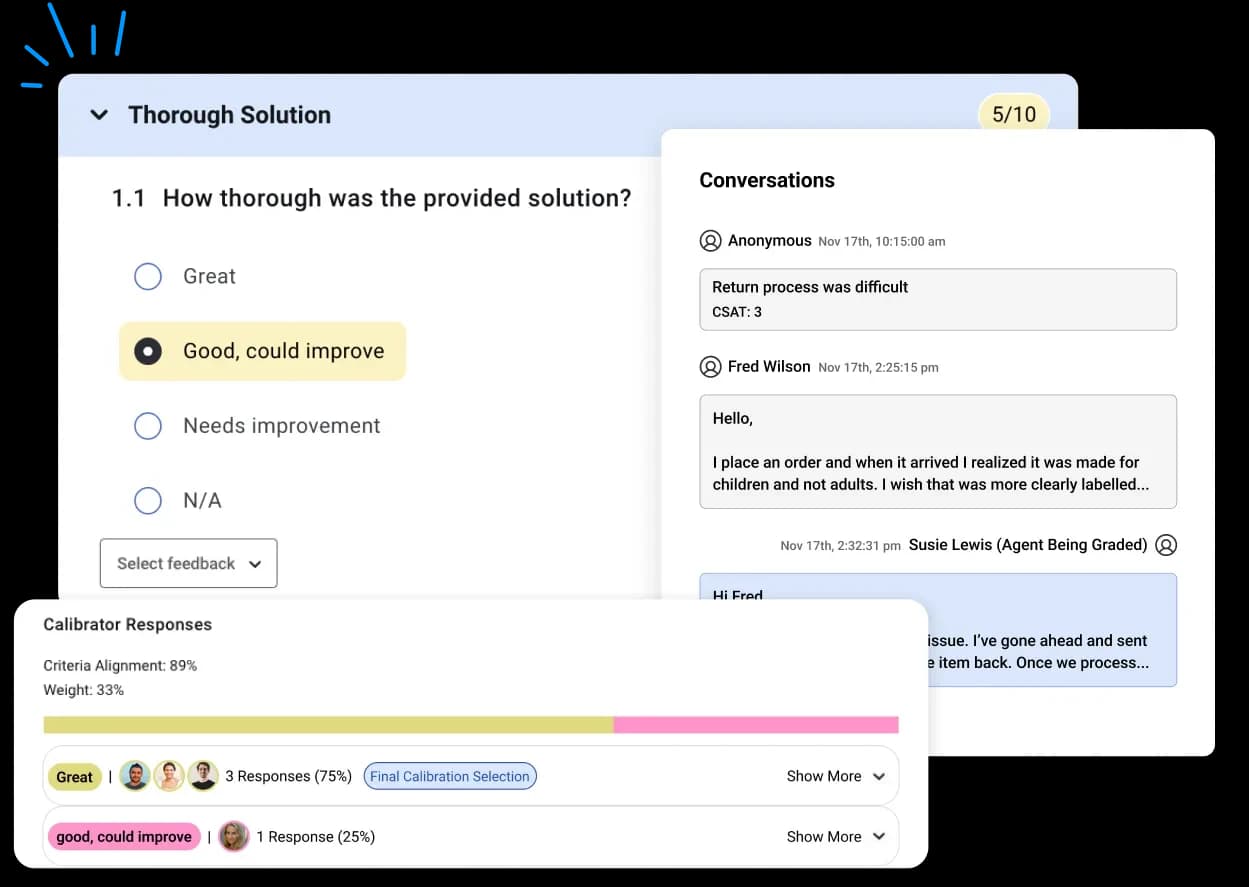
MaestroQA, now rebranded as Rippit, separates two jobs: live team calibration and Grade-the-Grader, where a benchmark grader blindly re-grades tickets someone else already scored. Its calibration view shows how each calibrator answered each question, with a "Criteria Alignment" percentage.
Scorebuddy builds calibration from existing scored results: you add them to a calibration list and assign it to users, including external users, which is handy if you outsource part of your support to a BPO partner. Its glossary defines Avg Variation as "the average of all differences between a set of Calibration's numerical scores, and the numerical scores of the original Scores." The calibration module is in its entry Foundation plan, though prices are "Request a price."
If you run QA inside your helpdesk instead, check what it actually covers. I keep a longer list of AI QA tools if you're shopping. Gorgias offers Auto QA, which scores conversations automatically, but I didn't find a human-reviewer calibration workflow in its docs. Same for Freshdesk and Front in the docs I searched. If your helpdesk doesn't have it, a shared spreadsheet with the grid from step 3 does the job fine for a team of three to five reviewers.
Calibrating AI graders and AI agents
More teams now let AI score 100% of conversations, with humans reviewing a sample. That doesn't remove calibration. It adds one more reviewer to calibrate, and it's the one that reviews the most tickets.
Zendesk QA measures this directly. Its AutoQA dashboard has an Accuracy score that "measures the consistency and level of agreement between ratings generated by AutoQA and those provided by human reviewers," with above 75% counting as high agreement. It also tracks Modified AutoQA conversations, where a human changed the AI's score in at least one category. That list is your calibration agenda for the AI, and it's the fastest way to do support QA with AI without trusting it blindly: if humans keep overriding the same category, the AI grader and your rubric disagree, and one of them needs fixing. AutoQA scores also stay out of the agent's IQS, so the AI can't quietly move an agent's score on its own.
Agents feel it when nobody does:
"My company uses AI to score calls, too. You can have a great call, but if it doesn't pick up on certain keywords you get a lousy score for it"
Treat the AI grader like a new reviewer joining the team. Put a few AutoQA-scored conversations into your calibration session, score them blind alongside it, and see where it lands. My guide to AI support QA covers the rest of that setup, and can AI do support QA is honest about where it still falls short.
The same logic applies when the agent is AI. If an AI agent answers tickets, your reviewers need to agree on how to grade its replies before they start, or you'll get the 88% versus 12% problem from earlier, the same gap you see when teams argue about AI resolution rate: one reviewer marks a reply as a pass because the answer is right, another marks it as a fail because it's three paragraphs too long. Agree on the bar first, then grade. A written brand voice for the AI makes the tone category much easier to calibrate. My post on AI agents in Zendesk QA walks through scoring bot conversations.
Common QA calibration mistakes
- Scoring together in the room. You lose the one thing you came to measure, the original disagreement. Score blind first, always.
- Only calibrating easy tickets. If every session ends in agreement, you're picking the wrong conversations.
- Treating the average as the answer. Three people saying 4 doesn't make 4 right. Someone owns the ruling.
- No written follow-up. If the ruling doesn't make it into the scorecard guidance, you'll have the same argument next month.
- Comparing only total scores. Two reviewers can both give 80% while disagreeing on half the categories.
- Never calibrating the AI grader. It reviews more tickets than anyone else on the team. It needs a seat in the session.
- Running it without agents' disputes. Disputed reviews are free calibration material. Zendesk QA's disputes dashboard even has a "Disputed reviewers" table that "shows which reviewers may need additional help with consistency and accuracy." Pull from it when you pick conversations, and see my Zendesk QA agent feedback post for how disputes flow back to agents.
Try eesel for AI replies your QA team can trust
If you're adding AI to your support queue, the calibration question comes up on day one: how will your reviewers grade what it writes? eesel's AI helpdesk teammate joins your existing Zendesk, Freshdesk, Gorgias or Help Scout queue and lets your team settle that before it goes live. It replays real past tickets so reviewers can score its answers against what your agents actually sent, it starts as internal-note drafts, and every run shows the sources and reasoning behind the reply. When a reviewer corrects it, the correction becomes a standing instruction, so the same ruling applies to every future ticket. It's free to try with 100 credits, and paid plans start at $299 a month on the eesel pricing page.

Frequently Asked Questions
What is support QA calibration?
How do you run a QA calibration session?
How often should support teams do QA calibration?
What is a good calibration score in QA?
Should QA calibration be blind?
Which QA tools have calibration features?
How do you calibrate AI QA scores with human reviewers?



Article by
Riellvriany Indriawan
Riell is a designer and writer at eesel AI with about two years of experience researching CX platforms, AI chatbots, and helpdesk software. She combines her design background with a sharp eye for how these tools actually look and feel in practice — making her comparisons unusually visual and user-focused.