

Quality assurance in customer support is one of those things everyone agrees is important, but few teams get right. You know the drill: managers spot-check a handful of tickets, agents get feedback weeks after the interaction, and everyone wonders if the process is actually improving anything.
Here's the uncomfortable truth: most teams review only about 2% of customer conversations manually. That means 98% of your team's work goes unevaluated. You're making coaching decisions, performance reviews, and training investments based on a tiny sample that probably doesn't represent reality.
This guide walks you through building a quality assurance workflow in Zendesk that actually works. Whether you're starting from scratch or looking to improve an existing process, you'll learn how to set up automated scoring, create meaningful scorecards, and connect QA insights to real coaching outcomes.

What is a quality assurance workflow in Zendesk?
A quality assurance workflow is the systematic process of evaluating customer interactions to ensure they meet your standards and identifying opportunities for improvement. In Zendesk, this means reviewing tickets, chats, emails, and calls to score agent performance against defined criteria.
There are two main approaches:
- Manual QA: Human reviewers read or listen to interactions and score them based on a rubric. This provides nuanced feedback but is time-consuming and limited in scope.
- Automated QA: AI analyzes every conversation against your criteria, flagging issues and scoring performance automatically. This gives you 100% coverage but works best when combined with human oversight.
The 2% problem is real. When you're only reviewing a tiny fraction of conversations, you miss patterns, recurring issues, and coaching opportunities that only show up at scale. You also risk biased sampling (reviewers naturally gravitate toward interesting or problematic tickets, not representative ones).
For teams looking to augment their Zendesk setup with additional AI capabilities, we integrate directly with Zendesk to provide continuous learning and feedback loops that complement your existing workflow.
Setting up your QA foundation in Zendesk
Before diving into configuration, you need to establish the foundation that will guide your entire QA process. This means defining what "quality" actually means for your team.
Define your quality standards
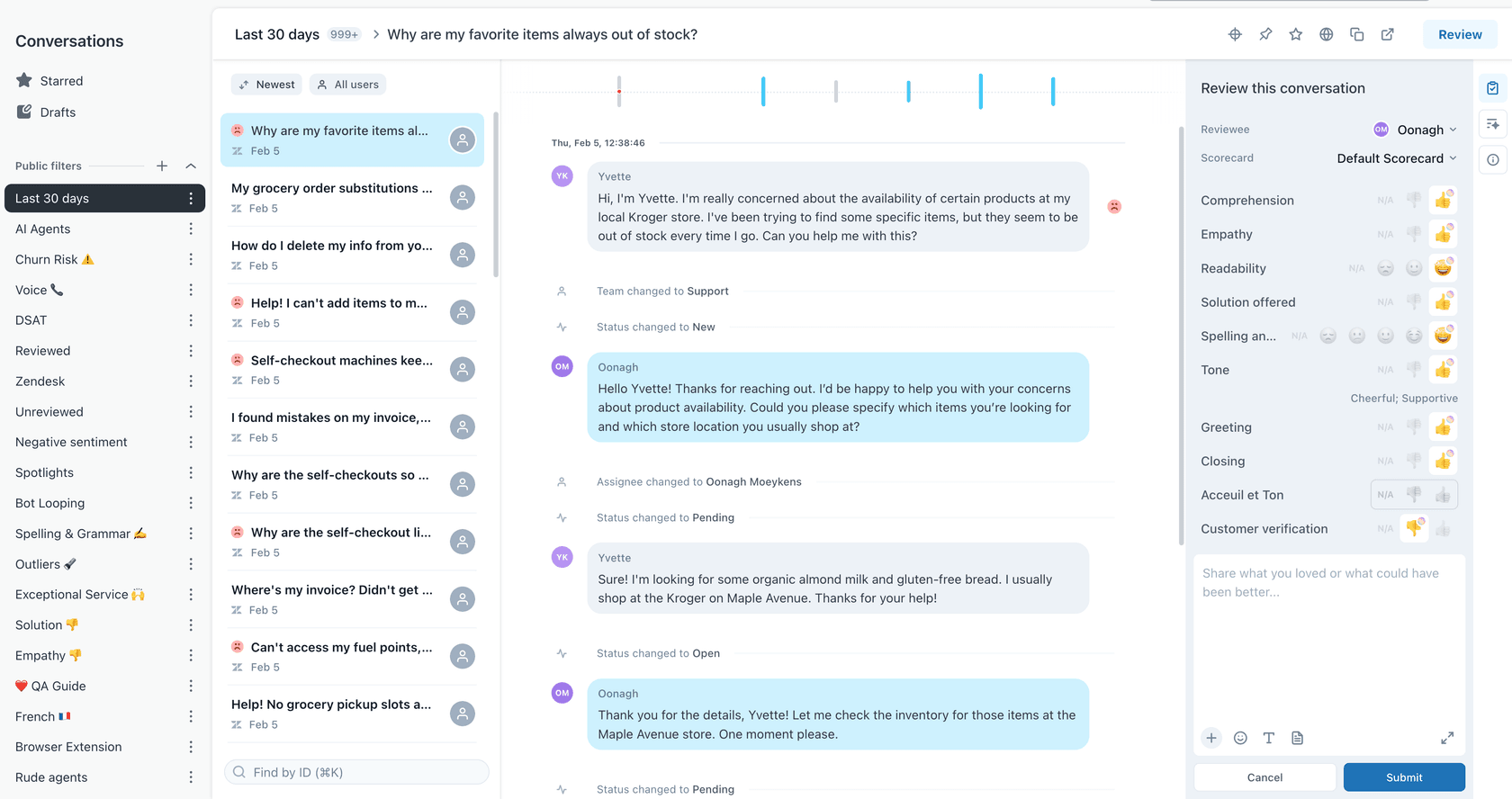
Zendesk QA automatically scores these default categories:
- Greeting: Did the agent open the conversation well?
- Empathy: Support for continuous customer relations
- Spelling and grammar: Spelling, punctuation, and word choice
- Closing: Did the agent close the conversation properly?
- Solution offered: Was the answer correct and thorough?
- Tone: Quality of customer service voice
- Readability: Is the reply easy to follow?
- Comprehension: Did the agent understand the customer's request?
You can customize some of these categories and add your own, such as personalization, process adherence, or going the extra mile.
Your standards should align with business goals. If you're trying to reduce churn, empathy and going the extra mile might carry more weight. If compliance is critical, process adherence becomes non-negotiable.
Create your QA scorecard
Scorecards define how conversations are evaluated. Zendesk QA comes with out-of-the-box scorecards covering common support standards, but you'll likely want to customize.
You can create entirely new categories by telling the AI what to look for in plain English. For example, a retail brand might check if agents handle refund requests correctly, while a SaaS company might prioritize technical accuracy.
Key scorecard features include:
- Weighting criteria to reflect business priorities
- Marking certain criteria as critical for passing
- Using different scorecards for different teams or channels
- Setting up conditional scorecards that apply based on ticket type
Build your review team structure
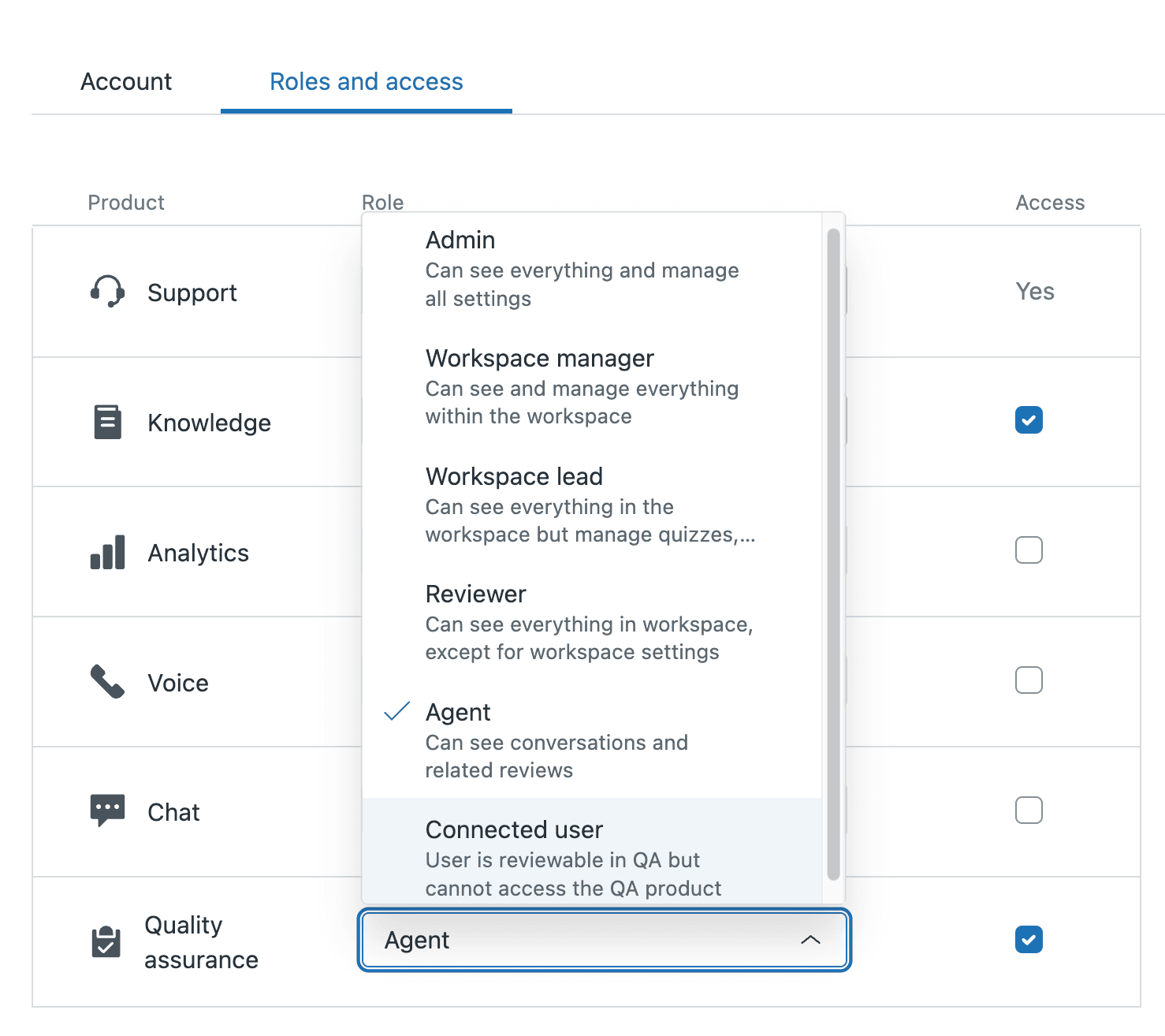
QA responsibilities typically distribute across several roles:
- Peer reviewers: Senior agents who spend a few hours weekly reviewing newer colleagues' tickets
- QA specialists: Dedicated analysts who perform systematic ticket audits
- Team leads: Review subsets of their team's tickets for coaching conversations
- QA managers: Design the quality framework and ensure consistency through calibration
Calibration is critical. Have multiple reviewers score the same ticket to ensure everyone aligns on what "good" looks like. Without this, your scores become meaningless.
Implementing the QA workflow step by step
Let's walk through the actual setup process. Each step builds on the previous one, so don't skip ahead.
Step 1: Configure Zendesk QA settings
Access Zendesk QA from the Zendesk products icon in the top bar, then select Quality assurance. Your ticket conversation data automatically imports and syncs every 4-6 hours. QA is a paid add-on available on all Suite and Support plans, and the Workforce Engagement Bundle pairs it with workforce management.
First, review your help desk connection settings. You can filter out selected content to protect privacy (like credit card numbers or personal information) and set data retention periods for inactive conversations.
Step 2: Set up AutoQA for automated scoring
AutoQA is the engine that analyzes 100% of your conversations. It scores interactions based on your criteria, moving you from reviewing 2% of tickets to complete coverage.
Activate the autoscoring categories that matter for your business. AutoQA must be turned on in your account settings first, and each category has to be active and assigned to a workspace and an active scorecard. Out-of-the-box options include empathy, tone, and comprehension. You can also create custom categories using natural language prompts.
The AI scores every interaction, giving you consistent evaluation that doesn't get tired or develop biases. But remember: AutoQA identifies issues and scores performance. It doesn't replace human judgment for complex situations.
Step 3: Configure Spotlight for risk detection
Spotlight automatically highlights conversations that need human attention. Instead of randomly sampling tickets, you can focus on high-value, critical, or instructive cases.
Predefined Spotlights identify:
- Churn risk conversations
- Outliers and unusual patterns
- Escalations
- Exceptional service (positive reinforcement matters too)
- Dead air on calls
- Stuck conversation loops
You can also create custom Spotlights using natural language. Tell the AI what to look for, and it will flag matching conversations for review.
Step 4: Establish the human review process
AI handles the bulk evaluation, but humans add nuance and context. Set up your review workflow:
Create assignments that automatically route flagged conversations to the right reviewers. You can set recurring tasks based on specific criteria, like reviewing five technical tickets per week for each agent.
Reviewers can add manual notes to AI-generated scores, pin conversations for training purposes, and dispute scores when they disagree with the AI assessment. This feedback loop helps the system improve over time.
Step 5: Set up reporting and coaching workflows
The QA dashboard gives team leads a snapshot of recent performance across teams, flagged interactions, and coaching opportunities. Agents can see their own scores, view examples of quality interactions, and receive feedback directly in Zendesk.
Connect QA data to coaching by bundling specific conversations and notes into formal coaching sessions. Track when coaching occurred and whether agents reviewed the feedback. This closes the loop between evaluation and improvement.
AI-powered QA automation in Zendesk
AI doesn't replace human reviewers. It augments them. Here's how the combination works in practice:
AutoQA handles the volume problem by scoring every conversation, ensuring nothing slips through the cracks. This eliminates the sampling bias that plagues manual-only programs.
Spotlight filters the noise, surfacing the 5-10% of conversations that actually need human attention. Reviewers spend their time on high-impact coaching opportunities instead of randomly selected tickets.
Real-time QA insights appear directly in the Agent Workspace during live interactions. Agents can see quality guidance while conversations are still open, preventing issues before they escalate.
Voice QA uses speech-to-text transcription to analyze phone calls for silence, compliance adherence, and quality markers. This extends your QA program beyond written channels.

For teams looking to go further, our AI agent learns continuously from corrections and feedback. When you edit a response or leave internal notes, the system incorporates that learning immediately. No retraining cycles or re-uploads required. You can read more about how AI works in Zendesk and the various approaches to quality assurance automation.
Measuring QA success: Key metrics to track
You can't improve what you don't measure. Focus on these metrics to evaluate your QA program:
Internal Quality Score (IQS): Your primary quality metric, calculated from scorecard ratings across all evaluated conversations.
CSAT correlation: Compare QA scores against customer satisfaction ratings. Low QA scores should correlate with low CSAT. If they don't, your scorecard might be measuring the wrong things.
Common failure categories: Track which dimensions agents struggle with most. If empathy scores are consistently low across the team, you need empathy training, not individual coaching.
Agent performance trends: Monitor how individual agent scores change over time. The goal is improvement, not perfection.
Time savings: Measure how much time your team saves with automated scoring versus manual review. Zendesk says automated reviews can cut review time by up to 80%.
Common mistakes to avoid when implementing QA
After helping dozens of teams set up QA workflows, we've seen the same mistakes repeatedly:
Reviewing too few conversations: The sampling trap gives you false confidence. You find a few issues, fix them, and think you're done. Meanwhile, hundreds of problematic interactions go unnoticed.
Inconsistent scoring without calibration: Three reviewers scoring the same ticket should arrive at similar scores. If they don't, your data is unreliable.
Focusing only on negative feedback: QA isn't just about catching mistakes. Recognize exceptional service and share examples of great work.
Not connecting QA to coaching: Scores without action are just numbers. Every low score should trigger a coaching conversation or training intervention.
Delayed feedback loops: Feedback delivered weeks after an interaction loses impact. Aim for feedback within days, not weeks.
Scaling your Zendesk quality assurance workflow
Start small and expand. Begin with one team or channel, refine your scorecards, and prove value before rolling out organization-wide.
As you scale, consider:
- Adding channels: Extend QA to voice, social media, and AI agent interactions
- Team-specific scorecards: Different teams need different criteria. Your billing team and technical support team shouldn't use identical scorecards.
- Cross-functional insights: QA data reveals product issues, process gaps, and training needs that extend beyond the support team. Share insights with product, engineering, and operations.
The goal isn't perfect scores. It's consistent improvement and a culture where quality matters.
Streamline quality assurance with AI-powered tools
Building an effective QA workflow takes time and iteration. The teams that succeed treat it as an ongoing process, not a one-time setup.
If you're looking to complement your Zendesk setup with additional AI capabilities, we offer integrations that learn continuously from your feedback. When you correct an AI-generated score or leave coaching notes, the system improves immediately. No waiting for retraining cycles.
Our approach uses plain-English instructions for customization. Tell the AI what to look for in your support interactions, and it adapts to your specific standards and business context.
See our pricing to learn more about how we can help streamline your quality assurance process.