A QA scorecard is the backbone of any serious customer service quality program. Without clear criteria, your reviews become subjective. One manager might focus on grammar while another prioritizes empathy. The result? Inconsistent feedback, confused agents, and no real improvement in service quality.
Here is the short version: well-defined criteria turn quality assurance from gut feeling into a systematic process. They give your team a shared language for what "good" looks like and create a foundation for measurable improvement.
In this guide, we will break down the essential rating categories for Zendesk QA scorecards, explore scoring frameworks, and show you how to implement criteria that actually drive better support. We will also look at how AI is changing the game, including how we approach quality assurance at eesel AI for Zendesk.

What is a QA scorecard and why criteria matter
A QA scorecard is an evaluation framework that breaks down customer service quality into specific, measurable components. Think of it as a rubric for reviewing conversations. Instead of asking "Was that a good interaction?" you ask "Did the agent solve the problem? Was their tone appropriate? Did they follow procedure?"
These criteria feed into your Internal Quality Score (IQS), the percentage that represents your team's performance against your standards. According to the Customer Service Quality Benchmark Report, the industry benchmark for IQS is 88%. But here is the catch: only about a third of support teams actually track IQS, leaving most operations flying blind on quality.
Well-defined criteria do more than produce numbers. They give agents clarity on expectations. They help managers provide specific, actionable feedback. And they connect daily interactions to business outcomes like customer satisfaction and retention. Zendesk's guide to building QA programs offers additional frameworks for connecting quality metrics to business results.
Bottom line? Your criteria determine whether QA becomes a genuine driver of improvement or just another administrative task.
Essential Zendesk QA scorecard criteria
The most effective scorecards evaluate seven core dimensions of support quality. Here is what to include:
Solution quality
Did the agent solve the customer's problem correctly and completely? This is the foundation of good support. An agent can be friendly and professional, but if they do not resolve the issue, the interaction fails its primary purpose.
Grammar and spelling
Error-free communication matters across all channels. Typos and grammar mistakes undermine credibility, especially in email where customers expect polished responses. Even in fast-paced chat, basic errors signal carelessness.
Tone of voice
Was the communication professional and aligned with your brand? Tone includes formality level, word choice, and overall demeanor. A financial services company might prioritize precision and restraint, while a lifestyle brand might encourage warmth and enthusiasm.
Empathy
Did the agent demonstrate understanding of the customer's emotions? Empathy is not just saying "I understand." It's acknowledging frustration, validating concerns, and showing genuine interest in helping. This category often carries significant weight because it directly impacts how customers feel about the interaction.
Personalization
Did the agent use the customer's name and reference relevant history? Personalization shows customers they are not just ticket numbers. It might include mentioning past interactions, referencing account details, or tailoring the solution to their specific situation.
Process adherence
Did the agent follow internal procedures and protocols? This includes proper tagging, correct escalation paths, security verification, and compliance requirements. In regulated industries, this category might be marked as "critical," meaning a failure here fails the entire review.
Proactive help
Did the agent go beyond the basics to anticipate needs? This might mean addressing potential follow-up questions, offering additional resources, or checking for related issues. It's the difference between satisfactory and exceptional service.
Your specific categories should reflect your business priorities. A SaaS company might weight product knowledge heavily. An e-commerce business might prioritize speed and efficiency. Start with these seven and adjust based on what matters most to your customers. Buffer's quality program and other Zendesk customers have shared their approaches to customizing these criteria for different industries.
Choosing the right scoring scale
Once you have defined what to measure, you need to decide how to score it. Zendesk QA offers four rating scales, each with different trade-offs:
| Scale | Options | Best For |
|---|---|---|
| Binary | Good/Bad | High-volume teams needing speed |
| 3-point | Good/Satisfactory/Bad | Balance of nuance and efficiency |
| 4-point | Good/Slightly good/Slightly bad/Bad | Forcing decisive assessments |
| 5-point | 5-1 scale | Detailed feedback for coaching |
Binary scales are fastest. Reviewers make quick judgments, and you get consistent data. The downside? No middle ground. An interaction that's mostly good but has one issue gets the same score as a complete failure. Zendesk's QA documentation covers how to configure each scale type.
3-point scales add that middle option. They work well for most teams, providing enough nuance without slowing down reviewers.
4-point scales eliminate the neutral option. This forces reviewers to decide whether an interaction is above or below standard, which can be useful for calibration.
5-point scales offer the most detail. They are ideal for coaching-focused programs where you want to track incremental improvement. The trade-off is review speed.
Beyond the scale itself, consider weighting your categories. Not all criteria are equally important. If compliance is non-negotiable in your industry, give it higher weight. If you're trying to differentiate on customer experience, weight empathy and personalization more heavily. Zendesk QA lets you assign weights from 0 to 100 for each category.
Channel-specific criteria considerations
The same core criteria apply across channels, but how you evaluate them changes based on the medium:
Email support emphasizes thoroughness and grammar. Customers expect complete answers without back-and-forth. Your criteria might include "anticipated follow-up questions" or "provided comprehensive solution." Response time matters less than quality.
Chat support prioritizes speed and multitasking. Agents often handle three or four conversations at the same time. Your criteria should include response time benchmarks and the ability to maintain context across multiple chats. Tone can be more casual than email.
Phone support focuses on vocal skills and emotional intelligence. Reviewers evaluate pacing, volume, active listening, and the ability to manage emotionally charged conversations. Phone agents need different skills than written channel agents.
When building cross-channel scorecards, identify which criteria are universal and which need channel-specific definitions. Grammar matters in email and chat but isn't relevant for phone. Response time is critical for chat, less so for email. Adapt your evaluation approach while maintaining consistent standards for the criteria that apply everywhere. Hiver's research on QA scorecards provides additional guidance on adapting criteria for different support channels.
Frameworks for organizing your criteria
Raw criteria lists can feel overwhelming. Frameworks help you organize them into a coherent structure. Two models dominate QA scorecard design:
The 4C Framework organizes criteria into four pillars:
- Communicate clearly: Clarity, tone, active listening, grammar
- Build connection: Empathy, personalization, engagement
- Follow rules: Script adherence, data protection, compliance
- Solve correctly: Accuracy, resolution quality, follow-up
This framework works well for teams prioritizing customer experience. It balances soft skills with hard requirements.
The Pillar Framework takes a broader view:
- Customer experience: CSAT, NPS, sentiment metrics
- Compliance: Process adherence, regulatory requirements
- Performance: First-call resolution, handle time, efficiency
- Continuous improvement: Feedback integration, coaching outcomes
This model suits teams with formal quality management systems. It connects QA to broader business metrics.
Choose a framework that matches your team's maturity and goals. Early-stage teams often benefit from the simplicity of 4C. Established operations might prefer the comprehensive Pillar approach. The key is having a structure that reviewers understand and can apply consistently. Zendesk's scorecard template library includes examples of both frameworks in practice.
Implementing your QA scorecard with Zendesk
Once you have defined your criteria and chosen your framework, it is time to build the scorecard in Zendesk QA. Here is how the process works:
Navigate to Quality Assurance > Settings > Scorecards and create a new scorecard. Add your categories, select your rating scale for each, and assign weights. You can organize categories into groups if you have many criteria. Zendesk's help documentation provides detailed setup instructions with screenshots.
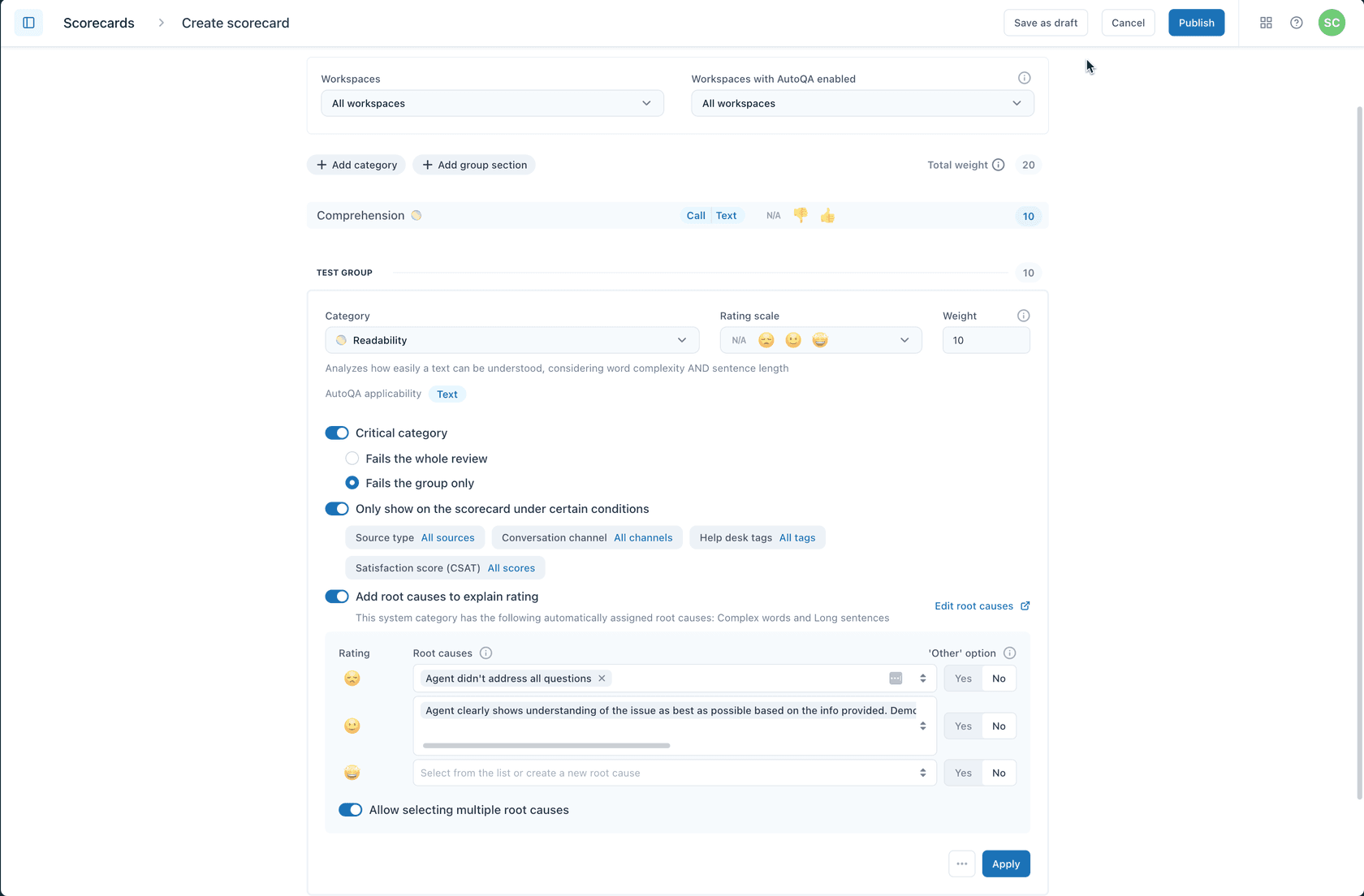
Zendesk QA includes several system categories that are automatically scored when AutoQA is enabled. These cover common criteria like spelling, grammar, and tone. You can supplement these with custom categories for business-specific requirements.
Calibration sessions are essential for consistency. Have multiple reviewers score the same conversations independently, then compare results. Discuss discrepancies and align on interpretation. Most teams run calibration monthly or quarterly. Zendesk's QA calibration guide explains how to run effective calibration sessions with your team.
Review your criteria regularly. Customer expectations change. Products evolve. What mattered six months ago might not matter now. Schedule quarterly reviews of your scorecard and adjust based on what you're learning.
Taking QA further with AI-powered evaluation
Here is a statistic that should concern any support leader: on average, only 2% of customer conversations get manually reviewed. That means 98% of your interactions go unevaluated. You're making decisions about quality, training, and process improvements based on a tiny sample.
AI changes this equation. Instead of sampling, you can review 100% of interactions. AutoQA in Zendesk automatically scores conversations across your categories, flagging outliers and identifying trends that manual review would miss.
But AI-powered QA isn't just about coverage. It's about timeliness. Traditional QA happens days or weeks after the interaction. By then, the moment for coaching has passed. AI can provide near-real-time feedback, letting managers intervene while the context is still fresh. McKinsey's research on AI in customer service shows that AI-driven quality improvements can significantly impact customer satisfaction scores.
At eesel AI, we take this a step further. Our AI Agent treats quality assurance as an integrated part of the support workflow, not a separate review process. The AI learns your standards from your existing data, then evaluates every interaction against those standards automatically. Agents get feedback immediately. Managers get dashboards showing quality trends across the entire operation. And because it's all automated, you get complete coverage without adding headcount.
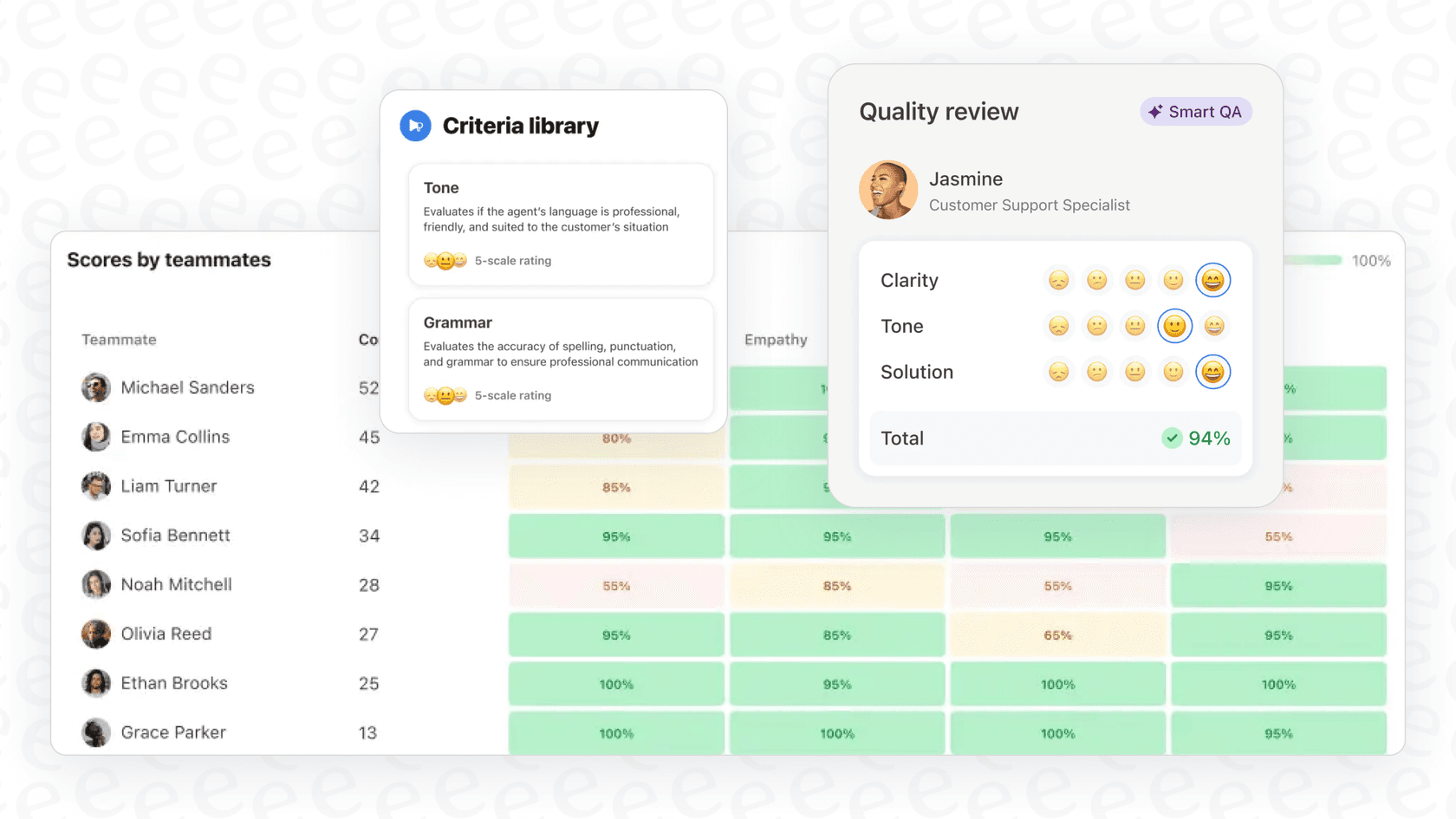
The result is a quality program that drives improvement instead of just measuring it.
Start building your QA scorecard today
Building an effective QA scorecard starts with understanding what matters to your customers and your business. Define your criteria based on those priorities. Choose a scoring scale that balances detail with practicality. Organize everything into a framework your team can apply consistently.
Start simple. You don't need twenty categories on day one. Pick the five or six criteria that matter most, get your team comfortable with them, then expand. A simple scorecard used consistently beats a complex one that sits unused.
If you're ready to move beyond manual review and get complete visibility into your support quality, we can help. Our AI-powered quality assurance evaluates every interaction automatically, giving you the data you need to coach effectively and improve continuously. You can also try eesel free and see how it works with your existing Zendesk setup.