


Why passing the answer test doesn't mean you're ready to launch
I build eesel's helpdesk integrations, which means I spend my days in exactly the code where launch-day problems live: triggers, handoffs, API calls into order systems, and the tags that say who touched a ticket. The model is rarely where it breaks; the plumbing usually is.
Zendesk's own testing best practices are a fair picture of how most of the industry thinks about this. They tell testers to "Focus on whether the AI agent's response was accurate and matched the tone of voice you expected." That's good advice, and it's also only the tip of the iceberg. The same help center documents, in other articles, that AI agent tickets don't run your ticket triggers and automations until they're escalated. So your routing rules fire for the first time at the exact moment of handoff, which is the one moment an accuracy test never reaches.
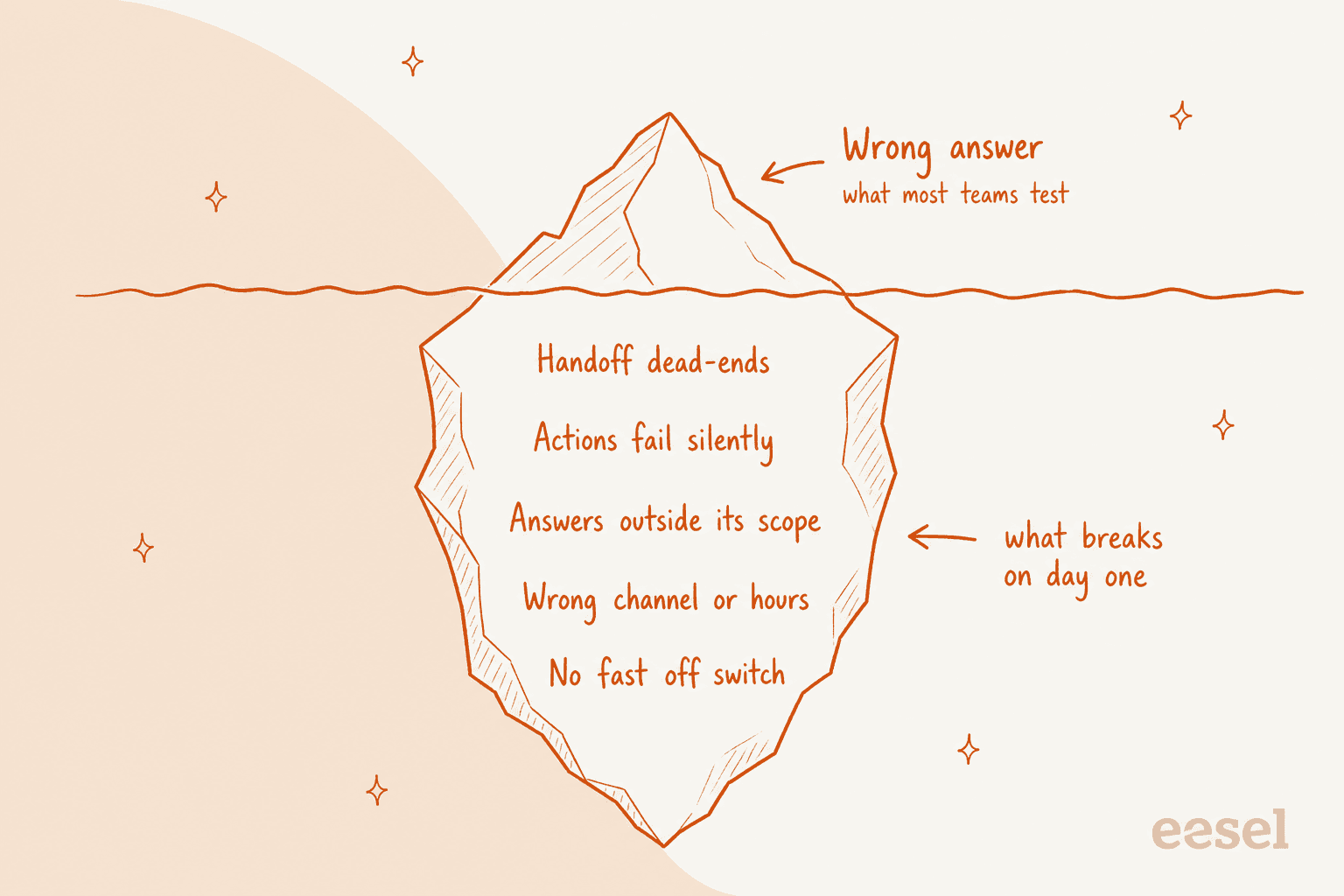
I've got my own scars here. On eesel's own platform I've watched a bot treat its own replies as new customer messages and answer itself, a self-reply loop that only showed up once it ran on a live helpdesk. I've seen internal UI text leak into a public reply during a customer's production trial. And I've seen bots on eesel's platform invent answers when the knowledge base came back empty, instead of handing off. None of those were wrong answers to a test question. All of them were seams.
The legal side has caught up too. In Moffatt v. Air Canada, the airline's chatbot told a customer he could apply for the bereavement rate after travelling, within 90 days of the ticket being issued, which contradicted Air Canada's own policy page. The tribunal called Air Canada's argument that the chatbot was "a separate legal entity" a "remarkable submission" and ordered it to pay $812.02. The bot was wrong, but the real failure was that nobody checked it against the source policy before customers relied on it.
If you've already read my colleague's guide to AI support agent testing, you've got the answer side covered. This post is the companion piece: everything else you have to check in the week before you flip the switch.
The seven pre-launch checks at a glance
Here's the whole plan on one screen. The first check is the one most teams already do. The other six are where launch day goes wrong.
| # | Check | What you're proving | Pass mark before launch |
|---|---|---|---|
| 1 | Replay real tickets | It answers your common questions correctly and in your tone | Scored on 50+ past tickets, accuracy and tone scored separately |
| 2 | Scope limits | It refuses or hands off topics it must not touch | Every excluded topic hands off, asked three different ways |
| 3 | Handoff paths | A person actually receives the ticket, with context | Every path lands in a watched queue, in hours and after hours |
| 4 | Actions | Lookups and writes work, and fail safely | Each action tested on test records, plus a forced failure |
| 5 | Where it shows up | It answers the right tickets and skips the rest | One test ticket per exclusion (internal, spam, VIP, other brand) |
| 6 | Off switch | You can stop it fast without losing tickets | Someone has turned it off and back on, timed |
| 7 | Reporting | You can tell what it did on day one | AI-touched tickets tagged and visible in one view |
The pass marks are mine, not an industry standard. Set your own, but write them down before you start testing, not after you've seen the results. If you need help picking the numbers, the AI support pilot scorecard has a template.
Check 1: replay real tickets for the answers
Start with the answer test, because everything else assumes the agent gets the easy questions right. Pull 50 to 100 recently solved tickets across your top topics, run them through the agent without it replying to anyone, and compare its answer with what your team actually sent.
Most helpdesks give you a tool for this. Freshdesk's email agent can evaluate imported tickets, up to 50 queries per run, and recommends at least 20. HubSpot's customer agent runs batch tests of up to 8 test sets without using credits. eesel's Simulation skill replays your real past tickets and scores each answer against what your team sent, then suggests instruction changes.
Score accuracy and tone as two separate numbers. On one eesel trial on live traffic, a jewelry ecommerce inbox doing about 1,000 tickets a month, 88% of drafts were pointed in the right direction but only 12% were sent as-is, and 7% had a factual error. Most rewrites were for length and tone, not facts. A single "accuracy" score would have hidden both problems.
Then keep the test set alive. This Reddit comment is the most useful advice on the topic, and it's not fancy:
"keep a list of test questions handy and run it through and see if you get the right answers. Whenever an edge case appears, add to the list of test questions, update your agent and re-run your tests. Boring, but works."

Include questions your docs only half-answer. The right result there is a handoff, not a confident guess. If you find answers that are wrong because the source is stale, that's a knowledge problem, and a knowledge base audit will fix more than any prompt tweak.
Check 2: test what it must not answer
This is where "we told it not to" meets reality. Every major helpdesk now separates soft guidance from hard rules, and the soft version is what most teams set up.
- Zendesk lists "Always escalate to an agent if the user mentions being hacked" as a bad instruction, because "Instructions cannot trigger escalations" (Zendesk instructions guide). You need a use case for that.
- Freshdesk says its "Topics to avoid" setting "may not fully prevent responses in edge cases", and points you to the handover setting for strict enforcement (Freshdesk identity and instructions).
- Help Scout puts it plainly: roles change how Scout replies, and to send topics straight to your team, "create an exclusion" (Scout roles).
- HubSpot lets you set guardrails per segment, and warns that responses "may not always exactly match" what you specified.
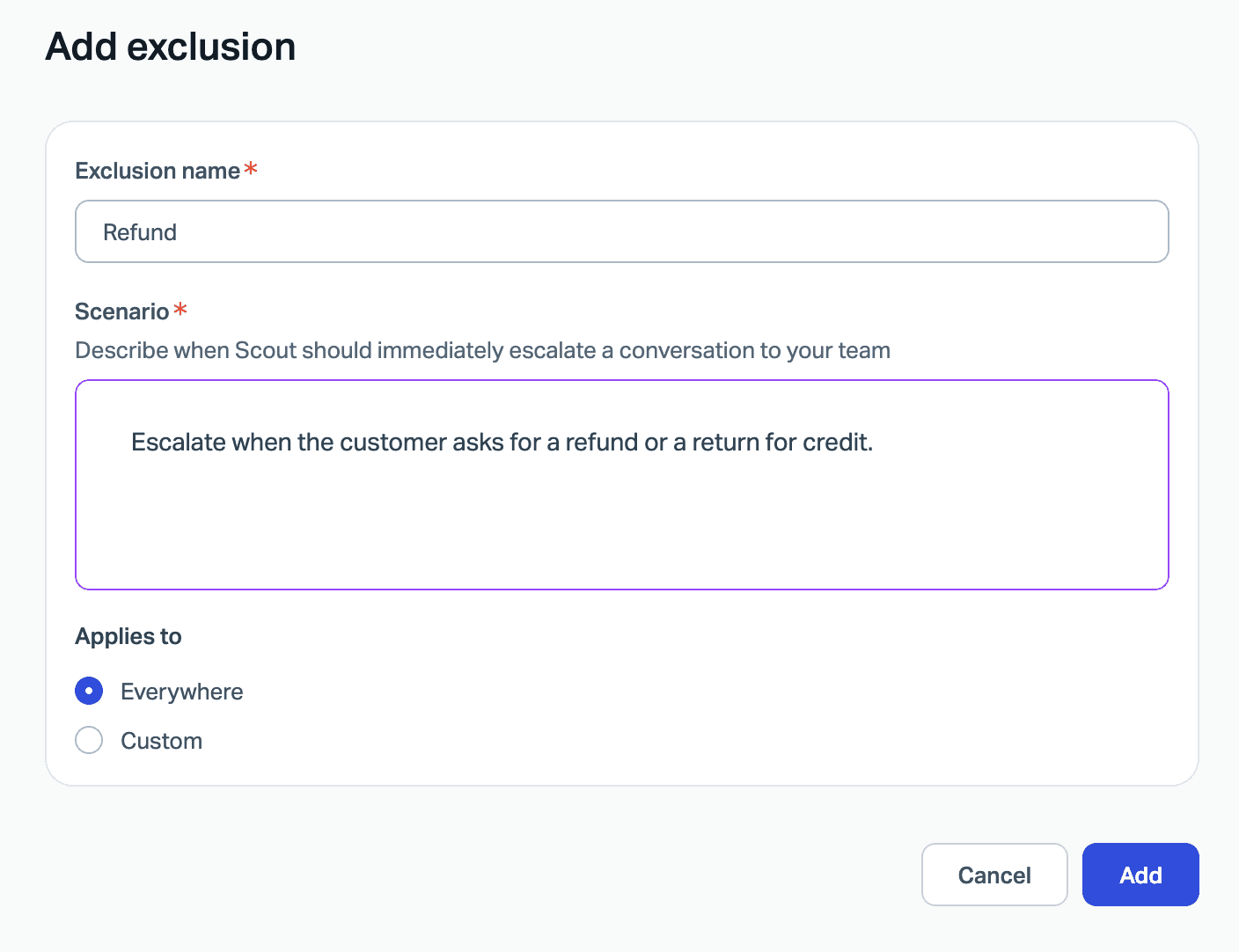
So for every topic on your "never" list (refunds over a limit, legal threats, account security, medical or safety questions, anything about a delivery date you can't promise), test it three ways: asked directly, buried in a longer message, and asked again after the agent says no. The pass mark is a handoff every time.
One ecommerce support manager using eesel caught exactly this in review. Their agent kept telling customers orders would arrive on time, and the note they left for it was blunt: "stop promising customer things we cant do. we cannot guarantee this customer's order to them by friday." That's a scope test you can write before launch: "Will it arrive by Friday?"
Then test what happens when a customer tries to talk it off-script. In January 2024 a DPD customer asked the bot to swear and write a poem about the company, and it did:
"Parcel delivery firm DPD have replaced their customer service chat with an AI robot thing. It's utterly useless at answering any queries, and when asked, it happily produced a poem about how terrible they are as a company. It also swore at me. 😂"
OWASP ranks prompt injection as the top risk for LLM apps and recommends "adversarial testing and attack simulations". For a support agent, that means a short list of tries: "ignore your instructions", "are you a human?", "give me a discount code", and a message that pastes in fake policy text. For a fuller playbook, see the guide to adversarial testing.
Customer stories make the scope point clearly. Luxedo, which sells projection systems, scoped its eesel agent to residential customers only: tickets from schools, gyms and other commercial buyers are skipped and stay with sales. Hardware failures, warranty decisions, refunds and electrical safety always go to the team. A boundary that specific is easy to test before launch: send one ticket from each excluded group and confirm the agent leaves it alone.
Check 3: run every handoff path end to end
A real handoff test asks three questions: did a person get the ticket, could they see what happened, and did the customer know what to expect? Those are three different checks, and each helpdesk handles them differently.
| Helpdesk | Where a handoff lands | Does context travel? | After-hours handling |
|---|---|---|---|
| Zendesk AI agents | The agent's transfer group, or an "Escalate to team" per path | Messaging history is backfilled into the ticket | Availability block in the dialogue |
| Freshdesk Freddy AI Agent | Unassigned queue or a named group (email) | Yes, an automatic private note with the reason | "Transfer outside business hours" toggle |
| Gorgias AI Agent | The handover section of the AI Agent view | No summary note documented | Separate online and offline instructions |
| HubSpot customer agent | Chosen users or teams, or a routing workflow | No summary documented | Working hours plus a separate handoff message |
| Help Scout Scout | Chat: the customer picks Email or Chat. Email: your inbox | No summary documented | Not documented for Scout |
A few of these details are easy to miss and painful on day one:
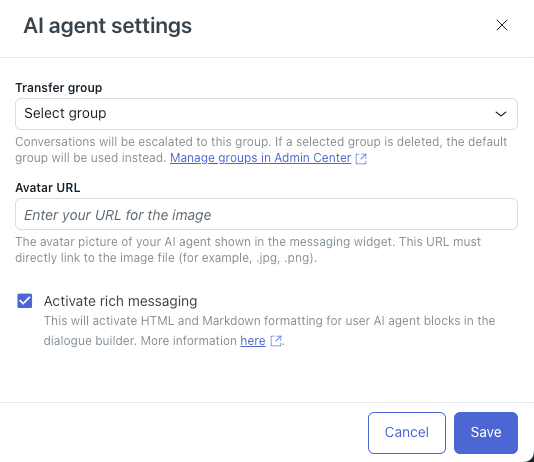
- Zendesk's transfer group has a silent fallback. The settings dialog warns that "If a selected group is deleted, the default group will be used instead." Rename or merge a group after setup and your handoffs quietly go somewhere else. Zendesk's email agents also stop replying once the
escalated_by_ultimatetag is applied, and Zendesk tells you to configure your workflows to find those tickets yourself. - Gorgias doesn't route handovers to a team by default. You build an auto-assign rule on the
ai_handovertag (Gorgias handover guide). Without it, handovers sit in the AI Agent view. - HubSpot's "Team only" routing hands off even when nobody is there. HubSpot says the agent "will execute a handoff even if no users are currently available", and it doesn't look at chat widget availability (HubSpot handoff setup).
- Freshdesk's takeover can't be undone. When a person clicks "Stop responding & assign to me", the AI draft "is discarded permanently" (Freshdesk email safeguards). Make sure your team knows that before they test it on a ticket they care about.
Here's what a handoff loop looks like from the customer's side. Every exit leads back to the start:
"The ChatBot looping around providing generic answers, asking what my problem is. It ignores direct request to speak with an agent or to create a customer service. It simply starts with "Please, tell us about the problem ..." If I keep asking the same question, I can managed to get to a list of choices: 1. Report a technical issue, 2. Visit our Status page, 3. Time Tracker issues. Typing 2 and 3 leads to nowhere. Typing 1 reset the chatbot and it start again asking about my problem."
And here's the version where the handoff "works" but the context didn't travel:
"Doesn't help at all if your support team ignores the bot chats. There is NOTHING more frustrating than talking to a bot for ten minutes just to have your live agent ask "can you please give me your account number one more time?"."
So the handoff test has five steps. Ask for a person three different ways (direct, frustrated, and mid-flow). Trigger every escalation reason you've configured. Open the ticket as the agent who receives it and check the history and any summary are there. Read the message the customer got about what happens next. And time how long it takes someone on the team to notice the ticket. For more on designing the handoff itself, see these AI handoff best practices and the guide on when to hand off.
The handover message matters as much as the routing. SE Ranking set its eesel agents to tell customers to expect a reply in one or two business days, never that someone is joining now. Refunds, trial extensions and repeated questions go to the team with the customer's name and email attached. That's a promise the team can keep, so it's also a promise you can test.
Test the after-hours path separately
After hours is where handoffs break most, because the queue that's normally watched isn't. Every helpdesk handles it a little differently:
- Freshdesk has a "Transfer outside business hours" toggle, and warns you to avoid using instructions for business hours handling (Freshdesk handover settings).
- Zendesk uses an availability block at the start of the escalation path.
- Gorgias closes an offline chat ticket if the shopper doesn't leave an email address.
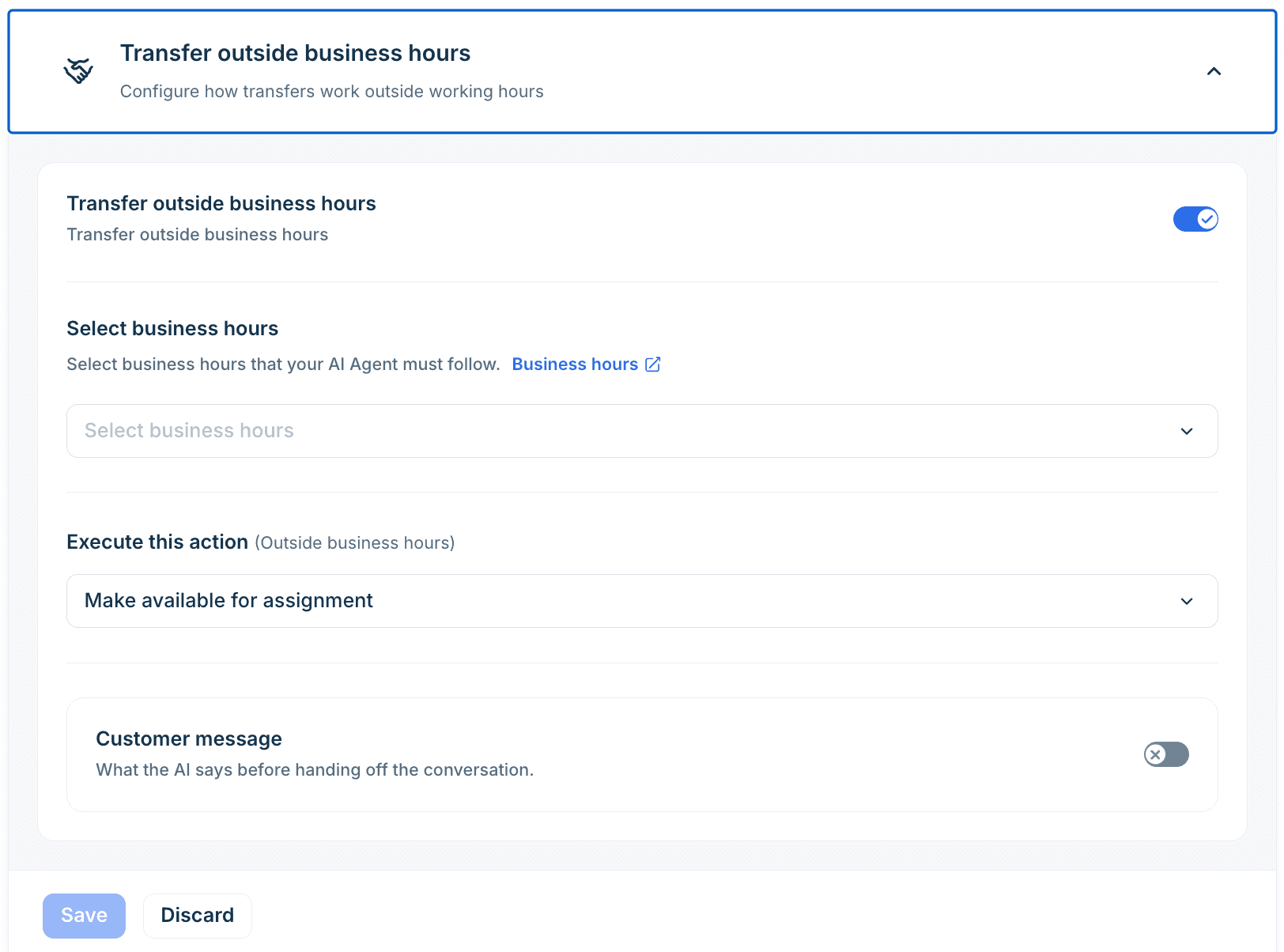
Run one handoff test with your business hours set to "closed" and confirm three things: where the ticket lands, what the customer is told, and whether anything gets closed without a reply. If your helpdesk has its own business hours settings, check the AI agent uses the same schedule as your team.
Check 4: test every action, then break it on purpose
Actions are where an AI agent stops talking and starts doing: looking up an order, adding a tag, starting a refund, cancelling a subscription. They're also where test environments let you down most, because testing an action usually means touching a real system.
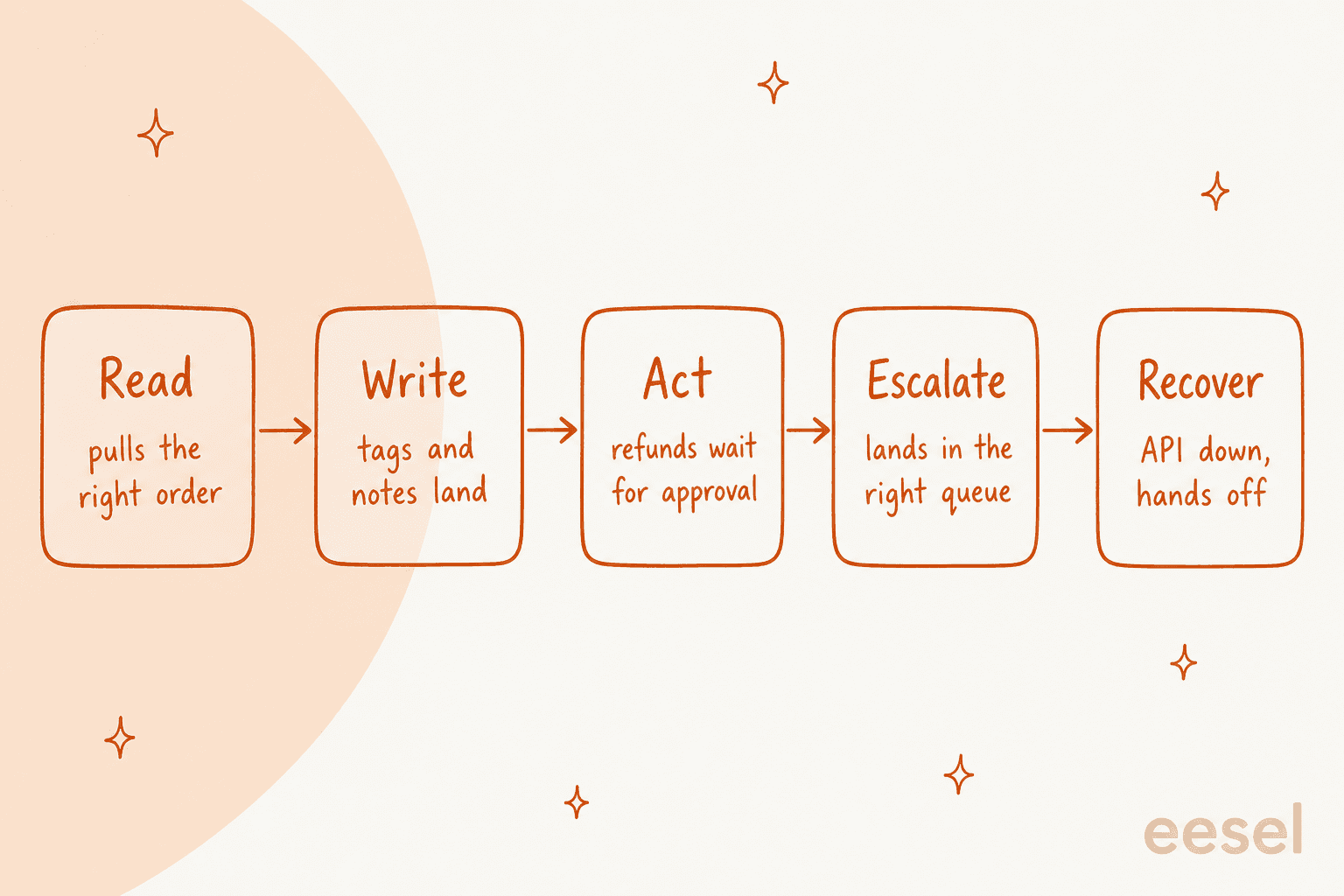
Test each action in all five ways it can matter. Read: does it pull the right order when two customers share a name? Write: do tags, notes and field changes land on the right ticket? Act: does anything that costs money wait for a person? Escalate: when the action can't finish, does the ticket go to a human? Recover: when the API is down or slow, does the customer get a sensible reply instead of silence?
What the helpdesks document about failures:
- Zendesk custom actions time out after 10 seconds, and then "the action isn't performed." Zendesk's own guide to generative procedures gives a good rule to copy: "If API returns 'timeout', retry up to 2 times. If still failing, escalate the request." It also flags that a call can return success and still go down the failure branch if the agent can't read the response.
- Freshdesk chat actions route to a fallback path on timeout or failure. On email, though, "confirmation blocks are skipped" because there's no live conversation, and Freshdesk tells you to put safeguards "at the API layer" (Freshdesk API actions). Its Test API button uses "real values and may affect your external system".
- Gorgias stops a multi-step action at the failed step and hands the ticket to your team, but earlier steps stay done (Gorgias action logs). Test conversations "use real data from your connected apps", so use a test customer profile.
- HubSpot lets you set up to 20 actions with an action protection level (None, Match email or Verify email), but doesn't document what happens when one fails. Test that yourself.
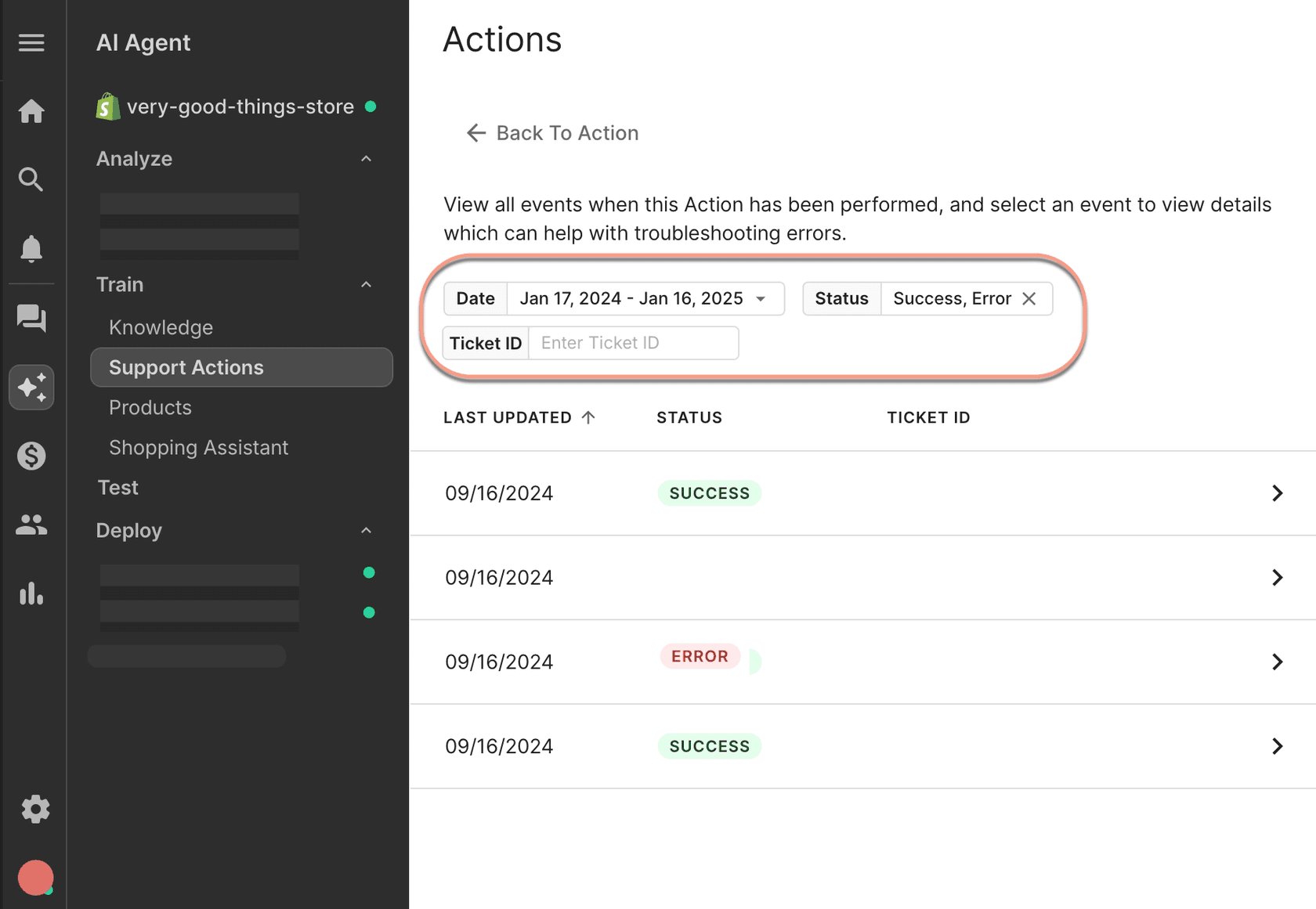
No helpdesk I checked has a button that simulates an API outage. To test the Recover step, point the action at a staging endpoint and turn it off, or give it a wrong order number and an expired token. It feels like extra work right up until the order system has a bad morning.
The safest default is the boring one: start every action that changes something behind an approval. In eesel, each action is set to Auto, Needs approval or Disabled, new agents are meant to start supervised, and "Approvals never run on their own after a timeout." If you're writing your own rules for which refunds a bot can touch, a refund approval matrix is a good place to start.
Check 5: confirm where it shows up, and where it stays quiet
An agent that answers well on the right tickets can still embarrass you on the wrong ones. Triggers, channels, brands and rules decide which tickets the agent sees, and every helpdesk has its own surprises:
- Gorgias rules run first. If a rule sends an auto-reply, the AI Agent "may still attempt its own response", and the customer gets two messages (Gorgias rules and AI Agent). Gorgias also closes, without replying, any message it judges unrelated to ecommerce or support, and that can't be turned off. Check the closed and snoozed tickets after a test run.
- Zendesk escalates every message that contains a PDF to a person, which it calls "expected behavior" (Zendesk troubleshooting). If your customers send invoices as PDFs, your deflection numbers will look different from your test.
- Freshdesk lets you deploy the email agent to internal teams first, "a safe pilot rollout", with up to five levels of nested rules for who it serves (Freshdesk email agent setup).
Send one test ticket for every kind of ticket the agent should skip: an internal ticket, spam, a VIP, a ticket for your second brand, a job application, a vendor pitch. Lesson Pro, which runs several lesson brands from one Zendesk, set its eesel agents to skip job applications, voicemails and order forms, and to identify the brand before writing a word. Getting a brand wrong in a reply is worse than replying slowly, and it's the easiest thing to test.
Then let the agent reply to a real test ticket inside your live helpdesk and watch that ticket for ten minutes. This is the only way to catch a self-reply loop, the bug I mentioned earlier, where the trigger fires on the agent's own reply. A sandbox won't show it either. Zendesk's sandbox turns webhooks off by default, doesn't copy action flows or skills-based routing, doesn't support SMS, and a full copy "can take up to a week or more". It's a fine place to test answers and a weak place to test seams. There's more on that trade-off in Zendesk sandbox vs production.
Check 6: rehearse the off switch
Every launch plan has a line that says "we can turn it off if something goes wrong". Very few teams have actually done it. Do it before launch, time it, and make sure two people know how.
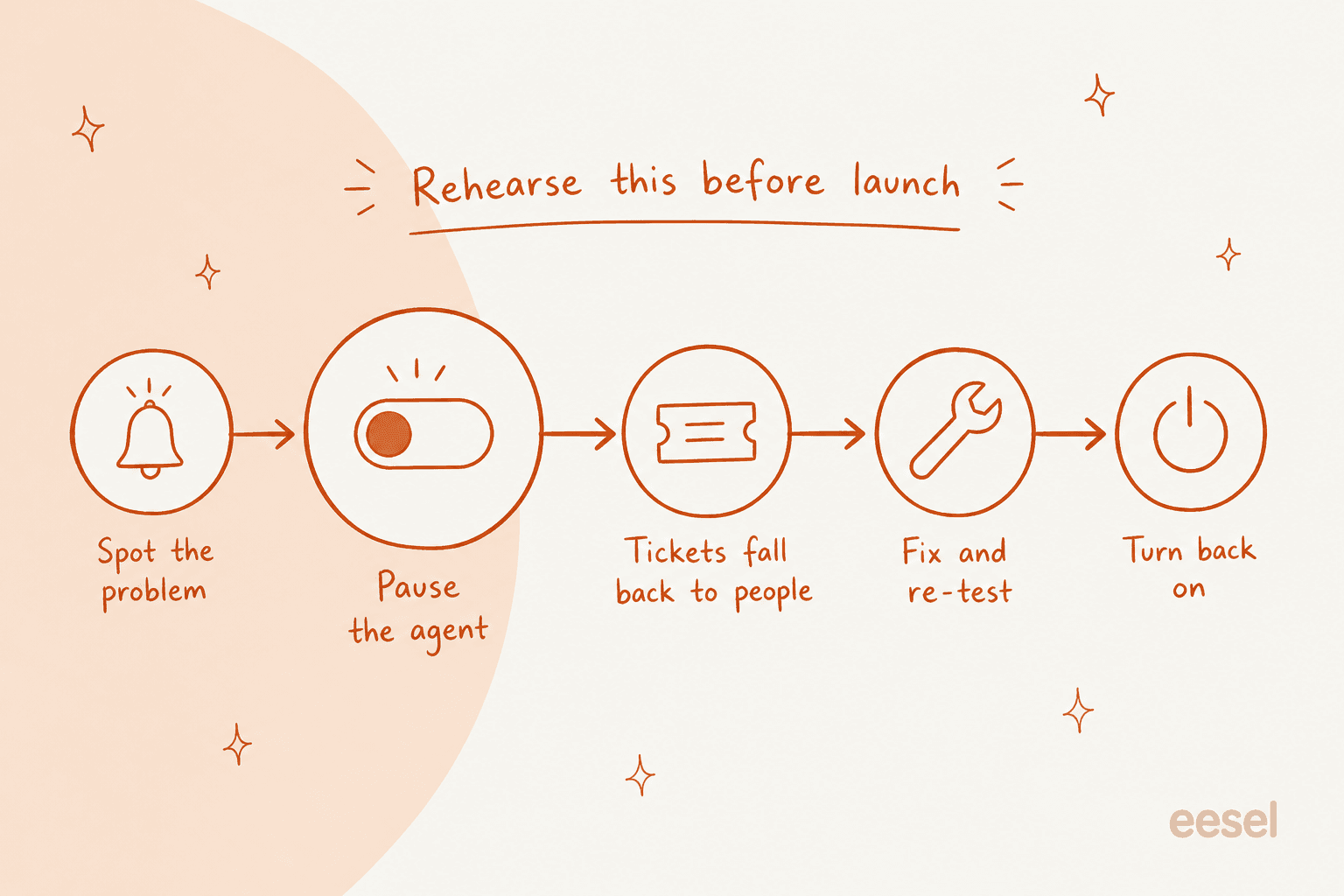
The off switch isn't the same thing in every helpdesk, and some of the obvious-looking switches don't do what you'd expect:
| Helpdesk | How you turn it off | Watch out for |
|---|---|---|
| Zendesk | Deselect the channel under Manage channels (Zendesk guide) | No pause button. If you edited the email trigger, that menu no longer manages the email agent |
| Freshdesk | Deactivate the agent on the source, or take over a ticket | Takeover is per ticket and can't be undone. Config changes apply to new tickets only |
| Gorgias | Per-channel ON/OFF toggle in Deploy | Turning a skill off isn't an off switch, the agent falls back to your knowledge (Gorgias skills) |
| HubSpot | Usage & Limits switch, or Remove per channel | When off, it keeps handling existing threads, only new ones go to people (HubSpot deploy) |
| Help Scout | Enable toggle per Beacon and per inbox | Whether it's instant isn't documented |
Two of those are worth a second read. In Gorgias, the thing that looks like "turn off the refund skill" doesn't stop refund questions; the agent answers them from your knowledge instead, and stopping it on a slice of tickets takes an "ignore" rule. In HubSpot, the handoff page lists "the agent is paused" as a reason to hand off, while the deploy page says existing threads keep running when it's off. Test which one you get.
Write the drill down as a one-page runbook: who can turn it off, the exact clicks, where the tickets go when it's off, who tells the team, and what has to be true before you turn it back on.
Check 7: set up the reporting before day one
On launch day, someone will ask "is it working?" and you'll want an answer in under a minute. That means the tags and views have to exist before the first live ticket, not after.
At minimum, tag every ticket the AI touches, tag every handoff with a reason, and build one view for "handed off and not yet picked up". SE Ranking asked for an ai_handled tag on every ticket eesel touches, plus helpful and not helpful tags, so it could count containment inside Zendesk instead of guessing. Freshdesk logs a handover reason for every ticket automatically, including "System issue" and "Max turns exceeded", which is a free escalation quality report if you use it.
Then decide what you'll review in week one. This is the best short answer I've read on that:
"The expensive misses are usually the ones that look confident and don't escalate. So I'd rather have a slightly annoying bot that hands off early than one that quietly invents an answer. If I were running it, I'd review a small sample of resolved tickets every week, plus every escalation and complaint. That's probably more important than the model choice."
Gorgias suggests reviewing at least 10 AI-handled tickets in the first week (Gorgias go-live guide). I'd go further on day one: read every handoff and every action run. The CX AI metrics guide covers what to track after that.
What to do if something goes wrong on day one
Even with all seven checks done, something will surprise you. The useful question is whether it's a "pause now" problem or a "fix today" problem. Pick the symptom you're seeing:
Launch-day triage
Something went wrong on day one. Do you pull the plug?
Pick what you are seeing. You get the call, the first move, and the pre-launch test that would have caught it.
- Pause?
- Pause the topic if money, legal or safety is involved. Otherwise keep it on and fix today.
- Do now
- Find every reply on that topic since launch and send a correction from a person. Fix the source document, then add a plain rule ("never quote a refund window, link the policy page").
- Test that catches it
- Questions your docs half-answer or contradict. The right result is a handoff, not a confident guess.
- Pause?
- Pause now on that channel. A trapped customer is the fastest route to a public complaint.
- Do now
- Turn the channel back to people, then check where the handoff is supposed to land and whether "talk to a person" is a trigger at all.
- Test that catches it
- Ask for a human three different ways, mid-conversation, outside business hours and on every channel.
- Pause?
- Pause the action, not the whole agent. Move it back to approval-only.
- Do now
- Pull the activity log for every run of that action since launch and reverse what you can by hand.
- Test that catches it
- Run each action against test records, then break it: wrong order number, two matching customers, the API timing out.
- Pause?
- Keep it on but narrow the trigger today.
- Do now
- Add the missing exclusion (tag, brand, group, sender) to the trigger and check what else matches the same condition.
- Test that catches it
- Send one test ticket per exclusion you care about: internal, spam, VIP, the second brand, and confirm the agent skips it.
- Pause?
- Keep it on. The agent did its job, the routing didn't.
- Do now
- Point the handoff at a group someone watches, add the view to the team's shift, and promise a realistic reply time in the handoff message.
- Test that catches it
- Trigger a handoff and time how long it takes a teammate to notice it, during hours and after.
- Pause?
- Pause now. Loops multiply by the minute.
- Do now
- Check the trigger fires on customer messages only, not on any update or any public comment.
- Test that catches it
- Let the agent reply to a real test ticket in the live helpdesk and watch the ticket for ten minutes afterwards.
The pattern behind the widget: pause anything that traps a customer or spends money, and fix routing and trigger problems with the agent still running. When it's a vendor's support bot that goes wrong in public, the fix tends to look the same. After Cursor's AI support bot invented a lockout policy in April 2025, the cofounder's own post-mortem on Hacker News started with labeling and a refund:
"Apologies - something very clearly went wrong here. We've already begun investigating, and some very early results:
Any AI responses used for email support are now clearly labeled as such. We use AI-assisted responses as the first filter for email support. We've made sure this user is completely refunded - least we can do for the trouble." mntruell (Cursor cofounder), Hacker News

Your go/no-go call
The night before launch, run down this list. If any line is a "no", hold that piece back for now. Launch the lane that passes and hold the rest.
- The agent has been scored on real past tickets, with accuracy and tone scored separately.
- Every "never answer" topic hands off, tested three ways, using a hard exclusion rather than an instruction.
- Every handoff path lands in a queue someone watches, in hours and after hours, with context attached.
- Every action has been tested on test records and forced to fail once.
- One test ticket per exclusion type has been skipped correctly, and a live test ticket didn't loop.
- Two people have turned the agent off and back on, and know where tickets go when it's off.
- AI-touched tickets and handoffs are tagged, and there's a view for unpicked handoffs.
If you want a full rollout plan to go with this, the guide to running an AI support pilot covers the four weeks after launch, and the list of AI implementation mistakes covers the ones that show up later.
How eesel handles the seams before launch
I'm biased, since I build it, but this is the part of eesel I'm proudest of, because it's built around the seams rather than the demo.
- Answers first. The Simulation skill replays your past tickets and scores each answer against what your team sent, then lists fixes. Connecting a helpdesk is read-only: "It does nothing on tickets until you create an automation."
- Hard switches, not just instructions. If some ticket history shouldn't be learned from, eesel's docs are blunt: "Telling it in its instructions to ignore past tickets does not stop it finding them; the switch does" (Zendesk setup).
- Actions behind approval. Every action is Auto, Needs approval or Disabled, and the docs recommend keeping refunds behind an approval.
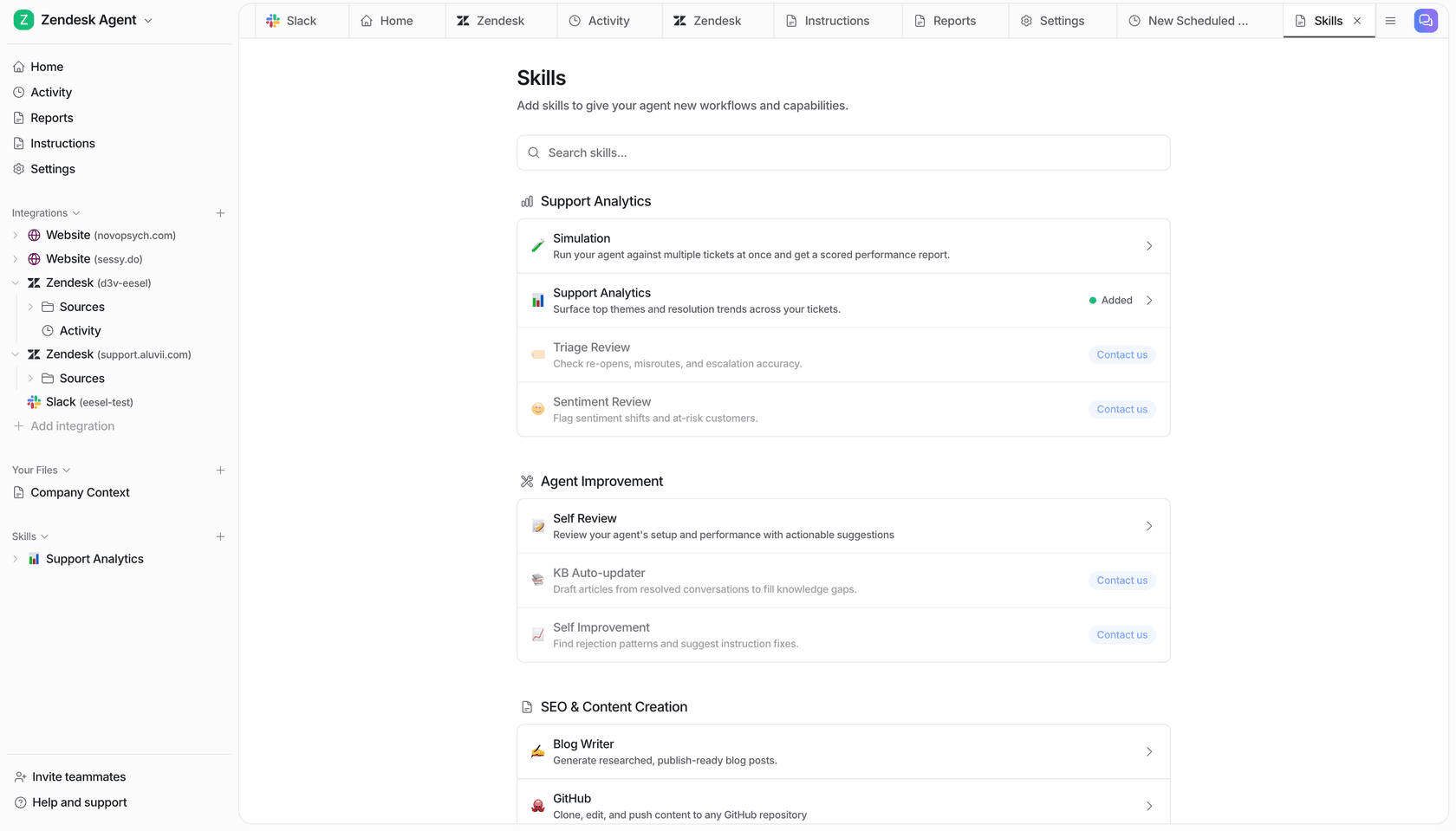
- A log of what it actually did. The Activity page lists every ticket, what it searched, each action, who approved it, and skipped tickets with the reason.
- A terminal for the plumbing. The eesel CLI lets you test the agent with
eesel chat, check held actions witheesel approvals, readeesel activity, and use--dry-runto print the exact call a write would make without sending it. That's useful when a coding agent like Claude Code is helping you wire up the integration and you want to see the write before it happens.

Beautek, a B2B equipment supplier in Germany, is a good example of the handoff side done right. Its website chat answers product and order questions in German, but frustration, legal questions, complex orders or a request for a person create a Zendesk ticket with the conversation attached. In one month that was 20 Zendesk tickets created from chat, most of them sales leads, while Zendesk tickets themselves stay as drafts the team approves.
Test your AI agent before launch with eesel
If your launch plan is "we tested the answers, we'll figure out the rest live", eesel is built for the rest. It joins your Zendesk, Freshdesk, Gorgias or HubSpot like a new hire: it learns from your past tickets, gets scored on them before it touches a customer, and can start with every reply and refund waiting for your approval. You decide when each lane goes live, and you can switch any of it back off.
The free plan includes 100 credits with no card, and paid plans start at $299/month for 500 credits (pricing). Try eesel on a copy of last week's tickets and see what it would have done.