


Why "resolved by AI" means five different things
I've spent two years on the search side of support content, and the pattern in what buyers type is clear: they ask "what is a good AI resolution rate?" long before they ask "what does my vendor count as resolved?" The second question is the one that matters, because the number on your dashboard is only as honest as its definition.
Here's the scar that taught eesel this. On a 100-ticket cross-check of a German online jewelry retailer's Zendesk inbox (about 1,000 tickets a month), the agent's drafts were 88% directionally right, but only 12% were sent as-is, and 7% had a factual error. One "accuracy" number would have hidden both of the other two. The same inbox was 22% spam, which is why the first question I now ask about any quoted AI resolution rate is whether auto-closed spam is in it.
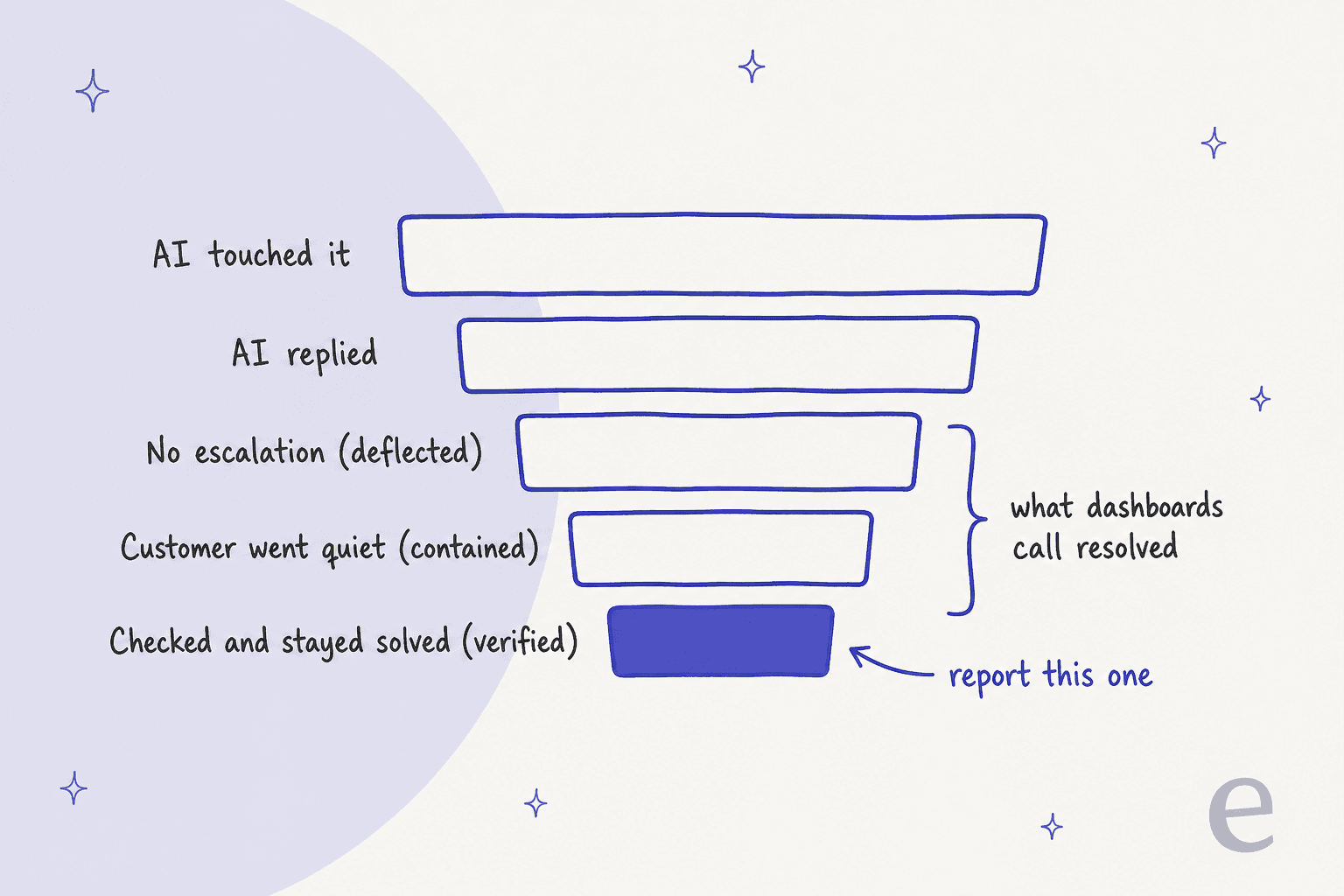
Each step down that funnel is a stricter definition, and each one gives you a smaller number:
- Touched: the AI saw the conversation. Gorgias calls this coverage, HubSpot calls it handle rate.
- Replied: the AI sent something. Easy to count, says nothing about outcome.
- Deflected: nobody escalated. Zendesk's own docs say "any conversation that doesn't end in escalation is considered deflected."
- Contained: the customer went quiet inside a time window. Quiet can mean happy, or it can mean they gave up.
- Verified: something checked the outcome. A model reading the transcript, a human audit, or (the strongest test) no repeat contact about the same issue.
"execs loved our "automation success rate" - 40-something percent deflection, beautiful QBR slides. meanwhile i'm going through churn interviews and people are literally saying "i tried to get help and just gave up." that's not deflection, that's abandonment dressed up in a metric."

If you remember one thing, it's that a vendor's headline AI metric is usually somewhere between deflected and contained, and the gap between that and verified is where your CSAT quietly leaks. For the broader list of service numbers, I keep a separate guide to AI customer service metrics and the classic customer service KPIs.
How each helpdesk defines its AI metric
This is the section most posts skip, and it's the one that decides whether your report means anything. I read each vendor's own help center and pricing page in October 2026. The short version: the billing unit and the headline metric are usually the same thing, which is worth knowing before you treat that metric as neutral.
| Helpdesk | What its AI "win" is called | What counts | Time window | What you pay |
|---|---|---|---|---|
| Zendesk | Verified resolution (one of three tiers) | No follow-up from the customer, then an LLM reads the transcript and confirms it was solved | 2 hours on messaging (up to 72), 72 hours on email, from the first message | $1.50 committed, $2.00 pay-as-you-go per automated resolution (pricing) |
| Freshdesk (Freddy AI Agent) | Resolved / deflection rate | "Conversations closed without human intervention" | Abandoned after about 24 hours of no reply | $49 per 100 sessions, billed per session whatever the outcome (pricing) |
| Gorgias | Automated interaction | Customer does not need a human within 72 hours | 72 hours | $0.85 to $1.00 per automated interaction (pricing) |
| HubSpot (customer agent) | Resolution | Agent shared a source or took an action, and no visitor-initiated handoff | Set 72 hours after the last visitor reply | 50 HubSpot Credits per resolved text conversation |
| Salesforce (Agentforce) | Deflected session / billable resolution | Session "ended by user", or for billing: 2+ turns, final feedback not negative, no escalation | Up to 2 hours per chat resolution | $2 per conversation, or Flex Credits at $500 per 100k (pricing) |
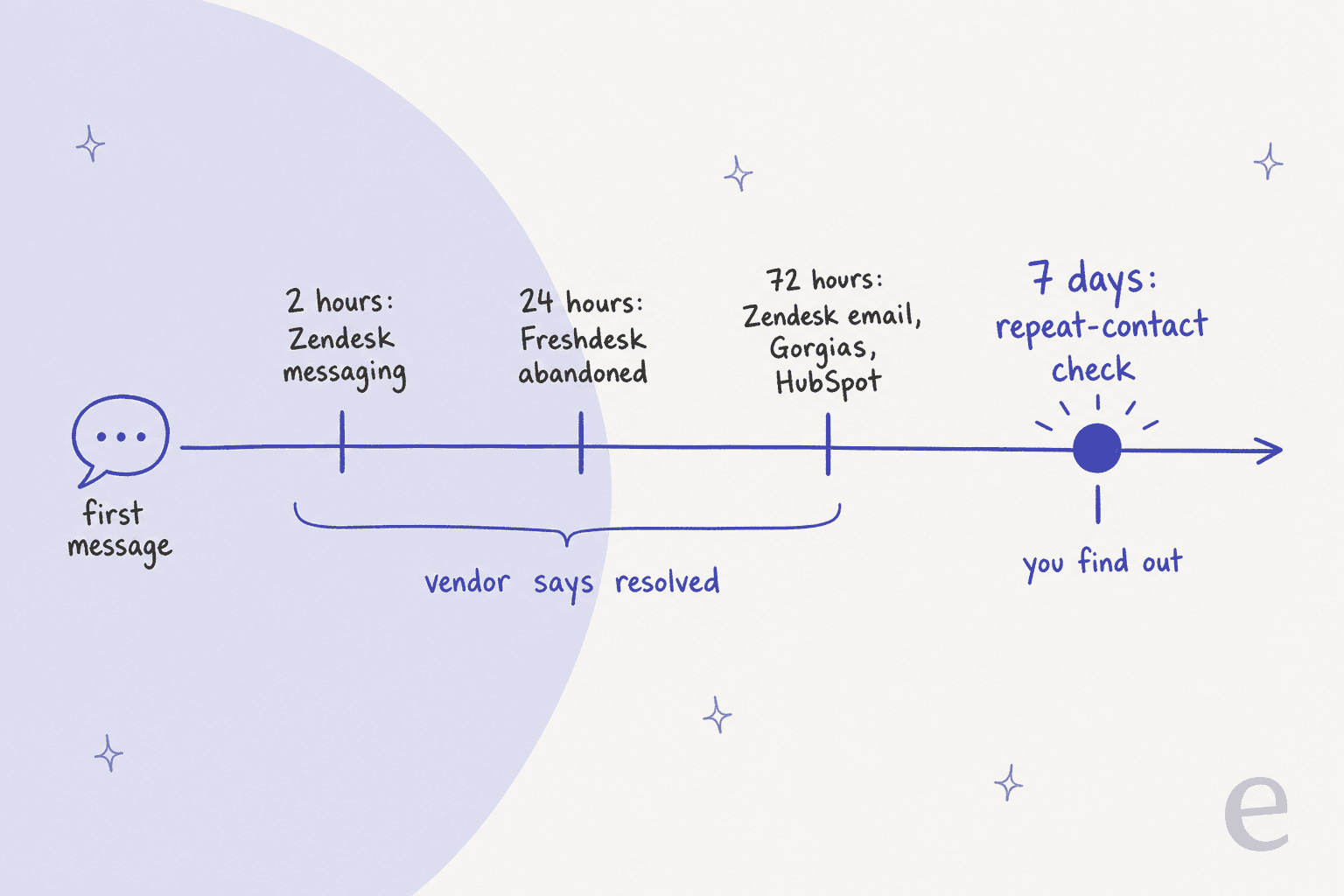
The timeline is the part that surprised me most. Every vendor decides "resolved" within three days. A customer who writes back on day four about the same broken order shows up as a brand new conversation, and the first one stays a win. That's why repeat support tickets belong on any AI scorecard.
"The last one in the absence of feedback is only a very weak proxy for a resolved issue. If you consider customer support a cost center, you can guess how managers would optimize these numbers."

Zendesk: three tiers, and only one is billed
Since May 18, 2026, Zendesk splits every automated resolution into three tiers. Assisted escalation means the AI helped but a human finished. Contained resolution means the customer didn't ask for clarification, give feedback, or ask for a human, but the conversation failed an LLM check. Verified resolution means it passed. Only verified ones count against your allowance.
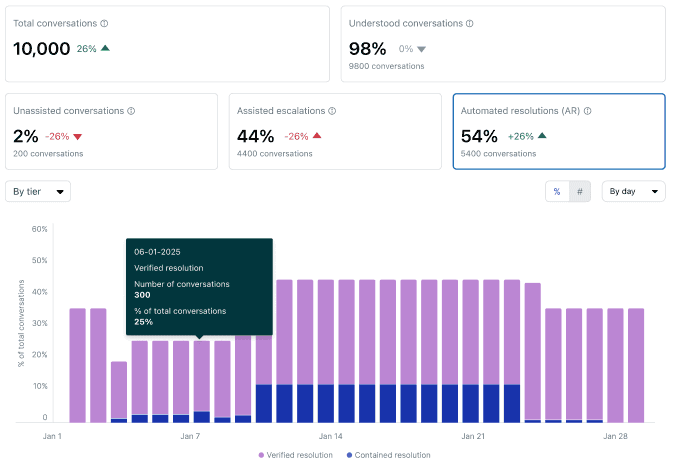
This is a fair design, and it's the closest any helpdesk gets to "verified". Three things to know before you quote it upward:
- The verification is a model reading the transcript. No human review step is described.
- The window starts at the first message, so on messaging the default check runs 2 hours in.
- Resolutions are "counted per conversation rather than per user", and the current AI agent reports have no reopen or repeat-contact metric. The old "non-reopened resolution rate" only lives in the legacy dataset.
Buyers have pushed on the counting rules for a while. Before the tiers existed, one Zendesk admin evaluating the pricing wrote:
"We're also finding the "resolution" logic really unclear, especially when a user clicks something passively (like "Yes" on an article) and it still counts as a full resolution. It feels risky to commit when the billing metric isn't tightly tied to actual customer outcomes."
The verified tier is a real step toward fixing that. Zendesk's resolution rate is automated resolutions divided by all conversations, per its metrics reference. Its AI CSAT is called BSAT: the share of 4 and 5 ratings on a 1 to 5 scale, messaging only. One detail matters for your read. Per the BSAT docs, BSAT requests sent by a trigger "aren't sent for conversations that were escalated to a human agent." So BSAT mostly scores the conversations that already went well.
I've covered the dashboards themselves in Zendesk AI agent analytics and the billing math in Zendesk AI pricing.
Freshdesk: watch where abandoned conversations land
Freshdesk's AI Agent Studio reports a funnel: Total, Unresolved, Escalated, Abandoned, Resolved, Closed. "Resolved" is "conversations closed without human intervention," and a conversation with no reply for about 24 hours is classed as abandoned. To its credit, Freshdesk flags a deflection rate "below 60% for a high-volume topic" as a red flag, and warns that a rising count is not a rising rate.
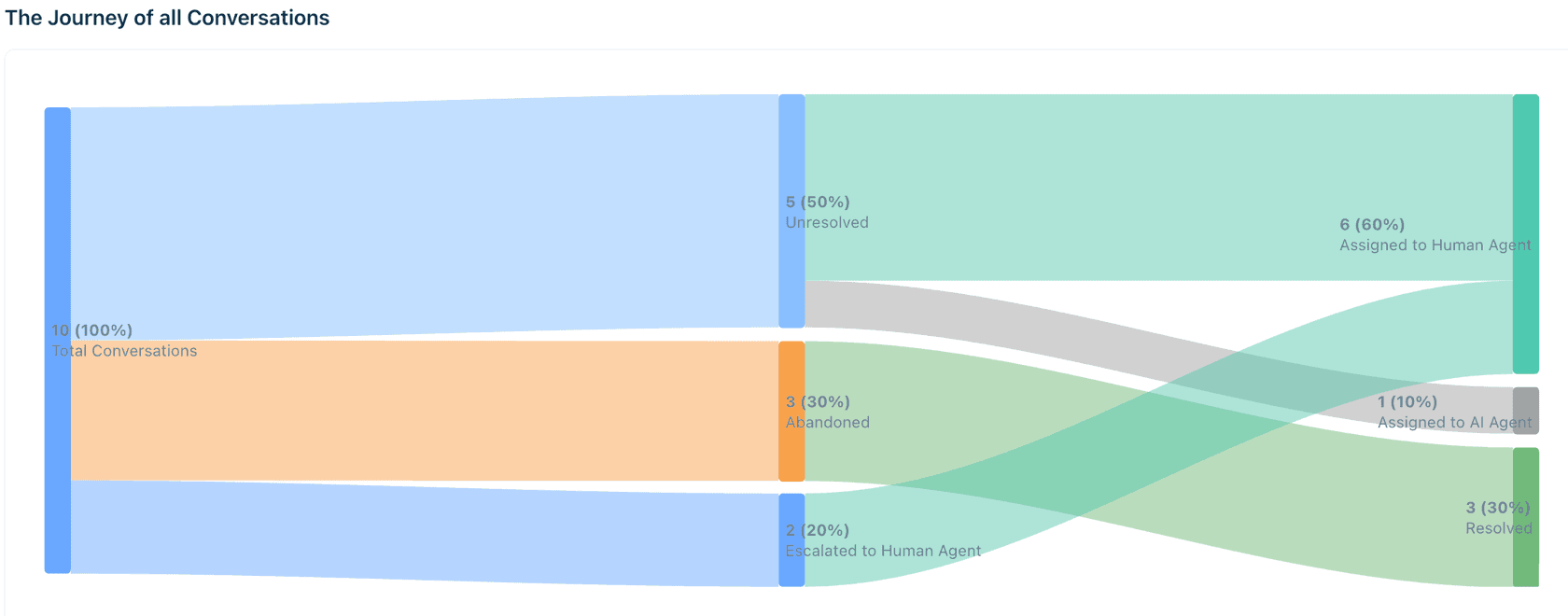
Look closely at the sample chart in Freshdesk's own docs: the 3 abandoned conversations flow into the Resolved column on the right. That's the containment problem in one picture. The email agent is looser still, since its deflection trend can include "a ticket being closed by a human agent after the customer read an answer without further interaction."
Freddy's AI CSAT is thumbs feedback, not a survey, and I found no repeat-contact metric for the AI agent. Billing is per session ("all interactions... within a 24-hour window", 72 hours on email, per the session FAQ), so your cost per resolution is total session spend divided by resolved conversations, not $0.49. More on the product in my Freddy AI agents breakdown and the Freddy AI pricing guide.
Freshworks' 2026 benchmark, built on 33,889 accounts and 1.2 billion tickets per its benchmark report, reports that "AI agents are delivering an average deflection rate of 83%." That is a real number from a big dataset, but the public pages don't define deflection, and they publish no repeat-contact or AI CSAT figure next to it. Treat it as a deflection benchmark, not a resolution benchmark.
Gorgias: the dashboard number is the invoice number
Gorgias counts an automated interaction when "the customer does not require the involvement of a human agent within 72 hours." Its metric glossary is one of the clearest I read:
- Automation rate = automated interactions divided by all billable workload (automated plus human-handled tickets), spam excluded.
- Coverage rate = the share of tickets AI Agent "resolved, handled, or handed over".
- Success rate = billable AI interactions divided by every ticket AI Agent handled, handovers included.
- AI CSAT = the 1 to 5 survey average on any ticket where AI Agent sent at least one reply, handed-over ones included. That's a fairer read than a survey sent only on clean wins.
Two things to keep in view. Under current pricing, a ticket the AI fully resolves can carry both a ticket fee and an automation fee. And the "cost saved" card assumes $3.10 of human cost per ticket on top of your ticket fee, which may or may not match your team. If you're on Gorgias, my Gorgias analytics guide and Gorgias AI Agent pricing breakdown go deeper.
HubSpot: the one vendor that says it out loud
HubSpot's customer agent counts a resolution when it shared a content source or took an action "and there is no qualifying handoff", with the status set 72 hours after the last visitor reply. Only handoffs the visitor starts count. A rep reassigning the ticket, or a workflow doing it, does not stop it counting as resolved.
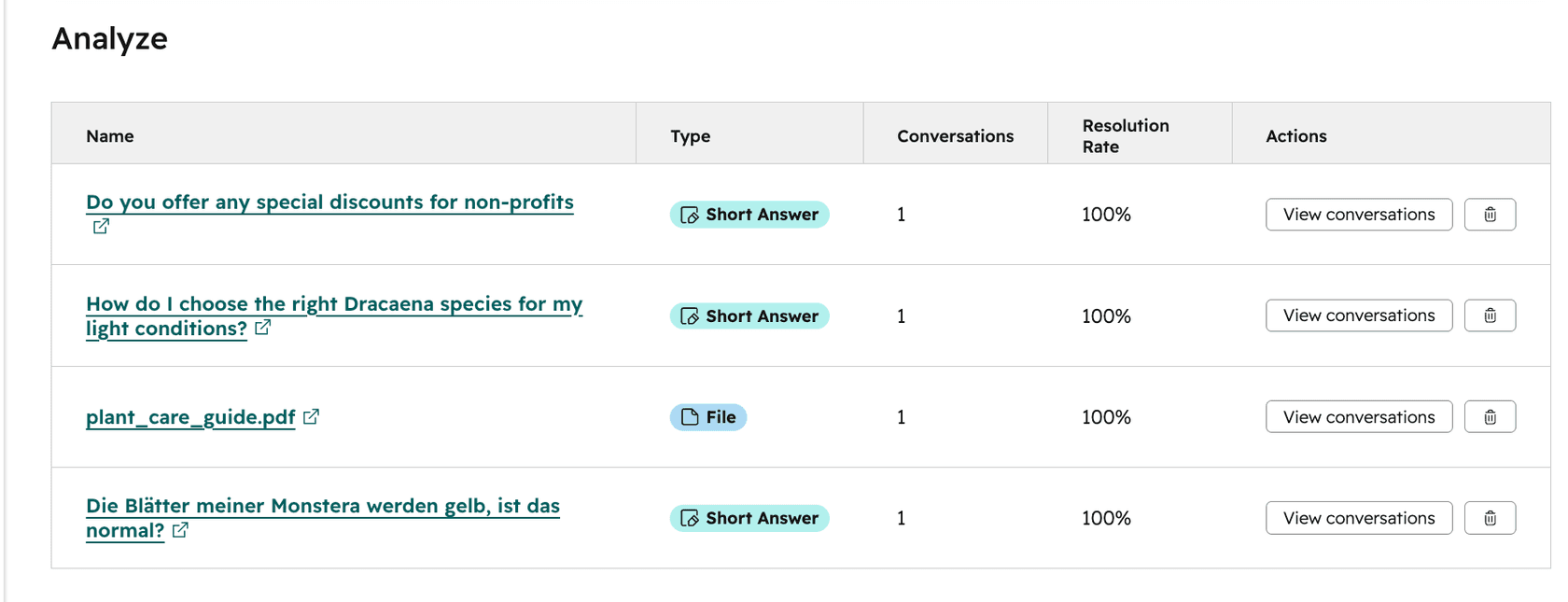
The screenshot above is a good reminder that a 100% rate on one conversation is not a finding. Volume first, rate second.
The line I'd pin above every AI dashboard comes from HubSpot's own performance docs: "Deflections do not always indicate resolution. For example, if the customer agent was unable to answer a question, the customer may have left the chat without requesting a human agent." HubSpot also bills per resolution in HubSpot Credits, and if a customer replies to an email thread after 72 hours, the conversation reopens and "additional credits are consumed" if it resolves again. The Breeze customer agent post covers setup.
Salesforce: deflection and resolution kept apart
Agentforce's Agent Analytics defines a deflected session as one "ended by user (not by escalation or abandonment)", and keeps a separate, model-judged Task Resolution Rate. That separation is the right instinct. Billing is stricter than deflection: a billable resolution needs at least two turns, final feedback that is "not explicitly negative", and no escalation, with a chat resolution capped at 2 hours. See Agentforce pricing for the full rate card.
Salesforce's survey of 3,075 service professionals found AI agent adoption rose from 39% to 66% from 2025 to 2026, with customer satisfaction ranked the "#1 improved KPI". Those are self-reported answers from service teams, not measured customer CSAT, which is exactly why your own measurement matters.
The CX AI metrics that tell you it's working
So what do you track? Here's the set I'd use, with the formula, because a metric without a formula is a vibe. The fuller argument for each lives in posts on AI CSAT, containment and escalation quality and AI first contact resolution.
Verified resolution rate (the north star)
Formula: conversations the AI closed, minus those that came back about the same issue within 7 days, minus those that reached a human anyway, minus spam and "thanks!" closes, divided by all conversations the AI touched.
Use your vendor's strictest tier as the starting point (Zendesk's verified tier, Salesforce's task resolution), then subtract repeat contacts yourself. Report it next to the vendor number, never instead of it, so nobody thinks you're hiding the flattering one.
Repeat contact within 7 days
Formula: AI-resolved conversations where the same customer opens a new conversation on the same topic within 7 days, divided by AI-resolved conversations.
This is the guardrail no vendor ships. Match on customer email or ID plus topic tag. If it rises while your resolution rate rises, the AI is closing things it didn't fix.
"Don't track deflection without tracking subsequent contact. A bot might "successfully" complete a chat, but if the user submits an email ticket 20 mins later – that bot was trash. You have to analyze repeat contact rates to get true transparency."
Note the channel switch in that example. A repeat check that only looks at the same ticket misses the customer who gives up on chat and emails instead, so match on the customer, not the ticket.
Handoff quality
Formula: escalated conversations where the human did not have to re-ask for information the customer already gave, divided by all escalations. Track human response time after handoff too (Gorgias reports it natively).
A low escalation rate is not the goal. A clean escalation is. Customers forgive "let me get a person" far more than they forgive repeating themselves. My notes on AI agent handoff cover what a good summary note contains.
Human-checked accuracy
Formula: from a random sample of AI-resolved conversations (I use 50 a week), the share a person marks fully correct, with zero policy errors.
LLM verification and thumbs-up buttons are useful, but a person reading a random sample is the only check that catches a confident wrong answer the customer believed. Split errors by severity, and hold refunds, pricing and account changes to a stricter bar. A support QA calibration session keeps reviewers consistent, and AI support quality assurance covers tooling.
"The AI will never be able to answer 100% of the questions, but if it tries and just answers 'sorry I don't know this,' I cannot go and check all my 7,000 tickets to see if the AI actually made a good answer..."
A CX lead handling about 7,000 tickets a month, on an eesel sales call
That's the case for sampling. Nobody reads 7,000 tickets, but anyone can read 50, and 50 random ones catch the patterns. One builder on Hacker News learned the same thing the slow way:
"our dashboard only tracked immediate task completion, and had no idea a cheaper model had quietly produced a worse answer that the customer reopened a week later."
AI CSAT, read with care
There are three different things sold as AI CSAT, and they are not interchangeable:
| Type | Who rates | Where you see it | Watch out for |
|---|---|---|---|
| Survey score | The customer, 1 to 5 | Zendesk BSAT, Gorgias Average CSAT | Who gets surveyed (Zendesk skips escalated chats) and response rate |
| Thumbs feedback | The customer, yes or no | Freddy, HubSpot "helpful" share, Salesforce feedback counts | Tiny samples, angry customers skip it |
| Model-rated quality | An AI grading the AI | Salesforce Quality Score, eesel's AI CSAT | Not customer feedback at all |
Always report the survey response rate next to the score. A 90% score from 4% of conversations tells you very little.
Knowledge gap rate
Formula: conversations where the AI did not have the knowledge to answer, divided by all conversations it touched, broken down by topic.
This is the most useful metric for actually improving the agent, because it points at the article you need to write. A rising gap on one topic is a to-do list. See support knowledge gap analysis for how to run it.
Cost per verified resolution
Formula: total AI cost for the month (licence plus usage) divided by verified resolutions, not reported ones.
Per-resolution pricing makes the reported number look like your cost per outcome, but it isn't once you subtract repeats and false wins. Cost per resolution compares this with human handling.
Work out your real resolution rate
Plug last month's numbers from your helpdesk into the calculator below. It strips out the "resolutions" that weren't, and reprices the rest.
Type in your own month: conversations touched, resolutions claimed, and the three kinds that don't hold up. The verified rate and cost update as you type.
With the default numbers, a 50% dashboard rate becomes about 34% verified, and each real outcome costs about 1.5x what the dashboard implies. That ratio is the number I'd bring to a renewal conversation. For the wider business case, my guide to measuring AI support ROI walks through the rest.
A scorecard with guardrails
A single number gets gamed, even without anyone meaning to. Tune the agent to close more, and it closes more, including things it shouldn't. So pair the north star with guardrails that move the wrong way when that happens.
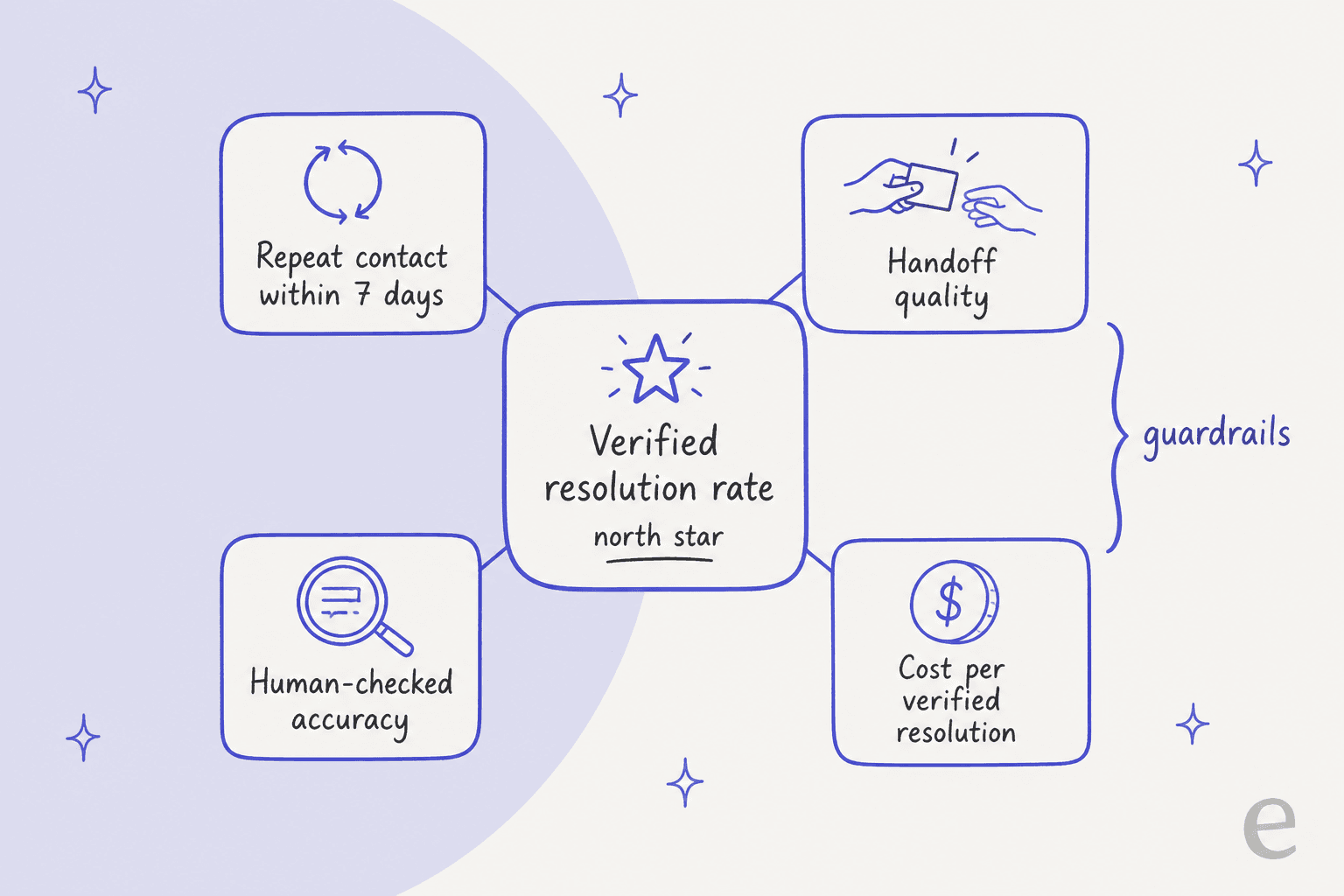
Here's the scorecard I'd start from. The targets are my starting points, not industry benchmarks, so set your own after the first month of data.
| Metric | Formula | Starting guardrail | Check it |
|---|---|---|---|
| Verified resolution rate | Closed, not repeated, not escalated, not spam / all touched | Trending up month over month | Weekly |
| Vendor resolution rate | Your helpdesk's own definition | Report beside verified, never alone | Weekly |
| Repeat contact within 7 days | Same customer, same topic, new conversation / AI-resolved | Must not rise when resolution rate rises | Weekly |
| Handoff quality | Escalations with no re-asking / all escalations | Above 90% | Monthly sample |
| Human-checked accuracy | Fully correct / random sample of 50 AI resolutions | Zero errors on refunds, pricing, account changes | Weekly |
| AI CSAT (survey) | 4 to 5 ratings / all ratings, with response rate | Within a few points of human CSAT on the same topics | Monthly |
| Knowledge gap rate | No-knowledge conversations / all touched, per topic | Falling on your top 5 topics | Weekly |
| Cost per verified resolution | Total AI cost / verified resolutions | Below your human cost per ticket | Monthly |
Break every row down by topic and channel. An average across topics hides the one path that fails every time, and a refund topic at 40% verified next to a tracking topic at 90% tells you exactly where to work. The analytics dashboard template post has a layout you can copy.
"This is a management / measurement issue, not a tooling issue. Specifically, it's an offshoot of Goodhardt's Law: a metric that becomes a target ceases to become a good metric (because the business will solve for the target to its detriment). The solution is to pair Deflection Rate with a strong guardrail metric"
What this looks like on a real queue
Customer stories make the gap between "replied" and "resolved" concrete, because eesel reports them separately.
Question Beauty runs eesel on Gorgias and Shopify. Between 8 August and 8 September 2026, the agent handled about 990 tickets and sent about 960 replies, yet only about 280 tickets were closed by eesel and about 250 were assigned to a person. Count replies and it looks like 97% automation. Count closures and it's closer to 28%. Both are true, and only one is an outcome.
Swiftreg, which sells private number plates in the UK, shows the accuracy side. In the same month eesel handled about 2,100 Zendesk tickets, sent 1,494 public replies and left 1,055 internal notes where a step belonged to staff. Order lookups run on scripts Swiftreg wrote, and a validator checks each reply against those results before anything is sent. That's human-checked accuracy built into the workflow rather than bolted on after.
ClutchLoop is the narrow-scope version: the agent replies on its own to returns and product questions only, and sent about 180 replies directly on about 230 Gorgias tickets, "about seven in ten conversations, no person needed." Scope is a metric decision too. A smaller set of topics the AI owns end to end is easier to verify than a big set it half-handles.
How eesel reports AI performance
I'll be upfront about how eesel does this, since it's the product I work on. The Reports page shows volume, AI CSAT, knowledge gaps and approvals, and the docs say plainly that "AI CSAT is not customer feedback. It is an AI's rating of your agent's answers." I like that it says so, because it keeps a model score from being passed off as a customer one.
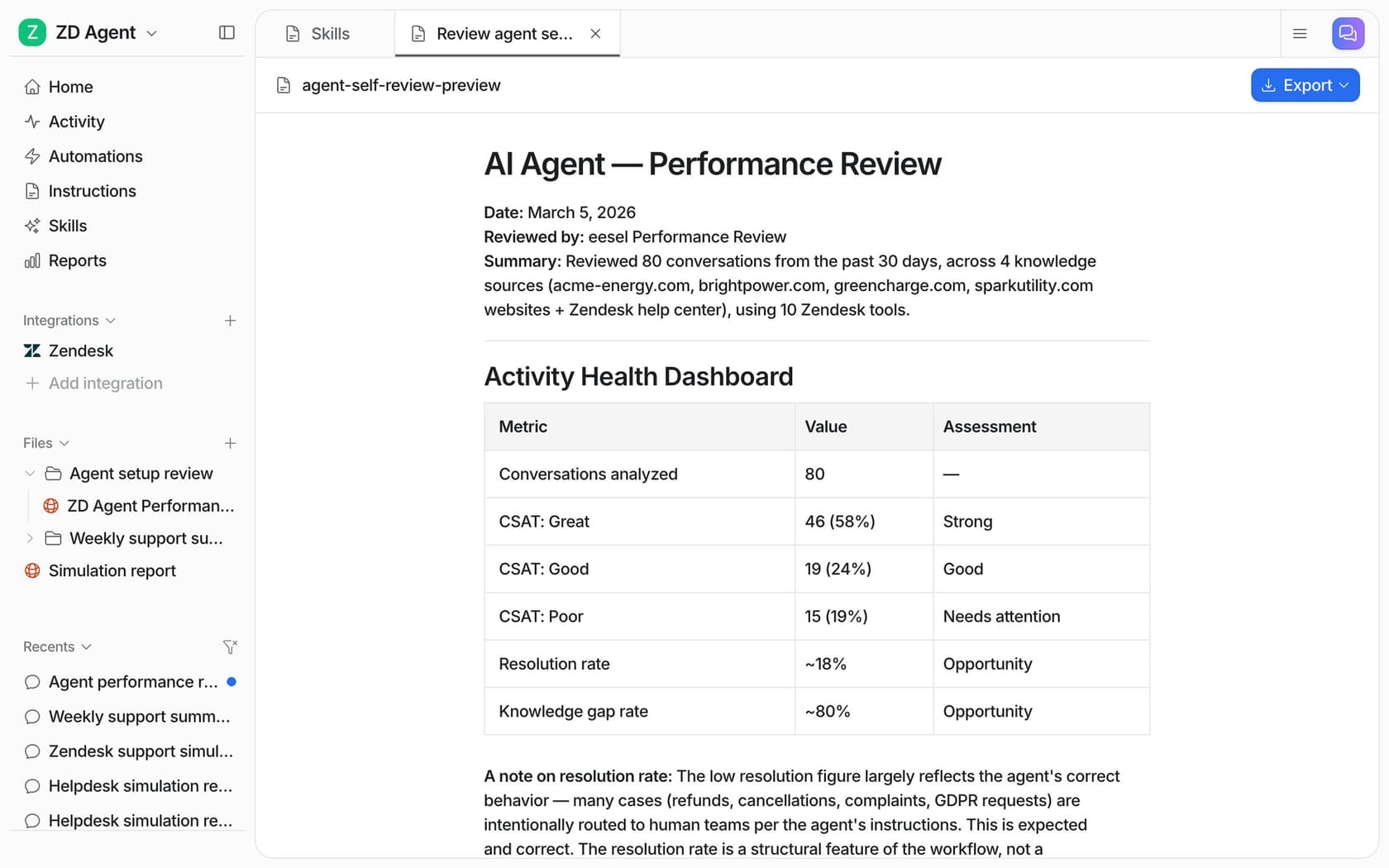
You can also ask the agent for a performance review in chat, and it writes one with the numbers first, then ranked fixes. In the demo report above, the resolution rate is about 18%, and the report explains that refunds, cancellations and complaints were routed to people on purpose. A low rate with the right handoffs beats a high one that guesses.
Two more pieces map straight onto the scorecard:
- Simulation before go-live. The Simulation skill "runs your agent against real past tickets or generated test cases, scores each answer, and suggests instruction changes." That's human-checked accuracy, run on your own history, before a customer sees anything.
- Approvals as a graduation metric. Per the reports docs, "an action approved every time without edits is ready to run on its own." Start in draft mode, watch approval rates by topic, and turn on only the topics that earn it.
On cost, eesel pricing is a fixed monthly plan where "a ticket or a chat is 1 credit", starting at $299 a month for 500 credits. It charges for tickets worked, not resolutions, so the bill doesn't depend on what gets labelled resolved. The trade-off is plain: you pay for a ticket even when the agent hands it to a person, so cost per verified resolution is still the number to watch.
Try eesel
If your AI dashboard reports deflection and you need verified resolutions, eesel works inside the helpdesk you already have, on Zendesk, Freshdesk, Gorgias or HubSpot. It replays your past tickets in a simulation before going live, starts by drafting for your team, and reports what it sent, what it closed, and what it handed over as separate numbers.

The free plan comes with 100 credits, enough to see real drafts on your own tickets before you pay. Try eesel and check the numbers against your own queue.