AI responses for Help Scout: how to draft and automate replies

Rama Adi Nugraha

Katelin Teen
Last edited September 25, 2026

What "AI responses" actually means in Help Scout
"AI response" gets used for two very different jobs, and picking the wrong one is where teams waste a month. One job is helping your human agents write faster: the AI suggests a reply, an agent reads it, tweaks it, and hits send. The other job is resolving the conversation on its own, with no agent involved. Help Scout does both, but through separate features that live in separate places.
Here is how the built-in pieces split up.
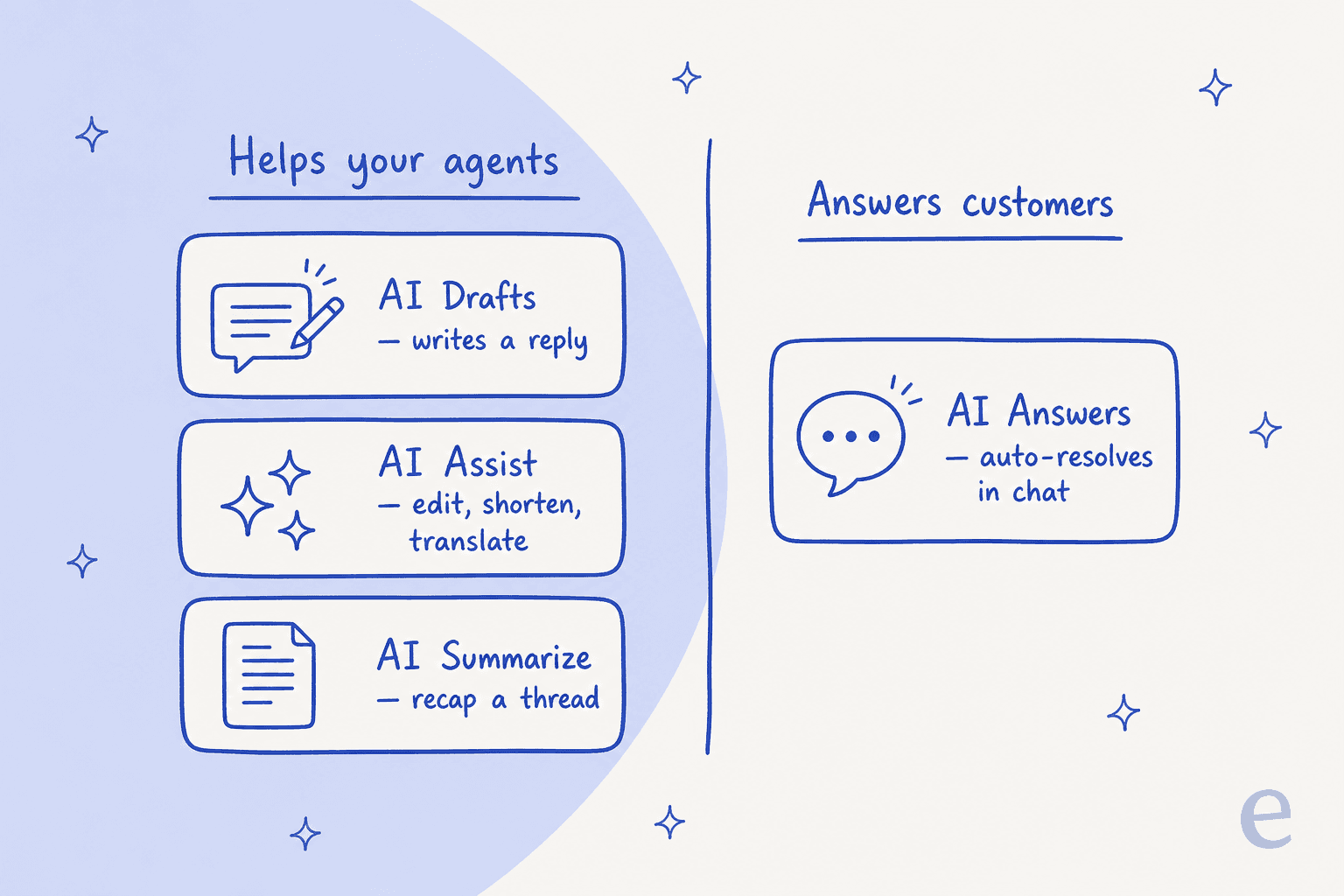
The AI features page names four: AI Drafts, AI Assist, and AI Summarize sit on the agent side (grouped as the Inbox Assistant), while AI Answers is the customer-facing agent. If you want the full context on how the vendor frames all this, our overview of the Help Scout AI approach goes deeper. Once you know which side of that line you care about, the setup and the cost both get clearer.
Help Scout's built-in AI, feature by feature
Let me walk the agent-side tools first, because they are the ones most Help Scout teams already have access to and the fastest to switch on.
AI Drafts and AI Assist (the agent's copilot)
AI Drafts is the one people mean when they say "AI response." You open a conversation, and it writes a full reply based on your help content and past conversations, per the pricing comparison. You read it, edit anything that is off, and insert it. AI Assist is the lighter cousin that lives on any draft you have already started: expand, shorten, change the tone, or translate.
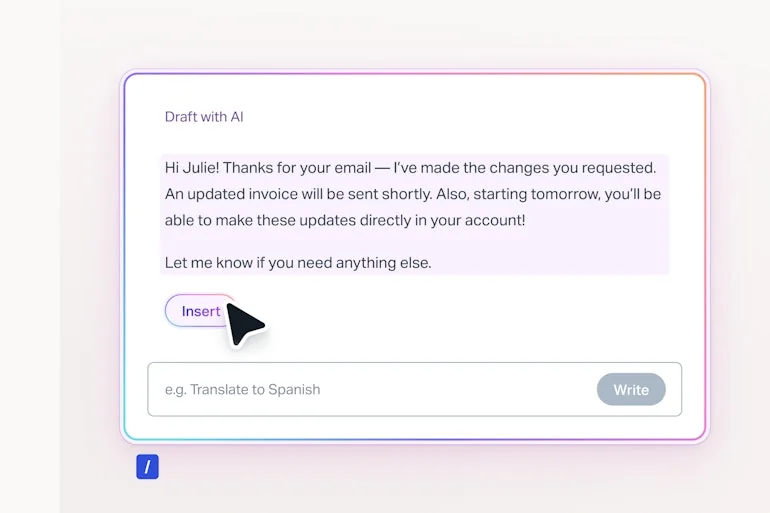
The catch to know upfront: AI Drafts and AI Summarize are gated to the Plus and Pro plans, while AI Assist is included on every paid plan. So if you are on Standard, the only agent-side AI you get is the editing helper, not the full draft writer. If drafting is the whole reason you are here, budget for Plus.
AI Answers (the customer-facing agent)
AI Answers is the piece that resolves questions without an agent. It lives inside Beacon, Help Scout's embeddable widget, and answers customers directly from your knowledge base and any web sources you feed it.
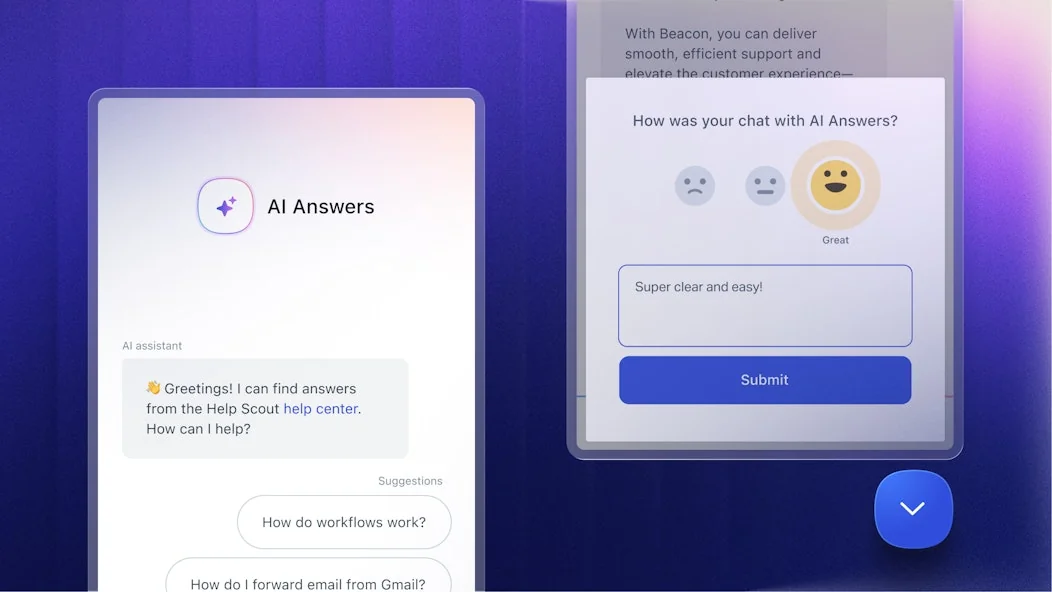
Two things I like here. Help Scout publishes an average resolution rate of 73.19% on the AI features page, which is a refreshingly specific number to put in writing. And you can test in private by running it through support scenarios before it goes live. One honest limit worth naming: the improvement loop is review-based, so AI Answers "learns as it goes" by suggesting changes you approve rather than ingesting your full ticket history on day one, and historical transcripts are not listed as a training source on Help Scout's own pages.
What Help Scout's native AI costs
Help Scout bills seats, not tickets, for everything except the AI agent. The one usage meter in the whole product is AI Answers, charged per resolution. Here is the full picture.
| Plan | Price (per user/mo, annual) | Agent-side AI included | AI Answers |
|---|---|---|---|
| Free | $0 | None | Not available |
| Standard | $25 | AI Assist only | $0.75 / resolution |
| Plus | $45 | AI Assist, AI Drafts, AI Summarize | $0.75 / resolution |
| Pro | $75 (min 10 users) | AI Assist, AI Drafts, AI Summarize | $0.75 / resolution |
All figures come from the Help Scout pricing page. A "resolution" is defined there as a conversation resolved by AI Answers without human help, and you are only charged once per conversation. New accounts also get three months of free, unlimited AI Answers resolutions, which is a genuinely generous way to test the water. For a fuller cost walk-through, our Help Scout pricing guide breaks down the seat math at different team sizes.
A quick worked example: a 12-agent team on Plus is $540/month for seats before a single AI resolution, and every conversation AI Answers closes adds $0.75 on top. That is predictable, but it is also two separate meters to watch.
Where the built-in AI stops
Help Scout's AI is good at what it is scoped to do, and I would not talk anyone out of AI Drafts for a small team. But there is a ceiling, and it is the same ceiling users flag in reviews. Help Scout sits at 4.4 out of 5 across 436 reviews on G2, and the aggregated cons digest opens with a lack of advanced features note about limited customization.
For AI responses specifically, that shows up in three places: the agent-side draft writer is Plus-and-up, AI Answers only runs in the Beacon chat widget rather than inside your email replies, and there is no documented way to dry-run it against your own historical ticket archive before launch (the private test is scenario-based). None of that makes Help Scout a bad tool. It just means if you want AI drafting or sending across your actual mailbox, you are looking at a dedicated AI helpdesk agent.
Users still like the core product, to be fair:
"From your list, Help Scout's often a winner for simple email flows and mobile access; Freshdesk might offer better bang for low volume without overkill features. Zoho's solid if you want integrations."

Option 2: add a dedicated AI agent with eesel
This is the route I would take if the goal is resolving tickets, not just drafting them. eesel joins Help Scout as a real AI agent inside your mailbox, not a separate chatbot widget. It reads conversations, drafts and sends replies from your team's address, adds internal notes, updates tags, and routes to teammates the way a human agent would.
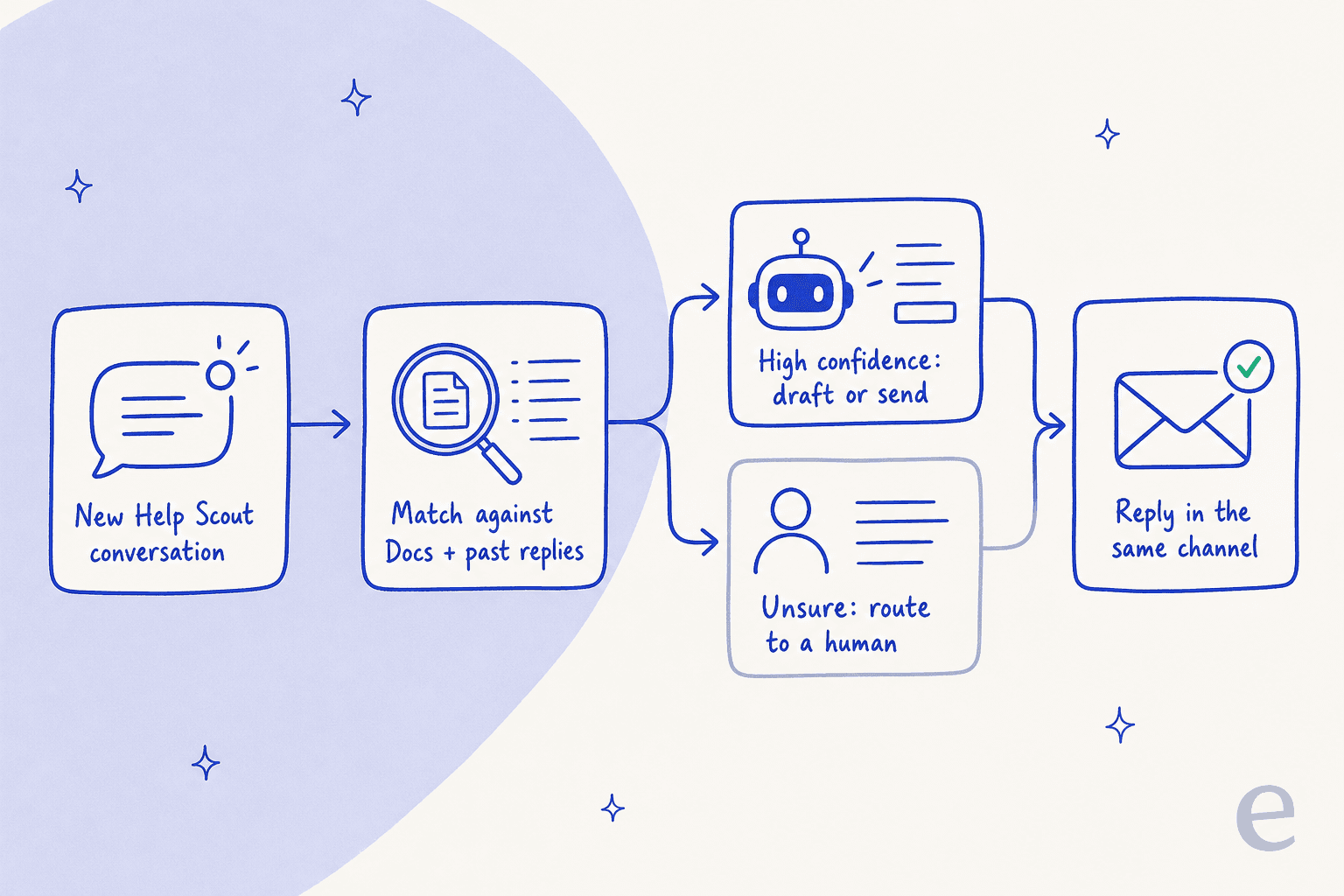
The mechanics matter here. When a new conversation lands, the agent matches it against your Docs and past replies, and only acts when confidence is high; anything uncertain routes straight back to your team. It works across every channel Help Scout supports, so it replies in email or Beacon chat in whatever channel the customer used. If you are still weighing platforms, our Help Scout vs Front comparison covers where each one lands on AI.
Setting it up (three steps, no code)
Connecting it is deliberately boring, which is what you want from a support integration.
- Authorize the connection through the Help Scout API from the eesel dashboard. Two clicks, no developer.
- Let it import your knowledge. It automatically pulls your Docs articles, past Help Scout conversations, and saved replies, so there is no manual training step. You can add Confluence, Notion, or Google Docs as extra sources.
- Simulate, then launch. Run the agent against your past conversations to see how it would have replied, fill any gaps, and go live.
The integration page claims 85%+ tier-1 resolution out of the box within a week and setup in under 30 minutes. If your team lives in a terminal, the same teammate is drivable through the eesel CLI and API, so scripts and coding agents can inspect instructions or push a config change against the same workspace the dashboard uses. That is the same programmatic surface people reach for when working with the Help Scout API directly.
Draft-only vs autopilot, and why you test first
The single most important choice is how much you let the agent do on its own, and you do not have to decide it blindly. eesel runs in draft-only mode, where a human approves every reply, or autopilot, where it sends directly. The move I would make is to climb this ladder rather than jump to the top.
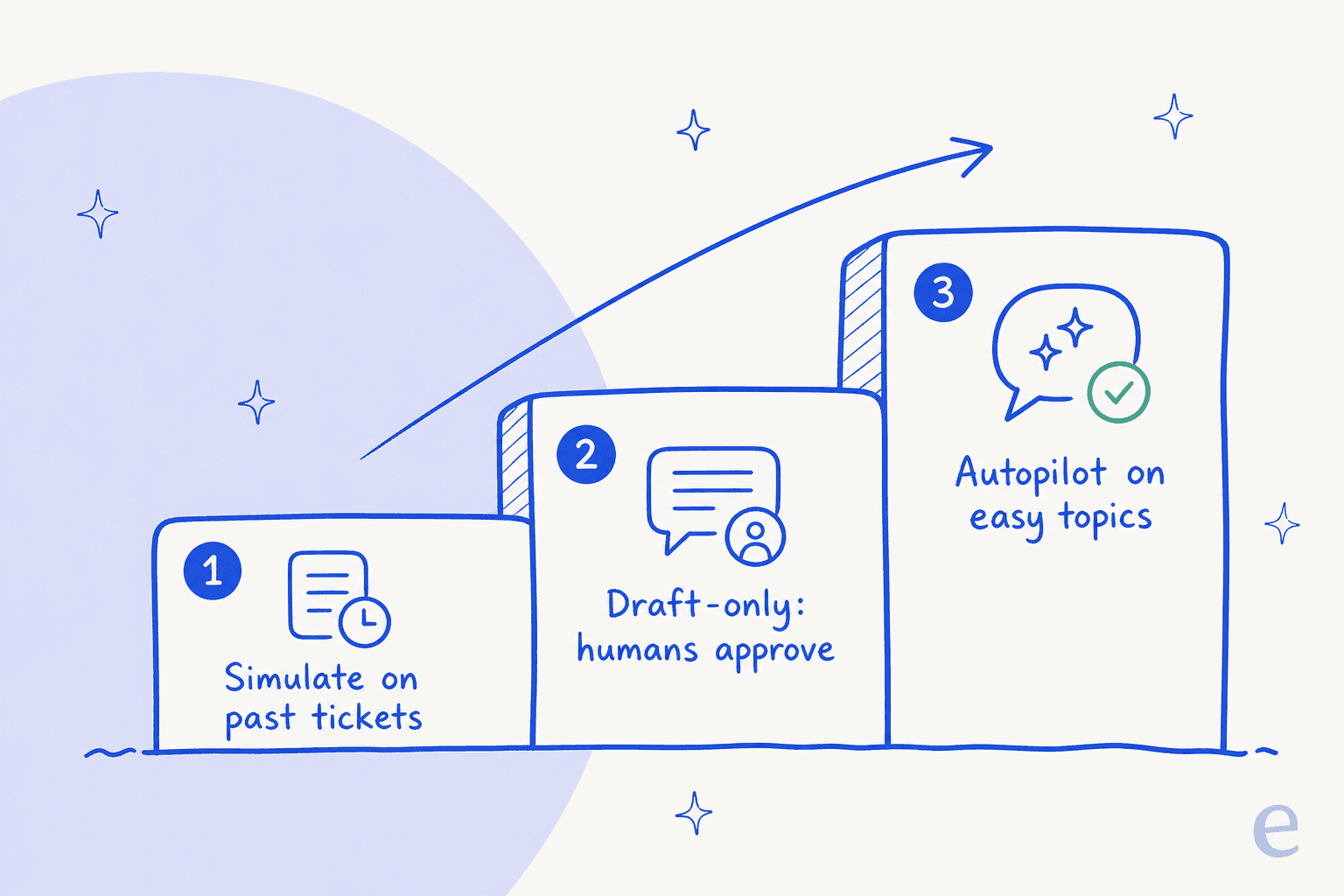
Simulate against your real past tickets first, so you see how the agent handles your actual questions. Then run draft-only for a couple of weeks and let agents approve or fix replies. Once you trust its answers on, say, order-status or password-reset questions, switch those topics to autopilot and keep the messier ones in draft-only. We have watched confident-sounding bots quietly give wrong answers, which is exactly why simulating on historical tickets before go-live is not optional in my book.
Native AI vs a dedicated agent: a quick comparison
Here is how the two routes line up on the things a buyer actually weighs.
| Dimension | Help Scout AI Answers | eesel AI agent |
|---|---|---|
| Billing unit | $0.75 per resolution | $0.40 per conversation handled |
| Where it runs | Beacon chat / self-service | Inside your mailbox (email + Beacon) |
| Trains on | Docs, web sources, instructions | Docs, past conversations, saved replies (+ Confluence, Notion, Google Docs) |
| Agent-side drafting | AI Drafts (Plus and Pro) | Draft-only or autopilot, all channels |
| Test before launch | Private scenario runner | Simulation over your own past tickets |
| Per-seat fee | Yes (seat-based plans) | None |
Neither is strictly "better." If your customers self-serve in a chat widget and you are happy paying per resolution, Help Scout's native AI is the shorter path. If you want AI drafting and sending across your email queue, trained on your real history, with a simulation you can trust, that is the dedicated-agent case. And if you are questioning the platform itself, our roundup of Help Scout alternatives is worth a look before you commit.
Try eesel for Help Scout
If you have read this far, you probably want AI responses working inside your Help Scout mailbox, not just in a chat bubble. That is the specific thing eesel for Help Scout does: it connects in under 30 minutes, trains itself on your Docs and past replies, and starts drafting (or sending) in the same conversation view your team already uses, at $0.40 per conversation with no per-seat charge.

The part I would not skip is the simulation. Before it replies to anyone, you can run it over your historical Help Scout conversations and read exactly how it would have answered, then watch real numbers on the reports dashboard once it is live. You can try eesel free and have it drafting on your own tickets the same afternoon.
Frequently Asked Questions
How do I turn on AI responses in Help Scout?
Help Scout's agent-side AI (AI Drafts, AI Assist, AI Summarize) sits inside the reply editor on the Plus and Pro plans, and the customer-facing AI Answers agent is an add-on you enable on top of any paid plan. For replies that draft or send straight from your mailbox, you can connect a dedicated agent like eesel for Help Scout through the API.
How much do AI responses for Help Scout cost?
Help Scout's AI Answers is billed at $0.75 per resolution, and the agent-side AI features come bundled into the Plus ($45/user/mo) and Pro ($75/user/mo) plans. See the full Help Scout pricing breakdown. eesel charges $0.40 per Help Scout conversation handled with no per-seat fee.
Does Help Scout AI train on my past tickets?
Help Scout's AI Answers trains on your Docs, web sources, and custom instructions rather than your historical ticket archive. AI Drafts does draw on past conversations for agent suggestions. A dedicated agent like eesel imports your Docs, past Help Scout conversations, and saved replies automatically.
Can I review AI responses before they send to customers?
Yes. Help Scout's AI Drafts writes a suggestion an agent inserts and edits before sending. With eesel you choose draft-only mode, where a human approves every reply, or autopilot for topics you trust. Read more on Help Scout self service.
What is the difference between AI Answers and an AI agent in Help Scout?
AI Answers is Help Scout's self-service chatbot that resolves questions inside the Beacon widget. An AI agent like eesel works inside the mailbox across email and chat, drafting, sending, tagging, and routing like a human agent. Compare the wider Help Scout AI feature set first.


Article by
Rama Adi Nugraha
Rama is a software engineer at eesel AI with two years of experience writing about B2B SaaS, AI tools, and customer support technology. Based in Bali, Indonesia, he brings a developer's perspective to product comparisons — cutting through marketing copy to what the integrations and APIs actually do.