Help Scout customer properties: setup, limits and API

Kira

Katelin Teen
Last edited November 6, 2026

A Help Scout customer property is a custom data field on the contact profile. You can create up to 50 contact properties and 50 company properties, in five types, and they show in the conversation sidebar of every Inbox. Fill them by hand, with Zapier, the Inbox API or Beacon identify, and use them to branch workflows and saved replies on Plus or Pro. Use properties for facts about the person and custom fields for facts about one conversation. The eesel CLI lets a coding agent connect eesel to Help Scout and test answers first, though a Help Scout admin still approves the connection.
What are Help Scout customer properties?
They are the "who is this person" fields. Help Scout's properties article now titles the feature Contact and Company Properties, and says you pick which details to track, add them manually or programmatically, and your team sees them in every conversation. The URL and the API still say "customer", which is why both names float around.
Typical contents, per Help Scout's own examples: a user ID, timezone, plan ID, billing status, account name or the date someone became a contact. The practical value is that an agent opening a conversation no longer has to open the billing tool to learn whether the sender is on a free trial or an annual plan. If you are still deciding on a tool, my Help Scout review and Help Scout alternatives pages cover the wider picture.
How do you create a property, and what are the limits?
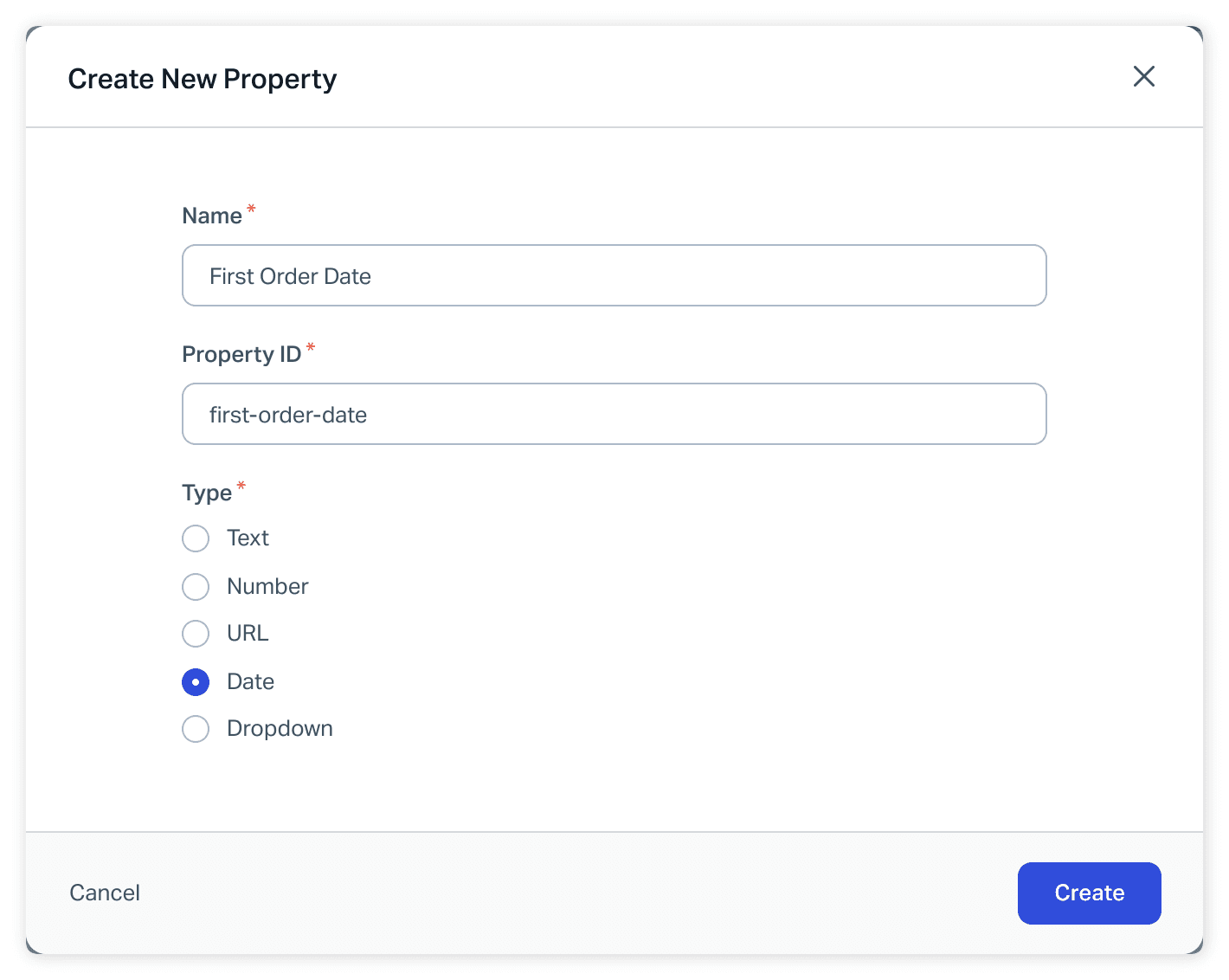
Go to Settings, then Properties, then pick Contact or Company. Only Account Owners and Administrators can create or edit them, though everyone can view them. The rules that decide whether your setup holds up:
- Fifty each. Up to
50contact properties and50company properties, global across all Inboxes. - Five types. Text (up to 255 characters), number, URL (shown as a clickable link), date and dropdown (up to 100 options).
- Name up to 100 characters. The name is the label agents see.
- The ID is case sensitive. It is generated from the name, you can override it, and it allows only hyphens and underscores.
- Type and ID are locked. You can edit the display name later, but not the type or the ID.
- Deletion is immediate. Help Scout says there is no way to restore a deleted property, and a new property with the same ID does not bring the data back.
The locked ID matters most. If Zapier or your app code sends planName and someone creates the property as PlanName, the value silently goes nowhere. Copy the ID from the settings page (click it to copy to the clipboard) and hand that exact string to your developers. Zendesk custom ticket fields have a similar lock-in on field type, and so do Freshdesk ticket fields.
Which Help Scout plans include customer properties?
The docs give two slightly different answers, so here are both. The properties article's plan box says all paid plans. The Beacon JavaScript API reference says customer properties are available on Standard, Plus and Pro, with company management on Plus and Pro. The Free plan is not named in either, so I would check before building on it.
| Plan | Price on the pricing page | Properties | Use in workflows, saved replies, views |
|---|---|---|---|
| Free | 5 users, 1 Inbox, 1 Docs site | Not listed | Not listed |
| Standard | $25 per user per month | Yes | No, per the docs |
| Plus | $45 per user per month | Yes | Yes |
| Pro | $75 per user per month | Yes | Yes |
The pricing page describes the feature as collecting and displaying up to 50 additional customer data points, and puts advanced workflows on Plus. Prices are headline per-user rates with a monthly and annual toggle. My Help Scout pricing breakdown prices a whole team. The split to remember: Standard teams can store and see properties, but acting on them automatically is a Plus feature.
How do properties get populated?
Four routes, and the first is the one everyone starts with. The properties article walks through each.
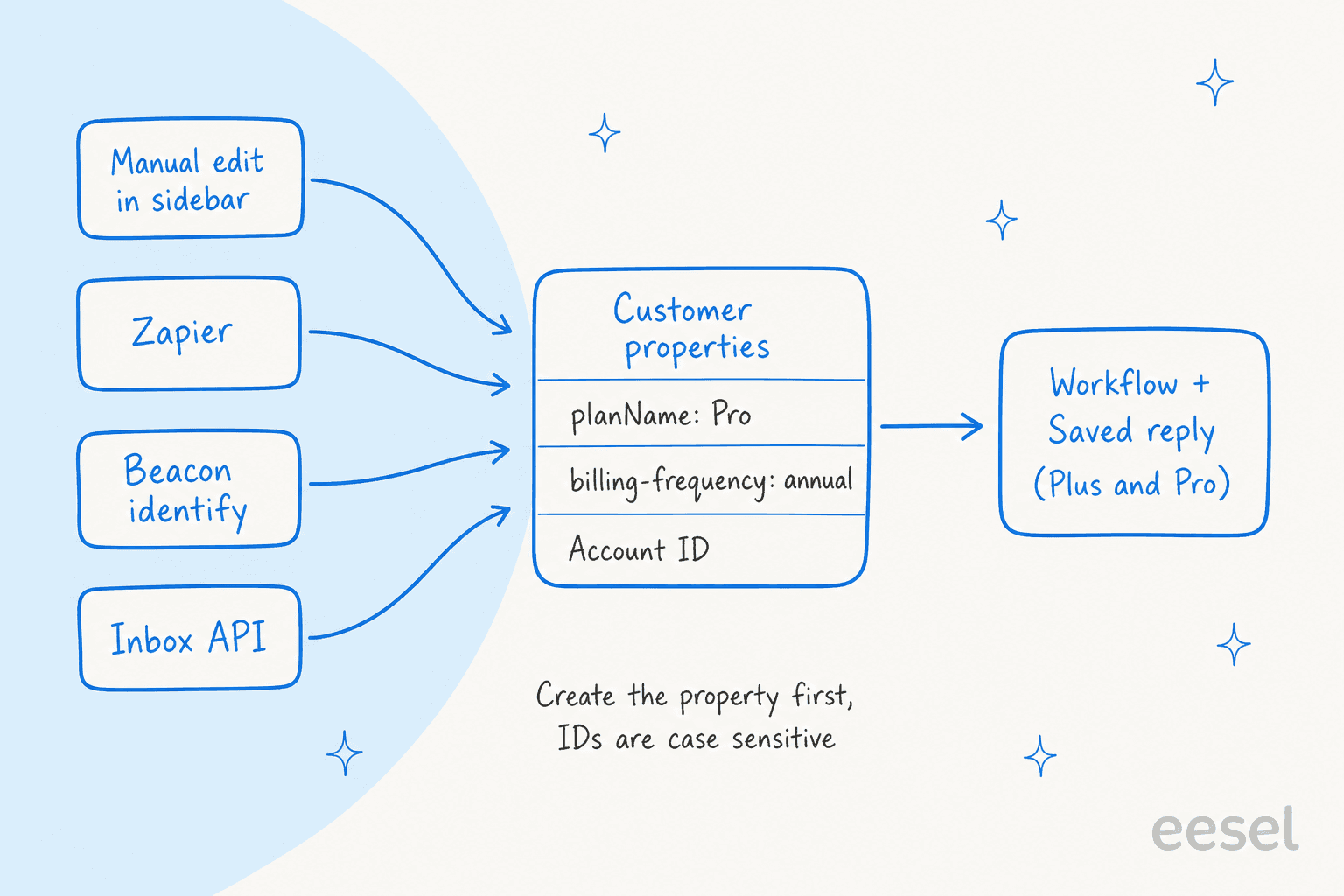
- By hand. Click a property in the sidebar card to edit it in place, or open Customers, then Contacts, then the Properties tab on the profile.
- Zapier. The Create Customer action lists your contact properties under the standard profile fields. The Update Customer Properties action needs the Contact ID, so add a Find Customer step first if your trigger lacks one. My Zapier AI notes cover the automation side.
- Beacon identify. Pass the exact property ID as a key in
Beacon('identify', ...). Values sync from your billing system or app each time the visitor loads Beacon. - The Inbox API. For bulk imports or an ongoing sync, the Update Customer Properties endpoint takes a
PATCHto/v2/customers/{id}/properties.
Beacon('identify', {
  name: 'Steve Aoki',
  email: 'steve@aoki.com',
  signature: 'YOUR_SERVER_GENERATED_SIGNATURE_HERE',
  Subscription: 'Free Plan',
  'Favorite-Movie': ''   // empty string removes this value
})
Per the Beacon JavaScript API reference, keys must match existing property IDs including capitalization, value types must match, and properties left out of a call are not touched. Company properties are narrower: the docs say you can update them through the public API, while Zapier and Beacon identify are not yet supported for them. Pair identify with Secure Mode if you want signed profiles, as covered in my Help Scout Beacon form fields post and Help Scout integrations guide.
What does the API accept for each type?
The API is stricter than the UI, which is where bulk imports tend to fail. All of this is from the update endpoint reference:
| Property type | API format | Example |
|---|---|---|
| Number | Integer | 5 |
| Text | String, max 255 characters | "green" |
| URL | Valid URL | "google.com" |
| Date | YYYY-MM-DD | "2019-01-02" |
| Dropdown | Option id or label | "Tesla" |
Operations are replace and remove only, the path is the property slug with a leading slash, and a success returns 204 No Content. The property must be created first, in the web app or through the Create Property Definitions endpoint, and GET /v2/customer-properties lists the definitions with their dropdown option IDs. Reading a customer returns each property with its value, a text label for dropdowns and a source object that identifies which sub-system last updated it.
How are properties different from conversation custom fields?
Properties live on the person, so they follow them into every conversation. Custom fields live on one conversation and, as I covered in my Beacon form fields post, are tied to one Inbox, with up to 10 per Inbox on Plus and Pro. Help Scout's advice is blunt: use properties for details specific to a contact, and custom fields for situational details such as the type of question.
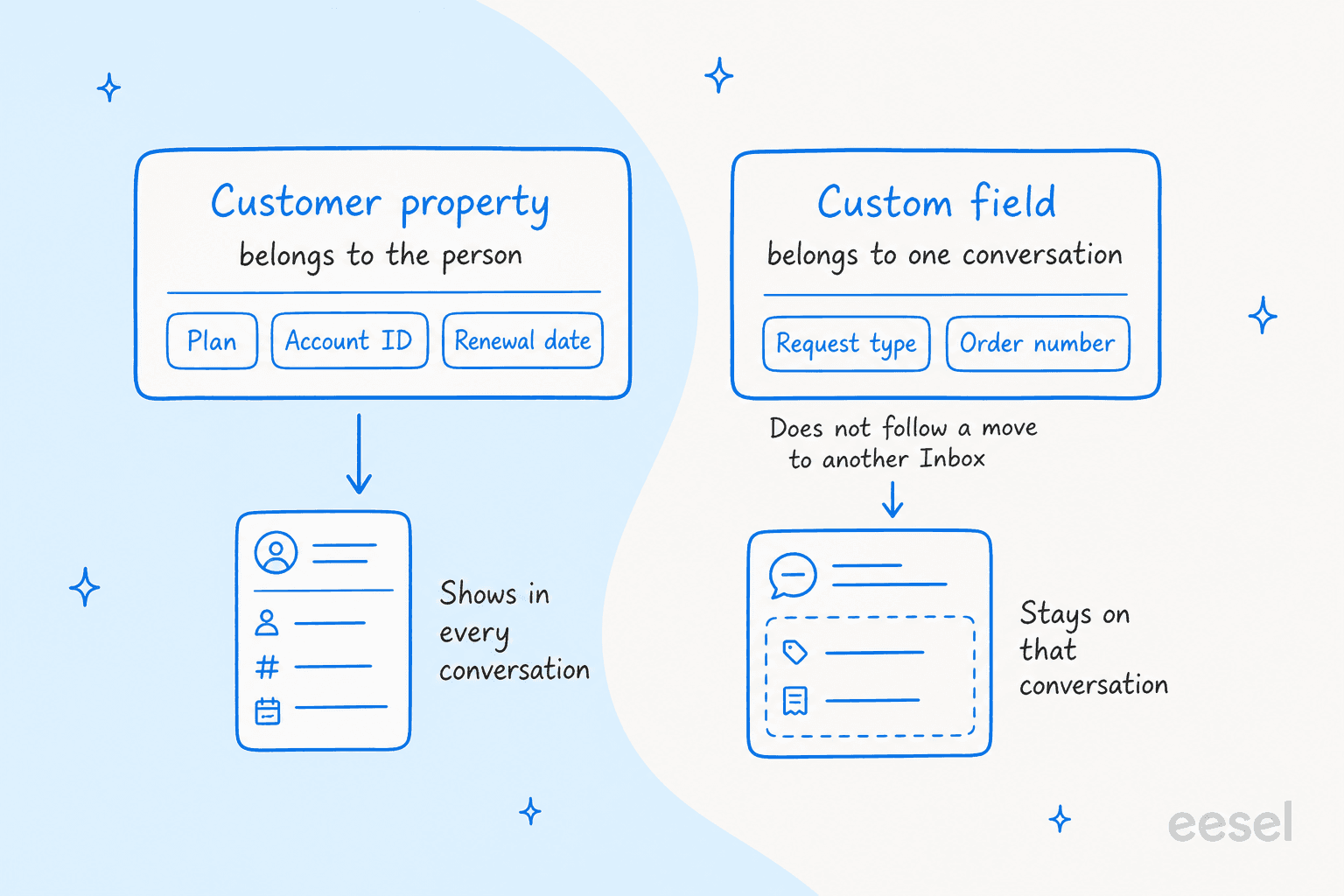
My rule of thumb: if the answer would still be true next month in a different conversation, it is a property. If it describes today's question, it is a field. A conversation moved between Inboxes keeps the customer's properties because they are global, which is one more reason to put plan and account data there. Other tools split the same way, as in Zendesk user segments and CRM tags.
Where do agents see properties, and can they search them?
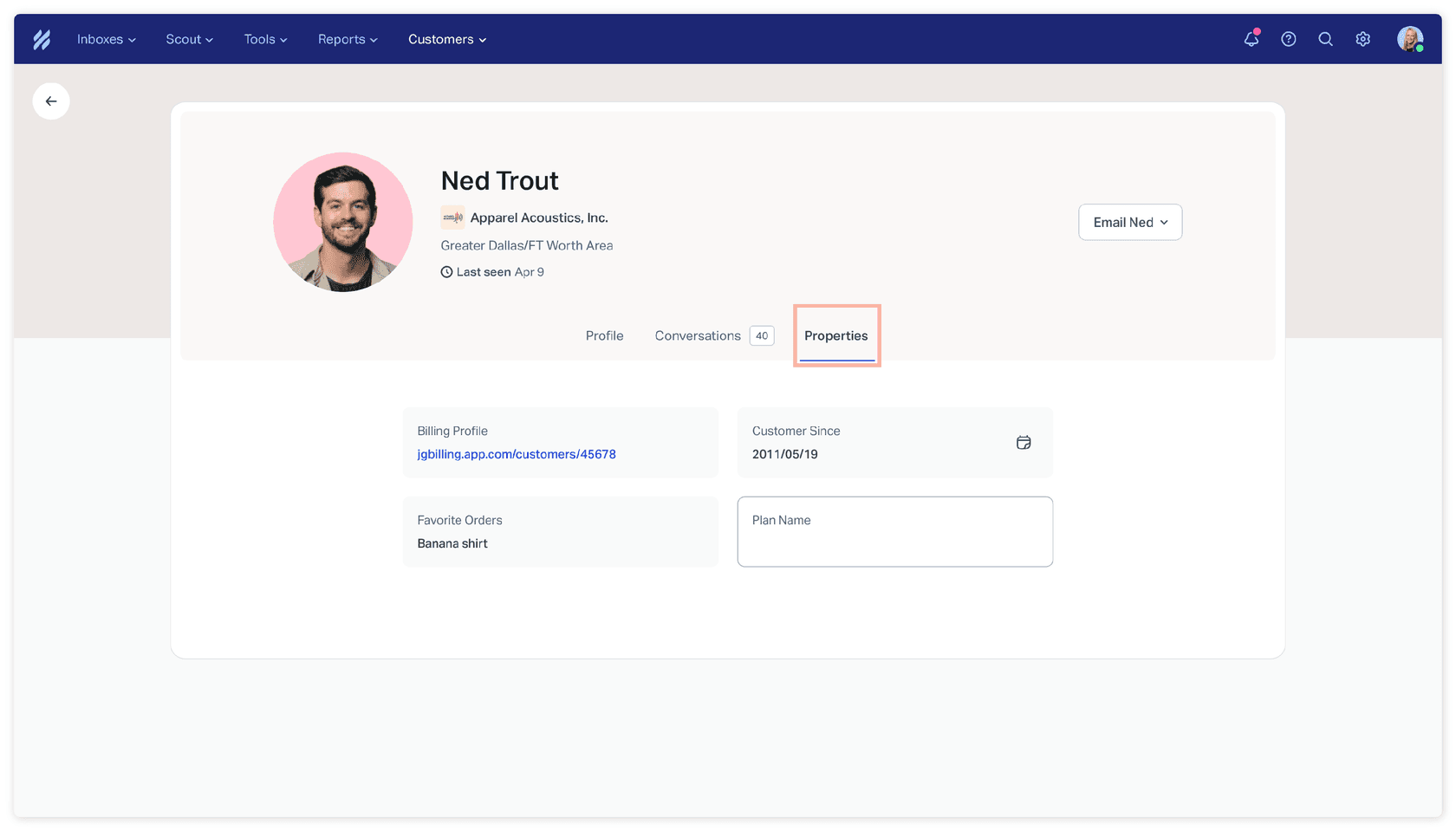
In the conversation sidebar, inline in the Customer and Company cards. Each person can show or hide properties from the three-dot menu on the card, so one teammate's tidy view does not change another's. Clicking the avatar opens one combined panel with the profile's details and properties, and clicking a property edits it in place. The profile page has a dedicated Properties tab.
Properties also appear in global search under the heading Customer Properties. On Plus and Pro, Help Scout's workflow conditions include a Customer Property condition, so a workflow can look for conversations that include or exclude a value, and the same article says properties can be used in saved replies and Inbox views. That turns a stored plan name into routing, and my automatic ticket assignment, intelligent routing and ticket triage guides cover what to do next. Help Scout saved replies are the other place a stored plan name pays off.
What properties are worth creating first?
Start with the three that change how you answer, not the ones that are merely available.
- Plan or tier. A dropdown (
planName) lets a workflow tag higher tiers and assign them to your most senior queue, and it is the single most useful property for SLA best practices. - Account or user ID. A text property lets an agent paste it straight into your admin tool. Use a URL property instead if you can link to the billing profile, since URLs render as clickable links.
- Renewal or start date. A date property answers "how long have they been with us" without a lookup.
Skip anything you would only fill for a handful of people. A property that is blank on 90 percent of profiles is clutter in the sidebar, and you have a hard cap of 50. Keep dropdown options short, because the API accepts the option label and a rename can break a sync that sends the old text.
Where does an AI agent fit with customer properties?
eesel is an AI helpdesk teammate that works inside the Help Scout mailbox. Its Help Scout setup docs list a Find customer action that finds customers by email or name and, in team chats, also reads contact details, your team's notes and their property values, such as plan. A List properties action lists the customer and organization properties your account keeps. The docs also say actions marked team chats only work when a teammate asks the agent, in the dashboard chat or a scheduled run, and are not available while it is answering a customer.
So here is the honest summary. A teammate can ask eesel "what plan is this customer on?" and get an answer from the profile. While eesel drafts a reply to a customer, the documented property read is not part of that flow, and I found no documented action that writes properties. The pattern I would use is to let a Help Scout workflow turn the property into a tag on Plus or Pro, then let the agent act on the tag, as I describe in AI ticket triage. My Help Scout AI agent and Help Scout AI posts expand on the setup.
My closest real example is on another helpdesk. MentorShow, a French online learning platform, runs eesel on HubSpot Service Hub. Its instructions tell the agent to read the thread and the member's HubSpot record, including subscription status, next renewal date and past tickets, because a login problem from someone with no active subscription is not a login problem. Between 8 August and 8 September 2026 eesel read about 1,200 HubSpot conversations and tickets and wrote 432 drafts for the team, each left as an internal note for a person to send. That is the job a plan property does in Help Scout: give whoever answers the account context before the first word is written. See also the HubSpot integration.
For a coding agent, the eesel CLI can run npx @eesel/cli integrations connect helpscout_v2 to show the connection options, and eesel chat lets you ask test questions first. Connecting the mailbox still needs a Help Scout admin or account owner to approve it in the browser.
What mistakes should you avoid with properties?
- A mismatched ID.
planNameis notPlanName. Copy the ID from the settings page. - Deleting a property to tidy up. The data is gone from every contact and cannot be restored.
- Storing a conversation fact as a property. "Request type" overwrites itself with each new conversation. Use a custom field.
- Wrong value types. A date must be
YYYY-MM-DDthrough the API, and a number must be an integer. - Building routing on Standard. The workflow condition needs Plus or Pro.
- Expecting company properties from every route. Zapier and Beacon identify do not support them yet.
Run one test contact end to end before a bulk import. Set the value, find it in the sidebar, trigger the workflow and check the result. If you later add an agent, start on Leave draft reply and keep Send reply off until the answers hold up, which I explain in customer support approval workflows and AI agent handoff. For related Help Scout setup, see snoozed conversations, collision detection and ticket deflection. First contact resolution explains why context on the profile pays off.
Try eesel with your Help Scout mailbox
If your properties already tell you who is on which plan, eesel for Help Scout is the next layer I would add. It works inside the mailbox, reads your Docs site and past conversations, and lets a teammate ask it about a customer's plan from the profile. You can try eesel with 100 free credits for 7 days, then paid plans start at $299 a month for 500 credits, where a ticket or chat is one credit (eesel pricing). Comparing options? See my best AI for Help Scout roundup, or Help Scout vs Front.
Frequently Asked Questions
What are customer properties in Help Scout?
How many customer properties can you create in Help Scout?
50 contact properties and 50 company properties per account, and they apply across all Inboxes. Each has one of five types: text, number, URL, date or dropdown. See Help Scout pricing for plan costs.Which Help Scout plans include customer properties?
How do you update Help Scout customer properties with the API?
PATCH to /v2/customers/{id}/properties with replace or remove operations, using the property slug as the path. The property must exist first. My Help Scout API guide covers the wider API.What is the difference between customer properties and custom fields in Help Scout?
Can Beacon identify fill Help Scout customer properties?
Beacon('identify', ...) and the value syncs to the contact each time they load Beacon. Setting a value to an empty string removes it. See my Beacon form fields post.