Help Scout Beacon modes: Self service, Neutral and Ask first

Riellvriany Indriawan

Katelin Teen
Last edited November 6, 2026

Help Scout Beacon has three modes: Self service opens on Docs and hides contact options until a visitor searches or rates an article down, Neutral shows both, and Ask first opens on the contact screen. I would start with Neutral, pick Self service only when your Docs really answer the repeat questions, and pick Ask first for sales, onboarding and billing support. The setting only exists when Docs and the contact form are both on, and with Scout switched on you get just Self service and Neutral. The eesel CLI lets a coding agent set up eesel beside Beacon and test answers first, though a Help Scout admin still approves the connection.
What are Help Scout Beacon modes?
A Beacon mode decides which screen a visitor lands on and how hard it is to reach a person. Help Scout's Beacon modes guide says the setting "controls how site visitors interact with your Beacon". You can push people to get in touch right away, push them to self-service first, or stay neutral.
Beacon has two main screens. Answers is Docs search and suggested articles. Ask is the contact screen with the email form and, when someone is online, chat. Mode is only a rule about which one comes first and whether the other is gated.
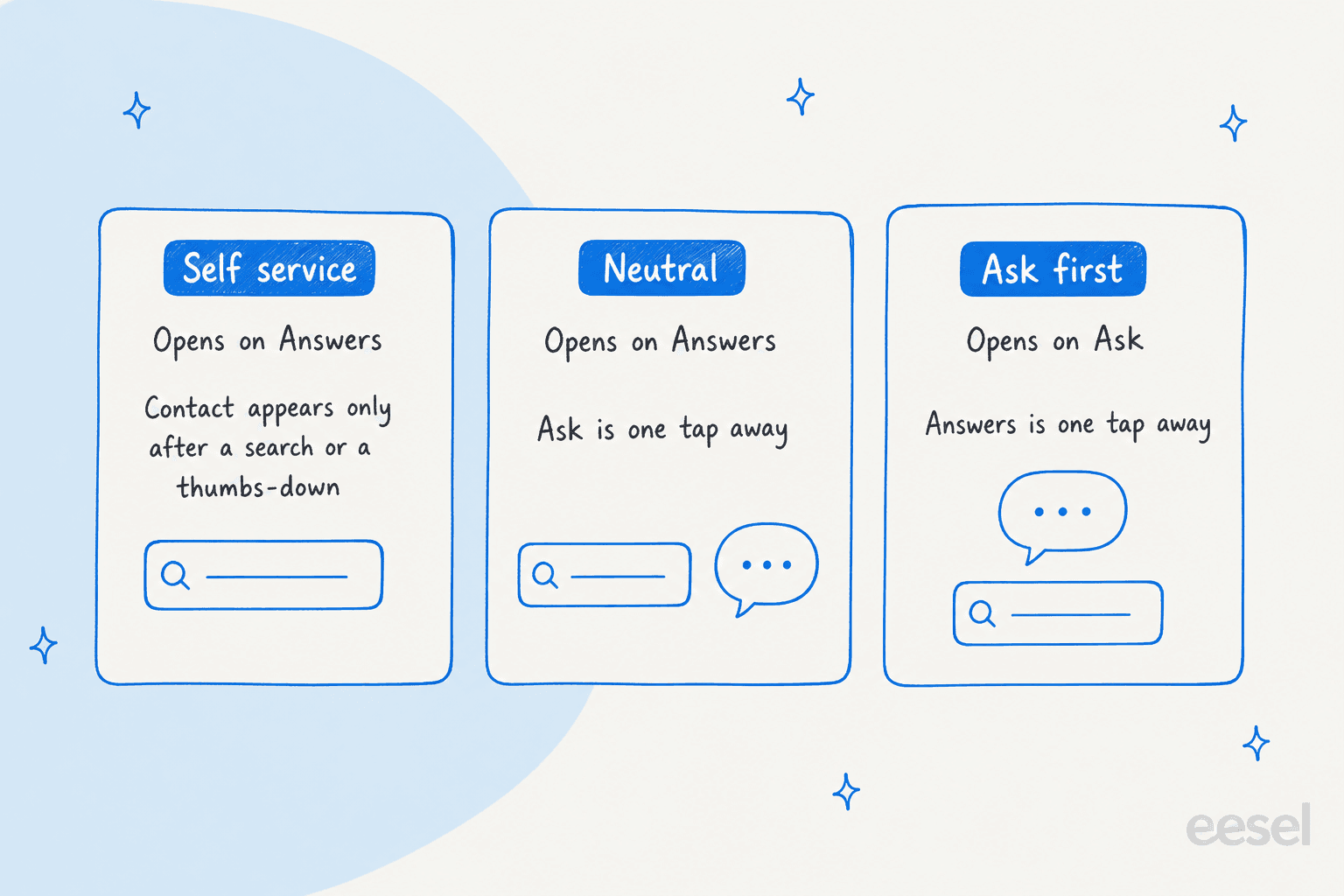
That is the whole feature, and it is smaller than the name suggests. It does not change who answers, how fast, or what the Docs say. It changes where the first tap lands. If you are still choosing a tool, my Help Scout review and Help Scout features guide cover the rest of the product.
When does the mode setting show up in Beacon?
Only when Beacon has something to choose between. Help Scout's guide says to enable Email form on the Contact options screen and Docs on the Self Service screen, and then Mode shows as an option. On an existing Beacon, go to Tools > Beacons > your Beacon > Edit Beacon > Docs with both Docs and Show Contact Form turned on.
Two rules catch people out:
- Docs-only or form-only Beacons have no mode. The developer docs say the
modeoption applies "if your Beacon has Docs and Messaging (email or chat) enabled". - Scout trims the list to two. The modes guide says there are only two options, Self service and Neutral, if Scout is enabled. Ask first disappears.
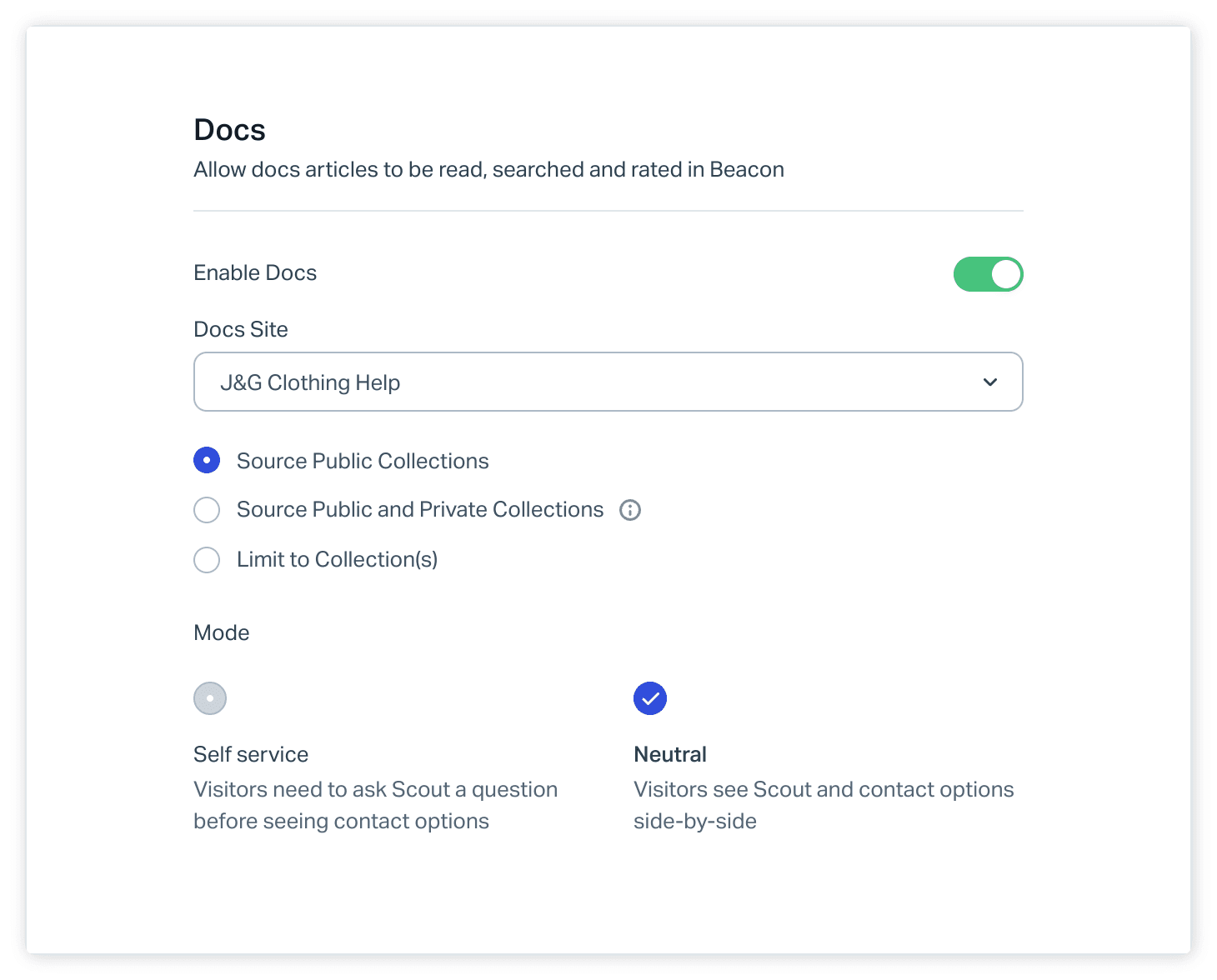
Chat adds one more constraint. Per the contact settings guide, chat only shows to customers when a Help Scout user is online and available, and with chat on the contact form cannot be turned off, because it is the fallback. So even in a mode that foregrounds chat, out of hours visitors see email.
What does Self service mode do?
It puts help articles first and makes contact options earn their appearance. Help Scout describes it as "help articles first, contact options second": Beacon opens on Answers, and per the docs it is not possible to move to Ask without interacting with the content. The customer must run a search, or open an article and leave a negative rating, and then contact options appear.

The consequence I would plan around is the dead end. A visitor with a locked account does not want to search. They have to type something to unlock contact, and if the search finds nothing, the no-results screen in Help Scout's own demo offers a Get in touch link. That works, but it is a detour you chose for them. Self service pays off when your Docs are good enough that most searches end in an article, and it hurts when they are not. My Help Scout self-service guide covers the Docs side, and help center search gaps shows how to find the searches that come up empty.
What does Neutral mode do?
It shows both sides and lets the visitor choose. Beacon opens on Answers, with suggested articles and a search box, and customers can move to Ask at any point. Nothing is gated.

Neutral is my default for a first Beacon, because it gives you a clean baseline. You see what visitors do when nobody steers them: how many read an article, how many reach Ask, how many skip straight to the form. That is the data you need before deciding whether to gate. If you later want to cut repeat questions, deflection rate is the number to watch, and ticket deflection with Help Scout shows where an agent adds to it.
What does Ask first mode do?
It reverses Neutral. Beacon opens on the Ask screen, and customers can move to Answers at any point. Per Help Scout, you see "contact options first, help articles second".

The screen carries more weight than it looks. The Ask screen can show up to 5 profile photos of Help Scout users who have access to the connected Inbox, if Show photos is on, and a chat option when someone is available. For a business where the customer is mid-purchase or mid-onboarding, a face and a chat button is the point, so I would not hide it behind a search box. The cost is more raw conversations, including ones a Docs article would have answered.
Which Beacon mode should you pick?
Pick by who is arriving and what they need, not by how much you want fewer tickets. This is my own read of Help Scout's descriptions, not a Help Scout recommendation, and I found no published figures on how each mode changes conversation volume, so treat it as a starting hypothesis to measure.
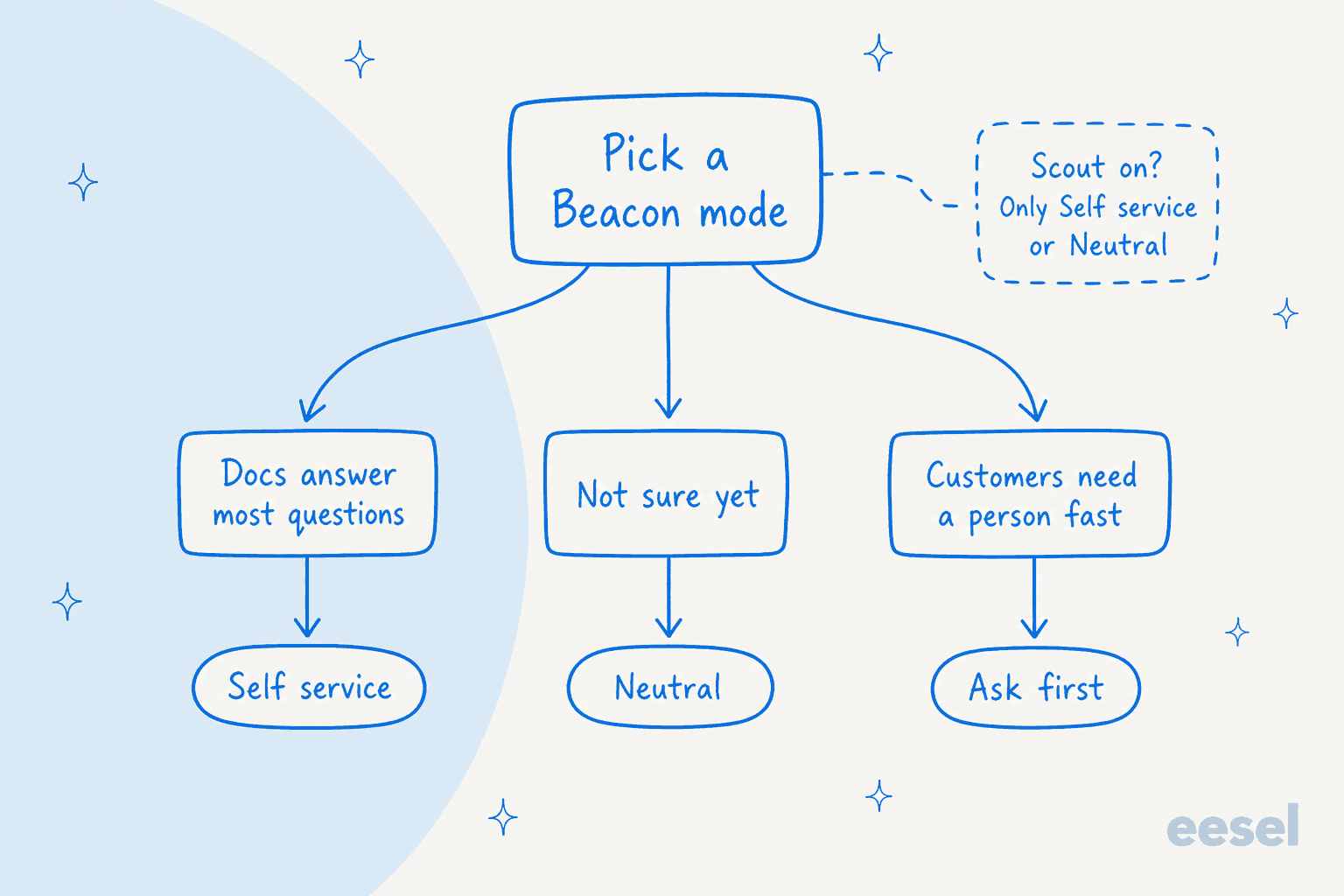
What describes your Beacon visitors best?
Two of those answers deserve a second look. Billing and account issues are the case where gating hurts most, because the visitor already knows Docs will not help. And a pre-sales visitor is usually worth a conversation even when an article exists. If most of your volume is the same ten how-to questions, Self service is where the mode setting earns its keep.
How do you set the Beacon mode in code?
Use Beacon('config', ...) with mode. Help Scout's JavaScript API lists three values, selfService, neutral and askFirst, and the same limit applies: it takes effect when Docs and messaging are both enabled.
Beacon('config', {
  docsEnabled: true,
  mode: 'selfService',
  messaging: { chatEnabled: true }
})
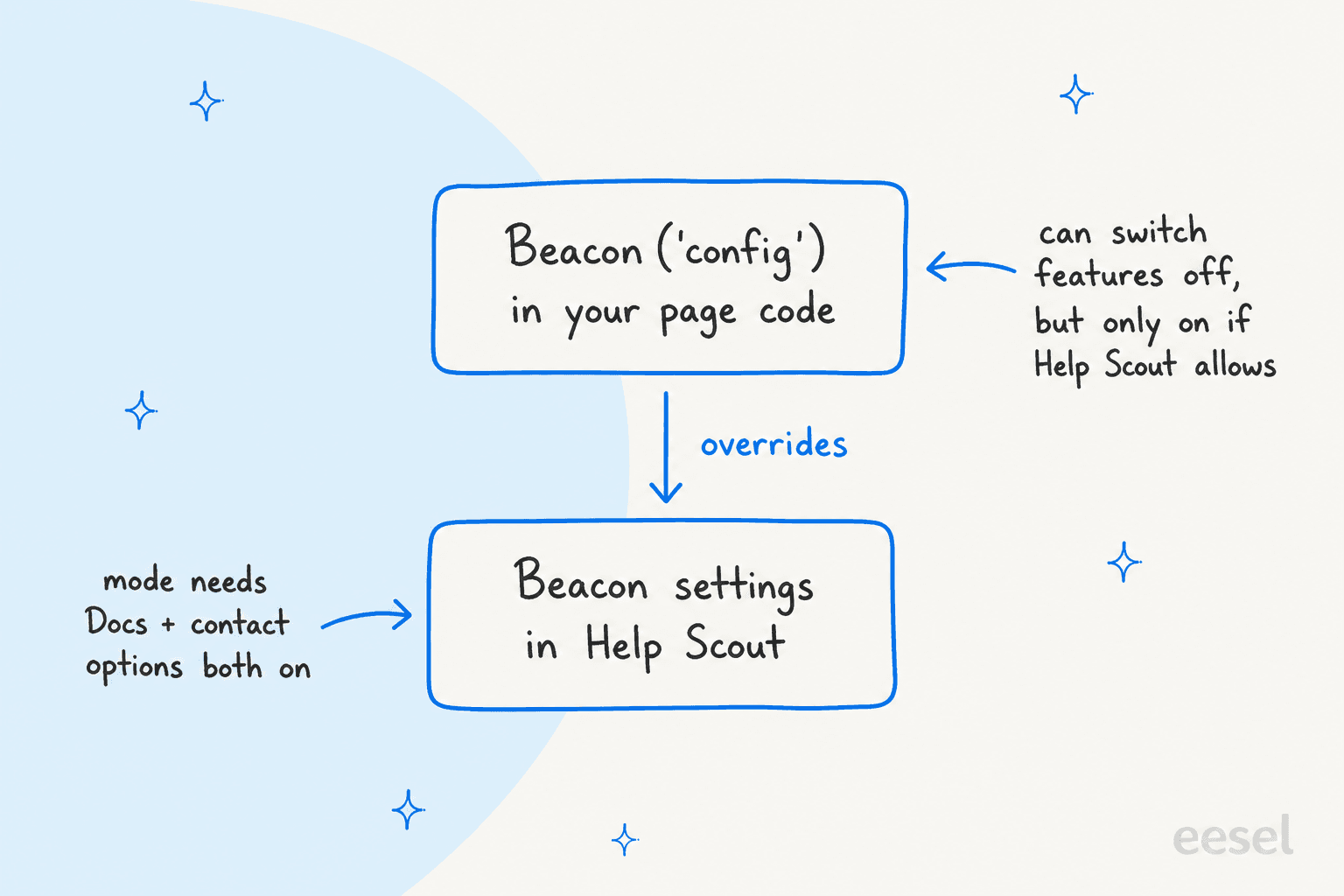
The rules that matter:
- Code beats the builder. The docs say any attribute set through
configoverrides manual settings in the Beacon Builder. A mode you set in code will not match what the settings screen shows. - You can turn off, not on.
docsEnabledandmessagingEnabledcan only be enabled through the API if they are already enabled in the Beacon settings. The same is true ofchatEnabled. - Per-page modes may work. Because
configruns in your page code, you could pass a differentmodeon a pricing page than on a help page. I have not verified that, and the docs do not describe switching modes after load, so test it on staging. - Navigate is a separate lever.
Beacon('navigate', '/ask/')opens the Ask screen and/answers/opens Answers. The docs do not say how this interacts with a gated Self service Beacon, so I would test before building a "Contact us" link on it.
Which other Beacon options change the experience?
Mode is one of several settings that shape what a visitor sees, and a few of them do more than people expect. All of these come from the Beacon API reference and Help Scout's customize Beacon guide.
| Option | What it does | Where I would use it |
|---|---|---|
display.style | icon, text, iconAndText or manual for the launcher button | manual (Hidden in the builder) for your own "Help" link |
hideFABOnMobile | Hides the Beacon button on mobile | Pages where it covers a checkout button |
enableFabAnimation | Turns the first-load pulse off | Quieter pages |
hideAvatars | Hides user avatars until a live chat starts | When you do not want faces on the Ask screen |
messaging.contactForm.showGetInTouch | Shows a contact link on the Beacon home screen | Neutral or Self service when you want a visible way out |
Beacon('suggest', [...]) | Replaces the suggested articles by page or any criteria | Matching articles to the page the visitor is on |
Beacon('article', id) | Opens one article in Beacon, a sidebar or a modal | Linking from your app's own help icon |
The combination I would reach for first is Neutral plus suggest. Suggested articles by page put the right answer on the first screen, and the visitor who needs a person is still one tap from Ask. My Beacon form fields post covers what the contact form collects once someone gets there.
Where does an AI agent fit with Beacon modes?
Beacon modes decide which door a visitor sees first. An AI agent decides who answers behind it. They are separate layers, and neither replaces the other.
On the Help Scout side, Scout is Help Scout's own AI. Its docs say it answers customer questions in Beacon from your knowledge sources and routes complex ones to your team. The modes guide lists only Self service and Neutral once Scout is on.
eesel is an AI helpdesk teammate that works inside the Help Scout mailbox. Per its Help Scout docs, it can answer visitors in Beacon live chat when you create an automation on the event "A visitor sends a live chat message". It replies in the chat, ends it when the question is answered, and hands it to your team with a summary note when it cannot help or the visitor asks for a person. Two limits matter for this post:
- It only answers during staffed hours. Beacon offers chat only while someone on your team is Available, and out of hours it offers email instead, which your email automations pick up.
- It does not set the mode. The docs list actions like draft and sent replies, notes and tags, and nothing that changes Beacon's configuration. Mode stays a Help Scout setting or a line in your page code.
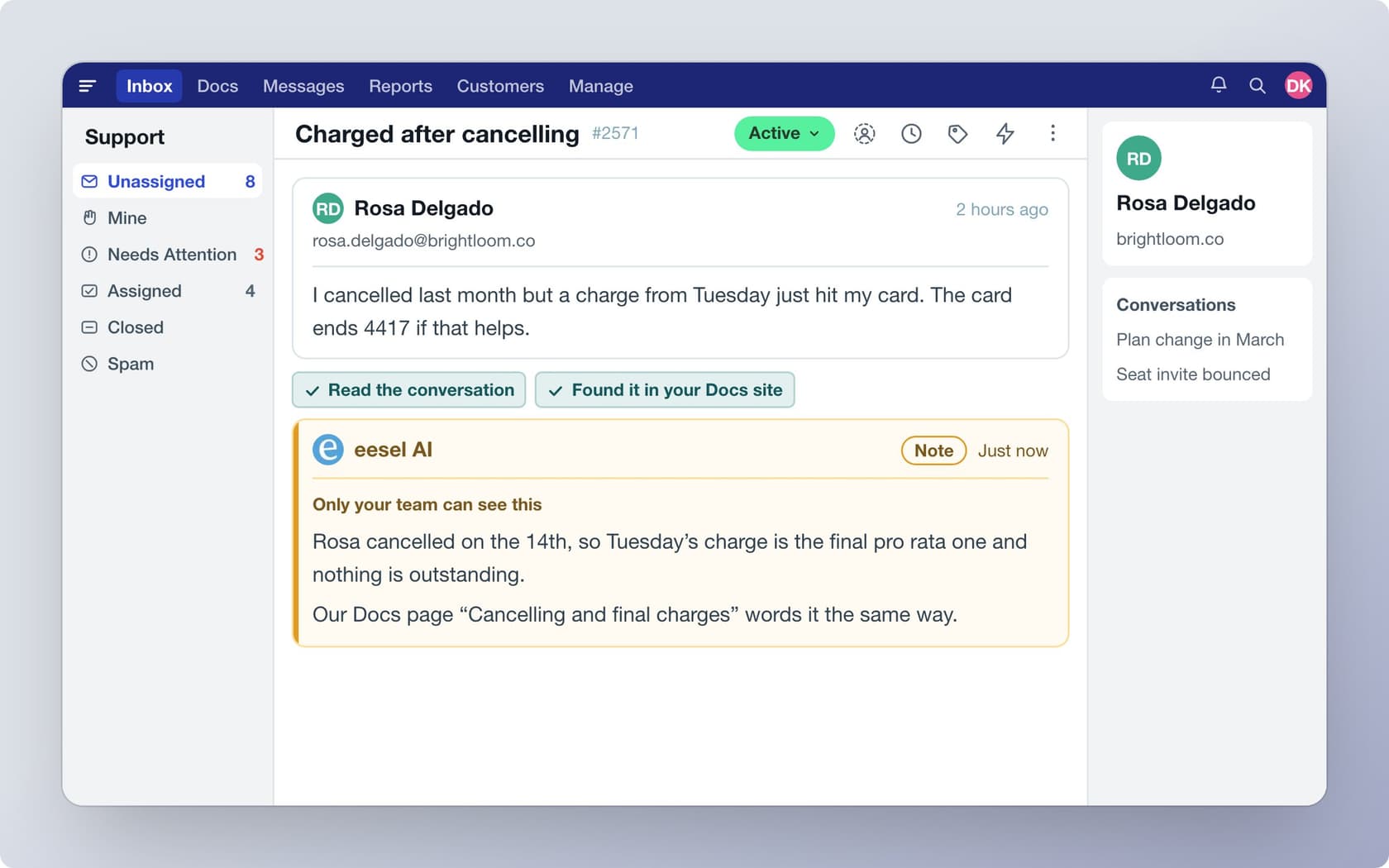
If you want a chat that lives outside Beacon, eesel also has a chat bubble you paste on your site, which answers from your pages and help center and hands off to a person. I would not read that as a Beacon replacement. It is a different widget, with no documented control over Beacon's modes, so check whether you want two launchers on one page.
The closest real proof I have is on another helpdesk, so I will say so. SamCart, a platform for selling digital products, runs one agent on Freshdesk tickets and a separate one on its website chat bubble, each with its own greeting and tone, both answering from the same help center of about 280 articles. The chat asks for a name and email before it answers, so the team can follow up. That is the same split I would make with Beacon: let one door suit browsers and one suit people who want a reply, and keep the knowledge behind both identical. See also my notes on AI chat bubbles and live chat deflection.
For a coding agent, the eesel CLI can run npx @eesel/cli integrations connect helpscout_v2 to show connection options, manage automation settings, and eesel chat to ask test questions before anything goes live. Connecting the mailbox still needs a Help Scout admin or account owner to click Authorize in the browser.
What mistakes should you avoid with Beacon modes?
- Gating before the Docs are ready. Self service sends every visitor through search. If your top questions return nothing, you have built a maze. Check outdated help content first.
- Changing the mode in code and forgetting the builder.
configwins, so the settings screen can quietly lie to the next person who opens it. - Expecting chat to show all day. Chat appears only when a user is online. Check what your Ask screen looks like at 2am.
- Picking a mode for deflection alone. A gated Beacon can raise frustration as easily as it lowers volume, and CSAT will show it before volume does.
- Leaving handoff vague. Whoever answers behind Beacon, a person or an agent, should know when to pass the chat on. My notes on human handoff in chat and AI escalation cover it.
For related Help Scout setup, my posts on snoozed conversations, saved replies and collision detection are the next reads.
Try eesel with your Help Scout mailbox
If Beacon sends the right visitors to your team, eesel for Help Scout is the next layer I would add. It reads your Docs site and past conversations, answers Beacon live chats during staffed hours, and hands off to a person when it should. You can try eesel with 100 free credits for 7 days, then paid plans start at $299 a month for 500 credits, where a ticket or chat is one credit (eesel pricing). If you are comparing options, see my best AI for Help Scout roundup.
Frequently Asked Questions
What are the Help Scout Beacon modes?
How do I change the mode of my Help Scout Beacon?
mode as selfService, neutral or askFirst in Beacon('config'). See my Help Scout API notes for the developer side.Why can't I see the mode option in my Beacon?
Which Beacon mode is best for reducing tickets?
Does Beacon mode work with Scout or chat?
Does the JavaScript mode setting override the Beacon builder?
Beacon('config') override the manual settings in the Beacon Builder. You can switch features off in code, but docsEnabled and messagingEnabled can only be enabled if they are already on in the settings. See Beacon form fields for more on config.