


Let’s be honest, most of the time your customers don't actually want to talk to you. It's not personal. They just want a quick answer so they can get on with their day. Giving them a way to find those answers themselves is a huge win for everyone: they solve their own problems in seconds, and your support team can focus on issues that actually need a human touch.
If you're using Help Scout as your customer communication platform, you're in luck. They’ve built a solid set of tools to make this happen. This guide will walk you through everything you need to know about the Help Scout self service setup, from its key features and AI tools to its pricing and potential blind spots.
What is Help Scout self service?
So, what exactly is Help Scout self service? It’s not one single product but a combination of two features working together: Help Scout Docs (their knowledge base) and Help Scout Beacon (their handy help widget).
The goal here is simple: give customers the right information, right when they need it, so they don't have to ask you for it. When this works well, it can seriously cut down on the number of repetitive questions that clog up your inbox. Help Scout even suggests that a well-maintained self-service hub can reduce email volume by up to 30%. It’s all built to help your team work smarter, not harder, while keeping customers happy.
The core components of Help Scout self service
Help Scout's approach to self-service rests on two main tools. Let's dig into what they do and how they fit together.
Help Scout Docs: Your central knowledge base
Think of Help Scout Docs as the brain of your entire self-service operation. It’s the single source of truth where you write, manage, and publish all of your help articles, how-to guides, and FAQs.
Here are a few things that make it stand out:
-
Simple setup: You don't need a developer to get a nice-looking help center online. The interface is clean and lets you build and publish a site that matches your brand in just a few minutes.
-
Easy customization: You can change up the colors and layout to match your brand right away. If you want to get more technical, you have the option to use custom CSS for full control.
-
AI writing help: Docs comes with an AI Assist feature that can feel like having a writing partner. It can help you flesh out ideas, rephrase awkward sentences, translate content, or just change the tone to be more helpful.
-
Useful reports: The Docs Report shows you what your customers are actually looking for. You can see your most popular articles, the search terms people are using, and, most importantly, which searches are failing. Those "failed searches" are pure gold because they show you exactly what content you need to create next.
-
Access controls: You get to decide who sees what. You can make your whole knowledge base public, lock it down for specific users, or even create private collections just for your internal team to use. This is perfect for internal playbooks or troubleshooting checklists.
Help Scout Beacon: The on-page help widget
If Docs is the brain, Beacon is the friendly face that delivers all that knowledge. It's a small widget you can pop onto any page of your website or inside your app, putting help just a click away.
Here’s why it’s so effective:
-
Instant answers: Beacon’s main job is to offer help before a customer even has to ask. It looks at the page a customer is on and suggests relevant articles from your Docs site. For example, if someone is on your pricing page, Beacon can pop up with a link to your billing FAQ.
-
A smooth handoff to a human: Self-service is great, but it can't solve every single problem. When a customer is stuck, Beacon gives them an easy way to reach a real person. They can send an email or start a live chat directly from the widget without having to leave the page they're on.
-
Smarter contact forms: You can add custom fields to Beacon’s contact form to collect key details upfront. You could ask for a product category or the urgency of the issue. This information can then be used in Help Scout’s workflows to automatically tag and route the ticket to the right person.
Powering Help Scout self service with AI
Help Scout has started integrating AI to make its self-service tools a bit smarter. The star of the show here is a feature called "AI Answers."
Think of AI Answers as a 24/7 assistant that works inside the Beacon widget. Instead of just suggesting articles, it actually reads the content in your Help Scout Docs to give direct, conversational answers to customer questions. The idea is to automate the simple stuff, freeing up your team to handle more involved problems.
But there’s a catch. Help Scout's AI can only learn from information inside its own system. It pulls knowledge from your Help Scout Docs and past customer conversations, and that’s it.
What happens if your most important troubleshooting guides are in Confluence? Or your latest product updates live in Google Docs? Or your official company policies are stored in Notion? Help Scout’s AI has no idea that content exists. This creates knowledge gaps that lead to weak answers, frustrated customers, and more tickets for your team, which is exactly what you were trying to avoid.
A more effective approach is to use a separate AI tool that can connect to all your company's knowledge, wherever it's stored. This is where something like eesel AI comes in. Instead of being locked into a single platform, eesel AI connects to your help desk and all your other knowledge sources. It can read your official help center, past tickets, internal wikis, and more, giving your AI the full story so it can provide answers that are actually complete.
Help Scout self service pricing
Help Scout includes its self-service features in all of its plans, but what you get depends on which tier you’re on. Here’s a quick look at their official pricing page.
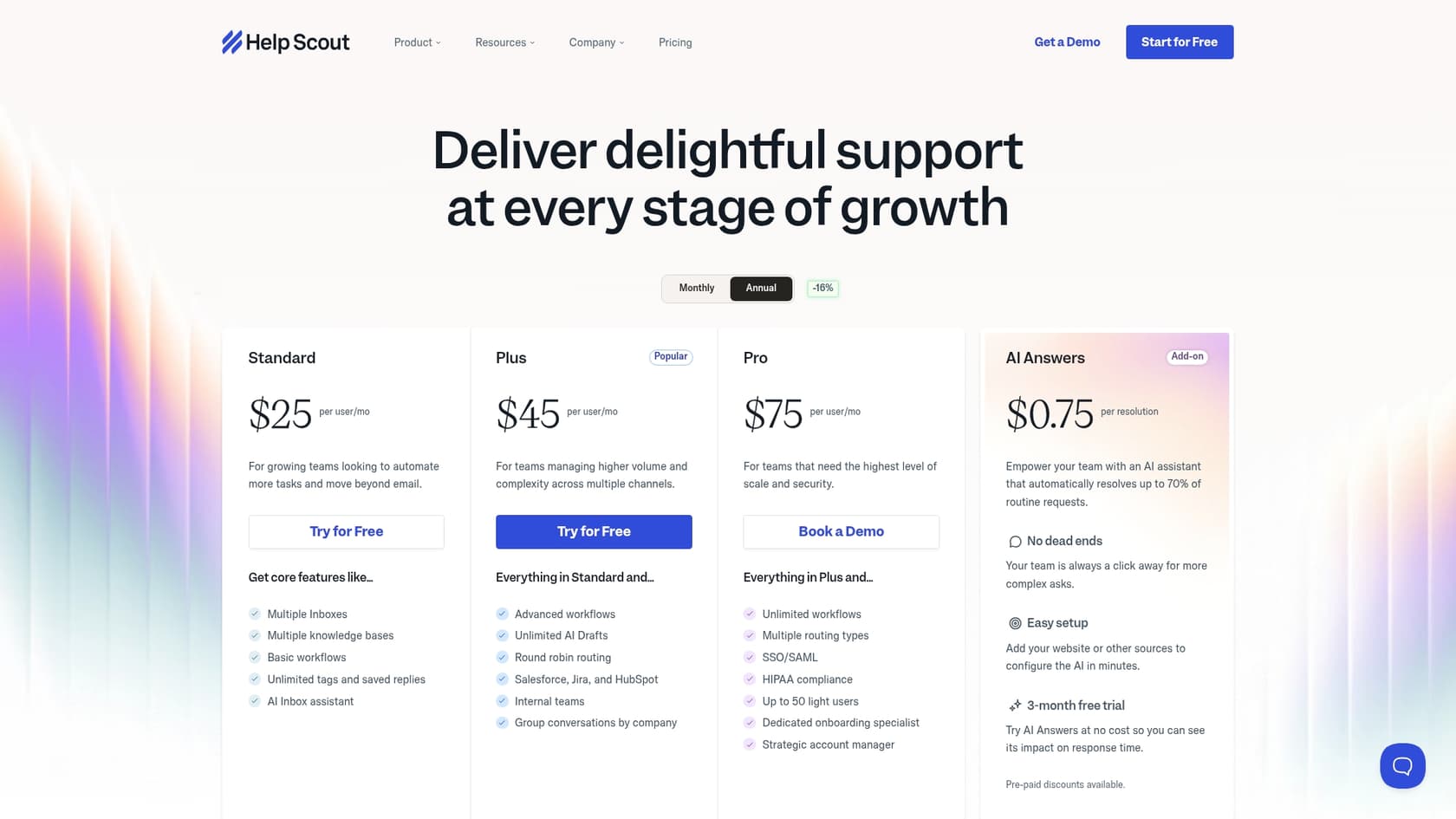
| Plan | Price (per user/mo) | Docs Sites Included | Key Self-Service Features |
|---|---|---|---|
| Free | $0 | 1 site (10 articles max) | Basic knowledge base for very small teams. |
| Standard | $25 | 2 sites (unlimited articles) | Full-featured Docs, basic workflows. |
| Plus | $45 | 3 sites (unlimited articles) | Adds custom fields for Beacon and advanced workflows. |
| Pro | $75 | 5 sites (unlimited articles) | Adds HIPAA compliance and advanced security. |
The plans themselves are pretty straightforward, but things get a little more complicated when you add AI into the mix.
The AI Answers feature isn't included in any of the base plans. It’s an add-on that costs $0.75 per resolution. A "resolution" is when the AI successfully answers a customer's question without a human having to step in.
On the surface, this sounds fair. But for a growing business, a "per-resolution" model can be a real headache. It makes your monthly costs totally unpredictable. If you have a busy month or a product launch that leads to more questions, your bill could jump unexpectedly. It turns budgeting into a bit of a guessing game, which isn't ideal when you're trying to scale.
This is a big difference from a tool like eesel AI, which has a predictable pricing model. Our plans come with a flat monthly fee and a generous number of AI interactions. You’ll find no per-resolution fees, so you always know exactly what you're paying. This lets you grow your AI support without worrying about surprise costs.
The verdict: Is Help Scout self service right for you?
So, after all that, should you go with Help Scout for your self-service strategy? Like most things, it depends on your team's needs.
Help Scout self service is a great fit if:
-
You're already all-in on Help Scout. If your team is already using their shared inbox, adding Docs and Beacon is a no-brainer for a seamless setup.
-
Your company knowledge is tidy. If all of your support documents already live in Help Scout Docs (or you can move them there easily), the platform will work just fine.
-
You value simplicity over everything else. Help Scout is famous for its clean, user-friendly design. You can get a good self-service system up and running fast.
But it might not be the best choice if:
-
Your knowledge is spread out everywhere. If your team uses a mix of tools like Confluence, SharePoint, or Google Drive for important information, Help Scout’s AI will be working with incomplete data.
-
You need predictable AI costs. The pay-per-resolution model can become a financial liability as your company grows and customer questions increase.
-
You need smarter automation. Help Scout's Workflows are based on rules you have to set up manually. It can't learn from your past tickets to automatically tag, route, or triage new conversations on its own.
Taking your Help Scout self service to the next level
Help Scout self service provides a solid, easy-to-use foundation for any team looking to empower its customers. It's a fantastic place to start building out a knowledge base and offering on-page help.
But for teams that need more flexibility, better AI, and predictable costs, a dedicated AI platform is the next logical move.
An AI Agent from eesel AI, for example, works with help desks like Zendesk and Freshdesk to deliver a more powerful self-service experience. It’s designed to solve the common limitations of built-in tools by offering:
-
Unified Knowledge: Connect eesel AI to all your tools, Confluence, Google Docs, Notion, past tickets, and more, to give your AI the full context it needs to solve problems accurately.
-
Predictable Pricing: Our flat-rate plans mean you'll never get a surprise bill. You can scale your support without scaling your budget anxiety.
-
A True Self-Serve Setup: You can connect your knowledge sources, configure your AI, and go live in just a few minutes, all on your own.
If you’re ready to build a self-service experience that can truly grow with you, take a look at how eesel AI can work with your existing support tools.
Frequently asked questions
What exactly is Help Scout self service and how does it help customers?
Help Scout self service combines Docs (their knowledge base) and Beacon (their help widget) to empower customers to find answers independently. This reduces repetitive inquiries and allows your support team to focus on more complex issues.
How does the AI in Help Scout self service work, and what are its limitations?
Help Scout's AI Answers feature provides direct, conversational responses within Beacon by learning from your Help Scout Docs and past conversations. Its main limitation is that it can only access knowledge within Help Scout's ecosystem, missing information stored in other platforms.
Can I customize the appearance of my Help Scout self service knowledge base to match my brand?
Yes, Help Scout Docs offers easy customization options for colors and layout to align with your brand. For more advanced control, you also have the option to use custom CSS.
What are the pricing considerations for Help Scout self service, especially regarding AI features?
Help Scout's self-service features are included in all plans, with varying Docs site limits. However, the AI Answers add-on costs $0.75 per successful resolution, which can make monthly costs potentially unpredictable for growing teams.
When might Help Scout self service *not* be the ideal solution for my company?
Help Scout self service might not be ideal if your crucial company knowledge is scattered across many different tools outside of Help Scout. It's also less suitable if you need predictable AI costs or more advanced, learning-based automation beyond rule-based workflows.
How does Help Scout self service allow customers to reach a human agent if they can't find an answer?
Help Scout Beacon provides a smooth handoff, allowing customers to easily send an email or initiate a live chat directly from the widget. This ensures they can connect with a human without leaving their current page if self-service isn't enough.