What an SLA actually is (and the two clocks people confuse)
An SLA is a documented commitment to a response standard, usually between a support team and its customers (external SLAs) or between two internal teams like IT and the rest of the business (internal service desk SLAs). It's the difference between "we'll get to it" and "urgent tickets get a first reply within an hour, every time."
The confusion that trips up most teams is treating an SLA as one number. It's two clocks running at once:
- First response time is how long the customer waits for any acknowledgement that a human (or an AI) has picked up their ticket. It starts when the ticket is created and stops at the first reply.
- Resolution time is how long until the issue is genuinely closed. It's the clock customers feel most, and the one hardest to control, because it depends on complexity you can't always predict.
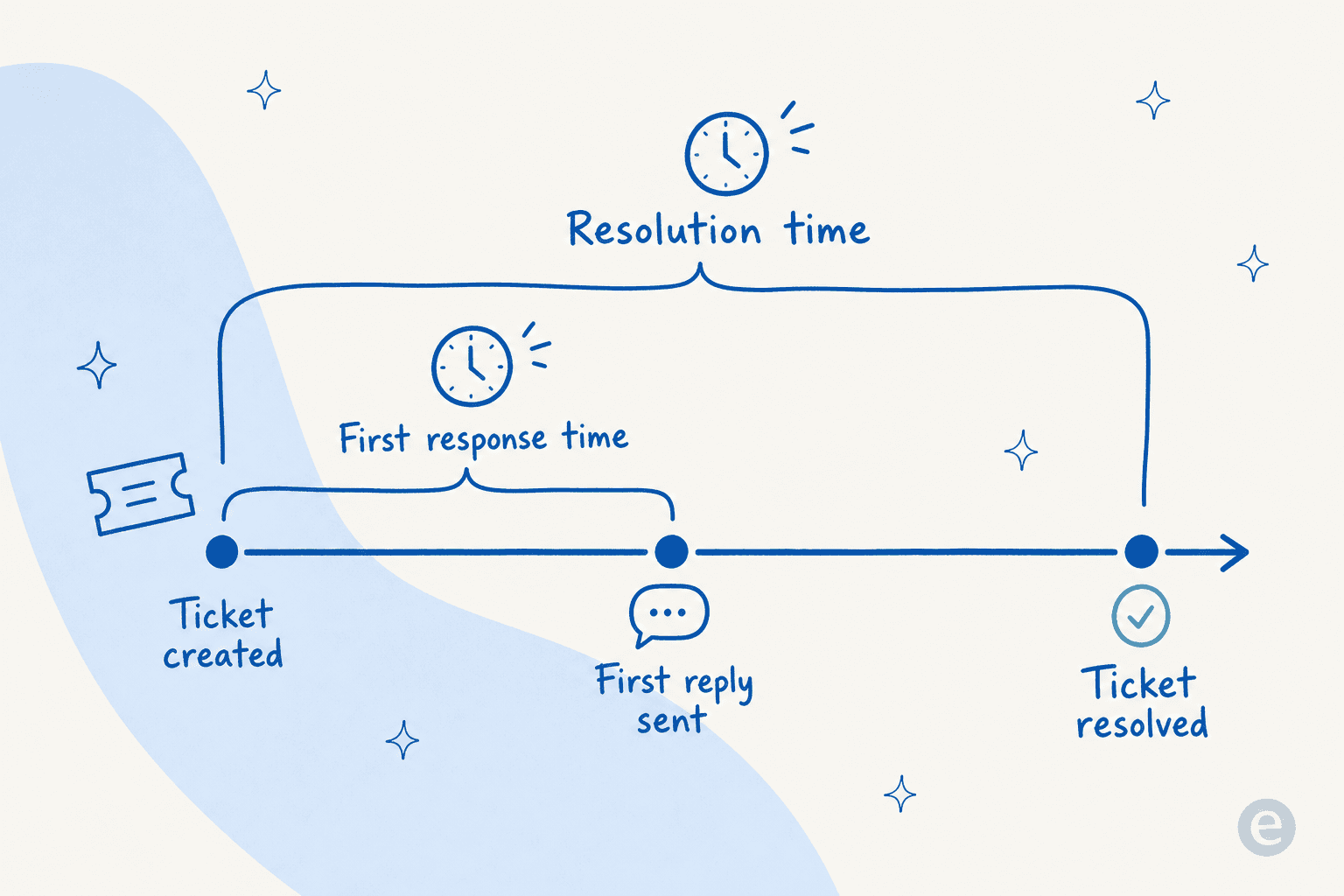
Keep them separate. A team can nail a 15-minute first response and still leave tickets open for a week, and a single blended "average handle time" number hides exactly that failure. If you take one thing from this post: report the two clocks separately, per priority. Everything else is downstream of that.
SLA best practices that actually move the needle
1. Tier your targets by priority
A flat SLA ("all tickets answered in 4 hours") is either too slow for the outage that's costing a customer money or too aggressive for the "how do I change my avatar" question. Tiering fixes that. Assign every ticket a priority on the way in, and give each priority its own response and resolution target.
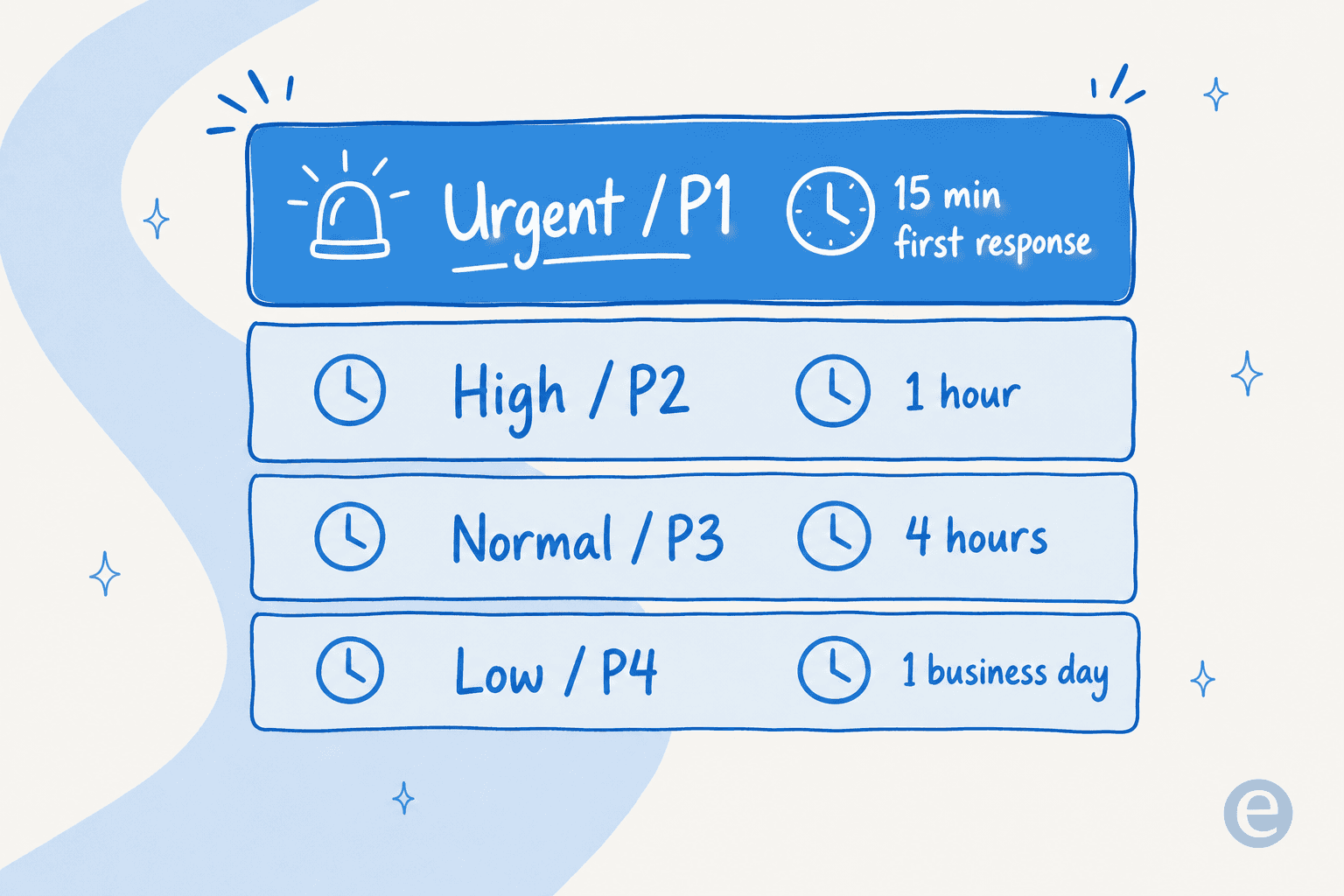
A workable starting grid for a mid-size support team looks like this:
| Priority | Example | First response | Resolution target |
|---|---|---|---|
| Urgent (P1) | Service down, payment failing, security issue | 15 min | 4 hours |
| High (P2) | Feature broken for one user, blocked workflow | 1 hour | 8 business hours |
| Normal (P3) | How-to question, minor bug, billing query | 4 business hours | 2 business days |
| Low (P4) | Feature request, cosmetic issue, general feedback | 1 business day | 5 business days |
The numbers aren't the point; the shape is. Steal it, then calibrate against what your team can genuinely sustain. Tiering only works if priority is assigned accurately and quickly, which is why ticket triage is the unglamorous foundation under every good SLA. Get triage wrong and a P1 sits in the P3 queue until it breaches.
2. Set targets you can hit 95% of the time, not aspirational ones
The most common mistake we see is a leadership team writing an SLA that reads well in a sales deck ("1-hour resolution!") and a support team that misses it every single day. A target you breach constantly is worse than no target: it trains agents to ignore the clock and it erodes the exact trust the SLA was meant to build.
Set targets against your real historical data. Pull the last quarter of tickets, look at what you actually delivered at the 90th and 95th percentile, and set the SLA a notch tighter than that as a stretch you can reach, not a fantasy. If you don't have clean historical numbers yet, your first job isn't the SLA, it's support ticket analysis to see what you actually deliver today.
3. Pick the right clock: business hours vs calendar hours
An SLA that says "1 hour" means nothing until you say which hour. A ticket that lands at 2am counts very differently depending on your calendar:
- Business-hours SLAs pause the clock outside your support window. Right for a 9-to-5 team, because a ticket at 11pm shouldn't count as a breach when nobody's rostered.
- Calendar-hours SLAs run 24/7. Right for teams that promise round-the-clock support, but only honest if you actually have 24/7 coverage to match.
The trap is promising calendar-hours speed on a business-hours team. You'll breach every overnight ticket and your SLA report will look like a disaster that isn't real. Set the calendar in your helpdesk first, then publish the target.
4. Pair every speed target with a quality target
Speed metrics have a dark side: they're easy to game. An agent racing a first-response clock can fire off a "Thanks, looking into this!" macro that technically stops the clock and helps nobody. That's a met SLA and a failed interaction.
Guard against it by pairing every SLA with a quality signal, usually CSAT or a QA score, and reviewing them together. If first-response SLA attainment is climbing while CSAT is flat or falling, your team is gaming the clock. The best support orgs treat SLA and satisfaction as a single dashboard, never two separate wins.
5. Make breaches visible before they happen, not after
An SLA report that tells you last month's breach rate is a post-mortem. What actually protects the target is a live view: which open tickets are approaching their deadline right now, so someone can act before the clock runs out. Most modern helpdesk software surfaces this as an "SLA at risk" view, and support ticket automation rules can auto-escalate a ticket the moment it crosses a warning threshold. Reactive SLA management chases breaches; proactive SLA management prevents them.
Where AI changes the SLA math
Here's the honest version, from having run this across thousands of real tickets and live rollouts: most SLA breaches aren't a skill problem, they're a volume-and-timing problem. Tickets arrive faster than a fixed roster can respond, they arrive overnight, and the repetitive ones clog the queue so the genuinely urgent ones wait. AI attacks all three at once.
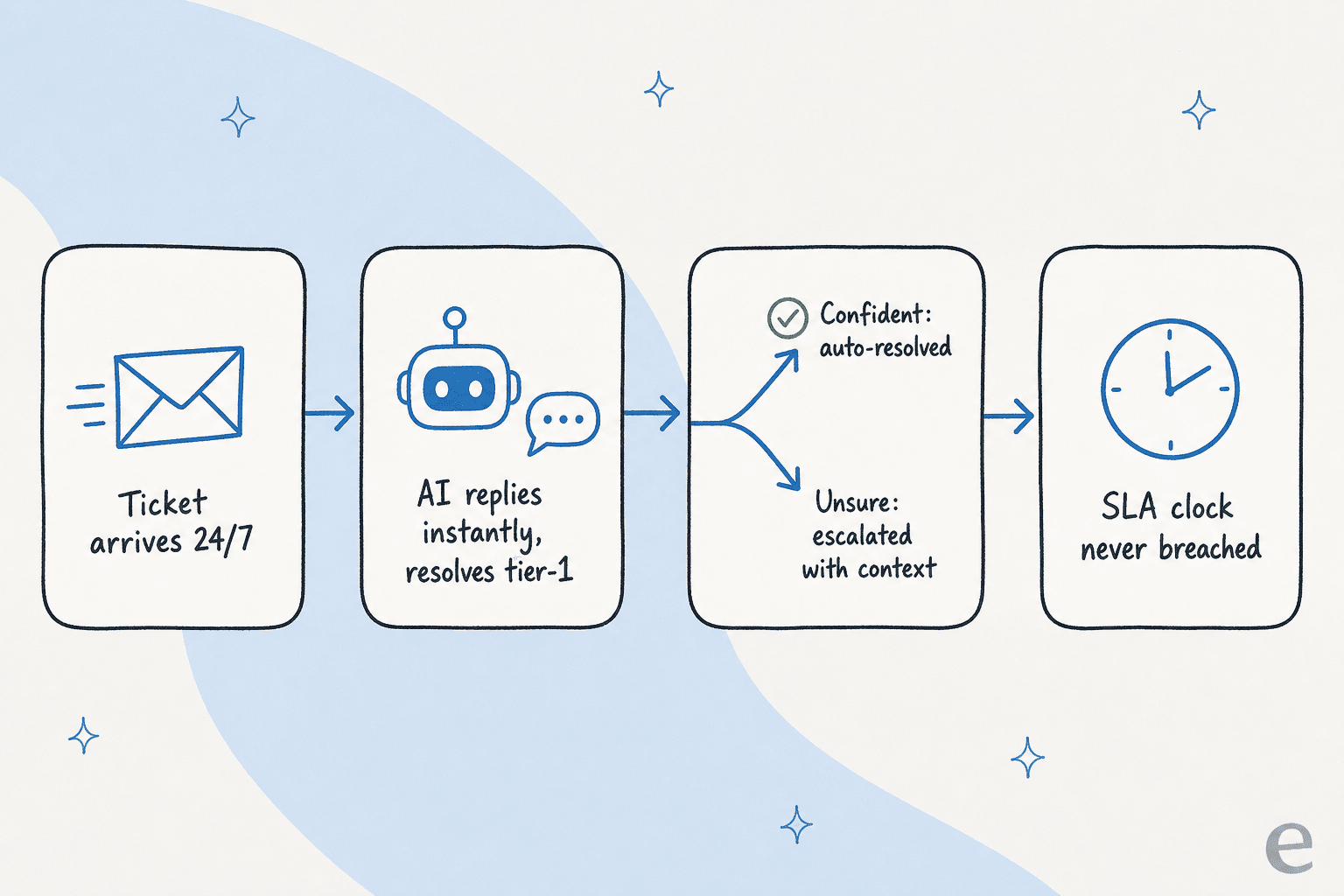
An AI helpdesk agent that's trained on your past tickets and help docs does three things directly relevant to SLAs:
- It answers instantly, 24/7. First-response SLAs are the easiest ones to protect with AI, because the AI never sleeps and never has a queue. A ticket at 2am gets an accurate, sourced reply immediately, not at 9am when the roster logs on. That alone is why teams reach for AI to reduce first response time.
- It clears tier-1 volume so agents defend the hard SLAs. When the AI resolves the repetitive "where's my order / how do I reset my password" tickets, your humans aren't racing the clock on fifty easy tickets, they're spending their hours on the complex ones where a breach actually loses a customer, which is also where the real cost savings show up.
- It triages and routes automatically. Accurate, instant ticket classification and routing means a P1 lands in the right queue in seconds, not after sitting misfiled behind a pile of P3s.
This isn't hypothetical. One gig-economy analytics customer on Zendesk saw eesel resolve 73% of their tier-1 requests in the first month, with results landing during a 7-day trial:
"In the first month, eesel is resolving 73% of our tier 1 requests... Our team implemented and achieved results quickly during our 7-day trial. The platform even includes automations for ticket tagging, assignment, and status updates!"
Kim Simpson, Gridwise (G2 review)

eesel AI working inside Zendesk, drafting and resolving tickets in the live queue
The catch: don't let AI game your SLA either
The same speed trap applies to AI, harder. An AI that auto-replies to everything to stop the clock is the worst version of the "Thanks, looking into it!" macro, at machine scale. We've watched confident-sounding bots quietly give wrong answers, which is why we now simulate every rollout against historical tickets before it goes live, and why the AI only auto-resolves tickets it's actually confident about. One DTC supplements CX lead we work with framed the whole game as knowing what not to answer: they wanted an AI that only handles "the tickets that it's confident to handle and all the other ones, leave them alone."
That's the difference between AI that protects your SLA and AI that inflates your attainment number while your CSAT quietly craters. Confidence-based escalation, not blanket auto-reply, is what makes the speed real.
How to measure SLA performance without fooling yourself
Once targets are live, the reporting has to be honest. A few things we'd insist on:
- Report attainment per priority and per channel, never blended. A 92% overall SLA number can hide a 60% attainment on P1s, which is the only tier that matters when it's failing.
- Watch the pause logic. "Waiting on customer" statuses should pause the resolution clock; if they don't, your resolution SLA punishes agents for slow customers.
- Trend it weekly, not monthly. A monthly report catches a bad week after it's cost you. Support analytics that update continuously catch it while you can still fix the roster.

If you're building this from scratch, our full SLA management guide walks through the reporting setup in more detail, and if you're shopping for a tool that reports all of this out of the box, the best AI helpdesk software roundup is a good next read.
Common SLA mistakes to avoid
A quick checklist of the traps we see most often, so you can skip learning them the expensive way:
- One blended target for everything. No priority tiers, so P1s and feature requests share a clock. Fixed by tiering (best practice #1).
- Aspirational targets nobody hits. Looks great, breached daily, trains the team to ignore the SLA entirely.
- Wrong calendar. Business-hours promise measured on calendar hours (or vice versa), producing breach reports that are noise.
- Speed without quality. SLA attainment up, CSAT down, because the clock is being gamed.
- Post-mortem reporting only. Finding out about breaches after they happened instead of preventing them live.
- Set-and-forget. SLAs written once and never recalibrated as volume, team size, and product complexity change. Revisit them every quarter.
Try eesel for hitting your SLAs
If the real problem behind your SLA report is volume and timing, that's exactly what an AI helpdesk agent is built to fix. eesel trains on your past tickets and help docs, plugs into Zendesk, Freshdesk, and 100+ other tools, and starts answering instantly and around the clock, so first-response SLAs stop being the thing that breaks overnight.
What makes it safe for SLA work specifically is the control: you can run a simulation against thousands of your historical tickets to see exactly what it would have resolved and where it would have escalated, before a single customer sees it. The AI only auto-resolves what it's confident about and hands the rest to your team with full context, so you protect the SLA without gambling on accuracy. It's one fixed monthly plan from $299/month for 500 credits (1 credit per ticket or chat) with no per-seat fees, and the free plan gives you 100 credits, no card, to try on your own queue.

Frequently Asked Questions
What is a good SLA for customer support?
What is the difference between response time and resolution time in an SLA?
How do you measure SLA compliance for support?
Can AI help meet support SLA targets?
Should SLAs run on business hours or calendar hours?
How do you set SLA targets for a small support team?
What happens if you keep missing your support SLA?
What are the most important SLA best practices?


Article by
Riellvriany Indriawan
Riell is a designer and writer at eesel AI with about two years of experience researching CX platforms, AI chatbots, and helpdesk software. She combines her design background with a sharp eye for how these tools actually look and feel in practice — making her comparisons unusually visual and user-focused.