What makes a survey question actually work
Before the question lists, it's worth being honest about why most surveys underperform. It's rarely the topic, it's the wording. A question that tries to measure three things at once, or nudges the customer toward a nice answer, produces data you can't trust and then quietly gets ignored.
Four rules cover almost all of it:
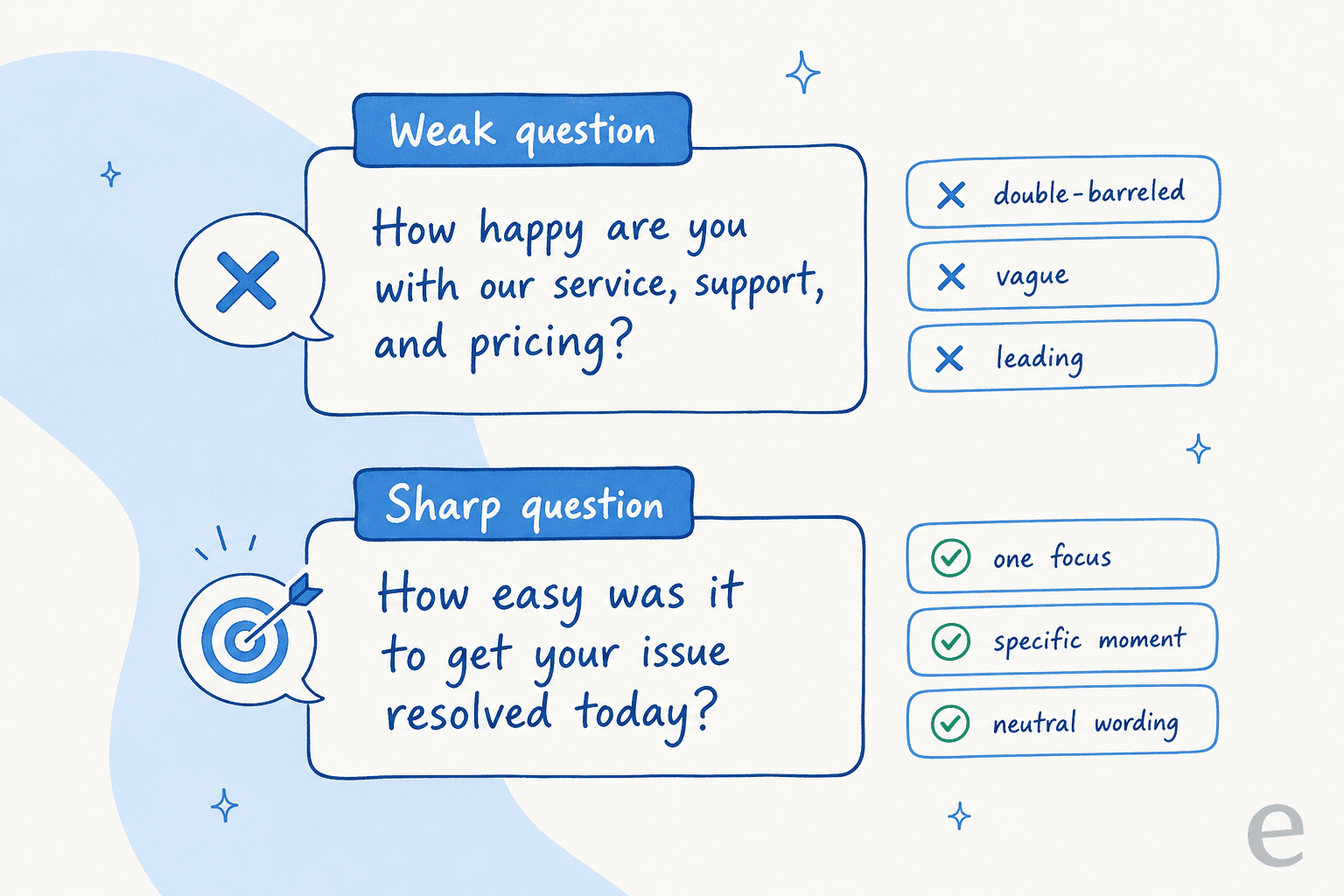
- One question, one focus. "How happy are you with our service, support, and pricing?" is three questions wearing a trenchcoat. If the score drops, you have no idea which part broke. Split it.
- Neutral wording, no nudging. "How much did you love our amazing new checkout?" tells the customer what you want to hear. Ask "How would you rate the checkout experience?" instead.
- Match the question to a real moment. Ask about a ticket right after it closes, not three weeks later when the customer has forgotten it happened. Memory decays fast, and stale surveys get stale answers.
- Always leave room for the why. A number tells you that someone's unhappy; an open comment tells you why. One rating plus one optional open-ended field is the highest-signal survey you can send.
Keep those four in mind and the specific questions below mostly write themselves.
The three survey types (and when to use each)
Almost every satisfaction question you'll ever ask fits into one of three well-established formats. They measure different things, on different scales, at different moments, so picking the right one matters more than the exact phrasing.
| Type | What it measures | Scale | When to send | Best for |
|---|---|---|---|---|
| CSAT | Happiness with one specific interaction | 1-5 (or 1-7) | Right after a ticket, order, or chat | Spotting broken moments fast |
| NPS | Overall loyalty and likelihood to recommend | 0-10 | Quarterly or at lifecycle milestones | Tracking the relationship over time |
| CES | How much effort the customer had to spend | 1-7 | Right after a resolution or self-service attempt | Finding friction in a process |
| Open-ended | The why behind any score | Free text | Alongside any of the above | Surfacing themes you didn't think to ask about |
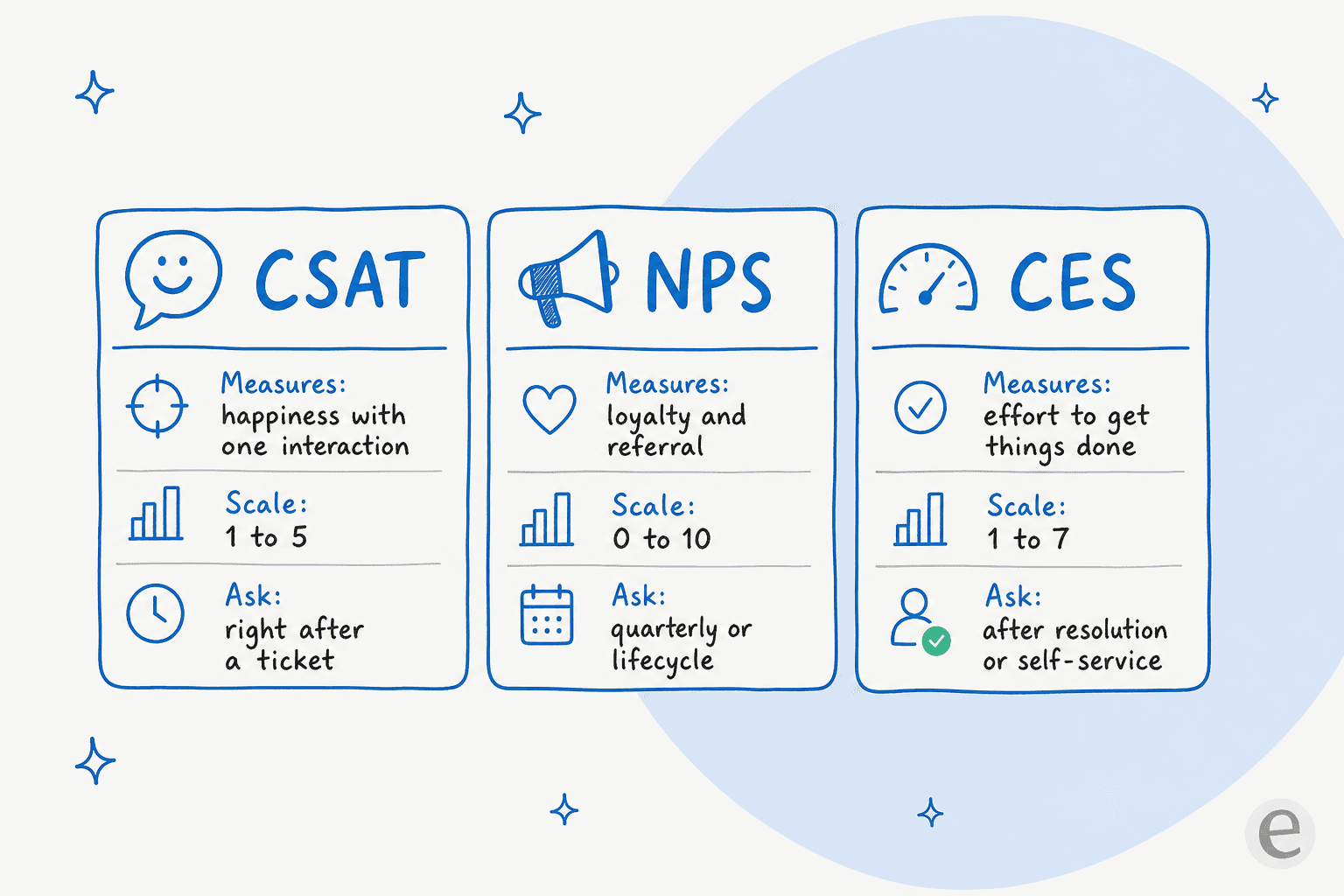
A quick way to remember it: CSAT is a snapshot, NPS is the relationship, and CES is the friction. If you only run one, run CSAT on your support tickets, it's the fastest signal that something in your support workflow broke. All three are worth watching next to your other customer service metrics.
Not sure which one to send?
Pick the goal that matches what you're trying to learn right now:
Send a CSAT question
You want to know if a specific ticket, chat, or order went well. Fire it right after the interaction closes.
Send an NPS question
You care about the overall relationship, not one moment. Send it quarterly or at a lifecycle milestone.
Send a CES question
You suspect something is harder than it should be. Ask right after a resolution or a self-service attempt.
Add an open-ended question
You have a score but not the reason. Pair one free-text prompt with any rating above.
CSAT survey questions
CSAT questions are your workhorse. They rate a single, recent interaction, and because they're tied to a specific moment, they're the quickest way to catch a broken step. Send one immediately after a ticket closes, an order ships, or a chat ends.
Core rating questions:
- How satisfied were you with the support you received today?
- How would you rate your overall experience with us?
- How satisfied are you with how quickly we resolved your issue?
- How well did our team understand your question?
- How satisfied are you with the answer you were given?
- How would you rate the quality of the help you received?
- Did this interaction meet your expectations?
- How satisfied were you with your recent purchase?
- How would you rate the onboarding experience so far?
- Overall, how happy are you with our product?
Follow-up questions (ask right after the score):
- What's the main reason for your rating?
- What could we have done to make this a 5-star experience?
- Was there anything about this interaction that frustrated you?
- Is there anything we could have explained more clearly?
Keep the scale consistent across every CSAT survey, a 1-5 in one place and a 1-7 in another makes your reporting a mess. If you're firing these from a helpdesk, most support the "survey on close" pattern natively; here's how to send a CSAT survey on close so it goes out the moment the ticket wraps.
NPS survey questions
NPS (Net Promoter Score) asks the single loyalty question, then a follow-up. It's about the whole relationship, not one ticket, so send it on a slower cadence: quarterly, at renewal, or at a lifecycle milestone. The classic question almost never changes, but the follow-up is where the real insight lives.
The core question:
- How likely are you to recommend us to a friend or colleague? (0-10)
Follow-ups by score band:
- (Promoters, 9-10) What do you love most about using us?
- (Promoters, 9-10) What would make you recommend us even more strongly?
- (Passives, 7-8) What's one thing that would move us from good to great for you?
- (Detractors, 0-6) What's the main reason for your score?
- (Detractors, 0-6) What would we need to change for you to stay?
- Which feature or part of the product is most valuable to you?
- Is there anything currently stopping you from getting more value from us?
- How well are we meeting your needs compared to when you started?
The trap with NPS is treating the number as the deliverable. A 42 tells you nothing on its own; the detractor comments tell you everything. Route those straight to someone who can act, ideally flagged for churn risk automatically. If you run an online store, NPS also pairs well with the chatbot metrics you're already tracking. Many helpdesks can send this on a schedule too, like an NPS survey in Freshdesk.
CES (Customer Effort Score) questions
CES measures how hard the customer had to work. It's the most underrated of the three, because effort predicts churn better than raw satisfaction, someone can be "satisfied" with an answer that took four emails and a phone call to get, and they'll still leave. Send CES right after a resolution or a self-service attempt.
Effort rating questions:
- How easy was it to get your issue resolved today?
- How much effort did you personally have to put in to get help?
- To what extent do you agree: "The company made it easy to handle my issue."
- How easy was it to find the information you were looking for?
- How easy was it to reach a person when you needed one?
- How straightforward was the checkout / signup process?
- How easy was it to use the self-service help center?
Follow-ups:
- What made this harder than it needed to be?
- Where did you get stuck, if anywhere?
- What would have made this easier?
CES is the question that exposes friction your CSAT hides. A high-effort resolution is a broken process wearing a smile. When self-service is the culprit, it usually points at a thin knowledge base, the same root cause behind a low deflection rate. Fixing the docs raises CES and cuts ticket volume at the same time.
Open-ended and product-feedback questions
Rating questions give you trend lines; open-ended questions give you the reasons and, often, the ideas you'd never have thought to ask about. Use them sparingly (they cost the respondent effort) but always include at least one.
General open-ended:
- What's the one thing we could do to improve your experience?
- If you could change one thing about our product, what would it be?
- What almost stopped you from buying / signing up?
- What nearly made you give up while getting help?
- What do we do better than anyone else you've used?
- What were you trying to accomplish when you contacted us?
Product and feature feedback:
- Which feature do you use most, and why?
- Which feature do you wish worked differently?
- What's missing that would make this a must-have for you?
- How well does the product fit into your existing workflow?
- What would you tell a colleague who's considering us?
Support-specific:
- Was your issue fully resolved, or is something still open?
- Did you have to repeat yourself to more than one person?
- How did the wait time feel to you?
- Was the tone of the support you received right for you?
- Did we follow up when we said we would?
- Is there anything else you'd like us to know?
That's 50+ to pull from. The mistake teams make isn't running out of questions, it's collecting all this text and never reading it. Which is the real subject of the next section.
The mistakes that quietly ruin survey data
Even with good questions, a few habits poison the results. Watch for these:
- Double-barreled questions. Anything with an "and" in it ("How was the speed and quality?") measures two things and reports one number. Split them.
- Leading questions. "How great was your experience?" primes a positive answer. Stay neutral.
- Surveying too late. A CSAT survey sent a week after the ticket closes measures the customer's memory, not the interaction.
- Too many questions. Response rates crater after the first two or three. A one-question CSAT will beat a ten-question form every time.
- Only surveying happy paths. If you only survey resolved tickets, you're systematically excluding your angriest customers, the ones who abandoned the queue.
- Collecting without acting. The most common failure of all. A survey nobody reads is worse than no survey, because it costs the customer effort and buys you nothing.
That last one is the one that matters most, and it's a scale problem, not a wording problem.
The real work is reading the answers
Here's the thing nobody tells you when you set up a survey program: writing the questions takes an afternoon, and reading the answers takes forever. A team handling a few thousand tickets a month generates a firehose of open-text comments, and "someone will go through them" turns into a backlog nobody touches. The scores get glanced at in a Monday dashboard, the comments rot, and the feedback loop, the entire point of the exercise, never closes.
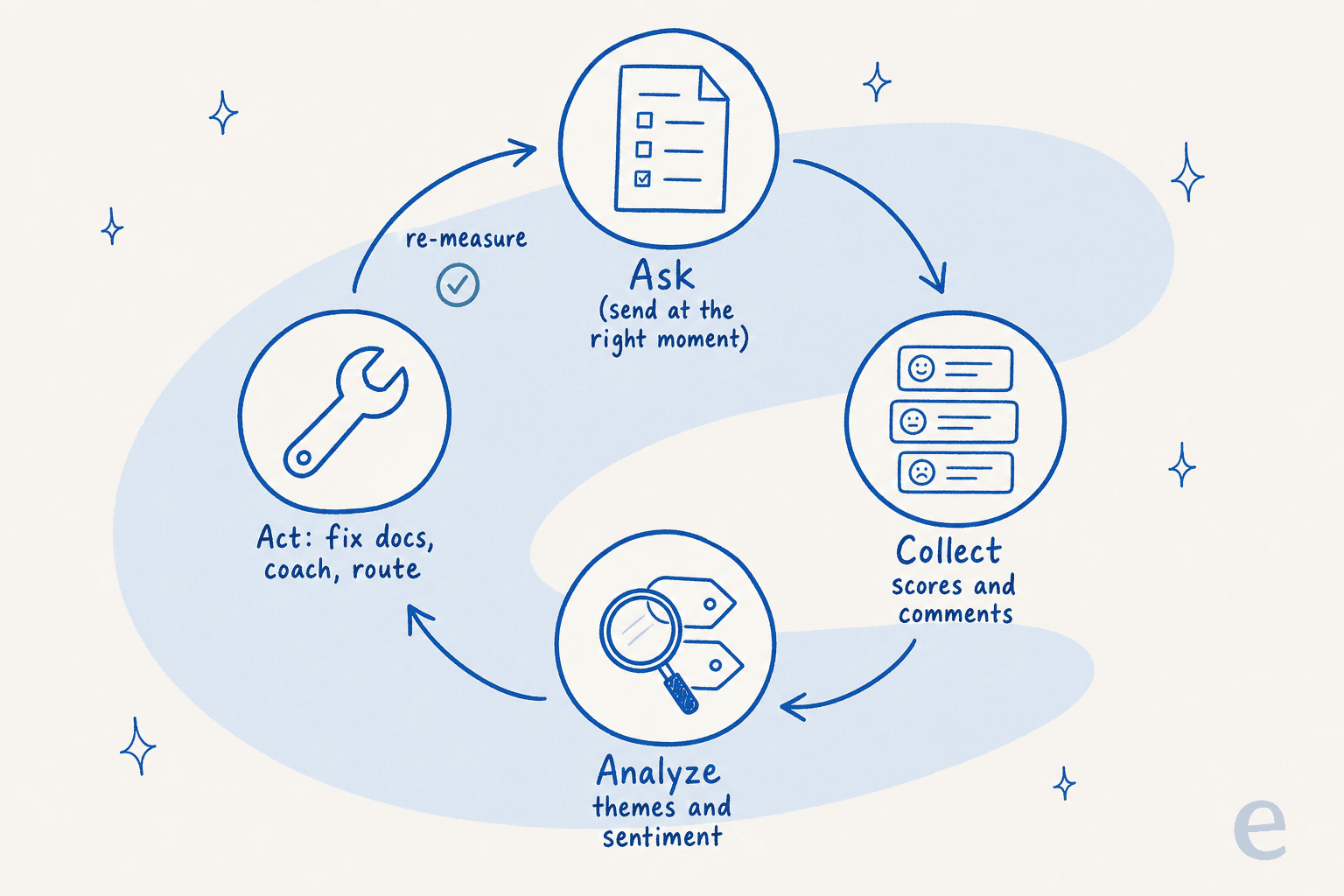
This is exactly where AI earns its keep. Instead of a human reading 4,000 comments, an AI can tag every response by theme, score its sentiment, and surface the three issues driving most of your detractors, then route the urgent ones to a person like any other ticket triage step. The rating question stays the same; what changes is that the why behind every score actually gets read.
I've watched this from the other side for years. The single most common thing I hear from support leads isn't "we don't know what to ask", it's "we're drowning in feedback we can't process". One CX lead at a DTC brand put the underlying instinct well:
"The AI will never be able to answer 100% of the questions... I need an AI who is only handling the tickets that it's confident to handle and all the other ones, leave them alone."
a DTC supplements CX lead (eesel AI)
The same logic applies to survey comments: let AI confidently handle the bulk classification and sentiment work, and escalate the genuinely tricky, high-stakes responses to a human. That's the version of automation that actually holds up on a live queue, and it's why we simulate every rollout against a company's historical tickets before it ever touches a customer.
Turn survey answers into action with eesel
Most of this guide is tool-agnostic, the questions work anywhere. But if the bottleneck is reading and acting on the responses, that's the specific problem eesel AI was built for. It plugs into the helpdesk you already run (Zendesk, Freshdesk, Gorgias, Front, and 100+ integrations), learns from your past tickets and help docs, and can tag, triage, and route feedback the same way it handles live support.

The differentiator is the simulation step: before eesel touches anything live, it runs against your historical tickets so you can see exactly how it would have classified and responded, no guessing. That's the same discipline that let Gridwise resolve 73% of tier-1 requests in the first month. The result is a feedback loop that actually closes: bad scores get read, themes get surfaced, and the fixes (better docs, agent coaching, smarter routing) feed straight back into your AI helpdesk agent.

You can wire the questions above into your helpdesk today, then let eesel handle the part that always breaks, reading every answer and doing something with it. It's free to start (usage-based at 40¢ per ticket, no per-seat fees), so you can point it at a slice of your real feedback and watch what it catches before committing. If you want the wider context, our guides on AI for customer service, customer service management, and the best AI helpdesk software go deeper.
Frequently Asked Questions
What are good customer satisfaction survey questions?
What is a CSAT survey question?
How many questions should a customer satisfaction survey have?
What's the difference between CSAT, NPS, and CES?
Can AI analyze customer satisfaction survey responses?


Article by
Kurnia Kharisma
Kurnia is a software engineer and writer at eesel AI with two years of SEO experience, writing about AI tools, helpdesk software, and customer support. He pairs a developer's understanding of how these products are built with search-driven research into what actually ranks and resonates with the people searching for them.