If you are trying to add custom questions to your Zendesk CSAT surveys, you have probably hit a wall. The native CSAT feature is useful for basic feedback, but it does not support additional questions beyond the main rating. This frustrates teams who want deeper insights into customer satisfaction.
The good news? You have options. This guide walks you through workarounds using native Zendesk features, third-party tools that integrate with your help desk, and alternative approaches like eesel AI that analyze customer sentiment without sending surveys at all.
Let us break down what you can do.
What Zendesk's native CSAT can and cannot do
Before exploring workarounds, you need to understand exactly what the native CSAT feature offers. Zendesk's CSAT surveys are available on Suite Professional ($115 per agent per month) and Suite Enterprise ($169 per agent per month) plans.
The native survey structure is fixed: one question, a rating, an optional comment field, and optional reasons for negative feedback. You can customize the question text, adjust the timing (the default sends 24 hours after a ticket is solved), and choose between 2, 3, or 5-point rating scales. You can also translate surveys using Dynamic Content for multilingual support.
What you cannot do is add custom questions. The "Customizable CSAT" feature released in 2023-2024 improved flexibility for the main question and rating display, but the underlying structure remains the same. Even with a 5-point scale, reporting still converts responses to binary good or bad ratings. Agents cannot see which specific rating a customer chose, only the final positive or negative classification.
This matters because teams often want to ask follow-up questions about specific aspects of the support experience: agent knowledge, resolution speed, or ease of contact. Native CSAT cannot capture this level of detail.
Workaround 1: Maximizing native CSAT with creative configuration
While you cannot add true custom questions, you can squeeze more value from native CSAT with strategic configuration.
Customize the main question to be more specific than the default "How would you rate the support you received?" Try "How satisfied were you with the solution provided?" or "How would you rate your experience with [Agent Name]?" This focuses responses on what you actually want to measure.
Use the comment field strategically. The comment prompt is customizable, so guide customers toward useful feedback. Instead of the generic "Tell us more," try "What could we have done to resolve your issue faster?" or "Was there anything our agent could have explained better?"
Configure negative feedback reasons to capture specific issues. You can define up to 9 reasons why customers give negative ratings. Use these to identify patterns: "Issue took too long to resolve," "Agent lacked product knowledge," or "Solution did not work."
Combine the solved notification with CSAT to reduce email fatigue. Instead of sending a separate "ticket solved" email followed by a survey 24 hours later, deactivate the CSAT automation and add the {{satisfaction.rating_section}} placeholder to your solved ticket trigger. Customers get one email, not two.
Use tag-based targeting to survey specific segments. You might exclude partners or internal users, or only survey tickets tagged with specific product categories.
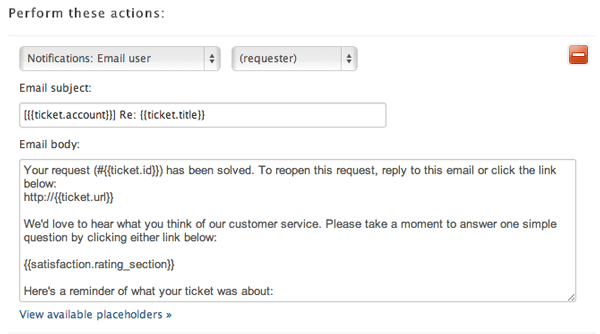
The limitation? You are still working within a rigid structure. These tweaks help, but they do not give you true multi-question surveys.
Workaround 2: Third-party survey tools for Zendesk CSAT survey custom questions
When native options fall short, dedicated survey tools fill the gap. These platforms integrate with Zendesk via triggers and automations, embedding custom surveys into your workflow.
Nicereply
Nicereply starts at $59 per month (annual billing) for 100 responses and 3 users. It supports CSAT, CES, and NPS surveys with fully customizable questions. You can add follow-up questions, choose from multiple rating scales (3 emojis, thumbs up or down, 10 stars), and enable instant ratings that record feedback even if customers abandon the survey.
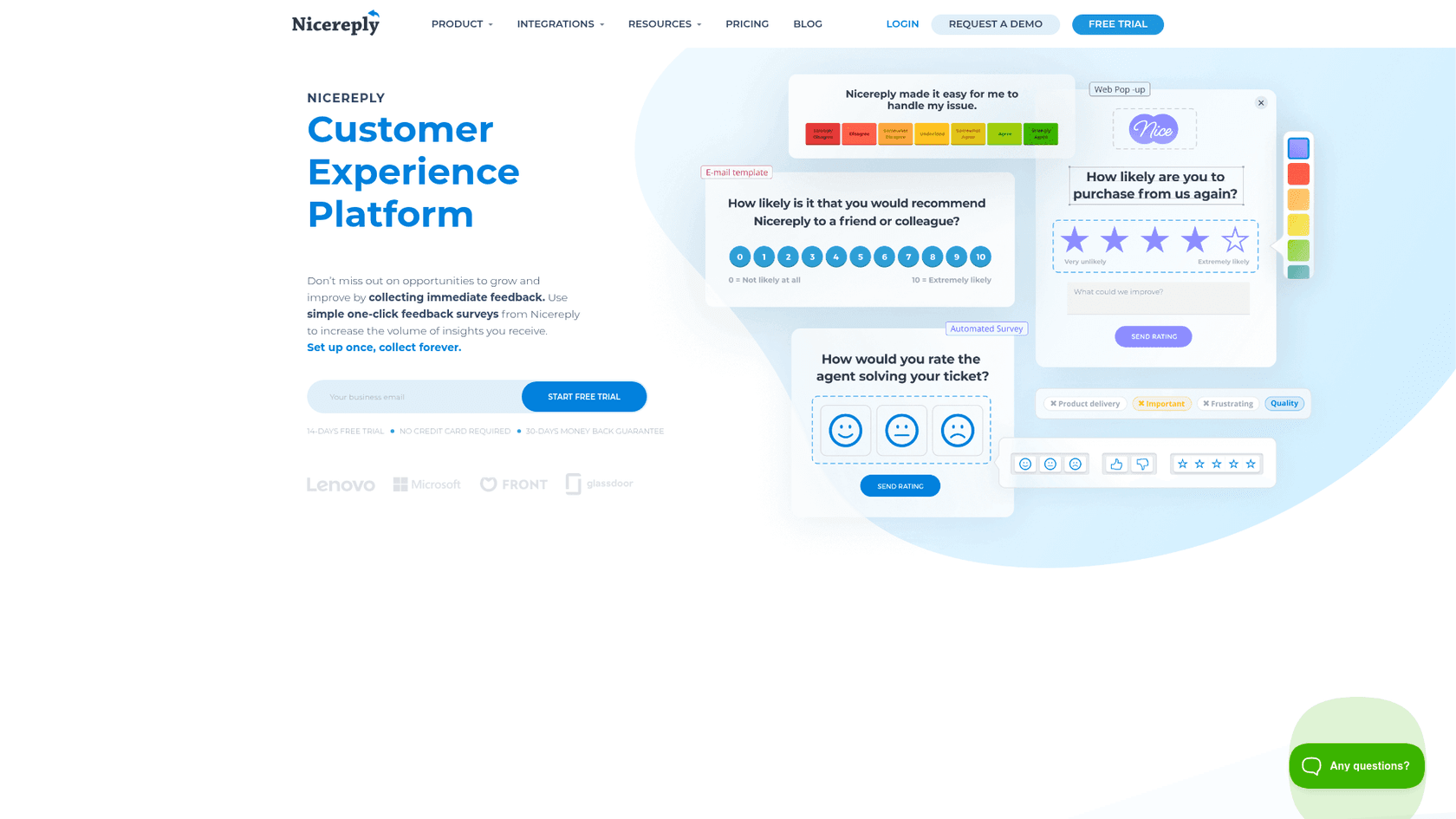
The platform offers post-resolution surveys, in-signature surveys, link surveys, and website pop-ups. It integrates with Zendesk, Front, Help Scout, Pipedrive, and HubSpot.
Simplesat
Simplesat starts at $109 per month (annual billing) for 1,000 responses and 5 account users. Unlike most tools, Simplesat allows unlimited support agents and team members regardless of plan. It supports CSAT, CES, NPS, and 5-star ratings with multi-question surveys and conditional logic.
Key features include AI-generated question suggestions, AI-driven topic detection for feedback categorization, and website testimonial widgets. The platform integrates with Zendesk, Salesforce, Slack, and Microsoft Teams.
How these tools work
Setup is straightforward. You create a survey in the third-party platform, copy an embed code or HTML snippet, and paste it into a Zendesk trigger or automation. When tickets meet your criteria (typically when marked solved), Zendesk sends the email containing the embedded survey. Customer responses sync back to Zendesk via the integration, often appearing as ticket comments or custom field values.
The trade-offs are real: additional cost, another tool to manage, and potential data fragmentation. But for teams needing detailed feedback, the investment often pays off.
Workaround 3: External survey platforms
For occasional deep-dive surveys rather than transactional CSAT, general survey tools work well.
SurveyMonkey, Typeform, and Google Forms can all be triggered from Zendesk. You create the survey in your platform of choice, then set up a Zendesk trigger that sends a follow-up email with the survey link after ticket resolution.
Capturing responses back into Zendesk requires more effort. You might use webhooks to push data into custom ticket fields, or manually review survey results in the external platform. Some tools offer native Zendesk integrations that automate this sync.
This approach works best for quarterly satisfaction surveys, product feedback collection, or other non-transactional research. For daily CSAT measurement, the friction of leaving Zendesk and lower response rates make this less practical than dedicated tools like Nicereply or Simplesat.
A different approach: AI-powered customer sentiment analysis
Here is a question worth asking: do you actually need surveys to understand customer satisfaction?
Surveys have inherent limitations. Response rates typically hover around 10%, meaning you miss 90% of customer sentiment. Survey fatigue is real: customers bombarded with feedback requests stop responding. And feedback arrives after the interaction, when the moment has passed.
eesel AI takes a different approach. Instead of sending surveys, it analyzes customer sentiment directly from ticket conversations. Every email, chat message, and support interaction becomes a source of insight.

The AI reads conversations as they happen, identifying satisfaction signals in real time. No surveys needed. No waiting 24 hours for a response. No wondering what the 90% of non-responders think.
For teams frustrated with CSAT limitations, this offers continuous feedback without survey fatigue. You understand customer sentiment from actual interactions, not just the small subset willing to click a rating button.
Our Zendesk integration connects directly to your help desk, training on your past tickets and help center to understand your business. You can run bulk simulations over historical tickets to see how the AI interprets satisfaction signals before making any changes to your workflow.
Our pricing starts at $299 per month for up to 1,000 AI interactions, with no per-agent fees. This often works out more cost-effective than survey tools for teams with high ticket volumes.
Choosing the right approach for your Zendesk CSAT survey custom questions
The best solution depends on your specific situation. Here is a quick framework:
| Approach | Best For | Cost | Setup Complexity |
|---|---|---|---|
| Native CSAT tweaks | Teams with basic needs, tight budgets | Included in Suite Pro/Enterprise | Low |
| Nicereply | Teams wanting customizable surveys, multiple metrics | From $59/month | Low |
| Simplesat | Teams needing multi-brand support, high volumes | From $109/month | Low |
| External surveys (Typeform, etc.) | Occasional deep-dive research | Varies (often free tiers) | Medium |
| AI sentiment analysis (eesel AI) | Teams wanting continuous feedback without surveys | From $299/month | Low |
Stick with native CSAT if you just need basic satisfaction tracking and can work within its limitations.
Choose a third-party tool when you need custom questions, multiple survey types, or detailed analytics.
Consider AI sentiment analysis when you want to understand customer satisfaction without relying on survey responses, or when low response rates frustrate your current approach.
Start improving your customer feedback strategy today
You have options for capturing customer satisfaction feedback in Zendesk, even if native CSAT does not support true custom questions. Whether you maximize native features, integrate a dedicated survey tool, or explore AI-powered sentiment analysis, the key is choosing an approach that matches your team's needs and resources.
If you are tired of low survey response rates and want to understand customer sentiment from actual conversations, try eesel AI. Our 7-day free trial lets you see how AI-powered sentiment analysis works with your existing Zendesk data, no surveys required.