Timing is everything when asking customers for feedback. Send a satisfaction survey too soon and you risk premature negative ratings from customers who haven't had time to verify your solution worked. Wait too long and the experience is no longer fresh in their minds, leading to lower response rates.
This is the Zendesk CSAT survey email delay dilemma. Out of the box, Zendesk offers two extremes: immediate surveys via triggers, or a fixed 24-hour delay via the system automation. But what if you need something in between? What if you want to wait 4 hours for technical issues, or send surveys the next morning for better visibility?
This guide covers every method available to delay Zendesk CSAT surveys, from native automations to third-party apps. We'll also look at how we approach satisfaction automation at eesel AI, where timing decisions can be handled intelligently based on your historical data.
Why timing your CSAT surveys matters
The moment you ask for feedback shapes the feedback you get. Here's what the data shows:
- Immediate surveys (0 hours): Higher response rates because the interaction is fresh, but customers may not have verified the fix actually worked
- Short delays (2-4 hours): Gives customers time to test solutions for technical issues while keeping the experience top-of-mind
- Medium delays (10-12 hours): Surveys arrive the next business day, often landing at the top of the inbox when customers check email
- Long delays (24+ hours): The Zendesk default, giving maximum time for verification but often resulting in lower response rates
A community member on the Atlassian forums summed up the frustration perfectly:
I don't know about all of you but having the satisfaction survey sent out imminently after a ticket has reached a resolved status is a huge pain! This causes false reviews if a ticket is not truly resolved or no reviews at all.

The right timing depends on what you're supporting. Password resets probably don't need a delay. Complex technical troubleshooting probably does. The goal is matching your survey timing to the reality of how long customers need to verify their issue is actually resolved.
Understanding Zendesk's default CSAT behavior
Before changing anything, you need to understand how Zendesk handles satisfaction surveys by default.

When you enable CSAT in your Zendesk account, the platform creates a system automation called "Request customer satisfaction rating (system automation)." This automation runs hourly and sends survey requests 24 hours after a ticket's status changes to "Solved."
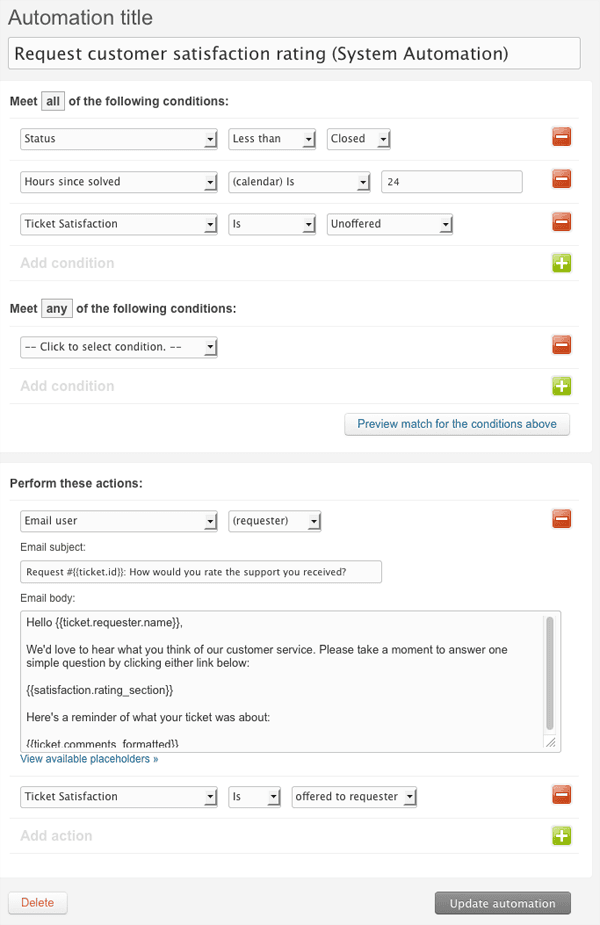
The key distinction to understand: Zendesk uses two different tools for automation. Triggers are event-based and fire immediately when something happens. Automations are time-based and check conditions periodically, acting after time has passed. The default CSAT setup uses an automation with a 24-hour window.
Here's where it gets limiting. The native system automation has a single fixed delay time. You can modify it to be shorter or longer (anywhere from 1 hour to 28 days), but you can't easily set different delays for different types of tickets without building custom workarounds.
Also worth noting: CSAT surveys are only available on Suite Professional ($115/agent/month) and above. If you're on Suite Team or Support Team plans, you'll need to use a third-party solution for satisfaction surveys entirely.
Method 1: Use automations for custom delays
The most straightforward way to customize your CSAT timing is modifying Zendesk's native automation system. This keeps everything within Zendesk and doesn't require additional tools.
How to modify the default automation
First, navigate to Admin Center > Objects and rules > Business rules > Automations. Find the automation titled "Request customer satisfaction rating (system automation)" and open it.
You'll see conditions that look like this:
- Ticket: Status | Is | Solved
- Ticket: Hours since solved | Greater than | 24
- Ticket: Satisfaction | Is | Unoffered
Change the "Hours since solved" value to your preferred delay. Common choices include:
- 2-4 hours for technical issues that need verification
- 10 hours to land in the inbox the next morning
- 48 hours for enterprise clients with complex implementations
Creating custom automations for different scenarios
If you want different delays for different ticket types, you'll need to create separate automations. Here's how:
- Deactivate the default system automation (to avoid conflicts)
- Create a new automation for each timing scenario
- Add conditions that target specific ticket types
For example, an automation for technical tickets might have:
- Ticket: Status | Is | Solved
- Ticket: Hours since solved | Greater than | 4
- Ticket: Tags | Contains | technical
- Ticket: Satisfaction | Is | Unoffered
The action would be: Ticket: Satisfaction | Offered to requester
Important considerations
Always use "Greater than" (not "Is") for time-based conditions. Zendesk automations run hourly, so they check if conditions are met at the time of the check, not at exact hour marks.
Add a nullifying condition to prevent automations from running multiple times. The "Satisfaction is Unoffered" condition handles this for CSAT surveys specifically.
Test with internal tickets before rolling out to customers. Create a test ticket, solve it, and verify the survey arrives at the expected time.
For more on setting up satisfaction triggers, see our guide on how to trigger Zendesk satisfaction surveys on ticket solve.
Method 2: Third-party apps for delayed actions
If you need more precision than hourly automation checks, the Delayer app from the Zendesk Marketplace offers 1-second accuracy for delayed actions.
How Delayer works
The app adds webhook-based delayed actions to your Zendesk account. Instead of relying on Zendesk's hourly automation checks, Delayer uses an external service to trigger actions at precise times.
Use cases that make sense for Delayer:
- Send CSAT surveys 30 seconds after ticket resolution
- Close tickets 30 minutes after being solved
- Send custom NPS surveys with specific timing
- Request third-party reviews (Google Business, Trustpilot, G2) after support interactions
Setting up Delayer
The installation process involves:
- Install from the Zendesk Marketplace (7-day free trial available)
- Grant permissions for the app to access your Zendesk account
- Authorize Zendesk Sunshine Conversations
- Create triggers that call the Delayer webhook with your desired delay
The app creates a webhook and provides a trigger example. You configure the delay in seconds, add any tags you want applied, and set up the message content.
Limitations to consider
Delayer has only 10+ installs as of early 2026, indicating relatively low adoption. The app requires Sunshine Conversations authorization, which adds complexity. Pricing isn't publicly listed on the marketplace page, so you'll need to contact the developer for costs beyond the trial period.
For teams that just need simple timing adjustments, native automations are usually sufficient. Delayer works well when you need precise delays (under an hour) or want to chain multiple delayed actions together.
Method 3: External survey tools with built-in delays
If Zendesk's native CSAT feels limiting, dedicated survey platforms offer more flexibility. Two popular options with Zendesk integrations are Wootric (now part of InMoment) and Retently.
Wootric/InMoment
Wootric, now part of InMoment's customer experience platform, offers granular control over survey timing through their Zendesk integration. The key feature is the email_delay parameter, which lets you specify delays in minutes.
The JSON payload for a Zendesk trigger looks like this:
{
  "emails": "{{ticket.requester.email}}",
  "subject": "How was your support experience?",
  "email_delay": 240
}
Setting email_delay to 240 sends the survey 4 hours after the trigger fires. Set it to 0 for immediate delivery.
Wootric also supports custom properties, so you can pass Zendesk ticket data (ticket ID, assignee name, tags) into your survey for richer analytics. The platform supports email, SMS, and WhatsApp delivery.
The trade-off is complexity. You're managing surveys outside of Zendesk, which means separate reporting, separate user management, and potential data silos.
Retently
Retently is another dedicated CX platform with Zendesk integration. Unlike Wootric's per-trigger delay configuration, Retently handles timing through campaign settings.
Key features for Zendesk users:
- Survey delay and throttling built into all plans
- Automatic survey sending based on ticket status changes
- AI-powered feedback classification
- NPS, CSAT, and CES survey types
| Plan | Monthly Price | Surveys | Seats |
|---|---|---|---|
| Basic | $49 | 1,000 | 1 |
| Pro | $299 | 20,000 | 10 |
| Enterprise | Custom | Custom | Custom |
Source: Retently pricing
Retently's survey delay feature prevents over-surveying by spacing out requests. This is useful if you have customers who submit multiple tickets in a short period.
When external tools make sense
Consider moving to a dedicated survey platform when:
- You need advanced analytics beyond Zendesk's built-in CSAT reporting
- You want to survey across multiple touchpoints (not just support tickets)
- You need sophisticated throttling and sampling rules
- You're already paying for Suite Professional primarily for CSAT features
The downside is added cost and complexity. For many teams, Zendesk's native CSAT with modified automation timing is sufficient.
Choosing the right delay for your use case
There's no universal "best" delay. The right timing depends on what you're supporting and who your customers are.
| Delay | Best For | Response Rate | Feedback Quality |
|---|---|---|---|
| Immediate (0 hours) | Simple issues, password resets, account unlocks | High | May be premature |
| 2-4 hours | Technical issues requiring verification | Medium-High | Balanced |
| 10-12 hours | Next-business-day visibility | High | Good |
| 24 hours (default) | Complex implementations, enterprise | Lower | Well-considered |
Simple issues like password resets don't benefit from delay. The customer knows immediately if it worked. Complex technical issues need time for verification. A customer might discover 3 hours later that the fix didn't fully resolve their problem.
Consider your customers' email habits. Surveys sent at 5 PM might sit overnight. A 10-hour delay from a 3 PM resolution lands at 1 AM, which might not be ideal either. Think about when your customers are most likely to check email and respond.
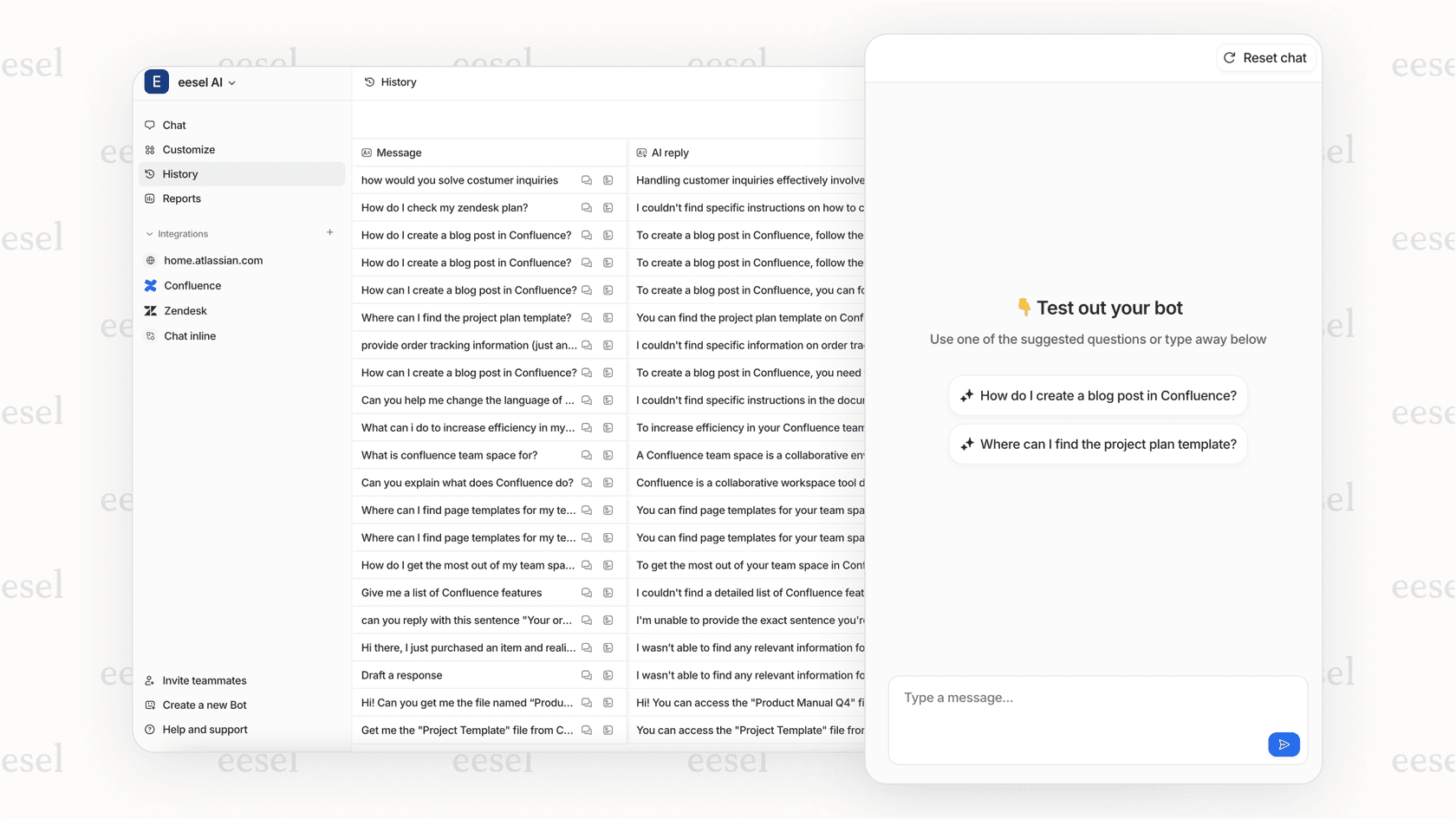
If you're using eesel AI for support automation, our system can analyze your historical CSAT data to suggest optimal timing based on ticket type, time of day, and customer patterns. Instead of guessing, you get data-backed recommendations.
Best practices for delayed CSAT surveys
Getting the timing right is just the start. Here are proven tactics to maximize response rates and data quality:
Always include the "Satisfaction is Unoffered" condition. This prevents duplicate surveys if a ticket gets reopened and solved again. Without it, customers might receive multiple survey requests for the same issue.
Test with internal tickets first. Create test tickets using your own email, solve them, and verify surveys arrive when expected. Check that the survey links work and responses are recorded correctly.
Monitor response rates after timing changes. If you move from 24 hours to immediate surveys, you should see response rates increase. If they don't, something else might be wrong (survey fatigue, email deliverability, etc.).
Consider ticket type in your timing strategy. You might set up multiple automations with different delays based on tags. Technical tickets get 4 hours. Billing questions get immediate surveys. Feature requests get next-day timing.
Don't survey every ticket. Some interactions don't need CSAT. Internal tickets, spam, and simple requests that took 30 seconds probably don't warrant feedback requests. Use conditions to filter what gets surveyed.
For teams drowning in support data, we built eesel AI to handle satisfaction automation intelligently. Instead of manually configuring complex trigger logic, you essentially hire an AI teammate that learns when to request feedback based on your historical patterns and continuously improves from corrections.
Improve your Zendesk CSAT workflow with smarter timing
You now have multiple approaches to delay Zendesk CSAT surveys: native automations for simple timing adjustments, third-party apps for precise delays, and external survey platforms for advanced CX programs.
The right choice depends on your specific situation:
- Native automations work for most teams needing basic timing changes (2-24 hours)
- Delayer app helps when you need sub-hour precision or complex delayed action chains
- External tools like Wootric or Retently make sense for dedicated CX teams with multi-touchpoint survey needs
Start by identifying your current response rates and the types of tickets generating premature negative ratings. Then test different timing approaches with a subset of tickets before rolling out account-wide.
If you want to go beyond manual timing configuration, eesel AI integrates with Zendesk to analyze your CSAT patterns and automate satisfaction requests based on what actually drives quality feedback for your specific support context. We handle the timing decisions so you can focus on acting on the feedback you receive.