12 website survey examples (with copy-paste questions)

Riellvriany Indriawan

Katelin Teen
Last edited July 6, 2026

What actually counts as a website survey
Quick framing before the examples, because "website survey" gets used for two different things.
There's the on-site survey: a widget, pop-up, or embedded form that runs while someone is browsing (a feedback tab, an exit-intent prompt, a rating on a help article). And there's the post-interaction survey: a short question fired right after a moment that matters, most often after a support conversation closes. Both live "on your website" in the sense that customers hit them through your product or site, so I'll cover both here.
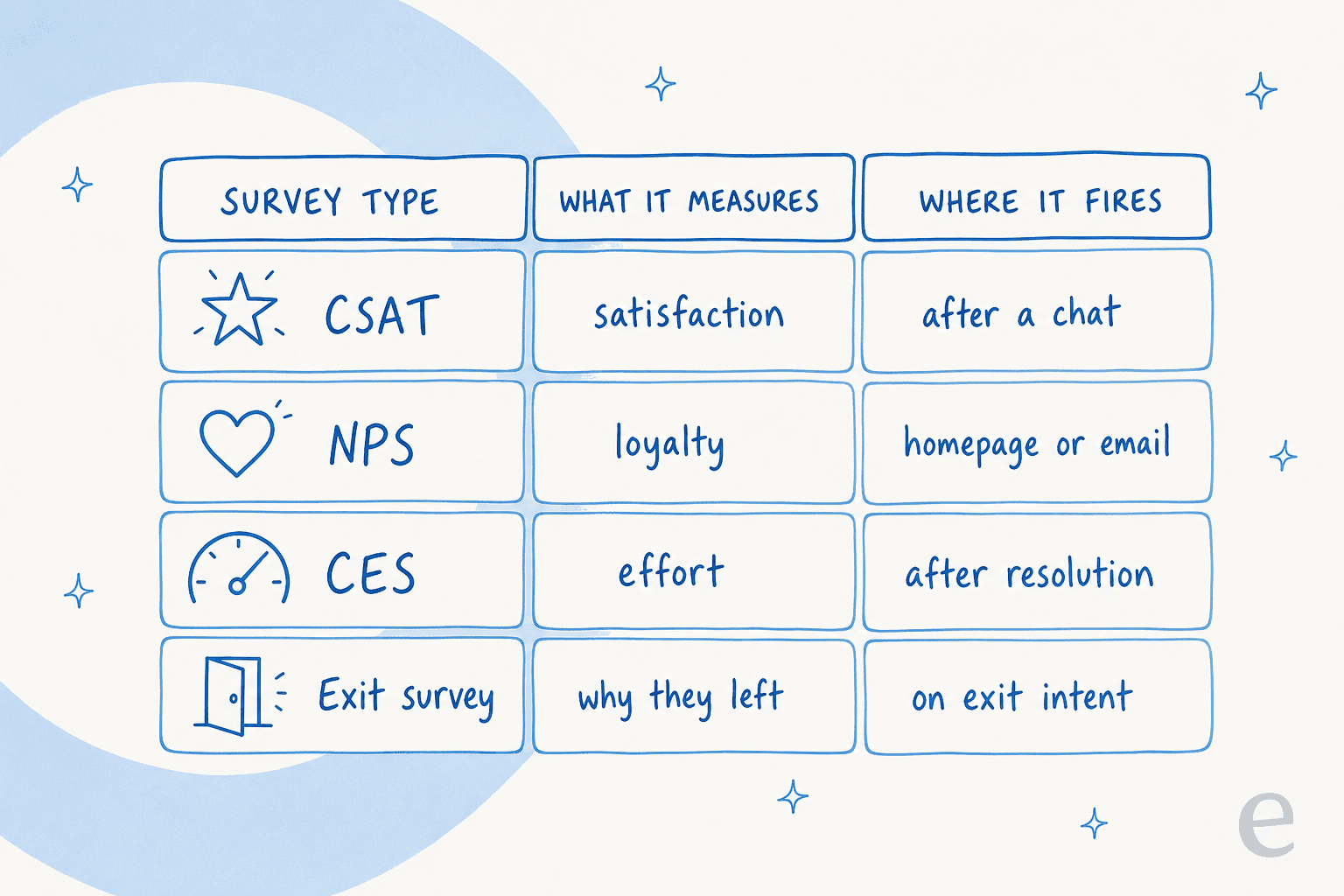
The distinction that matters more is what each one measures. A customer effort score survey and a loyalty (NPS) survey look almost identical on the page but answer completely different questions. Match the survey type to the decision you're trying to make, and the examples below fall into place.
12 website survey examples you can copy
Each example has the same shape: what it is, when to fire it, and the exact questions. Lift the wording, swap in your product name, and you have a working survey. For deeper wording variants, our libraries of customer satisfaction survey questions and survey question samples go further than I can here.
1. On-page website feedback survey
The classic feedback tab or slide-in widget. It's low-commitment and always available, so it catches the visitor who's mildly annoyed but wouldn't email support.
- When to fire: persistent tab, or a slide-in after 30+ seconds on a key page.
- Ask: "Did you find what you were looking for today?" (Yes / No), then a conditional "What were you looking for?" open field on No.
The "No" answers are gold, they're a list of the things your site fails to explain, which doubles as a knowledge base to-do list.
2. Post-chat CSAT survey
The single most common website survey, fired the moment a support conversation ends. This is your CSAT number, and it's the one most teams report to leadership.
- When to fire: immediately after a chat or ticket is resolved. Here's the eesel guide on sending a CSAT survey when a conversation closes.
- Ask: "How would you rate the support you received?" (1-5 or 😞😐😀), then "Anything we could have done better?" as an optional comment.
Keep it to those two. A five-question survey after someone just waited on support is how you tank your response rate.
3. Net Promoter Score (NPS) survey
Measures loyalty, not satisfaction with one interaction. Useful as a trend line over quarters, less useful for diagnosing a single bad day.
- When to fire: on a schedule (quarterly), or after a milestone like a renewal, not after every chat.
- Ask: "How likely are you to recommend us to a friend or colleague?" (0-10), then "What's the main reason for your score?"
The follow-up open question is where the value is, the 0-10 number alone tells you almost nothing about why.
4. Customer effort score (CES) survey
CES asks how hard the customer had to work, and it's often a better predictor of churn than raw satisfaction. If people can get things done easily, they stay.
- When to fire: right after a task, a resolved ticket, a completed checkout, a self-serve fix.
- Ask: "How easy was it to handle your issue today?" (Very difficult → Very easy).
We wrote a whole piece on why customer effort score tends to beat CSAT for spotting friction. It's worth the read if you're picking one metric to obsess over.
5. Exit-intent / abandonment survey
Fires when a visitor's cursor heads for the close button or the back button. It's your one shot to learn why someone is leaving without buying or signing up.
- When to fire: on exit intent, on a pricing or checkout page.
- Ask: "What stopped you from signing up today?" with a few pre-set options (Too expensive / Still comparing / Missing a feature / Just browsing) plus an "Other" field.
Pre-set options beat an open box here, people leaving fast won't type a paragraph, but they'll click one button.
6. Product and feature feedback survey
Targeted feedback on a specific feature, fired in-app right after someone uses it. This is how you find out whether the thing you shipped actually landed.
- When to fire: after a user completes an action tied to the feature.
- Ask: "How useful was [feature]?" (Not useful → Very useful), then "What would make it better?"
Our list of product feedback questions and product survey questions has more angles if you're running a proper product research round.
7. Pricing-page survey
The pricing page is where high-intent visitors either convert or quietly bounce. A micro-survey here catches the objection before it becomes a lost deal.
- When to fire: on the pricing page, either on exit intent or after 20+ seconds of dwell.
- Ask: "Is our pricing clear?" (Yes / No / I have a question), routing "I have a question" straight to a chat or a real-time support channel.
8. Onboarding / new-user survey
Runs in the first days of a new account to catch confusion while it's fresh and fixable. New users who get stuck early rarely come back to tell you, they just churn.
- When to fire: a day or two after signup, or after the first key action.
- Ask: "How's your setup going so far?" (Stuck / Getting there / All good), with a comment box on Stuck.
Tie the "Stuck" responses back to your customer support portal content, they're a live feed of where your docs leave people hanging.
9. Website usability (UX) survey
Less about the product, more about the site itself: navigation, findability, layout. Best run as a short intercept on high-traffic pages.
- When to fire: intercept survey on the homepage or docs, sampled (say 1 in 20 visitors) so you don't nag everyone.
- Ask: "How easy was it to navigate this page?" (1-5), then "Was anything confusing or missing?"
10. Content / help-article survey
The tiny "Was this helpful?" widget at the bottom of every help doc. Underrated, because it tells you exactly which articles are failing at the article level.
- When to fire: foot of every knowledge base article.
- Ask: "Was this article helpful?" (👍 / 👎), then "What was missing?" on 👎.
A 👎 with a comment is a direct instruction for what to rewrite. If you're running an AI agent on that same knowledge base, those gaps are also exactly what it needs filled to answer more tickets on its own.
11. Lead-qualification / pre-sales survey
A short survey on demo-request or contact pages that both qualifies the lead and personalizes the follow-up. It doubles as a conversion tool, not just feedback.
- When to fire: on the demo-request or "talk to sales" form.
- Ask: "What are you hoping to solve?" (a few segment options), "How big is your team?", "What's your timeline?".
12. Cancellation / churn survey
The one nobody enjoys but everybody needs: fired at the moment someone cancels. This is the most honest feedback you'll ever get, because the customer has nothing left to lose by telling you the truth.
- When to fire: on the cancellation flow, before the account closes.
- Ask: "What's the main reason you're leaving?" (pre-set reasons + Other), then "What could we have done differently?"
Feed these into your customer experience strategy reviews. Churn reasons cluster fast, and the top two or three are usually fixable.
Which website survey should you use?
Twelve examples is a lot to hold in your head. If you're staring at your site wondering which one to build first, pick the goal that's actually bugging you right now and start there.
What makes people actually answer
Every survey above lives or dies on the same handful of rules. I've watched good questions get ignored purely because they fired at the wrong moment or ran three questions too long.
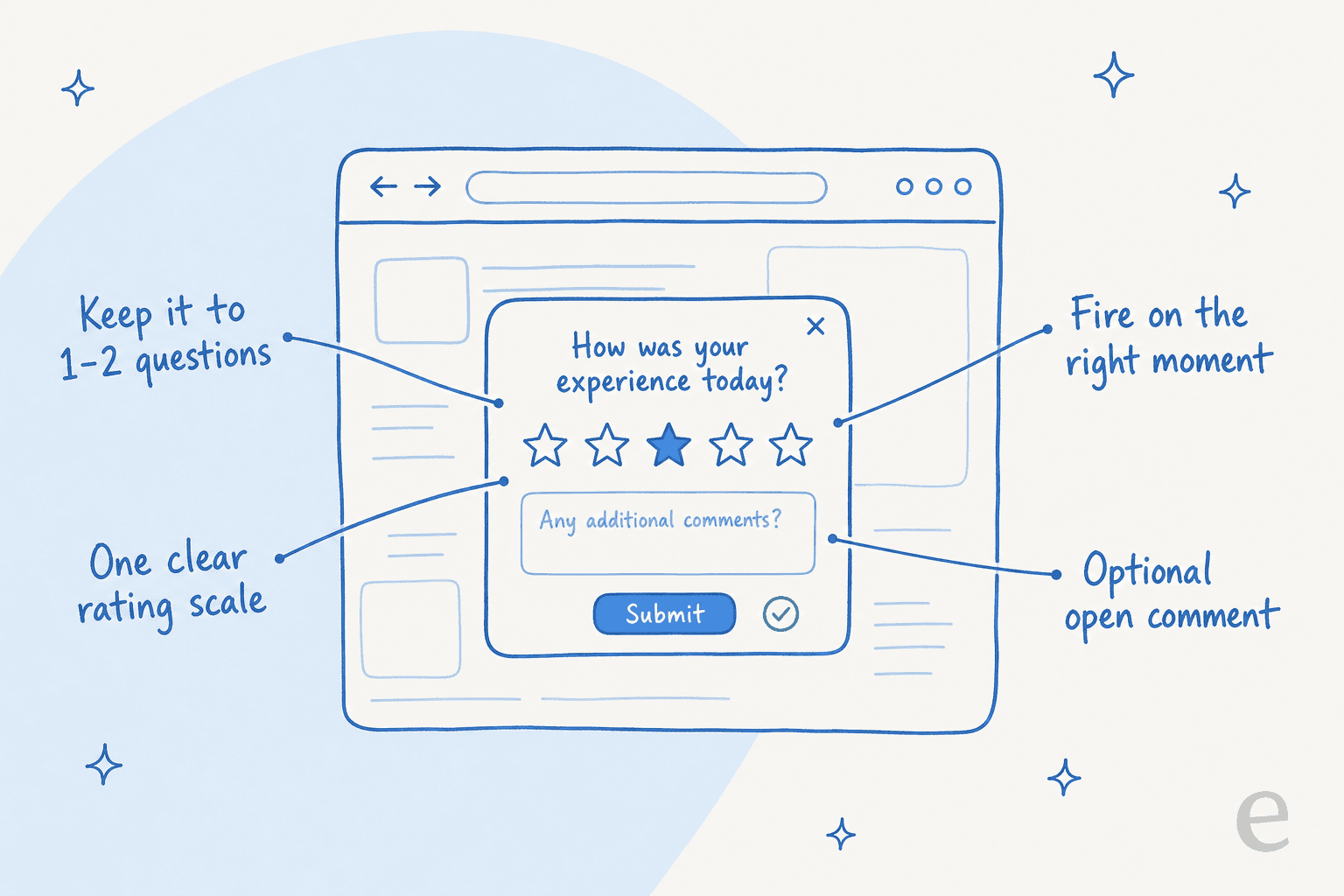
- Keep it short. One or two questions. Every extra field costs you responses. If you need depth, ask the rating on the page and route the willing to a longer form.
- Fire on a moment, not a timer. A CSAT survey after a resolved ticket, an exit survey on exit intent, a feature survey after the feature is used. A pop-up at a random 10 seconds just annoys people.
- One clear scale. Don't mix a 1-5, a 0-10, and a set of emoji in the same survey. Pick one and stay consistent so your data is comparable over time.
- Make open text optional. Forcing a comment kills completion. Offer it, and the people with something to say will use it.
- Close the loop. If someone flags a problem and never hears back, they won't answer next time. Even an automated "thanks, we're on it" beats silence.
For the wording itself, our customer feedback survey questions and customer service feedback examples are the places to raid.
Turn survey answers into fewer tickets
Here's the part that changes how you think about all of this. Most teams treat a survey as a scoreboard, a number you report and move on from. But if you actually read the open-text answers, they're a ranked list of the questions your customers keep having to ask.
That's the same list an AI support agent needs. When we roll out eesel on a customer's helpdesk, the first thing it does is learn from past tickets and help docs. The recurring themes your surveys surface (the "I couldn't find X", the "the pricing wasn't clear", the same setup question fifty times) are exactly the tier-1 volume a well-trained agent can resolve on its own.
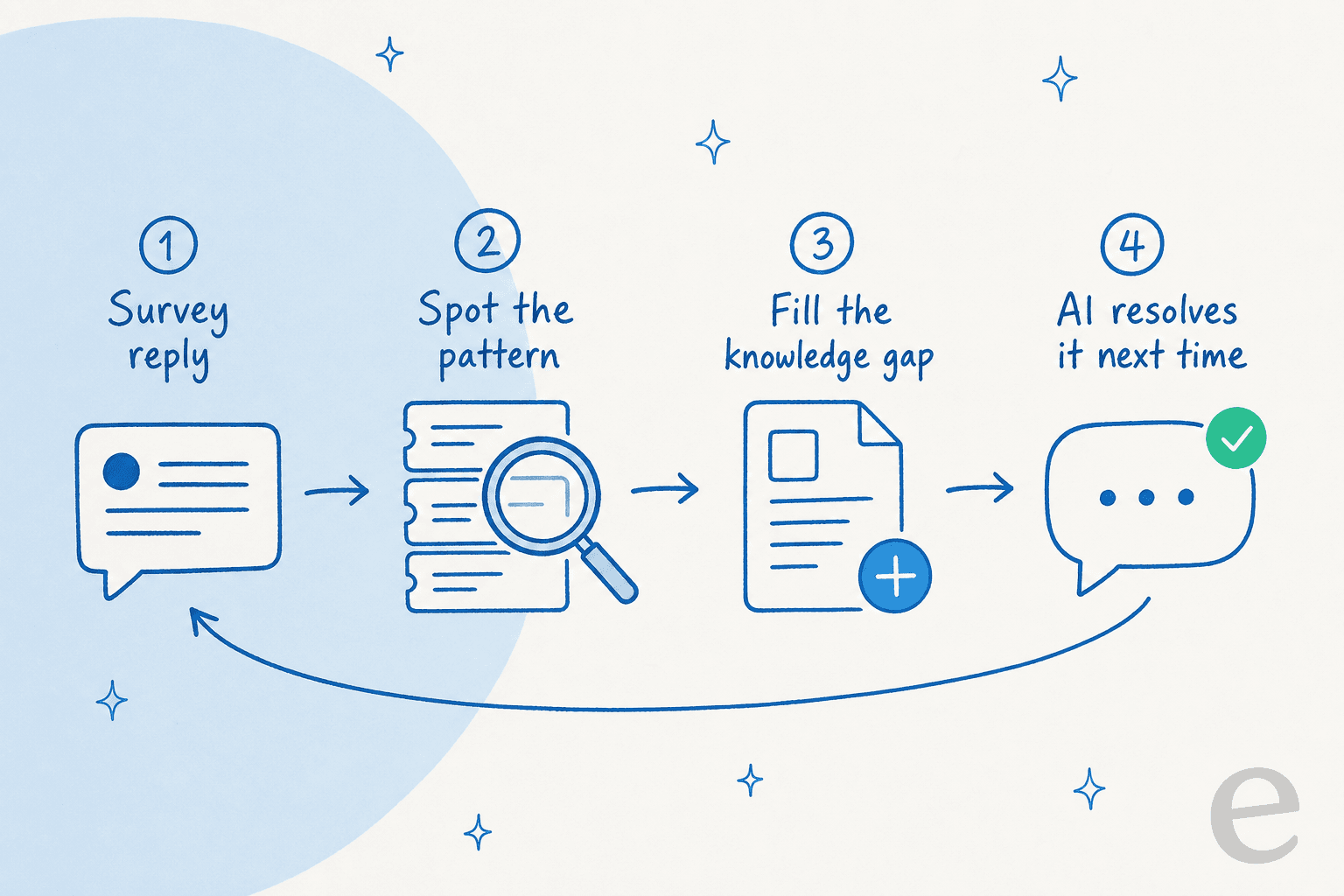
This is where the manual-analysis wall usually hits. Reading a few hundred survey comments by hand is doable; reading thousands isn't. AI sentiment analysis and theme clustering handle the volume, and the dedicated AI customer feedback tools are built for exactly that read. The difference with an AI agent is that it doesn't just report the recurring question, it starts answering it. In our own deployments, that recurring tier-1 work is where the bulk of customer service automation value shows up, one customer, Gridwise, saw eesel resolve 73% of tier-1 requests in the first month.
Try eesel
If your surveys keep surfacing the same handful of questions, that's not a reporting problem, it's an automation opportunity. eesel drops an AI teammate into your existing helpdesk (Zendesk, Freshdesk, Gorgias, Front, and more), learns from the tickets and docs you already have, and resolves the repetitive tier-1 questions your feedback keeps flagging. You can simulate it against your own past tickets before it ever replies to a customer, so you see the coverage numbers up front rather than hoping.

It's free to try with 100 free credits and no credit card, and it plugs in through your existing tools rather than asking your team to learn a new one. If you're already measuring customer satisfaction and staring at a backlog of the same questions, that's the exact gap it's built to close.
Frequently Asked Questions
What is a website survey?
What questions should I ask in a website feedback survey?
How many questions should a website survey have?
When is the best time to trigger a website survey?
How do I analyze website survey responses at scale?


Article by
Riellvriany Indriawan
Riell is a designer and writer at eesel AI with about two years of experience researching CX platforms, AI chatbots, and helpdesk software. She combines her design background with a sharp eye for how these tools actually look and feel in practice — making her comparisons unusually visual and user-focused.