Losing customers is an expensive problem for any business. According to research mentioned by Forbes, U.S. companies lose a staggering $136 billion every year from customers they could have kept. And the most frustrating part? The warning signs are usually sitting right there in your daily support conversations.
Your customers are constantly telling you what’s wrong. They’ll let you know when they’re frustrated, confused, or even starting to look at a competitor. The real challenge is that no human team can realistically sift through thousands of emails, chats, and support tickets to catch every single red flag. It’s just not possible.
This is where AI can step in. By using it to analyze all of your support interactions, you can shift from a reactive "firefighting" mode to a proactive one, spotting churn risks long before they turn into cancelled subscriptions.
Let’s walk through the exact steps to set up a system that uses AI to flag these risks, alert your team, and help you hang on to your customers.
What you’ll need
Before we jump in, let’s talk about what you need. Setting up an AI-powered system to find churn risks is probably more straightforward than you think. You really only need two things.
-
Access to your support conversation data: This is what the AI learns from. You'll need admin access to your help desk (like Zendesk, Freshdesk, or Intercom), chat logs from tools like Slack or Microsoft Teams, and anywhere else your team talks to customers.
-
An AI conversation intelligence platform: You’ll need a tool that can plug into all your data sources and actually make sense of the conversations. The trick is to find one that's easy to set up and puts you in control. While there are lots of options, a platform like eesel AI is built so you can get it running yourself in just a few minutes.
Step 1: Connect all your customer conversation sources
First things first, you need to give your AI the full story. Churn signals don't just show up in formal support tickets. They pop up in a Slack message to an account manager, a comment on a shared Google Doc, or a question in a community forum. If you're only looking at one channel, you're going to miss things.
The goal here is to bring all these different conversations together. Instead of trying to manually export data or asking a developer to build something complicated, modern AI tools can connect to your apps with simple, one-click integrations.
Look for a platform that connects to all the places your team and customers are talking. For example, eesel AI integrates with over 100 sources right out of the box, including:
-
Help Desks: Zendesk, Freshdesk, Gorgias
-
Knowledge Bases: Confluence, Notion, SharePoint
-
Collaboration Tools: Slack and Microsoft Teams
When you connect all these sources, you’re training an AI on more than just official tickets. You’re including the informal, candid feedback that often contains the clearest hints that a customer is unhappy. This gives you a much more complete picture. Most AI features that are built into a help desk can only see what’s happening on their own platform, leaving you with a massive blind spot.

Step 2: Teach the AI to spot your unique churn signals
Once your data is connected, it’s time to tell the AI what to look for. This isn’t a generic, one-size-fits-all kind of deal. The things that signal churn are different for every business. Your goal is to go beyond simple "positive" or "negative" sentiment and start identifying the specific patterns that mean a customer is at risk.
Figure out what churn risk looks like for you
Get your team together and brainstorm the kinds of phrases, topics, and behaviors that usually pop up before a customer leaves. It could be things like:
-
Competitor mentions: "We're taking a look at [Competitor Name] as well."
-
Frustration with key features: "I'm getting really fed up with the reporting feature."
-
Pricing or billing questions: "This is costing more than I expected," or "How do I cancel my subscription?"
-
Persistent bugs: "This bug is making it impossible for my team to work."
-
A key contact leaves: "The person who originally signed us up has left the company."
Let the AI learn from your history
The best AI is one that learns from your business. It should be able to analyze thousands of your past conversations to understand your company's tone, common problems, and what a successful solution looks like. This is where a tool like eesel AI really helps. It automatically studies your historical tickets, so it’s tuned to your business from day one without you needing to manually feed it information. A lot of other platforms require long setup calls and professional services just to get the AI up to speed, which can delay you by weeks.
Test your AI's performance before it talks to a single customer
You shouldn't have to just cross your fingers and hope for the best when you turn on an AI. A big risk with many AI tools is that they work like a "black box," so you have no idea how they'll actually behave with live customers. It's really important to test your setup in a safe environment first. This ability to test and refine without any risk is a huge advantage over platforms that basically ask you to flip a switch and see what happens.

Step 3: Set up automated workflows to alert your team
Spotting a churn risk is great, but that information is useless if it doesn't lead to action. Your AI system needs to fit right into your team's current workflows so that high-risk signals get attention immediately.
Get real-time alerts for at-risk customers
The second your AI flags a conversation as a potential churn risk, the right people need to know about it. And I don’t just mean an email that gets buried in a crowded inbox. A modern setup should send alerts directly to the tools your team lives in all day.
For example, you can set up eesel AI to automatically:
-
Post a message in a dedicated
#churn-alertschannel in Slack or MS Teams. -
Include a quick summary of the problem, the customer's name, their general sentiment, and a direct link to the conversation.
This means your Customer Success or Account Management teams can jump on the problem in minutes, not days.
Automate tasks so nothing falls through the cracks
Beyond just sending alerts, you can use the AI to kick off a formal follow-up process. This is where having a flexible workflow builder comes in handy. With eesel AI's custom actions, you can create rules that:
-
Automatically create a task in Jira or your CRM for a customer success manager to follow up.
-
Tag the ticket in Zendesk or Freshdesk with "Churn Risk" so you can easily track it.
-
Escalate the conversation to a senior support agent or an account manager.
This kind of automation ensures that every risk has an owner and a clear plan for resolution. It’s a simple way to make sure those critical issues don't get lost in the shuffle. Many other tools have rigid automation rules that make you change your process to fit their software, instead of the other way around.

Step 4: Act on the insights and see how you’re doing
With your detection and alert system running, the last step is to act on the data and measure the impact.
When an alert comes in, your team should have a playbook ready for what to do next. That might be a personal email, a phone call, or an offer to do a quick training session. The goal is to show the customer you're paying attention and are ready to help solve their problem.
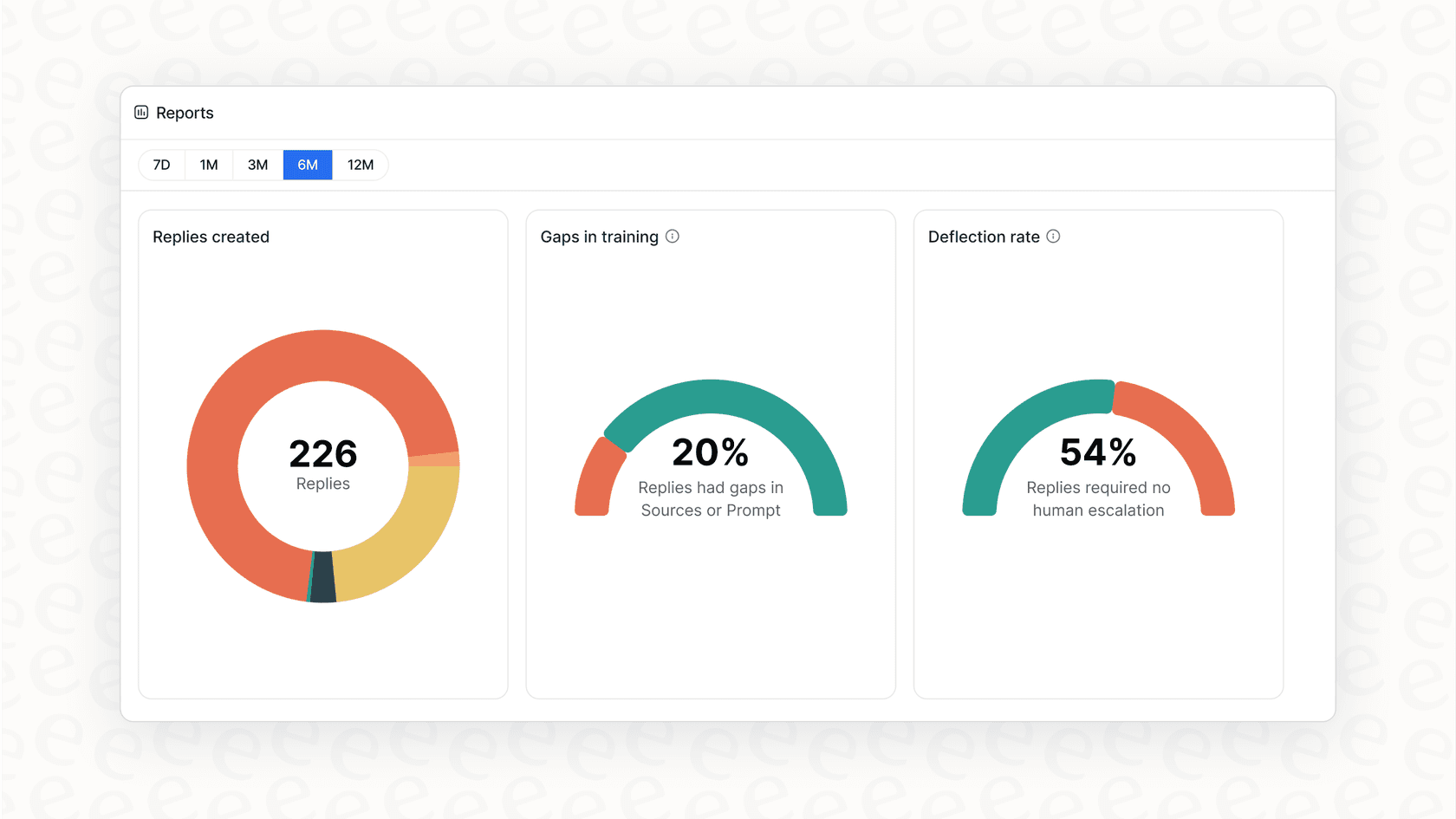
Finally, you need to track your progress. Keep an eye on your churn rate to see if your new system is making a difference. A good AI platform will also give you you reports that are genuinely useful. For instance, eesel AI's analytics dashboard can point out gaps in your help articles and show you conversation trends, giving you a clear path for making both your customer experience and your AI even better over time.
Stop letting churn take you by surprise
Using AI to find churn risk in your support conversations can completely change your customer success strategy, moving it from reactive to proactive. By bringing all your data together, training an AI on what matters to your business, and building real-time alerts into your daily work, you can give your team the tools they need to build stronger relationships and protect your revenue.
While a lot of tools promise AI-powered insights, the best ones are easy to set up, give you full control, and let you test everything with confidence. Platforms like eesel AI are designed to be completely self-serve, so you can go live in minutes with a system that learns from your data and works with the tools you already use.
Ready to stop guessing and start preventing churn? Learn how eesel AI can help you get started today.
Frequently asked questions
What are the primary benefits of using AI to detect churn risk?
Learning how to use AI to detect churn risk allows your business to move from reactive "firefighting" to proactive prevention. This helps you spot unhappy customers early, strengthen relationships, and ultimately protect your revenue by reducing customer loss.
What do I need to get started with AI for churn detection?
You primarily need two things: access to all your customer support conversation data from various platforms (like help desks, chat, collaboration tools) and an AI conversation intelligence platform that can connect to these sources and process the data.
How do I train an AI to recognize my business's specific churn signals?
You should brainstorm unique churn signals with your team, such as competitor mentions or frustration with key features. Then, leverage an AI platform that can learn from your historical conversation data, allowing it to automatically tune to your company's specific context and patterns.
What automated actions should I set up for when a churn risk is detected?
You should set up automated workflows for real-time alerts to the relevant teams, such as Slack or MS Teams notifications with conversation summaries. Additionally, automate tasks like creating follow-up actions in your CRM or tagging tickets for easier tracking and escalation.
Can I test the AI's accuracy before it goes live?
Yes, it's crucial to test your AI in a safe environment. Look for platforms with a simulation mode that lets you run the AI on thousands of your past tickets, allowing you to review its responses and forecast its performance before live deployment.
Why is it important to connect all customer conversation sources for churn detection?
Connecting all sources, not just formal support tickets, provides the AI with a complete picture of customer interactions. Churn signals often appear in informal chats or comments, and consolidating this data ensures you capture all potential red flags and gain deeper insights.