What contact center management actually means
A contact center is any operation that fields customer contacts across more than one channel. The management part is everything that keeps it running: forecasting how many people you need, deciding who handles what, keeping answers accurate and on-brand, and reporting on whether any of it is working.
People still use "call center" and "contact center" interchangeably, but the distinction matters for how you manage the thing. A call center is voice only. A contact center is voice plus email, chat, social, and messaging, which means the management job is less about phone queues and more about designing a consistent experience across channels a customer flips between mid-conversation. Someone who starts on live chat and follows up by email expects you to remember the first conversation.
That omnichannel reality is why modern contact center management leans so heavily on the underlying customer service software and its data. When every channel writes to the same record, a manager can actually see the whole picture. When they don't, you're managing five disconnected queues and calling it a contact center.
The six pillars of contact center management
Almost everything a contact center manager does falls into one of six buckets. It's worth naming them, because a struggling metric almost always traces back to a specific pillar you can go fix.
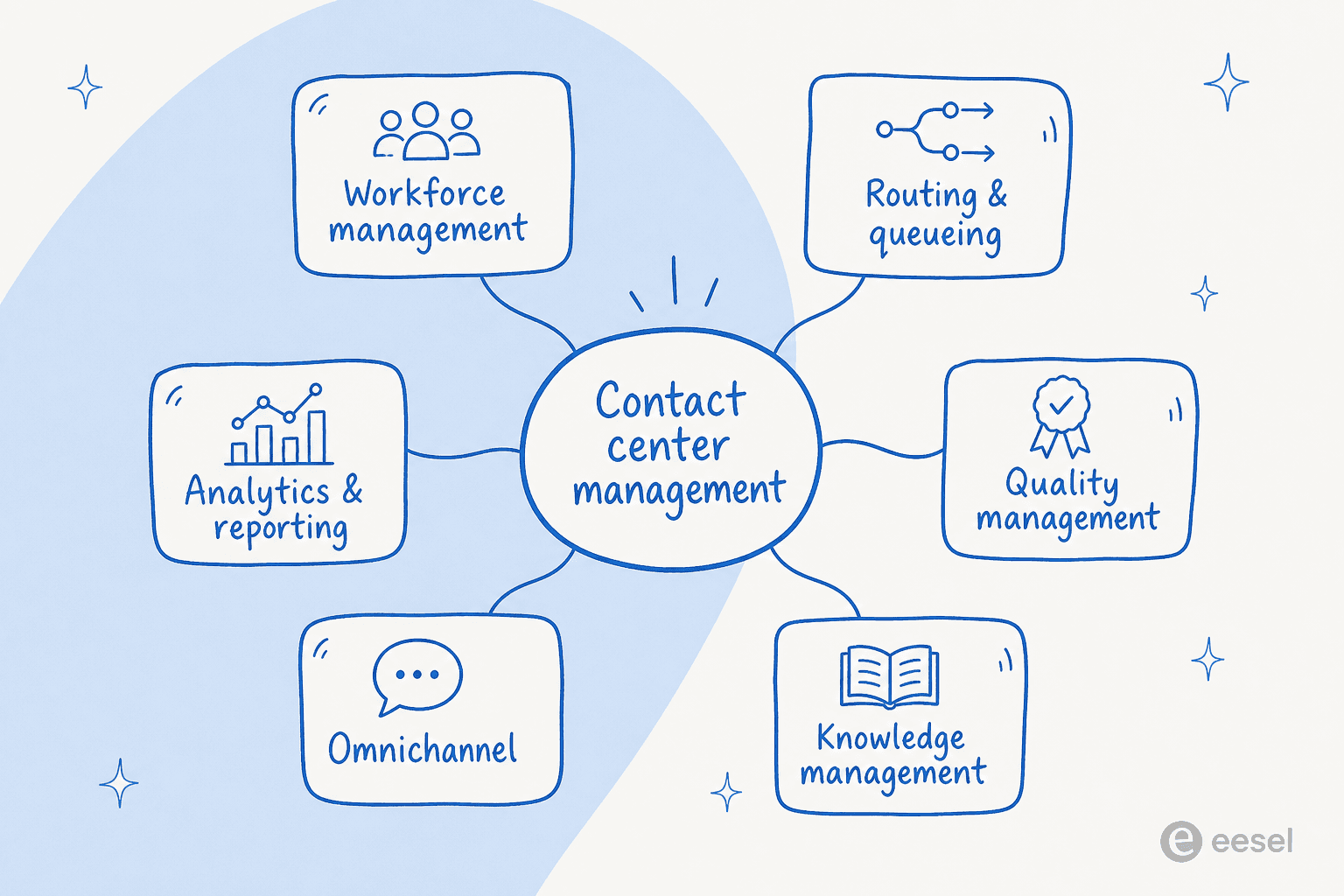
| Pillar | What it covers | The metric it moves |
|---|---|---|
| Workforce management | Forecasting volume, scheduling, adherence, shrinkage | Occupancy, service level |
| Routing & queueing | Getting each contact to the right person or bot | Average speed of answer, transfer rate |
| Quality management | Coaching, QA scoring, consistency of answers | CSAT, QA score |
| Knowledge management | Keeping docs accurate so answers are correct | First contact resolution, handle time |
| Omnichannel coverage | Consistent service across voice, chat, email, social | CSAT, channel deflection |
| Analytics & reporting | Turning contact data into decisions | Every metric above |
The pillar most teams underinvest in is knowledge management, and it's the one that quietly drags down everything else. If your docs are stale or scattered, agents guess, answers drift, and first contact resolution sinks no matter how good your routing is. This is exactly why AI knowledge management has become the load-bearing pillar: an AI agent is only ever as good as the knowledge behind it, so the act of feeding it forces you to fix the docs you'd been ignoring.
Workforce management is a forecasting problem
The classic version of contact center management is staffing. You forecast how many contacts will arrive, in what shape, and roster people to hit a service level without overstaffing. It's genuinely hard, because volume is spiky and humans need breaks, training, and time off.
The trap here is treating headcount as the only lever. When Black Friday doubles your volume, hiring can't flex that fast, and the temporary agents you scramble to onboard don't know your product. This is where deflecting the predictable, repetitive contacts changes the forecasting math entirely, which we'll get to.
Routing and queueing decide who does what
Once a contact lands, someone has to decide where it goes. Good routing sends billing questions to billing, angry escalations to a senior agent, and simple "where's my order" contacts to self-service or automation. Bad routing bounces customers between agents and tanks your transfer rate.
Most of this is now automatable. AI can read an incoming contact, classify it, tag it, and route it before a human touches it, which is the difference between a manager triaging a queue by hand and one who reviews exceptions. If you want the mechanics, we've written separately on ticket triage and routing automation.
The metrics that actually matter
You can drown in contact center metrics. These are the handful that a manager should be able to recite from memory, because they map directly to whether customers are happy and whether the operation is efficient.
| Metric | What it tells you | Watch out for |
|---|---|---|
| First contact resolution (FCR) | Share of contacts solved in one interaction | The single best proxy for both cost and CSAT |
| CSAT | How satisfied customers are after a contact | Easy to game with leading survey questions |
| Average handle time (AHT) | How long an agent spends per contact | A low AHT with low FCR means agents are rushing |
| Resolution / deflection rate | Share handled without a human | Only meaningful if quality holds |
| Service level | % of contacts answered within a target time | Classic voice metric, still useful for chat |
| Cost per contact | Fully loaded cost to handle one contact | The number that should drive tool decisions |
The metric worth obsessing over is first contact resolution. It correlates with almost everything you care about: a contact solved on the first touch is cheaper, and the customer is happier. Chase FCR and CSAT and cost tend to follow. Chase AHT in isolation and you get agents who close tickets fast and leave customers to write back.
One caution I'd flag from experience: a resolution or deflection rate only counts if quality holds behind it. It's easy to "deflect" a contact by making self-service so annoying the customer gives up, which shows up as a great deflection number and a terrible CSAT. Track them together or the deflection number lies to you. For the full breakdown, our post on customer service metrics goes deeper.
Where contact center management usually breaks
Having sat on the queue side of this, the failure modes are pretty consistent, and none of them are about lazy agents.
The first is volume outrunning the team. A director of support at a fast-growing startup put the core tension plainly:
"As a fast-growing startup with a small team, our customers far outnumber our employees. It's crucial that we have robust self-service solutions as well as tools to supercharge the efficiency of our client-facing teams."
Jon Miron, Director of Support & Operations, Yellowdig
When customers outnumber staff, the repetitive contacts, the password resets, the "where's my order," the same five FAQs, eat the hours your team needed for the hard stuff. A smaller team we work with described being "over ran by questions that can be easily answered by a simple AI." That's the pattern: the easy contacts crowd out the ones that need judgment.
The second break is knowledge rot. Answers live in a help center, a Notion wiki, three Google Docs, and one senior agent's head. New agents can't find anything, so handle time climbs and answers drift. As one team told us, "our vast documentation needed to be organised" before any of it could be useful, and that's before you even think about automation.
The third is the one nobody talks about: managers spending their week assembling reports instead of coaching. Pulling numbers out of the helpdesk, reconciling channels, building the weekly deck. That's time not spent on the pillar that actually moves quality, and it's why automated support ticket analysis tends to pay for itself in a manager's calendar alone.
How AI changes the contact center management job
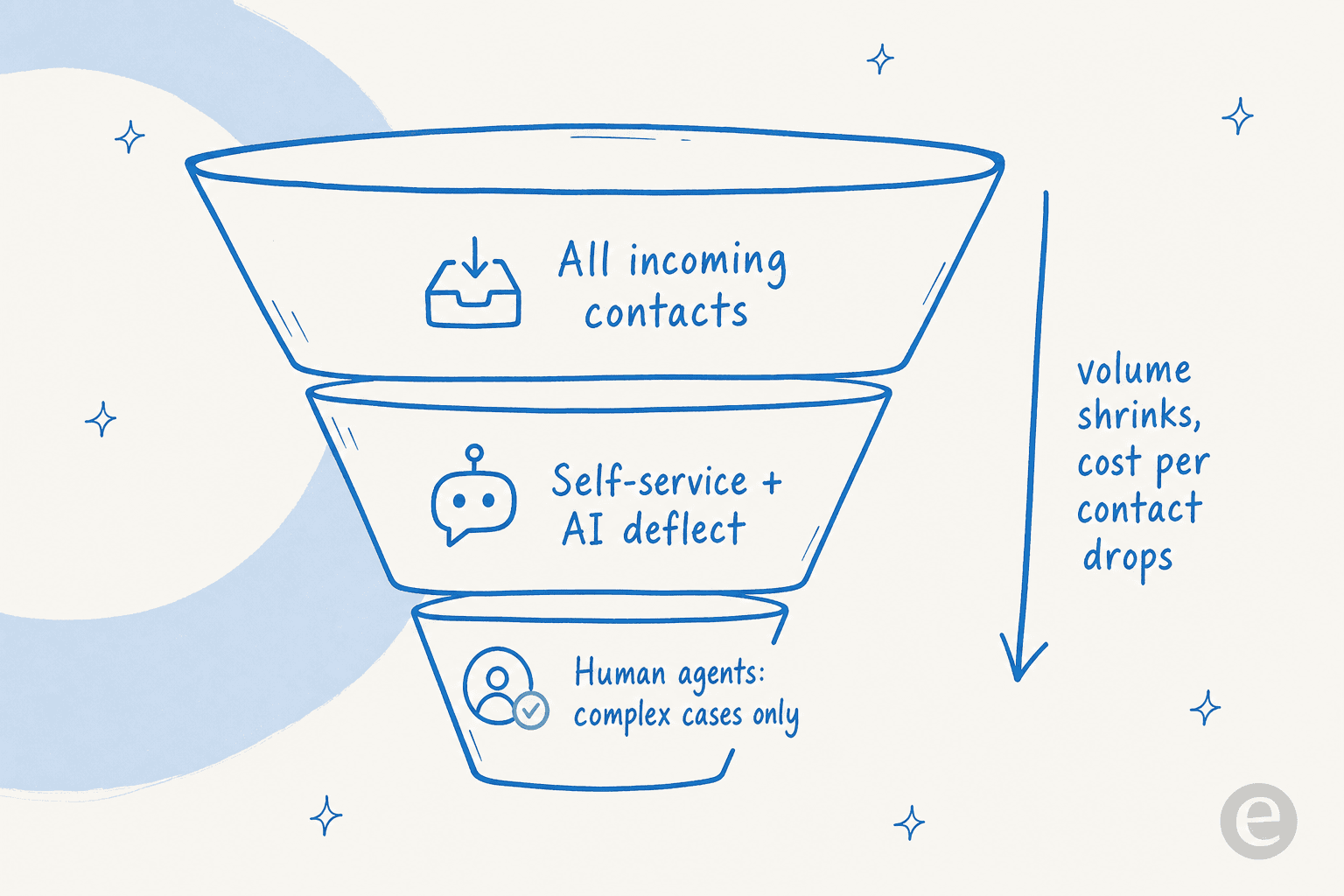
Here's the reframe. For most of contact center management's history, the only lever for more volume was more people. AI moves the lever. Instead of scaling headcount with contacts, you deflect the predictable tier-1 contacts to an agent trained on your own resolved tickets, and reserve humans for the cases that need them.
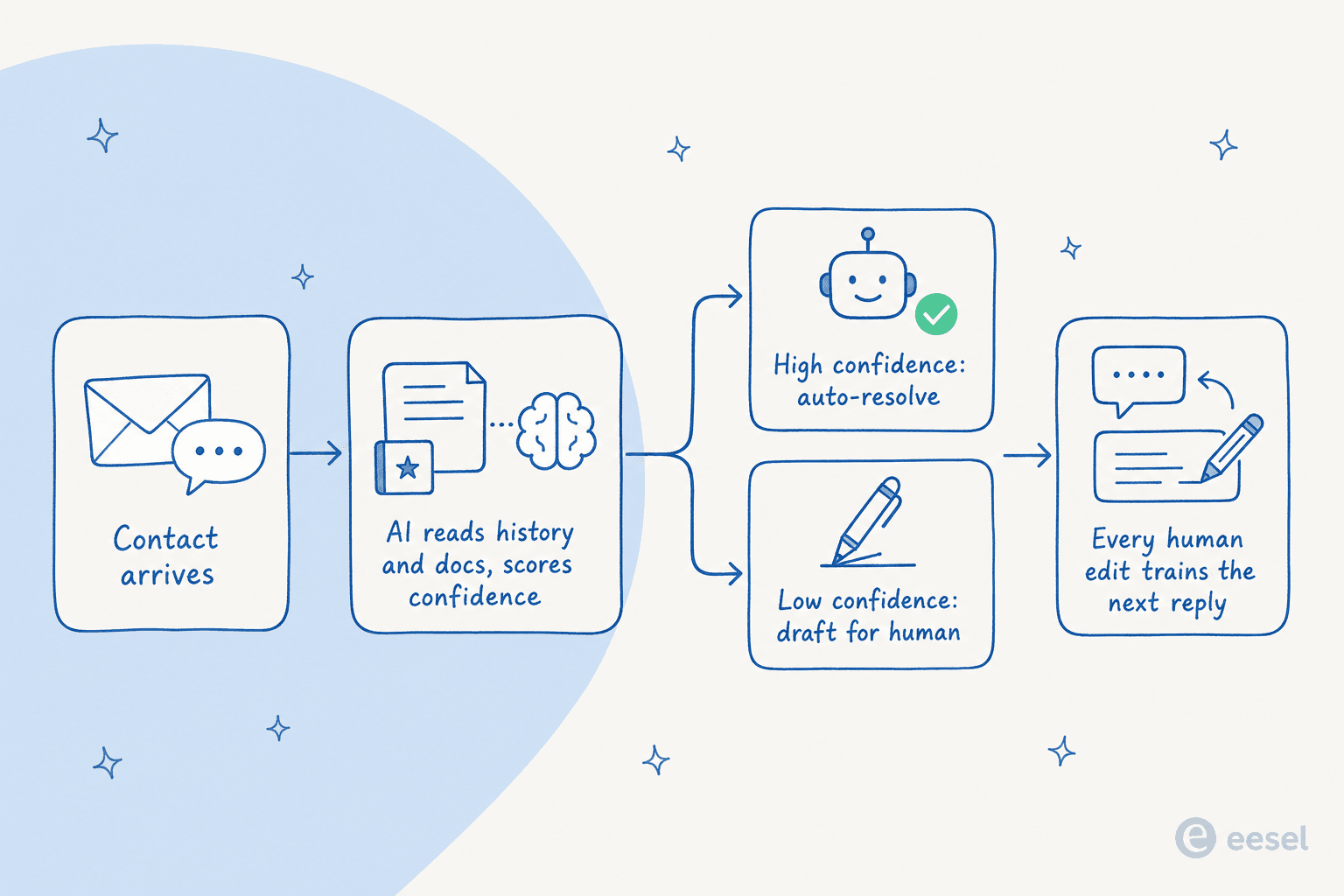
The mechanism matters, because "add AI" done badly just means a chatbot that annoys people. A well-run AI contact center agent reads the incoming contact, checks it against your ticket history and docs, and scores its own confidence. High-confidence contacts get resolved automatically. Low-confidence ones get drafted for a human to approve, or escalated cleanly. Every correction a human makes trains the next reply. That confidence gate is the whole ballgame, and it's exactly what one CX lead was after:
"The AI will never be able to answer 100% of the questions... I need an AI who is only handling the tickets that it's confident to handle and all the other ones, leave them alone."
a DTC supplements CX lead, on why confidence-based control is non-negotiable
When you get that right, the volume funnel reshapes. Self-service and AI absorb the repetitive layer, and the queue your human agents work shrinks to the genuinely complex cases, where they're most valuable anyway.
The results back this up when it's set up properly. A gig-economy analytics company saw eesel resolve 73% of tier-1 requests in the first month, with results landing during a 7-day trial:
"In the first month, eesel is resolving 73% of our tier 1 requests. eesel offers easy Zendesk implementation and setup. Our team implemented and achieved results quickly during our 7-day trial... The platform even includes automations for ticket tagging, assignment, and status updates!"
Kim Simpson, Gridwise
On the internal side, a payments company reported up to 80% time savings finding answers and onboarding new staff once their knowledge was AI-searchable. The pattern is the same whether the contacts are external customers or internal employees hitting an HR help desk: the AI eats the repetitive layer and gives the humans their time back.
Try before you trust: simulation
The reason "add AI" usually fails is that teams flip it on live and hope. We learned the hard way that a confident-sounding bot can quietly give wrong answers, which is why every eesel rollout simulates against a customer's historical tickets first, showing coverage by theme and the gaps to fill, before a single real customer sees an AI reply. For a contact center manager, that's the difference between a leap of faith and a forecast: you see the projected resolution rate on your actual volume before you commit.
Estimate your own numbers
Contact center management decisions come down to cost per contact, so it's worth plugging in your real numbers. This calculator compares what your automatable contacts cost your team today against usage-based AI at $0.40 per resolved contact.
The exact resolution rate is something you confirm against your own tickets rather than take on faith, but the shape holds: once you're paying per resolved contact instead of per seat, the automatable layer gets dramatically cheaper, and a volume spike stops being a staffing crisis.
Building a modern contact center management stack
You don't need to rip out your helpdesk to modernize. The teams doing this well keep their helpdesk (Zendesk, Freshdesk, Gorgias, Front, HubSpot) and layer AI on top, so agents keep working where they already work. This holds whether you're a lean startup or running a high-volume enterprise queue. A few principles worth holding to:
- Automate on top of your existing tools, don't migrate. A copilot for customer service that drafts replies inside your current helpdesk beats a rip-and-replace that stalls for six months.
- Feed the AI your resolved tickets, not just help articles. Your real answers to real customers are better training data than a marketing help center, and it's the thing native helpdesk AI usually can't do.
- Keep a human in the loop until the numbers earn autonomy. Start in draft mode, watch the confidence gate, then grant autonomy on the ticket types that are consistently right.
- Let the AI keep the knowledge honest. Good agents surface the topics your docs don't cover, turning knowledge management from a chore into a byproduct.
The through-line is that contact center management in 2026 isn't a headcount planning exercise with a chatbot bolted on. It's about deciding which contacts a human should ever see, and building the routing, knowledge, and automation so that the rest resolve themselves without the quality dropping.
Try eesel for your contact center
eesel AI is an AI helpdesk agent that plugs into the helpdesk you already run and handles the repetitive tier-1 contacts, drafting or auto-resolving them, tagging and routing the rest, and leaving your team the cases that need a human. It learns from your past tickets and docs on day one, answers in 80+ languages, and, crucially, simulates against your historical contacts first so you see the resolution rate before it goes live.

Pricing is usage-based at $0.40 per resolved ticket with no per-seat fee, so your bill tracks contacts handled rather than agents on staff, and a quiet month costs less than a busy one. You can start free with $50 of usage, no credit card, and point it at your own ticket history to see what it would have resolved. If you're managing a contact center and the repetitive contacts are eating your team's week, that's the layer worth automating first.
Frequently Asked Questions
What is contact center management?
Contact center management is the practice of running the people, tools, and workflows that handle customer contacts across every channel: phone, email, chat, social, and messaging. It spans staffing, routing, quality, knowledge, and reporting. In 2026 it increasingly includes an AI helpdesk agent that resolves tier-1 contacts before a human ever sees them.
What is the difference between a call center and a contact center?
A call center handles voice only. A contact center handles every channel a customer might use, so the management job is really omnichannel workflow design rather than just phone queues. Most teams now run AI live chat and email alongside voice.
What are the main pillars of contact center management?
Six pillars: workforce management, routing and queueing, quality management, knowledge management, omnichannel coverage, and analytics. Each maps to a metric, so weak customer service metrics usually point back to a specific pillar that needs work.
How does AI help with contact center management?
AI reads your past tickets and help docs, then drafts or auto-resolves repetitive contacts, tags and routes the rest, and surfaces themes managers used to hunt for by hand. Done well, support ticket automation shrinks the queue humans touch instead of just adding another dashboard.
How much does AI contact center software cost?
It varies by pricing model. Per-seat tools charge for every agent whether or not they use the AI; eesel AI is usage-based at $0.40 per ticket with no platform or per-seat fee, so 1,000 automated contacts a month runs about $400. Compare that to your loaded cost per contact before deciding.


Article by
Riellvriany Indriawan
Riell is a designer and writer at eesel AI with about two years of experience researching CX platforms, AI chatbots, and helpdesk software. She combines her design background with a sharp eye for how these tools actually look and feel in practice — making her comparisons unusually visual and user-focused.