Dixa AI deflection: how Mim deflects tickets and what it costs

Rama Adi Nugraha
Written by

Rama Adi Nugraha

Katelin Teen
Reviewed by

Katelin Teen

Last edited June 17, 2026

Expert Verified
Illustration of an AI agent deflecting customer support tickets in Dixa

What deflection actually means

"Deflection" gets thrown around loosely, so let's pin it down. A ticket is deflected when the customer gets their answer without a human agent ever touching it. Not "the AI suggested a help article," not "the AI drafted something for an agent," fully resolved, hands-free.
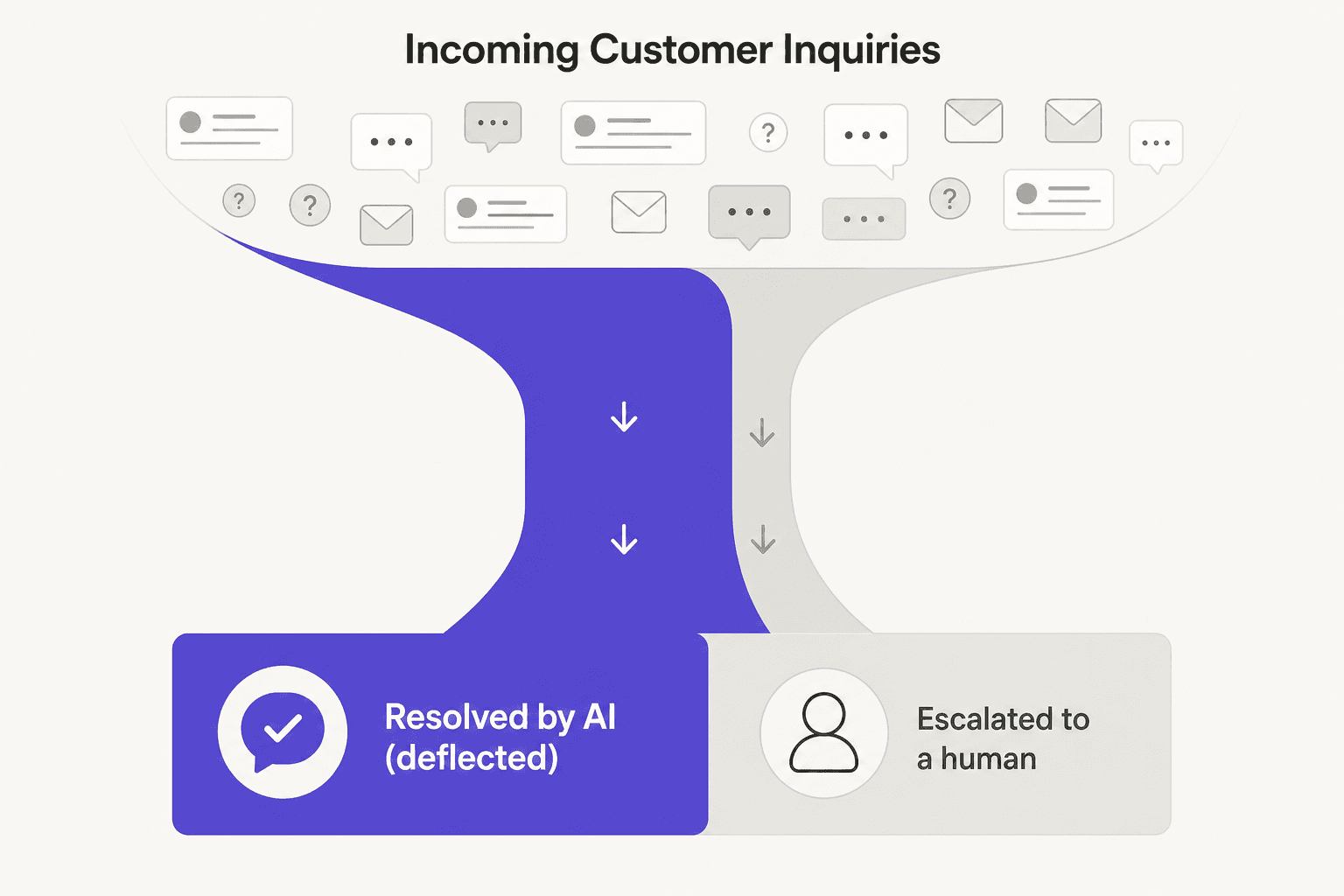
A deflection funnel: incoming inquiries split into a large stream resolved by AI and a smaller stream escalated to a human

That distinction matters because deflection is where the real cost savings live, every deflected ticket is an agent-hour you didn't spend. It's also where the risk lives, because a deflected ticket is one no human checked, and it's why tier-1 deflection is the natural place to start. A high deflection rate is only good if the deflected answers were right.

Dixa's deflection engine: the Mim agent

Dixa positions itself as "the agentic CS platform behind exceptional ecommerce brands," and it manages conversations rather than tickets, auto-routing each one by skill, language, and priority. The deflection piece is Mim, its customer-facing AI agent.

Mim is well-built for retail. Dixa says it resolves up to 80% of inquiries without human intervention, connects to Shopify and Magento to pull live order data, works in 30+ languages, and includes promise-detection controls to curb hallucinations. There's also an AI Co-Pilot on the agent side for smart drafts, auto-tagging, and summaries.

Dixa's AI agent page, showing how Mim resolves customer inquiries, as taken from Dixa

To Dixa's credit, deployment is fast: it says 38% of its customers are fast-growth companies and most go live in two to four weeks without IT.

How Mim deflects a ticket, step by step

The deflection loop is worth understanding because it's the same shape for any good AI agent, and it shows you exactly where it can break.
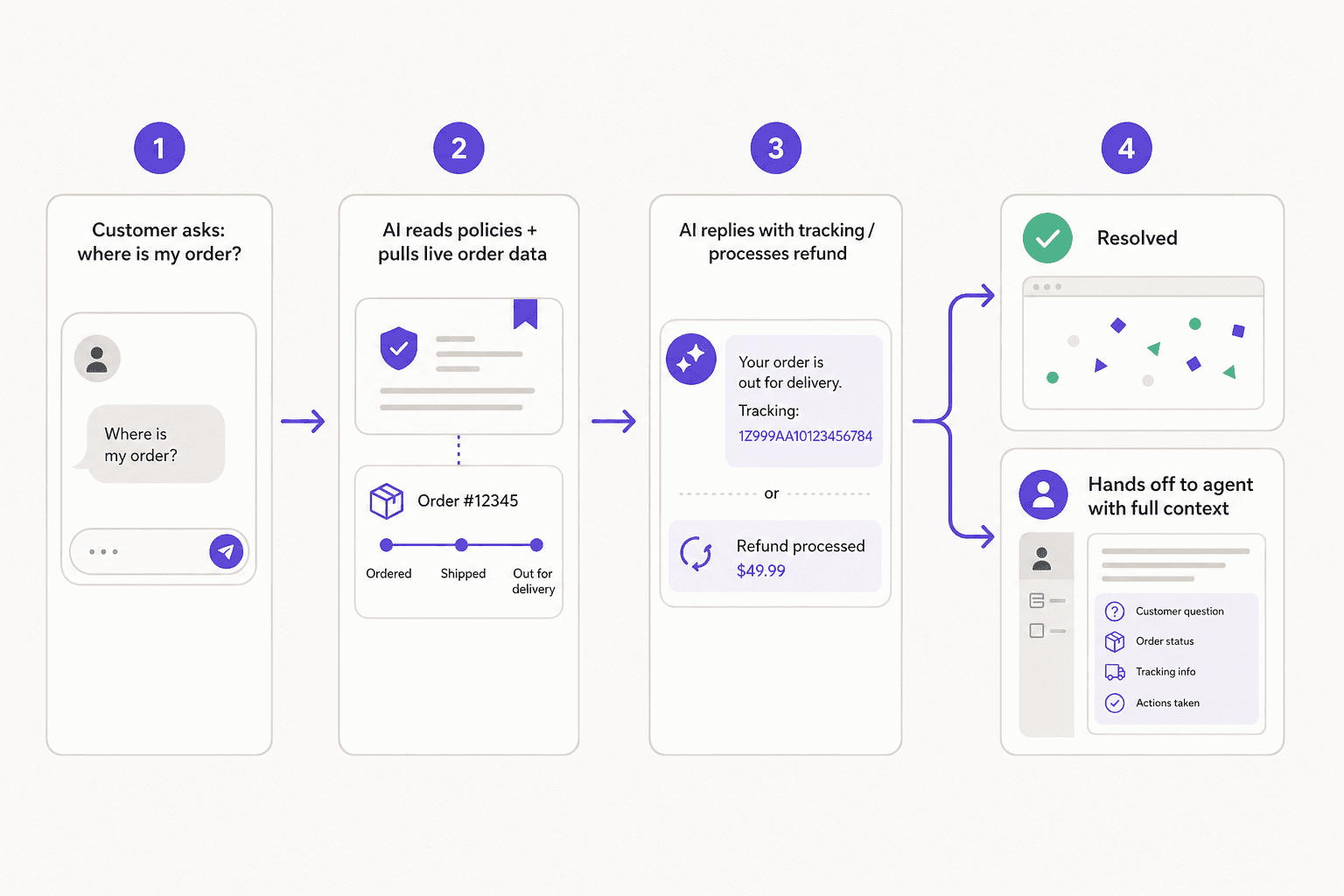
How an AI agent resolves an ecommerce ticket end to end: customer asks, AI reads policies and pulls order data, AI replies or processes a refund, then resolves or hands off with context

A customer asks "where's my order?" Mim reads the relevant policy and pulls the live order record, then either answers with the tracking detail or actions the refund. If it can't resolve confidently, it hands the conversation to an agent with the full context attached, so the customer doesn't repeat themselves. The make-or-break step is that middle one: deflection quality is entirely a function of whether the AI can reach accurate, current data. Point it at a stale knowledge base and your deflection rate looks great while your CSAT quietly tanks.

The pricing angle Dixa actually wins on

Here's where Dixa makes a smart argument. Most AI support tools charge per resolution, so the better your AI gets and the more it deflects, the bigger your bill. Dixa charges a flat rate for its AI, so the cost doesn't scale with contact volume.
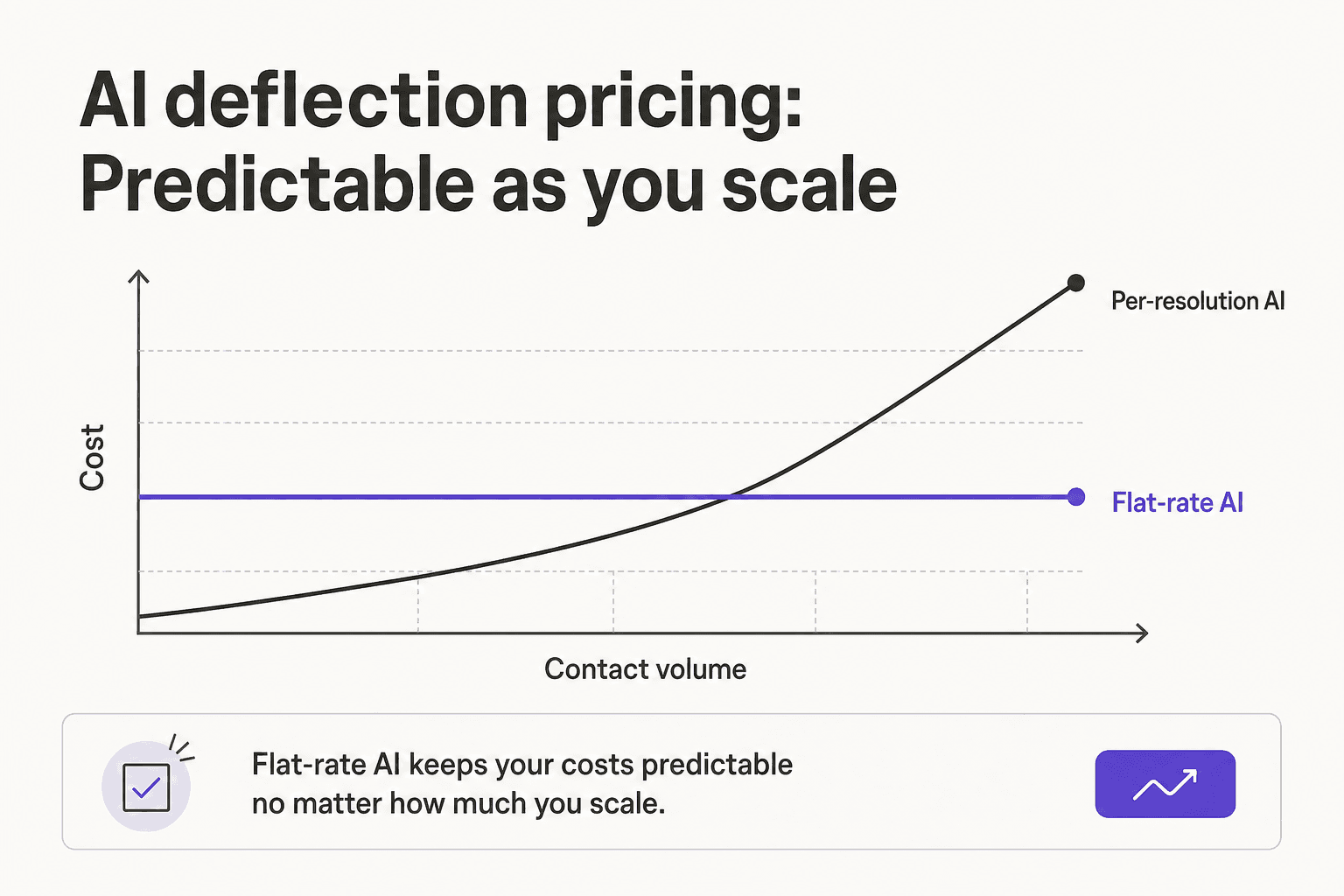
A chart comparing flat-rate AI pricing, which stays level as volume grows, against per-resolution pricing, which climbs steeply

For a high-volume ecommerce support brand, that's a real difference, you're not punished for success. The catch is that you can't see the number: every AI add-on is gated behind a "book a demo" conversation, with no published price and no free trial. So you're trading per-resolution unpredictability for sales-cycle opacity.

Where Dixa's deflection has limits

Three honest caveats. First, the most powerful AI, intent detection and advanced AI insights, sits on Dixa's Ultimate-and-above tiers, so smart deflection and basic deflection aren't the same plan, a point reviewers raise in community threads. Second, the quote-only model and lack of a self-serve trial make it slow to evaluate. Third, Dixa is a whole platform: to get its deflection, you move your support operation onto Dixa. That's fine if you want a fresh all-in-one, less fine if you're happy with your current helpdesk and would rather not switch tools.

A more open way to deflect

If the thing you actually want is the deflection, not a platform migration, the layered approach is worth a look. eesel AI adds an AI agent on top of the helpdesk you already run, so you deflect tickets without leaving your current tools. The parts that matter for deflection specifically: it trains on your own past tickets so it answers like your team, it has a simulation mode so you can see precisely what it would have deflected across thousands of historical tickets before it touches a live one, and its pricing is public, pay-as-you-go per task rather than a sales call.

That simulation step is the bit I'd never skip. Deflection done blind is how you find out the AI was confidently wrong from an angry customer instead of from a dashboard.

Try eesel

If you want AI deflection you can prove before you trust it, eesel AI lets you run a simulation on your real past tickets, see the deflection rate and the exact answers, then go live confidence-gated on the ticket types you trust, all on your existing helpdesk.

The eesel AI dashboard showing ticket activity and AI resolution on an existing helpdesk

It's transparent pay-as-you-go with $50 of free usage to start, no demo required. Try eesel and see your real deflection rate before you commit to anything.

Frequently Asked Questions

What is Dixa AI deflection?
It's Dixa's AI agent, Mim, resolving customer inquiries end to end so they never reach a human. Mim reads your knowledge base and policies, pulls live order data, and handles things like refunds, cancellations, and tracking. Dixa reports it deflects up to 80% of inquiries. Our deflection rate guide explains how to read that number.
How much does Dixa AI deflection cost?
Dixa's plans are seat-based, Growth is €89 per agent per month and Ultimate is €139, billed annually. The AI capabilities are flat-rate add-ons priced only via a sales conversation, with no public numbers. Dixa pitches that flat rate as cheaper at scale than per-resolution pricing; see our Dixa review for the catch.
How good is Dixa's AI deflection?
For ecommerce, it's strong, Mim connects to Shopify and Magento, works in 30+ languages, and has hallucination controls. The limit is that the more advanced AI (intent detection, AI insights) is gated to the priciest tiers, so basic deflection and smart deflection aren't the same plan. Compare options in our Dixa alternatives roundup.
Can I add AI deflection without committing to a full platform?
Yes. Dixa is an all-in-one platform you move onto, but a layered tool like eesel AI adds deflection on top of the helpdesk you already run, trained on your own tickets, so you don't migrate to get it.
What's the safest way to turn on AI deflection?
Simulate first, then ramp. Run the AI against your historical tickets to see exactly what it would have deflected before it goes live, then start with the ticket types it's confident on. This avoids the worst case of an AI confidently deflecting a ticket it got wrong.

Share this article

Rama Adi Nugraha

Article by

Rama Adi Nugraha

Rama is a software engineer at eesel AI with two years of experience writing about B2B SaaS, AI tools, and customer support technology. Based in Bali, Indonesia, he brings a developer's perspective to product comparisons — cutting through marketing copy to what the integrations and APIs actually do.

Related Posts

All posts →
Illustration of Gladly's Sidekick AI resolving customer conversations
Customer Support

Gladly AI deflection: does the anti-deflection platform actually deflect?

Gladly markets itself against 'deflection bots', but its Sidekick AI resolves tickets autonomously. Here's what Gladly AI deflection really is, what it costs, and the trade-offs.

KiraKiraJun 18, 2026
Illustration of AI routing support tickets in HubSpot Service Hub
Customer Support

AI ticket routing for HubSpot Service Hub: how it works

How ticket routing works in HubSpot Service Hub, why the smartest routing is locked to Enterprise, and how to add AI-driven routing on any tier.

Riellvriany IndriawanRiellvriany IndriawanJun 18, 2026
Illustration of AI drafting and sending automatic replies inside Kustomer
Customer Support

Kustomer AI auto-reply: how it works and what to expect

How Kustomer's AI auto-reply works, the difference between Concierge and Envoy, the real numbers behind it, and the trade-offs to weigh before you switch it on.

Riellvriany IndriawanRiellvriany IndriawanJun 18, 2026
Illustration of AI sorting incoming support tickets in a Help Scout inbox
Customer Support

AI ticket triage for Help Scout: a practical guide

Help Scout's native AI is built to answer tickets, not triage them. Here's how AI ticket triage for Help Scout actually works, and how to add it without leaving your inbox.

KiraKiraJun 18, 2026
Illustration of support tickets moving safely from one helpdesk to another during a migration
Customer Support

How do I switch helpdesks without losing ticket history?

A practical 2026 guide to switching helpdesks without losing ticket history: what to export, how to map it, and the migration you might not even need to do.

KiraKiraJun 18, 2026
Illustrated hero banner for a roundup of the best helpdesk tools for startups in 2026
Customer Support

The best helpdesk tools for startups in 2026 (a hands-on list)

A hands-on list of helpdesk tools for startups in 2026, with real pricing, free tiers, and a clear pick for every stage from your first ten tickets to your first thousand.

KiraKiraJun 15, 2026
Banner image for Zendesk vs Hiver in 2026: Which helpdesk is right for you?
Customer Support

Zendesk vs Hiver in 2026: Which helpdesk is right for you?

Evaluating Zendesk vs Hiver? This 2026 comparison breaks down the architecture, hidden costs, and AI capabilities of both platforms.

Amogh SardaAmogh SardaApr 28, 2026
Illustration of a Help Scout support agent reviewing an AI-drafted email reply
Customer Support

How to set up AI auto-reply in Help Scout

A practical guide to AI auto-reply in Help Scout: what AI Drafts and AI Answers actually do, how to turn them on, what they cost, and how to keep the bot from sending wrong answers.

Riellvriany IndriawanRiellvriany IndriawanJun 18, 2026
Illustration of a support dashboard measuring whether an AI support agent is working
Customer Support

How do I know if my AI support is working?

A practical way to tell if your AI support agent is actually working: the five numbers to watch, the green flags, the red flags, and where to look.

KiraKiraJun 18, 2026

Ready to hire your AI teammate?

Set up in minutes. No credit card required.

Get started free