What a help desk actually is
A help desk is the front door for things that have gone wrong. Someone cannot log in, a printer is offline, an order never arrived. A ticket opens, someone works it, the ticket closes. In ITIL vocabulary that single activity is called incident management: restoring normal service after a disruption.
Atlassian, which has more commercial reason than most to define this cleanly, does not even write its own definition. It borrows Merriam-Webster's and then names what is missing from it, landing on the sentence that does the actual work: "While the main focus of a help desk is simply fixing issues, a service desk's main focus is delivering service to its customers or users."
Zendesk draws it the same way. A help desk, in its words, is "a frontline support function that handles user-reported issues as they occur," where "the model is reactive, focused on resolving individual incidents rather than managing broader services."
None of that is an insult. Most support teams on earth are help desks, and a lot of them are excellent. If your job is to answer a queue of questions accurately and fast, a help desk system is exactly the shape of tool you want, and adding governance you do not need is a good way to slow yourself down. Our roundup of help desk software for small businesses is full of teams who made that call correctly.
What a service desk actually is
Here is where it gets interesting, because the formal definition is much narrower than the marketing one.
PeopleCert, which owns ITIL after absorbing AXELOS, describes the service desk practice on its Practitioner certification as "the entry point and single point of contact for the service provider for all users," with the practitioner able to "capture demand for incident resolution and service requests."
Read that carefully. In ITIL, the service desk captures and routes demand. It does not own the fixing. The fixing belongs to incident management. Root cause belongs to problem management. Production changes belong to change enablement. The service desk is the switchboard, and the reason it feels bigger than a help desk is that it is surrounded by other practices doing the heavy work.
That is why "service desk" implies a stack rather than a queue. Atlassian's version of the list is that a service desk "usually encompasses ITSM activities that include service request management, incident management, knowledge management, self-service, and reporting," with "strong links to problem and change management processes."
The finding that most posts on this topic get wrong
I went looking for ITIL's definition of a help desk so I could put the two side by side. It does not exist.
There is no help desk practice in ITIL 4, no help desk module, and no help desk entry in the framework's vocabulary. The full certification catalogue lists service desk, incident management, problem management, change enablement, service level management, IT asset management, and service configuration management. No help desk. The closest ITIL's owner comes is listing "Help Desk Analyst" as a job title its Service Desk Analyst certification suits.
So when a comparison post tells you "ITIL defines a help desk as reactive break-fix support," it is inventing a citation. ITIL formalises exactly one of these two words. Worth knowing before you use the framework to win an argument, and worth knowing that ITIL is now mid-rollout of Version 5, so treating ITIL 4 as the current word is already slightly behind.
The two axes nobody separates
This is the part that makes the whole debate feel slippery, and it is not the reader's fault.
Freshworks sells both a customer help desk (Freshdesk) and an IT service desk (Freshservice). It also publishes a definition of "help desk" on each product's side of the site. They do not match.
On the Freshservice comparison page, a help desk is the reactive tier of internal IT: it "provides reactive IT support for end users" and "is often a smaller part of overarching service desk operations." The axis is process depth.
On the Freshdesk guide, a help desk is customer-facing: "a central point of contact between a business and its customers," with the service desk cast as the internal ITSM thing. The axis is audience.
Same company, same month, two incompatible splits. Whichever page you land on decides which definition you are taught. Neither page mentions the other product once.
Once you see that, the map stops being a line and becomes a grid:
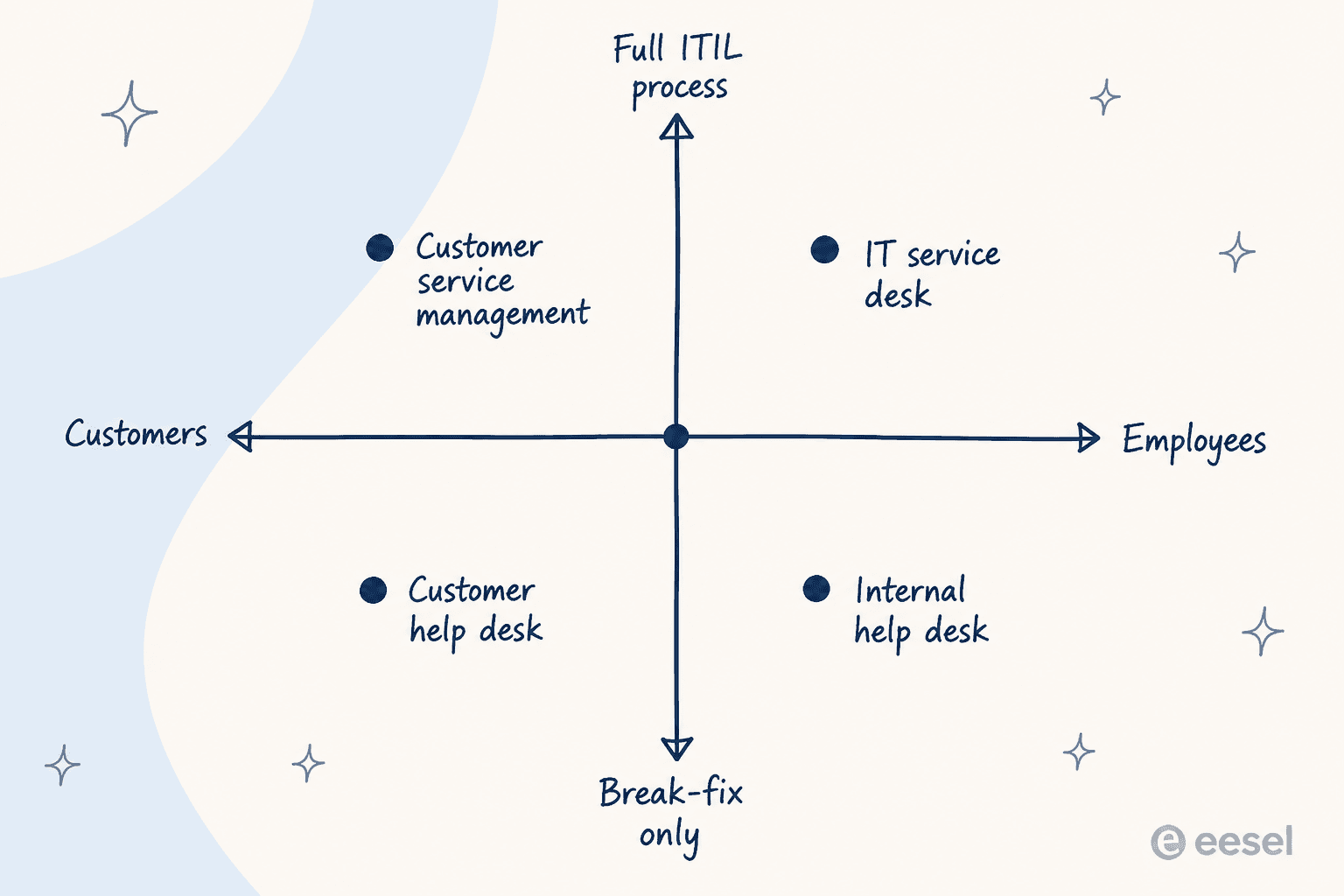
An ecommerce support team is a customer help desk. An IT team running incident-only tickets in a shared inbox is an internal help desk, and the label is identical even though the world is completely different. Add ITIL process to that internal team and you get an IT service desk. Add ITIL process to the customer-facing side and the industry calls it customer service management instead, which is the quadrant nobody has a clean name for.
Help desk vs service desk: the side-by-side
Here is the comparison with both axes held apart, sourced to the vendors and the framework rather than to vibes.
| Dimension | Help desk | Service desk |
|---|---|---|
| Primary job | Resolve the incident in front of you | Capture and route all demand, then govern what follows |
| ITIL status | Not a defined practice | A named ITIL 4 practice |
| Core practices | Incident management | Incident, service request, knowledge, plus links to problem and change |
| Typical requester | Customers, or employees in a low-process setup | Employees, and increasingly HR, finance, facilities, and legal |
| Service catalog | Rare | Standard, and usually the centrepiece |
| Problem records | No, repeat issues stay separate tickets | Yes, with root cause, workaround, and known error |
| Change approvals | No | Yes, with change types and a CAB for the risky ones |
| Asset register / CMDB | No | Asset management yes, full CMDB depends on the tool |
| Headline metrics | First contact resolution, MTTR, CSAT | SLA adherence, change success rate, self-service rate |
| Where the work stops | When the ticket closes | When the cause is gone |
| Cost profile | Entry seats, few gated modules | ITIL modules sit on upper tiers, assets often a separate SKU |
| Sensible team size | Any | Once repeat incidents outnumber novel ones |
The row I would stare at is the last-but-two. A help desk's work ends when the ticket closes. A service desk's work ends when the cause is gone. Everything else in the table is downstream of that one difference.
Zendesk, to its credit, is unusually honest about where its own line falls. Its service desk guide grades a service desk as ITIL-aligned on "operational processes only," and marks strategic IT planning with a plain no. Its comparison blog rates a service desk as only "Partial" on change and assets, reserving "Core, lifecycle managed" for full ITSM. Most vendors would have quietly ticked those boxes.
What the extra process actually looks like
Abstract comparisons are cheap. The concrete version is more convincing, so here is the same ticket travelling both routes.
Freshworks uses a worked example on its own comparison page: an employee, Aisha, is locked out. The help desk path is raise a ticket, troubleshoot with a technician, find the account was never created in the directory, activate it, close. The service desk path does all of that and then keeps going, reviewing the incident, watching for similar ones, and escalating the pattern into a problem to be fixed at the root.
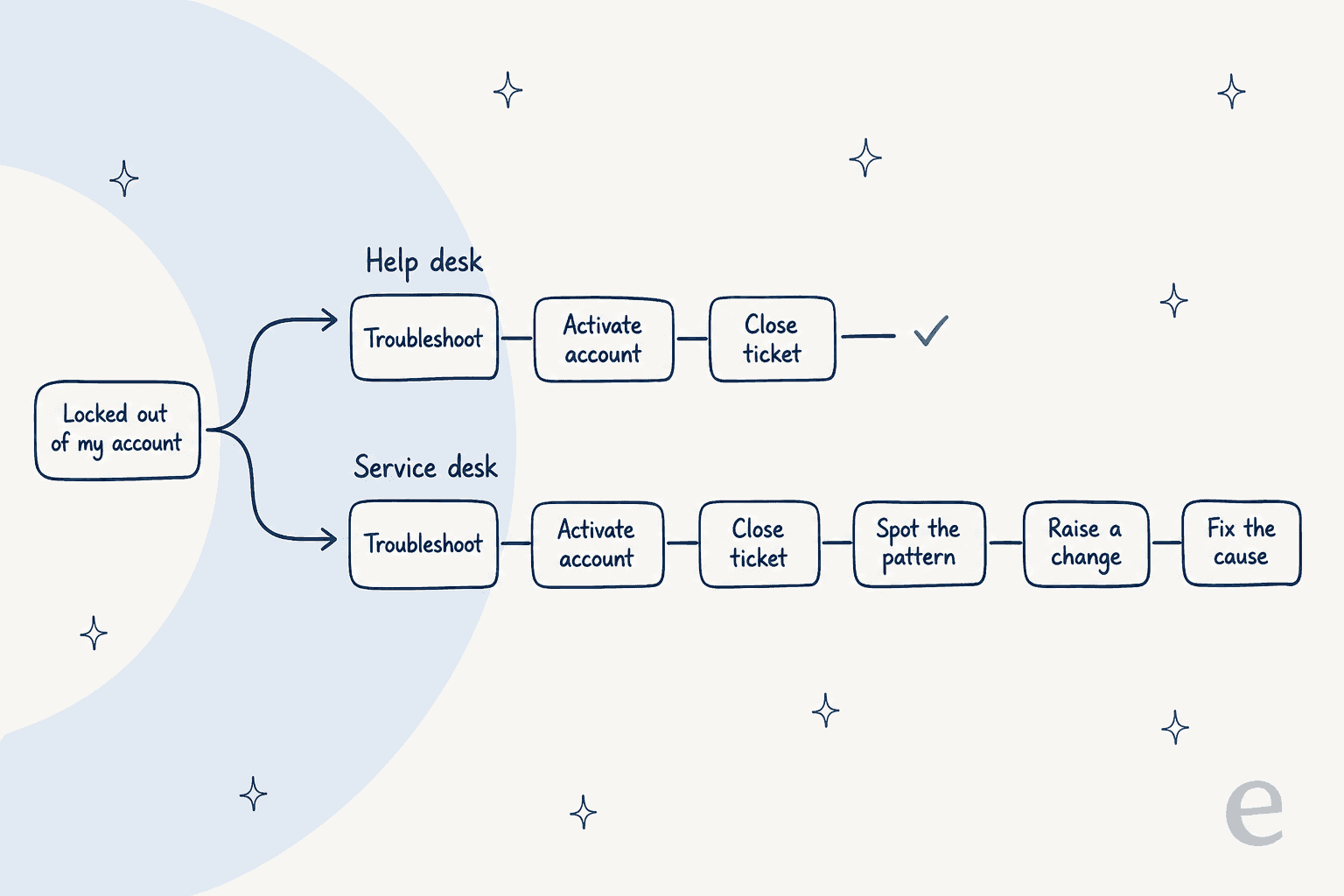
Note step two on the service desk path: Freshworks says the service desk "solves the problem via the help desk." Even the vendor selling the upgrade is nesting one inside the other rather than presenting them as rivals.
The governance is where it stops being a philosophy and starts being fields on a form. In Freshservice, a change record is not a ticket with a different label. It carries a change type (minor, unplanned, major, emergency, expedited), an impact rating, a risk rating, a planned start date, a rollout plan, and a backout plan.
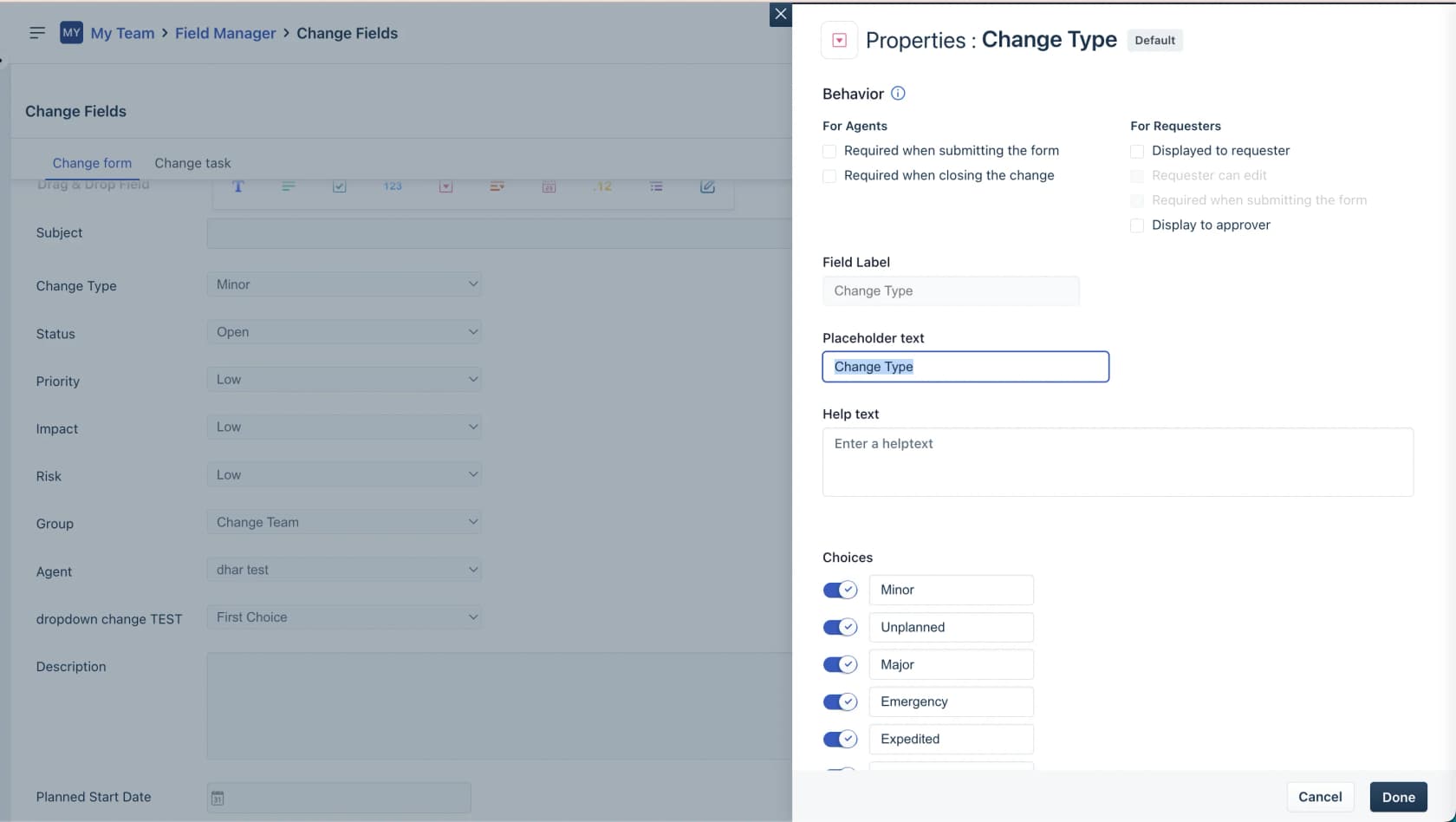
The change lifecycle is a gated state machine, moving from Open to Planning to Awaiting Approval to Pending Release to Pending Review, and the transitions are physically blocked unless every task is complete, every requested approval is in, and mandatory fields are filled. That is the difference between a process and a suggestion. The change types differ from each other by exactly one thing: whether the change advisory board has to meet before you ship.
Asset management is the other half. A service desk knows what you own, and links the thing to the ticket. Zendesk built a version of this for internal teams, surfacing the device record right inside the request:
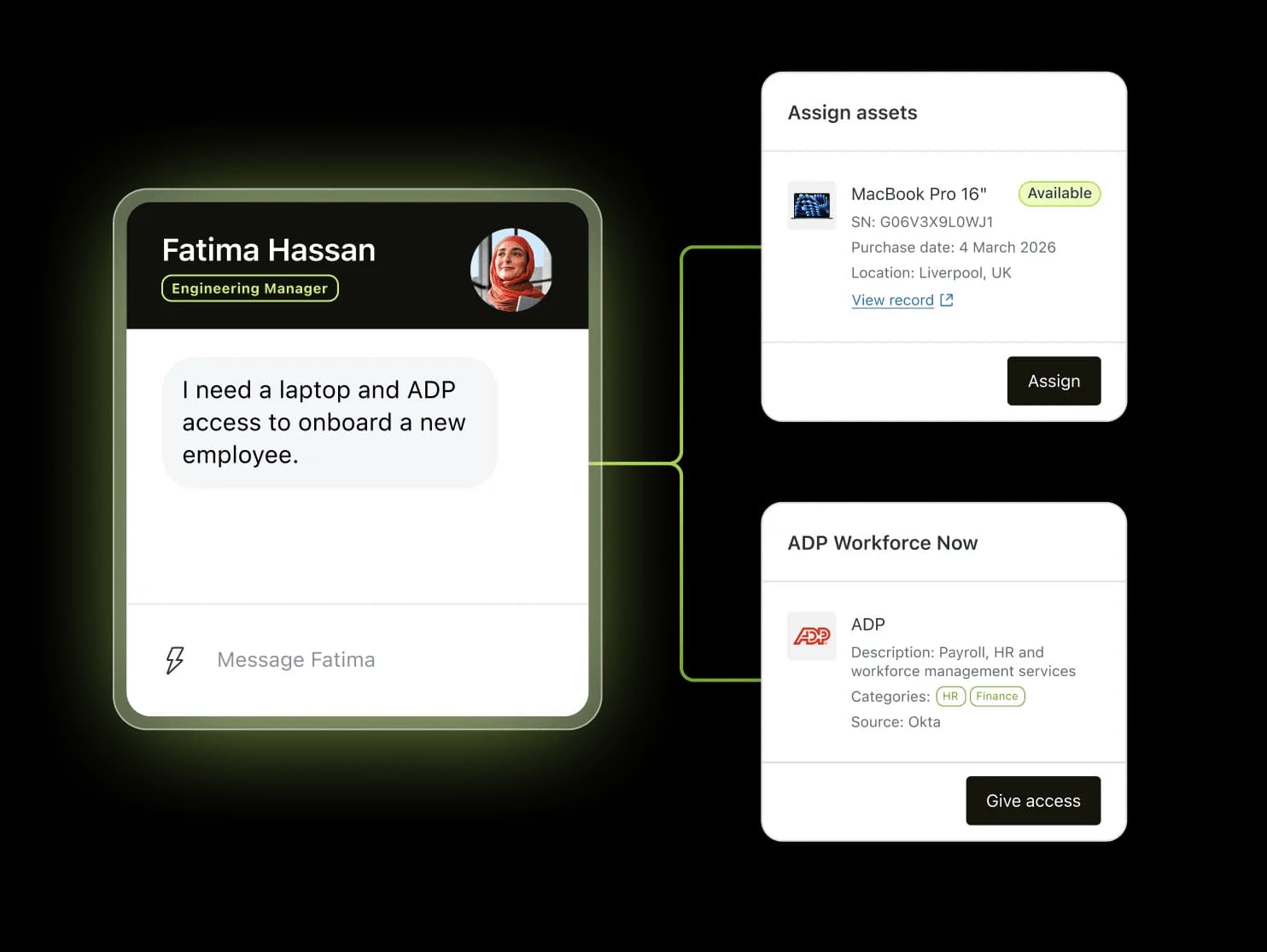
Worth being precise here, because the vocabulary hides a real gap. That is asset inventory, not a CMDB. The words "CMDB" and "configuration item" appear nowhere on Zendesk's ITSM page, ITAM page, or employee service pricing table. Hardware inventory syncs from Jamf, Intune, and Automox, with software asset management listed as coming soon. Freshservice, by contrast, ships a relationship map that defaults to three levels, where upstream shows potential causes and downstream shows blast radius. Both are legitimate products. Only one of them can tell you what breaks if you reboot that server.
Real-world examples: the same vendor sells you both
The cleanest way to see the split is to watch vendors who sell to both sides.
Freshworks runs the textbook version. Freshdesk is the customer help desk. Freshservice is the IT service desk, positioned as "service, operations, and assets unified" and built on ITIL practices. The pricing tells you where the line sits: Freshservice Starter at $19 per agent per month is incident-only, and problem, change, and release management do not appear until the Pro plan at $99. Asset management is a separate SKU on top. Freshdesk sells at $18 per agent per month for a fuller customer support feature set, because it is not carrying any of that governance. If you want the head-to-head, we wrote up Freshservice vs Freshdesk separately.
Atlassian sells one product under both names. The exact same Jira Service Management is marketed as help desk software on one page and as a service desk on another. Its own comparison page frames the categories as a maturity ladder you climb "from simple ticketing to full ITSM on a single, flexible platform." Pricing runs $20 per agent per month on Standard and $51.42 on Premium, with the Virtual Service Agent gated to Premium and above. Our JSM pricing breakdown has the full grid.
Zendesk came from the other direction, starting as the archetypal customer help desk and moving inward. It now runs a separate employee service product with ITSM sold underneath it, and its own tagline for the move is refreshingly blunt: "Service for employees, perfected by customers." Its Suite Team plan starts at $29 per agent per month, with the service catalog and asset management arriving at Growth for $59.
ServiceNow sits at the other end entirely, and the honest note there is that the ceiling is high and so is the bill. Practitioners in its own subreddit report that partner implementation costs can multiply the spend by up to 2.5 times. Our ServiceNow pricing guide and the cheaper alternatives roundup go into that properly.
What practitioners actually say
If you only read vendor pages you would think the distinction is settled. Ask the people working the queue and it splits almost exactly in half, and the split is not random.
The people hiring, applying, and answering tickets are close to unanimous that the words are interchangeable:
"Servicedesks are what you call them when you don't want to call them helpdesks."

"No difference. Job titles mean nothing in IT. Read the job responsibilities on the job posting."
The people arguing inside an ITIL context are equally certain it is real. My favourite piece of evidence is one sysadmin arguing both sides six years apart, and being right both times. In 2018 he gave a precise technical definition:
"Service Desk is an ITIL term.
A service desk does a lot more than a help desk. it acts as kind of a clearing house for all requests for service, even those between IT teams. For example they act as an intermediary between say, the team which provides server hosting resources and those who run an application."
By 2024, in a thread about job titles, the same person had moved to "you can be an entry level person inside the service desk/help desk/whatever." Both positions hold. The ITIL practice is a real thing with real scope. The job title carries none of that information.
There is a good statement of the opposite case too, from a certified ITSM practitioner writing on LinkedIn:
"The difference is not the toolset or ticket volume. It is the mindset.
Help Desk asks, "How fast can we close this ticket?" Service Desk asks, "How does this impact the service and the business?""

And the numbers say the naming is close to arbitrary. HDI survey data, reproduced by Atlassian, shows 36% of support centres call themselves a service desk and 23% a help desk, with the remaining 41% calling themselves something else entirely:
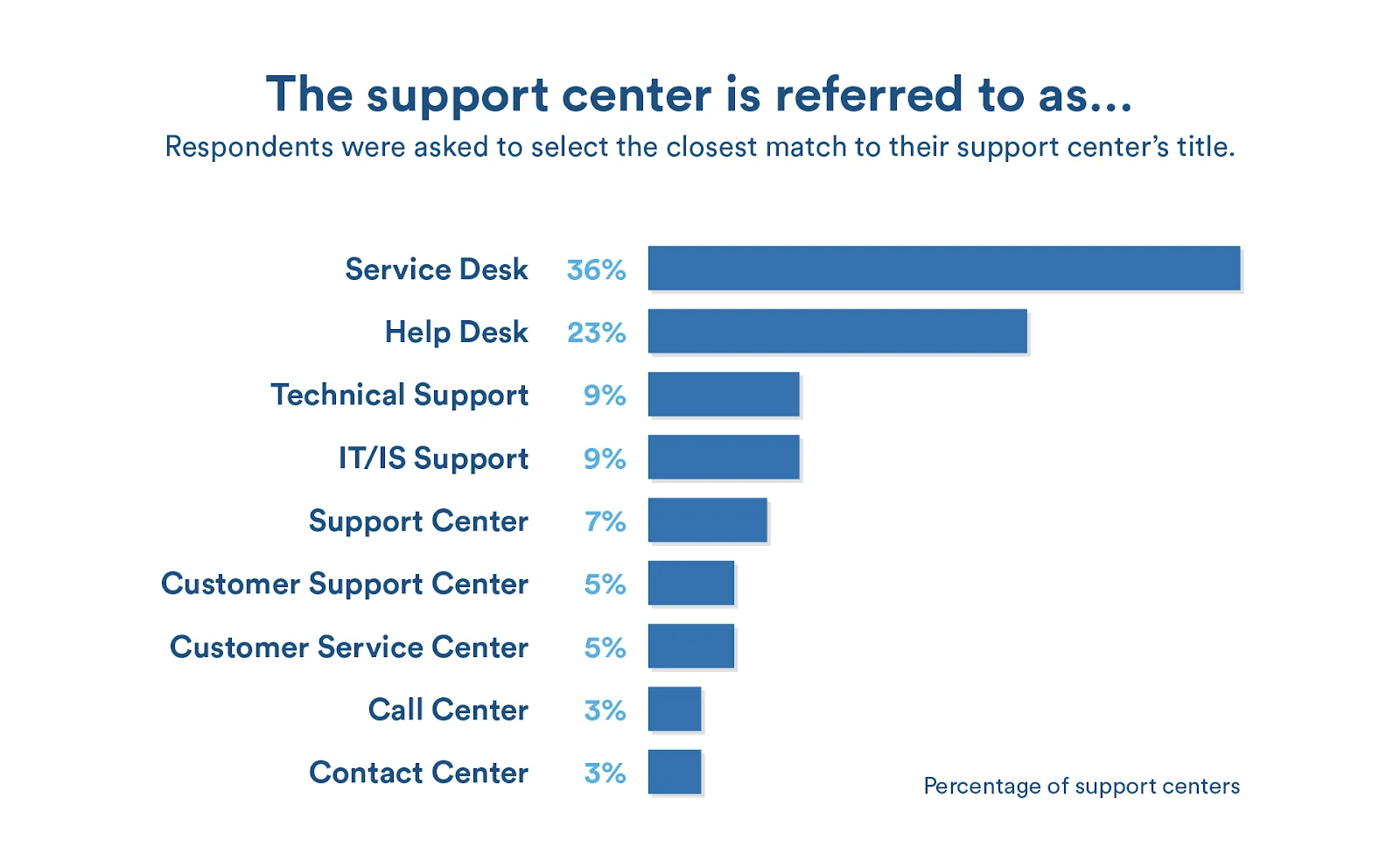
Atlassian even adds the caveat itself: there is "no guarantee that the service desks and help desks reported in this HDI survey align to our descriptions above." Two in five teams have opted out of the vocabulary altogether.
Which one do you actually need
Forget the label. Answer two questions and the answer falls out.
Which desk are you actually running?
Two questions. No email required, no score out of ten.
Pick one from each row to see the answer.
Buying ITSM here would cost you money and speed for governance nobody asked for. Spend the budget on channels, routing, and deflection instead.
Where to look next: help desk software for small teams and ecommerce help desk software.
You are IT, but you are running break-fix, and that is a perfectly good place to be. Add a service catalog before you add anything else, since it is the cheapest step up and the one employees notice.
Where to look next: internal helpdesk software and employee self-service portals.
This is the classic case, and the ITIL modules earn their tier price. Budget for the fact that change, problem, and asset management usually live on upper plans, and that assets are often billed separately.
Where to look next: ITSM software for smaller teams and our ITSM best practices guide.
The awkward quadrant. You want ITIL-grade process pointed at external customers, and most tools force you to pick a side. Look at platforms selling both halves rather than an ITSM suite you will bend backwards.
Where to look next: helpdesk software for high ticket volume and AI for ticketing systems.
If you landed on a help desk and feel vaguely guilty about it, do not. The pitfall Freshworks names on its own page is choosing overly complex solutions that exceed what the organisation needs, and I have watched that go wrong more often than the reverse. One enterprise admin put the failure mode perfectly, describing eight years of customisation that left paid-for capability unreachable:
"there are so many features that are - as I tell my leadership - still in the packaging, tucked away in a dusty box in someone's attic, collecting dust. For example, the CAB Workbench is an amazing tool for Change Management, but our current config. is so far deviated from OOTB that we can't "flip the switch"."
When you do decide to move up, the upgrade is not a rebrand. It is four concrete additions:
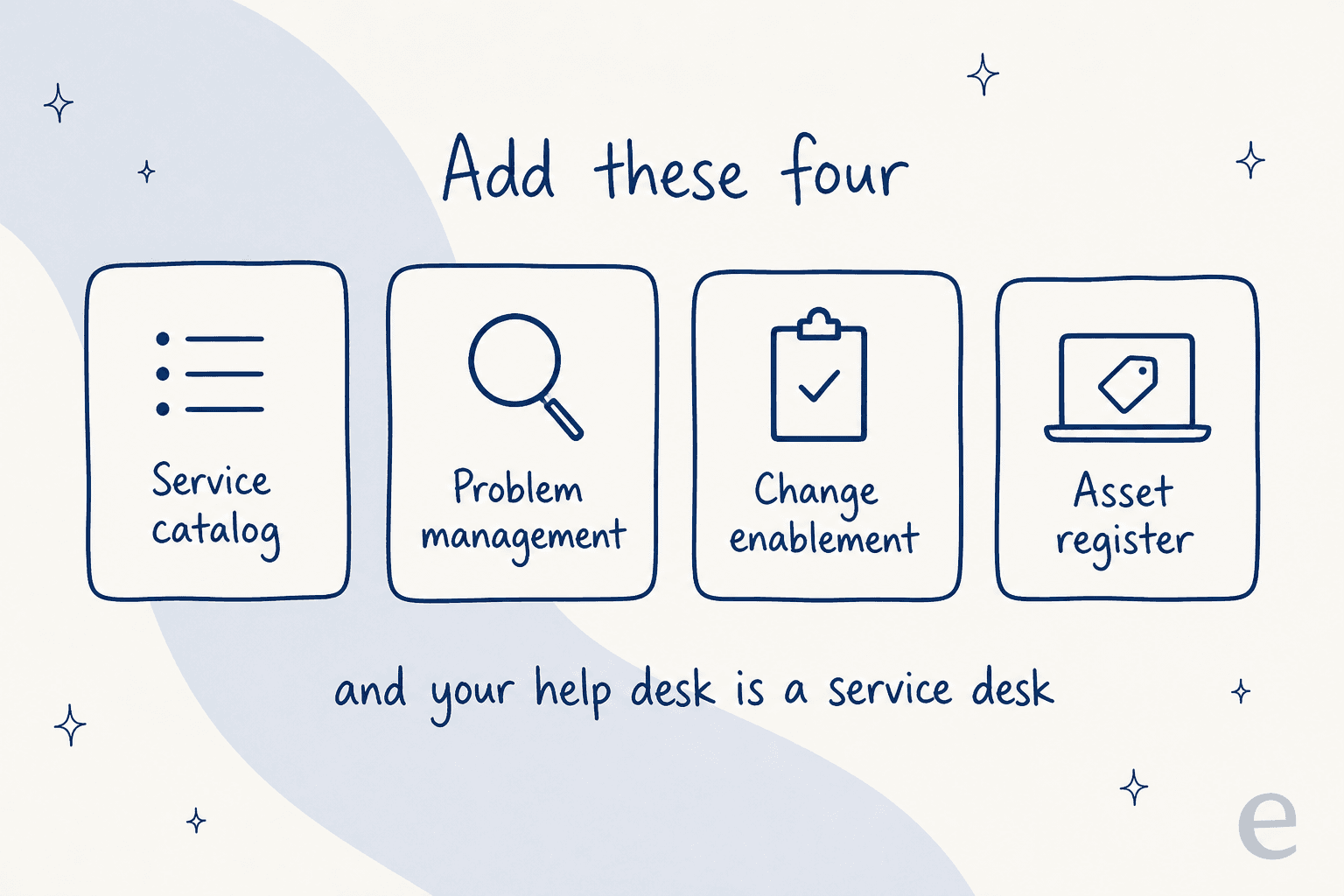
Add them in that order. The service catalog is the one your users feel, problem management is the one that reduces volume, change enablement is the one that stops outages, and the asset register is the one that makes the other three accurate.
A word of warning on the catalog, though. One r/ITManagers thread offers the sharpest test I have seen, which is that if everyone is hitting "other, other, other" then it has failed regardless of how many items it holds.
Where AI lands on both sides of the line
Something is quietly collapsing this distinction, and it is worth naming.
A help desk and a service desk look different at the process layer and nearly identical at the intake layer. Both receive natural-language requests from humans who do not know or care which practice their question maps to. "I can't log in" is the same sentence whether it arrives from a customer or from the head of finance, and it is a password reset either way.
That is the layer AI actually works on. Across the deployments I have helped set up, the tier-one shape is the same on both sides: password resets, access requests, hardware requests, onboarding questions, order status, and the long tail of "how do I do X." Roughly the same automation ceiling applies whichever sign is on the door.
What does not transfer is the governance. An AI agent should never approve a major change or close a problem record, and I would be sceptical of anyone selling that. The honest split is that AI handles intake and tier-one resolution on both desks, and the ITIL machinery stays human where the blast radius is real.
The other thing worth carrying over from the ITSM world is scepticism about deflection numbers. In ServiceNow's own subreddit, a product designer asked the community for Now Assist success stories to use as references and got five straight rebuttals, including one practitioner replying in that thread that "traditional automation is far more effective" than chained agents running at 50% accuracy. Another named the real blocker, which is not the model at all:
"It doesn't matter how good the LLM is at learning if the information it gets was. "Advised user, problem now resolved"
(Maybe you have better techs, but regards automation, laziness is blocking laziness in many cases.)"
That is exactly right, and it is why I do not trust a deflection estimate that was not measured against a specific team's own closed tickets.
Try eesel on whichever desk you are running
I work on eesel, which puts an AI teammate on top of the helpdesk you already have rather than asking you to migrate to a new one. It reads your past tickets and your existing docs, drafts or sends replies inside your own tool, and escalates the rest. That design exists precisely because the help desk versus service desk question is unanswerable from the outside: your ticket history already knows which one you are.

The part I would point at is simulation. Before anything replies to a real person, we run the agent over your historical tickets and show you coverage by theme, so you get a resolution number from your own queue rather than from a vendor deck. That habit came from a scar: we have had a customer's bot confidently invent an answer and send it to real people when its knowledge base had no match, which is the failure mode that makes buyers rightly suspicious of every number in this category. Simulating first is how you catch it before your users do.
For a sense of what that looks like when it lands, Gridwise resolved 73% of tier-one requests in its first month, having seen results during a seven-day trial. Pricing is usage-based at $0.40 per ticket with no per-seat fee, so a service desk with twelve approvers in the chain does not pay twelve times over. Try eesel free, or book a demo if you want me to run the simulation against your history first.
Frequently Asked Questions
What is the difference between a help desk and a service desk?
Does ITIL define a help desk?
Can one tool be both a help desk and a service desk?
Is a service desk more expensive than a help desk?
How do I know when to upgrade from a help desk to a service desk?


Article by
Kira
Kira is a writer at eesel AI with a Computer Science background and over a year of hands-on experience evaluating AI-powered customer service tools. She focuses on breaking down how helpdesk platforms and AI agents actually work so that support teams can make better buying decisions.