

Microsoft does not sell anything called a ticketing system. Search that phrase and you land on Dynamics 365 Customer Service. It is a CRM-shaped product where the object is a case rather than a ticket, and where the entry price is $50 per user per month paid yearly with a "Contact us" button instead of a checkout.
The real question, then, is which of five things you mean. A shared mailbox. A SharePoint list with a Power Automate flow on top. A Power Apps app on Dataverse. A Copilot Studio agent living in Teams. Or Dynamics 365 itself. They cost between nothing and $195 a seat, and every one of them breaks somewhere specific and predictable.
The part most buyers miss: on a Microsoft desk, AI is a second meter. The seat license does not include it. Copilot Credits get bought through a different product's pricing page. They need an active Azure subscription. And Microsoft states plainly that a varying number of credits is billed depending on usage, so there is no published cost per resolved ticket. I have spent the last three-plus years putting AI agents on live support queues at eesel, and pricing that a support manager cannot forecast is the single most reliable way to stall a rollout. If you want AI on the queue you already have, an AI layer for Teams that bills per ticket is a shorter path than re-platforming onto a CRM.
Does Microsoft have a ticketing system?
Not as a product you can buy by that name.
The nearest thing is Dynamics 365 Customer Service, which Microsoft positions with the line "Empower service representatives to resolve issues quickly using AI agents." It is a case management application sitting on the Dynamics 365 and Power Platform stack, sold the way enterprise software is sold: every paid tier's only call to action is Contact us. The sales line is staffed Monday to Friday, 6 AM to 3 PM Pacific.
That framing matters more than it sounds. A ticketing system is a queue with a workflow. A CRM case is a record attached to a customer, and the two overlap enough that some buyers go looking for a CRM ticketing system instead of picking a lane. But the buying motion and the price are nothing alike, and neither is the setup effort, which is why so many IT teams end up building something instead.
One more naming change is worth knowing before you read any Microsoft page in 2026. Microsoft has renamed the humans. Across the Customer Service pages, the person answering tickets is now a "service representative" or "service rep," and the word "agent" has been reassigned to the AI. The dedicated section on the product page is literally headed SERVICE AGENTS, describing "agentic service." When a Microsoft doc says an agent handled the case, it does not mean a person did.
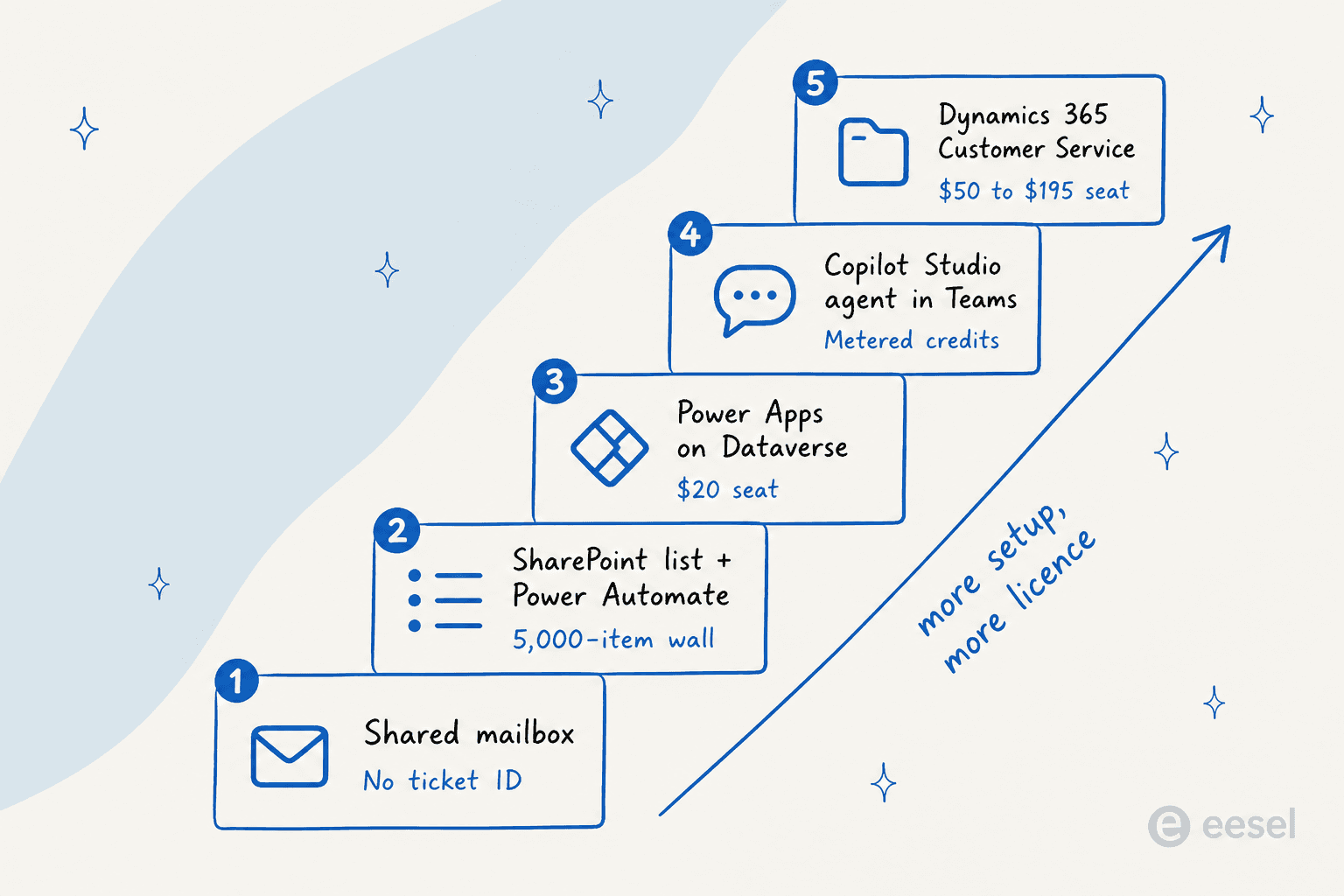
The five routes, side by side
Here is the honest comparison before I go through each one. Every price below is US list, per user per month, paid yearly, pulled from Microsoft's own pricing pages on 31 July 2026.
| Route | Licence cost per seat | Ticket ID | Reporting | Where it breaks first | Best for |
|---|---|---|---|---|---|
| Shared mailbox in Outlook | $0 on top of Microsoft 365 | None | None | Two people reply to the same email | Under ~50 requests a month |
| SharePoint list + Power Automate | $0 to $15 | List item ID | Basic list views | 5,000-item view threshold | A small internal queue |
| Power Apps on Dataverse | $20 (+$15 for flows) | Real, custom | Power BI, extra licence | Delegation limits, request caps | Teams that want a bespoke workflow |
| Copilot Studio agent in Teams | Metered credits | Whatever it writes to | Copilot Studio analytics | Credit spend you cannot forecast | Deflecting repeat questions |
| Dynamics 365 Customer Service | $50 / $105 / $195 | Case number | $105 tier and up | Reporting gated above the entry tier | Customer-facing support at scale |
Two things jump out of that table. Reporting is missing from the cheap end of every route, Microsoft's own $50 product included. And the ticket ID, the thing that makes a queue a queue, does not properly exist until route three. If AI on the queue is the actual reason you're comparing routes, my wider look at AI for ticketing systems is worth reading alongside this one.
Route 1: the shared mailbox
Almost every Microsoft support queue starts here, and for a while it works fine. A shared mailbox in Outlook costs nothing beyond the Microsoft 365 licences you already have. Everyone can see it, and nobody has to learn anything new. For small-team ticketing systems that never grow past a handful of agents, it is often the whole answer.
It fails on one thing: no ticket ID, so no state. You cannot tell whether an email is being handled. You cannot tell whether the thread that arrived on Tuesday is the same issue as the one from last week. And two agents will eventually reply to the same customer within a minute of each other. Every workaround people invent (colour categories, a "claimed" folder, a naming convention in the subject line) is a hand-rolled reimplementation of a status field.
The threshold is lower than teams expect. Once more than two people work the same inbox, or once anyone asks "how long are we taking to reply?", the mailbox has stopped being enough. I have written a fuller comparison of the shared inbox versus ticketing trade-off, plus a separate look at email help desk software for teams who want to keep email as the front door without losing the queue.
The take: fine as a starting point, but do not architect around it. The moment you are writing rules about who touches what, you have outgrown it.
Route 2: a SharePoint list with Power Automate on top
This is the classic homegrown build, and the one I get asked about most. A SharePoint list holds the tickets. A Power Automate flow catches new items and fires notifications, and a Teams tab surfaces the list. It looks free because you already pay for all three, though it's worth checking SharePoint pricing against a dedicated desk before you assume that holds at scale.
It is a real option. It also carries the most precisely documented ceiling in the whole Microsoft stack, and almost nobody checks that ceiling before building.
The 5,000 item wall
SharePoint's List View Threshold is 5,000. In Microsoft's own words, "Operations that exceed this limit are blocked". The reason is SQL row locking: past roughly 5,000 locked rows, SQL Server finds it more efficient to lock the whole table, so Microsoft blocks the query instead.
Three details that get lost in most write-ups:
- The warning fires at 3,000, not 5,000. You will see it on the List Settings page well before anything actually breaks.
- The number is not fixed. Microsoft hedges it directly: "The actual number is not always 5,000, and can vary depending on your site, the amount of activity in the database, and your site's configuration."
- You cannot raise it. The 20,000-item override for auditors and administrators is a SharePoint Server feature. In SharePoint Online the limit "can't be changed".
The list itself holds 30 million items. That is the number people quote when they say SharePoint scales fine. But a queue is really a view over a list, and views break long before the list does. A team closing 200 tickets a month is inside the warning band inside 15 months, and inside the block band inside two years.
The flow that runs it is on the worst tier
Power Automate sorts every account into a performance profile. A team building on the Microsoft 365 licences they already own lands on Low, the worst row of every table Microsoft publishes. On Low:
- 10,000 Power Platform requests per 24 hours, against 200,000 on Medium and 500,000 on High.
- Apply to each caps at 5,000 array items, versus 100,000 on every other profile. Pagination caps at 5,000 too, so it compounds with the SharePoint threshold rather than cancelling it.
- Minimum recurrence interval is 60 seconds, so a polling "new ticket" flow has a worst-case detection lag of a full minute before anything fires.
- The SharePoint connector itself throttles at 600 API calls per connection per 60 seconds.
And the quiet killer: per Microsoft's Power Automate limits documentation, a flow that stays above the limits "for 14 days, the system turns it off". Flows with errors are switched off after 14 days too. A queue whose routing silently stops two weeks after a volume spike is a very bad Tuesday.
One more licensing trap sits here. A plain Microsoft 365 licence carries 6,000 Power Platform requests per user per 24 hours, not the 40,000 a paid Power Platform seat gets. Every connector call counts as one request, so does every HTTP action, and so does every built-in action, from initialising a variable to a simple compose. Microsoft states it plainly in its request limits documentation: "Both successful and failed actions count toward these limits. Retries and requests from pagination also count."
The take: a good fit for a small internal queue with predictable volume and no growth plan. Do not put a customer-facing queue on it, and set a calendar reminder for the day the list passes 3,000 rows.
Route 3: Power Apps on Dataverse
If the SharePoint build is where teams start, this is where they escalate when it creaks. A model-driven Power App on Dataverse gives you a real data model, real relationships, a real ticket ID, and a UI you control.
The catch is licensing, and Microsoft puts it about as plainly as it can be put: "Building apps is not charged, but using them requires paid licenses." The free Power Apps Developer Plan covers building and testing across three developer environments, with a cap of 750 automation flows a month. Production is a different SKU.
| What you need | Price |
|---|---|
| Power Apps Premium (per user, to run the app) | $20 user/month, paid yearly |
| Power Automate Premium (per user, for the flows) | $15 user/month, paid yearly |
| Dataverse database capacity add-on | $40 per GB/month, paid yearly |
| Power Automate Process (unattended bot) | $150 bot/month, paid yearly |
| Power Automate Hosted Process (Microsoft-hosted VM) | $215 bot/month, paid yearly |
So the real floor is $35 per agent per month, on annual commitment, before a single ticket is answered. Ten agents is $350 a month, or $4,200 a year, for software you still have to build and maintain yourself.
Two footnotes bite in practice. First, the Dataverse entitlements pool at tenant level rather than per user: 250 MB database and 2 GB file per Premium seat, so ten agents pool to 2.5 GB of database. A ticketing system with attachments will exhaust the database pool long before the file pool, and extending it costs $40 per GB per month. Second, Microsoft's agentic features in Power Apps are "available in model-driven apps only" - build your queue as a canvas app and that layer is simply not there for you.
The delegation problem nobody warns you about
If you build on SharePoint rather than Dataverse, Power Apps delegation quietly changes what your app can do. The one that catches everybody: SharePoint ID fields look like numbers in Power Apps but are text underneath, so SharePoint only "supports the equal ('=') operation" for delegation on an ID field. Relational operators just do not work. "Show me every ticket with an ID above 4,000" is not a delegable query.
Not never delegates. Fourteen system fields never delegate. UpdateIf and RemoveIf do not really delegate at all, they "work locally but simulate delegation to a limit of 500/2000 records." Each one is survivable on its own. Put together, they are why homegrown Microsoft queues get a reputation for being fast on day one and slow on day 400.
The take: the right build if your workflow is truly unusual and you have a maker on staff. If your requirements are "tickets, statuses, assignment, SLAs," you are about to spend months rebuilding an internal helpdesk that already exists as a packaged product. Plenty of packaged internal desks cover exactly this shape out of the box, and if licensing cost is the objection, there's an open-source ticketing system you could self-host instead. Microsoft itself frames it that way, listing "Help desk management" as one of its ready-to-use Power Apps templates, alongside employee onboarding and asset checkout.
Route 4: a Copilot Studio agent inside Teams
This one is a deflection layer more than a ticketing system, and it is worth separating out, because a lot of "we built a ticketing system in Teams" projects are really this.
Copilot Studio is Microsoft's low-code platform for building agents. It absorbed Power Virtual Agents, publishes into Teams, SharePoint and Microsoft 365 Copilot, and reaches out through 1,400-plus connectors. Microsoft claims 90% of the Fortune 500 use it. On G2 it rates 4.4 out of 5 across 156 reviews.
For a repeat-question IT queue ("how do I reset my VPN," "where's the expense policy"), an agent in Teams that reads your SharePoint and Confluence is a legitimately good use of the stack, and it is the exact shape of work that AI in Microsoft Teams does well - it's basically a Teams IT support bot sitting in front of your queue. What you do not get is a queue, a status, an assignment, or any report on what it failed to answer.
The cost model is the thing to understand before committing, and it earns its own section.
The second meter: Copilot Credits
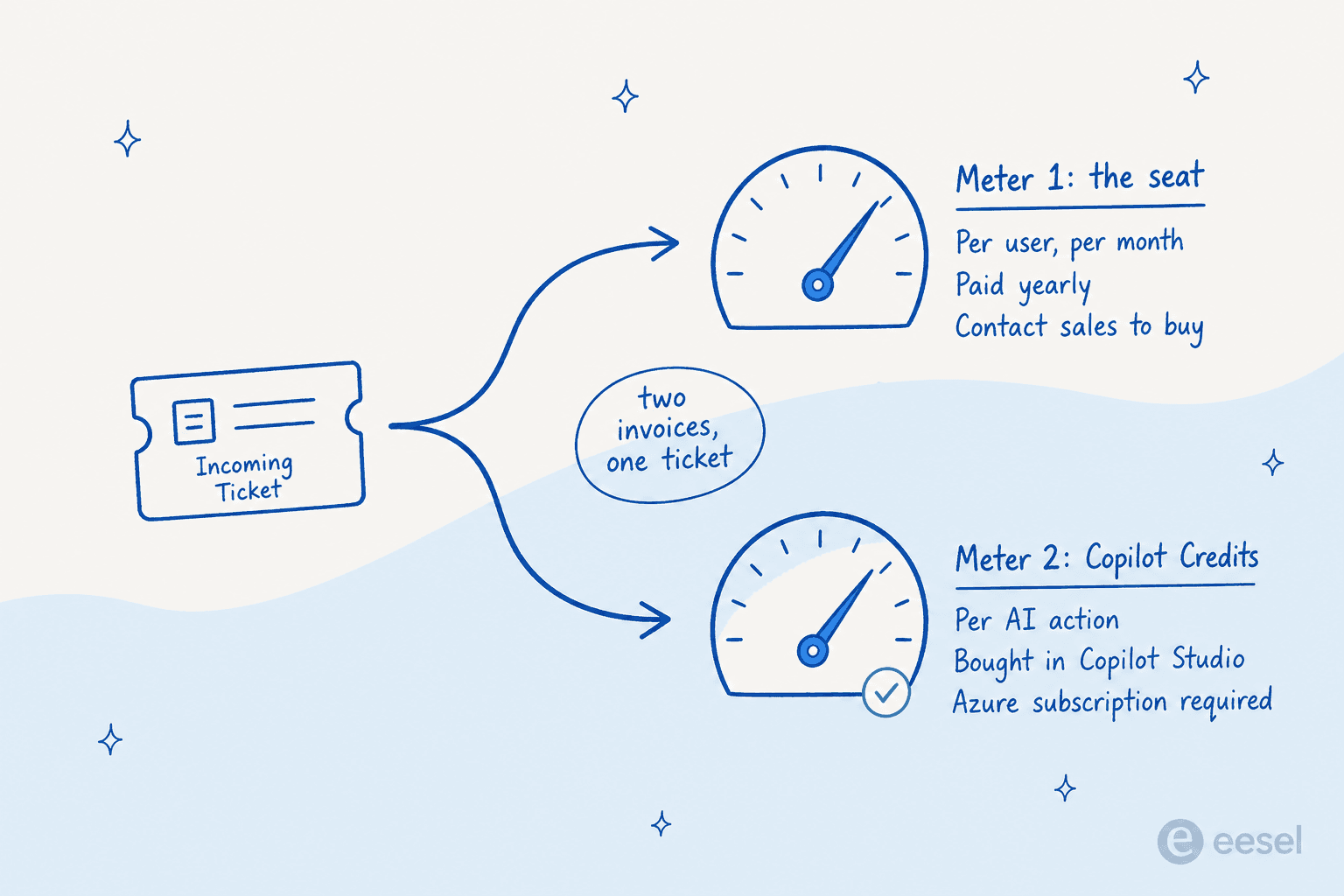
Here is the part that surprises people who priced Microsoft off the seat cost alone. The seat licence does not include the AI. On Customer Service Professional and Enterprise, all four of Microsoft's named service agents - the Case Management Agent, Customer Knowledge Management Agent, Customer Intent Agent and Quality Evaluation Agent - are all marked "Requires Copilot Credits (sold separately)" in Microsoft's own plan comparison, worth reading alongside any ticket deflection plan you're building around it.
You buy credits through Copilot Studio at $200 for 25,000 Copilot Credits per month, paid yearly. That works out to $0.008 a credit at list, though Microsoft never prints a per-credit rate itself. Both credit plans carry the same prerequisite, printed on each card: "An Azure subscription is required to use agents."
The number you cannot get is the number you need. Microsoft's own footnote says that whenever an action or response is completed by an agent, "a varying number of Copilot Credits will be billed depending on the specific usage", per its Power Automate pricing page. Published rates run from 1 credit for a classic answer up to 100 for a premium generative response. Add 10 for tenant graph grounding, and a separate premium-token meter on top of that when a reasoning model is involved. Nowhere is there a credits-per-resolved-ticket figure, so you can compute your cost per credit pack but never your cost per ticket - the exact gap a per-ticket-priced AI ticketing system is built to close.
The Premium tier at $195 lists "Included capacity" for those agents, but footnote 6 qualifies that as "Base Copilot Credit capacity" with no quantity published. The number lives only in the downloadable licensing guide.
None of this is a theoretical risk. In June 2026, an r/copilotstudio poster described exactly what an unforecastable meter does when something loops:
"I then deployed one agent from dev to prod. That's it — a single agent. Today I checked my Azure subscription and there's a bill for ~$47,000."

The mechanism showed up in the replies, and that is the part worth taking in before you switch anything on:
"Budgets for PAYG with Azure subscriptions in Copilot just have alerting purposes. There's no hard service stop for that… we had an agent flow triggered by incoming mail loop itself by sending mails to its own inbox by mistake."
A pay-as-you-go budget in Azure alerts, it does not stop. An email-triggered flow that can reply into its own inbox is a loop, and the meter keeps running until somebody notices.
I want to be fair here. This is not incompetence, it is a real modelling problem: usage really does vary, and a flat per-ticket rate means the vendor eats the variance instead of the customer. eesel's own pricing research still landed hard on the other side of it. We tried invented units and pulled them, because "credit" forced customers to do maths - the reaction we kept hearing was some version of "wait, what is a credit?" Tickets and chat sessions are units support managers already think in. When the person who has to defend the budget cannot forecast the bill, the rollout stalls in procurement, and no amount of model quality rescues it.
Route 5: Dynamics 365 Customer Service
The actual product. If you want Microsoft to sell you a proper ITSM ticketing system instead of the parts, this is it.
What a case actually is
Dynamics cases are more opinionated than most helpdesk tickets. The constraints are worth knowing before you design a workflow around them.
- Three statuses ship out of the box: Active, Resolved, Canceled. Active carries named sub-statuses (In Progress, On Hold, Waiting for Details, Researching).
- Case merging caps at 10. By default you can merge up to 10 cases at a time, and the merged case flips to Canceled with a Merged status reason.
- The hierarchy is exactly two levels. A child case cannot have a child case, and a parent case cannot be a child of another case. If your escalation model has three tiers of nesting, it does not fit.
- SLA migration has a ceiling. Moving more than 1,000 SLAs can fail the premigration checkup, and SLA conditions on related entities are limited to one level.
None of these are dealbreakers. They are all the kind of thing you want to find in week one rather than week nine, especially if SLA management is the piece your team actually cares about.
The pricing, and the gate that matters
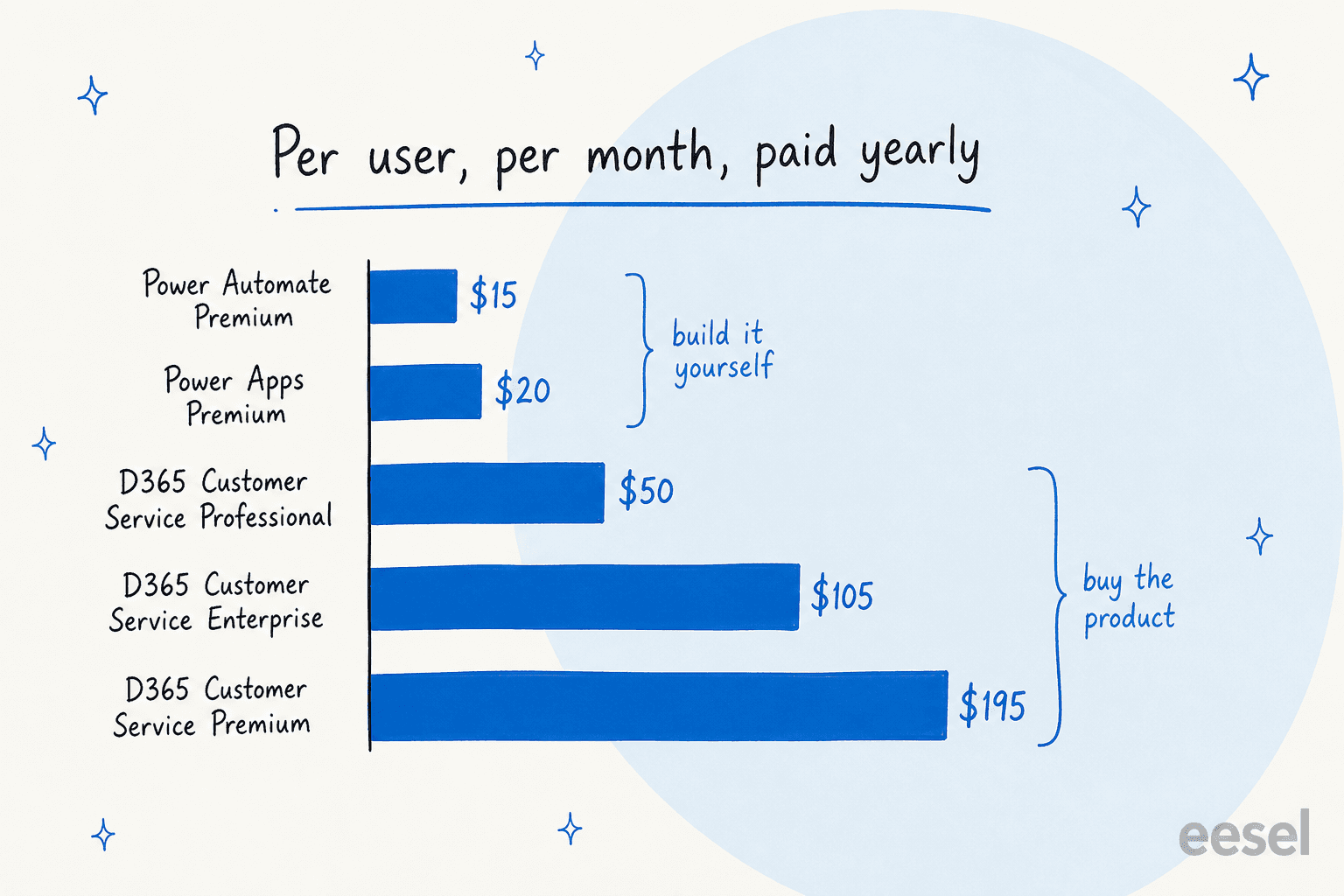
| Plan | Price (user/month, paid yearly) | What you get |
|---|---|---|
| Free trial | Free | Self-serve, the only path without a sales call |
| Customer Service Professional | $50.00 | Case management, knowledge management, Microsoft 365 interop, unlimited named users |
| Customer Service Enterprise | $105.00 | Adds Copilot, unified routing, Teams integration, analytics and KPI reporting, portals, Power Apps and Power Automate, workforce engagement |
| Customer Service Premium | $195.00 | Enterprise plus the full contact centre: chatbots, IVR, live chat, voice channel |
| Dynamics 365 Contact Center | $110.00 | Standalone contact centre, sold separately |
The sharp edge here is the reporting gate. At $50 a seat, Professional gives you case management and no analytics or KPI reporting at all. No Microsoft Teams integration either, and no unified routing. All of that starts at the $105 Enterprise seat, a 110% jump to unlock the ability to measure your own queue.
Notice too that Premium ($195) sits very close to Enterprise ($105) plus Contact Center ($110), bundled at a $20 discount. Voice is then a third bill: footnote 8 states that "Azure Communication Services pricing is separate and not included," so the $195 seat buys the contact centre software and not the minutes.
What Microsoft can prove
Every proof point on the page comes from Microsoft's customer carousel, so read them as vendor-published rather than independent. The strongest: Lenovo at a 20% reduction in handling time, Lexmark at a 23% increase in call centre productivity, and Hype at a 90% first call resolution rate with a 70% reduction in service rep intervention. Microsoft's own internal deployment claims 50% process time savings.
The analyst positioning is real. Microsoft is a Leader in the Forrester Wave for Customer Service Solutions, Q1 2026, published 11 March 2026, and a Leader in the 2025 Gartner Magic Quadrant for the CRM Customer Engagement Center, the same category ServiceNow competes in. Two things are worth noting anyway. Microsoft's own gloss on the Wave placement uses the phrase "on-par vision," which is unusually hedged language to volunteer about yourself. And the Total Economic Impact study it promotes is dated March 2024, two years before the page it sits on.
The take: the right answer if support is customer-facing, the volume is real, and the company already runs on Dynamics. It is the wrong answer for a 12-person internal IT desk, where the licence and the implementation partner and the sales cycle all cost more than the problem does. For that shape, an internal ticketing system built on a lighter desk - Jira included - gets you there faster.
Work out what it would actually cost you
Sticker prices hide the shape of the bill, so put your own numbers in.
Change the seat count and the toggles to see how the four Microsoft routes rank for your team. The interesting moment is the point where the DIY build stops being the cheap option.
Run it at ten people and the build-your-own route looks like an easy win at $350 a month against $500 for Dynamics Professional. Run it at ten people with AI on the queue and the gap narrows to $550 against $700, for a system one of your people still has to own. That $150 a month buys you a part-time job you have not costed.
What people actually say about running tickets on Microsoft
For this I read a lot of r/sysadmin and r/msp threads going back to 2020, including plenty of argument over whether a free ticketing system is even worth trying before buying anything. One phrase turns up in almost all of them, and it is not a feature comparison.
"Over my career, the phrase 'why not? we have the licenses' has been uttered at least one time by someone in a senior business role (or the project manager) for all the projects in my list of top 10 worst projects."
That is the decision-driver, and it is worth naming, because "we already pay for it" is an argument about the invoice rather than about fit. In the same thread, someone whose company had already committed described the result:
"We just started a project using Dynamics as our replacement ticketing system. So far we have not been impressed. But our CIO went forward with it anyway because we had licenses for it."
The Power Apps threads split down a cleaner line, and the split is about who maintains it rather than whether it works at all. People who built their own report it running fine for years:
"I developped a ticketing system with Power Apps and some Power Automate (formerly Flow). All our database is on Sharepoint Online. It's in production since November 2019, it works great."
People who inherited one tell a very different story:
"My predecessor used it to learn the power platform. Great... but the problem is there's a dozen great ticketing systems out there, most of which are free to a point, and aren't really expensive anyway. So what we were left with was a buggy POS which was missing 90% of the basic features I'd expect to see (and need). After a week of fighting with it, it went into the recycle bin."
Both accounts are true at the same time, which is the useful thing about reading them side by side. A homegrown Power Apps queue is a personal project that happens to be load-bearing. It works for exactly as long as its author is still there.
The last theme is scale, and the numbers people give are lower than you would guess. One sysadmin who had built the SharePoint-list-plus-Power-Automate version, notifications and SLA highlighting and all, closed their write-up with a flat recommendation against it:
"I wouldn't recommend this. 300 employees is enough to invest in a PROPER service desk."
How to actually pick
Strip away the licensing and it comes down to four questions.
Is the queue customer-facing? If yes, skip routes one and two and go look at a proper cloud-based ticketing system instead. A 5,000-item view threshold and a 60-second polling lag are internal-tolerance problems, and customers do not have that tolerance.
Do you need to measure it? If someone is going to ask for first response time, it is the $105 Enterprise seat or a different desk. The $50 tier cannot answer the question, and building the reporting yourself on Power BI adds another licence. That same measurement gap is why ticket classification has to come first - you can't report on a category you never tagged.
Does anyone own the build? A Power Apps ticketing system comes with a maintainer attached, whether or not you have named one. If the answer is "our IT manager will do it alongside their job," the honest cost is higher than the licence.
Is AI the actual reason you are shopping? This is the one that most often gets mis-scoped. Teams go looking for a new ticketing system when the real goal is fewer tickets reaching a human. Re-platforming to get AI is the most expensive way to buy AI, and it is why my guide to IT helpdesk AI argues for layering before switching in almost every case. If your team is already deep in Microsoft, the fastest move is usually to automate Microsoft Teams support on top of the queue you have.
Worth saying plainly: none of this makes Microsoft a bad choice. Dynamics 365 is a serious product with real analyst standing, and the Power Platform really can build things a packaged helpdesk cannot. The failure mode is not picking Microsoft. It is picking the cheap Microsoft route for a problem that needed the expensive one, then finding the gap at 3,000 list items. Read my broader take on automated IT ticketing if you're still deciding which lane fits.
eesel for a Microsoft ticket queue
If deflection is the reason you are reading this, and not a new desk, you probably do not need to re-platform at all.
eesel is an AI layer that plugs into the desk and the docs you already run - your internal knowledge base included. It reads Microsoft Teams, SharePoint, Confluence and your existing tickets, drafts or sends replies in the tool your team is already in, and goes live in minutes instead of an implementation quarter. Two things matter specifically against the Microsoft routes above. It bills per ticket, not per credit, so the number you take to finance is a number you can forecast. And every rollout is simulated against your historical tickets first, so you see what it would have answered, and how well, before it ever touches a live queue. I built that in because I have watched a confident-sounding bot quietly give wrong answers, and once is enough.

A fintech's internal IT desk, running on Jira Service Management with Confluence and Slack behind it, put eesel in as the first responder on its helpdesk queue. Deflection moved to 15% on the way to a 55% target. Their head of IT put it this way:
"We use it to be the first responder to our Helpdesk tickets in Jira. It essentially acts just like an agent would."
Jason Loyola, Head of IT at InDebted
That is the same shape of work a Microsoft-stack IT desk is trying to do when it puts AI on an internal desk rather than a Copilot Studio agent, minus the credit maths. Free to try, and setup takes about as long as reading this post.
Where this leaves you
There is no Microsoft ticketing system. There is a $50-to-$195 CRM called Dynamics 365 Customer Service, and a construction kit called the Power Platform. The interesting decision is which of the two your problem actually deserves.
The five routes are real, and they are ordered. Shared mailbox until two people collide. SharePoint and Power Automate until 3,000 items. Power Apps when the workflow is truly yours and someone owns it. Copilot Studio when the goal is deflection. Dynamics when support is the business.
The one thing I would not do is buy the seat and assume the AI came with it. On Professional and Enterprise it does not. It is metered in a unit whose per-ticket cost Microsoft does not publish, and it needs an Azure subscription attached before it runs at all. Whichever route you take, price that meter before you sign rather than after.