

DeskDay pricing at a glance
Here is the whole card, straight off DeskDay's pricing page.
| Standard (monthly) | Standard (annual) | Enterprise | |
|---|---|---|---|
| Price | $79 per tech/month | $59 per tech/month | $499/month, includes 5 seats |
| Extra seats | Per tech | Per tech | +$69 per seat |
| Seat minimum | 2 | None | 5 bundled |
| Billing term | Month to month | Annual | Annual commitment |
| Onboarding | $800 one time | Shown as waived | Waived, 20 hours included |
| Data migration | Free | Free | Free |
| Free trial | 14 days | 14 days | 14 days |
| AI assist (drafting, sentiment, guided resolutions) | Included | Included | Included |
| AI agents (autonomous) | Add on, unpriced | Add on, unpriced | Add on, unpriced |
| End user apps | DeskDay branded | DeskDay branded | Fully white labelled |
Two things stand out before we go further. The monthly plan carries a two seat minimum, the annual plan carries none, so a solo MSP on annual billing can buy exactly one seat at $59. The other is the discount. Annual takes 25% off, which works out to $240 per tech per year, meaning a ten person shop pays $2,400 a year for the right to leave any month.
I have spent enough time inside support tooling to know the seat floor is the detail people miss. Vendors usually put it on the cheaper term, to protect revenue. DeskDay put it on the flexible one.
What the $59 seat actually includes
Standard is not a stripped tier built to make Enterprise look good. You get ticketing and project management, announcements, contracts and invoicing, SLA plus automated time tracking, a workflow builder, SSO over OIDC or SAML for customer and tech logins both, and up to five custom support mail addresses.
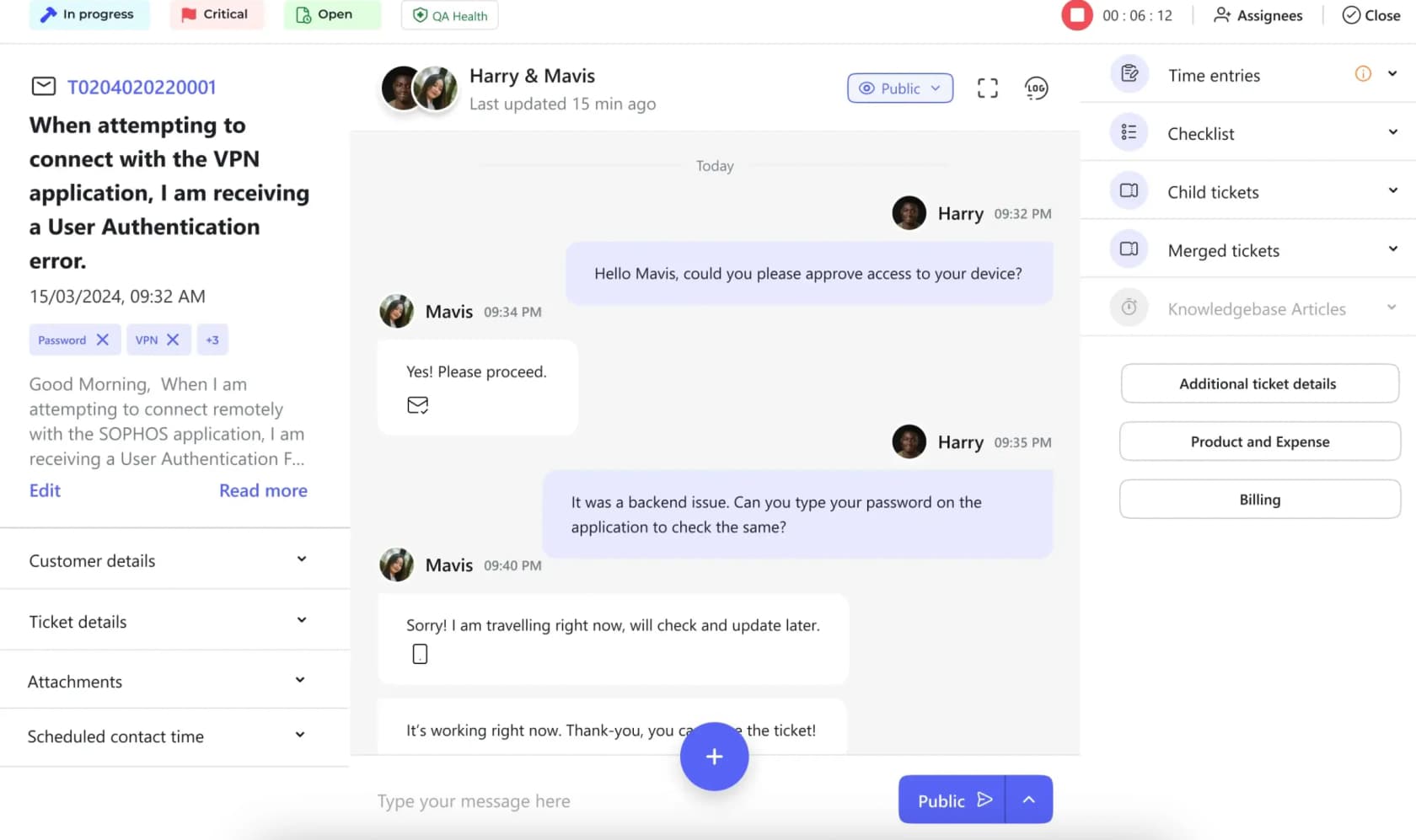
That screenshot is the argument for the price. Top right, the timer runs against the ticket while the tech is still chatting, and the right rail holds time entries, a checklist, child tickets, merged tickets and knowledge base articles, all without leaving the conversation. Most PSAs put time tracking and billing a tier above ticketing, or in a separate module you buy. Here it sits inside the $59, which is not how most automated ticketing systems package it.
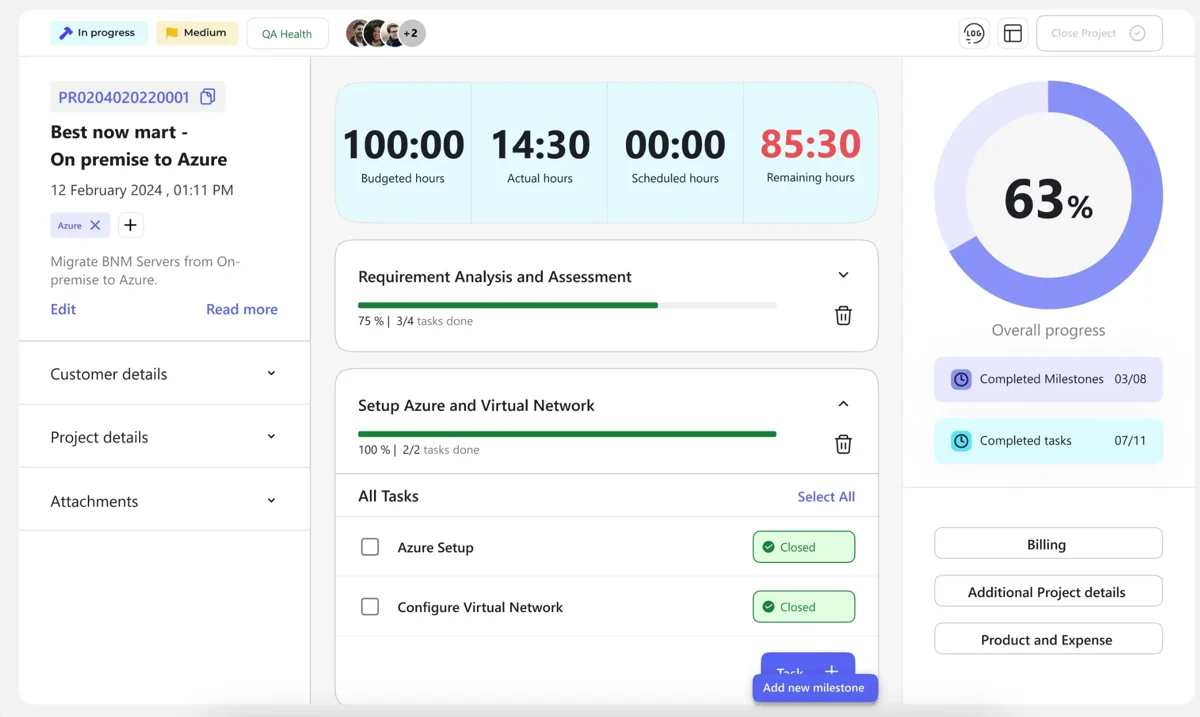
Time and billing are also where the seat pays for itself. Unbilled hours are the classic MSP leak, and the project view puts budgeted, actual and remaining hours right across the top of the record.
The AI in Standard tops out at assist. Helena, DeskDay's assistant, drafts replies, flags customer sentiment, and surfaces past resolutions and knowledge base documents to the tech. Real feature set, and it is included in the seat. It is still a different product from an AI helpdesk agent that closes a ticket. If you have been reading about rule based chatbots, this is the same distinction one rung up: suggestion versus action.
The Enterprise plan is a branding fee, not a bigger product
This is the part of the card most people misread. Enterprise does not unlock more platform. Read DeskDay's own feature list and the whole delta is white labelling, the Teams app, the iOS and Android apps, the Windows and Mac desktop apps, all of them going from DeskDay branded to fully branded as you.
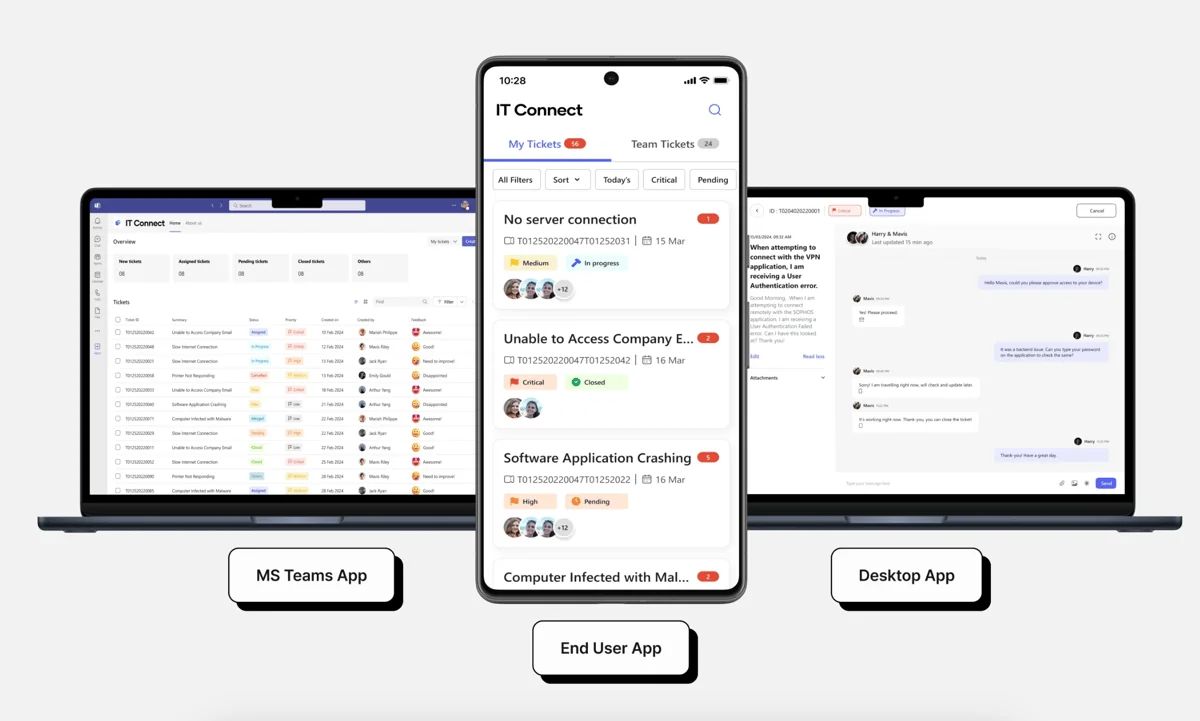
Those three surfaces are what your clients touch, so wanting your own logo on them is fair enough. Just price it honestly. At five techs, Enterprise is $99.80 per seat against $59 on Standard, so the branding runs $204 a month. And the marginal seat after that costs $69 instead of $59, which means the gap widens every time you hire.
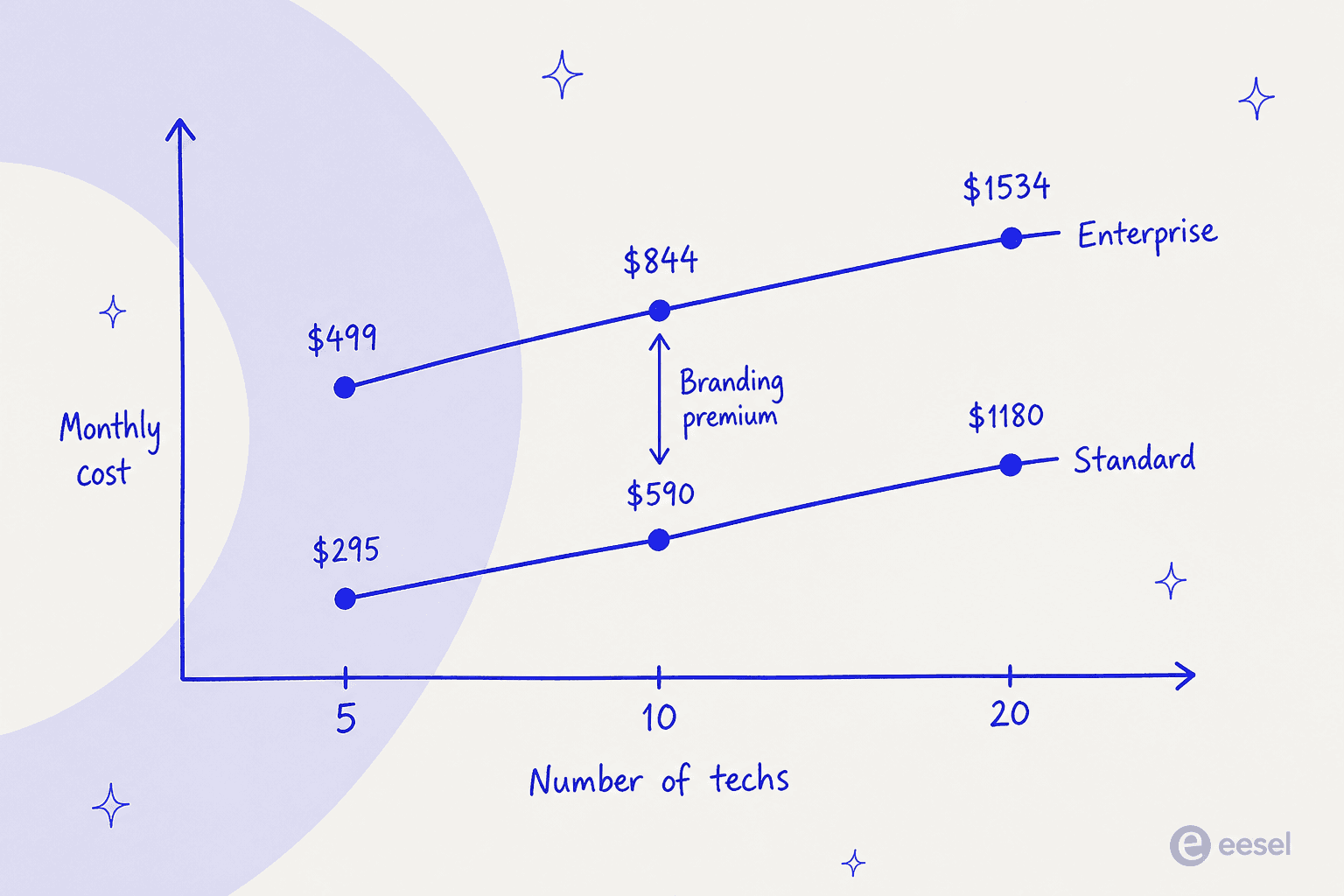
The lines never cross. No seat count exists at which Enterprise becomes the cheaper way to buy DeskDay, since a volume discount was never what it was doing. What you are paying is a per-month charge for a logo swap, $204 to start, growing by $10 per tech from there. Worth it for an MSP whose whole pitch is that they are your IT department. Harder to justify for one selling on price, where every line item competes with the offshore versus AI math.
Work out your own number
Rate cards read easily and apply annoyingly, which is why most AI powered ticketing comparisons end in a spreadsheet. Put your real tech count in below and the arithmetic falls out.
The meter DeskDay has not priced yet
Now the part that changes the answer.
DeskDay's homepage headline is "The AI-Native PSA built for modern MSPs & IT teams." Its comparison pages beat legacy tools partly on AI being included in the price. Then, in the pricing note on three of those same comparison pages, against every single price row, sits the phrase "AI agents as add on."
Nowhere on the site is there a rate for that add on. No per agent price, no per resolution price, nothing per ticket, not even a starting-from figure.
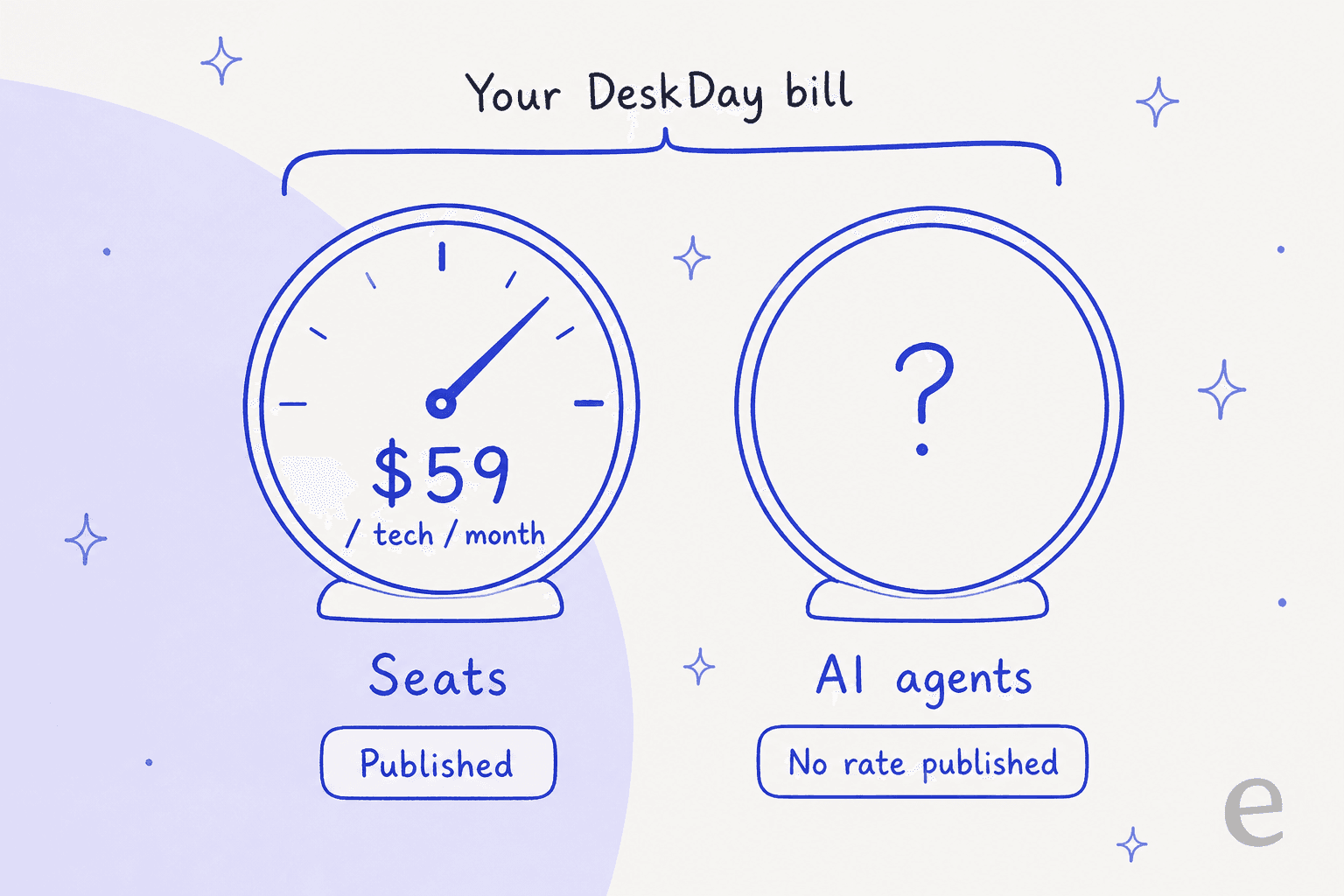
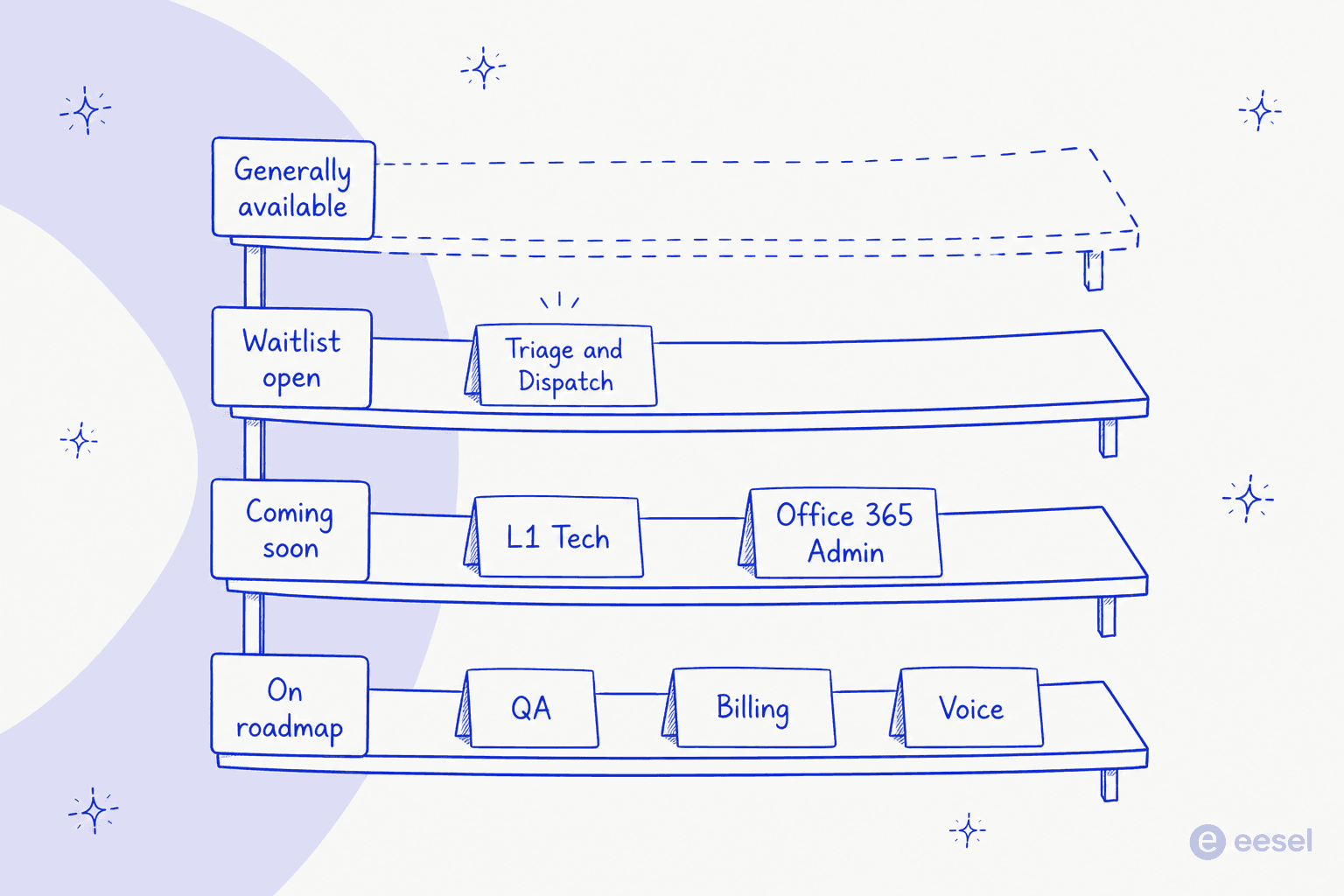
To be fair to DeskDay, some of that is because the agents are not out yet. The AI agents page lists six roles and not one of them is generally available. Triage and Dispatch has got the furthest, sitting at "Limited Access Open" behind a waitlist form. L1 Tech and Office 365 Admin are marked coming soon, while QA, Billing and Voice are still on the roadmap. The only button on that page, and on the Triage and Dispatch page too, says "Join waitlist."
What DeskDay does publish about the agents is good design thinking. Each one runs in either suggest mode or auto mode. You set a confidence threshold, below which it flags for human review instead of acting, every decision gets logged with the reasoning behind it, and one click pauses the agent. Right shape, and it matches how careful teams actually roll out AI escalation rules.
I have spent the last few years watching AI land on live support queues, and the pattern that keeps repeating has nothing to do with the AI underperforming. The AI performs. Then the bill arrives shaped differently than anyone modelled. One trial user in our own records ran twelve test chats, watched the agent handle all twelve well, opened the billing page, and filed a cancellation request on the spot. Nothing about the product had changed between minute nine and minute ten.
"Do not want to use this. Please cancel my subscription."
A trial user whose AI agent passed twelve test chats before they opened the billing page
So an unpriced meter is worth flagging even when the product behind it looks good. Another buyer I have notes on had watched a previous vendor's price more than double, and came in asking for contractual price locks before they would talk features at all. Not difficult people. They were pricing a risk that had already cost them once.
The practical move: budget the $59 as the floor, not the total, then ask DeskDay directly what the agent add on will cost, and against what unit, before you sign anything annual. Per seat, per ticket, per resolution, all three produce wildly different bills at MSP volumes. It is the same trap that shows up across AI for ITSM tools, and the exact question buried under Aisera pricing.
Onboarding, migration, and the trial
Three line items that do not appear in the headline price.
Onboarding is $800 on Standard. That buys 10 hours of expert setup support, valid for 90 days, two licence minimum, and it covers configuration, workflow guidance, team training and billing best practice. The annual toggle shows the fee as waived. DeskDay's own footnote hedges a little, saying it "may apply or be waived" depending on plan eligibility. Enterprise bundles 20 hours with the fee waived. And if you are a two person shop paying $118 a month, an $800 fee that does apply is nearly seven months of subscription, so get it in writing which side of that line you land on.
Migration is free on every plan. Historical tickets and conversations, customer records, users and contacts, all handled by DeskDay end to end. Worth naming, because migration is where legacy PSA switches die, and it is the quiet reason a lot of IT ticketing automation projects stall in year one. DeskDay's own comparison pages put ConnectWise onboarding at $3,000 to $5,000, and HaloPSA at $4,000 one time, which makes a free migration a real differentiator before you even get to the seat price.
The trial is 14 days, no card. The signup screen says so plainly.
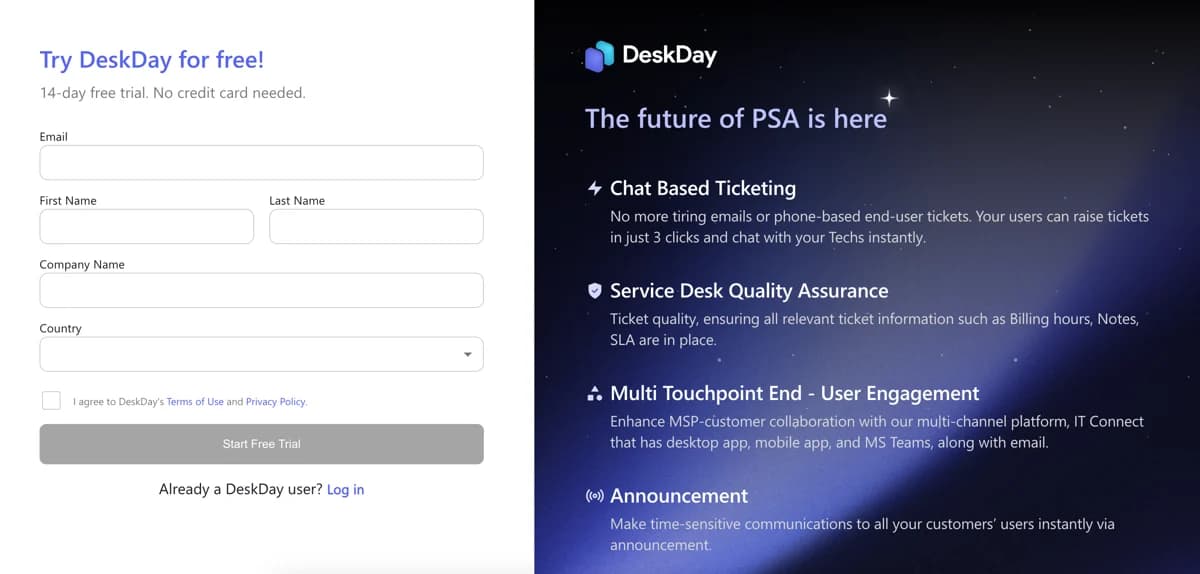
Fourteen days will let you test chat based ticketing and the timer against real work. It will not get you through a billing cycle, and it is nowhere near enough to judge an AI agent you cannot access yet. Spend the window on ticketing and time tracking, which is what you are actually buying here. If chat deflection is the goal, measure that separately with an AI live chat deflection test.
How DeskDay's price compares
DeskDay publishes competitor pricing on its own comparison pages. Generous of them, and worth reading with one eye open. Here is what they claim, set next to what I could verify independently.
| Platform | DeskDay's stated price | Independently verified today |
|---|---|---|
| DeskDay Standard | $59/tech/month annual | Confirmed on Capterra at $59 annual, $79 monthly |
| ConnectWise PSA | ~$25-$65/tech/month, quote based, $3,000-$5,000+ onboarding | Quote gated, not publicly checkable |
| Autotask | $115.48-$145/tech/month, $2,000-$6,000 onboarding | Quote gated, not publicly checkable |
| HaloPSA | ~$109/tech/month, $4,000 onboarding, 5 seat minimum | Halo now publishes £69 per agent per month billed annually |
| SuperOps | $79 PSA only, $129 Pro, $159 Super, per tech | SuperOps now bills per endpoint, from £1.30 down to £1.00 |
Two of the five are out of date. SuperOps no longer sells per tech at all, it bills per endpoint now, with volume tiers that start at a 100 endpoint minimum, so that is a whole different pricing model rather than a different number. Halo's published agent rate comes in lower than the figure DeskDay cites. Neither error changes DeskDay's underlying point, which is that it is the cheapest published seat in this group with no onboarding fee on annual terms. What it does mean: re-check any competitor number you read on a vendor's comparison page, this one included, against the competitor's own site.
The more useful takeaway is that two of the four competitors do not publish a rate at all. That same opacity runs through Capacity alternatives and most AI powered ITSM vendors. Among full suite MSP PSAs a public per seat number is still the exception, which is why DeskDay having one is the story.
What MSPs actually say about it
DeskDay's public review footprint is thin. It holds 4.7 out of 5 on G2, from three reviews, and G2 lists no pricing information at all. Three reviews is not enough to conclude anything from, so the more useful signal is r/msp, where DeskDay turns up regularly in threads about leaving ConnectWise.
The most concrete limitation I found came from a technician answering someone who needed separate knowledge bases per client:
"Deskday might be a good option depending on your size though with some drawbacks like one shared kb, some workarounds exist like using Teams channel per client (if you use DeskDay's Teams integration), where you can share service-related documentation or SOPs. You would love the chat driven support though."

A real architectural constraint, and it maps straight onto price. If you need per client isolation of documentation, one shared knowledge base is a blocker that no discount fixes, and it is worth checking against how you have your AI knowledge base chatbot set up today. In the same thread, a current customer was short and positive:
"I am. Really like DeskDay. Level RMM integration coming soon, so excited about that."
Worth noting the Level integration has since shipped. So has Xero, which an earlier r/msp commenter had named as the reason they were holding off. DeskDay's current integration list runs to NinjaOne, Datto RMM, N-able N-central, Level, QuickBooks, Xero and Hudu. Seven, which looks small next to a legacy PSA marketplace and looks fine if your stack is already on it. Integration depth is usually what decides these things when teams weigh AI tools for IT support.
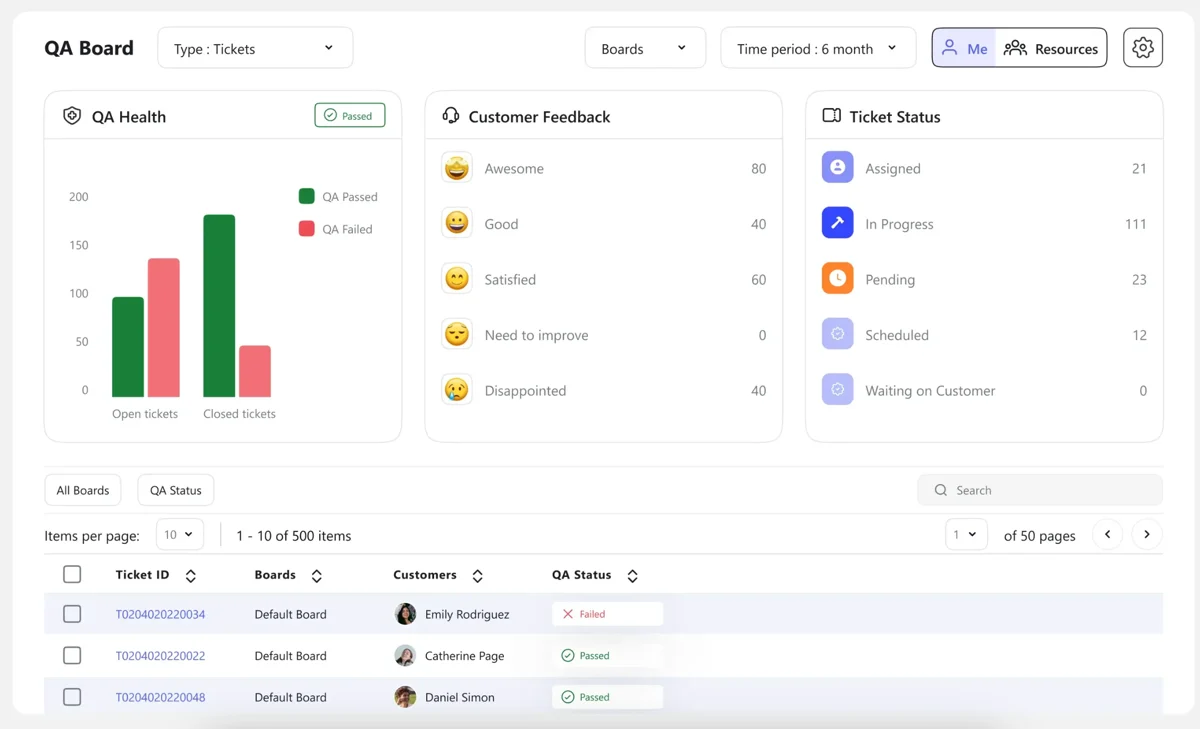
One of the less advertised things sitting inside the $59 is the quality assurance module, the sort of feature that usually lives behind an enterprise gate on most AI service desk platforms.
Who should pay $59, and who should not
Pay it if you are a small or growing MSP on a modern RMM that DeskDay already integrates with, you want ticketing, time tracking and billing inside one seat price, and quote gated PSAs have worn you down. Free migration plus an annual plan with no seat minimum makes the switch low risk. And $59 with time tracking and QA included is a strong number next to anything in our roundup of AI for the service desk. Clearest fit on this list, and a real one.
Think harder if you need per client knowledge bases, a deep integration marketplace, or a CRM and quoting pipeline living inside the PSA. None of those are gaps a price fixes.
Wait if the AI agents are the reason you are here. The assist features ship today and they are useful. Every autonomous agent, though, is on a waitlist or roadmap with no published rate, and signing a 12 month commitment on the strength of an unpriced, unshipped add on is the one move I would not make. It is the calculation behind any honest AI customer support cost savings model. If the agent is the point, an AI agent for customer service you can price and test today is the safer buy.
Skip it if you are an internal IT team rather than an MSP. DeskDay says it serves both and the ticketing does work for both, you would just be paying for multi tenant client management you will never touch. Layering an AI IT help desk onto the ITSM tool you already run is usually cheaper, and the shortlist lives in our best AI for IT helpdesk roundup, with a fuller breakdown in our guide to AI for ITSM.
Try eesel for the AI half
Being straight about this: eesel does not integrate with DeskDay. If DeskDay is your PSA, then we are not your AI layer today.
Where we do fit is the situation this whole post keeps circling back to. If your service desk runs on Jira Service Management, Freshdesk, Zendesk, Front, Help Scout, HubSpot or Salesforce, eesel drops an AI agent onto that queue, and the price sits on the page: from $299 a month for 500 credits, one credit per ticket or chat handled, used whatever the outcome, no per seat licence underneath, no waitlist. You can start on 100 free credits without a card.

The other half is proving it before it goes live. eesel replays your own past tickets and scores what the AI would have said against what your team actually sent, so the first number you see is one of your own rather than a vendor's average. One head of IT running an internal Jira service desk started at 15% deflection with a 55% target in front of them, a real trajectory instead of a launch day promise. Which is the argument for knowing the AI rate up front. You can only model the payback when both sides of the equation have numbers.
If you want to see what that looks like against your own ticket history, try eesel or book a demo. Getting a first agent live takes about thirty minutes.