What I mean by "the sticker is not the bill"
I want to be fair to Flamingo up front, because this is an interesting product and a brave price. A $2.2M pre-seed company shipping an entire MSP stack at a dollar a device, against ConnectWise and Kaseya, is not a cynical move. The founder's own launch post is refreshingly plain about the motive: Michael Assraf built Vicarius before this, watched MSPs lose margin to vendor payouts, and went after that. The bundle-everything instinct is the same one driving IT automation software generally.
But I have spent enough time watching teams get surprised by AI bills to know where this shape goes wrong. One of the sharper moments I can remember from an eesel sales call was an email-security company on Freshdesk, scaling toward roughly 20,000 tickets a year, who burned through 200 API calls in a single day of testing and immediately went quiet on price. Nothing about the product had failed. They had just done the arithmetic on a meter they could not forecast, and the arithmetic scared them. It is the same reflex I see whenever a team prices support ticket automation for the first time.
That is the exact shape of Flamingo's rate card, and it is why this post spends more time on what is missing than on what is printed.
Flamingo AI pricing at a glance
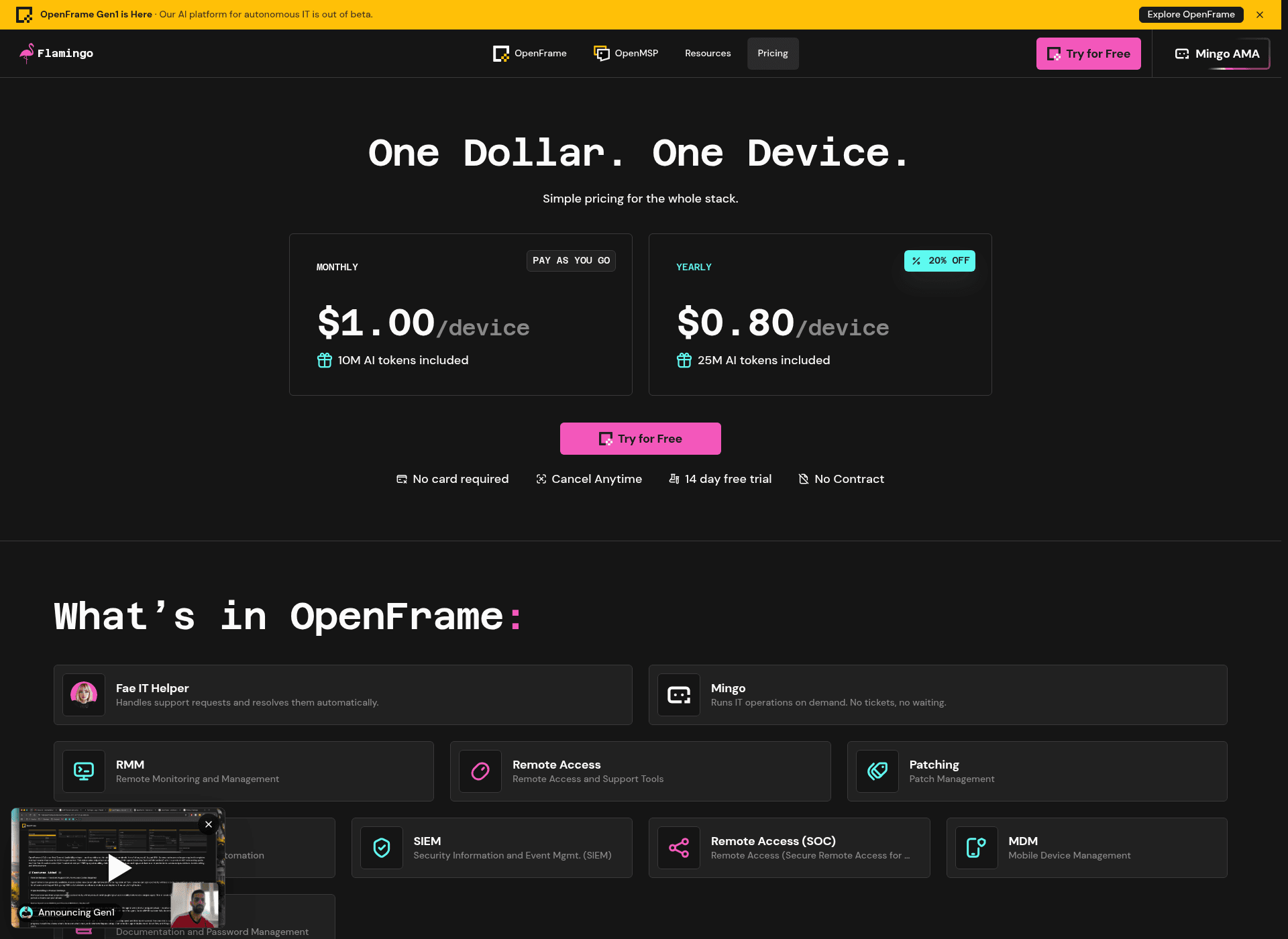
Everything below is copied from Flamingo's pricing page as published on 18 August 2026.
| Plan | Price per device / month | AI tokens included | Billing label | Status |
|---|---|---|---|---|
| Gen1 monthly | $1.00 | 10M | "Pay as you go" | Live since 15 Aug 2026 |
| Gen1 yearly | $0.80 | 25M | "20% off" | Live |
| Gen2 | $3.00 | Not stated | Not stated | "Coming soon, Q4 2026" |
| Gen3 | $5.00 | Not stated | Not stated | "Coming soon", no date |
What sits inside each tier:
| Tier | What it adds |
|---|---|
| Gen1 ($1.00) | Fae and Mingo agents, RMM, remote access, patching, PSA, SIEM, remote access (SOC), MDM, documentation and password management |
| Gen2 ($3.00) | Everything in Gen1, plus cloud backup, EDR, EPP, IAM, NMM, SEG, ZTNA |
| Gen3 ($5.00) | Everything in Gen1 and Gen2, plus automation, backup and DR, XDR, MDR |
Gen1 is the interesting row, because it is the only one live and it already carries the PSA. That is the piece most shops evaluate hardest, and it is worth reading next to a purpose-built ITSM self-service portal or a dedicated internal helpdesk tool before you decide the bundle wins.
The trial terms are unusually friendly and worth naming: 14 days, no card required, cancel anytime, no contract. In a category where HaloPSA buyers on r/msp are negotiating over a four-thousand-dollar onboarding fee, that is a real differentiator and Flamingo should get credit for it.
Two things the rate card does not have: any published price for self-hosting, and any published overage rate for the tokens. We will get to both.
The meter is tokens, and the token rate is not published
This is the finding, so let me state it plainly rather than dress it up.
Flamingo sells a per-device platform fee with an AI allowance attached. The monthly plan carries a badge reading "Pay as you go", which is the language of a metered product. But there is no overage price anywhere on Flamingo's properties. I checked the pricing page, the site FAQ, the v1.2.1 release notes and every published case study.
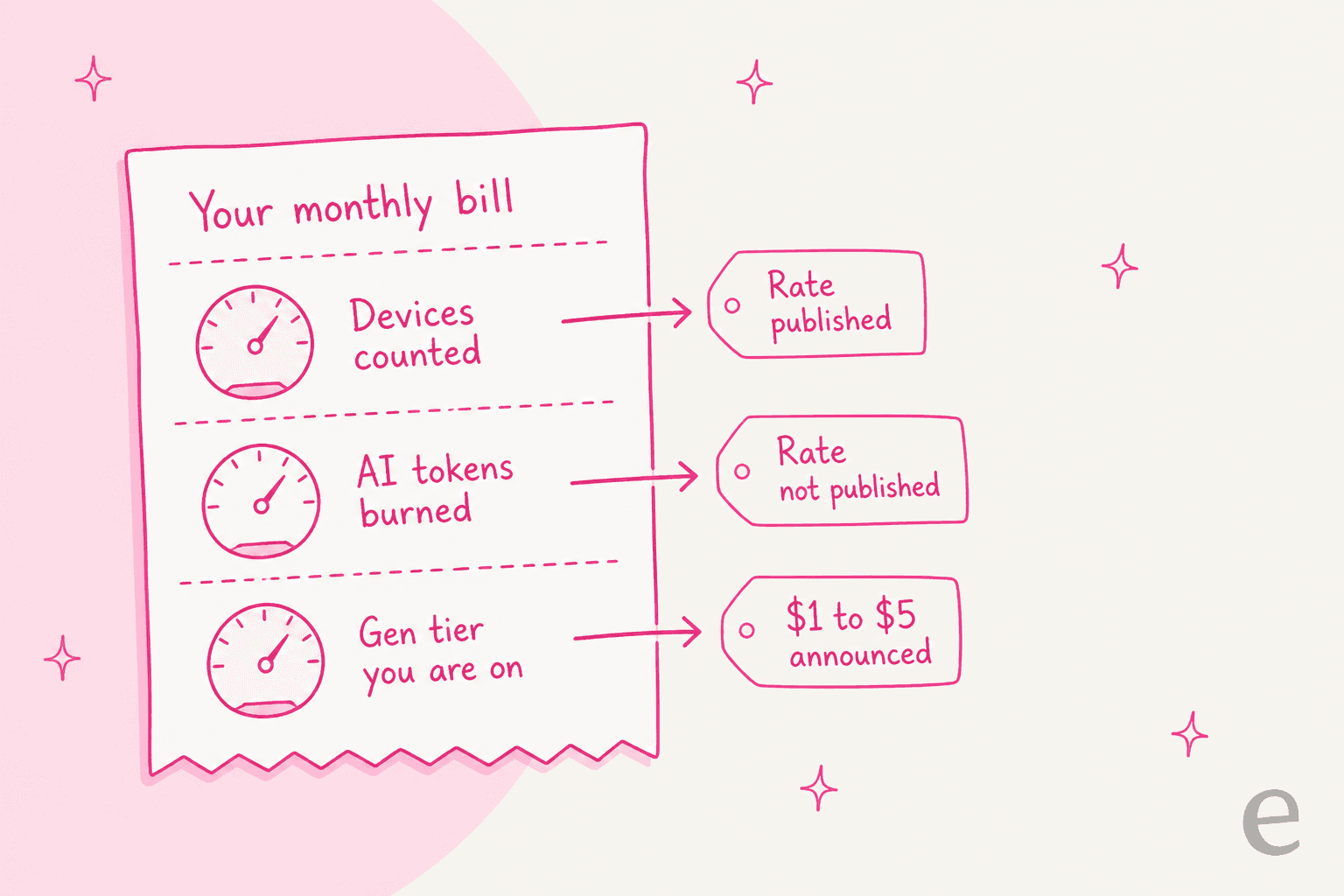
Five specific questions the rate card leaves open:
- What happens at 10M tokens. Throttle, block, or bill? Not stated.
- The price per additional million. No figure exists.
- Whether the allowance pools. If one heavy device burns 40M tokens and forty quiet ones burn nothing, are you fine or are you over? Not stated.
- Whether unused tokens roll over. Not stated.
- What a token counts. Input, output, or both, and on which model. Not stated, and no model is named for either agent.
To be fair, this is a two-days-out-of-beta product from a very young company, and unpublished is not the same as absent. But it is not a theoretical concern either. Flamingo's own meta description for its Mear Technology case study lists "over-reliance on AI tokens" as one of three things hampering that MSP, which is the vendor itself naming token dependence as a live customer objection. And a user in Flamingo's own public Slack hit a wall converting from trial to paid: "Trial ended but I can't proceed to payment with an error message."
The reason this matters more for an agent than for a copilot is scope. A suggestion box burns a predictable trickle. An agent that diagnoses a device end to end burns whatever the problem demands, which is why AI copilot pricing and autonomous-agent pricing behave so differently on the same rate card.
If you are evaluating this, the single most useful thing you can do is email Flamingo and get the overage rate in writing before you migrate a single client. That is not a knock on the product. It is the same thing I would tell anyone weighing an AI ticketing system whose unit economics are still settling.
Doing the arithmetic Flamingo does not publish
Flamingo does publish something useful next to the price: a 40-row table giving a dollar AI cost per task. It is the closest thing to a token-rate disclosure that exists.
| Routine task | Time with Fae and Mingo | AI cost | Claimed ROI |
|---|---|---|---|
| "How do I..." questions | 1 min | $0.02 | 480x |
| Password resets and unlocks | 3 min | $0.03 | 400x |
| Install an approved app | 4 min | $0.04 | 360x |
| Alert triage | 2 min | $0.06 | 1330x |
| Slow laptop tune-ups | 4 min | $0.12 | 120x |
| Scan for malware | 5 min | $0.20 | 230x |
| Patching | 4 min | $0.25 | 180x |
| Write and run a script | 5 min | $0.35 | 170x |
| Diagnose a slow or failing device | 8 min | $0.57 | 160x |
Here is the arithmetic, and I want to be explicit that the next paragraph is my inference and not Flamingo's published figure.
If the entire $1.00 per device covered exactly the 10M included tokens, that implies a rate of roughly $0.10 per million tokens. Under that assumption, a $0.57 device diagnosis costs about 5.7M tokens, so the monthly allowance covers roughly two full device diagnoses per device per month. A $0.02 "how do I" question costs about 200K tokens, so you get around fifty of those. Both numbers rest on an assumed rate, so treat them as a shape rather than a promise.
The yearly plan is where this gets interesting. It gives you 25M tokens for $0.80. That is 31.25M tokens per dollar against the monthly plan's 10M per dollar, which is a 3.1x better token rate for what is marketed as a 20% discount. Flamingo is not selling you a discount, it is selling you headroom. If the tokens are what you are actually buying, monthly is the expensive plan by a wide margin.
It also tells you what Flamingo expects the agents to be used for. Fifty quick answers per device per month is a real ticket deflection budget. Two full diagnoses is not a budget for handing the agent your whole queue, and it is worth checking your own deflection rate against that before you plan headcount around it.
The ROI table is worth reading twice
The multipliers in that table are large, and they are computed against a "without AI" column whose implied technician rate is not consistent from one row to the next.
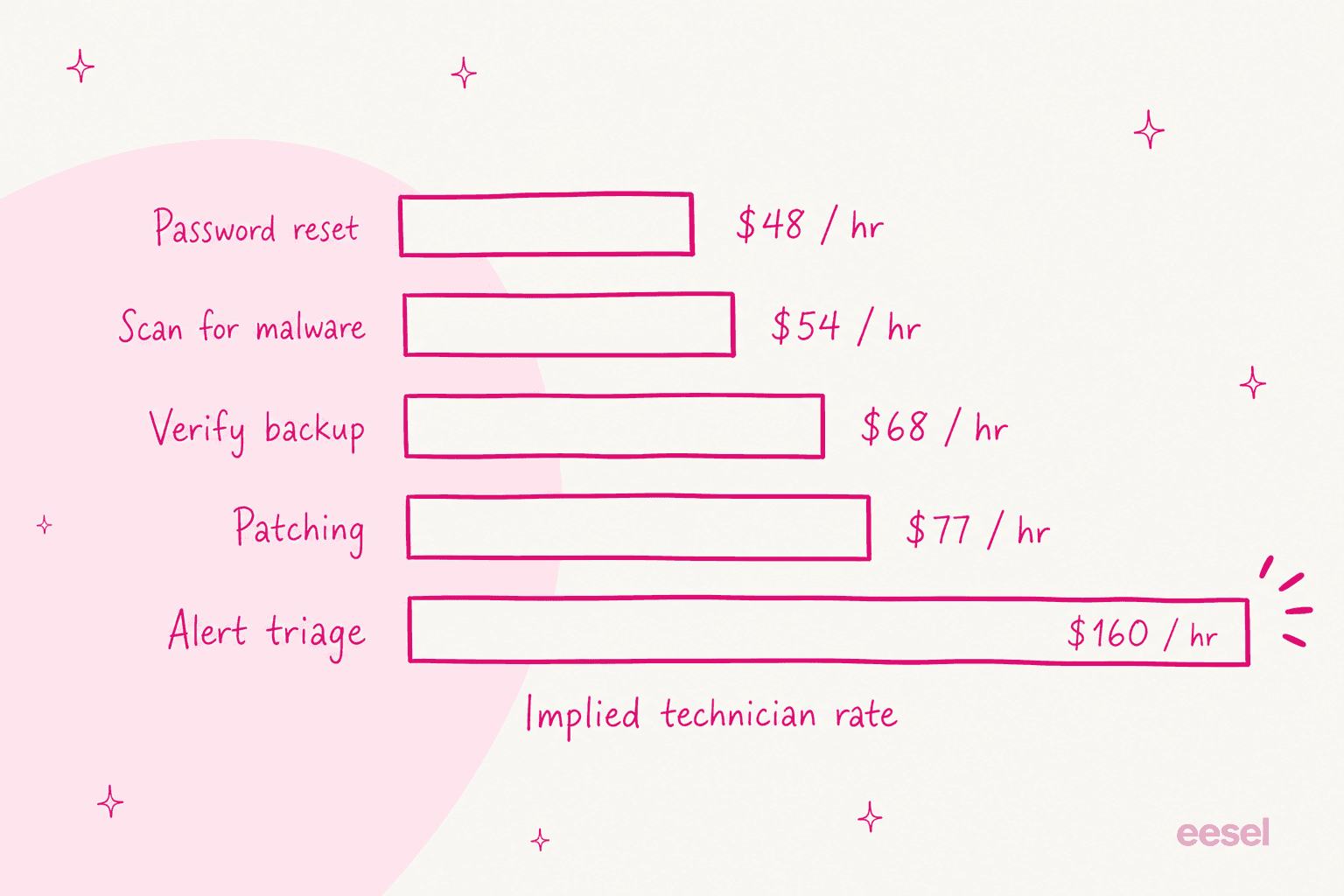
A password reset is 15 minutes at $12, which is $48 an hour. Scanning for malware is 50 minutes at $45, which is $54. Verifying backup integrity is 40 minutes at the same $45, which is $68. Patching is 35 minutes at that same $45, which is $77. And alert triage is 30 minutes at $80, which is $160 an hour, on the row carrying the headline 1330x multiplier. No hourly-rate basis is stated anywhere on the page, and the rows with the biggest multipliers use the highest implied rates.
Two other things the multipliers exclude: the $1.00 per-device platform fee itself, and the technician time still needed to approve each Mingo action. Flamingo's own Clegg Technologies case study describes that approval as per-step, with Mingo "asking for script approvals along the way". That is a sensible safety design and I would build it the same way, but it is labour the ROI column does not count. If you want the honest version of this calculation, my AI agent versus human agent cost breakdown does it without the marketing rate, and there is a fuller method in the guide on measuring AI support ROI.
The Gen escalator: $1 today, $5 already announced
The second variable is the tier itself, and this one is unusual because Flamingo publishes the increase in advance.
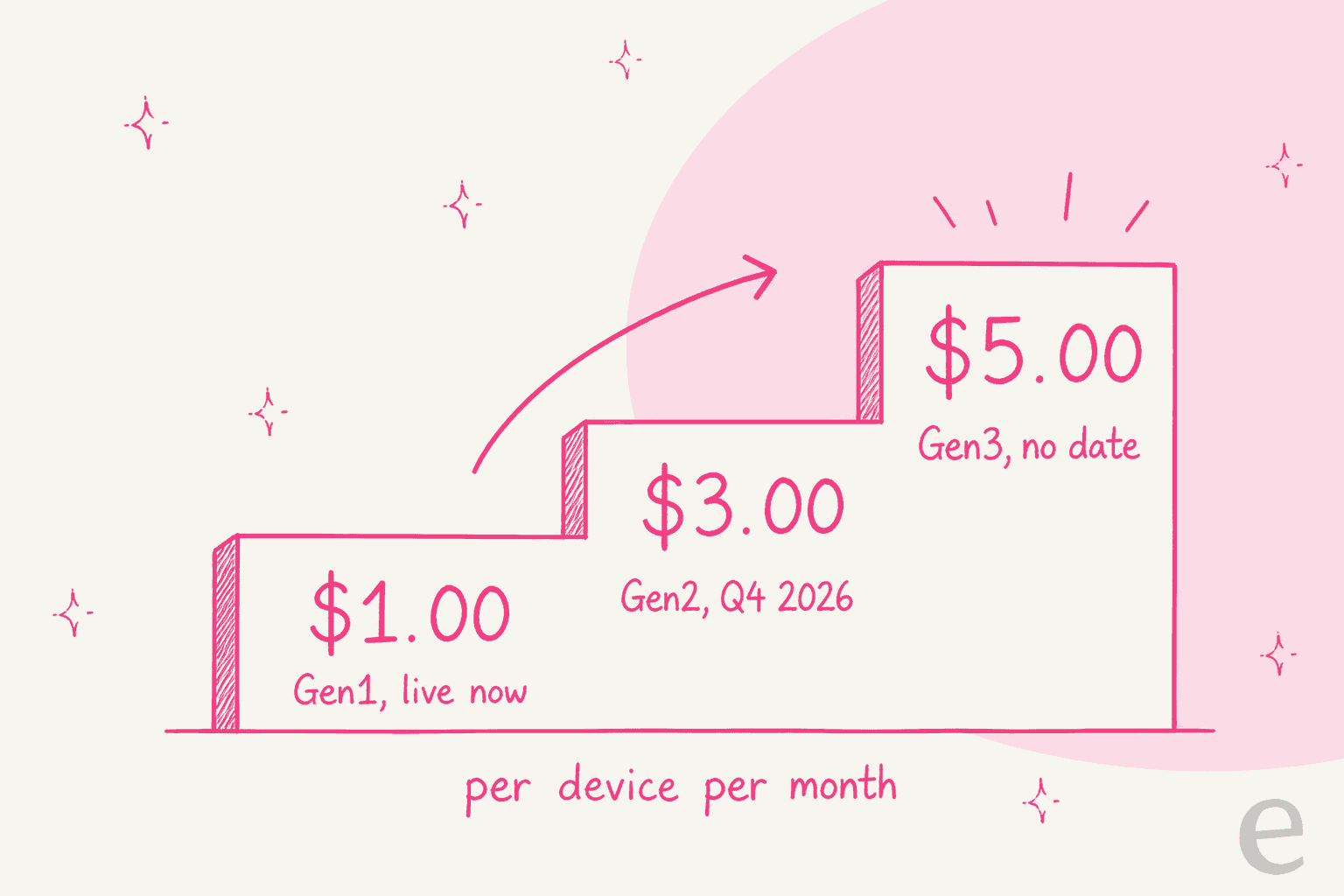
I actually like the transparency here. Most vendors in this category tell you nothing about the roadmap price and then move you at renewal. Flamingo puts $3.00 and $5.00 on the page next to the $1.00.
But look at what sits behind the paywall. Gen1 gives you the RMM, the PSA, the SIEM and the two agents. EDR, EPP, cloud backup, ZTNA and IAM are all Gen2, and backup and DR, XDR and MDR are Gen3. For most MSPs I have talked to, endpoint protection and backup are not optional extras, they are the products clients are actually paying for. So the honest read of the escalator is that the tier which replaces your whole stack is the $3.00 one at the earliest, and the version that includes managed detection is the $5.00 one with no date attached.
At 500 devices, that is $500 a month on Gen1 monthly, $1,500 on Gen2, and $2,500 on Gen3. The calculator above runs your own count. At $5.00 a device you are no longer in bargain territory, you are in the same bracket as most IT help desk services.
What is not stated anywhere: whether a Gen1 customer stays at $1.00 when Gen2 ships, or whether the tiers are a menu you pick from rather than a ladder you climb. That is worth a direct question to sales. r/msp has a long memory about this, and the Kaseya threads are where it lives:
"Yeah, you didn't sign a contract for the product(s). You signed a contract for the monthly spend."

To be clear, that is not a description of Flamingo, which advertises no contract and cancel-anytime. It is the anxiety a per-device meter has to overcome in this buyer's head, and the reason "no contract" is the strongest line on Flamingo's pricing page.
The third variable: how many devices you are billed for
If your meter is per device, the device count is a price, and Flamingo's device count has had bugs.
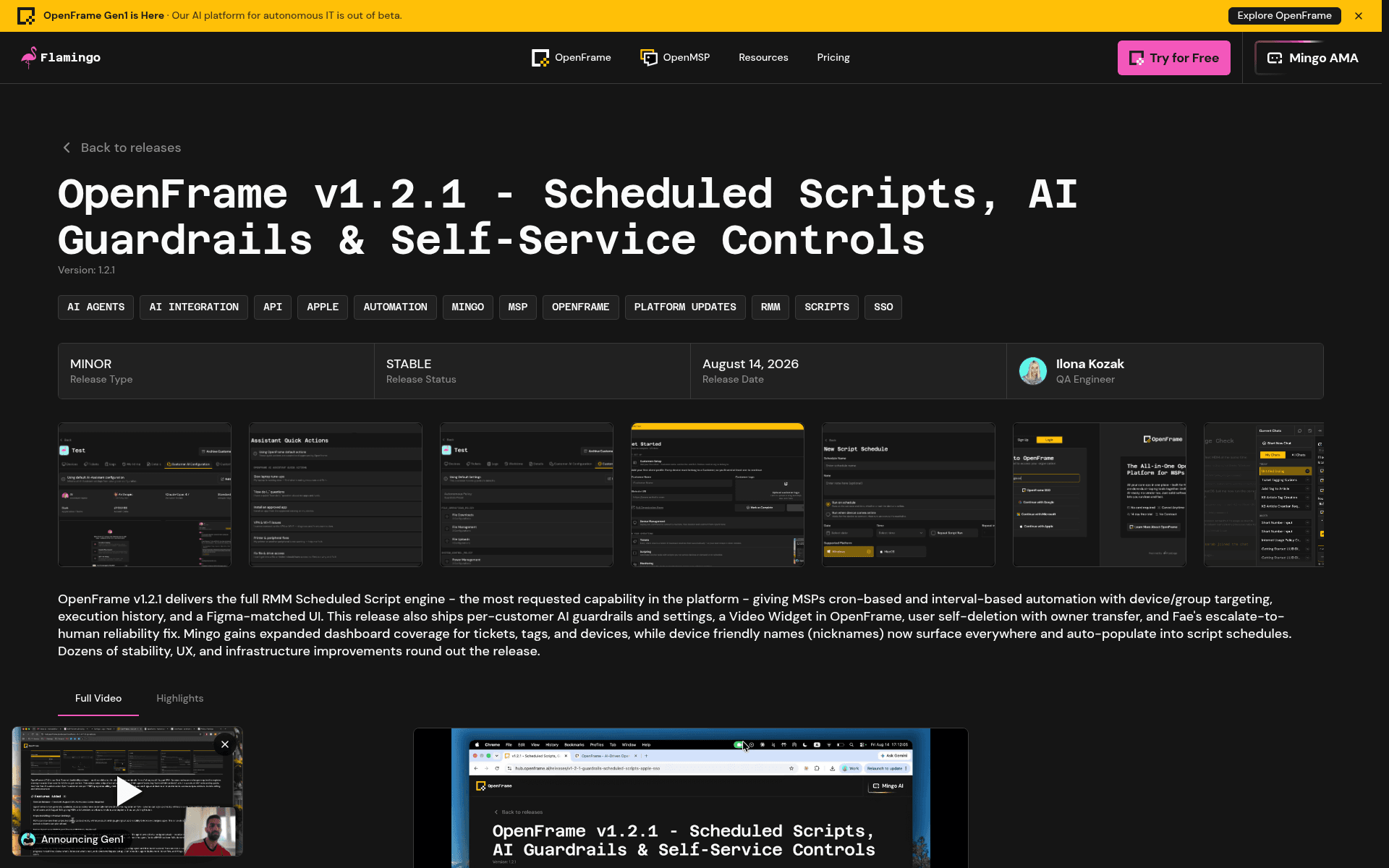
The v1.2.1 changelog, published 14 August 2026 by QA engineer Ilona Kozak, fixes two of them. The first: upgrading a client older than v0.9.6 "created a duplicate device record instead of reinstalling the existing one". The second: "Fleet ID Mismatches Causing Silent Device Linking Failures", where devices showed up with mismatched IDs after reinstallation. Two more entries cover Mesh and Fleet agents missing across tenants.
Independently, in Flamingo's own public Slack, a named operator reported the symptom:
"Hey guys, I'm seeing a lot of duplicate machines in my environment. One client is showing as having 23 computers, but they only own 13."
Tyson Wilcox, in the OpenMSP Slack
I want to be careful here, because I have no evidence anyone was overbilled, and Flamingo shipped fixes for exactly these bugs. But two independent sources describing device records duplicating, on a product whose only meter is device count, is a reconciliation question rather than a cosmetic one. If you run this, check your device list against your asset register in month one and month two. That is standard hygiene for any IT help desk software rollout, and it matters more here than usual. The same discipline applies to anything you meter, including ticket triage automation.
Worth crediting: publishing a changelog this candid is rare. Most vendors in ITSM automation tools would have shipped these fixes silently.
How Flamingo AI pricing compares
The meters are different enough that a straight price comparison misleads. Here is the shape of the market as published on 17 August 2026. My wider roundup of Flamingo AI alternatives goes item by item; this table is just the rate cards.
| Vendor | Billing unit | Published price | AI included? | Free tier |
|---|---|---|---|---|
| Flamingo (OpenFrame) | Per device / month | $1.00 monthly, $0.80 yearly | Fae and Mingo, token allowance | 14-day trial, no card |
| Atera (MSP) | Per technician / month | $129 Pro, $159 Growth, $209 Power (annual) | AI Copilot on all plans; Robin price not published | Trial only |
| SuperOps Prime | Per endpoint / month | $1.50 (min 100) down to $1.20 (1,000+) | Monica on Super tiers | Trial only |
| Syncro Core | Per technician / month | $129 annual, $159 monthly | Ticket summaries; triage on Team | Trial only |
| NinjaOne | Per endpoint | Quote-only; anchors $1.50 at 10,000 endpoints, $3.75 at 50 | Patch Intelligence AI | Trial only |
| HaloPSA | Per agent / month | £69 billed annually | Assist features | Trial only |
| Pulseway | Not published | Pricing page redirects to homepage | Pulseway Assist in paid PSA add-on | Trial only |
| ConnectWise | Not published | No figures on the pricing page | Sidekick, AI Agents | No |
| Tactical RMM | Self-hosted | Free software; Sponsor tier $55 to $850/month | None | Yes, self-host |
The number that decides it is devices per technician. Five Atera Pro seats cost $645 a month regardless of endpoint count. Eight hundred devices on Flamingo's annual rate cost $640. So the crossover sits around 160 devices per technician. Below that ratio the per-device meter is cheaper; above it, the per-technician meter is. A four-technician shop running 1,200 endpoints is firmly in per-technician territory, whatever the sticker says. If you are still narrowing the field, my roundup of the best AI for IT helpdesk work covers the agent layer, and AI IT support tools covers the service-desk side.
A real MSP put the per-endpoint side of this in numbers on r/msp:
"CWRMM cost us $4/endpoint with webroot, S1 was $6.60/endpoint, and Perch was close to $15something for 2.5 users. I pay $2.04/endpoint for Ninja"
Against $2.04 an endpoint for NinjaOne, a dollar looks excellent. Against a per-technician plan at scale, it does not. And a G2 reviewer names the mechanism directly, though it is worth flagging this one was a vendor-solicited review:
"the pricing model (per technician rather than per endpoint) can be cost-effective as you scale device counts."

The sharpest version of this argument came from a Flamingo customer, not a competitor. Stephen Mears of Mear Technology, a Scottish MSP running about 1,000 endpoints with five technicians, argues that per-device and per-user pricing is "a model with a shelf life", because as AI shrinks the work there are fewer users and fewer devices to bill against. He is making that case in Flamingo's own case study, about Flamingo's own meter. He is not alone in the preference either. Enterprise-side vendors have the same problem in a different shape, which is why Agentforce pricing and Aisera pricing both landed on consumption meters.
The costs that are not on the rate card
A pricing post that stops at the tier grid is doing half the job. Five line items to budget for.
Self-hosting is real but not free of cost. The OpenFrame code really is forkable and self-hostable, and the openframe-cli tool handles cluster lifecycle. But no self-hosting price is published, the licence is source-available rather than OSI open source, and running it means Kubernetes plus MongoDB, Cassandra, Apache Pinot, Redis, Kafka and NATS JetStream. That is a real infrastructure hire for a small shop. The public repo also trails the shipped product, sitting at 1.1.5 while the commercial build is versioned 1.2.1 in a private repo.
Compliance paperwork is not published. No SOC 2, no ISO 27001, no HIPAA attestation and no trust centre that I could find. A customer asked in Flamingo's own Slack, "Do you have a published BAA?", which tells you it was not publicly available at the time. If you serve regulated clients, price the audit conversation in. My ITSM ticketing system guide covers what to ask for, and the notes on SOC 2 and GDPR cover the chatbot-specific questions. For healthcare clients, start from what HIPAA-compliant AI actually requires.
There is no published uptime SLA. The status page at status.openframe.ai exists, though it was serving an unplanned-maintenance page when I checked on 17 August 2026, two days after general availability. Read that as a data point, not a pattern.
Data residency is US only. Confirmed by Flamingo's own FAQ. An Australian operator asked in the Slack about a local datacentre for government contracts and the answer was not yet. Worth weighing if you are comparing against an ITSM setup for SMBs with regional hosting.
The evidence base is early. Nine Trustpilot reviews, all five-star, and nearly every reviewer overlaps with a Flamingo case study. One G2 review. Zero Hacker News mentions. The single r/msp thread is one Flamingo's own account described as "this ad". Flamingo also offers a gift certificate for leaving reviews, which it discloses openly on its case-studies page. None of that makes the product bad. It means you are an early adopter and should price the risk accordingly. The one G2 reviewer says it cleanly:
"It's a new platform so some of the PSA/RMM features you would expect from a mature platform are not there yet"
So is Flamingo AI worth it?
My take, and I will be direct.
Buy it if you run under about 150 devices per technician, you are paying more than $2 an endpoint today, and you have the appetite to be an early customer on a platform that left beta this month. At that shape the arithmetic is hard to argue with, and the no-contract trial costs you nothing but a PowerShell command. Buy it yearly, for the token headroom rather than the discount.
Skip it if your technician-to-device ratio is high, if you need EDR or backup today rather than in Gen2, if you serve regulated clients who will ask for a SOC 2 report, or if an unpriced meter is something your finance team will not sign off on.
Get in writing before you migrate: the token overage rate, whether allowances pool across devices, whether Gen1 pricing survives the Gen2 launch, and how device records are reconciled for billing. Four questions, one email. If the answers do not land, an intake-side agent on your existing IT ticketing system is the lower-risk first move, and whether AI can handle IT tickets at all is worth settling before you pick a vendor.
The wider point is one I keep coming back to. The reason token meters make buyers nervous is not that tokens are expensive. It is that a token is not a unit anyone runs a business in. Nobody forecasts next quarter in tokens. They forecast in tickets, devices and technicians. Any AI vendor billing in a unit their customer does not plan in has handed the customer an unforecastable line item, and it is worth reading up on AI customer service cost models, and on where AI support cost savings actually come from, before you commit to one.
Try eesel AI on the queue side
If what actually drew you to Flamingo is the AI rather than the RMM, there is a lighter path that does not involve moving your stack.

eesel AI sits on the intake side of an IT queue, on the helpdesk you already run, and handles tier-1 requests before a technician opens them. It reads your existing internal knowledge base and answers in Slack or email, without you moving a helpdesk.
Three things that speak to what this post has been about. The unit is one credit per ticket or chat, not a token, so the bill is denominated in something you already forecast. Plans are a fixed monthly price from $299 for 500 credits, and overage is optional with a monthly cap you set, so an unexpected burst cannot become an unexpected invoice. And before any of it touches a client, you can rehearse the agent against your own closed tickets and score its answers against what your team actually sent.
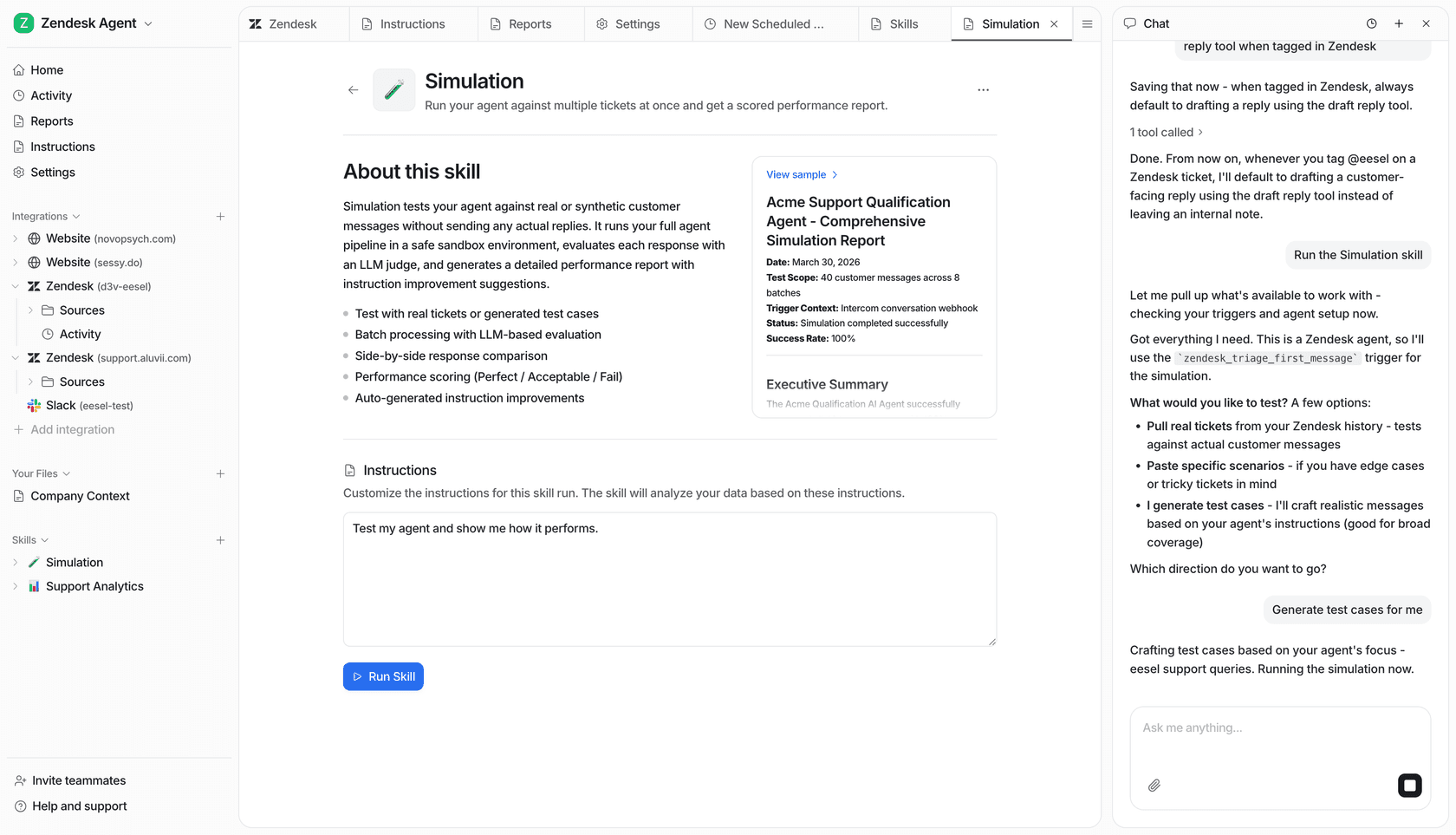
That rehearsal step exists because I have watched a confident-sounding agent give a wrong answer on a live queue, and I would rather find that out against history than in front of a client. Gridwise put it in numbers on G2: "In the first month, eesel is resolving 73% of our tier 1 requests."
It is not an RMM and it will not patch a laptop. If you want the whole stack replaced, Flamingo is the more interesting bet. If you want tier-1 deflection without a migration, start with a free trial and 100 free credits, no card.
Frequently Asked Questions
How much does Flamingo AI cost per device?
What happens when you run out of Flamingo AI tokens?
Is Flamingo AI pricing cheaper than Atera or NinjaOne?
Does Flamingo AI have a free plan?
Will Flamingo AI pricing go up from $1 per device?


Article by
Kurnia Kharisma
Kurnia is a software engineer and writer at eesel AI with two years of SEO experience, writing about AI tools, helpdesk software, and customer support. He pairs a developer's understanding of how these products are built with search-driven research into what actually ranks and resonates with the people searching for them.