
Choose an agent tool by the job, the control you need, and the deployment you can maintain. LangGraph and CrewAI focus on orchestration, OpenHands on coding, and visual tools such as Dify and n8n help assemble workflows. AutoGen and Rasa Open Source are in maintenance mode. Flowise reached end of life in August 2026; its entry is for existing deployments or teams considering a maintained fork.
Not every tool commonly called “open source” has a permissive license. This list includes source-available products and distinguishes their restrictions. Read the license for the exact components and version you plan to use.
For customer support, there is another option: operate a managed eesel teammate through its agent-friendly CLI. A person, script, or coding agent can inspect setup and try work in the same workspace as the dashboard. That provides terminal access without requiring your team to build and host a support-agent runtime.
I work at eesel. This is a documentation-based comparison checked in September 2026, not a claim that I personally benchmarked every tool.
How to compare open-source AI agents
I would separate four decisions before comparing features:
- Job: Are you building a custom agent, writing code, connecting apps, or configuring a support teammate?
- License: Does the exact component allow your intended use, modification, and distribution?
- Deployment: Who runs the models, service, storage, and tools?
- Review: Who checks the output and handles an incorrect or incomplete action?
A license summary is a starting point, not permission for every business model. Check the linked terms before offering a hosted service, removing branding, or deploying multiple tenants.
Best open-source AI agents at a glance
| Tool | Main use | License distinction | Operating responsibility | Hosted option |
|---|---|---|---|---|
| LangGraph | Stateful agent orchestration | MIT | Build the workflow and choose infrastructure | LangSmith |
| CrewAI | Cooperating agents and controlled workflows | MIT framework | Configure tasks, tools, and execution | CrewAI AMP |
| AutoGen | Existing multi-agent applications | MIT code; maintenance mode | Maintain or migrate the application | Evaluate Microsoft Agent Framework |
| AutoGPT | Agent automation platform | Platform: PolyForm Shield; other repo portions: MIT | Check component terms and deployment | Hosted platform |
| OpenHands | Software development agents | MIT core; enterprise exceptions | Control code execution and repository access | OpenHands Cloud |
| Dify | Visual LLM and knowledge apps | Modified Apache-2.0 with added conditions | Manage the app and connected data | Dify Cloud |
| Flowise | Existing visual workflows; repository archived | Apache-2.0 core; specified commercial components | Plan maintenance or migration | Confirm service availability |
| n8n | App automation with agent steps | Sustainable Use License; source-available | Maintain workflows and credentials | n8n Cloud |
| Rasa | Conversational applications | Apache-2.0 Open Source in maintenance mode; commercial platform separate | Check edition, deployment, and volume | Commercial Rasa offering |
GitHub stars are not an evaluation of answer quality or operational safety. I would test a representative task and an exception case before using popularity as a tie-breaker.
1. LangGraph: control over state and execution
What it does: LangGraph is a low-level framework for long-running, stateful agents. Its capabilities include durable execution, persistence, and human oversight. It is a fit when you want to define how the agent moves through steps rather than adopt a complete vertical product.
License and cost: The framework is MIT-licensed. Hosting, model calls, storage, and optional LangSmith services remain separate costs.
What to check: Design recovery and approval behavior, not only the successful path. Your application must decide how to handle a tool failure, changed source data, or a user who cannot access a record. A framework provides building blocks; it does not decide your support policy.
2. CrewAI: roles and controlled workflows
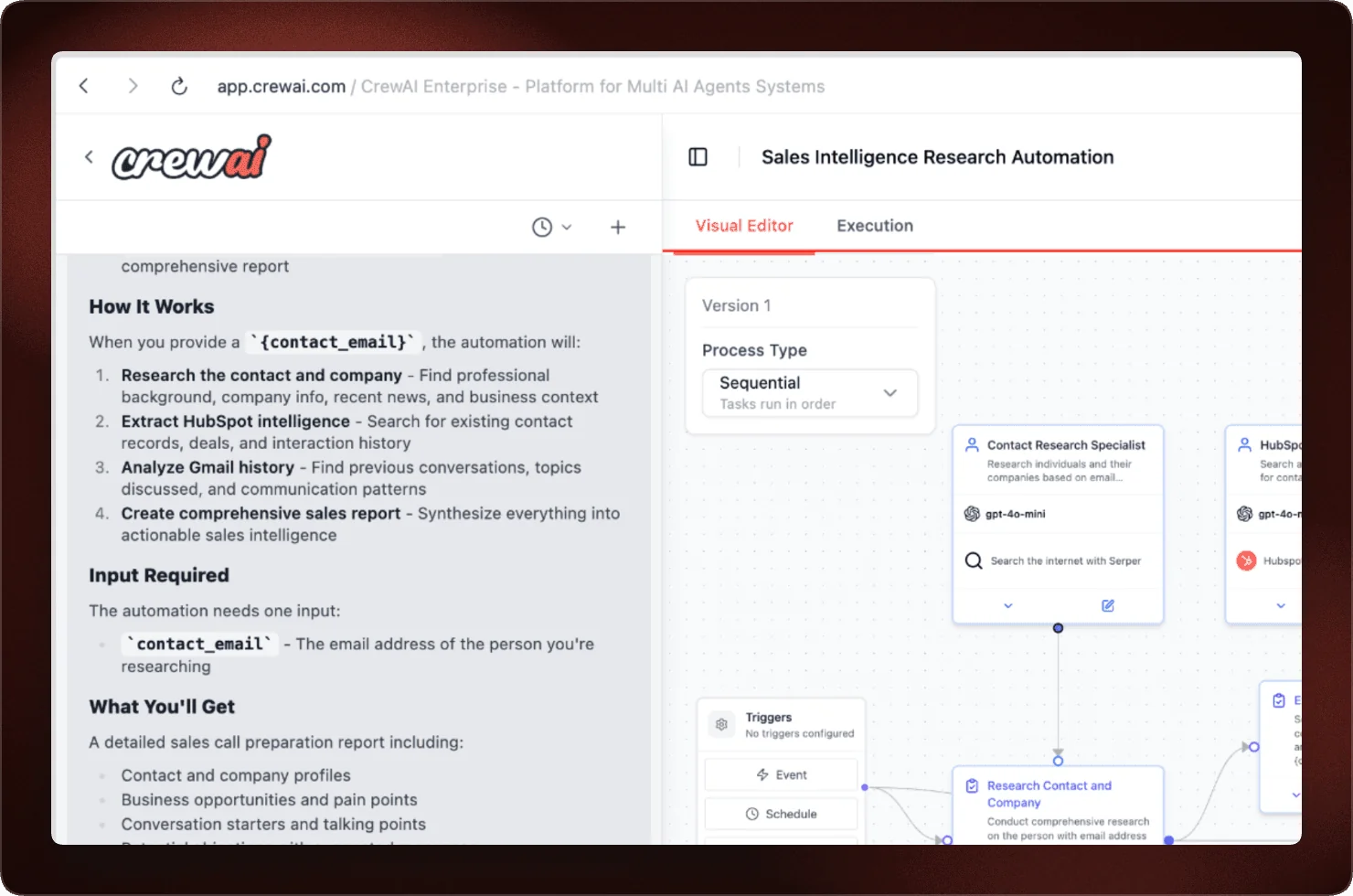
What it does: CrewAI combines Crews of cooperating agents with Flows for controlling execution. You can assign different tasks and tools where separate roles make the work easier to evaluate.
License and cost: The framework uses MIT. CrewAI AMP is a separate managed offering with deployment, tracing, API access, and no-code/low-code Crew Studio.
What to check: Compare one-agent and multi-agent versions of the same task. Extra handoffs may help, but they can also add model calls and make failures harder to trace. Keep the extra roles only if their contribution is measurable.
3. AutoGen: existing projects and migration decisions
What it does: Microsoft AutoGen supports multi-agent applications, including conversational coordination and prototyping through AutoGen Studio. Its current README says it is in maintenance mode and will not receive new features or enhancements.
License and cost: The code is MIT-licensed; model and infrastructure costs still apply. A migration can also require development and testing time.
What to check: Microsoft directs new users to Microsoft Agent Framework and provides a migration guide for existing users. An existing deployment does not need to be discarded blindly, but a new project should evaluate the maintained successor before adopting AutoGen.
4. AutoGPT: an automation platform with split licensing
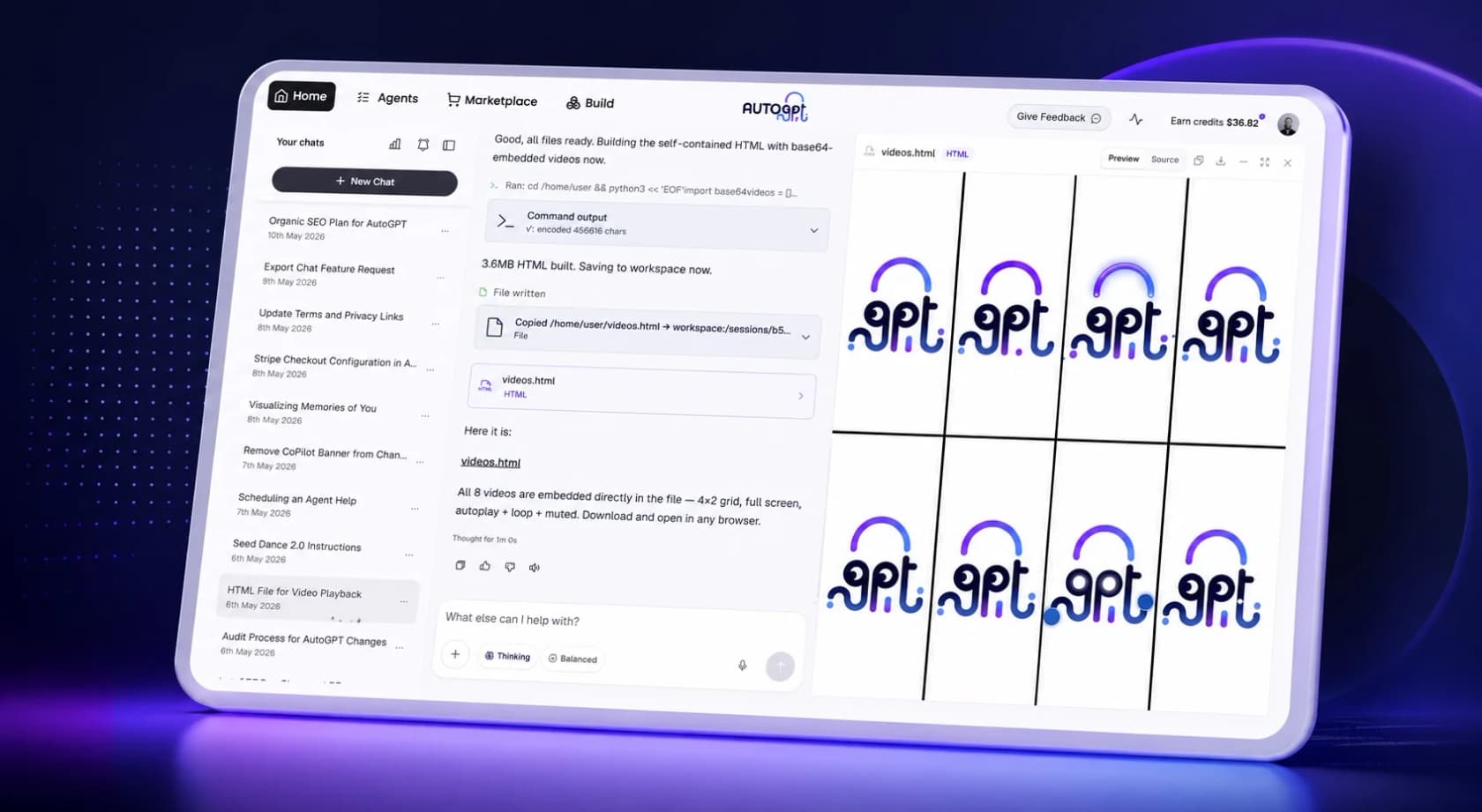
What it does: AutoGPT provides a platform for building and running agent workflows. Treat its current platform separately from the original standalone project when evaluating features and deployment.
License and cost: The repository's license file places the autogpt_platform directory under PolyForm Shield and other portions under MIT. Do not apply the MIT label to the whole product. Check the Shield terms for your intended offering.
What to check: Verify the exact workflow, tool credentials, and approval behavior you need. Self-hosting does not remove model, infrastructure, maintenance, or review costs.
5. OpenHands: software development agents
What it does: OpenHands focuses on development work with tools for interacting with code and execution environments. Evaluate it against a repository task with acceptance criteria and tests, not a generic claim about how autonomous it is.
License and cost: The core has an MIT license; the repository identifies enterprise components with separate terms. Self-managed use still needs compute and model access, while hosted services have their own commercial terms.
What to check: Restrict repository credentials, network access, and execution permissions to the task. Review changes and test results before merging. A coding agent can also help operate a business product through its CLI, but that is different from turning the coding agent itself into your production helpdesk.
6. Dify: visual apps using company knowledge
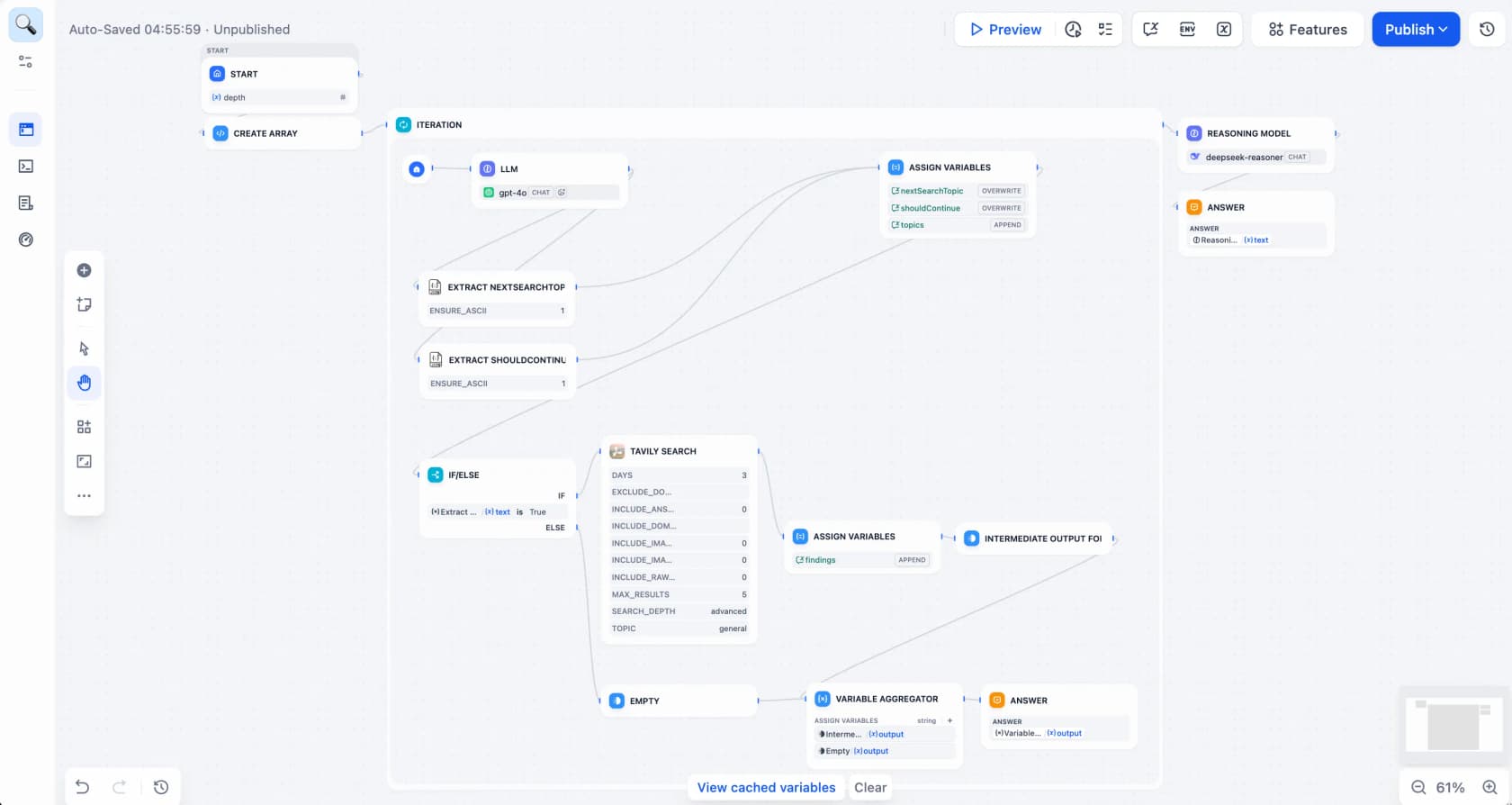
What it does: Dify provides a visual environment for LLM applications and knowledge-based workflows. It is a candidate when you want to assemble an application around your own data and tools.
License and cost: Its license adds conditions to Apache-2.0. These include multi-tenant restrictions and requirements concerning frontend logos and copyright information. Multi-tenant use is not limited to reselling: the license defines a tenant as a workspace.
What to check: Review those conditions against your deployment, and confirm your required integrations. Budget for model use and operation even when there is no license charge for your permitted use. A working knowledge demo still needs tests for missing, stale, or inaccessible sources.
7. Flowise: visual agent workflows
What it does: Flowise is a visual agent builder. It is useful when a canvas helps your team inspect the relationships between models, tools, and retrieval components.
Maintenance status: The GitHub repository was archived on August 13, 2026 and is read-only. The maintainer announcement sets August 31, 2026 as end of life. Treat it as an existing-code, fork, or migration evaluation, not an actively maintained upstream choice for a new deployment. Confirm any separate hosted-service commitments directly with the vendor.
License and cost: The license file puts most code under Apache-2.0, but specifies commercial exceptions, including the enterprise directory and certain explicitly marked files. “Everything is Apache-2.0” would be inaccurate. Model use, hosting, and optional cloud services are additional costs.
What to check: Identify which components your deployment needs before treating a community edition as equivalent to the commercial product. Test large or branching workflows for recoverability and access controls as well as output quality.
8. n8n: app workflows with agent steps
What it does: n8n connects application workflows and can include AI agent steps. It is worth evaluating when the agent's job is part of a wider process involving records, messages, or other systems.
License and cost: n8n describes its Sustainable Use License as source-available, not OSI-approved open source. Check the permitted uses, especially when providing n8n functionality to customers. Hosted pricing is based on workflow executions; model-provider charges can still be separate.
What to check: Trace the entire workflow, including retries and writes. Use predictable logic where the rule is fixed and an agent where interpretation is needed. A successful run must be checked against the intended result in the destination app.
9. Rasa: conversational applications and edition choices
What it does: Distinguish the Rasa open-source framework from the current commercial Rasa platform. The current offering includes Rasa Pro with CALM and the Rasa Studio interface. The Rasa framework repository is not the same thing as the separate Rasa SDK for custom actions.
Rasa Open Source is Apache-2.0-licensed and explicitly in maintenance mode. Evaluate that lifecycle separately from the current commercial platform before starting a new project.
License and cost: Rasa's pricing page lists a free Developer Edition that can run locally or in production: one bot per company, with up to 1,000 external conversations per month or 100 internal conversations per month. It is not restricted to prototypes. Larger deployments and support needs require checking commercial terms.
What to check: Confirm the edition's features, volume, and deployment requirements. On-premise hosting is a technical choice, not automatic proof that your application meets every security or regulatory requirement.
Compare operating costs, not just license fees
Open-source tools can give you control over code and deployment. That control also means deciding who maintains the service, upgrades dependencies, secures credentials, and fixes failed runs.
For a fair comparison, include:
| Cost or responsibility | What to measure |
|---|---|
| Model inference | Actual calls, retries, and context size |
| Infrastructure | Compute, storage, networking, and backups |
| Engineering | Setup, integration changes, and incident recovery |
| Human review | Checking outputs, correcting errors, and handling exceptions |
| Managed product charges | The vendor's actual billable unit and included services |
A managed teammate can reduce the amount you build, but it does not remove your responsibility to supply accurate information and review important work. Conversely, self-hosting may be worth the effort when deployment control is a requirement.
Operate a managed support teammate through eesel CLI
If your job is customer support, eesel gives you a ready-to-work teammate that connects to existing tools such as Zendesk and Freshdesk. Its CLI lets people, scripts, and coding agents operate that teammate in the same workspace as the dashboard.
CLI access is not the same as self-hosting or access to the whole backend. This is a managed alternative to assembling a support-agent application, not another open-source framework in the nine-tool shortlist.

Inspect the teammate before assigning work
With Node.js 18.17 or newer:
npx @eesel/cli login
npx @eesel/cli whoami
npx @eesel/cli agents
Select the intended agent and replace AGENT_ID with its ID:
npx @eesel/cli --agent AGENT_ID integrations
npx @eesel/cli --agent AGENT_ID instructions
npx @eesel/cli --agent AGENT_ID automations
These commands help you inspect the sources, standing rules, and automatic work you are configuring. They do not prove that an answer will be correct or that every connected integration supports the operation you want.
Compare the same support case on both approaches
For a useful build-versus-buy test, give your custom prototype and the eesel teammate the same approved policy and fictional case. Choose a case with missing information so you can see whether either system invents an answer.
Create or select a separate eesel test agent with no live triggers or write-capable connections. Replace TEST_AGENT_ID below with that agent's ID. Save an approved sample policy as support-policy.md in the current directory; keep expected answers outside the file.
npx @eesel/cli --agent TEST_AGENT_ID files upload ./support-policy.md
npx @eesel/cli --agent TEST_AGENT_ID new --name "build-versus-buy-pilot"
npx @eesel/cli --agent TEST_AGENT_ID chat "A fictional customer requests a refund but has not provided the purchase date. Use the support policy to draft a response and identify missing information."
The uploaded file supplies knowledge, not permissions or standing instructions. new starts a conversation, not another agent. Compare the draft with the policy, the missing information it requested, and the amount of human correction required.
Review execution and costs
npx @eesel/cli --agent TEST_AGENT_ID activity
npx @eesel/cli --agent TEST_AGENT_ID approvals
npx @eesel/cli billing
Output is JSON, with lists emitted as one object per line, so scripts can read the results. A coding agent can help inspect them; your team can use the dashboard to review the same work. An approval waiting on a person is not an executed action.
The billing command shows live billing state, not a complete forecast for your prototype comparison. Under current eesel pricing, support runs on credits (1 credit per ticket or chat, from $299/month for 500 credits, with a free plan of 100 credits), while blog drafts cost $4 each. Credits are used whenever the agent works on a ticket. Compare those charges with the prototype's model, hosting, maintenance, and review costs; any coding agent's own charges are separate.
The CLI's --dry-run previews the server call a write would make without sending it. It is not an answer-quality simulation or a guarantee that a real chat cannot change connected systems. Keep the test scope in permissions and connections, not only in the prompt.
Choose the control you actually need
If self-hosting, source modification, or a custom runtime is a requirement, evaluate the relevant framework and its exact license. If you want a support teammate that your developer can operate from a terminal while your team works in a dashboard, try eesel and use its CLI for a bounded comparison.
The choice is not “open source is difficult, managed is easy.” It is which responsibilities you want to own, and which approach completes your actual support work with acceptable cost and oversight.
Frequently Asked Questions
What are the best open-source AI agents?
LangGraph and CrewAI are useful starting points for agent orchestration; OpenHands focuses on coding. Flowise has an Apache-2.0 core with commercial exceptions, but reached end of life in August 2026. This list also includes source-available tools such as Dify and n8n, which should not be treated as having the same permissions as a permissive open-source license.
Are open-source AI agents free to run?
A license can permit use without a fee while the deployment still costs money. Budget for model inference, hosting, monitoring, engineering, and review. Local models also require compute. Managed products package some of these responsibilities into their charges.
Is eesel CLI an open-source agent framework?
This article presents eesel CLI as access to a managed eesel teammate, not as an open-source framework or a self-hosted eesel backend. A terminal interface alone does not establish a product's licensing or deployment rights.
Can a coding agent use eesel CLI?
Yes. Its JSON output is designed for software to read, and a coding agent can use it to inspect configuration, supply knowledge, and chat with the same teammate available in the dashboard. Scope commands to the intended agent and control the connected tools and actions.
Which tools can I use to build a customer-support agent?
Dify, current commercial Rasa offerings, and general orchestration frameworks can support custom conversational workflows. Rasa Open Source is in maintenance mode; Flowise is now a legacy or fork-maintenance choice. Verify integrations, permissions, escalation, and operating requirements. Compare a managed support teammate such as eesel separately.
Can Rasa Developer Edition be used in production?
Rasa's pricing page explicitly allows local or production use. It lists one bot per company and up to 1,000 external conversations per month or 100 internal conversations per month. Check the current terms for your deployment.
Does CLI access mean I control the whole agent stack?
No. CLI access lets you operate the exposed product features. Self-hosting and source access are separate choices. With eesel, you can inspect and configure the teammate through the CLI, but that does not mean you operate the underlying managed service.
Does eesel CLI dry-run simulate a support rollout?
No. It previews the server call a write command would make without sending it. Evaluate answers and actual task results separately. Use a bounded test setup: real chats can invoke enabled tools, and a prompt saying test only is not a permission boundary.