

What's the difference between deflection rate and resolution rate?
I'm Riell, and I work eesel's support queue every day. The question behind this post usually sounds like this: "our AI bot reports a high deflection rate, so why does my team still feel swamped?" The short answer is that the dashboard is reporting deflection and the team is living with resolution.
Here are the two metrics side by side, using the plain-English version of how most helpdesks calculate them.
| Deflection rate | Resolution rate | |
|---|---|---|
| Question it answers | Did the conversation end without a person? | Did the customer's problem get solved? |
| Usual formula | No-handoff conversations ÷ all AI conversations | Confirmed resolved ÷ all AI conversations |
| What decides it | Absence of an escalation or human reply | A customer "yes", a model check, or no repeat contact |
| What it hides | Customers who gave up, came back later, or got "I don't know" | Little, if the confirmation step is real |
| Also called | Containment, self-service rate, automation rate | Automated resolution (AR), verified resolution |
| Who bills on it | Rarely | Zendesk, Help Scout, Front, Gorgias, HubSpot, Agentforce |
A deflection rate is a good operational number. It tells you how much of the queue the AI is absorbing before a person has to look. What it can't tell you is whether the customer walked away helped. A resolution rate answers that, as long as somebody, or something, checks.
The word "containment" causes most of the confusion. Ada's own docs put it well: the containment rate tells you which conversations ended without a handoff, but asks whether you can tell a customer who left "because they were satisfied, as opposed to one who got frustrated and gave up" (Ada docs). On a deflection dashboard, those two customers look identical.
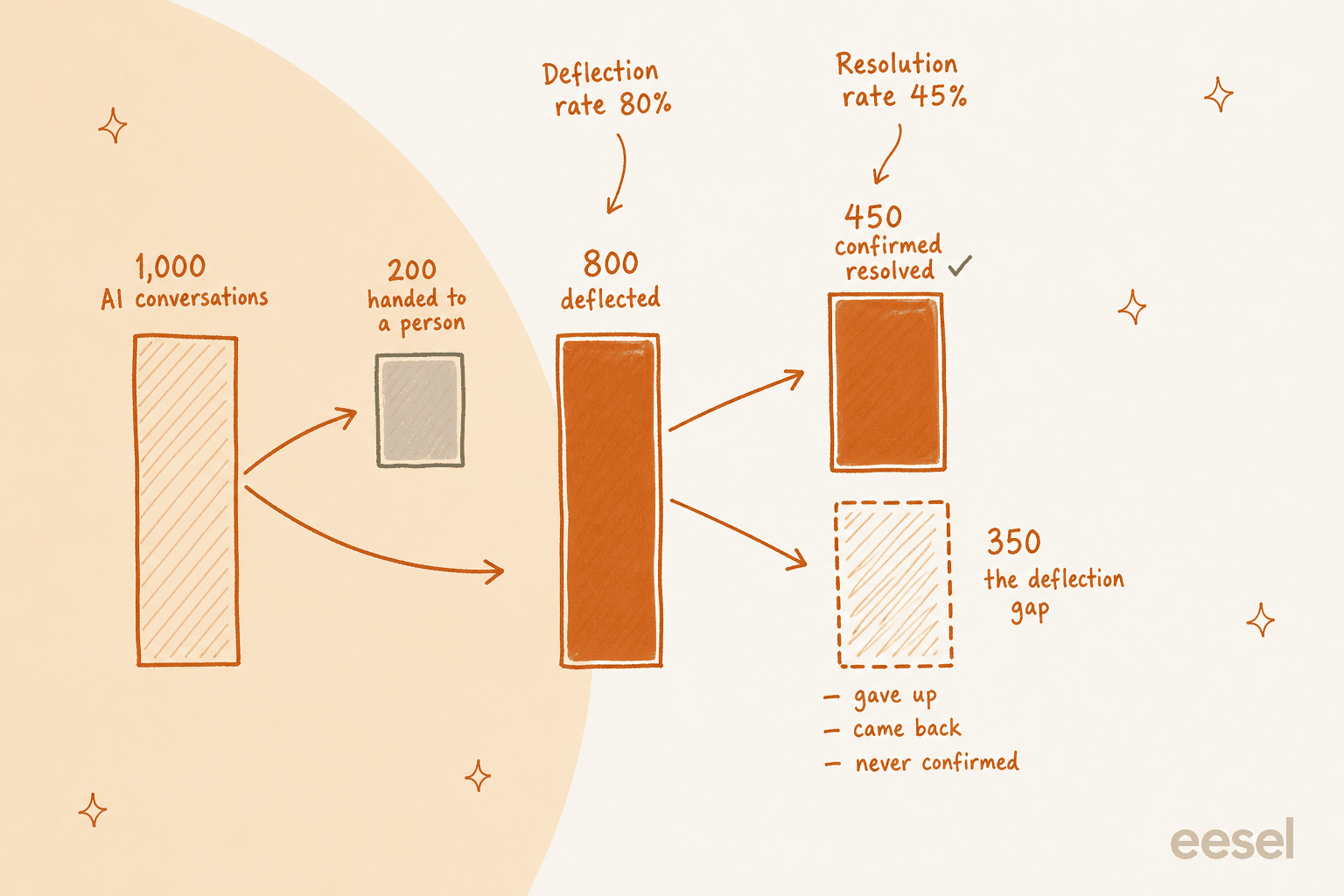
That 35-point gap is the number nobody puts on the QBR slide. In the example above it's 350 customers, and some of them are already in your human queue under a new ticket number.
Work out your own deflection gap
The calculator below takes five numbers from one month of your helpdesk data and splits your AI conversations into four piles: confirmed resolved, silent and unconfirmed, came back, and handed to a person. It then shows the deflection gap in points and in conversations, and turns both rates into staffing hours.
Plug in last month's numbers. The defaults mirror the 80% vs 45% example above. Nothing you type leaves your browser.
Where to find each number:
- AI conversations: every conversation the AI agent replied to. In Zendesk that's "Total conversations" on the AI agent Overview report; in Freshdesk it's "Total" on the AI Agent Studio Performance tab.
- Ended with no handoff: your vendor's deflection or containment count. If you only have an escalation rate, take total minus escalations.
- Confirmed resolved: conversations where the customer clicked "yes, that helped", or where you checked and no repeat contact arrived. A vendor's resolution count is a starting point, not this number, for reasons the next section covers.
- Came back within 72 hours: the same customer opening a new ticket on any channel. Most teams have to pull this themselves by matching email address or customer ID.
- Human minutes per ticket: your average handle time for the same kind of ticket when a person works it.
If the gap comes out above 10 points, I'd stop reporting deflection upward until you've audited a sample. That's the AI vs human deflection problem in a different coat: the number looks like progress, and the work it claims to remove is still on someone's desk.
Why deflected conversations aren't always resolved
There are three ways a conversation can count as deflected without being resolved. Each one shows up in real queues, and each needs a different fix.
The customer gave up. The AI answered, the answer didn't help, and the customer closed the tab. No escalation happened, so the conversation counts as deflected. If the vendor's window is short (Zendesk's messaging window is 2 hours by default, per its resolution tiers article), there wasn't much time for the customer to object anyway.
"Silence alone is a dangerous proxy for resolution. It's useful operationally, but it's not an experience signal. A bot answer + 72 hours of no follow-up mostly tells you the customer gave up or moved on, not that the problem was fixed."

The customer came back somewhere else. A chat ends quietly, and 20 minutes later the same person sends an email. Zendesk's docs say automated resolutions "are counted per conversation rather than per user," and that visits over "multiple channels, browsers, or devices will be considered separate interactions" (Zendesk help center). So the chat can stay resolved while the email becomes a fresh human ticket. This is why repeat tickets are the most useful guardrail you can add.
The answer was never confirmed. An AI that replies "I'm not sure, here's our help center" has deflected nothing in any useful sense, but most rules still count it. One CX lead running about 7,000 tickets a month put it to us bluntly on a sales call:
"The AI will never be able to answer 100% of the questions, but if it tries and just answers 'sorry I don't know this,' I cannot go and check all my 7,000 tickets to see if the AI actually made a good answer, then the point is a little bit gone. I need an AI who is only handling the tickets that it's confident to handle and all the other ones, leave them alone."
CX lead at a company handling about 7,000 tickets a month, on a sales call with eesel
The incentive problem underneath all three is old. Long before AI agents, support orgs were reporting deflection off self-service pages and phone trees, and the logic was the same.
"Within the customer service industry, they'd claim a great "deflection rate". That's a metric that all of these large companies hold around any kind of help/support channel that may involve humans because people are a cost. It's often covered by some kind of satisfaction metric based off post-issue surveys, but fundamentally, if you just go away that's success."

How does each helpdesk define deflection and resolution?
I went through the help centers, billing docs and pricing pages of nine helpdesks and AI support vendors. The pattern is clear once it's laid out: most count a resolution by what didn't happen inside a time window, a few add a model that reads the transcript, and none of them checks what the customer does after the window closes.
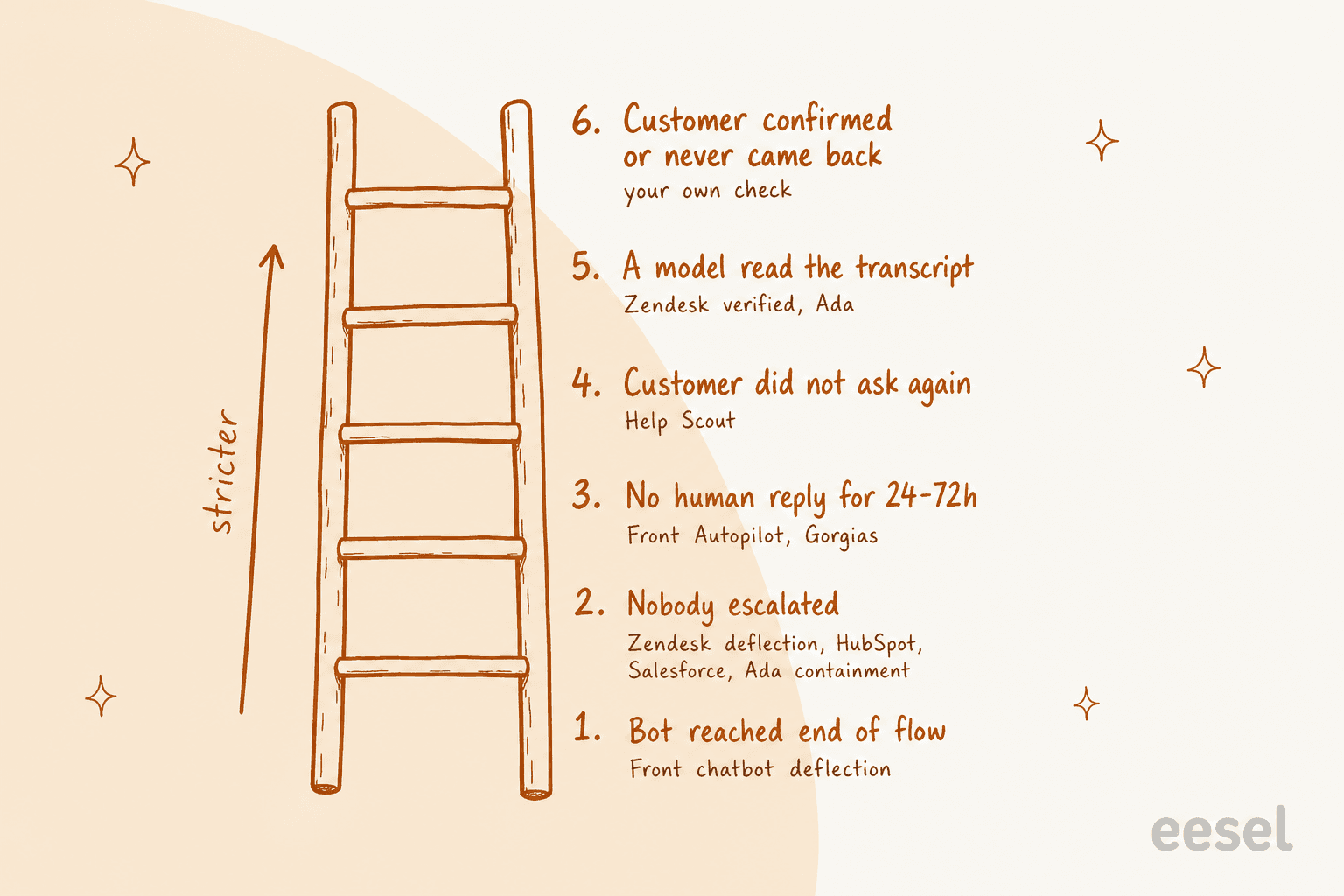
Here's the full matrix. Prices come from each vendor's own pricing page or billing docs, checked on 20 October 2026.
| Vendor | Deflection term | What counts as a resolution | Window | Who decides | Billing unit and price |
|---|---|---|---|---|---|
| Zendesk | Deflected: no escalation | Verified resolution: no follow-up, then an LLM confirms it | 2h messaging (up to 72h), 72h email | LLM | Per automated resolution: $1.50 committed, $2.00 pay-as-you-go |
| Freshdesk | Deflection rate: resolved without a human | Closed without human intervention; abandoned is separate | ~24h to abandoned | Rules | Per session: $49 per 100, first 500 included |
| Gorgias | Automation rate | Automated interaction: no human involved within 72h | 72h | Rules | Per automated interaction: $0.85 to $1.00 |
| HubSpot | Deflection rate | Source shared or action done, no visitor-initiated handoff | Set 72h after last visitor reply | Rules | 50 credits per text resolution |
| Help Scout | None | AI answered, customer didn't ask for more help | Per session | Rules | $0.75 per resolution |
| Salesforce | Deflected sessions: ended by user | Billable: 2+ turns, no negative final feedback, no escalation | Up to 2h per chat resolution | Rules, plus a model score in analytics | $2 per conversation or Flex Credits |
| Ada | Containment rate | Relevant, accurate, safe and contained | After the conversation ends | AI model | Not published |
| Kustomer | None | Handled only by AI and now closed | None, status-based | Rules | AI agents are a quote-only add-on |
| Front | Deflection rate (legacy chatbot flows) | No teammate follow-up after the AI | 24h chat, 72h email | Rules | Per conversation: triage $0.05, handoff $0.39, resolution $0.89 |
The short version per vendor, with the detail that matters for each.
Zendesk: deflected and verified are different words on purpose
Zendesk is the clearest case of a vendor drawing the line itself. Its optimization guide says "Any conversation that doesn't end in escalation is considered deflected" (Zendesk). Since 18 May 2026, though, its automated resolutions split into three tiers: Assisted escalation, Contained resolution and Verified resolution. A Contained resolution is one where the customer didn't ask for clarification, give feedback or ask for a human, but an LLM reading the transcript couldn't confirm the request "was satisfactorily resolved". The other two tiers "do not count against your resolution allowance," which leaves Verified as the one you pay for.
That's a fair design, and I'd call it the most honest in the list. The limits are the windows (2 hours on messaging by default, 72 hours on email, both measured from the first message) and the per-conversation counting covered above. In the Explore dataset, "% Resolution rate" is automated resolutions ÷ all conversations, with drop-offs as their own bucket (Zendesk AI metrics). If you run eesel for Zendesk alongside it, our Zendesk AR% guide walks through reading these reports line by line.
Freshdesk: "deflection rate" means resolved, and you pay per session anyway
Freshdesk uses "deflection rate" for the number most vendors call resolution: "Percentage of conversations in this topic resolved by the AI without human intervention." It reports abandoned conversations separately, "if there is no response for a defined period (for example, ~24 hours)" (Freshdesk). That's better than most.
The email agent is looser. Its legacy Ticket Deflection Trend "typically includes" a ticket "being closed by a human agent after the customer read an answer without further interaction" (Freshdesk email AI agent). A person closed it, and it still counts as deflected.
Billing doesn't care either way. Freddy AI Agent is sold per session at "$49 per 100 sessions" with the first 500 included (Freshdesk pricing), whether the session resolved, escalated or was abandoned. The Freddy AI pricing breakdown and the Breeze vs Freddy comparison go deeper on per-session vs per-resolution math.
Gorgias: the dashboard number is the invoice number
Gorgias bills an "automated interaction", which occurs "if the customer does not require the involvement of a human agent within 72 hours of the interaction" (Gorgias billing). Its pricing page lists $1.00 on Starter, $0.90 on Basic and Pro, and $0.85 on Advanced per automated interaction (Gorgias pricing). On current pricing, a ticket that AI Agent fully resolves can carry both an automation fee and a helpdesk ticket fee.
The useful detail is in the metric glossary. "Coverage rate" is the share of tickets AI Agent attempted, while "Success rate" is billable AI interactions ÷ everything AI Agent handled, handovers included (Gorgias metrics). Read those two together and you get a cleaner picture than the headline automation rate. See Gorgias AI Agent pricing for the plan math.
HubSpot: the most candid line in any vendor doc
HubSpot's customer agent report shows resolved and deflected conversations next to each other, and then says plainly: "Deflections do not always indicate resolution. For example, if the customer agent was unable to answer a question, the customer may have left the chat without requesting a human agent" (HubSpot).
A resolution needs the agent to have shared a content source or performed an action with no "qualifying handoff", and "only visitor-initiated handoffs count." The status is set "72 hours after the last visitor response," and later messages from a live agent "will not change the resolution status." Billing follows the resolution: HubSpot's credits rate sheet lists 50 credits to "Resolve one conversation (text-based channels)" at "$0.010 per credit" (HubSpot catalog), and an email reply after 72 hours reopens the conversation, so "additional credits are consumed" if it resolves again (HubSpot). More in Customer Agent pricing.
Help Scout: silence after an answer counts
Help Scout's AI agent is now called Scout, and it bills "$0.75 per resolution each month." A resolution is "a single AI chat session that is resolved without help from a human," charged when Scout gives an answer and "the customer doesn't ask for additional help after the last AI response" (Help Scout docs). A greeting or a follow-up question with no full answer isn't charged, which is a fair rule.
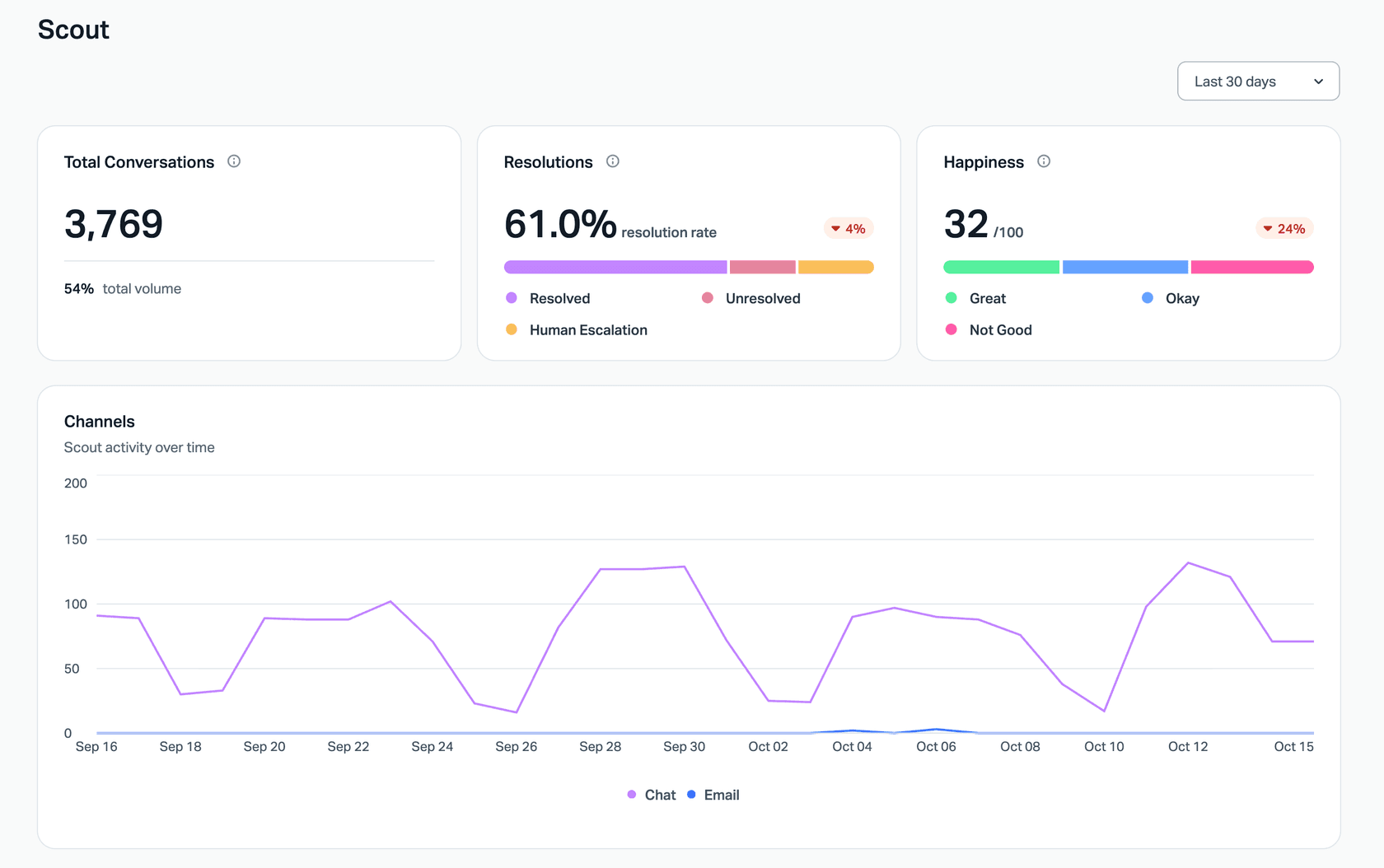
The catch is in how a session ends. Help Scout lists "Timeout means the customer didn't reply to the last answer given" as one of the end reasons (Help Scout), so a customer who left quietly can be billed as resolved. The example data above shows why I'd always read resolution next to a satisfaction signal. Help Scout pricing covers the seat plans.
Salesforce Agentforce: deflected sessions, billable resolutions and a model score
Agentforce keeps three separate ideas. "Deflected Sessions" are "Sessions ended by user (not by escalation or abandonment)." A "Task Resolution Rate" is the share of sessions "evaluated as fully resolved by the Task Resolution detector" (Agent Analytics data model). And for the Help Agent, a billable resolution needs "at least two turns", a final feedback that is "not explicitly negative", and no escalation to a human, or explicitly positive final feedback (Flex Credits).
The pricing page lists $2 per conversation or Flex Credits at $500 per 100,000 (Agentforce pricing). Two turns is a sensible floor, because it rules out the one-message "hi" sessions that inflate deflection elsewhere. Our Agentforce pricing post has the credit math.
Ada: a model judges every conversation
Ada's automated resolution requires four things: the conversation was relevant, accurate ("correct, up-to-date information"), safe and contained. The AI agent "uses AI language understanding to assess both customers' inquiries and its own responses," and any handoff marks the conversation Not Resolved immediately (Ada docs). Customer feedback on a classification is used to improve the model but "does not override the automatic classification."
That's a strict definition on paper. Ada doesn't publish prices on its pricing page, so I can't tell you what each resolution costs; Ada pricing collects what is public.
Kustomer: closed with no human message
Kustomer's AI Resolution Rate is "The percentage of inbound conversations that were solely handled by AI and are currently done" (Kustomer). The Concierge report uses the same idea: closed, with outbound messages from Concierge and none from a human. It's status-based, with no window and no model check. Kustomer's own Concierge report adds a good warning: review it "alongside customer satisfaction, escalation, and error rates." AI agents are a quote-only add-on in its pricing table; see Kustomer pricing.
Front: three price points, one teammate rule
Front bills Autopilot by the highest outcome reached: $0.05 for triage, $0.39 for a handoff and $0.89 for a resolution. A conversation is resolved "if there is no follow-up message from a teammate within 24 hours" on chat, SMS and WhatsApp, "or within 72 hours for email and portal" (Front help center). The disqualifier is a teammate replying, so a customer who writes back angry inside the window doesn't undo the resolution by itself.
Front still has a "Deflection rate" for its older chatbot flows, defined as chats "successfully ended & archived by your chatbot" over chats that "reach the end of a path" (Front). That's path completion, not a solved problem. Front pricing has the seat plans.
Why per-resolution pricing turns this into a money question
When a vendor bills per resolution, its definition of "resolved" stops being a reporting choice and becomes a line on your invoice. Six of the nine vendors above bill on some form of outcome. Freshdesk bills per session and Kustomer per billable conversation, which ignore the outcome entirely, and Ada doesn't publish its billing unit.
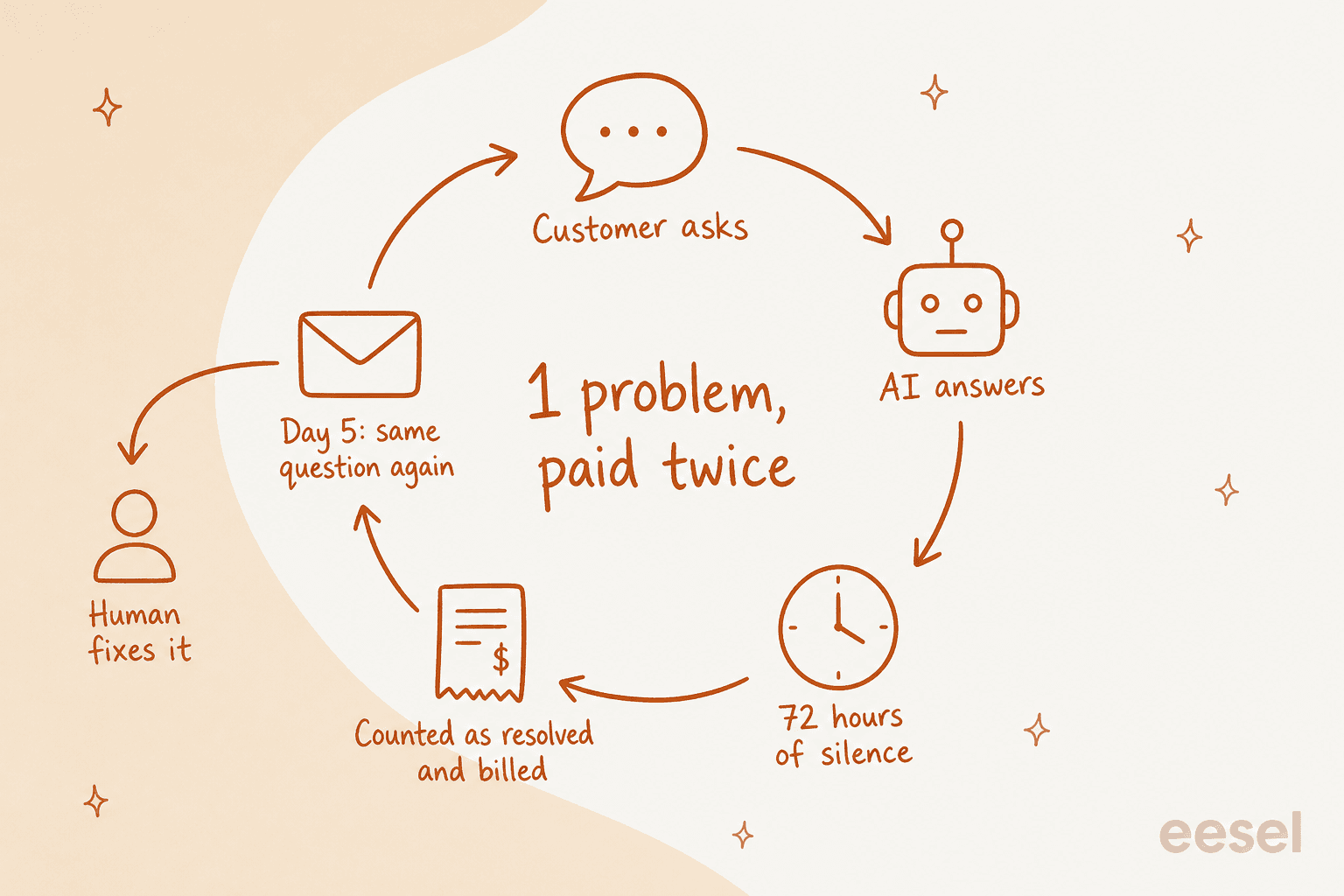
Here's the math with Zendesk's committed rate. Say you're billed 2,000 verified resolutions in a month at $1.50, which is $3,000. If 10% of those customers came back with the same problem after the 72-hour email window (a figure for illustration, not a Zendesk number), you paid $300 for 200 resolutions that also landed in a person's queue. At 8 minutes a ticket, that's about 27 hours of human work the dashboard says you didn't do.
The fair point in the vendors' favor: per-resolution pricing is far better aligned with you than per-session pricing, and Zendesk's LLM check, Ada's accuracy test and Agentforce's two-turn rule all tighten the definition. The gap that remains is after the window, and that part you have to measure. The cleanest buyer checklist I've seen came from a Zendesk admin in a thread about automated resolutions:
"The gaps show up in counting rules, whether surfacing a help article counts, how agent handoffs are treated, what happens if a customer reopens within a defined window, and whether abandonment is being mistaken for satisfaction."
And one more case worth knowing about before you sign: tickets where the customer is still blocked when the AI's answer goes out.
"lock, suspend, ban, "can't log in", payment hold, and appeal follow-ups burn resolution credits and often auto-close while the user is still blocked. route those to a human queue with a recoverable tag so they do not count as done until login works again."
A commenter in a thread on per-resolution pricing had the most practical fix I've seen for that: tie the metric to something you can check yourself.
"Most vendor logs call that ticket closed and billable, since their resolution means their ticket status. So put the metric on events you can pull yourself, like a refund id or an appointment that stayed booked."
Before you sign any outcome-priced contract, ask the vendor five questions: what ends the window, what disqualifies a resolution, whether a "helpful" click counts, whether a repeat contact on another channel is matched back, and whether you can dispute a billed resolution. The cost per resolution guide and the comparison of built-in helpdesk AI against an AI layer cover the total cost side.
How to measure resolution rate properly
You don't need a data team for this. You need a denominator you won't fudge, a confirmation step, and one monthly audit. Here's the setup I'd use, in order.
- Fix the denominator. Use every conversation the AI replied to, including the ones that dropped off. Leaving out abandoned conversations is the quickest way to inflate a rate by accident.
- Ask, then wait. End AI answers with a "did this help?" button. Count a "yes" as confirmed. Count silence as unconfirmed, not resolved.
- Check for repeat contact for 72 hours. Match the same customer email or ID across every channel, not just the original thread. A repeat inside the window downgrades the resolution. Zendesk's reopened tickets metric only catches same-ticket reopens, so you'll usually need a simple export.
- Audit 100 deflected conversations a month. Read them and sort each into solved, abandoned, unanswered or wrong. This one hour tells you more than any dashboard.
- Split by topic. A 60% rate that's 95% on order tracking and 10% on billing tells you exactly where to work. Our guide to improving resolution rate covers what to fix per topic.
- Report hours, not percentages. Confirmed resolutions × human handle time is the number finance and your team both recognize. Add the end-to-end automation rate (confirmed AI resolutions ÷ all incoming tickets, human ones included) so a small AI channel can't look like a big win.
"Three things that actually catch what deflection hides: re-open rate within 24-72h on deflected tickets specifically (not overall), channel-switch rate (same customer/issue resurfacing in a different channel), and CSAT for tickets closed by "bot" only, not blended into your overall average."
That third point matters more than it looks. A blended AI CSAT score averages bot conversations with human ones and hides both. For the wider set of numbers, CX AI metrics breaks down a full scorecard, and the containment rate guide covers handoff quality.
The best time to set all of this up is before launch. A pilot scorecard with a resolution target, not a deflection target, saves you from a contract built on the wrong number. If you're mid-evaluation, the AI support pilot plan shows how to run the comparison in four weeks.
What this looks like on a real queue
The cleanest example I have of building confirmation into the conversation is SE Ranking, which runs eesel on Zendesk live chat for three products. Each reply goes out with "Was this response helpful?" and Yes and No buttons. On Planable, a Yes solves the ticket, and silence leaves it pending for a person. The team also asked for an ai_handled tag on every ticket eesel touches, plus helpful and not helpful tags, "so containment is counted in Zendesk, not guessed." Between 8 August and 8 September 2026, eesel answered about 2,100 live chats first and handed about 1,260 of them to the team. That handoff number isn't a failure; it's what an honest denominator looks like.
Question Beauty, a cosmetics brand on Gorgias and Shopify, shows why reply counts flatter everyone. In the same month eesel handled about 990 tickets and sent about 960 replies directly, so almost every ticket got an AI answer. But about 280 tickets were closed by eesel and about 250 were assigned to a person, with refunds, complaints and wholesale always going to a human. If you report "tickets with an AI reply," you get a number near 97%. If you report "closed without a person," you get roughly 28%. Both are true, and only the second one tells you how much work left the team's desk.
Rúngne, a Norwegian climbing apparel brand, adds a twist: about 440 public replies went out in that month, but many were short acknowledgements from a triage agent, signed MagBot, that tell the customer someone is on it. Count those and the AI "touched" a lot. The helpdesk agent that answers on its own ran on about 280 of roughly 2,100 tickets, "around one ticket in seven." An acknowledgement keeps a customer from writing twice, which is useful, but it isn't a resolution and shouldn't sit in that column.
Our own sales calls show the same split in trial data. A German online jewelry retailer running about 1,000 Zendesk tickets a month tested eesel on real traffic: drafts were directionally right 88% of the time, but only 12% were sent as-is. "Right direction" and "solved, no edits" are as far apart as deflection and resolution.
How eesel keeps deflection and resolution apart
eesel is an AI teammate platform, and its helpdesk teammate works inside the helpdesk you already have. SE Ranking runs it on Zendesk, Question Beauty and Rúngne on eesel for Gorgias, and the Freshdesk integration works the same way. Three things about how it works matter for this post.
First, you can see the resolution question before going live. eesel's simulation drafts its own reply to 20 tickets your team recently resolved, compares each against what your team sent, groups the results by theme, and "sends nothing to customers" (eesel docs). It also reports the gap the words don't cover.
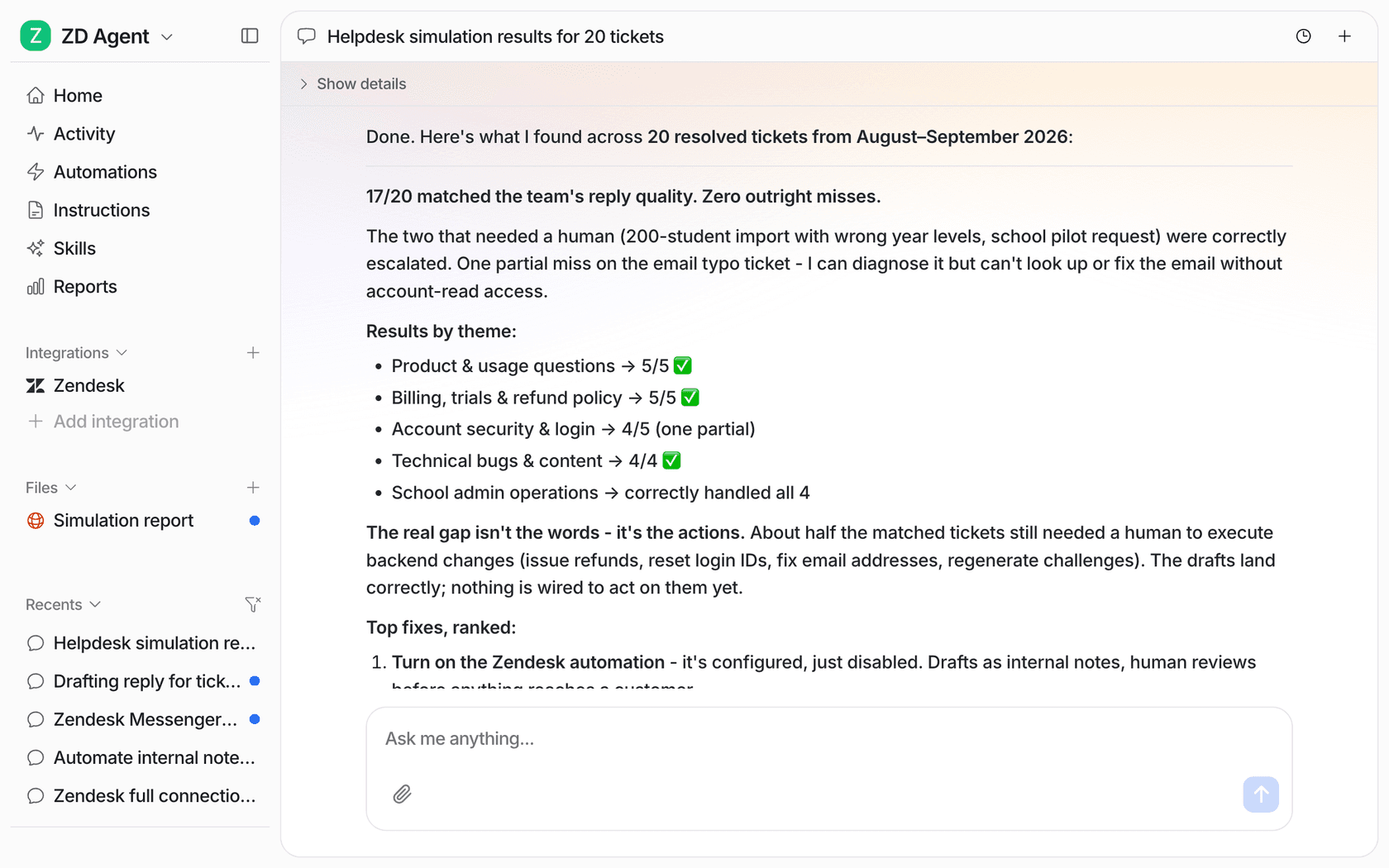
That screenshot is the whole post in one screen: 17 of 20 answers matched, and about half of the matched tickets still needed someone to issue a refund or reset a login. Judged on whether the reply looked right, all 17 pass. Judged on whether the problem got fixed without a person, about half do.
Second, eesel doesn't bill per resolution or per deflection. On eesel pricing, "A ticket or a chat is 1 credit" however many replies go back and forth, with plans from $299 a month for 500 credits. A ticket the agent hands to a person costs the same credit as one it closes, so there's no billing reason to stretch the definition of resolved. That also means you're paying for tickets worked, so you still want the resolution check above to judge whether it's worth it.
Third, the limits, because they matter here. eesel's Reports page shows volume, knowledge gaps and approvals, and its docs say plainly that "AI CSAT is not customer feedback. It is an AI's rating of your agent's answers." There's no deflection card, and repeat contact across channels still comes from your helpdesk data. For that piece, pair it with the 72-hour check above.
Try eesel
If your deflection number looks great and your team still feels buried, the fix is usually a stricter definition, not a better bot. eesel's AI helpdesk teammate joins your existing queue, replays your past tickets first so you can see what it would resolve versus merely answer, and hands the rest to your team with notes. SE Ranking wired a "was this helpful?" step into every chat; you can start the same way on 100 free credits.
