

Why this decision got harder in 2026
I build integrations at eesel, which means I spend my days on the unglamorous side of this question: what a helpdesk's API actually lets an outside AI read and do, and what it doesn't. eesel has been putting AI agents on live support queues for years now, and it connects to 11 helpdesks today. The same conversation comes up on sales calls almost every week. On one call with a support team at a US healthcare platform with a few thousand patients, their situation was summed up like this:
"We have kicked the tires in Zendesk AI solutions and found it largely inadequate and overpriced. So we're looking for other options..."
That's one buyer, not a verdict on Zendesk. Plenty of teams run native AI happily. But the question behind it is real: now that every helpdesk sells its own AI agent, is it worth looking anywhere else?
Three things changed this year that make the answer less obvious than "just use what's built in":
- The native agents got much better. Zendesk folded its Advanced AI agents into every plan, HubSpot shipped Breeze Customer Agent with batch testing, and Help Scout renamed AI Answers to Scout and pointed it at email as well as chat.
- The billing got stranger. Zendesk moved new accounts from counted resolutions to a dollar allowance on May 18, 2026. Gorgias now charges a ticket fee and an automation fee on the same resolved ticket.
- Helpdesks kept opening up to outside AI. Zendesk documents third-party bots as an official option, and the Gorgias App Store lists several third-party AI agents, eesel included. On Zendesk, outside bots plug in through its switchboard.
So here's the framework I'd use, one question at a time.
What's the difference between built-in AI and an AI layer?
Built-in AI is the AI agent your helpdesk vendor sells inside its own product: Zendesk AI agents, Freshdesk's Freddy AI Agent, Gorgias AI Agent, HubSpot's Customer Agent, Help Scout's Scout, Salesforce's Agentforce. It's configured in the helpdesk admin, it reads the helpdesk's own knowledge base, and it lives and dies with that helpdesk.
An AI layer is a separate product that connects to your helpdesk through its API and works the queue like another agent on the team. It reads tickets, drafts or sends replies, adds internal notes, tags and routes. Because it sits outside the helpdesk, it can also read things the helpdesk can't see natively, and it can connect to more than one helpdesk at once. eesel's AI helpdesk teammate is one example: it doesn't replace your helpdesk, its replies and notes land on the ticket itself.
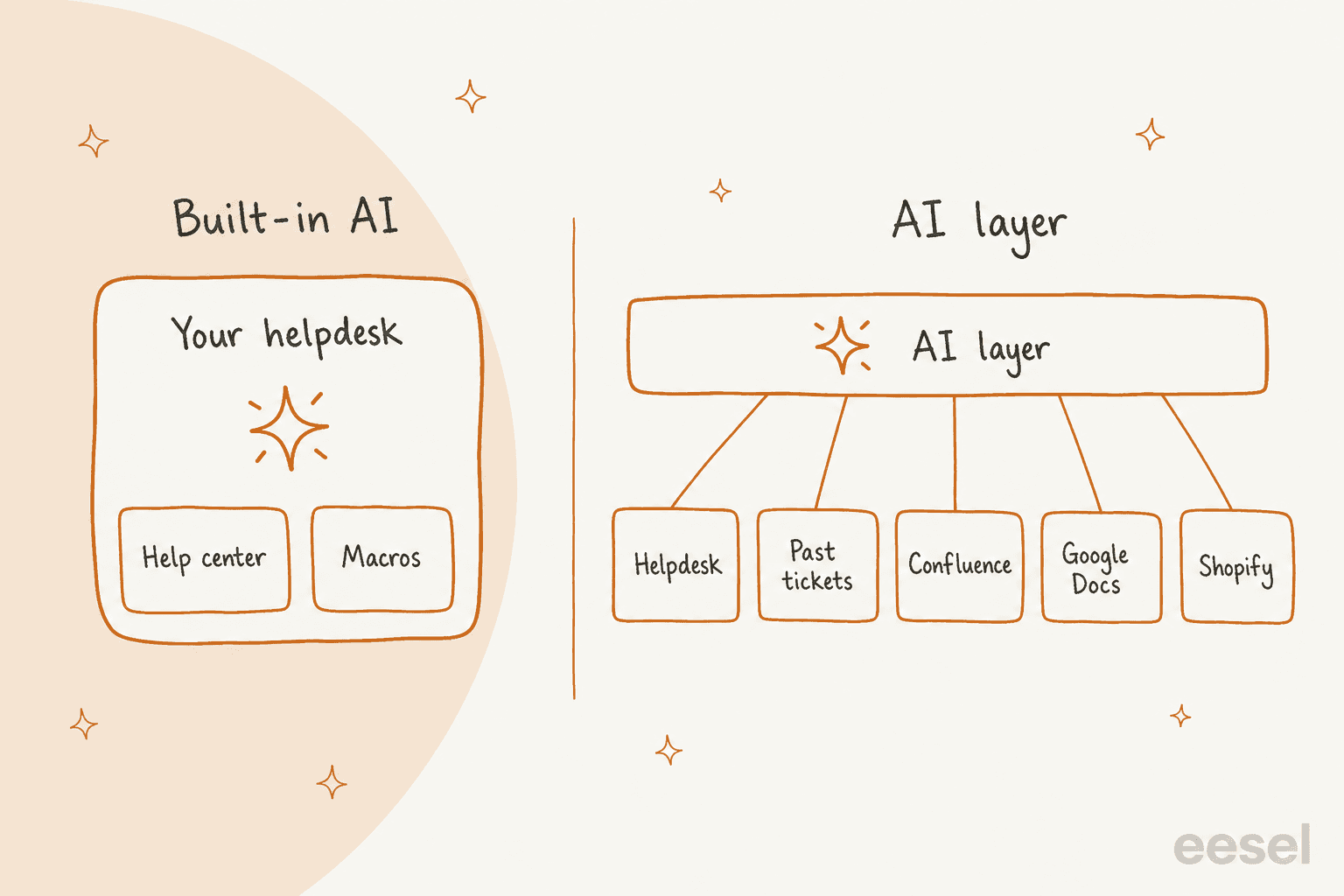
The trade is simple to state. Built-in AI wins on setup and on "one vendor, one bill." (If you're still choosing the helpdesk itself, my AI helpdesk roundup covers that first.) A layer wins on reach: what it can read, where it can work, and what survives if you change tools. Everything below is about working out which of those matters more for your queue.
How do the built-in AI agents compare?
Here's what I found on each vendor's own pricing and help pages, checked on October 20, 2026. The columns are the ones that decide this question in practice, not the feature checklists on the marketing pages.
| Helpdesk AI | Billing unit | List price | Learns from past tickets? | Outside docs (Confluence, Google) | Test on your past tickets? | Actions |
|---|---|---|---|---|---|---|
| Zendesk AI agents | Verified automated resolution | $1.50 committed, $2.00 pay-as-you-go per resolution; new accounts get a dollar allowance | Not as an answer source | Yes, synced: Confluence, SharePoint, Google Drive, Box, Dropbox and more | No. Test widget, plus a simulator on scenarios you write (early access, chat only) | Custom actions, action flows, MCP connectors |
| Freddy AI Agent | Session (72 hours on email) | $49 per 100 sessions | Not listed | Web links and files | No. Previews consume sessions | AI Agent Studio workflows, MCP actions $15 per 1,000 |
| Gorgias AI Agent | Ticket fee plus automated interaction | $0.90 to $1.00 per automated interaction | Not listed | URLs and uploaded documents | One existing ticket at a time | Shopify order actions, Recharge, Loop |
| HubSpot Customer Agent | Resolution (50 credits) | $0.50 per resolution | Not listed | Website pages and files | Batch testing on generated questions, free | Configured actions |
| Help Scout Scout | Resolution (one chat session) | $0.75 per resolution | No | Public web pages and files, manual re-sync | Test chat | None found |
| Salesforce Agentforce | Flex Credits per action | $500 per 100,000 credits, about $0.10 per action | Grounds in CRM records and Knowledge | Data 360 | Batch testing in the builder | Deep Salesforce actions |
| eesel (AI layer) | Ticket or chat handled | $299 for 500 credits, down to $0.35 per credit at 5,000 | Yes, plus help center and macros | Confluence, Google Drive and Docs, Notion, SharePoint | Yes, on 20 recently resolved tickets | Replies, notes, tags, routing, Shopify lookups |
Sources for each row are linked in the sections below. Two caveats before you screenshot this: Zendesk's resolution prices apply to the older automated resolution platform, and Gorgias AI Agent is built for Shopify stores connected to Gorgias, per its own docs.
What are you actually paying for?
This is where most comparisons go wrong, because the price per unit hides what the unit is. "Per resolution", "per session" and "per ticket" sound similar and behave very differently on your invoice.
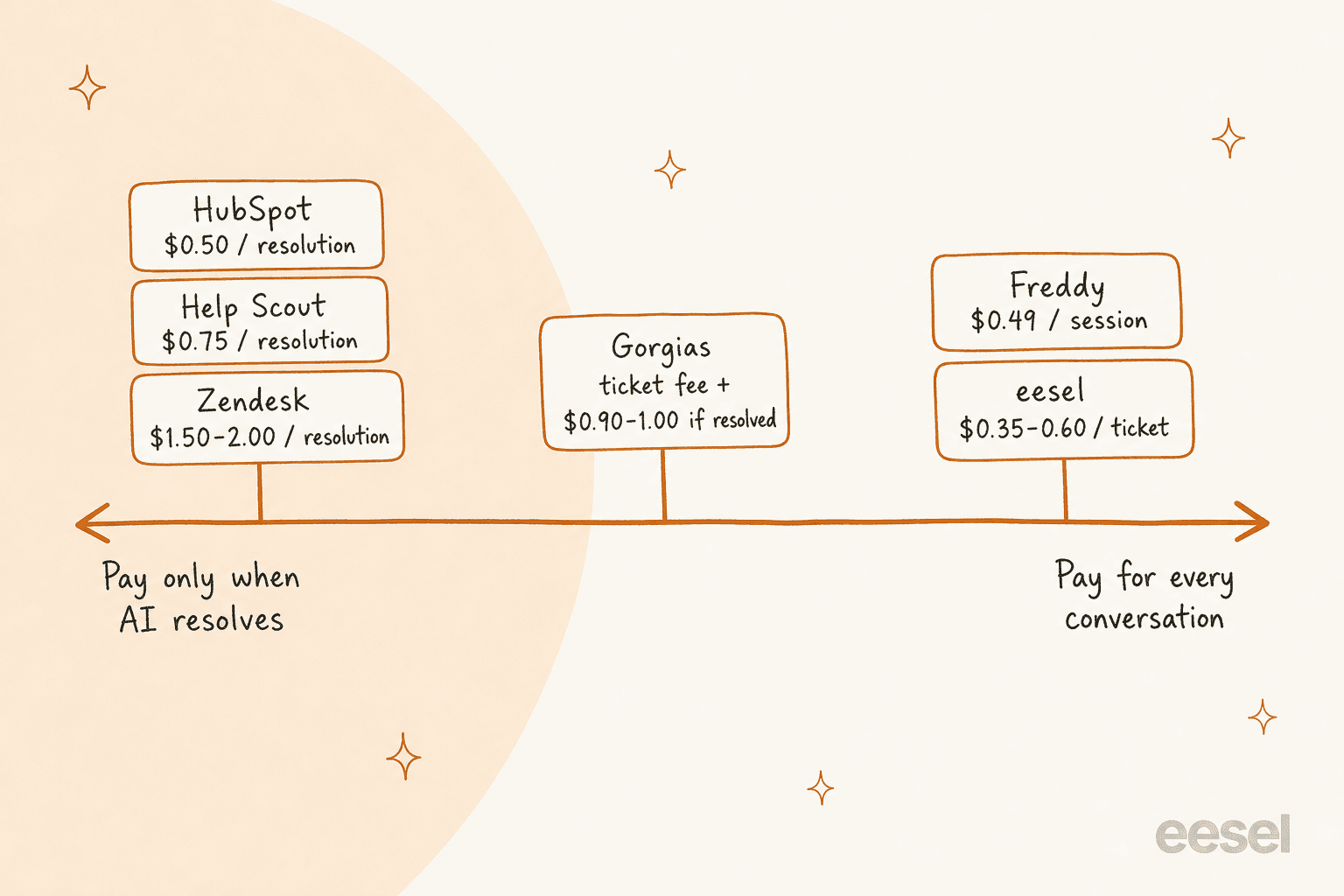
Per resolution: Zendesk, HubSpot and Help Scout
You only pay when the AI closes the conversation without a person. The definitions are where the detail lives:
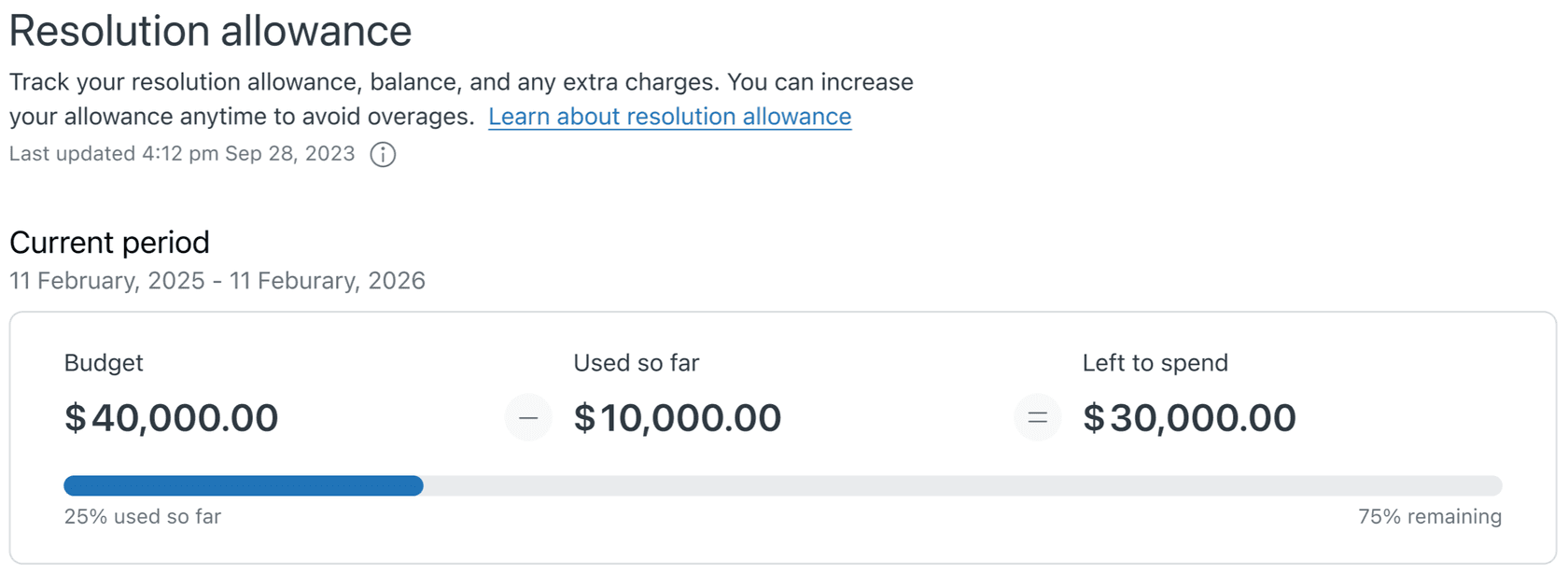
- Zendesk counts a resolution only after an LLM checks the conversation was resolved without a human, evaluated 72 hours after the first email or 2 hours after the first chat message. Extra resolutions are $1.50 committed or $2.00 pay-as-you-go on the pricing page. Accounts on the newer resolution tiers get a dollar allowance per seat instead ($2 on Team, $5 on Professional, $10 on Enterprise), and only "verified resolutions" draw it down.
- HubSpot charges 50 HubSpot Credits per resolved text conversation, which is
$0.50, and testing in preview uses no credits. My Breeze vs Freddy comparison has the full credit math. - Help Scout charges
$0.75per resolution, once per session, and only if the customer doesn't ask for more help after the last AI reply. You can set a monthly spending cap.
The appeal is obvious: a bad month for the AI is a cheap month for you. The catch is the flip side, which I'll get to in the worked example.
Per session: Freshdesk Freddy
Freddy AI Agent capacity comes in packs of 100 sessions for $49 on the Freshdesk pricing page. A session is a time window, not an outcome, and Freshworks' sessions FAQ is clear that escalated conversations still count, and so do previews while you build.
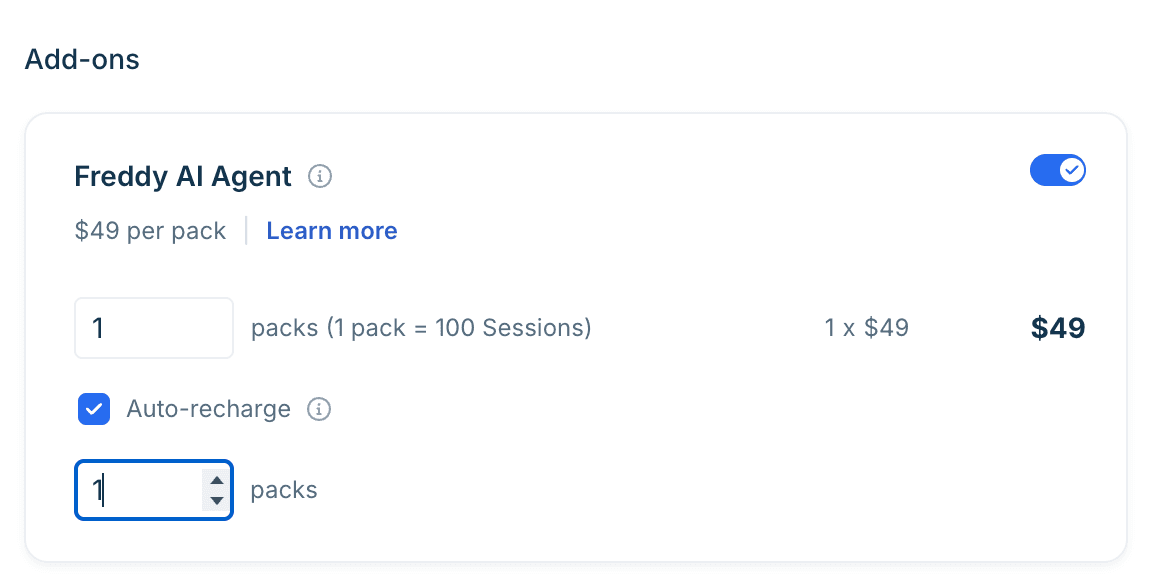
That predictability is the upside. You know 1,000 AI conversations cost $490, whatever happens in them. My session consumption guide goes deeper on what counts. The Chat AI Agent and WhatsApp need Freshdesk Omni, not plain Freshdesk.
Ticket fee plus automation fee: Gorgias
Gorgias prices the helpdesk per ticket and AI Agent per automated interaction. The detail most people miss is in its billing doc: when AI Agent resolves a ticket on its own, you pay both the ticket fee and the automation fee. If it hands over to a person, you pay only the ticket fee. An interaction counts as automated if nobody on your team gets involved within 72 hours. The pricing page lists $1.00 on Starter, $0.90 on Basic and Pro, and $0.85 on Advanced, though the bundled plan cards work out to $1.00 monthly and $0.90 annual.
Credits per action: Salesforce Agentforce
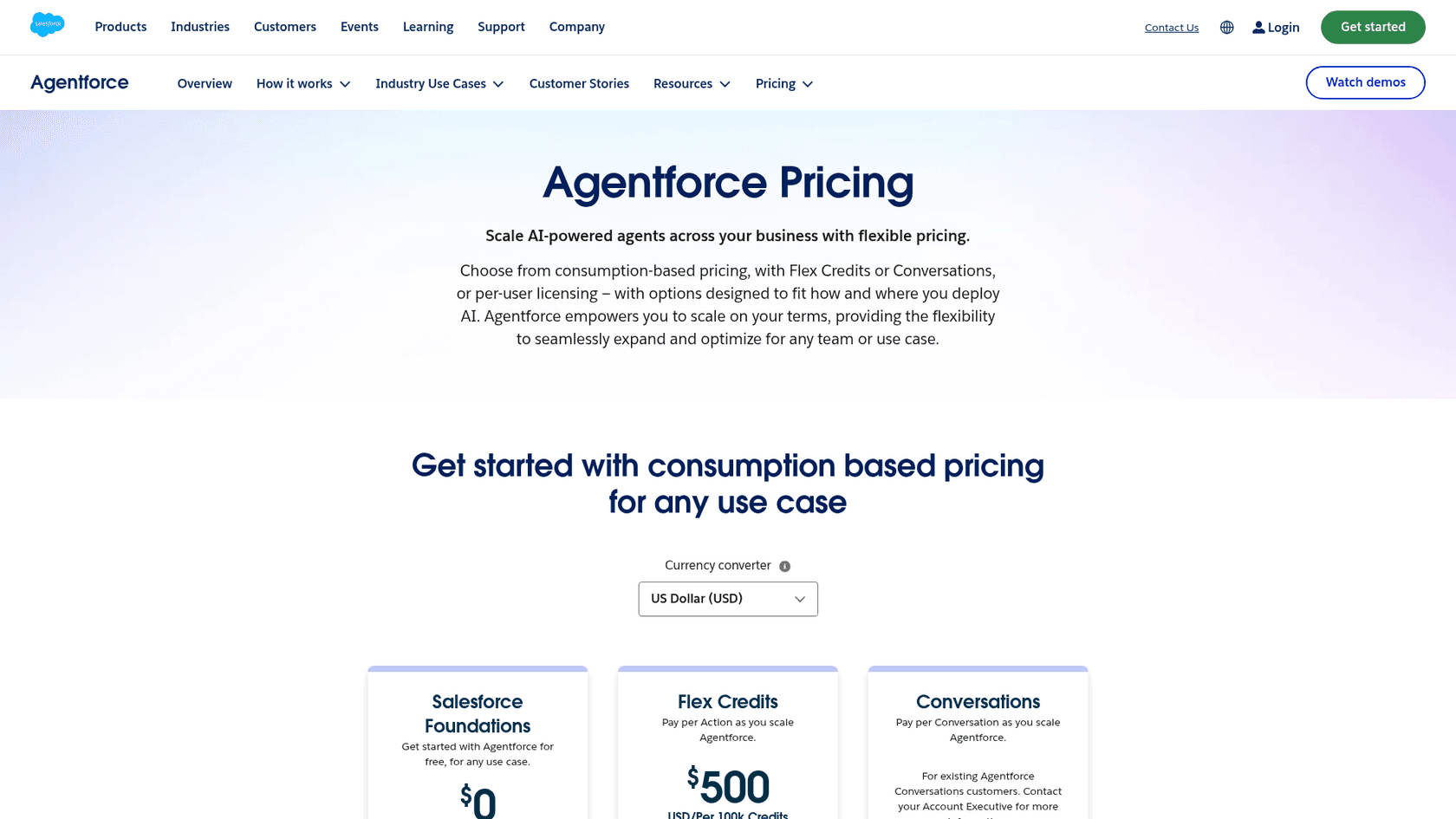
New Agentforce buyers pay through Flex Credits at $500 per 100,000 credits, and a standard agent action uses 20 credits, so about $0.10 each. My Flex Credits explainer breaks down what each action costs. The $2 per conversation price is now labelled for existing Conversations customers only. My colleague Riell covered the full rate card in his Agentforce review.
A fixed batch: an AI layer like eesel
eesel's pricing is a fixed monthly batch of credits, and "a ticket or a chat is 1 credit, however long." Plans start at $299 for 500 credits and go to $1,749 for 5,000, with every integration and unlimited seats included. That bill sits next to your Zendesk pricing or Freshdesk pricing, not instead of it. Two things to be straight about: you pay for every ticket eesel works on, resolved or not, and it's an extra bill on top of your helpdesk seats.
A worked example at 1,000 conversations a month
Say your AI handles 1,000 conversations a month. Here's the AI-only cost at a 40% resolution rate (a new deployment) and at 70% (a mature one), at list prices and before any included allowances:
| AI option | At 40% resolved | At 70% resolved | What moves the bill |
|---|---|---|---|
| HubSpot Customer Agent | $200 | $350 | Resolutions |
| Help Scout Scout | $300 | $525 | Resolutions |
| Gorgias AI Agent | $360 to $400 | $630 to $700 | Resolutions (plus ticket fees you already pay) |
| Freddy AI Agent | $490 | $490 | Sessions |
| eesel (1,000-credit plan) | $499 | $499 | Tickets handled |
| Zendesk AI agents (committed) | $600 | $1,050 | Resolutions |
Read the table both ways. At 40%, per-resolution pricing on HubSpot and Help Scout is cheaper than a flat plan, and that's a fair point in their favour. But per-resolution billing grows every time your AI gets better, and it grows with every seasonal spike. A flat batch stays the same in November as in March. If you want to run your own numbers, my cost per resolution breakdown walks through the method.
What can each one learn from?
This is the question I'd weight most heavily, because an AI agent can only be as good as what it reads. And this is where the two approaches split the most.
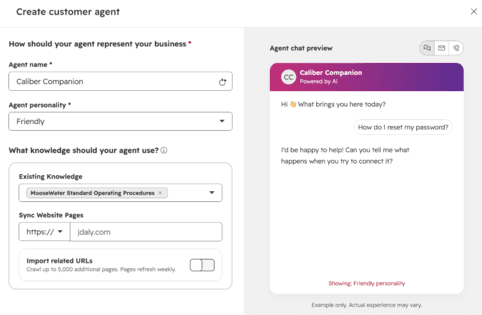
Built-in agents are strongest on the helpdesk's own content. Zendesk AI agents can also sync a long list of outside sources, including Confluence, SharePoint and Google Drive, per Zendesk's knowledge sources article, though they "do not search live data" and work from imported copies. Freddy AI Agent learns from solution articles, web links, files and custom Q&As. HubSpot's Customer Agent reads your HubSpot knowledge base and up to 5,000 crawled website pages, per its setup guide.
The gap I kept hitting is past tickets. None of the customer-facing native agents I checked lists your ticket history as an answer source. Zendesk uses historical conversations to suggest use cases and powers agent-side tools like similar solved tickets with it. Gorgias and Help Scout don't list past tickets as a source for AI Agent or Scout either.
Freshdesk users run into the same wall from the other side. One support lead on about 600 tickets a month posted this last week:
"It handles the very basic FAQ questions fine, but anything that needs looking something up still lands with a human. Our resolution rate barely moved. Before we spend more time tuning it, I'm trying to figure out if this is just Freddy's ceiling or something on our side, like the help center content being too thin. A colleague suggested putting a separate agent on top of Freshdesk instead."

And on HubSpot, the limit is data outside the CRM:
"What hasn't worked: anything that needs data outside HubSpot. If the answer lives in your ERP or billing system and you haven't piped it into HubSpot, the agent hits a wall."
That matters more than it sounds. On most of the support queues I've seen connected to eesel, the real answer to a weird question isn't in the help center. It's in a ticket someone resolved eight months ago, or a Google Doc the ops lead keeps. Here's how two eesel customers set this up:
- Cape Coffee Beans, a South African coffee retailer with more than a thousand products, runs eesel on Zendesk, Shopify and Google Drive. The team @mentions eesel in an internal note, and it searches the catalogue, past tickets and Drive files and links the source it used. It ran about 120 knowledge searches in a month.
- BEAUTEK, a German B2B equipment supplier, connected Zendesk, Notion, Google Drive and its website. eesel answers from about 6,700 pages and documents, including supplier sites, and drafted about 110 Zendesk tickets in a month.
If your knowledge lives in Confluence, Notion or old tickets, this one question can settle the whole decision. Google Drive works the same way through the Google Docs integration. My AI knowledge base guide covers how to get those sources in shape first.
Can you test it on your own tickets first?
Every vendor offers some kind of preview. What differs is what you're testing against: questions you make up, or the tickets your customers actually sent.
Here's what each one gives you before go-live:
- Zendesk has a free test widget and, in early access, a conversation simulator that runs multi-turn chats from scenarios you define. It's for messaging agents only, and Zendesk says it's "designed for testing with fictional data." Testing an email agent in production uses up resolutions, so Zendesk recommends a sandbox.
- HubSpot gives you a free test chat and batch testing on automatically generated questions.
- Gorgias has a free Playground and can re-run one existing ticket at a time, per its test conversations doc.
- Freshdesk previews consume Freddy sessions, published or not.
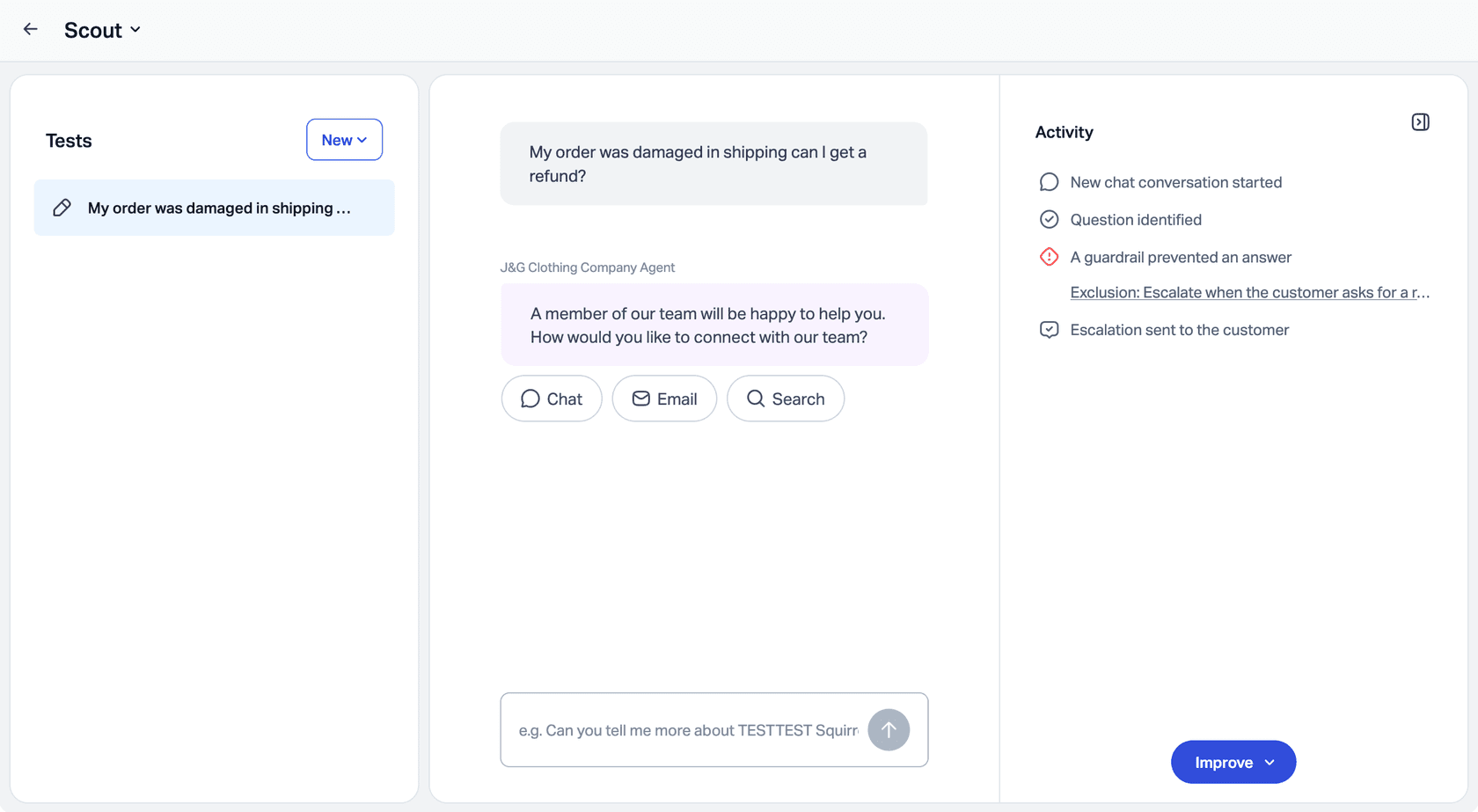
- Help Scout has a Scout test chat with an activity panel showing which guardrail fired.
eesel's approach is to replay real history. Its helpdesk simulation skill takes 20 tickets your team recently resolved, drafts its own reply to each, compares it with what your team sent, groups the results by theme and lists what to fix before going live. It sends nothing to customers.
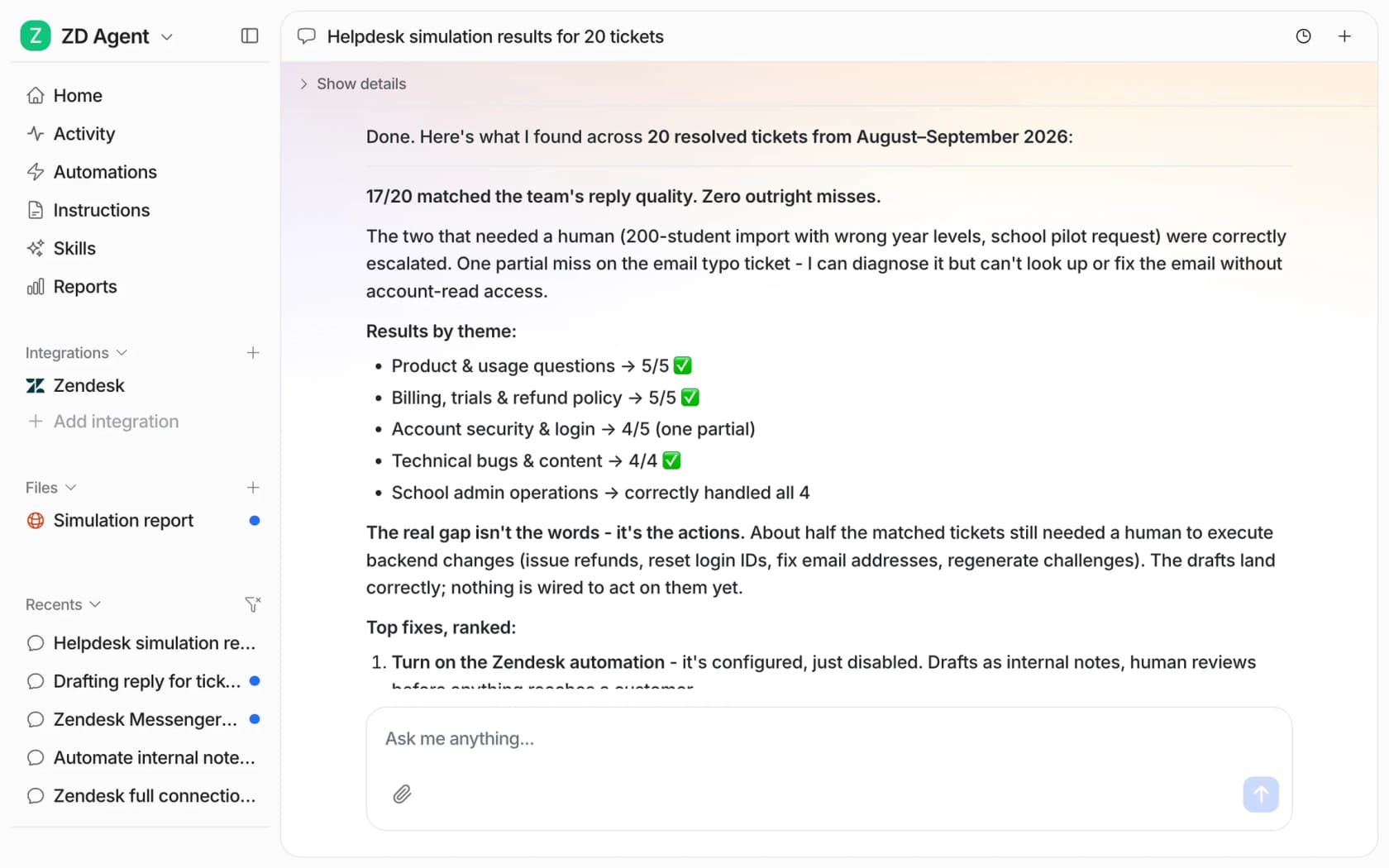
Test numbers matter for another reason: a vendor's own dashboard isn't an audit. One Salesforce admin's team learned that the hard way:
"We were seeing 30% deflection rate shown in the dashboard which really impressed people. We ran a big audit - a full manual review of nearly 700 conversations with the agent and each was given various tags in a spreadsheet to understand performance. It was actually deflecting 2%."
That's one team's audit, not a verdict on Agentforce, and another commenter in the same thread reports a measured escalation rate of about 15%. But it's the strongest argument I know for scoring the AI against your own tickets yourself.
Why I care about this so much: I've watched confident-sounding bots give wrong answers on live queues, and invented test questions are exactly where they look best. A real ticket with a typo, two questions and an angry tone is a much better exam. If you're building a test plan, my colleague's AI support agent testing guide and the pilot scorecard are good next reads.
What if you run several brands or helpdesks?
Native AI handles one helpdesk by definition, and multi-brand support varies. Zendesk creates each AI agent against one brand and its knowledge base, and you can connect only one AI agent to your email channel at a time, so brands on email are handled with procedures and search rules. HubSpot does better here: if you've created brands, you can run a separate Customer Agent per brand with its own tone and sources.
A layer can go one step further and handle brand logic in the instructions, across helpdesks if needed. Amagency answers support for Hoover Australia, Hoover New Zealand, Cubii Australia and Peacehive from one Gorgias account. eesel works out the brand from clues like the domain, currency and postcode, reads only that brand's rules, checks the order in the right store, and leaves a draft as an internal note. That's four brands on one agent, and it prepared about 350 tickets in a month.
If you're juggling brands, my multi-brand support guide covers the routing side.
What happens if you switch helpdesks?
Nobody picks a helpdesk planning to leave it. But teams switch, after a price rise, an acquisition, or outgrowing the tool, and the AI is now one of the most expensive things to rebuild.
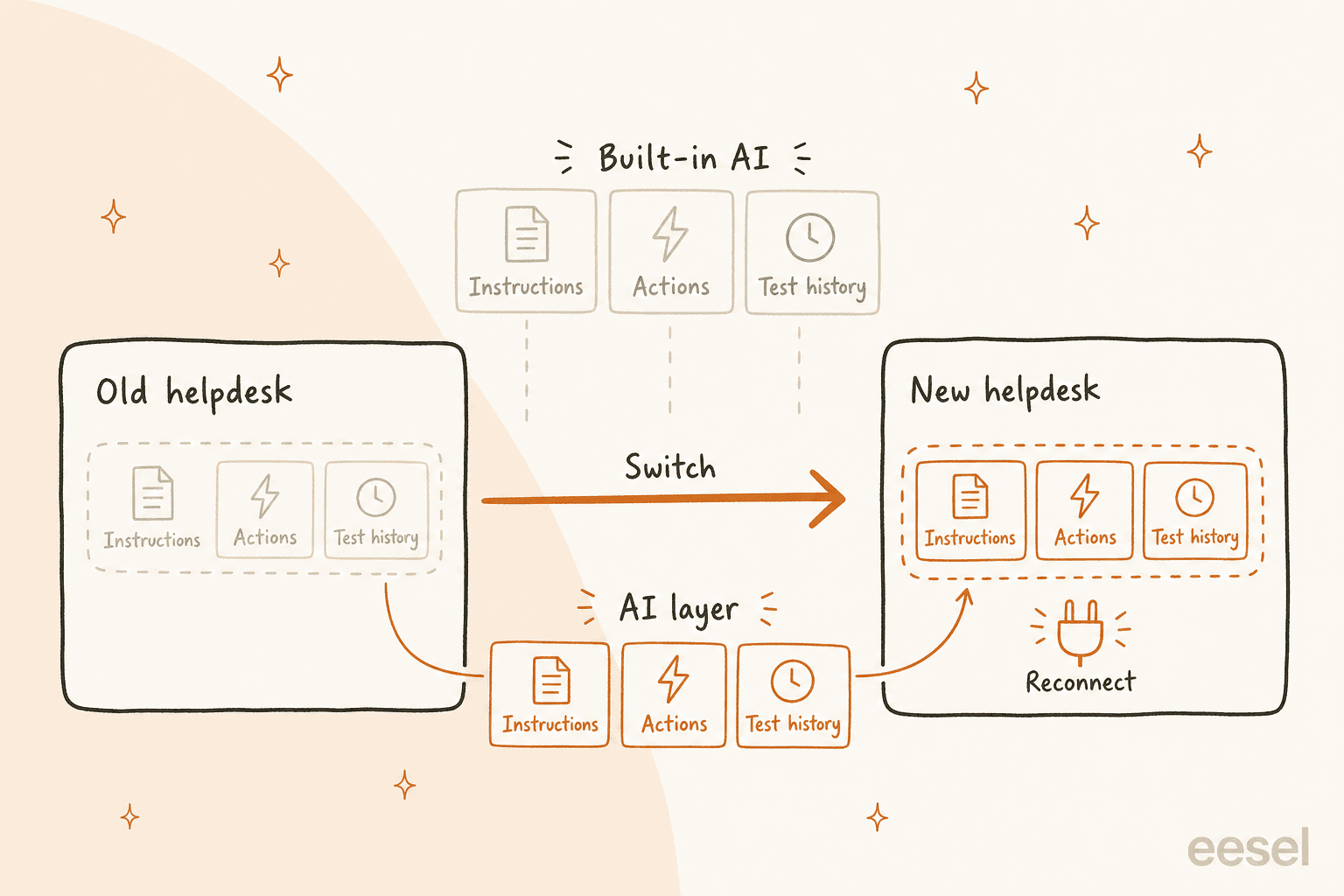
With built-in AI, your agent's instructions, guidance, tuned actions and test history live inside the old helpdesk's admin. Moving to a new helpdesk means a new AI agent, configured from scratch, on a new pricing model. With a layer, the knowledge and instructions sit in the layer, and you reconnect the new helpdesk. eesel works with 11 helpdesks, including Zendesk, Freshdesk and Gorgias. Some helpdesk-specific settings, like tags and triggers, still need remapping. It isn't zero work, just much less.
The migration itself is its own project. My guide on switching helpdesks covers keeping your ticket history intact.
What can each one actually do?
Answering questions is table stakes. The ROI shows up when the AI can do things: look up an order, cancel it, change an address, tag and route.
Native AI often has the edge on depth inside its own ecosystem. Gorgias AI Agent can cancel unfulfilled orders, edit shipping addresses, replace items and reship in Shopify, with customer confirmation on by default for irreversible actions. Agentforce can act on anything in Salesforce. Zendesk AI agents can now call custom actions, action flows and MCP connectors, with action credits at $200 per 100,000 actions beyond the plan's allowance, per the action builder announcement.
Some operators say native has caught up here. One r/Zendesk admin who scoped other vendors before staying put:
"I think between Zendesk's native AI and their advanced action flows it's insanely powerful now [...] To give an example we run 24/7 physical space operation and our bot pulls codes for access, cancels bookings, moves bookings and can tell us all the context we need on a customer."
Help Scout's Scout is the outlier: I found no actions in the Scout docs. It answers from knowledge or hands the conversation to your team.
A layer's actions depend on what each helpdesk's API exposes, which is the part of an AI helpdesk integration I spend most of my time on. eesel can reply, leave internal notes, tag and route on every supported helpdesk, look up Shopify orders, and reach other tools with an API. If your must-have is a deep native action (a Shopify refund flow inside Gorgias, say), check that specific action on both sides before you decide. An integration that can read and reply might not update every field you need.
Which one should you pick?
The most sensible advice I've seen on this came from a Reddit thread on exactly this question:
"Zendesk supports actions and API integrations, so I'd try your actual workflow there first. If it works and the handoff reaches the right group, I'd be inclined to stick with it and want a third-party bot to show a clear improvement on that same case before taking on another integration. Also, ask what you're charged when the bot tries an action and then hands off anyway."
I'd add one thing: run the same 20 real tickets through both, so you're comparing like with like.
Here's the decision path I'd walk a support lead through. Click your way down.
Pick the answer that fits your team at each step to see where you land. Built from the vendor pricing and help pages checked on October 20, 2026.
When the built-in AI is the better call
I work on the layer side of this, so let me be fair about where native AI wins.
- Your knowledge already lives in the helpdesk. If your help center is good and covers most questions, the native agent reads it with zero integration work. Zendesk's Copilot add-on then helps your human agents on the rest.
- Your volume is low and your resolution rate is modest. At a few hundred conversations and a 30% to 40% resolution rate, per-resolution pricing on HubSpot or Help Scout is hard to beat.
- You need deep native actions. A Shopify brand on Gorgias that mostly wants order edits and cancellations gets them without any extra vendor. My Gorgias AI Agent vs eesel comparison goes into where each one wins.
- Procurement is the bottleneck. One vendor, one contract and one security review is worth real money in some companies.
A layer earns its keep in the opposite situations: knowledge spread across tools, past tickets that hold the real answers, more than one brand or helpdesk, a possible switch on the horizon, or a finance team that wants the same AI bill every month. Plenty of teams also start with native AI and add a layer later, once the native agent hits the edge of its help center. If you're on Freshdesk, my Freddy vs eesel comparison is a good place to start.
Try eesel on the helpdesk you already have
If you've read this far, you probably already suspect your best answers live somewhere your helpdesk's own AI can't see. eesel joins your existing queue as an AI helpdesk teammate. It learns from your help center, macros and past tickets, plus Confluence, Google Docs or Notion, and you can replay 20 of your resolved tickets through it before a single customer sees a reply. It's one credit per ticket on a fixed monthly plan, and it works across Zendesk, Freshdesk, Gorgias, HubSpot, Help Scout and Salesforce, so it moves with you if you ever switch.

Try eesel free with 100 credits, no card needed.