
Featurebase pricing at a glance
Featurebase sells one subscription that bundles every module: the helpdesk inbox, the Fibi AI agent, feedback boards, roadmaps, changelog, surveys, the help center, and reporting. There is no separate SKU for any of them. The pricing page FAQ puts it plainly: "The pricing scales with seats - if you don't use all the products, you'll have less teammates on the platform and pay less."
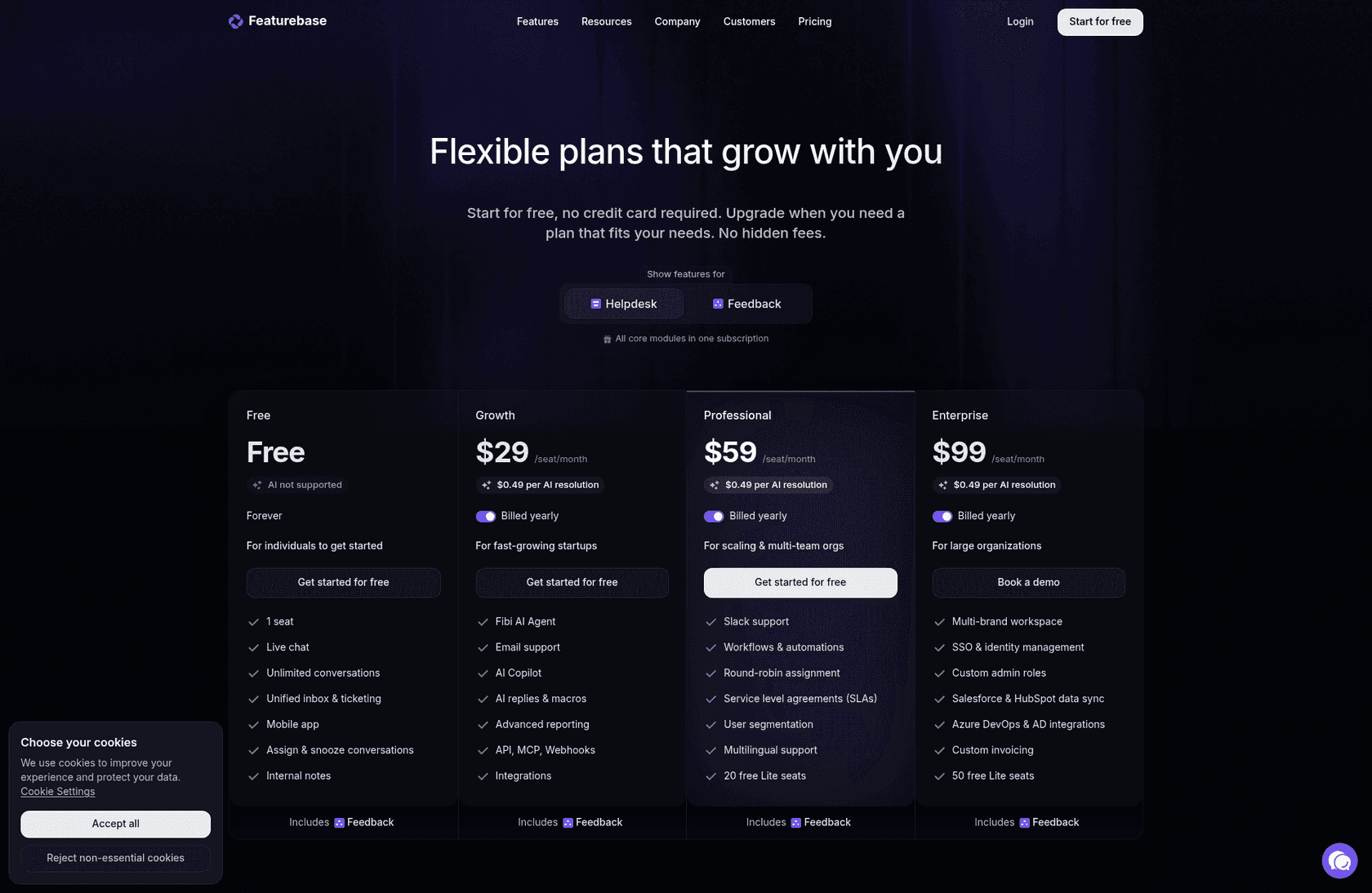
Here is every published price, both toggle states, read off the page on 17 August 2026.
| Plan | Billed yearly | Month-to-month | AI meter | Who the card is aimed at |
|---|---|---|---|---|
| Free | $0 forever | $0 | "AI not supported" | Individuals getting started |
| Growth | $29/seat/mo | $37/seat/mo | $0.49 per resolution | Fast-growing startups |
| Professional | $59/seat/mo | $75/seat/mo | $0.49 per resolution | Scaling and multi-team orgs |
| Enterprise | $99/seat/mo | $129/seat/mo | $0.49 per resolution | Large organizations |
Three things are unusual here, and all three are in your favour to know up front.
Enterprise is demo-gated but list-priced. Most vendors hide the top tier behind "contact sales". Featurebase publishes $99 and still asks you to book a demo. You can budget before you ever talk to anyone, which is more than you can say for most AI customer service vendors.
The monthly price hides behind a per-card toggle. The page defaults to the annual view, and the words "Billed yearly" sit next to the switch and do not change when you flip it. Only the number changes. If you skim, you will quote yourself $29 and sign up for $37.
The stated annual discount does not match the arithmetic. The FAQ says "All plans come with a 20% discount if you subscribe annually." The actual gaps are 21.62% on Growth, 21.33% on Professional, and 23.26% on Enterprise. That is a rounding story, not a scandal, and it happens to favour you. It is still the kind of thing worth checking on your own invoice.
One more that matters for procurement: SOC 2 Type II and GDPR are on every plan including Free, and Featurebase hosts data in the Netherlands and Germany. Plenty of vendors gate compliance behind Enterprise, so this is a genuine point in its favour.
The seat price is one of five meters
This is the part I'd want someone to tell me before I built a budget. Featurebase is not a per-seat product with an AI add-on. It is a per-seat product with four other meters attached, and only two of them have a published rate.
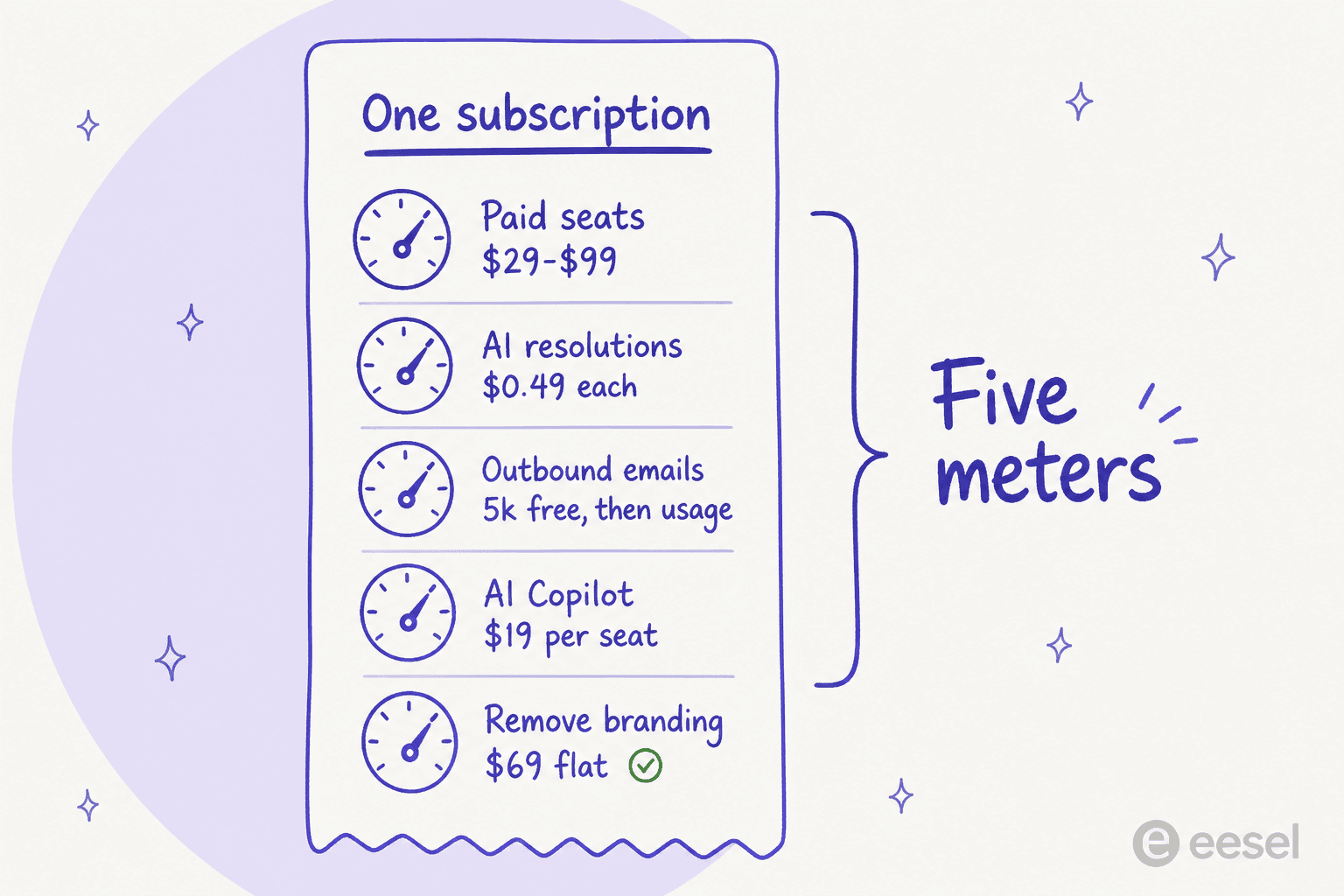
| Meter | Rate | Where it applies |
|---|---|---|
| Paid seats | $29 / $59 / $99 per seat per month | All paid plans |
| Fibi AI resolutions | $0.49 per successful resolution | All paid plans. Not on Free |
| AI Copilot | 10 free conversations per seat/month, then $19/seat/mo unlimited | All paid plans. Not on Free |
| Outbound emails | 5,000 free, then usage-based, rate not published | All paid plans. Not on Free |
| Remove Featurebase branding | $69/mo flat | Professional and Enterprise only |
Two of those deserve a flag.
The outbound email rate is nowhere on the page. You get 5,000 free and then "usage-based", with no per-email figure published anywhere on the pricing page. If you plan to run product updates, NPS surveys, or changelog blasts through Featurebase, that is a line item you cannot forecast until you're already on the hook for it. Worth asking sales for in writing.
Lite seats have a free allowance and no published price past it. Professional includes 20, Enterprise includes 50, and Growth includes none. Lite seats are for engineers, designers, or finance people who just need to read a conversation they've been added to, which is a sensible idea and something most shared inbox tools still charge full price for. But if you're on Growth and you want your engineering team to see feedback threads, every one of them is a full $29 seat.
The design intent is clearly good here. Featurebase is trying to say "buy one thing, not six", and for a small team replacing a feedback board plus a chat widget plus a docs site, that really is simpler than assembling three vendors. The catch is just that "one subscription" and "one number on the invoice" are not the same claim.
What Featurebase counts as a resolution
Every pay-per-resolution vendor lives or dies on this definition, and Featurebase's is unusually generous to Featurebase. From the Fibi resolutions doc, verbatim:
A resolution is counted when, following Fibi's last answer in a conversation, the customer either: 1. Confirms the answer was satisfactory (confirmed resolution), or 2. Exits the conversation without requesting further assistance (assumed resolution)
The FAQ on the same page is blunter about the second half:
Assumed resolution: When a customer doesn't ask follow-up questions or request to speak to a person (this auto-closes after 3 minutes of inactivity)... The system interprets silence after Fibi's answer (without negative feedback or follow-up questions) as satisfaction.
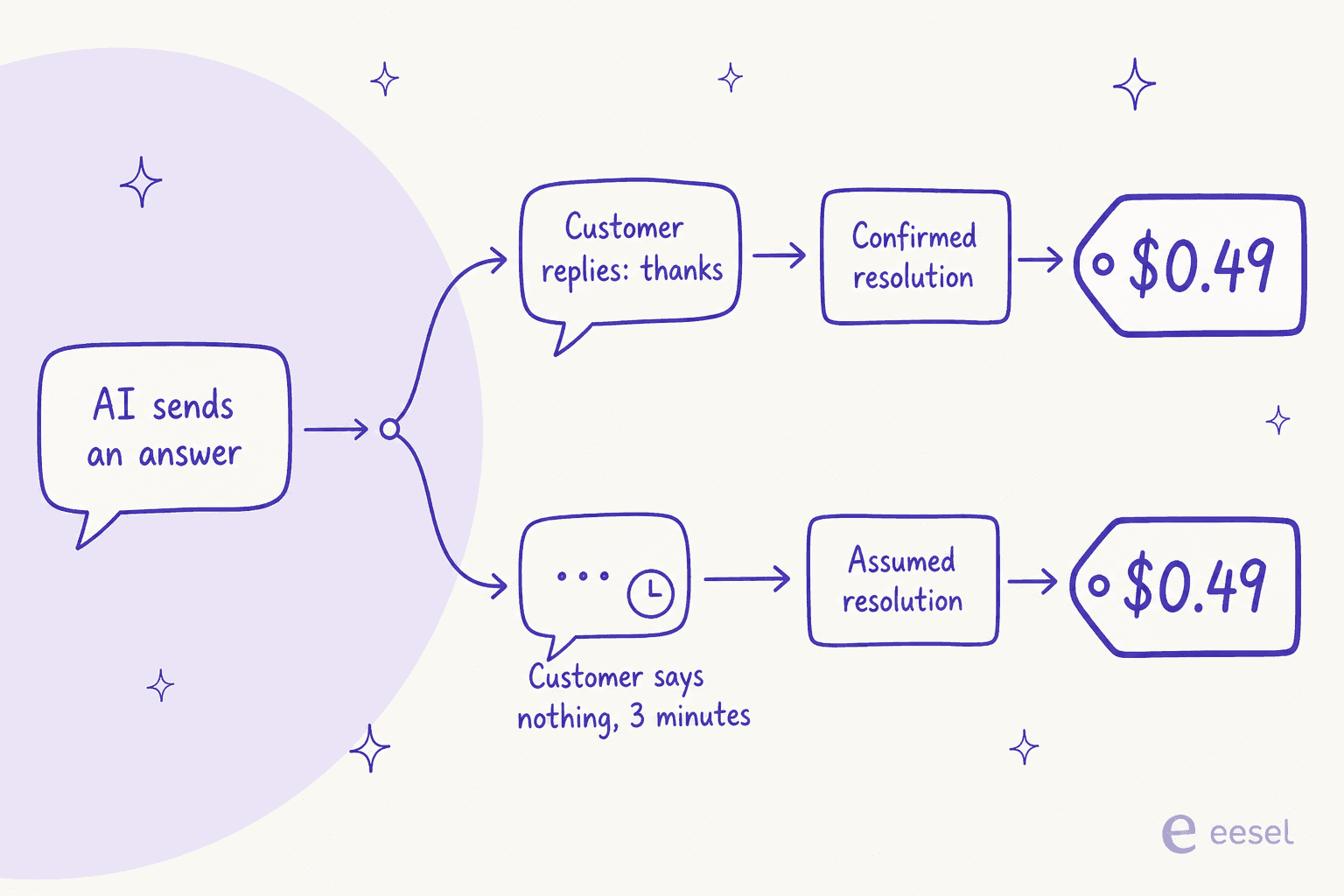
So a customer who reads the answer and gives up, or gets distracted, or closes the tab, produces the same $0.49 line as one who says "perfect, thanks". And the docs add: "The resolution approach isn't directly configurable."
To be fair, there are three real carve-outs, and they matter:
- Greetings don't count. "If Fibi merely responds to a greeting, this is not considered an answer."
- Returning customers claw the charge back. If someone comes back to the same conversation needing more help, "even across billing periods", that resolution is deducted and not charged.
- Asking for a human means no charge. If the customer requested a person, or asked for more help before a teammate joined, it is not billed as resolved.
That third one is well designed, and Featurebase says so in its own billing UI: "You are only charged for the number of AI resolutions, not the number of total conversations that end up being forwarded to humans." A lot of vendors bill the attempt. Featurebase doesn't, so a clean handoff to a human costs you nothing.
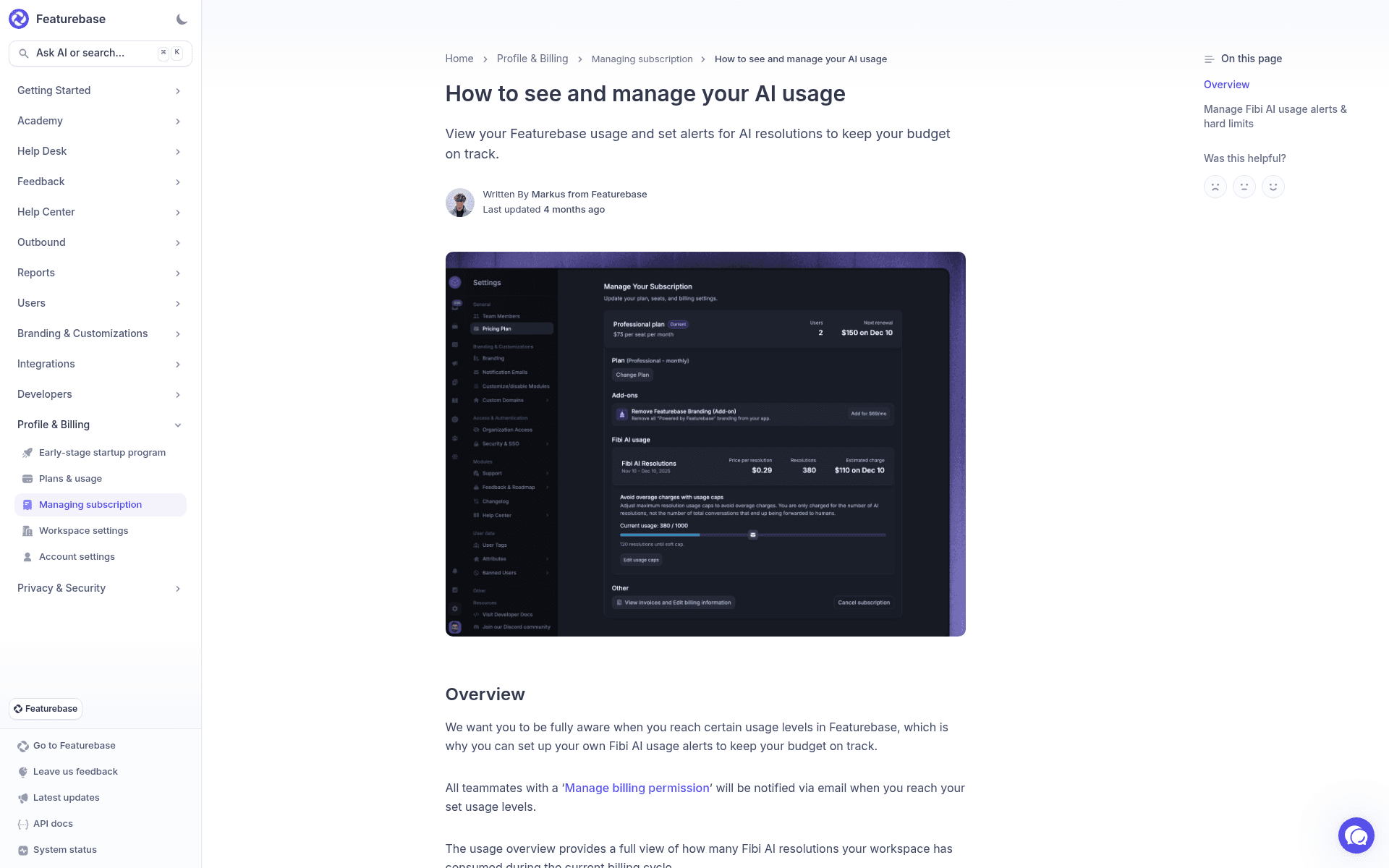
Look closely at that billing screenshot, because it carries a detail the pricing page does not. The Fibi usage panel shows a billing period of Nov 10 to Dec 10 2025, 380 resolutions, and a price per resolution of $0.29 producing an estimated $110 charge. The live pricing page today says $0.49. Featurebase's own help doc is still carrying the older rate in its illustration. I can't tell you exactly when it moved or why, and Featurebase hasn't published a changelog entry for it that I can find, but the two numbers are both public and both theirs. If you're modelling a multi-year commitment on a usage meter, that is the kind of thing to write a price-protection clause about.
The deeper issue is the one behind the rate. Silence-as-satisfaction is a defensible product decision, but it means your invoice is measuring conversation shape, not customer outcome. The lower your AI resolution rate truly is, the more the gap between "billed resolutions" and "actually resolved" grows, and nothing in the billing screen distinguishes the two.
Two things make that gap checkable rather than theoretical. Pull your own first contact resolution baseline before you sign, and turn on Fibi's CSAT prompt from day one so you have a satisfaction signal sitting next to the billing count. Featurebase supports CSAT collection inside the "Let Fibi answer" workflow step, and it costs nothing extra. Without it, the only number you'll have at renewal is the one you were billed on.
Work out your own Featurebase bill
Plug in your team and volume. The default numbers are a five-person support team at 2,000 AI conversations a month with a 65% resolution rate, which is roughly what a mid-sized SaaS support queue looks like.
Three worked examples
The calculator is the useful version of this, but here are three fixed scenarios so the shape is visible without touching anything. All three assume a 65% resolution rate and annual billing.
| Small team | Growing team | Busy team | |
|---|---|---|---|
| Plan | Growth | Professional | Professional |
| Paid seats | 2 | 5 | 12 |
| AI conversations/month | 500 | 2,000 | 5,000 |
| Billed resolutions | 325 | 1,300 | 3,250 |
| Seats | $58 | $295 | $708 |
| Resolutions at $0.49 | $159.25 | $637 | $1,592.50 |
| AI Copilot unlimited | not enabled | $95 | $228 |
| Remove branding | not available on Growth | $69 | $69 |
| Total per month | $217.25 | $1,096 | $2,597.50 |
| Per year | $2,607 | $13,152 | $31,170 |
| Seats as a share of bill | 27% | 27% | 27% |
That last row is the one I'd screenshot. Across every realistic scale, the seat price is roughly a quarter of what you actually pay. If you built your business case off the $59 card, you built it off a quarter of the number.
For context on whether those totals are good or bad, the busy team's $31,170 a year is roughly what one full-time support hire costs in many markets, which is the comparison most buyers are actually making when they run an AI versus human agent cost exercise. Featurebase wins that comparison comfortably at every row in the table. The question this post is answering is narrower: whether the number on the pricing card is the number you'll pay.
The busy-team column has a second problem stacked on the first, which is the next section.
The spend cap, and where it stops
Featurebase does give you a brake, and it's better than most. In Settings, under AI usage, you can set a soft cap that emails your billing admins, and a hard cap that disables Fibi for the rest of the billing period. That's a real guardrail and I'd rather have it than not.
It has a ceiling, though, and the ceiling is low. Verbatim from the docs: "You can't currently set the Hard Cap higher than 2000 to protect you from high invoices."
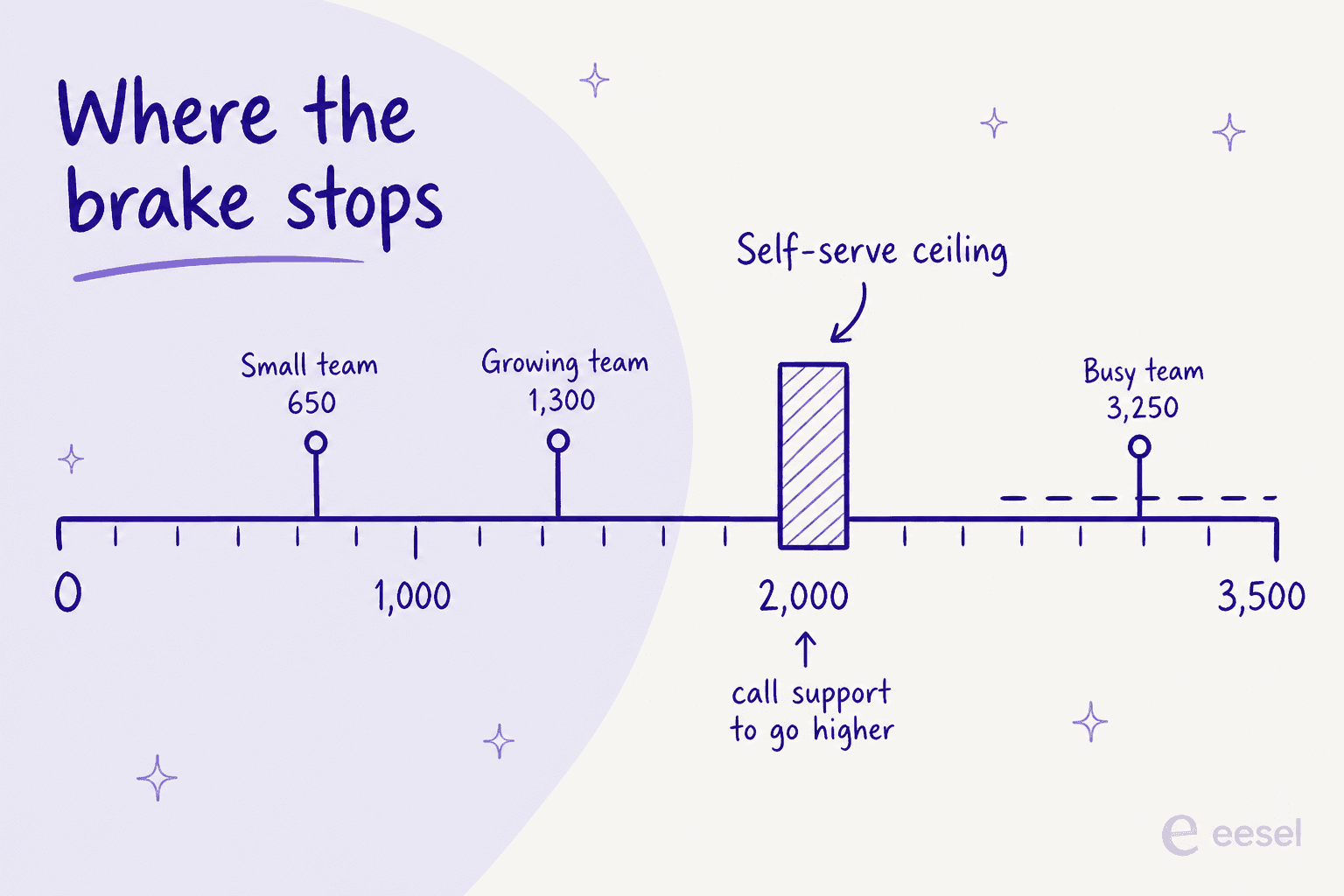
The busy team above runs 3,250 resolutions a month. They are past the ceiling, so they cannot set a hard cap that reflects their own budget without going through support. The protection mechanism runs out exactly at the volume where protection starts to matter.
Three more details from the same doc, all worth knowing before you rely on it:
- The cap is approximate. "We cannot guarantee the limit will be 100% accurate... the final number of resolutions can be slightly higher/lower."
- Setting a cap below current usage kills Fibi immediately, and you cannot set it below your contracted resolutions.
- After a hard cap trips, new conversations jump straight to handover. Which is the correct behaviour, but it means your queue goes fully human mid-month with no warning to the agents. Worth pairing with a real escalation plan.
What the Free plan actually gives you
The Free plan is honest about what it is, which I appreciate. It is one seat, one feedback board, one roadmap, 50 help center articles, and live chat as the only channel. The card says "AI not supported" and means it: no Fibi, no AI copilot, no AI replies or macros, no Ask AI search, no AI deduplication.
It also has no integrations at all, no API, no MCP, no webhooks, no custom domain, no reporting, and no Outbound. What it does keep is a public help center, the embeddable widget, SOC 2 Type II, and GDPR.
| Free plan limit | Number |
|---|---|
| Paid seats | 1 |
| Lite seats | 0 |
| Feedback boards | 1 |
| Roadmaps | 1 |
| Help center articles and collections | 50 |
| End users | Unlimited |
| Posts and comments | Unlimited |
| Channels | Live chat only |
| AI features | None |
| Integrations | None |
Read that as a single-founder feedback board with an AI knowledge base attached, and it's a decent free tier. Read it as a free helpdesk and you will be disappointed within a week, because one seat and no email channel is not a support desk. The 10-day paid trial with no credit card is the more useful entry point if you're evaluating the support half, and it's the only way to see automated ticket resolution working on your own content.
Where the plan gates bite
The single most common complaint in the G2 reviews is not that anything is broken. It is that things are gated. "Limited features on lower tiers" shows up 9 times in G2's own aggregated con clusters, second only to "missing features" at 11.
Here is what specifically moves from Growth ($29) to Professional ($59), because this is where most teams find out they need to upgrade:
| Capability | Growth | Professional |
|---|---|---|
| Workflows and automations | No | Yes |
| Service level agreements | No | Yes |
| Round-robin assignment | No | Yes |
| Team inboxes | No | Yes |
| Slack as a channel | No | Yes |
| Fibi over email | No | Yes |
| Fibi over Slack | No | Yes |
| Fibi custom actions | No | Yes |
| AI inbox translations | No | Yes |
| Multilingual help center | No | Yes |
| Single sign-on | No | Yes |
| Lite seats included | 0 | 20 |
| Remove branding | Not offered | $69/mo |
That is a demanding list for the difference between $29 and $59. Notice in particular that Fibi only reaches email and Slack on Professional. If you're buying Featurebase primarily for the AI agent and your volume arrives by email rather than chat widget, Growth is not the plan you want, whatever the pricing page implies. That single fact roughly doubles the realistic entry price for an email-first team, which is most shared inbox teams I talk to.
The other two Professional gates I'd flag are SLA management and multilingual support. Both are normal expectations for a team past about ten people, and both sit behind the same upgrade as the automation engine, so in practice there is no configuration where a growing team stays on Growth for long.
Admin SSO is stranger still. The workspace table's "Single Sign-On" (end users logging into your portal) lands on Professional. The security table's "Admin SSO (SAML/OIDC)" (your teammates logging in) is Enterprise only, with a 5-seat minimum. Both rows live on the same page and they mean different things. SSO gating is also the one gap where community voices and review sites independently agree, as one X thread comparing the two feedback tools put it:
"Canny Vs FeatureBase? Why?
me : Featurebase has a great UI; but Canny has free single sign on."
Discounts worth asking for
Featurebase publishes more discount routes than most vendors, and one of them is aggressive.
| Programme | Discount | Eligibility |
|---|---|---|
| Early-stage startup | 86% off, plus 1 year of Fibi AI free | Founded less than 2 years ago, fewer than 6 employees. Gets Professional features |
| Open source and non-profit | 15% off | Contact support |
| Annual billing | Stated as 20%, actually 21-23% | Any paid plan |
| Free trial | 10 days, no credit card | Any paid plan |
The startup programme is the one to notice. Professional features at 86% off is roughly $8.26 per seat per month, and a year of the AI agent with no per-resolution meter running at all. For a two-year-old company with five people, that is an excellent deal and I'd take it. The thing to plan for is the cliff: when year two arrives, you go from $0 of AI cost to a live $0.49 meter on whatever volume you've grown into by then. Budget for the second year, not the first, and if you're at that stage our notes on support for Series A startups cover what usually breaks at the same moment.
What buyers actually say about the pricing shape
Featurebase sits at 4.7 out of 5 from 50 reviews on G2, against Canny's 4.5 from 108. Worth saying plainly though: Capterra has zero reviews and Trustpilot has one, so G2 is the only sample with any weight behind it, and 89.8% of those reviewers are small businesses. Anyone telling you Featurebase is "well reviewed across review sites" is overstating the evidence.
The sharpest pricing comment on the page comes from a reviewer who still gave it 5 out of 5:
"The pricing can become expensive quite quickly if you want to add more languages or access additional AI features. I wish pricing were more based on usage or activity rather than specific features. That would make it easier for an early-stage startup like ours to access more functionality early on and scale alongside the product."

That is a precise diagnosis. The complaint is not the amount, it's the shape: capability gated by tier rather than metered by use. A five-person startup that needs SLAs and email-based AI has to buy the whole Professional tier for twelve people's worth of features it won't touch.
A second reviewer, from the only mid-market voice in the con set, points at the same thing from the other end:
"Some of these modules, along with features like versioning and multilingual support, feel somewhat incomplete or immature. It appears that the focus of innovation is on introducing additional modules, rather than enhancing essential or frequently requested features within the existing ones."
And the pro side is consistent enough to state as fact: the most repeated praise across the whole G2 set is response speed from the Featurebase team itself, named independently by four separate reviewers. One IT services reviewer also called it "well worth the price, cheaper than alternatives like Hubspot", which lines up with the arithmetic at small scale. That framing is worth holding onto, because the buyers running away from Zendesk's pricing and the ones comparing Chatbase pricing or GitBook pricing are arriving at Featurebase from four different categories at once, and each of them is measuring a different part of the bundle.
Is Featurebase worth the money?
Here's my honest read after going through every published number.
Featurebase is very good value below about 1,000 AI conversations a month, and the reason is bundling rather than rate. You are getting a helpdesk, an AI agent, a knowledge base, feedback boards, a roadmap, a changelog, and surveys for the price of one mid-tier tool. If you were otherwise going to buy a feedback tool plus a support desk plus a docs platform, the consolidation is real money saved. For a team at that stage it is one of the better options in startup support tooling right now.
Above that, the shape starts working against you. The $0.49 meter scales with conversation volume while your seat count doesn't, so the AI line overtakes the seat line and keeps going. The 2,000-resolution ceiling on the hard cap arrives right about then. And the assumed-resolution definition means the meter counts silence, which is precisely the outcome you'd least like to pay for. If you're modelling this against your current spend, our breakdown of AI customer service cost has the per-unit comparisons across the main vendors.
The gap I'd want closed before I put it on a live queue is testing. Featurebase says it outright in its own docs: "Currently, there's no separate sandbox environment." The recommended way to test a change to Fibi's knowledge is the live messenger on your real website. There's a good after-the-fact correction tool, the "Improve answer" panel, but that runs downstream of a real customer conversation. The safety model is correct-after-live rather than simulate-before-live.
I have watched a confident-sounding bot quietly give wrong answers to real customers for a week before anyone noticed, which is exactly why every eesel rollout gets simulated against thousands of historical tickets before a single reply goes out. That's not a knock on Featurebase's engineering, it is a difference in what the product is built to guarantee. If your queue is small and forgiving, live testing is survivable. If it isn't, that's the risk to price in alongside the $0.49, and it is the reason I'd stage any support chatbot automation rather than flipping it on across the whole queue.
Try eesel
If the thing pushing you off Featurebase is the meter count rather than the product, that is the specific problem eesel was built around. There is exactly one meter: $0.40 per ticket your AI actually handles, with no per-seat fee, no platform fee, and no monthly minimum. Route 200 of your 1,000 tickets to the AI and you pay for 200, because you're never charged for tickets your humans handle.
The other half is the part I care about more. Before anything reaches a customer, eesel replays your agent against thousands of your own past tickets and shows you what it would have said and what it would have cost, so you get your resolution rate and your monthly bill as a forecast rather than an invoice. That's the dry run Featurebase's docs say doesn't exist yet.

Being straight about the trade: eesel does not do feedback boards, roadmaps, or public changelogs. If you're buying Featurebase for the product half, keep it, and the Featurebase alternatives roundup splits the market by which half you're actually replacing. If you're buying it for the support half, it's worth an hour to compare. You get $50 of free usage to test with, no card required, and it connects to Zendesk, Freshdesk, Gorgias, Help Scout, and Front in a few minutes. Try eesel and see what your own ticket history says.
Frequently Asked Questions
How much does Featurebase cost per month?
Is Featurebase free, and what are the limits?
What is Featurebase's pricing for AI resolutions?
Does Featurebase charge extra beyond seats and AI resolutions?
Is Featurebase cheaper than Zendesk or Freshdesk?


Article by
Kurnia Kharisma
Kurnia is a software engineer and writer at eesel AI with two years of SEO experience, writing about AI tools, helpdesk software, and customer support. He pairs a developer's understanding of how these products are built with search-driven research into what actually ranks and resonates with the people searching for them.