

A good AI support RFP template has three parts: pass/fail gates (security, data use, your helpdesk), a written question bank, and a test on your own past tickets that every vendor runs the same way. Rank vendors only after the gates, and score the ticket test higher than the demo.
The question that saves the most money is about the billing unit. Zendesk bills each "verified resolution" ($1.50 committed, $2.00 pay as you go), Salesforce Agentforce bills $2 per conversation, and eesel bills one credit per ticket or chat it works on ($299 for 500). Ask every vendor to price the same month of your tickets, because their quotes can't be compared until they do.
If you want a vendor that will run that ticket test before you sign anything, eesel replays 20 of your resolved tickets, compares its drafts with what your team actually sent, and sends nothing to customers. The template below works for any vendor, eesel included.
Why do most AI support RFPs pick the wrong vendor?
Because they score what the vendor says instead of what the AI does on your tickets. A typical RFP asks 80 questions, gets 80 confident answers, and then picks whoever gave the best demo. The demo used the vendor's chosen scenarios, on a clean knowledge base, with a sales engineer driving.
I build integrations at eesel, so I see the other side of this: the buyer's questions after the contract is signed. They are almost never about features. They are "why did it answer that ticket?", "why did my bill go up in November?" and "why does it say yes to products we don't support?" Every one of those could have been an RFP question.
The fix is a different order of work, not more questions:
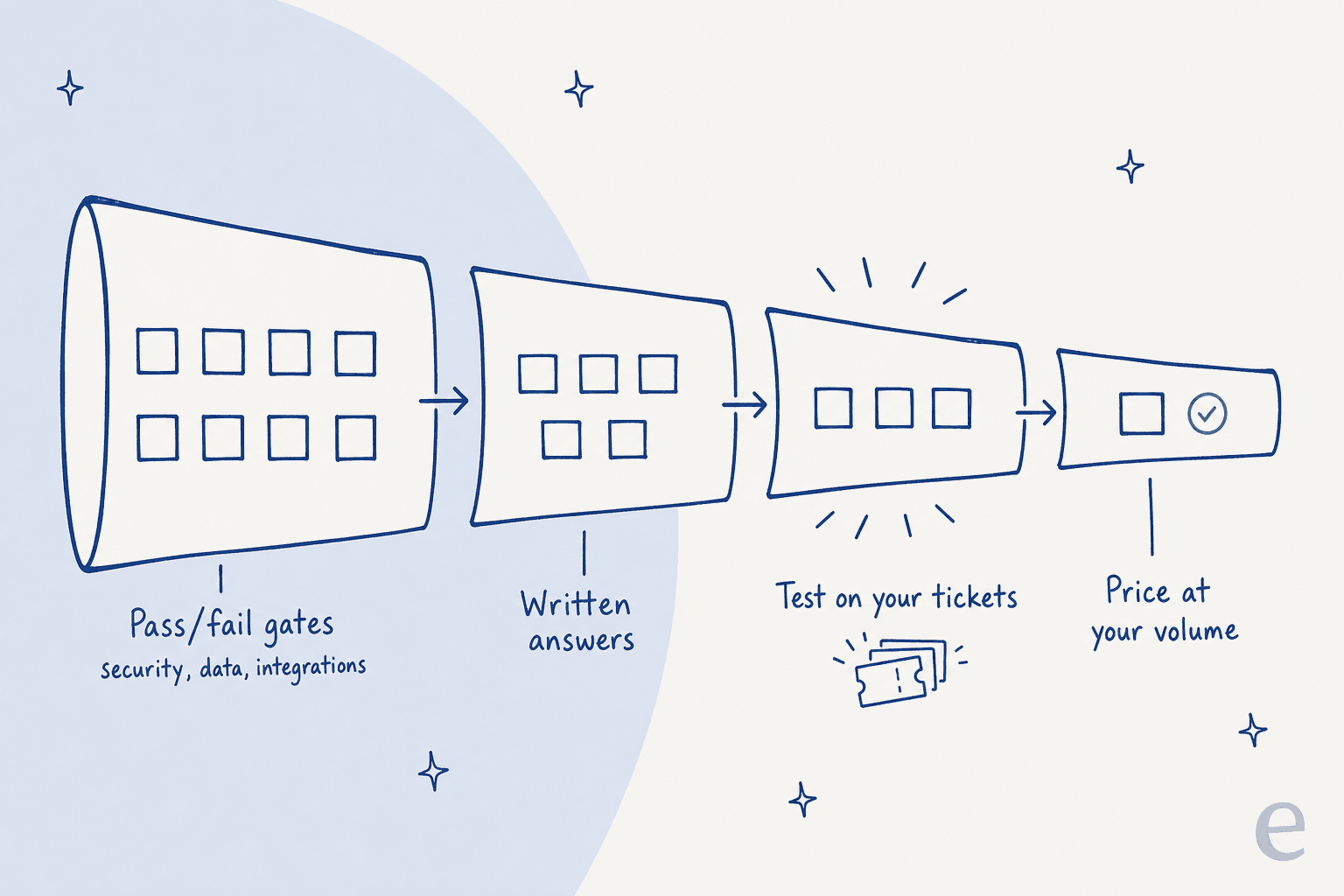
- Gates first. Anything that can kill the deal (security certification, data use, your helpdesk, HIPAA) is a yes/no, checked before anyone scores anything.
- Written answers second. The question bank below, answered in writing, with evidence.
- Your tickets third. The two or three survivors run the same test set from your history.
- Price last, at your volume. Every vendor fills in the same cost row.
On eesel's sales calls, the request that comes up most is training the AI on the buyer's own past tickets My colleague Amogh put it bluntly after a run of demos: "past ticket training strikes again." Buyers already know their own history is the real test. Most RFP templates just don't ask for it.
What goes in an AI support RFP template?
Ten sections. Each one maps to a decision you'll have to defend later, to your CFO, your security team or your agents.
| # | Section | What it decides | Pass/fail or scored? |
|---|---|---|---|
| 1 | Your background and goals | What "good" means for you (volume, channels, languages, target outcomes) | Context only |
| 2 | Vendor overview and references | Whether they've done this at your size, on your helpdesk | Scored |
| 3 | Resolution quality and accuracy | Whether it answers correctly, and admits when it can't | Scored (highest weight) |
| 4 | Handoff and control | What it does when it shouldn't answer | Scored |
| 5 | Helpdesk integration and actions | Whether it works inside your tools and can do things, not just talk | Gate, then scored |
| 6 | Security, privacy and data use | Certifications, model training, retention, PII | Gate |
| 7 | Pricing and billable units | What you'll pay at your volume, in a bad month and a good one | Scored |
| 8 | Implementation and support | Who does the work, how long, and what you have to supply | Scored |
| 9 | Ticket test | How it does on your own history | Scored |
| 10 | Contract and exit | Price locks, data export, what happens when you leave | Gate, then scored |
Section 1 is the one teams skip, and it's the one that makes vendor answers comparable. Give them your real numbers: tickets per month by channel, top 10 contact reasons, languages, helpdesk, and which ticket types you never want the AI to touch. One support lead put that last one plainly on an eesel call: "There are certain tickets I don't want to go through AI." Put that list in the RFP, not in a follow-up call.
What questions should you ask AI support vendors?
Copy these into your RFP as written questions. For each one I've added what a strong answer looks like, because the weak answers all sound similar and the difference is in the detail.
Resolution quality and accuracy
This section gets the most weight, and it's where vendors are most practised. Push past the headline number.
- What does your resolution rate count? Strong answer: an exact definition, who or what decides a ticket was resolved, and whether spam, auto-closed tickets and customers who simply left are included.
- What's your resolution rate on tickets like ours? Strong answer: results split by contact reason and channel, with the sample size and date range. A single blended number across all customers tells you nothing.
- What does it do when the knowledge base has no answer? Strong answer: it says it doesn't know and hands over. Ask them to show it.
- Does it ever answer from the model's general knowledge instead of our content? Strong answer: no, or yes with a setting to turn it off. A technical evaluator on an eesel sales call asked exactly this: whether the AI falls back to something like ChatGPT when it doesn't know, and whether that can be switched off.
- How do you catch a wrong answer after launch? Strong answer: a named process (sampling, scoring, alerts), plus where you see it in the product.
- What happens when the model provider changes the model? Strong answer: they re-run tests on your history before the change reaches you, and tell you.
That first question matters more than it looks:
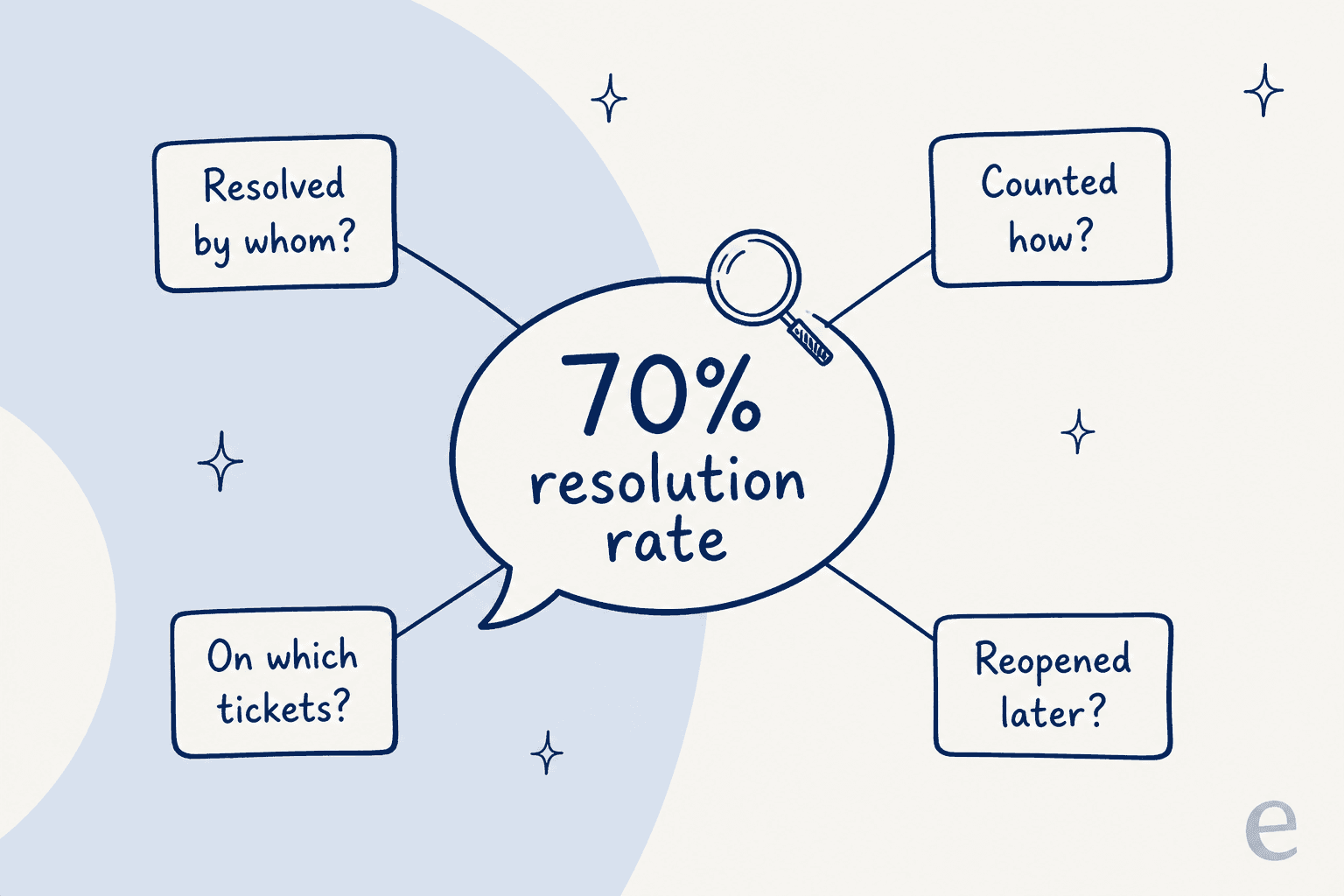
In one eesel trial on real e-commerce Zendesk traffic, 22% of the incoming tickets were spam. A vendor that counts closing spam as a "resolution" can add 22 points to its rate without answering a single customer. The post on deflection vs resolution rate walks through how nine helpdesks count this differently.
One operator on Reddit described what happens when nobody checks what "resolved" means:
"So we audited a week's worth of auto tickets and found 3 separate cases where the bot made up a policy that doesn't exist. The scary part is the customers believed what it said and walked away feeling that WE were wrong. It even marked the ticket as "resolved" so we didn't notice until they dropped a negative review."

So add a seventh question: how do you count a ticket the customer reopens, or contacts you about again, within 7 days? If the vendor's number doesn't subtract those, it's measuring how conversations end, not whether problems got solved.
Handoff and control
- Which tickets can we exclude completely, and how? Strong answer: by tag, form, channel, customer segment or topic, set by you, not by a ticket to their support team.
- Can it start by drafting replies for agents before it sends anything? Strong answer: yes, with a switch per topic or channel to go from draft to send.
- What does the human see when it hands over? Strong answer: a summary, what it already tried, and the sources it used, written into the ticket.
- Can a customer reach a human at any point? Strong answer: yes, and you can see how often they ask.
The clearest version of this I've seen came from a CX lead at a direct-to-consumer brand handling about 7,000 tickets a month:
"The AI will never be able to answer 100% of the questions, but if it tries and just answers 'sorry I don't know this,' I cannot go and check all my 7,000 tickets to see if the AI actually made a good answer. Then the point is a little bit gone. I need an AI who is only handling the tickets that it's confident to handle and all the other ones, leave them alone."
That's a requirement, so write it as one: "The AI must only reply to tickets it can answer from our content, and must leave all others untouched for a human." Then test it. My post on AI agent handoff best practices covers what a clean handover looks like.
Helpdesk integration and actions
This is my day job, so I'll be blunt: "integrates with Zendesk" can mean anything from a full agent that tags, routes and replies inside tickets, to a widget that reads your help center and nothing else.
- Does it work inside our helpdesk as an agent, or beside it? Strong answer: it reads and writes tickets, tags, fields and internal notes in your helpdesk, with a list of exactly which.
- Which actions can it take, not just answer? Strong answer: a named list (look up an order, update a field, issue a refund under a limit), with how each is authorised and logged.
- What does it learn from? Strong answer: help center, macros, past tickets, internal docs, each one optional and filterable. Ask whether you can choose which past tickets it reads (date range, tags).
- What happens when our helpdesk API is down or slow? Strong answer: retries, no duplicate replies, and a log you can read.
- How fast does it reply? Strong answer: measured times for chat and email on real traffic. One buyer ran a 67-test evaluation, found the answers solid, then walked away because the chat widget was slow and kept getting stuck. Speed belongs on the scorecard.
If you're on a specific helpdesk, ask for a customer on that same helpdesk as a reference. Compare what each vendor says against what your helpdesk's own AI does: the Zendesk AI pricing, Freshdesk Freddy AI pricing and Gorgias AI pricing breakdowns are good baselines.
Security, privacy and data use
Most of this section is pass/fail. Deals I've seen stall at this stage did so for one reason each: no SOC 2 report, an internal ISO review the vendor couldn't pass, or no HIPAA business associate agreement. Find out in week one, not week six.
- Which certifications do you hold today, and which are in progress? Ask for the report or a bridge letter, and the scope. "SOC 2 Type II in progress" and "SOC 2 Type II report available under NDA" are different answers.
- Is our data used to train any model, yours or a provider's? Strong answer: a clear no, in the contract. Read the detail: Zendesk's trust center says its generative AI isn't trained on customer data, but sanitised service data does train its own cross-account machine learning models.
- Where is our data stored and processed, and by which subprocessors? Strong answer: a list, with regions.
- Can you redact card numbers and other personal data before it's stored? One media company evaluating eesel made this their top objection before they'd even start a trial.
- Do you sign a HIPAA BAA, and on which plan? Only if you handle health data, but if you do, it's a gate.
- What happens to our data when we leave? Strong answer: export in a named format, deletion with confirmation, and a time limit.
A standard security questionnaire won't catch all of this on its own. A buyer at a 200-person B2B SaaS company put the gap well:
"My company (200 people, B2B SaaS) is starting to use AI vendors for customer support and internal tools. Our procurement process is basically "fill out security questionnaire, get SOC 2, done." But I'm realizing SOC 2 doesn't cover AI-specific stuff. Like what happens when the vendor updates their model and it starts giving wrong answers? What if the training data had customer info in it?"
That's why the model-change question from the accuracy section belongs next to the security gates, not only in the product review.
For the full version, use the AI support vendor security checklist as an appendix to the RFP, and the SOC 2 and GDPR guide if your security team is new to AI vendors.
Pricing and billable units
The answers here look comparable and aren't. One vendor bills per resolution, one per conversation, one per credit, one per seat, and three won't publish a price at all. Ask these:
- What exactly is one billable unit? Get the definition in writing.
- Who decides a conversation counts, and can we see and dispute it?
- What happens in our busiest month? Ask for the bill at 2x your normal volume.
- Is there an overage, and is it on by default?
- Are price increases capped for the contract term? One hardware support team evaluating eesel had watched a previous vendor's price more than double, and wanted a price lock in writing this time.
- Fill in this row: our ticket volume by month for the last 12 months, priced at your rates.
The billing unit changes who pays for failure:
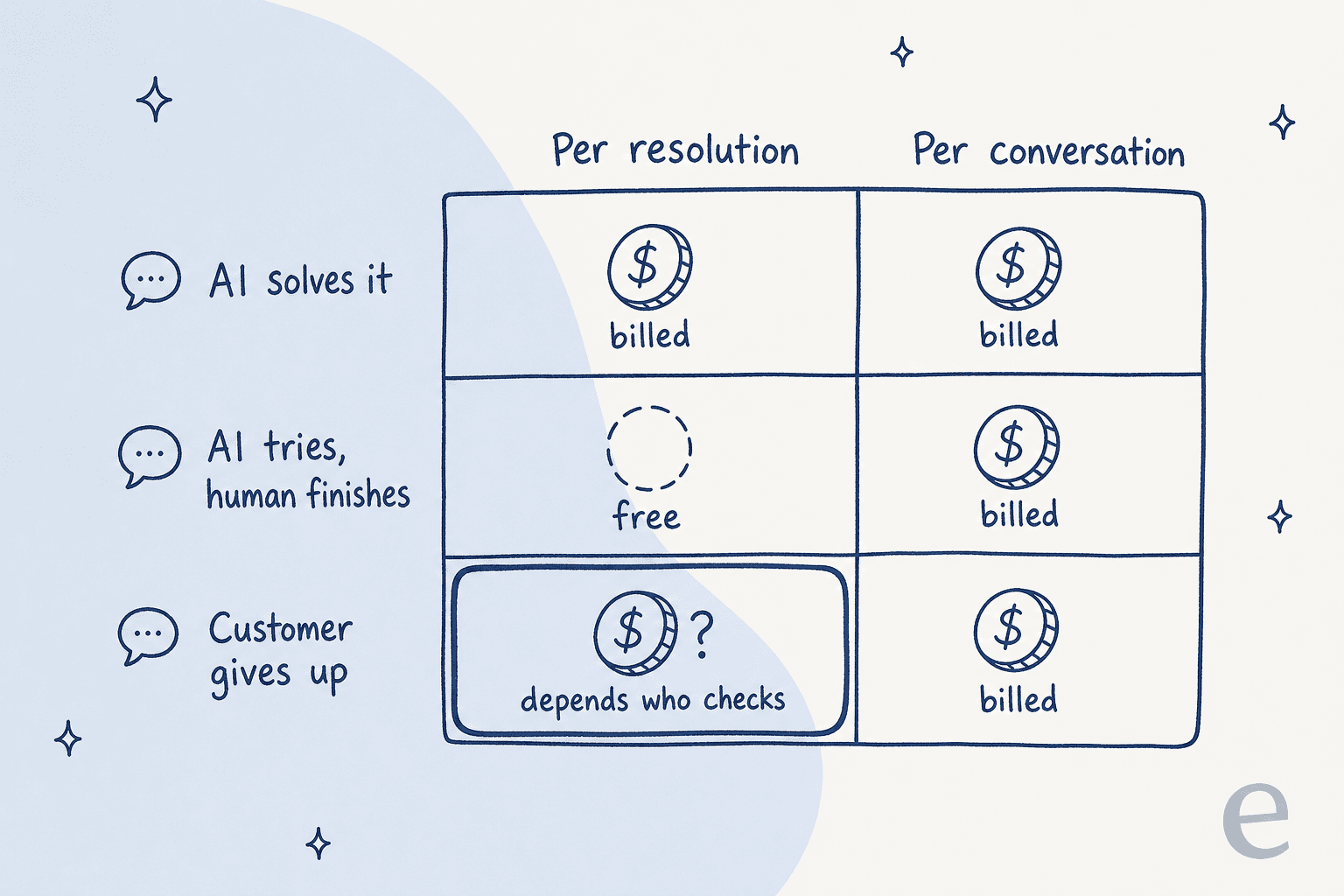
That bottom-left cell is now the most important question in the section. Since May 18, 2026, Zendesk sorts every AI conversation into three tiers, and only a "verified resolution" draws on your allowance. Zendesk's own model makes that call, 72 hours after the first email or 2 hours into a messaging chat. That's fair to you in one way (you don't pay for escalations), but you should still ask how to audit the verdicts.
Decagon, which lets customers pick either model, makes the case against per-resolution billing on its own pricing blog: "You never want to be in a situation where you're arguing over what a 'resolution' is." Sierra goes the other way with outcome-based pricing, where the outcomes are agreed per customer.
On Hacker News, replying to a startup selling outcome-based billing, one engineer named the question every per-outcome quote should answer:
"can you clearly explain how you will measure and track the outcomes? That's the key detail that matters. Relying on customers to self-report is not sufficient, and an automated self-report-system is not a true improvement."

Here's what the public price cards look like for the same month. Move the sliders to your numbers:
Two things jump out when you play with it. Per-resolution pricing gets cheaper when the AI resolves less, so a low quote can hide a weak agent. And the gap between vendors changes completely with your resolution rate, which is why you price after the ticket test, not before. For a deeper cut, see the true cost per resolution and the Agentforce pricing breakdown.
Implementation and support
- What do you need from us, in hours, by role? Strong answer: an estimate for your support ops, engineering and security time, not "minimal effort".
- How long until the first ticket type is live? Strong answer: a date tied to a scope, with what could delay it.
- Who owns tuning after launch? Strong answer: named, with what's included in the price.
- What are the most common reasons your rollouts stall? A vendor with real rollouts has a specific, honest answer. A vague one is a warning sign.
- Can we pay less while we ramp up? A CFO on one eesel sales call asked for reduced pricing during implementation and said "this is not just for you, but for any tech vendor." It's a normal ask.
The implementation guide and the list of implementation mistakes are useful to send to your project owner.
Contract and exit
- Can we export our conversations, settings and test results? In what format?
- What's the notice period, and is there an early-exit fee?
- What happens if the first use case misses the agreed target? Strong answer: a written remedy (extended pilot, credit, or the right to leave).
If you're replacing an AI vendor rather than buying your first, add the guide to switching AI support vendors to your reading.
How should you score AI support vendors?
Run the gates first. Anyone who fails a gate is out, however good the demo was. Then score the rest from 1 to 5 on each row and multiply by the weight.
| Category | Weight | What earns a 5 |
|---|---|---|
| Ticket test on your history | 25% | Matches or beats your team on most contact reasons, hands over the rest cleanly |
| Resolution quality and accuracy (written) | 15% | Exact definitions, numbers split by contact reason, admits what it can't do |
| Handoff and control | 10% | You choose what it touches; drafts first, then sends |
| Helpdesk integration and actions | 15% | Works inside your helpdesk, named actions, logs |
| Price at your volume (12 months) | 15% | Lowest total at your real volume, with a busy-month number and a cap |
| Implementation and support | 10% | Realistic hours, named owner, short time to first live topic |
| Speed | 5% | Measured chat and email reply times on real traffic |
| References and vendor stability | 5% | A customer on your helpdesk, at your size |
Gates (pass/fail, before scoring): required certification or report available, contractual no-training on your data, your helpdesk supported, data residency you need, HIPAA BAA if you handle health data, data export on exit.
Two choices here are deliberate. The ticket test carries more weight than the written answers combined with handoff, because it's the only row the vendor can't write their way into. And speed has its own row, because a slow chat widget loses deals that accurate answers won. The AI support pilot scorecard has a longer version if you want sub-scores.
How do you test vendors on your own tickets?
This is section 9 of the RFP, and it's the one I'd fight for. Here's how to run it so the results are comparable.
- Pull a test set from the last 90 days. 100 to 200 resolved tickets, sampled across your top contact reasons in proportion to volume. Strip anything you can't share.
- Add the hard ones on purpose. 10 to 20 tickets where the honest answer is "no" or "we don't support that", plus a few angry customers and a few that need an action (refund, order change).
- Give every vendor the same set and the same knowledge. Same help center export, same macros. No vendor-picked scenarios.
- Score each answer against what your team actually sent. Correct and usable as is, correct but needs editing, wrong, or correctly handed over.
- Report several numbers, not one. Accuracy, sent-as-is rate, wrong-answer rate, handover rate, and reply time.
Step 5 is where the truth comes out. In one eesel trial on real e-commerce Zendesk traffic (284 chats plus a 100-ticket cross-check), the AI hit 93% triage accuracy and caught every spam ticket. But agents sent its drafts unchanged only 12% of the time. When the team dug in, about 65% of the rewrites were for length and tone (agents cut 8 to 15 sentence drafts down to 1 to 3), and only about 5% were for factual errors. One number would have said "great" or "useless". Five numbers said "accurate, too wordy, fix the tone".
The "honest no" tickets from step 2 matter more than they sound. One B2B technical team told eesel on a sales call that a bot had confirmed "yes, we support your car model" for brands that weren't in their database, because the knowledge base said "we support all models". That's exactly the sort of answer a vendor demo never shows.
This is the step eesel is built around. The Helpdesk simulation skill takes 20 tickets your team recently resolved, drafts its own reply to each, compares it with what your team sent, groups the results by theme, and sends nothing to customers:
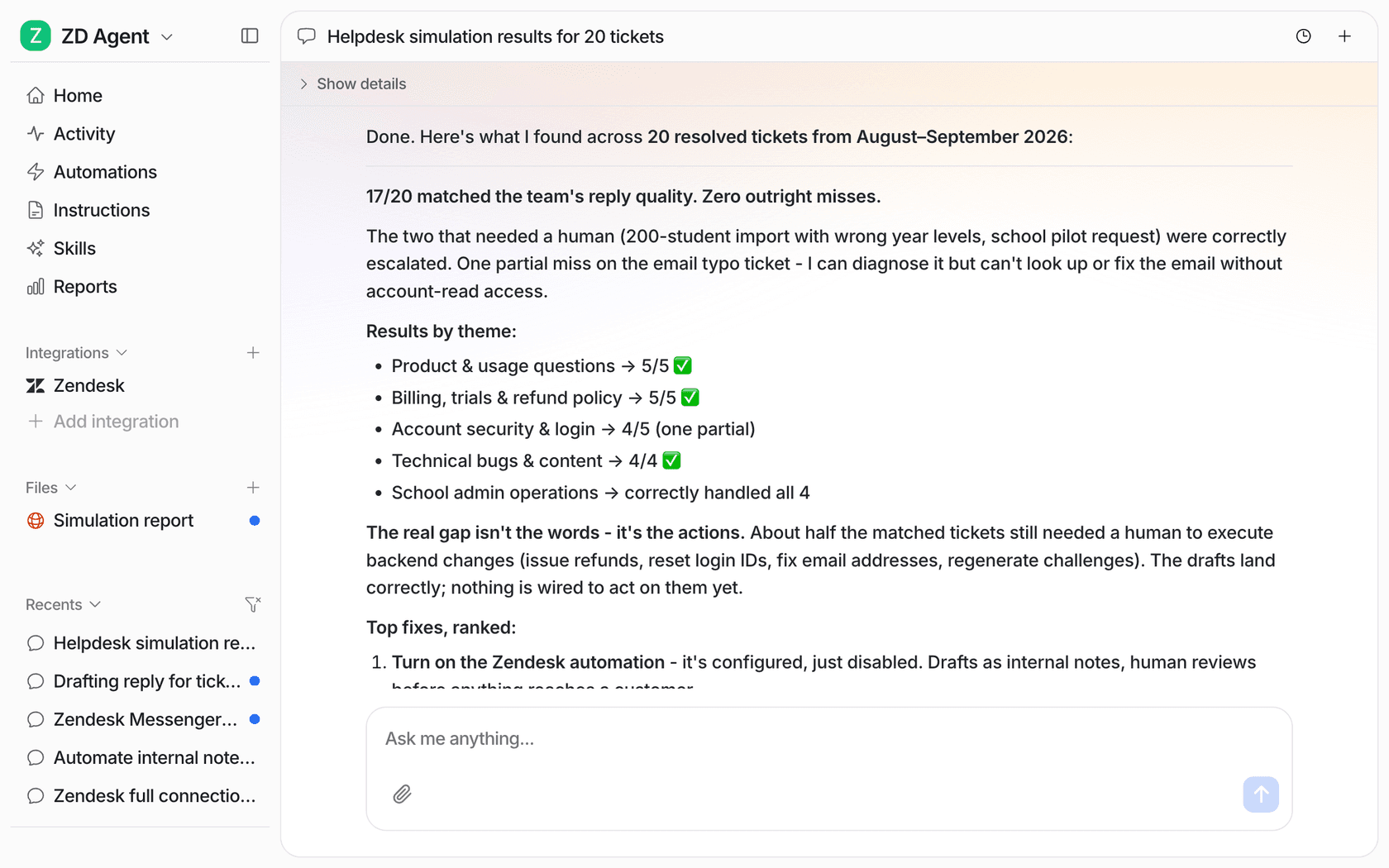
Notice what that report says the gap is: not the wording, but the actions. About half the matched tickets still needed a person to do something in a back-end system. That's the kind of finding you want before you sign, because it tells you which integrations to ask about. If a vendor can't run something like this on your history, ask them how else you'll know. The guide to AI support agent testing goes deeper on building the test set.
One more test worth borrowing from a Reddit thread on what a live demo should prove:
"Make them do the demo with a knowledge base that's deliberately outdated by like 6 months, and see if the agent just confidently spits wrong info or admits it don't know. That's the real test for me"
Your real knowledge base is already a bit out of date somewhere, so this isn't a trick question. It's the normal case.
What do AI support vendors publish before you send the RFP?
You can fill in part of the RFP yourself from vendor pages. Here's what I found on each vendor's own site in October 2026:
| Vendor | Billing unit | Public price | Certifications (as stated) | Trains on your data? |
|---|---|---|---|---|
| eesel | 1 credit per ticket or chat it works on | $299/500 credits to $1,749/5,000; free plan 100 credits | SOC 2 Type II audit in progress, HIPAA BAA on Enterprise, GDPR DPA | No |
| Zendesk | Verified resolution, from an allowance | $1.50 committed, $2.00 pay as you go | SOC 2 Type II, ISO 27001 and 42001, HIPAA BAA with an add-on | Not for generative AI; sanitised data trains its own classification models |
| Salesforce Agentforce | Conversation, Flex Credit or user | $2/conversation; $500 per 100,000 Flex Credits | Not listed on the pricing page | No for third-party models |
| Ada | Not published | Quote only | SOC 2 Type 2, HIPAA, GDPR, PCI | Fine-tunes on de-identified data |
| Decagon | Per conversation or per resolution | Quote only | SOC 2 Type II, ISO 27001, HIPAA, GDPR | No for model providers |
| Sierra | Outcome-based | Quote only | SOC 2 Type II, ISO 27001 and 42001, HIPAA, FedRAMP High | Not stated |
Three of six won't publish a price, which is fine for enterprise sales but means your RFP has to ask for the same cost row from each. My roundup of the best AI customer support agents covers more vendors if your longlist is bigger.
What mistakes do teams make with AI support RFPs?
- Sending 200 questions. Vendors answer long questionnaires with copy from their last one. 40 sharp questions get better answers than 200 generic ones.
- Letting vendors pick the demo scenarios. Every vendor looks good on its own examples. Use your tickets.
- Comparing quotes with different units. Per resolution and per conversation can't be compared until both are priced on your month.
- Treating "in progress" as "done". A certification in progress may be fine for you, or may be a gate. Decide before the demo, not after.
- Skipping the busy month. Price your peak, not your average. Per-unit pricing follows your volume up.
- Leaving agents out. The people who'll edit the AI's drafts should score the ticket test. They'll spot tone problems that a manager reading summaries won't.
The worst-customer point is worth repeating, because it's the easiest one to skip:
"test it as your worst customer not your best one vague question, typo in it, missing half the context. if it handles that you're probably fine. most people only test the clean version and then wonder why it breaks on real customers"
How would eesel answer this RFP?
Since I've told you to ask hard questions, here are eesel's answers to the ones that tend to decide things, including the ones that might rule it out.
- What it is: an AI helpdesk teammate that works inside your helpdesk as another agent: it drafts or sends replies, tags and routes tickets, and learns from your help center, macros and past tickets. It connects to Zendesk, Freshdesk, Gorgias, Help Scout, HubSpot, Front and Salesforce, among others.
- Billing unit: one credit per ticket or chat it works on, however many replies. Plans run from
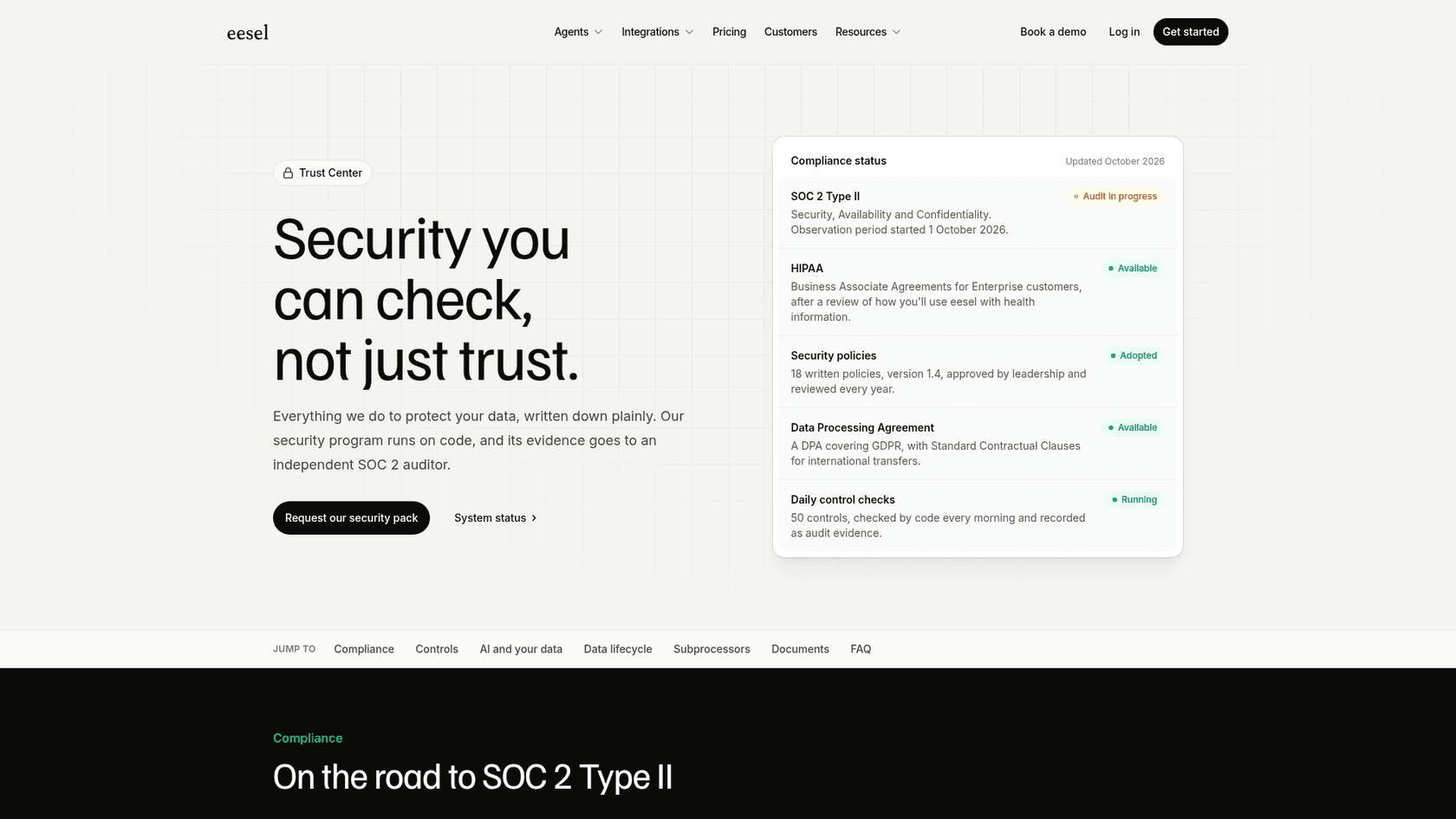
$299for 500 credits to$1,749for 5,000, with no seat fees. Overage is$0.80a credit and off unless you switch it on, with a cap you set. A free plan has 100 credits and needs no card. - Security: SOC 2 Type II audit in progress, with the observation period started 1 October 2026. If you need a finished report today, that's a gate eesel doesn't pass yet. HIPAA BAAs are on Enterprise. eesel doesn't train or fine-tune models on your data.
- Ticket test: built in, on your own resolved tickets, before anything reaches a customer.
What it looks like in production, from published customer stories:
- Regulated finance, draft-first. smava, a German loan comparison company, runs three eesel agents on one Zendesk: one categorises every ticket, one drafts from the macro library, and one prepares customer-ready answers. That's 27,000 tickets handled in a month and 15,300 draft replies, and eesel never sends them itself.
- Answers only from your documents. An industrial automation company put its technical library behind a chat that answers only from the documents, links its source, and admits when it has none. Every support ticket arrives with a draft for an engineer to edit.
- Volume on a fixed plan. SamCart runs one agent on Freshdesk tickets and one on its website chat, answering from 280 help center articles on a plan of 8,000 interactions a month.
Try eesel as one of your RFP vendors
If you're writing an AI support RFP this quarter, put eesel on the shortlist and make it run section 9 first. Connect your helpdesk, ask it to simulate on your recently resolved tickets, and you'll have a scored report by contact reason before any sales call, with nothing sent to customers. Then hold it to the same gates and the same cost row as everyone else.
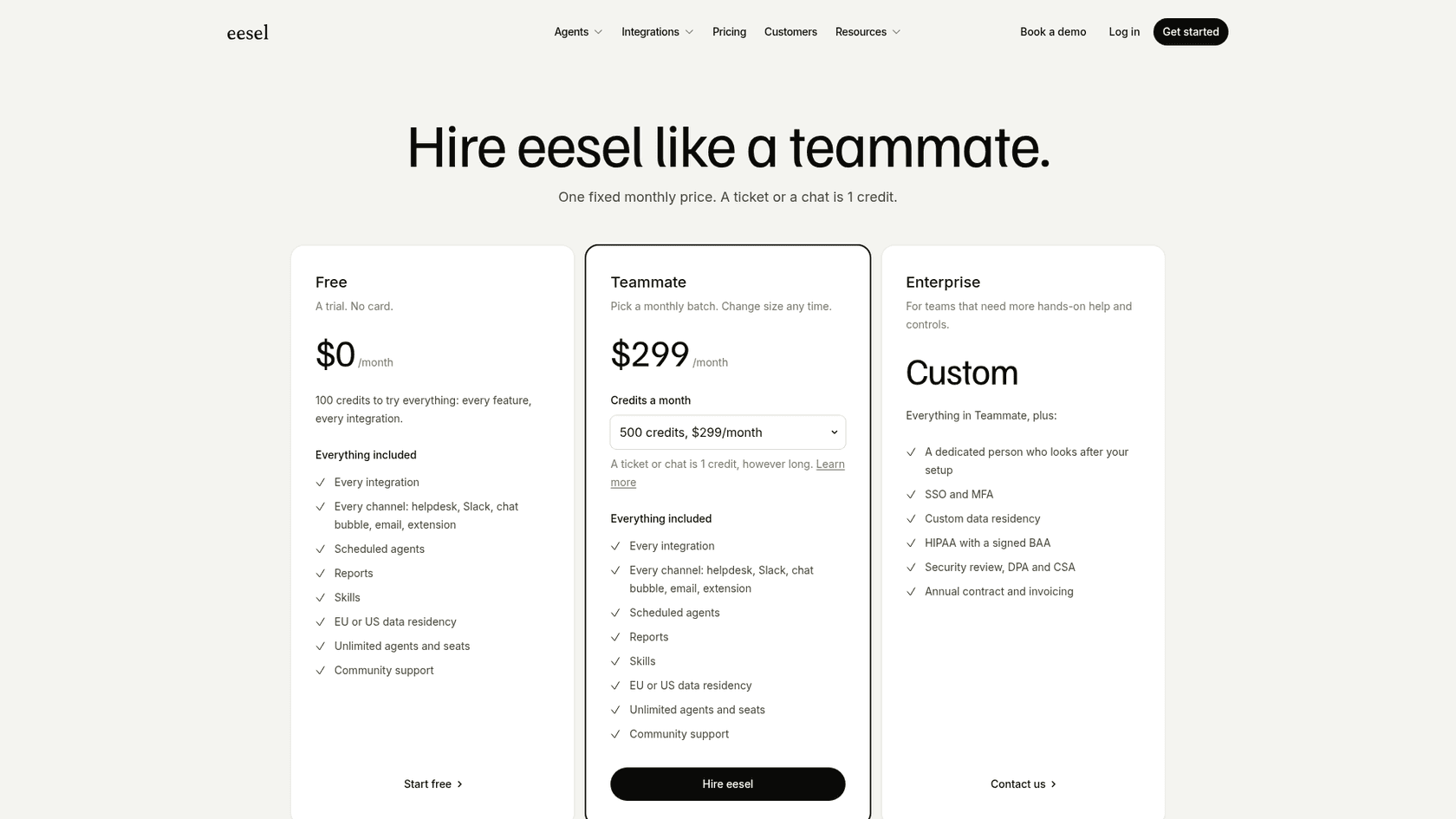
Try eesel free, or book a demo if your security team wants to see the controls first.