

Why isn't a SOC 2 report enough for an AI support vendor?
I work on the agent side of eesel, which means I spend a lot of time on the part of the product that security reviewers poke at hardest. eesel has also lost deals on exactly this checklist. A US healthcare platform on Zendesk stopped the conversation mid-demo because we couldn't sign a BAA at the time. A large podcasting platform on Freshdesk couldn't move forward without a finished SOC 2. Those two calls are a big reason eesel now has a public trust center with a dated audit timeline, so I'll be honest about where we stand as I go.
Here's the thing those calls taught me. A SOC 2 report tells you a vendor runs its systems carefully: encryption, access reviews, change management, incident response. The AICPA's Trust Services Criteria cover security, availability, processing integrity, confidentiality and privacy. That's the floor, and you should insist on it.
But an AI support agent is a different kind of vendor. It doesn't just store your tickets. It reads them, sends them to a large language model run by another company, and in many setups it can refund an order or change an account. None of the SOC 2 categories asks "can a customer talk your bot into a refund?"
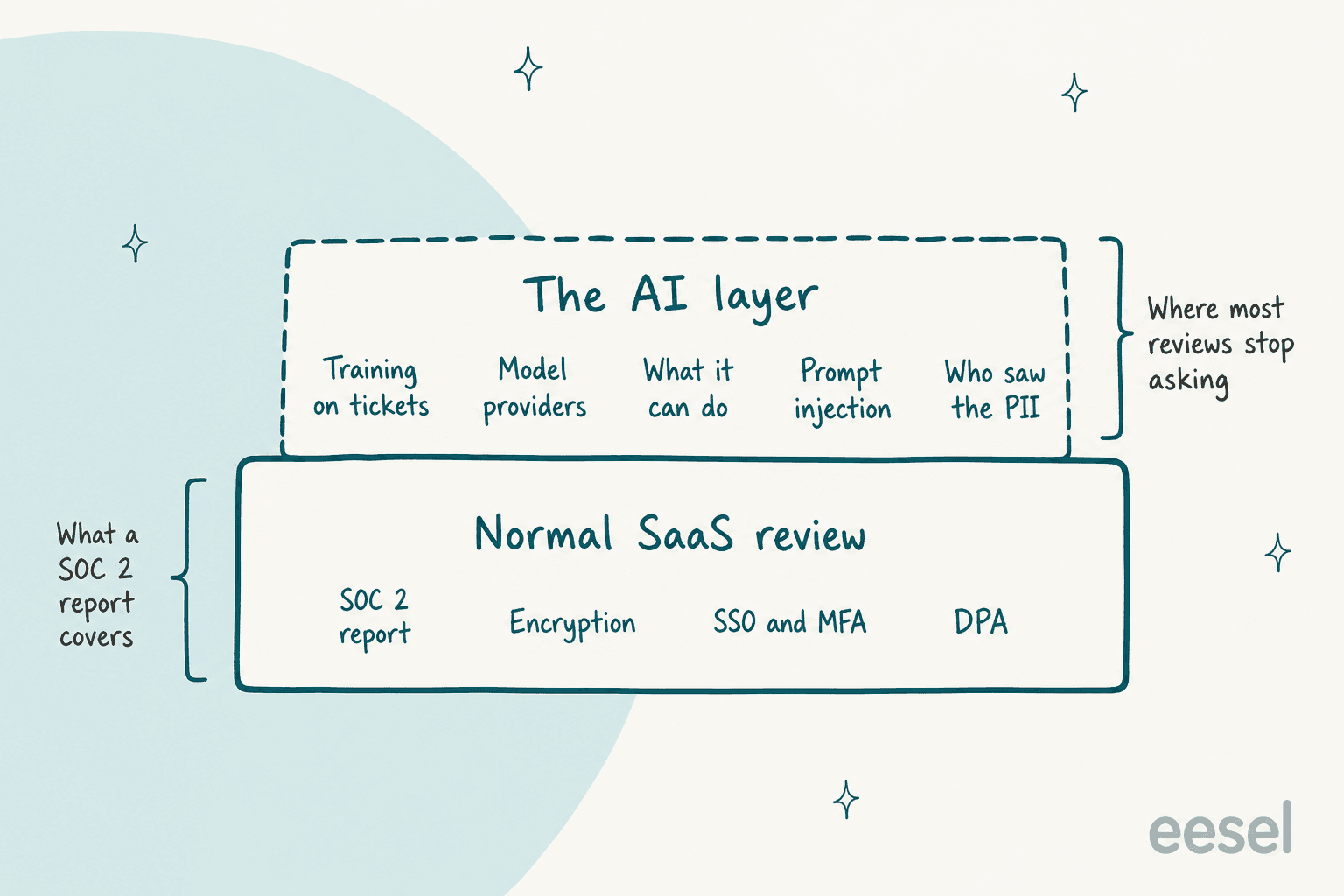
The AICPA itself has started warning buyers about the badge-collecting mindset. Its SOC 2 topic page links a 2026 piece titled "Promises of 'fast and easy' threaten SOC credibility." So read the report, check its dates, and check whether the AI product is actually inside its scope. Then keep going.
The good news is that you don't have to invent the second layer. The frameworks already exist:
| Framework | Who publishes it | What it gives a support buyer |
|---|---|---|
| OWASP Top 10 for LLM Applications 2025 | OWASP | The attack list: prompt injection, sensitive information disclosure, excessive agency, and 7 more |
| NIST AI RMF and its Generative AI Profile (AI 600-1) | NIST | Four functions (govern, map, measure, manage) to structure the review |
| CSA AI Controls Matrix v1.1 | Cloud Security Alliance | 247 control objectives across 18 domains, plus the AI-CAIQ questionnaire for vendor evaluation |
| SIG questionnaire | Shared Assessments | "Artificial Intelligence (AI)" is now one of its 21 risk domains |
| ISO/IEC 42001:2023 | ISO | A certifiable AI management system, which ISO calls "the world's first" |
If your security team already uses SIG or CAIQ, ask the vendor for a filled-in copy before the first call. It saves a week. The checklist below is what I'd layer on top, phrased for a support lead rather than an auditor.
The AI support vendor security checklist
Tick items as the vendor answers them. The ones marked critical are the ones I'd treat as blockers before an AI agent touches live customer tickets. The counter at the top keeps score.
1. Training and retention
2. Where the data goes
3. What the agent can do
4. Attacks and sensitive data
5. Visibility and control
6. Paperwork
The rest of this post walks the six groups, with what 7 well-known helpdesk vendors actually publish for each one. I picked Zendesk, Freshworks, Salesforce, HubSpot, Gorgias, Help Scout and Front because their AI lives inside the helpdesk, so their trust pages are the ones most support teams end up reading.
Do they train on your tickets?
This is the first question everyone asks, and the answers are less uniform than you'd expect. There are really three separate questions hiding in it: does the vendor train its own models on your data, does the model provider behind it, and does your data help other customers' agents.
Most vendors are clear on the model-provider part. Zendesk says its LLM sub-processors "cannot use your Service Data to train their models," and Front prohibits its subprocessors from using customer data "to train foundation models." The vendors' own models are where it gets interesting:
- Zendesk trains "generic, cross-account machine learning models" for classification on service data, after a sanitization pass that removes identifiers, per its Trust Center. Its generative features are a separate case.
- Gorgias is unusually direct about it: "Our AI Agent does learn from interactions from other brands," with safeguards to reduce leakage, says its AI Agent security FAQ. That honesty is useful. It also means a competitor's agent may benefit from your ticket history, which some brands will accept and some won't.
- Freshworks offers a training opt-out, but it's done by emailing support@freshworks.com, per its Freddy AI data processing framework. Get the confirmation in writing.
Then there's retention at the model provider. "Zero data retention" means the provider keeps nothing once it returns an answer. Zendesk, Salesforce and Front all claim it for their generative features. Help Scout's AI Assist docs say OpenAI stores data "for up to 30 days." Thirty days isn't a dealbreaker for most teams, but it's a number your DPA should match.
On eesel's side: we don't train or fine-tune models on your data, and the four open-model hosts on our subprocessor list run with zero data retention. For Anthropic, OpenAI and Google we rely on their commercial API terms, which don't allow training on API data. If you need a retention number for those three in writing, ask us for it as part of the security pack rather than taking a blog post's word for it.
Where does a ticket actually go?
Picture one customer email. It lands in your helpdesk, gets synced to the AI vendor, gets sent to a model provider, and gets stored in a search index (often a vector database) and some logs. Every hop is a place it can be kept, copied or moved across a border.
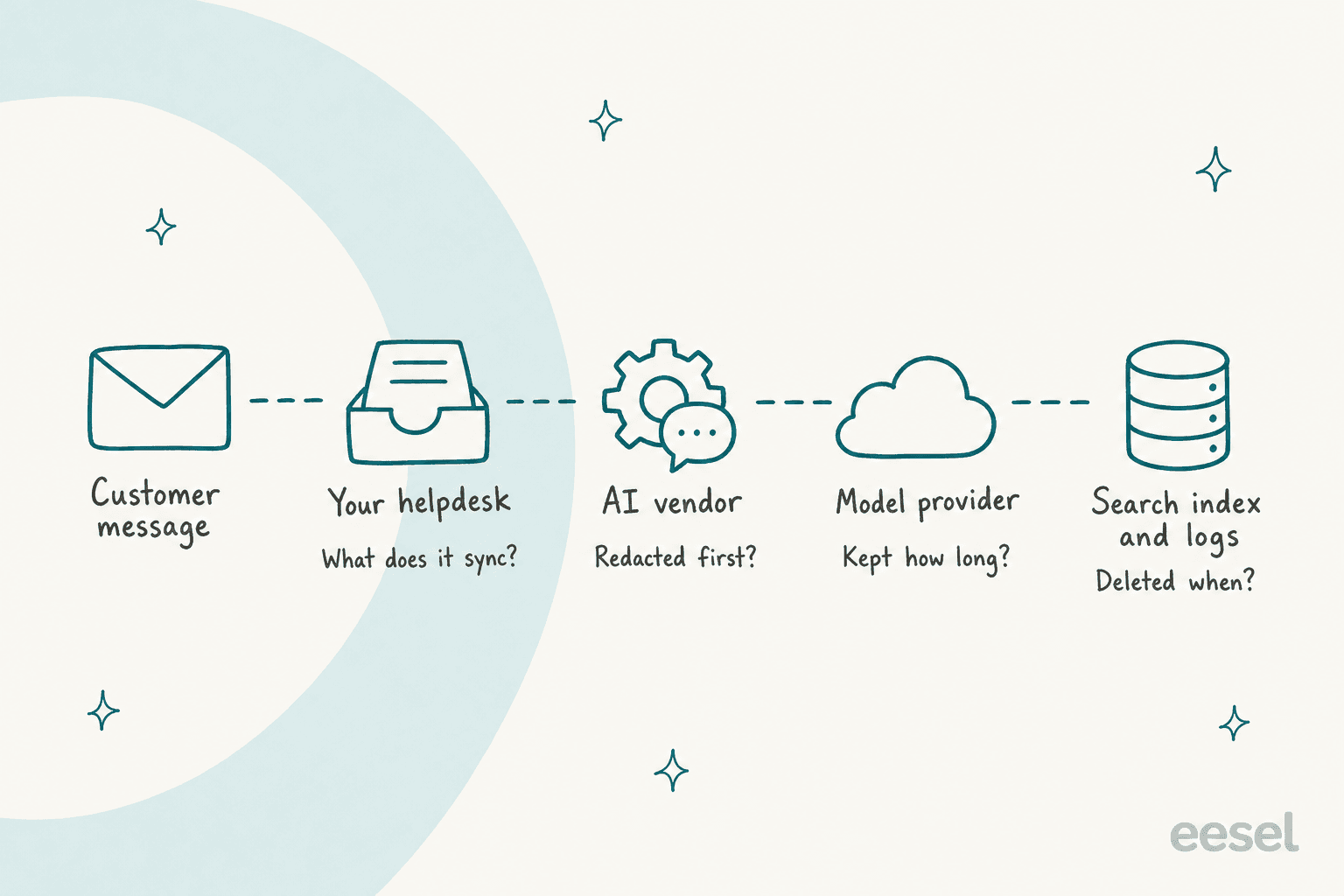
Under GDPR Article 28, the model provider is a sub-processor, and the vendor can't add one without telling you and giving you the chance to object. So the subprocessor list is a legal document, not a formality. It's also where the drift shows up. Gorgias's FAQ says AI Agent uses "OpenAI, Anthropic, and internally fine-tuned LLMs," while its subprocessor list, last revised March 30, 2026, lists OpenAI as the only AI provider. Help Scout's list is dated January 2025. Neither is necessarily wrong (a model hosted on a cloud provider may legally sit under that cloud provider's row, which is exactly how Salesforce explains its Anthropic usage), but it's a question to ask.
Data residency is the other half, and this is where the fine print lives. Each of these is documented by the vendor itself:
- HubSpot: for the Australia and Canada data centers, every AI provider row on its sub-processors page shows "United States." The EU data center keeps AI processing in the European Economic Area.
- Salesforce: if the in-region endpoints don't respond, "the request falls back to Azure OpenAI in the United States." Turning that off requires Data 360 first, per its geo-aware routing docs.
- Freshworks: for India, Australia and Middle East/Africa accounts, some features process in the US, but "AI features that require data processing outside your primary hosting region are disabled" by default. That default is a good one. More on Freddy in the Freshdesk data residency guide.
- Zendesk: AI use "does not impact any Customer data locality commitments," except that acquired products such as AI Agents - Advanced "may remain on" Google Cloud in the US or Europe "for a period of time," per the Trust Center.
- Front: you pick US or EEA hosting, but data "may be otherwise processed" outside it "as reasonably necessary," per its hosting policy.
None of this is hidden. It's all on the vendors' own pages, which is to their credit. It just isn't on the page your sales rep sends you. For eesel, production runs on AWS in the US (N. Virginia) by default, and our trust center ties full EU data residency, including AI processing, to the Enterprise plan. Confirm the plan before you assume it.
What is the agent allowed to do in your helpdesk?
This is the section I'd spend the most time on, because it's where the real damage happens. OWASP calls it Excessive Agency: damaging actions taken in response to "unexpected, ambiguous or manipulated outputs." Its three root causes are too much functionality, too many permissions, and too much autonomy. Translate that to support and it's an agent that can issue refunds when it only needed to look up orders.
The legal side has caught up too. In Moffatt v. Air Canada, a British Columbia tribunal rejected the airline's argument that its chatbot was responsible for its own words: "It makes no difference whether the information comes from a static page or a chatbot." The damages were small ($812.02 CAD all in) and it's a tribunal ruling, not binding case law. But the principle travels: what your agent says and does is on you.
So the question for the vendor is concrete: show me the permission list, and show me what happens before anything irreversible runs.
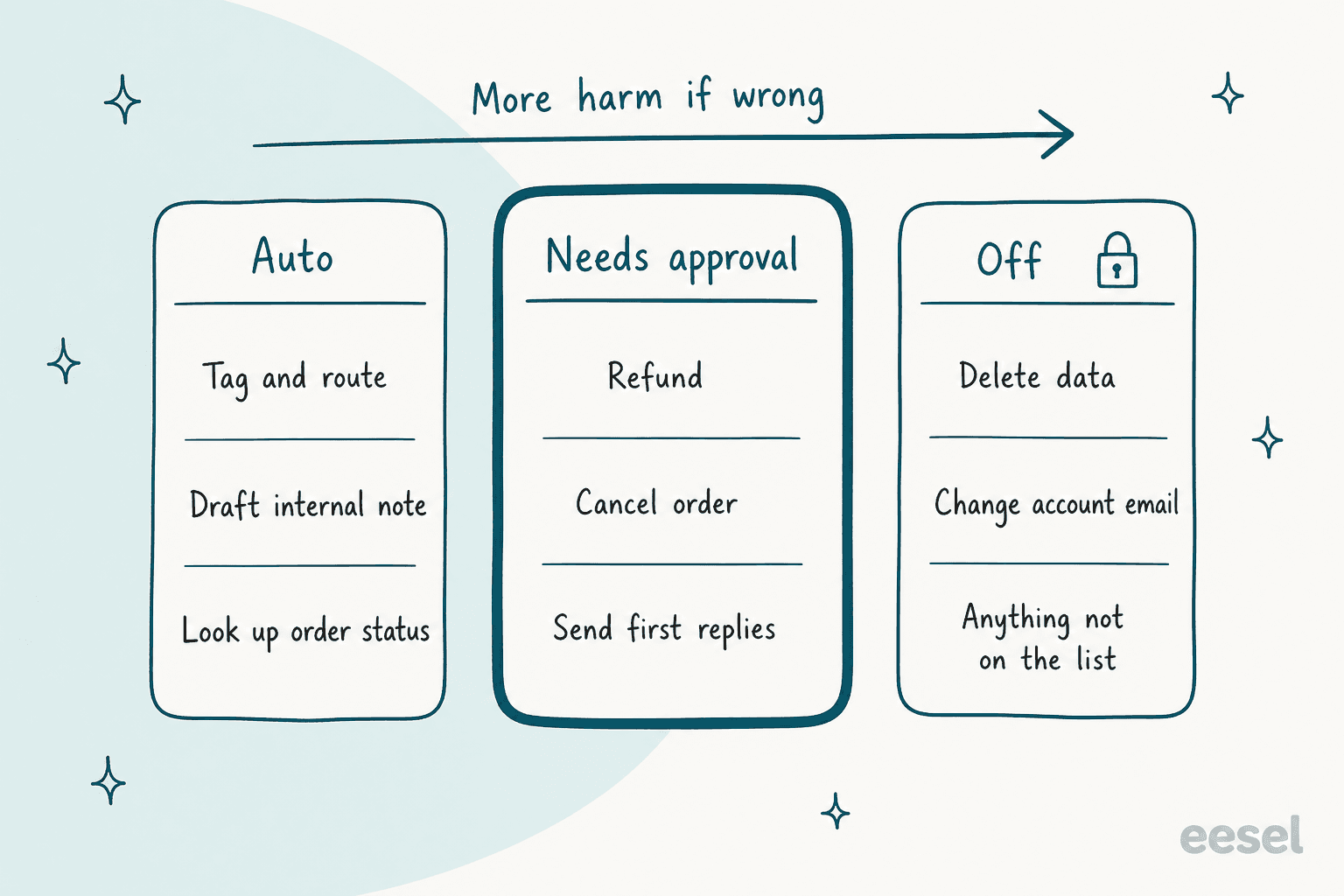
Here's what the vendors document:
- Gorgias has a good default. For irreversible actions "like canceling an order or skipping a subscription, Customer confirmation is turned on automatically," and turning it off means confirming you understand, per its actions docs. More in our Gorgias AI Agent actions breakdown.
- HubSpot gives each customer agent action a protection level of None, Match email or Verify email, and advises that account-access changes should send secure links instead of acting directly, per its setup guide. Our Breeze guardrails guide covers the escalation side.
- Salesforce has agents "respect standard Salesforce access controls," and custom actions inherit the permissions of the flow or Apex class behind them, per Trust and Agentforce. Powerful, but it means your Salesforce permission hygiene is now your AI permission hygiene.
- Freshworks says its agent "stays within predefined flows," per the Freddy AI trust framework. Ask what that looks like in the admin screen.
Notice the two different shapes: Gorgias and HubSpot ask the customer to confirm, while a human-approval queue asks your team. Customer confirmation stops an attacker who isn't the account owner. It doesn't stop the agent from making a bad call the real customer happily accepts, like a refund outside policy. For money-moving actions I'd want a person on your team in the loop, at least for the first few months. Our guide to support approval workflows goes deeper on where to put the line.
This is the part of eesel I'm most opinionated about. Every action is a permission, set per agent to Auto, Needs approval or Disabled, and the actions and approvals docs recommend keeping "refunds, cancellations and anything that costs money behind an approval." Approvals never run on their own after a timeout, Viewers can't approve, and each approval records who decided and when.
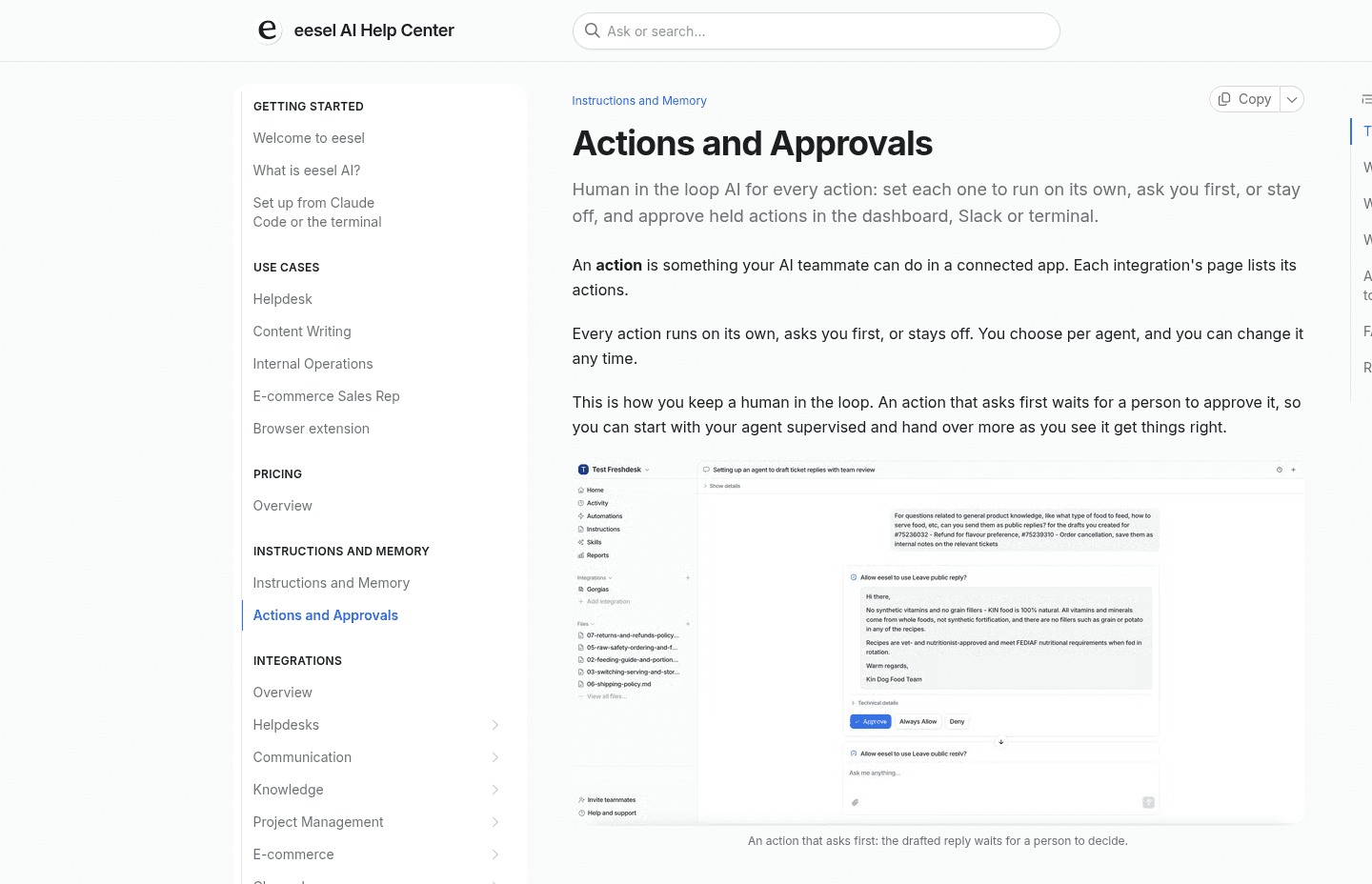
Two more things a reviewer should check here. First, credentials: on eesel, outbound requests go only to domains you've allowed under Network Access, and the auth header is attached server-side, so "a manipulated agent can't read out a key or token because it never had one." Second, every other way in. eesel has a CLI (npx @eesel/cli) that lets a person, a script, or a coding agent like Claude Code or Cursor chat with the teammate, upload knowledge, wire up automations and clear the approval queue with eesel approvals. Every workspace is also a Model Context Protocol server. The security point is that CLI and MCP writes "follow the same action permissions as everything else," so a held action stays held no matter which door it came through. Ask every vendor the same question about its API.
Scope matters as much as permissions. Adverscale, which helps people with US passport applications, runs its Zendesk agent only when a person writes @eesel in an internal note, and "She never decides a refund." XAP, an education software company working with US states and colleges, puts a filter in front of its Freshdesk agent so only referral cases and portal password resets get through.
Can a customer email talk the bot into something?
Yes, potentially, and good vendors will say so instead of claiming immunity. OWASP lists prompt injection as the number one risk and notes that injected instructions "do not need to be human-visible/readable, as long as the content is parsed by the model." For a support agent, that means white text in an email, a line in a PDF attachment, or a poisoned help article. OWASP also notes that retrieval-augmented generation and fine-tuning "do not fully mitigate" it. Our prompt injection glossary entry has the plain-English version.
What vendors document:
- Freshworks scans inputs with "Azure AI Content Safety and Prompt Shields" (Freddy AI trust framework).
- Salesforce has "Prompt Defense," described as system policies plus prompt injection detection (Trust and Agentforce).
- Front lists a "Front AI Pentest 2026" report on its trust center, which is exactly the kind of document I'd ask every vendor for.
- Zendesk, HubSpot, Gorgias and Help Scout don't describe a prompt injection defense on the pages I checked. That doesn't mean none exists. It means you have to ask.
The honest answer is that filters reduce the risk and permissions cap the damage. eesel's security FAQ puts it well: "the protection isn't that the model can't act. It's that what it can act on is bounded, and you set the bounds." An action you haven't turned on isn't available to the model at all, whatever an email tells it. If you want to probe this yourself before signing, our guide to adversarial testing has test prompts worth trying.
Sensitive data is the sibling risk. OWASP's Sensitive Information Disclosure covers PII, financial details, health records and credentials. The trap I see most is assuming a vendor's PII masking covers the AI agent. Salesforce is refreshingly upfront here: pattern-based and field-based masking "is disabled for agents," and its privacy FAQ says that's "to improve performance and accuracy of agents" (Data Masking Limitations in Agentforce). Zendesk's automatic redaction and data masking sit in its ADPP add-on for Enterprise plans.
I'll hold eesel to the same standard. Our PII redaction covers 15 categories (cards, SSNs, bank details, API keys, names, addresses and more) on past tickets before they're stored or indexed, and it fails closed: tickets it can't redact are skipped, not indexed raw. But it's opt-in per integration, off by default on newer workspaces, and it doesn't apply to live conversations. When the agent fetches a ticket live to draft a reply, the raw ticket reaches the model. If that matters for you, it belongs in the DPA conversation. Our guide on redacting PII in support transcripts covers the wider options.
Can you see every reply and action afterwards?
An audit trail is what turns "we think the agent behaved" into "here's what it did on ticket 4,812 and why." It's also the item most often missing for AI specifically. The general admin audit log is common. A log of what the AI did is not:
- Front's audit log is on every plan, but its listed sources are Admin Copilot, API, Applications, SCIM and Teammates. Autopilot isn't one of them.
- HubSpot's activity history "only records HubSpot-user based actions."
- Zendesk's audit log is for Enterprise plans and above. For Custom Agents, Zendesk says it shows "how an agent arrived at its responses or decisions."
- Salesforce logs prompts, responses and trust signals in Data 360, with an audit trail on Enterprise and above with an Einstein add-on. The most complete of the seven on paper.
- Gorgias lets you "view every single answer AI Agent sends, including the knowledge sources it pulls from," per its FAQ.
In eesel, Activity lists every run across every channel: what triggered it, what knowledge it read, what actions it took, and its reasoning. You can filter by approved, rejected and pending.

Visibility before launch matters as much as after. The safest review I've seen ends with the agent running on your own resolved tickets, with nothing sent, so your security team and your support leads judge real answers instead of a demo script. eesel's simulation report does this on 20 recently resolved tickets, and our guides on testing an AI agent before launch and running an AI support pilot walk through the rest. It's also the best defense against AI hallucinations: XAP's agent "never invents a URL, a fee, a date or a policy," and leaves a placeholder for the team when it can't ground a detail.
How do the 7 helpdesk vendors compare on paper?
Here's the paperwork side in one table, from each vendor's own trust center, DPA and help docs, checked October 20, 2026. "Not stated" means I didn't find it on the public pages, not that it doesn't exist.
| Vendor | SOC 2 Type II | ISO 42001 (AI) | HIPAA for AI | AI residency exception | AI action gating | AI-specific log | Breach notice |
|---|---|---|---|---|---|---|---|
| Zendesk | Yes | Yes | AI eligible under BAA, needs Advanced Compliance add-on | AI Agents - Advanced on Google Cloud US/EU for now | Copilot needs human review, admin kill switch | Custom Agents show reasoning | 48h |
| Freshworks | Yes | Not listed | BAA scope doesn't mention Freddy | Some features in US for India, Australia, MEA, off by default | "Predefined flows" | Not stated | Without undue delay |
| Salesforce | Yes | Yes | Listed as an attestation | US fallback on by default, off needs Data 360 | Inherits user and flow permissions | Prompts and responses in Data 360 | Without undue delay |
| HubSpot | Yes | Not listed | Enterprise Sensitive Data, Breeze scope not stated | Australia and Canada AI processed in US | None, match email, or verify email | Human users only | 72h |
| Gorgias | Yes | Not listed | Report on request, plan not stated | OpenAI row lists US only | Customer confirmation, on for irreversible actions | Every answer with sources | 72h |
| Help Scout | Yes (Security and Availability) | Not stated | Pro plan plus a separate AI Healthcare Addendum | US-only hosting | Not stated | Not stated | Without undue delay |
| Front | Yes | Not listed | Not stated | May process outside chosen region | Granular permissions for external agents | Autopilot not a listed source | Without undue delay |
| eesel | Audit in progress, report 2027 | Not listed | BAA on Enterprise | Default US, full EU residency on Enterprise | Auto, needs approval or off per action | Every run with reasoning | 48h |
Two lines in that table deserve a second look. First, breach windows. GDPR Article 33 gives you, the controller, 72 hours to notify the regulator, but only asks the processor to tell you "without undue delay." If your vendor's contract says the same, your 72-hour clock can start before you even know. Ask for a number in hours.
Second, HIPAA. Help Scout's requirement for a separate AI Feature Healthcare Addendum is actually a good pattern, because it forces the question most healthcare buyers forget: does the BAA cover the AI, or just the inbox? Our HIPAA-compliant AI guide and the AI customer service for healthcare post go further. If you're on one of these helpdesks specifically, we've also written up Zendesk security and compliance, Freshdesk SOC 2 and Gorgias SOC 2 in more detail.
One more law to keep on the list. Article 50 of the EU AI Act requires AI systems that talk to people to tell them they're talking to an AI, unless it's obvious, and that duty has applied since 2 August 2026. If you serve EU customers, check the vendor lets you set that disclosure.
How do you run the review without stalling the project?
Security reviews for AI tools tend to die in a queue, not in a "no." Here's the order I'd run it in, which usually fits inside two weeks:
- Ask for the pack on day one. SOC 2 report or audit timeline, DPA, subprocessor list, and a filled-in CSA AI-CAIQ or SIG Lite. A vendor that takes a week to send these is telling you something.
- Run the 10 critical items above on a call. Training, cross-customer learning, retention, model providers, per-action permissions, money-moving approvals, prompt injection, the action log, SOC 2 scope. Get the answers in writing afterwards.
- Map the data path for your region. Draw the five hops from the diagram above with the vendor's real answers. Residency exceptions show up here.
- Start the agent in draft mode. Internal notes only, nothing sent to customers. Timengo, a Danish secure-email vendor whose customers include municipalities and schools, runs eesel this way on Freshdesk: "The engineer sends; eesel does not."
- Expand permissions one action at a time. Watch the log, then move tagging to automatic, then first replies, and keep refunds on approval the longest.
If you're still deciding whether to buy at all, build vs buy for AI support covers the in-house route, and how to switch AI support vendors helps if you're replacing one that failed a review. Our AI support pilot scorecard turns step 4 into pass or fail numbers.
Try eesel with your security checklist in hand
If your team is about to run this review on an AI agent for Zendesk or Freshdesk, run it on eesel too. eesel is an AI helpdesk teammate that joins your existing queue on Zendesk, Freshdesk and other helpdesks, with every action on a permission list you control and every run logged with its reasoning. smava, a consumer-finance comparison site, runs scoped eesel agents for two brands on one Zendesk, where "Each agent has one job and a list of things it must never do."
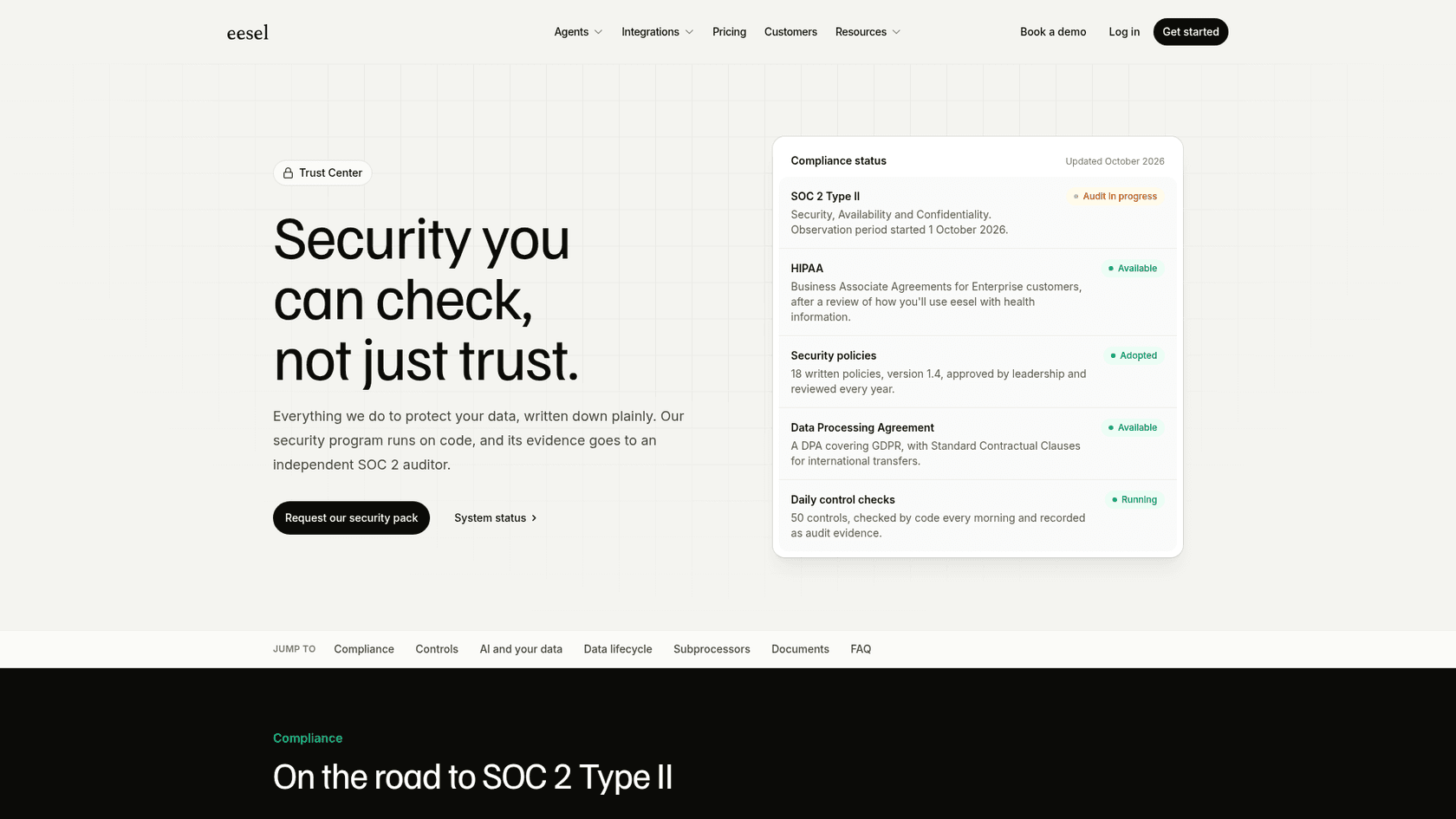
The trust center has our current status, and the security pack (policies, DPA, CAIQ or SIG Lite answers) is available on request under NDA, usually within one business day. You can also start free with 100 credits on the pricing page and run a simulation on your own past tickets before anyone signs anything. Try eesel.